

Next-Gen App & Browser Testing Cloud
Trusted by 2 Mn+ QAs & Devs to accelerate their release cycles


On This Page
- Latest features galore in Automation testing
- New Analytics Automation dashboard is out of beta
- Automated testing on latest browsers
- Filter your tests based on Real device
- Share video recording of a test session
- Real-time testing on new browsers
- New features in manual app testing [Real device]
- Test apps with Network throttling & Custom network throttling
- Latest add-ons in Mobile app automation testing [Real device]
- Screenshot testing on Windows 11
- Newest integrations – Codemagic & Tricentis Tosca
- Summing up!

- Home
- /
- Blog
- /
- Feb’22 Updates: New Features In Automation Testing, Latest Devices, New Integrations & Much More!
Feb’22 Updates: New Features In Automation Testing, Latest Devices, New Integrations & Much More!
We released a slew of fantastic additions last month, including new features in automation testing, app automation, manual app testing, new real iOS devices, screenshot testing on Windows 11, and more. In February 2022, see what's new at TestMu AI.

Salman Khan
January 27, 2026
Hola, testers! We are up with another round of exciting product updates to help scale your cross browser testing coverage. As spring cleaning looms, we’re presenting you product updates to put some spring in your testing workflow. Our development team has been working relentlessly to make our test execution platform more scalable and reliable than ever to accomplish all your testing requirements.
We are excited to share the latest enhancements and feature additions to our products with you today. Over the span of one month, a lot has happened. We have rolled out a slew of cool additions on our platform like new features in automation testing, app automation, manual app testing, latest OS – Windows 11 for automated screenshot testing, new real iOS devices, newest integration with Tricentis Tosca & Codemagic, and much more!
So are you ready to uncover the cool features?
Let’s reveal!
Latest features galore in Automation testing
Last month we rolled out many new features in TestMu AI automation with the vision of providing an excellent browser compatibility testing experience one step further. Shown below are the latest feature releases from the last month.
- You can now test on iOS simulators which now support full HAR Logs.
- We now support the private NPM dependency feature in Cypress testing.
- Taiko now supports test hooks for performing automated browser testing.
- Perform mobile browser automation on the new Android emulator – Samsung Galaxy S21 5G
- You can run test automation on the latest Selenium version – 4.1.2
- We now enabled support for Headless browsers in Playwright, Puppeteer, and Taiko.
- Users can now use the live-interaction feature in Selenium automation testing, which allows them to pause a running test and interact as if it were manual testing.
One a side note, you can test on Samsung galaxy a5 mobile browser online.
New Analytics Automation dashboard is out of beta
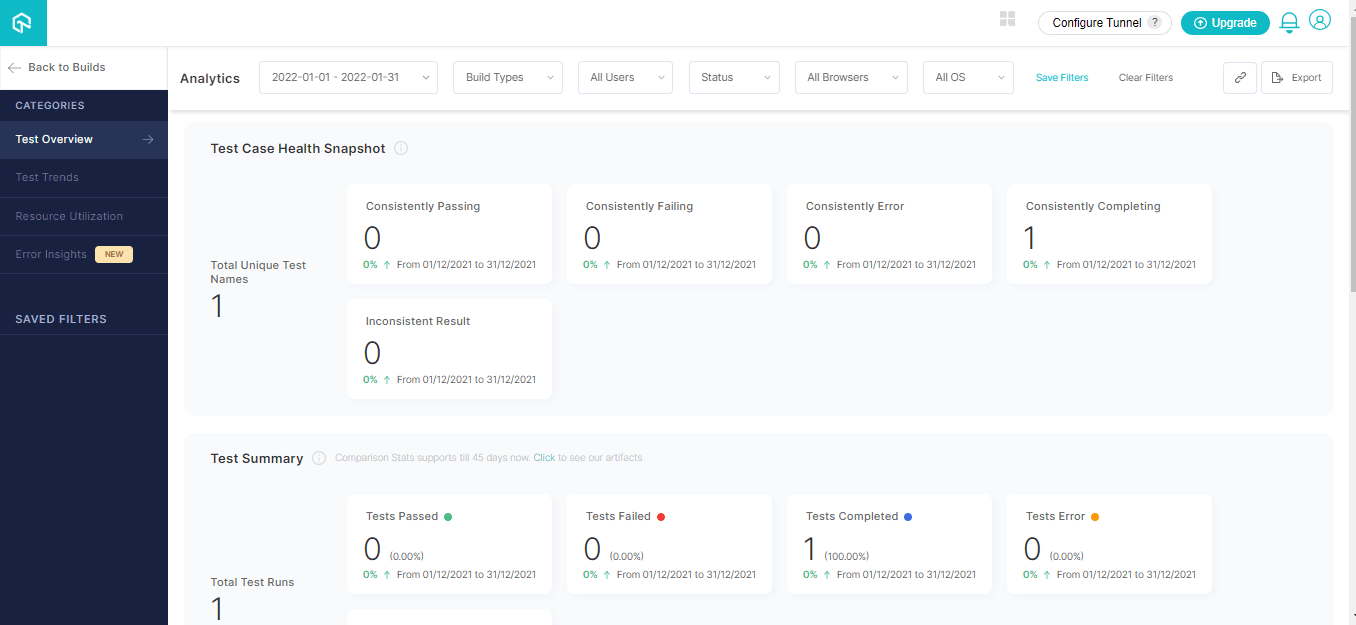
Last year, we launched a revised Analytics Automation dashboard for viewing and analyzing test runs on the TestMu AI Automation platform. The new Analytics Dashboard offers comprehensive insight and analytics for all of your builds and test runs.
We are pleased to announce the new Analytics automation dashboard is now out of the Beta phase.
Automated testing on latest browsers
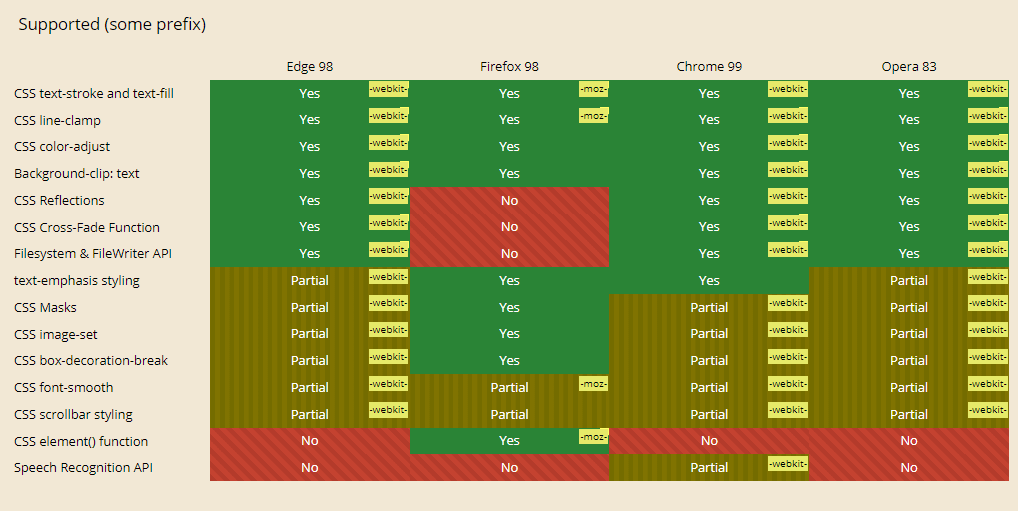
The latest versions of Chrome, Firefox, Edge, and Opera are now available on TestMu AI for test automation. Now perform browser test and ensure your websites and web apps deliver a cross-browser compatible experience.
Shown below is the list of recently added browsers.
- Chrome 99 Beta, 98, 97
- Firefox 98 Beta, 97, 96
- Edge 98 Beta, 97
- Opera 83
Let’s check the browser compatibility of Chrome 99 Beta, Firefox 98 Beta, Edge 98 Beta, and Opera.
You can generate Selenium automation capabilities from the TestMu AI Desired Capability Generator.
In addition, you can test on Samsung Galaxy A7 mobile browser online.

Filter your tests based on Real device
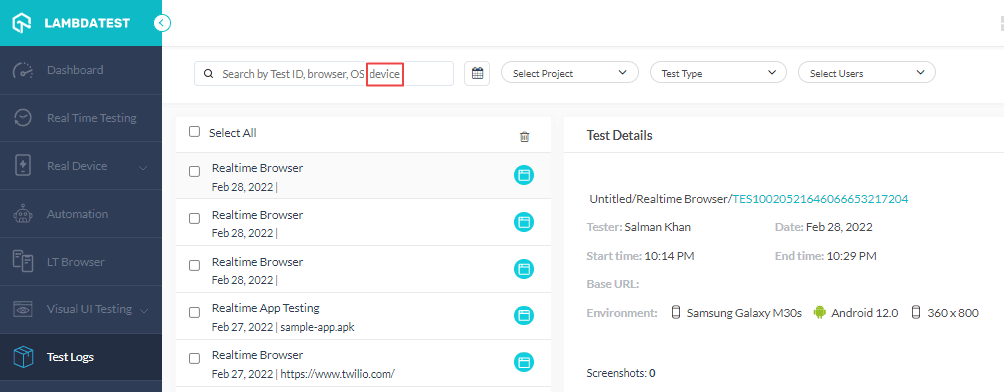
Earlier, we added options to filter tests based on Test ID, browser, and OS in the Test Logs section. In order to make filtering tests even more optimized, we have now added an option for filtering your live-interactive browser and app tests based on real devices.
Share video recording of a test session
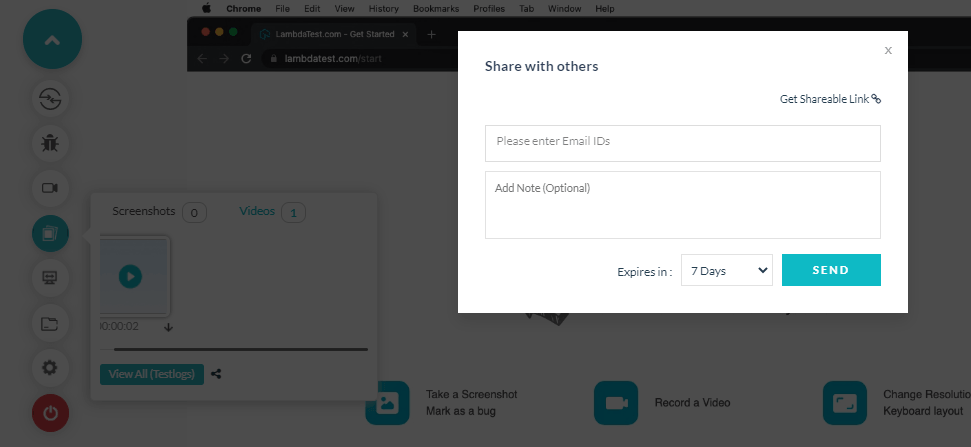
You can now share the video recordings of test sessions via a shareable link while performing cross browser testing. To share the recording, you are required to generate a shareable link, enter the Email ID of the recipient, description of the test session (optional), set the expiry of the test link, and you are done.
Real-time testing on new browsers
We are glad to announce the additions of new browsers to our browser hub. You can now perform online browser testing on 3000+ real browsers and operating systems and make sure your websites and web apps are ready for the latest version of Chrome, Firefox, Opera, and Edge.
Check out the newly added browsers-
- Chrome 99 Beta, 98
- Firefox 98 Beta, 97
- Opera 84
- Edge 99 Beta, 98
You can refer to the below video tutorial on how to perform real-time browser testing on TestMu AI.
New features in manual app testing [Real device]
TestMu AI real device cloud offers you to test applications manually across a wide range of Android and iOS devices in real-world environments. To make your manual app testing more productive, we introduced some new features like network throttling, custom network throttling, new real iOS devices for the latest operating system – iOS 15, and more.
Here is a quick rundown of the recent features that we have added!
Test apps with Network throttling & Custom network throttling
Have you ever experienced abrupt buffering while accessing an app online or a dip in your download speeds?
This can be due to the network or bandwidth throttling.
Don’t worry! With the network throttling functionality in TestMu AI mobile app testing on real devices, you can now test apps in varying network conditions like Slow 3G, Fast 3G, 4G, and 5G. By this way, you can validate how your app performs in different network conditions.
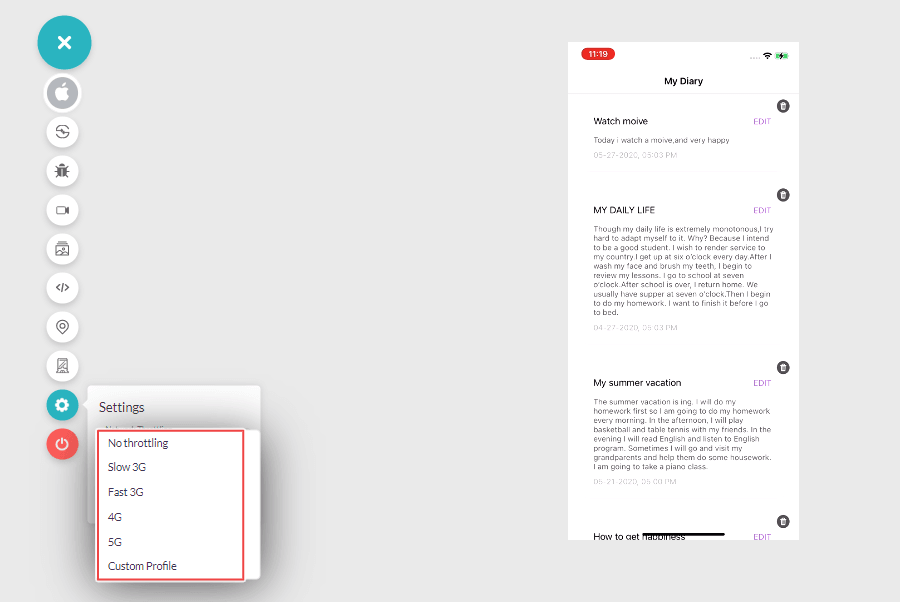
In addition to network throttling, we also have introduced an option for Custom Profile that lets you perform custom network throttling by creating your own throttling presets.
By enabling Custom Profile, you can customize the speeds for,
- Download
- Upload
- Latency
Also, read – How To Test Mobile Websites On Different Network Conditions?
Mobile app testing on latest real iOS devices
Are your apps ready for iOS 15?
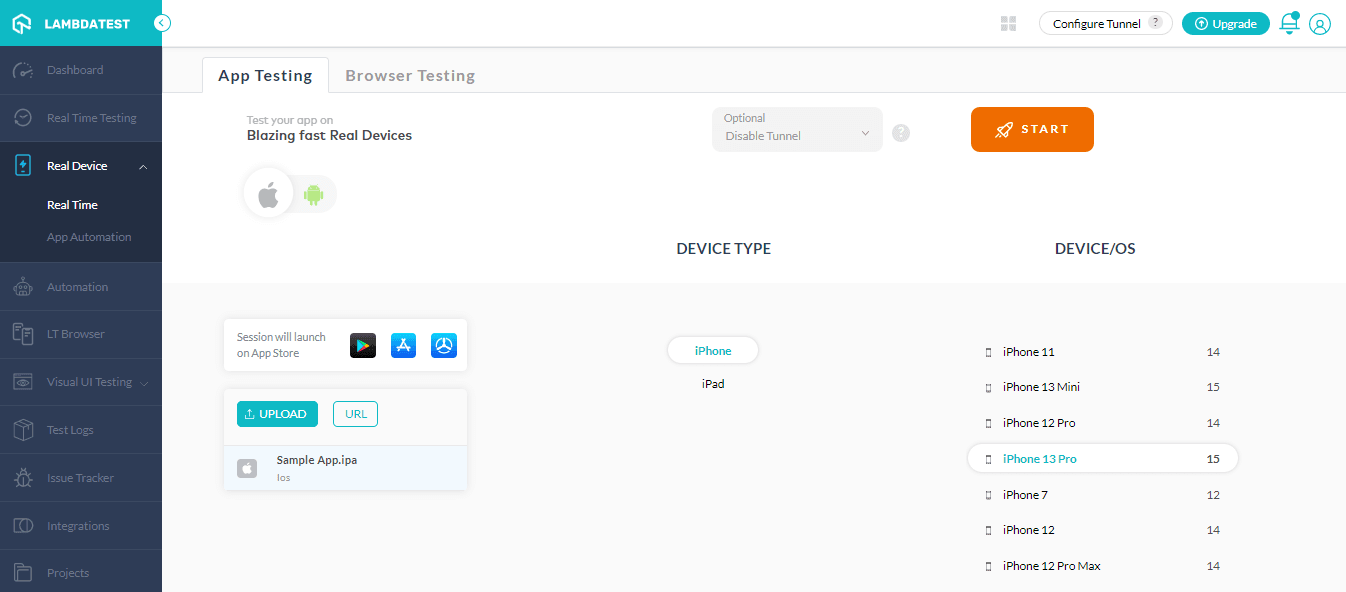
Don’t leave it to chance. We are happy to announce the addition of a host of new iOS devices to our pool of real devices. You can now take your mobile device cloud testing a step ahead and test apps on the newly added iOS devices running iOS 15.
Here are the latest ones-
- iPhone 13 Pro Max, Pro, Mini, 13
- iPhone SE 2nd Gen
- iPhone 6s
- iPhone 8
- iPad mini 6th Gen (WiFi+Cellular), (WiFi)
- iPad 9th Gen (WiFi+Cellular), (WiFi)
Device & App logs are now available in Dev tools
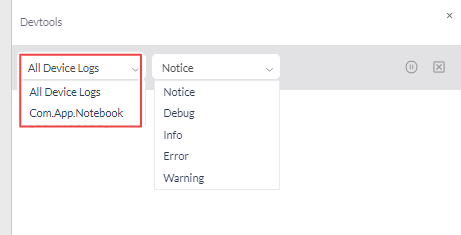
Device logs and app logs are system logs captured by iOS or Android that are customized to your application. They can help you gain access to your device and application logs, which is especially helpful if the application crashes during test execution.
In Dev tools, we have now enabled the device logs and app logs that will help you debug apps on real devices if they crash.
Refer to the below tutorial on how to perform real-time app testing on TestMu AI.
For more such videos around mobile app testing tutorial, responsive testing, mobile testing, and Cypress testing, subscribe to our TestMu AI YouTube channel.
Latest add-ons in Mobile app automation testing [Real device]
TestMu AI lets you perform Appium testing to automate mobile apps across real Android and iOS devices. Now capitalize on the real power of mobile app automation by leveraging the newest features added to the TestMu AI app automation platform.
Listed below are the latest features –
- The automatic-refresh feature has been added to the app automation dashboard to view test execution details. This will help you view test results without reloading the dashboard to update the test data.
- You can define a “custom _id” for the app when uploading it for app automation testing. Now you no longer need to remember the “app URL” when using the “custom id” to perform app automation on the same app.
Refer to the below cURL request with a custom _id for uploading the app.
curl --location --request POST 'https://manual-api.lambdatest.com/app/upload/realDevice' --header 'Authorization: Basic <Basic Auth Code>' --form 'name=""lambda1""' --form 'appFile=@"LambdaTest.apk"' --form 'custom_id="LambdaTest"'

Screenshot testing on Windows 11
The new operating system – Windows 11 is now live on TestMu AI automated screenshot testing platform. You can capture automated full paged screenshots on real Windows 11 OS in a single click.
This will help you ensure a pixel-perfect experience across all latest and legacy versions of Chrome, Firefox, Opera, Internet Explorer, and Edge browser.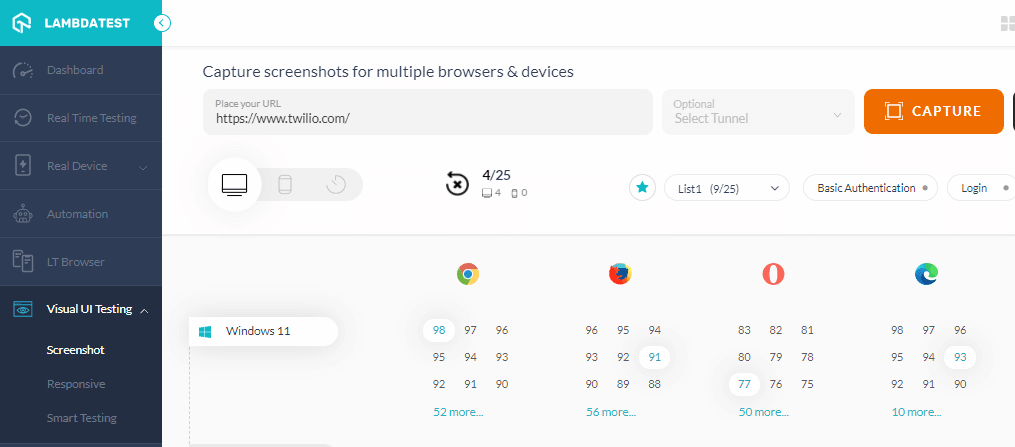
Bonus addition: You can run screenshot tests on the new browsers – Chrome 98 and Edge 98.
Newest integrations – Codemagic & Tricentis Tosca
Last month we went live with two new integrations – Codemagic and Tricentis Tosca.
Codemagic + TestMu AI integration: Codemagic is a mobile app testing CI/CD solution that works with Flutter, React Native, Ionic, Cordova, Native Android, and iOS apps. TestMu AI integration with Codemagic helps mobile app development teams to expedite their mobile continuous integration and delivery and ship quality apps faster.
Tricentis Tosca + TestMu AI integration: Tricentis Tosca is an automated testing platform for web product end-to-end testing. Tricentis Tosca accelerates testing by providing a no-code, AI-powered, scriptless solution for end-to-end automation testing. By leveraging TestMu AI and Tricentis Tosca integration, you can run automated tests using Tricentis Tosca across 3000+ browsers and OS combinations on TestMu AI cloud-based Online Selenium Grid.
Please refer to our documentation on TestMu AI and Tricentis Tosca integration.
Summing up!
That’s all for today! More incredible features are on the way. I hope you liked our new additions to the lineup. Give our new features a shot, and let us know what you think.
We always appreciate valuable responses and feature requests from our beloved users. You can drop comments or suggestions on the TestMu AI community. You can also contact us at the 24×7 chat portal or mail us to support @lambdatest.com.
Till then, happy testing!


Did you find this page helpful?
More Related Hubs
TestMu AI forEnterprise
Get access to solutions built on Enterprise
grade security, privacy, & compliance
- Advanced access controls
- Advanced data retention rules
- Advanced Local Testing
- Premium Support options
- Early access to beta features
- Private Slack Channel
- Unlimited Manual Accessibility DevTools Tests