

Next-Gen App & Browser Testing Cloud
Trusted by 2 Mn+ QAs & Devs to accelerate their release cycles


On This Page
- Test On Latest OS In Automation Testing
- Automation Testing On Cypress 9.0.0
- New Browsers In Automation
- Accessibility Testing Support In Real Time Testing
- New Browsers In Real Time Testing
- New Browsers In Screenshot Testing
- Test Mobile Web And Native Apps With Custom Network Throttling
- Upload Mobile Apps With Sizes Upto 1 GB

- Home
- /
- Blog
- /
- Dec’21 Updates: Latest OS in Automation, Accessibility Testing, Custom Network Throttling & More!
Dec’21 Updates: Latest OS in Automation, Accessibility Testing, Custom Network Throttling & More!
Now test on the latest OS in TestMu AI Automation, run accessibility tests on more macOS versions and Windows 10, test websites using custom network throttling, and much more. Check out what’s new at TestMu AI in December 2021.

Salman Khan
February 10, 2026
Hey People! With the beginning of a new year, we are excited to announce a collection of new product updates! At TestMu AI, we’re committed to providing you with a comprehensive test execution platform to constantly improve the user experience and performance of your websites, web apps, and mobile apps. Our incredible team of developers came up with several new features and updates to spice up your workflow.
The last month brought some new exciting features to the TestMu AI platform like the new OS (Windows 11, macOS Monterey, and iOS 15) in Automation, support for Cypress 9, and new browsers. Also, we added several new features for live-interactive testing, including accessibility testing on more macOS versions, support for Microphone, custom network throttling, and much more.
Let’s take a look at the latest releases that’ll make your TestMu AI experience even more seamless.
Test On Latest OS In Automation Testing
We are pleased to announce that you can now perform automated cross browser testing on the new operating systems: Windows 11, macOS Monterey, and iOS 15.
Cross Browser Testing On Windows 11 & macOS Monterey
We’ve added macOS Monterey and Microsoft’s long-awaited OS Windows 11 on our cross-browser testing cloud to perform automation testing of your websites and web apps on the latest Windows and macOS.
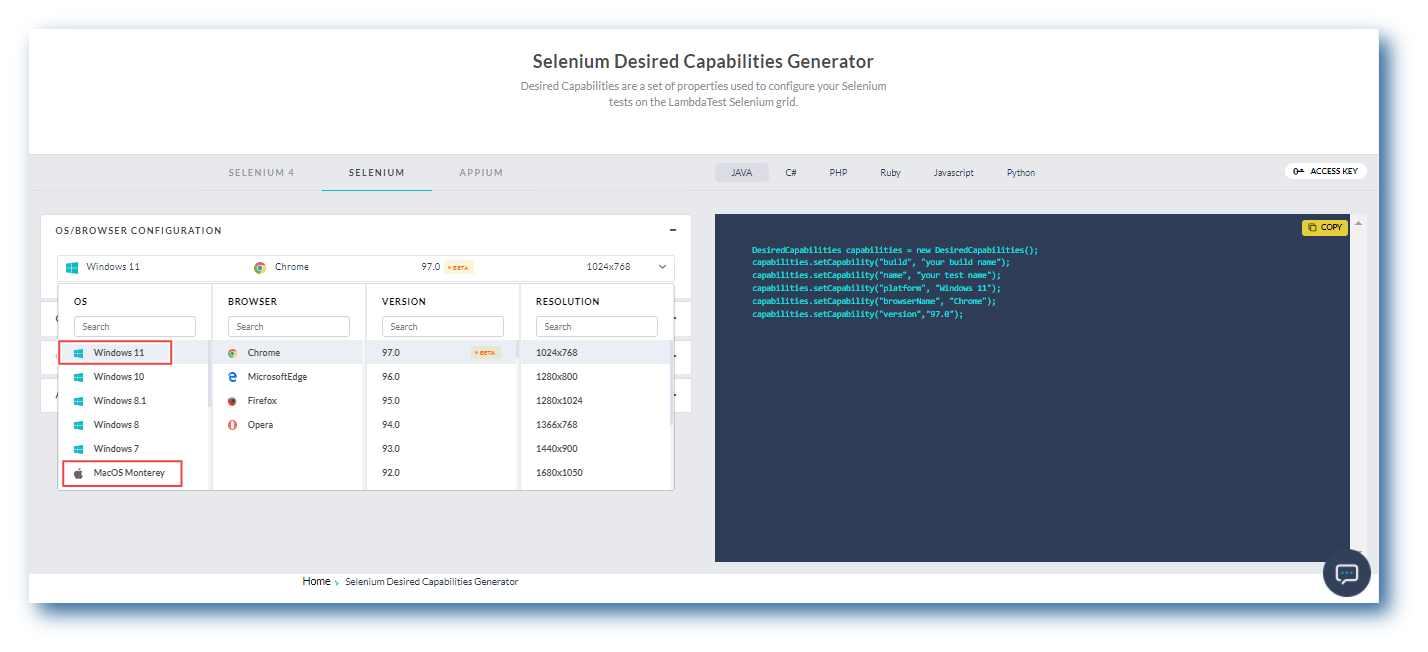
You can generate desired capabilities for Windows 11 and macOS Monterey from TestMu AI Desired Capability Generator.
Test On Apple Next-gen: iOS 15
Are your websites and web apps iOS 15 ready?
Don’t worry, as the latest iOS 15 is now available to all TestMu AI Automation users. You can now perform mobile browser automation on a wide range of iOS simulators running iOS 15 – iPhone XR, iPhone XS, iPhone 12 Pro, and more.
You can also generate Appium capability to test on iOS simulators from our desired capability generator.
Automation Testing On Cypress 9.0.0
Cypress came out with its third major release – Cypress 9.0.0. The new feature includes File encoding, and the bundled Node.js, electron, and Chrome browser versions have all been upgraded. There are also a few minor enhancements that can help you perform Cypress testing. For example, Cypress has improved its handling of sticky headers. Its recent version will help ensure that a sticky header does not obscure an element.
TestMu AI Automation now allows you to perform test automation on the latest – Cypress 9 across 40+ browser versions.
New Browsers In Automation
We have added all the newly released browser versions for Firefox, Edge, and Opera on our automation testing platform to help you evaluate your website’s rendering process.
Below are the new browsers that are added:
- Firefox 96 Beta, 95
- Edge 97 Beta
- Opera 82
Accessibility Testing Support In Real Time Testing
In November, we released a new feature: Accessibility testing for macOS Monterey, macOS Catalina, and macOS Big Sur. We are glad to announce that we have extended the support for Accessibility testing on other macOS versions and Windows 10.
You can now run accessibility tests using Screen Reader on macOS High Sierra, macOS Sierra, and macOS Mojave. Not only this, but you can also perform Accessibility testing on Windows 10 using NVDA (Non-Visual Desktop Access).
Bonus Addition: To play audio from the remote machines, we have now enabled the Microphone feature for online browser testing on macOS Big Sur and macOS Monterey.
New Browsers In Real Time Testing
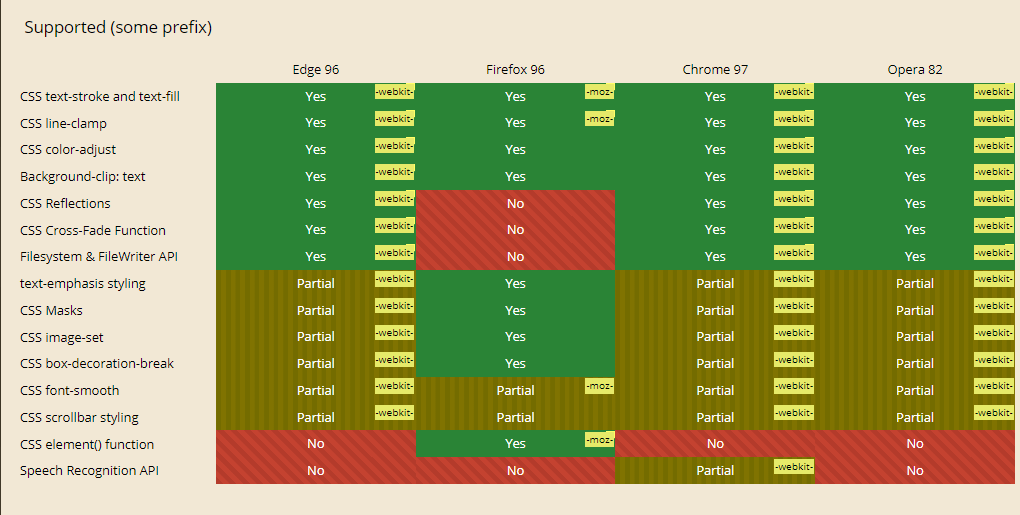
You can now test your websites and web apps in real-time to ensure they work perfectly on the newly released browser versions like Chrome, Firefox Edge, and Opera. Other than this, we’ve also added Safari 15 for macOS Big Sur.
Shown below are the latest browsers for live-interactive testing.
- Chrome 97 Beta, 96
- Firefox 96 Beta, 95, 94
- Edge 97 Beta,96, 95
- Opera 82, 81
Let’s check browser compatibility between Chrome 97, Firefox 96, Edge 96, and Opera 82.

New Browsers In Screenshot Testing
With TestMu AI Automated Browser Screenshot testing, you can capture bulk screenshots of websites and web apps across desktop and mobile browsers.
The new browser versions for capturing automated screenshots are out.
- Chrome 96, 95
- Firefox 94
- Edge 95, 96
- Opera 81
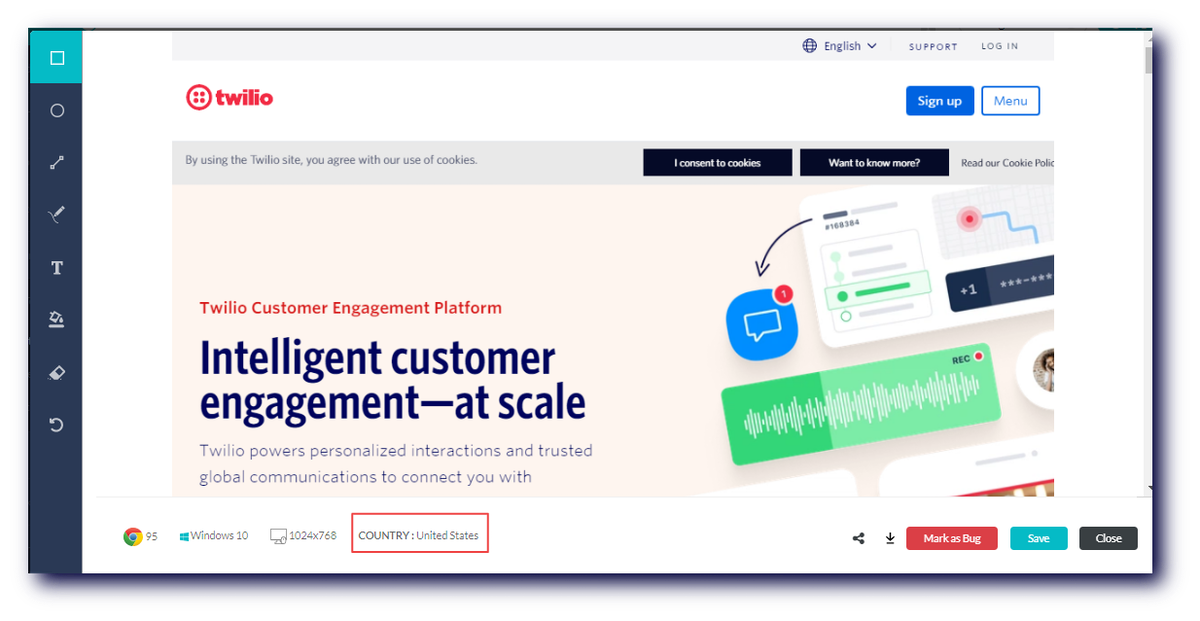
We’ve also made one minor improvement in our Screenshot testing UI. Earlier in Screenshot Geolocation testing, while capturing screenshots for bug logging, the user couldn’t see the Geolocation info for their websites and web apps currently being tested.
We have now added Geolocation info that enables users to see the Geolocation info for their websites and web apps that are currently being tested in.
Test Mobile Web And Native Apps With Custom Network Throttling
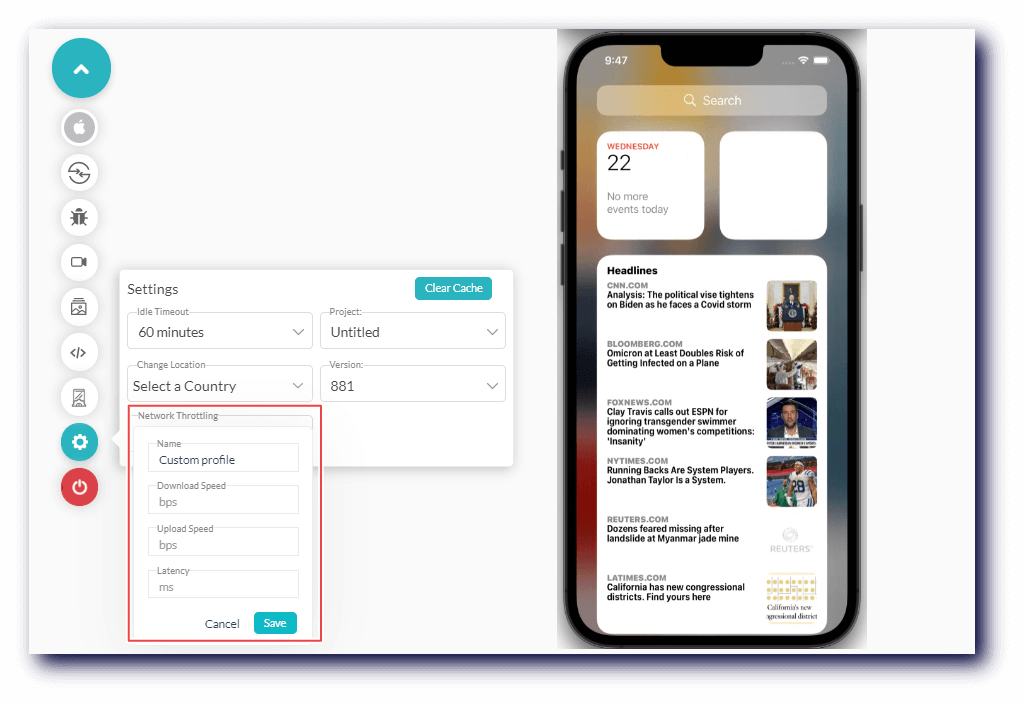
TestMu AI offers network throttling to test websites in different network conditions like Offline, Slow 3G, Fast 3G, 4G, and 5G. In addition, with Custom network throttling, you can now test mobile web and native applications by creating your own throttling presets.
With this feature, you can customize the speeds for:
- Download
- Upload
- Latency
Also Read: How To Test Mobile Websites On Different Network Conditions?
Upload Mobile Apps With Sizes Upto 1 GB
TestMu AI Mobile App testing enables you to test apps on various Android and iOS devices. Earlier, the mobile app upload size limit was set to 300 MB for mobile app testing. This limit has now been raised to 1 GB.

Austin Siewert
CEO, Vercel
Discovered @TestMu AI yesterday. Best browser testing tool I've found for my use case. Great pricing model for the limited testing I do 👏
2M+ Devs and QAs rely on TestMu AI
Deliver immersive digital experiences with Next-Generation Mobile Apps and Cross Browser Testing Cloud

You can refer to the below video tutorial to know more about TestMu AI Mobile App testing’s features.
Wrapping Up!
That’s all folks for today. We hope that the new addition will spice up your testing workflow. We are continually scaling and improving our testing platform to meet all your testing requirements. So give these new features a try and share your thoughts on the TestMu AI Community.
Also, don’t forget to register for our upcoming webinar on Zebrunner and TestMu AI smart test execution and transparent test analytics to delve deeper into effective test automation and test analysis.

Happy Testing!


Did you find this page helpful?
More Related Hubs
TestMu AI forEnterprise
Get access to solutions built on Enterprise
grade security, privacy, & compliance
- Advanced access controls
- Advanced data retention rules
- Advanced Local Testing
- Premium Support options
- Early access to beta features
- Private Slack Channel
- Unlimited Manual Accessibility DevTools Tests