

Next-Gen App & Browser Testing Cloud
Trusted by 2 Mn+ QAs & Devs to accelerate their release cycles


On This Page
- What is the CSS :has() Pseudo-Selector?
- Browser Compatibility of CSS :has() Selector
- Understanding the Syntax of :has Selector
- Working of :has() With Combinators and Other Pseudo-Selectors
- Selecting Element in a Range
- Practical Example of CSS :has() Selector in Form Validation
- Relevance of the CSS :has() Selector
- CSS Methodologies and Techniques as Alternatives to :has() Selector
- Limitations of CSS :has() Selector

Complete Guide to CSS :has() Selector
The CSS :has() selector allows you to style parent elements and target siblings. In this guide, learn about CSS :has() selector with its practical use case examples.

Clinton Joy Fimie
January 21, 2026
For years, CSS Selectors have enabled us to style elements based on their tags and classes, even down to their position in the DOM (Document Object Model).
However, when it comes to styling elements based on their nested content (children), there is a limitation, and this has led to developers using JavaScript as a solution. In turn, this has led to unnecessary complexity and affected the maintainability of the code.
Introducing the CSS :has() pseudo-selector—the long-awaited solution to achieving selection of parent elements through the attributes of their children, what was once deemed impossible without JavaScript—it addresses the situation head-on, offering a way we can target elements based on their children’s elements. Brace yourself as we dive into the realm of this relational selector and unveil its potential.
In this guide, we’ll explore the CSS :has() selector, which allows for styling parent elements and target siblings.
This guide not only delves into the need for the CSS :has() selector but also provides a comprehensive overview of its general usage, diverse applications, and practical use case examples. We’ll also explore browser compatibility considerations and fallback options.
What is the CSS :has() Pseudo-Selector?
Pseudo-selectors, or pseudo-classes, are simply the keywords we use in CSS. They are placed after the main selector and allow for the targeting and styling of specific elements. Unlike regular selectors, pseudo-selectors are specifically used to select and style elements based on their state or position within the document tree. Target elements must meet specific criteria to be selected.
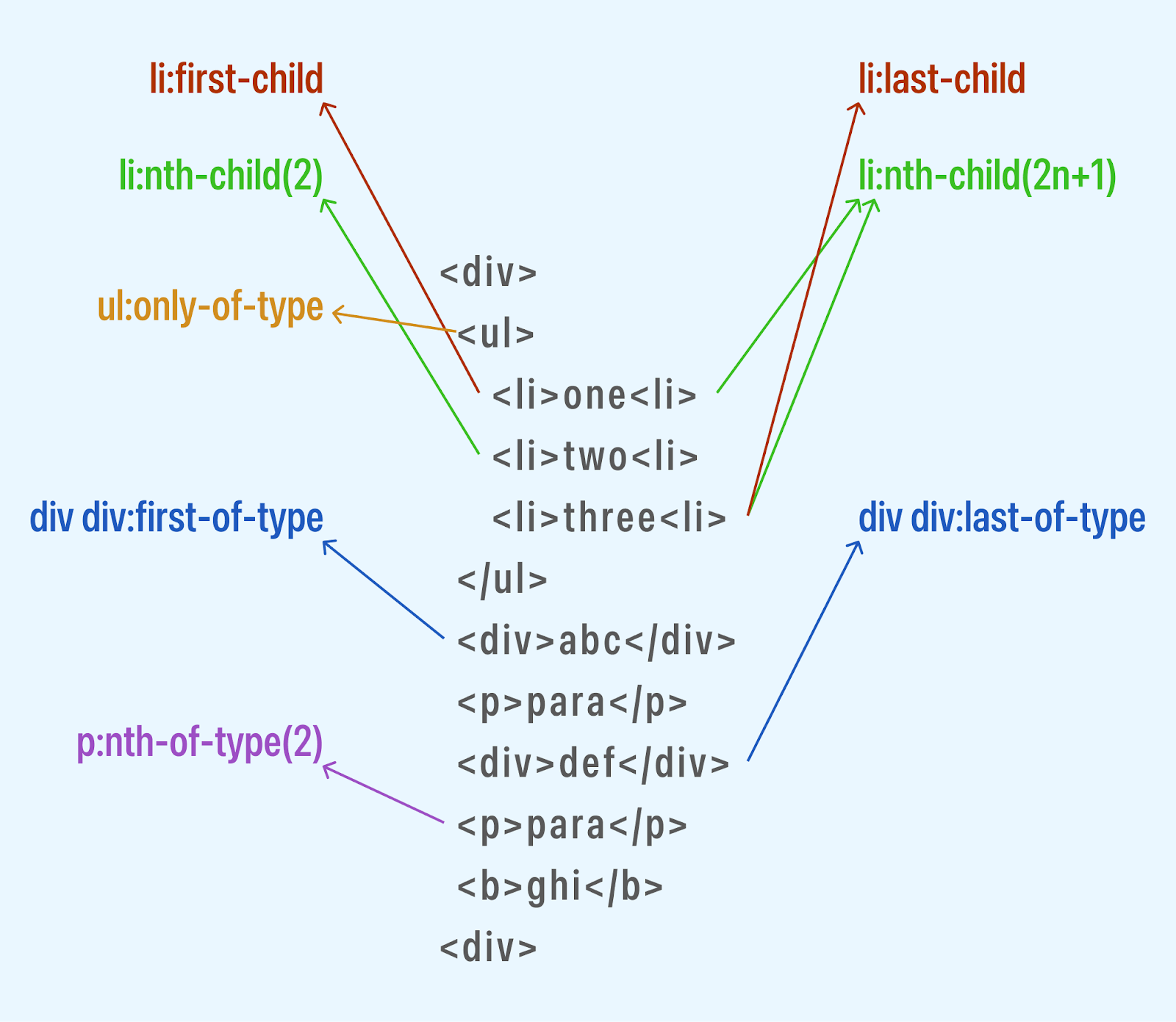
Pseudo-selectors essentially solve the problem of dynamically selecting and styling elements based on various conditions, such as their position, content, or user interaction state.
The :has() pseudo-selector is the only CSS Selector that selects elements based on whether they contain specific descendants. It targets the parent element with one or more descendants that match the specified selector and can also target siblings or child elements.
The CSS :has() pseudo-selector is considered a functional selector. This is because, to target specific elements, it takes in parameters. These parameters can be an element, a list of elements, or sometimes combinators (+, ~, >); these are used for targeting elements.
The :has() selector is the perfect selector for targeting elements based on their content, as it enables you to select elements based on the presence or characteristics of their child elements. This selector is particularly useful when we want to apply styles to a parent element based on the existence or properties of its child elements.
Here is a basic example of the CSS :has() selector.
HTML:
<!DOCTYPE html>
<html lang="en">
<head>
<meta charset="UTF-8">
<meta name="viewport" content="width=device-width, initial-scale=1.0">
<title>Document</title>
</head>
<body>
<div>
<span class="my-class">This div has a span child element with the class my-class.</span>
</div>
<div>
<span>


This div has a span child element, but the span element does not have the class my-class.
</span>
</div>
<div>
This div does not have any child elements.
</div>
<div>
<span>This div has a span child element, but it is not the only child element.</span>
<span>This is another child element.</span>
</div>
<div>
<span>This div has a span child element, but it is not the only child element.</span>
<p>This is another child element.</p>
</div>
</body>


</html>
The HTML code above defines five div elements, each subtly different in its child elements. The first div has a span child element with the class my-class. The second div has a span child element, but this time without a class. The third div does not have any child element. The fourth div has two span child elements. Last but not least, the fifth div has a span and a p child element.
Let’s add our CSS.
CSS:
body{
background-color: #f0f8ff;
color: black;
}


div{
margin: 3rem;
}


div:has(.my-class) {
color: rgb(255, 0, 0);
}


div:has(span) {
color: rgb(0, 0, 255);
}
div:has(*) {
border: 1px solid rgb(255, 0, 0);
}


div:has(p ){
font-size: 1.5rem;
}
@supports not (selector(html:has(body))) {
body:before {
padding: 1rem;
color: rgb(255, 0, 0);
display: block;
content: "Your browser doesn't support the `:has()` pseudo-class yet.";
}
}
For the CSS code, we first have some general style for the body of our design, and we create a margin of 3rem around each div.
And for the part we are most interested in, using the CSS :has() pseudo-selector, we added a red color to any div element with a child element with the class my-class. Next, applied the red color to any div element with a child element with the tag name span.
We set a border: 1px solid rgb(255, 0, 0) style to any div element that has any child elements. Next, we applied a font-size: 1.5rem style to any div element that has a child element with the tag name p.
Lastly, we used the @supports rule, which we will discuss in depth later, to check if the browser supports the CSS :has() pseudo-class. If the browser does not support the :has() pseudo-class, then a message will be displayed in the browser.
And here is what our result looks like:
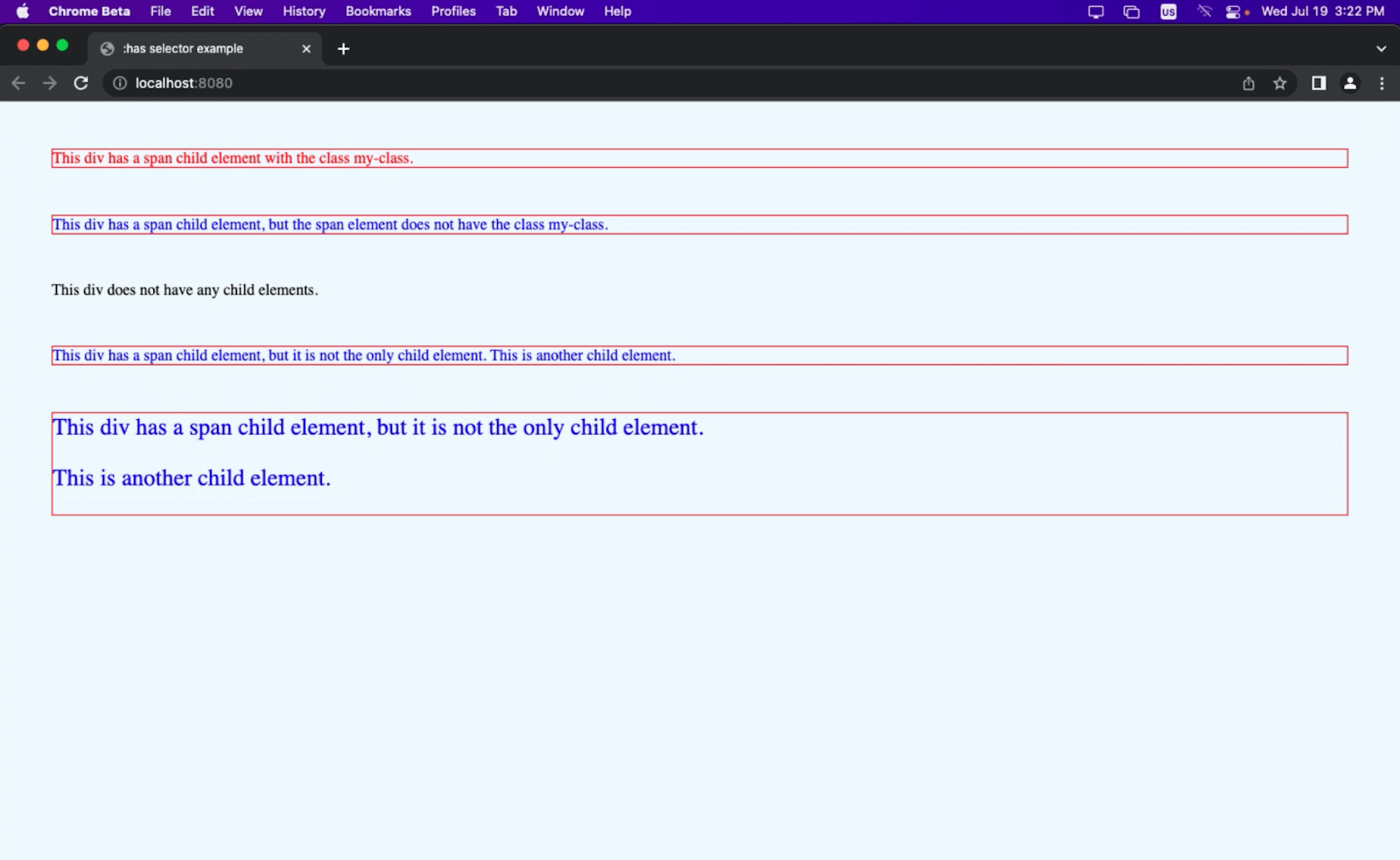
Basic example of CSS :has() selector in use
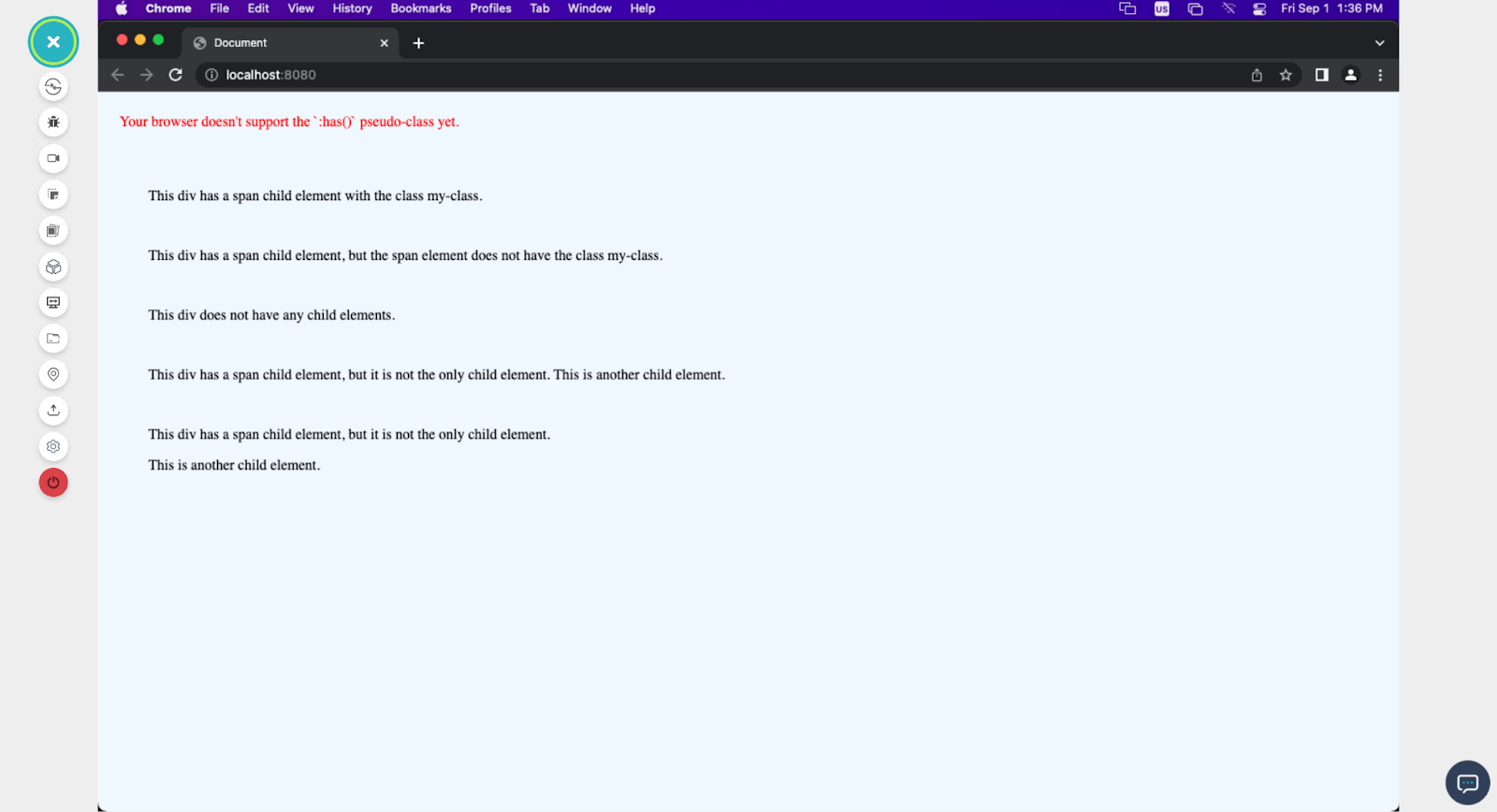
Result on a Chrome 104 browser
The above output is rendered on the TestMu AI platform, an AI-powered test orchestration and execution platform that lets devs and testers perform browser testing to check the compatibility of their websites and web apps across 3000+ real browsers, devices, and platforms.
With TestMu AI, you can run browser compatibility tests for CSS :has() selector and other web technologies that are a part of your website or web application.
Subscribe to our TestMu AI YouTube Channel for the latest updates on tutorials around cross browser testing, automation testing, and more.
From the Chrome browser preview, we can see the browser support for the :has property on different versions of the Chrome browser, as the beta version of the Chrome browser supports the CSS :has() property, therefore letting us style our div, while the older Chrome version (104) does not.
Let’s now discuss browser support and compatibility of CSS :has() property in detail.
Browser Compatibility of CSS :has() Selector
The :has() pseudo-selector is a new feature that was just added to CSS, and its browser support is still evolving. When writing this guide, here is the browser’s support of the most popular browsers for the CSS :has() pseudo-selector:
- Chrome (version 105 and newer)
- Edge (version 105 and newer)
- Firefox (version 103 and newer)
- Safari (version 15.4 and newer)
- Opera (version 91 and newer)
- IE 11
Shown below is the browser support for CSS :has() selector.
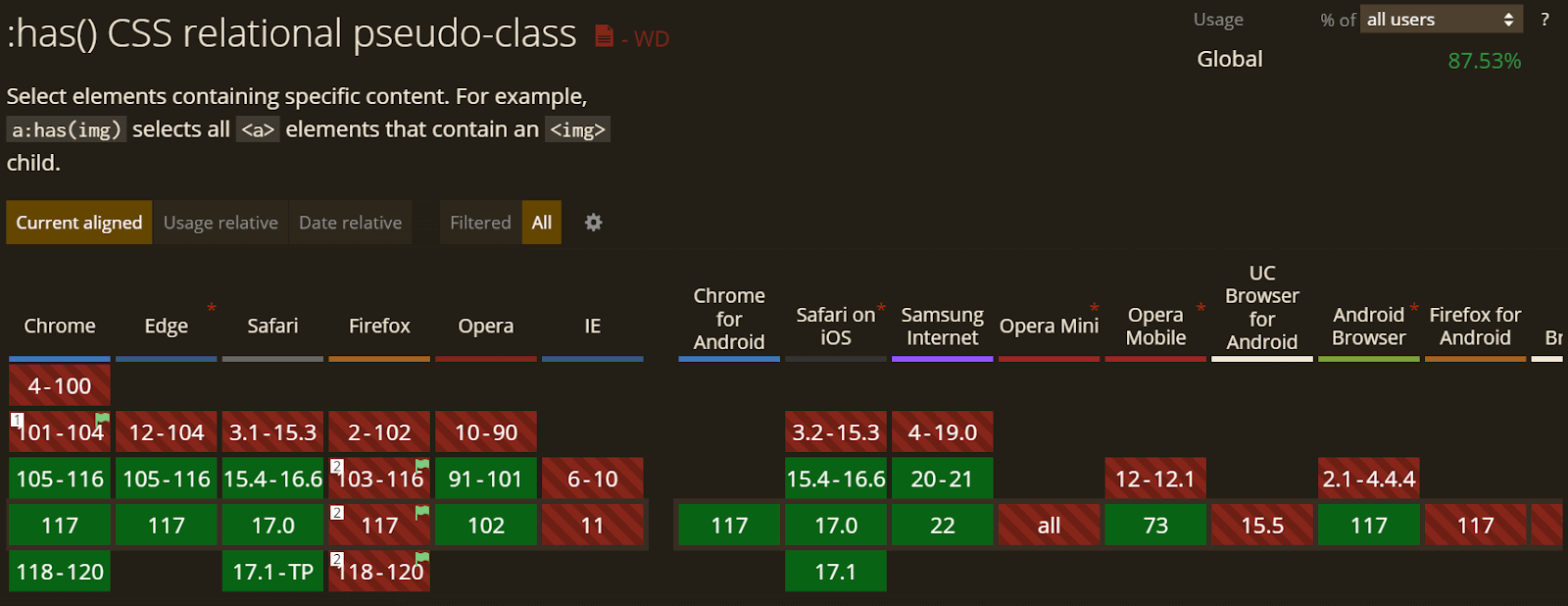
Browser Support Checks for CSS: has Selector
Due to the fact that the CSS :has() pseudo selector isn’t supported in all browsers, it is only best if we perform browser support checks. This way, we can provide fallbacks for browsers that don’t support the CSS :has() pseudo-selector. To do this, we use the @supports CSS rule, as shown in the code below.
@supports (selector(html:has(body))) {
body:has(/* element */) {
/* style */
}
}
@supports not (selector(html:has(body))) {
body:before {
padding: 1em;
color: red;
display: block;
content: "Your browser doesn't support the `:has()` pseudo-class yet.";
}
}
In the code above, the first @supports rule checks if the browser supports the :has() selector. If the browser does support the pseudo-class, then the CSS rule inside the @supports block will be applied. The CSS rule inside the @supports block specifies that the body element should have a specific style if it has one or more child elements that match the selector of whatever element or class we select.
The second @supports rule checks if the browser does not support the :has() pseudo-class. If the browser does not support the pseudo-class, the CSS rule inside the @supports block will be applied.
The CSS rule inside the @supports block specifies that a before element should be added to the body element. The before element will have a specific style, and it will contain a message that tells the user that their browser does not support the :has() pseudo-class yet.

Note: Test CSS selector for browser compatibility. Try TestMu AI Today!
Understanding the Syntax of :has() Selector
The syntax of the :has() pseudo-class is as follows:
Target:has(selector)
Target represents the CSS Selector for the element we want to style. It could be any valid CSS Selector, a tag, a class, or an id that selects one or more elements on the web page.
CSS :has() a pseudo-class selector that selects elements based on whether they contain a specific descendant that matches the given selector.
Working of :has() With Combinators and Other Pseudo-Selectors
So far, we have seen the CSS :has() pseudo-selector in basic use, but the combinator takes the game slightly further.
Combinators in CSS are signs that are used to specify the relationship between two or more elements in a selector. With combinators, we can select elements based on their position relative to other elements in the HTML structure.
There are four main types of combinators, and they are:
- Descendant combinator (space): This allows for targeting elements nested in other elements.
- Child combinator (>): The child combinator targets elements that are immediate children of a parent element (only direct children).
- Adjacent sibling combinator (+): This combinator selects an element that is the next sibling of another specified element and shares the same parent. It targets elements that appear immediately after the first element.
- General sibling combinator (~): The general sibling combinator selects an element that is a sibling of another specified element and shares the same parent. It targets elements that appear after the first element, regardless of their position.
The CSS :has() pseudo-class can be used with combinators to refine further the condition for which we select elements based on the relationship between their children.
Let’s take this code as an example.
<!DOCTYPE html>
<html>
<head>
<title>:has selector example</title>
<link rel="stylesheet" href="style.css">
</head>
<style>
li:has(p + p) {
color: rgb(27, 179, 179);
}


</style>
<body>
<ul>
<li>


<p>First paragraph</p>
<p>Second paragraph</p>
</li>
<li>
<p>Only one paragraph</p>
</li>
<li>
<p>First paragraph</p>
<div>
<p>Another paragraph</p>
</div>
<p>Third paragraph</p>
</li>
</ul>
</body>
</html>
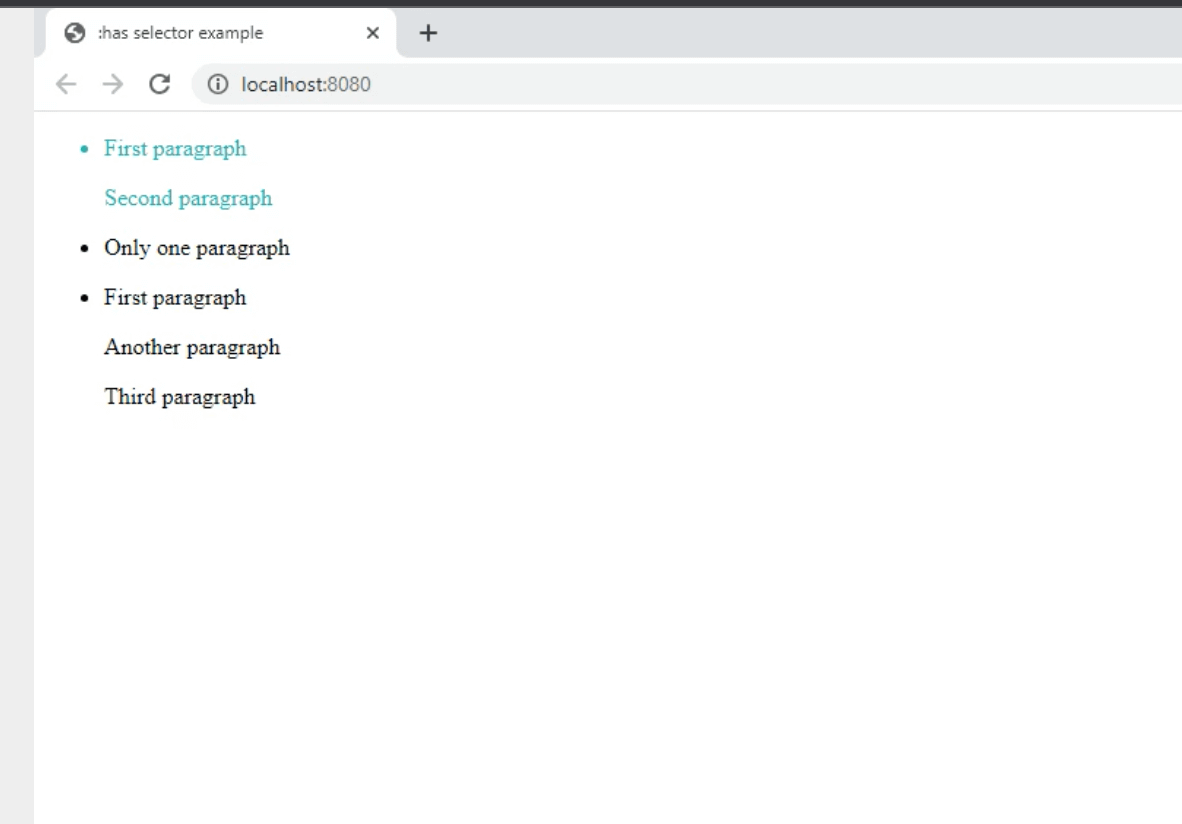
In this example, the CSS Selector li:has(p + p) targets li elements that have two consecutive p elements as direct children. The first list item has two consecutive p; hence, it will be styled with a different color since it contains two paragraphs in a row.
The :not Pseudo-Selector
The :not selector is a CSS pseudo-class that allows us to select elements that do not match a specific selector.
It excludes certain elements from being styled or targeted based on specific criteria. The :not selector can be used to create exceptions or exclusions within your CSS rules.
The :not selector can be combined with the :has() selector to target elements that do not match a specific selector.
Let’s use it to edit our previous code.
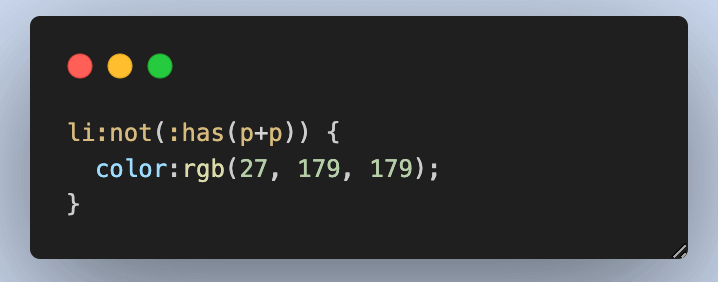
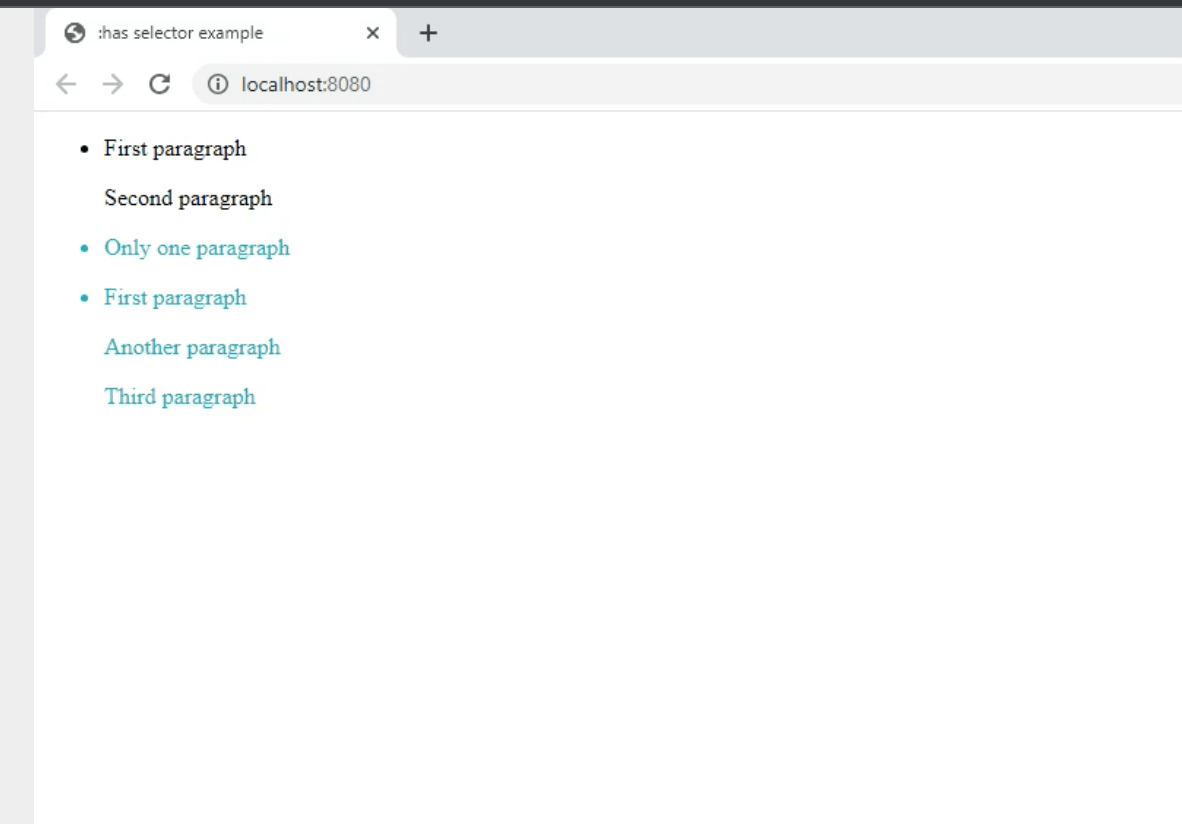
Using the :not pseudo-selector, we can style the list items that do not contain two consecutive p tags.
Selecting Element in a Range
The CSS :has selector offers a valuable feature that allows the selection of elements within a specified range. This includes targeting the first or last element and all elements within that range. This capability becomes even more powerful when combined with combinators, as it opens up various possibilities for manipulating elements based on their position.
To illustrate how elements can be selected in a range, let’s consider this code snippet.
HTML:
<!DOCTYPE html>
<html lang="en">
<head>
<meta charset="UTF-8">
<meta name="viewport" content="width=device-width, initial-scale=1.0">
<title>Document</title>
<link rel="stylesheet" href="./style.css">
</head>
<body>
<nav>
<h3>Browser Testing</h3>
<ul class="nav-items">
<li><button>Configure tunnel</button></li>
<li><button>Upgrade Now</button></li>
</ul>
</nav>
<ul class="design"><h1>Browser testing</h1>
<h3>Browsers List</h3>
<li><img src="https://raw.githubusercontent.com/Cejay101/LamdaTestImages/34c915228872e5ff257653862c273bd914915a5f/images/chrome%20logo.svg" alt=""> Chrome</li>
<li><img src="https://raw.githubusercontent.com/Cejay101/LamdaTestImages/34c915228872e5ff257653862c273bd914915a5f/images/safari%20logo.svg" alt=""> Safari</li>
<li><img src="https://raw.githubusercontent.com/Cejay101/LamdaTestImages/34c915228872e5ff257653862c273bd914915a5f/images/edge%20logo.svg" alt="">Edge</li>


<li> <img src="https://raw.githubusercontent.com/Cejay101/LamdaTestImages/34c915228872e5ff257653862c273bd914915a5f/images/internet-explorer%20logo.svg" alt=""> Internet Explorer</li>
<li><img src="https://raw.githubusercontent.com/Cejay101/LamdaTestImages/34c915228872e5ff257653862c273bd914915a5f/images/firefox%20logo.svg" alt="">Firefox</li>
<li><img src="https://raw.githubusercontent.com/Cejay101/LamdaTestImages/34c915228872e5ff257653862c273bd914915a5f/images/brave%20logo.svg" alt=""> Brave</li>
<li><img src="https://raw.githubusercontent.com/Cejay101/LamdaTestImages/34c915228872e5ff257653862c273bd914915a5f/images/opera%20log.svg" width="20px" alt="">Opera</li>
<br>
<hr>
<br>
<h3>Operating System</h3>
<li><img src="https://raw.githubusercontent.com/Cejay101/LamdaTestImages/34c915228872e5ff257653862c273bd914915a5f/images/windows-applications%20logo.svg" alt="">windows 11</li>
<li><img src="https://raw.githubusercontent.com/Cejay101/LamdaTestImages/34c915228872e5ff257653862c273bd914915a5f/images/windows-applications%20logo.svg" alt="">windows 10</li>
<li><img src="https://raw.githubusercontent.com/Cejay101/LamdaTestImages/34c915228872e5ff257653862c273bd914915a5f/images/apple%20logo.svg" alt="">MacOS Monterey</li>
<li><img src="https://raw.githubusercontent.com/Cejay101/LamdaTestImages/34c915228872e5ff257653862c273bd914915a5f/images/apple%20logo.svg" alt="">MacOS Catalina</li>
<li><img src="https://raw.githubusercontent.com/Cejay101/LamdaTestImages/34c915228872e5ff257653862c273bd914915a5f/images/apple%20logo.svg" alt="">MacOS Big Sur</li>
<br>
<hr>
<br>
<h3>Resolution</h3>
<li>1024x768</li>
<li>1280x720</li>
<li>1280x800</li>
<li>1280x1024</li>


</ul>


</body>
</html>
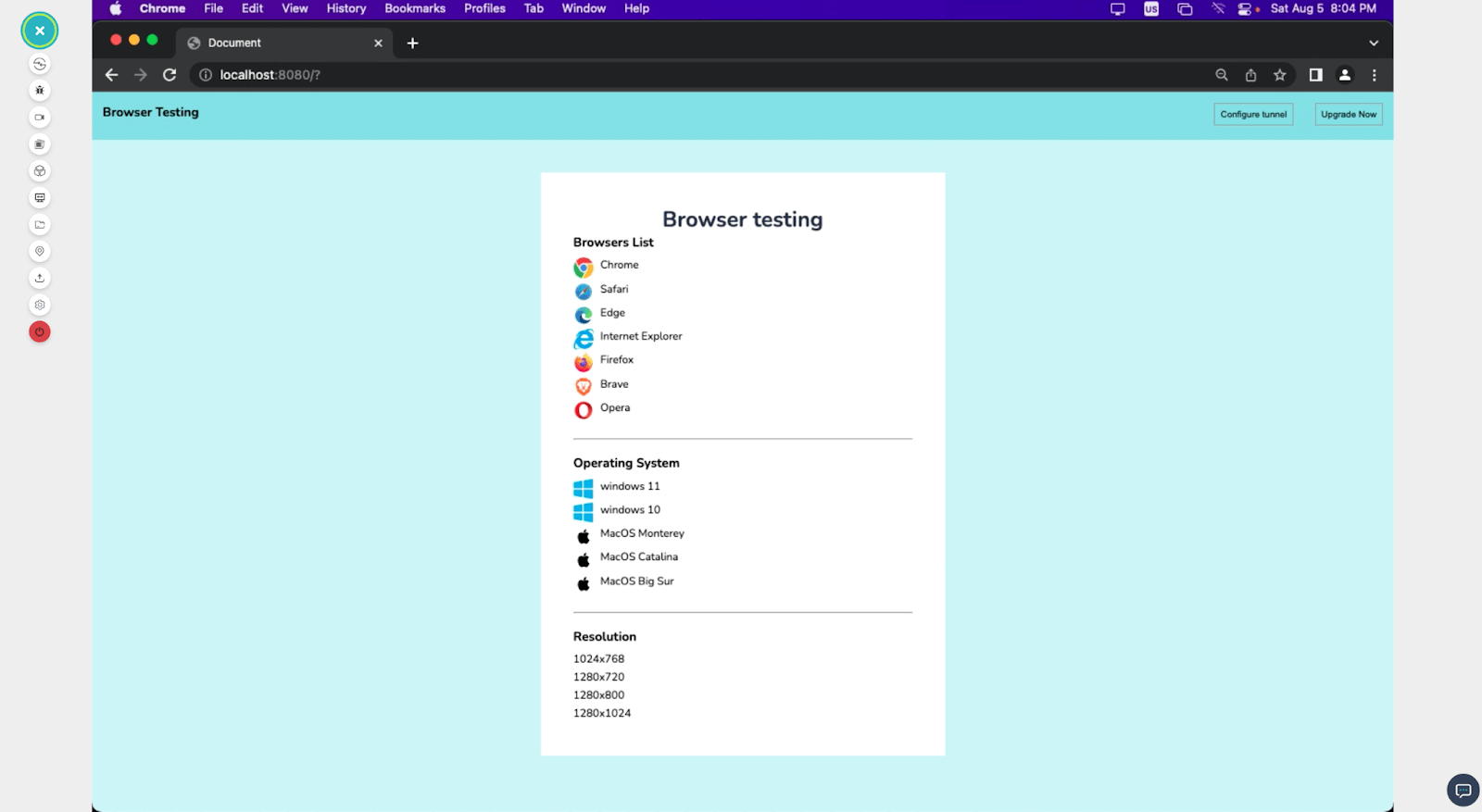
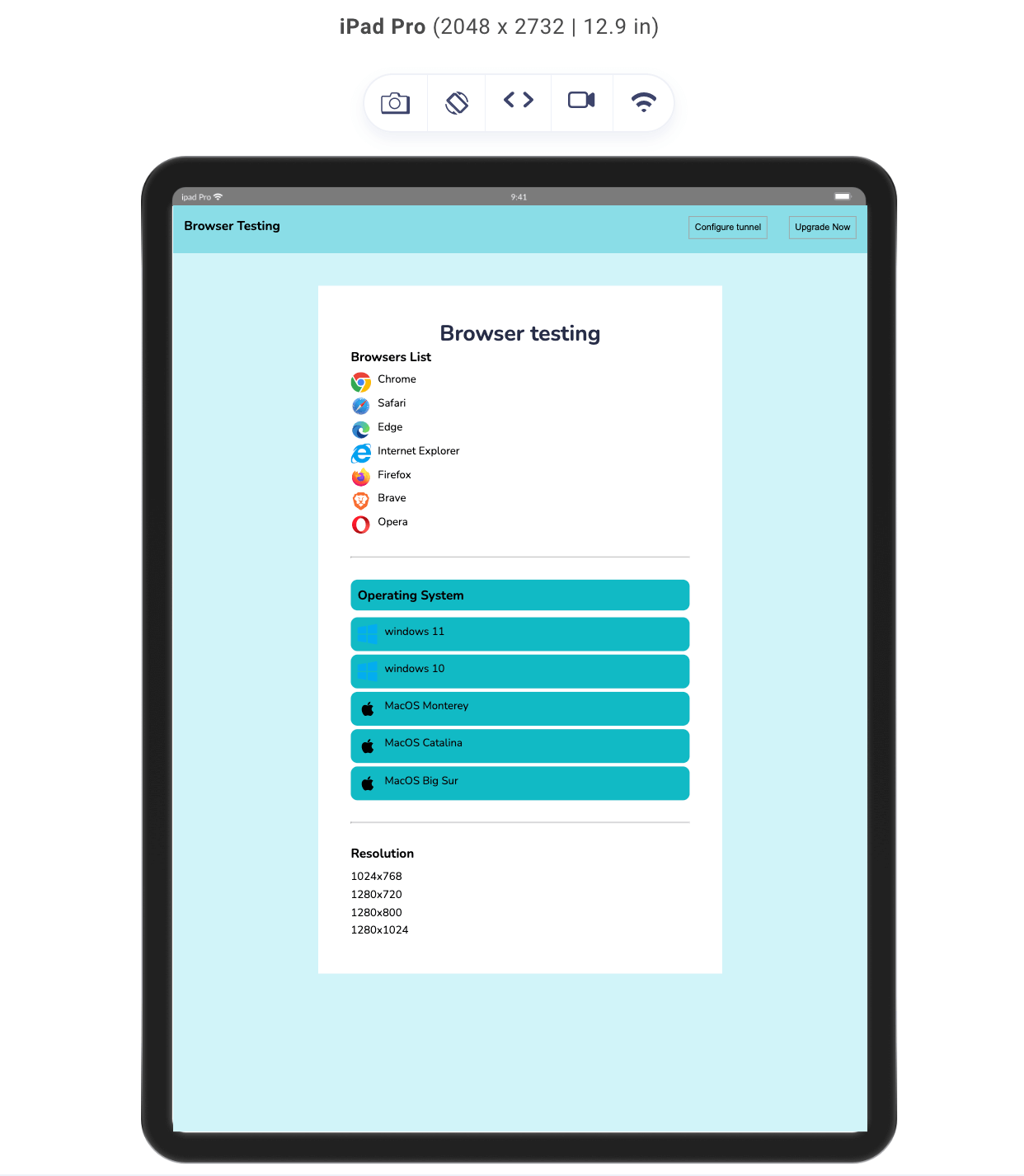
Above we have the HTML of a simple design, with the point of focus being the unordered list, which contains different element tags that will be used to demonstrate how selecting in range works with the CSS :has() selector.
CSS:
@import url('https://fonts.googleapis.com/css2?family=Nunito:wght@400;700&display=swap');


*{
margin: 0;
padding: 0;
list-style: none;
}
body{
background-color: rgba(196, 241, 247, 0.786);
font-family: 'Nunito', sans-serif;
}
/* Nav */
nav{
display: flex;
justify-content: space-between;
align-items: center;
padding: 1rem;
background-color: rgb(138, 221, 231);
}
a{
text-decoration: none;
color: rgb(0,0 ,0);
}
button{
padding: 0.5rem;
background-color: inherit;
border: 1px solid rgb(158, 158, 158);
}
.nav-items{
list-style: none;
gap: 2rem;
display: flex;
align-items: center;
background-color: inherit;
}


h1{
text-align: center;
font-size: 2rem;
color: rgb(39, 45, 71);
}
.design{
background-color: rgb(255, 255, 255);
width: 500px;
margin: 3rem auto;
padding: 3rem;
}
h3{
margin-bottom: 10px;
}
img{
width: 30px;
}
li{
display: flex;
gap: 10px;
margin-bottom: 5px;
}
@media screen and (max-width:630px) {
.design{
max-width : 90vw;
padding: 1rem;


}
}
@supports not (selector(html:has(body))) {
body:before {
padding: 1rem;
color: rgb(255, 0, 0);
display: block;
content: "Your browser doesn't support the `:has()` pseudo-class yet.";
}
}
The CSS above addresses the basic style of our design. And below is the result we got for our design.
Selecting First Element in a Range
As developers, there might be times when we need to style elements that directly follow a particular tag. A good way of doing this is using the CSS :has() selector along with combinators to select whatever first element is in range.
Let’s add some style to our previous code to illustrate this.
.design h3 + :has(~ h3)
{
background-color:#0ebac5;
padding: 10px;
border-radius: 10px;
}
With the above code, h3 elements that are siblings of the current h3 element are the h3 elements that are after the current h3 element. So, the h3 + :has(~ h3) selector selects all h3 elements that are immediately followed by another h3 element.
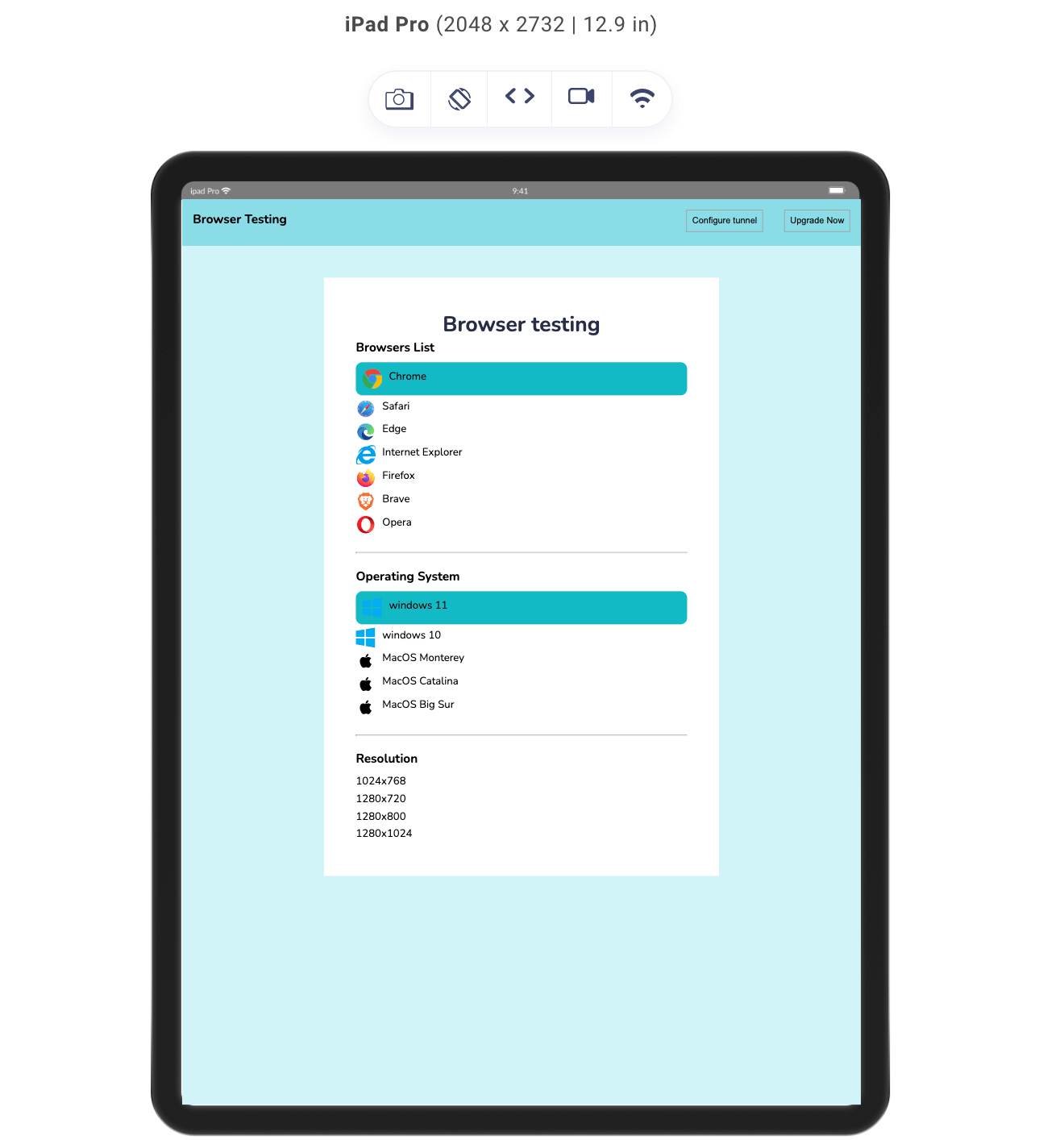
Selecting the First Element in a Range
Selecting the Last Element in a Range
Selecting the last element is a bit similar to selecting the first; the difference is in the combinators used.
.design h3 ~ :has(+ h3)
{
background-color:#0ebac5;
padding: 10px;
border-radius: 10px;
}
The CSS Selector .design h3 ~ :has(+ h3) would select the last element of the first two h3 elements in the list because they are both preceded by another h3 element. The last element of the third h3 element would not be selected because it is not preceded by another h3 element.
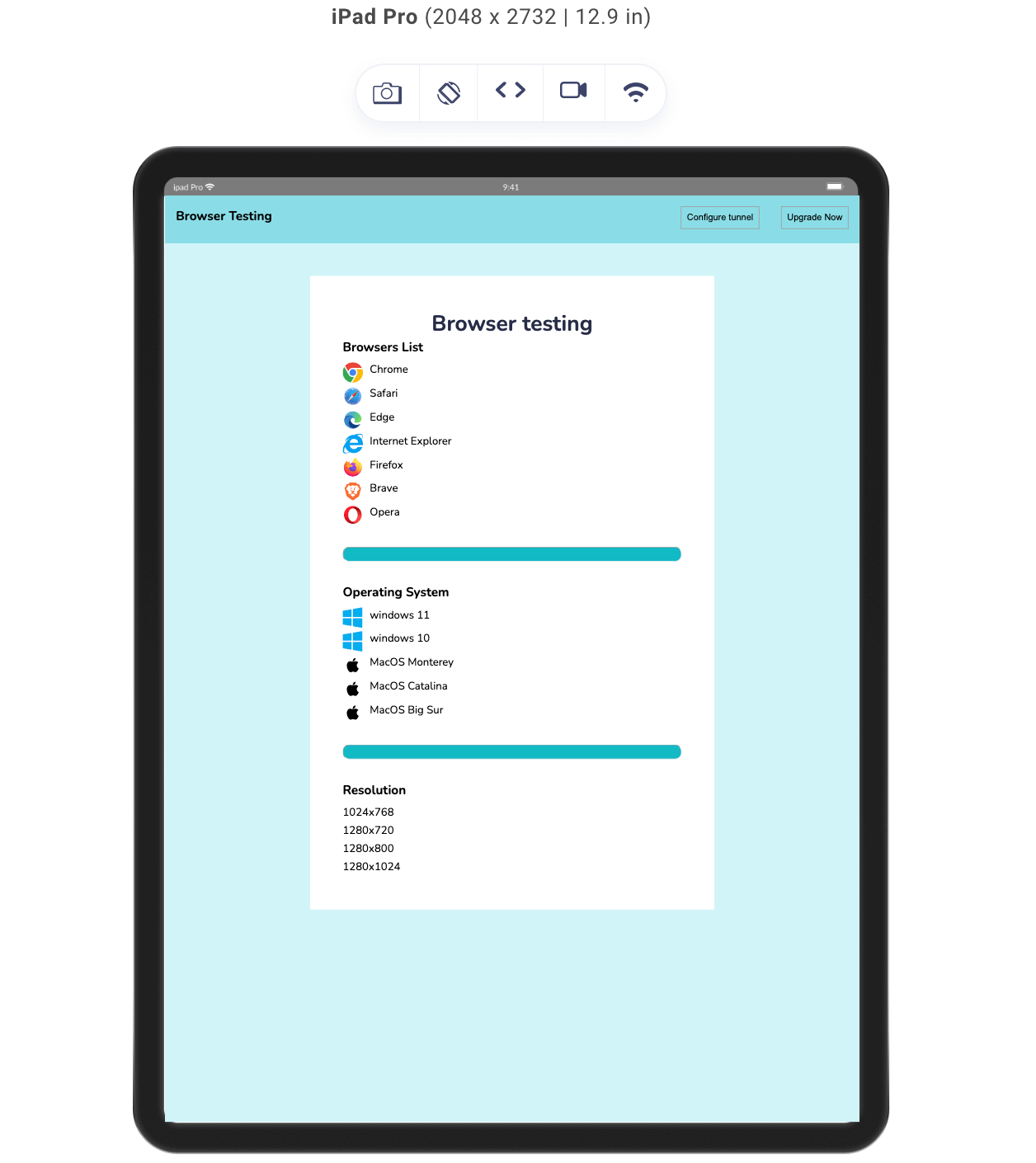
Selecting the Last Element in a Range
Selecting the Sibling in a Range
With the :has() selector, we can also select all elements within a certain range and apply styles to all the elements. Just like we did with other sibling selections, we use the has alongside combinators.
.design h3 ~ :has(~ h3)
{
background-color:#0ebac5;
padding: 10px;
border-radius: 10px;
}
In the code above, we use .design h3 ~ :has(~h3) to target all sibling elements that come after the first h3 and before the last h3.
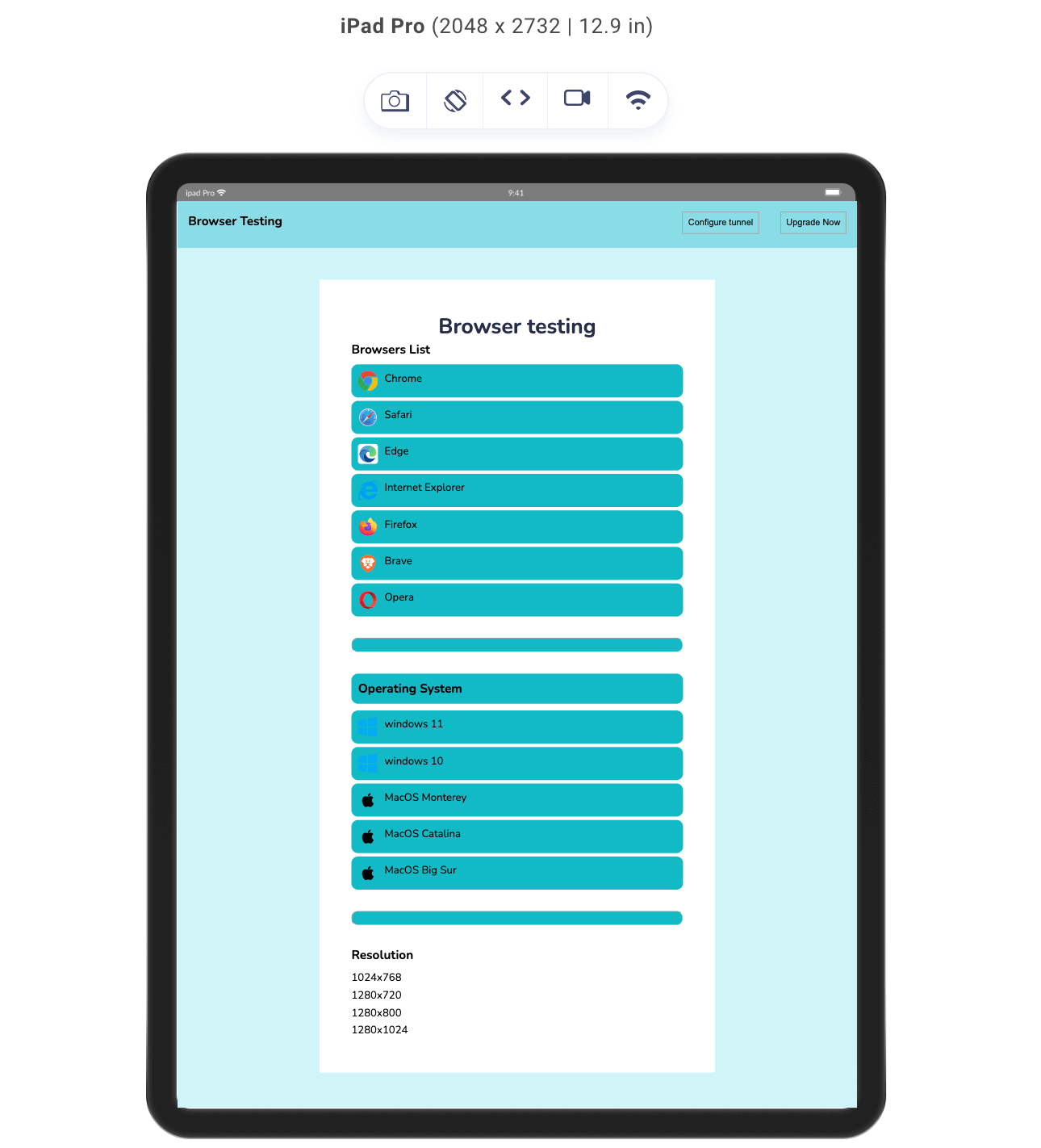
Selecting the Element in a Range
As we can see, all sibling elements are styled with a teal background, including the hr element.
Let’s try selection in range with a different element (hr) so we have another look at how our design is affected.
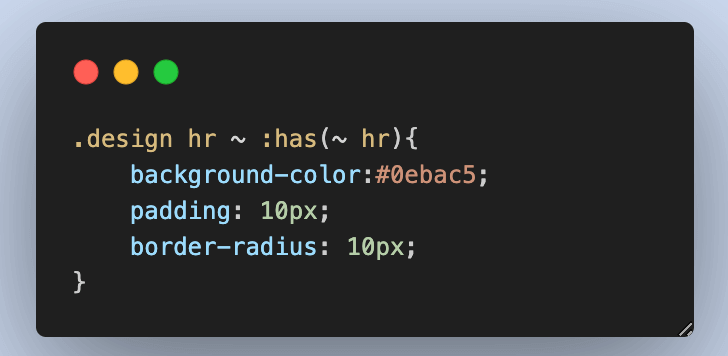
In this example, we can see that every element between the horizontal rule was selected and styled, hence the selection in range.
CSS :has() vs Other Pseudo-Selectors That Target Siblings
If you have experience using CSS, you’ll likely be familiar with various pseudo-selectors that allow for targeting specific elements within a set. For instance, the first-child pseudo-selector targets the first element within a parent, while the last-child pseudo-selector targets the last element.
Additionally, the nth-child selector enables you to pinpoint a specific child or a range of children based on their position. However, there’s a key distinction when it comes to the :has() pseudo-selector, which sets it apart from these other pseudo-selectors.
As we have seen, the :has() pseudo-selector introduces a unique approach to selection. Unlike the first-child and last-child selectors, which solely consider the position of elements within their parent, and the nth-child selector, which relies on position or formulas, the :has() selector focuses on the characteristics of children elements.
While the other pseudo-selectors are position-oriented, the :has() selector adds an additional layer of logic that allows you to apply styles based on the structure and content of the elements themselves, not just their positions within the parent.
Here is a table of a clear distinction of each of these Pseudo-selector
| Selector | Purpose | Selection Criteria | Example |
|---|---|---|---|
| :has | Target parent elements with specific descendant elements. | Based on the existence of specific descendants that match the selector. | div:has(p) targets divs containing p elements. |
| :first-child | Target the first child element of a parent. | Based on the position of the first child element within its parent. | p:first-child targets the first p element. |
| :last-child | Target the last child element of a parent. | Based on the position of the first child element within its parent. | li:last-child targets the last li element. |
| :nth-child | Target a specific child element based on its position within a parent. | Based on the position or formula provided for selecting the element. | li:nth-child(odd) targets odd-numbered li elements. |
Practical Example of CSS :has() Selector in Form Validation
There are different scenarios where the :has() selector can be very useful. Form validation is one of them.
When creating forms, we often use the label and input tags together, hence siblings. To demonstrate the sibling selector in use, we will create a form showing when the input fields are validated and when they are not.
HTML:
<!DOCTYPE html>
<html lang="en">
<head>
<meta charset="UTF-8">
<meta name="viewport" content="width=device-width, initial-scale=1.0">
<title>Document</title>
<link rel="stylesheet" href="./style.css">
</head>
<body>
<nav>
<h3><a href="https://www.lambdatest.com/"><img class="logo" src="https://www.lambdatest.com/resources/images/logos/logo.svg" alt="logo"></a></h3>
<ul class="nav-items">
<li><a href="https://www.lambdatest.com/feature">Platform</a></li>
<li><a href="https://www.lambdatest.com/enterprise">Enterprise</a></li>
<li><a href="https://www.lambdatest.com/blog/">Resources</a></li>
<li><a href="https://www.lambdatest.com/support/docs/getting-started-with-lambdatest-automation/">Developers</a></li>
<li><a href="https://www.lambdatest.com/pricing">Pricing</a></li>
</ul>
<img class="hamburger" src="https://www.lambdatest.com/resources/images/icons/toggle_menu.svg" alt="">
</nav>
<form class="form">
<h2>Sign Up</h2>
<p>Please provide your name, email and phone number.</p>


<div class="field">
<label for="name">Name </label>
<span>
<input type="name" id="name" required placeholder="e.g Clinton joy"/>
</div>
<div class="field">
<label for="email">Email Address </label>
<span>
<input type="email" id="email" required placeholder="e.g clinton@gmail.com"/>
</div>
<div class="field">
<label for="number">Phone number </label>
<span>
<input type="number" id="number" required placeholder="+1 893 389 393"/>
</div>
<div>
<button>Submit</button>
</div>
<p>Already have an account? <a class="sign-in" href="https://accounts.lambdatest.com/login?_gl=1*cz6gbh*_gcl_au*MTU1OTQzNjIzMS4xNjg5ODI4OTQ5">Sign In</a></p>
</form>


</body>
</html>
From the HTML code above, we laid out the markup of a signup form.
The webpage consists of a simple navigation section (< nav >) and a form section (< form >).
The form section has three fields, each consisting of a label tag, a span tag, and an input. The structure of this field is laid out this way to enable us to target sibling elements using the :has selector, and you will see that in use shortly.
CSS:
@import url('https://fonts.googleapis.com/css2?family=Nunito:wght@400;700&display=swap');


*{
margin: 0;
padding: 0;
}
/* Nav bar */
a{
color: rgb(0, 0, 0);
text-decoration: none;
}
nav{
display: flex;
justify-content: space-between;
align-items: center;
padding: 1rem;
}


.nav-items{
list-style: none;
gap: 2rem;
display: flex;
}
.hamburger{
display: none;


}
body{
background-color: #0ebac5;
font-family: 'Nunito', sans-serif;
}
.form{
background-color: rgb(255, 255, 255);
border-radius:10px ;
width: 600px;
/* height: 500px; */
margin: 3rem auto;
padding: 3rem;
max-width: 100vw;
}
h2{
margin-bottom:0.5rem ;
font-size: 3rem;
color: rgb(36, 54, 96);
font-weight: bold;
}
p{
font-size: 1.5rem;
color: rgb(148, 148, 148);
margin-bottom: 2rem;
}
.field{
margin-bottom: 1.5rem;
position: relative;
}
label{
font-size: 1rem;
color: rgb(36, 54, 96);
}
input{
display: block;
padding:1rem;
width: 100%;
font-family: 'Nunito', sans-serif;
box-sizing: border-box;
font-size: 1rem;
border: 1px solid rgb(188, 188, 188);
border-radius: 5px;
}
button{
border: none;
background-color: rgb(36, 54, 96) ;
color: white;
padding: 1rem 1.5rem;
margin-bottom:2rem ;
border-radius: 5px;
font-family: 'Nunito', sans-serif;
}
span{
position: absolute;
right: 0;


}
span:has(+ input:invalid),
span:has(+ input:invalid)::before {
content: '✖';
color:rgb(236, 29, 29);
}


span:has(+ input:valid),
span:has(+ input:valid)::before {
content: '✓';
color: rgb(27, 159, 91);
}


input:focus{
border: none;
}
input:hover{
background-color: rgb(36, 54, 96);
}
input:focus:invalid {
background: rgb(213, 155, 165);
border: red 2px solid;
outline: rgb(236, 29, 29);
}


input:focus:valid {
border: rgb(35, 152, 66) 2px solid;
outline: rgb(27, 159, 91);
background: #c9ffd9;
}
p:has(a){
color: rgb(36, 54, 96);
}
.sign-in{
color: blue;
}


@supports not (selector(html:has(body))) {
body:before {
padding: 1rem;
color: rgb(255, 0, 0);
display: block;
content: "Your browser doesn't support the `:has()` pseudo-class yet.";
}
}
@media screen and (max-width:712px) {
.hamburger{
display: block;
width: 30px;
}
.nav-items{
display: none;
}
h2{
font-size: 2rem;
}
p{
font-size: 1rem;
}
.form{
width: 90vw;
max-width: 100vw;
padding: 1rem;
}
}
The CSS code includes essential styles that enhance the webpage’s appearance. Our primary focus centers on the div with the class name field. All elements within this div are siblings, and with the CSS :has() property, we can successfully target an element based on its sibling.
In the CSS, we effectively use the :has() selector to target the span element inside the field section. We adjust the span content and apply styles based on validating an adjacent input field, which is also a sibling.
Despite having multiple divs with the “field” class, this technique ensures consistent styling of the span content based on input field validation. This approach streamlines the user experience across different “field” divisions.
Note: Perform live-interactive desktop browser testing on the cloud. Try TestMu AI Today!
Relevance of the CSS :has() Selector
The CSS :has() selector holds significant relevance in the world of web development, most of which is associated with its ability to target elements based on specific siblings or children. This capability introduces a new level of context awareness and precision to CSS selection and brings a better solution to the old JavaScript way of targeting parent elements, thereby removing the unnecessary complexities that the JavaScript method incurs.
Here are some of the main implications of the :has() selector :
- Contextual StylingUnlike other pseudo-selectors that focus on the position or type of elements, the :has() selector allows us to style parent elements based on the content they contain (children). This context-driven approach to design is great for the evolving complexity of web design, enabling us to create more tailored user interfaces.
- Flexible TargetingAnother perk of the :has() selector is the ability to target parent elements that meet specific criteria defined by their descendants. This provides flexibility in selecting elements that would otherwise require complex combinations of classes or attributes.
- Reduced Dependency on ClassesThe :has() selector can reduce our reliance on adding extra classes solely for styling purposes. We saw this in action when we targeted elements in a range; all those elements were targeted without the need to know what elements were used or their class names.
So, instead of cluttering HTML with classes, we can leverage the relationship between parent and child elements to apply styles, promoting a cleaner separation of content and better presentation.
The CSS :has() selector is generally relevant for modern web design by offering a more intuitive and context-sensitive approach to element selection.
CSS Methodologies and Techniques as Alternatives to :has() Selector
We previously discussed the browser support for the :has() selector. Certainly, when the :has() pseudo-selector is unavailable, or you need to achieve similar effects in older browsers, you can utilize CSS methodologies and techniques to achieve similar results. Here are a few alternatives to consider:
- Class-based targeting: This is the last resort when it comes to targeting elements using classes or attributes on parent elements to target specific child elements. While this might involve adding more classes to your HTML, it provides clear and explicit control over styling.
- JavaScript manipulation: Use JavaScript to add classes or attributes to parent elements based on the presence of specific descendants. Then, style those elements with CSS.
- Pseudo-classes on child elements: Apply styles to child elements based on their position or content using pseudo-classes like :first-child, :last-child , or :nth-child.
Limitations of CSS :has() Selector
The CSS :has() selector is set to revolutionize web development, yet it carries certain limitations that we have to consider when using it. Some of those include
- Browser compatibility: This is the leading limitation when it comes to the CSS :has() selector. While the :has() selector enjoys support in a browser, it’s essential to recognize that it might not be compatible with all browsing environments. While modern browsers acknowledge the :has() selector, older browser versions may lack this support. Consider this when working with the CSS :has() selector.
- Performance implications: One notable limitation of the CSS :has() selector is its potential impact on performance. To identify all elements that match the selector, it traverses through the entire DOM hierarchy. This can noticeably slow down the rendering process, particularly on web pages boasting an extensive array of elements. If you are dealing with small projects, this will affect your performance.
- Debugging challenges: Debugging issues related to the CSS :has() selector can be challenging. When the code doesn’t yield the expected result, it can be difficult to determine the issue. The lack of specificity when working with the CSS :has() selector makes debugging difficult.
Conclusion
In this guide, we have explored the CSS :has() pseudo-selector and looked at its capabilities, applications, and considerations. We have delved into various aspects surrounding this selector, from its syntax and usage with combinators and pseudo-selectors to its relevance and potential alternatives.
The CSS :has() pseudo-selector offers a dynamic approach to styling elements based on the existence of specific descendants; this poses a solution to the JavaScript method of doing it, thereby avoiding complexity.
However, it’s important to acknowledge that while the CSS :has() selector brings forth innovative possibilities, it’s not without its limitations and challenges. Bear in mind that the potential for reduced browser support, performance concerns, and complexities in debugging and usage underlines but doesn’t overwrite the importance of employing this property judiciously.
As an alternative, various CSS methodologies, techniques, and pseudo-selectors can be used to achieve similar effects when the :has() selector is unavailable or when a different approach is preferred. Though diverse, these alternatives contribute to improving your skills as a web developer.
By understanding the CSS :has() selector nuances, embracing its strengths, and navigating its limitations, developers can make informed decisions that enhance the quality and efficiency of their work.


Frequently asked questions
Did you find this page helpful?
More Related Hubs
TestMu AI forEnterprise
Get access to solutions built on Enterprise
grade security, privacy, & compliance
- Advanced access controls
- Advanced data retention rules
- Advanced Local Testing
- Premium Support options
- Early access to beta features
- Private Slack Channel
- Unlimited Manual Accessibility DevTools Tests