

Next-Gen App & Browser Testing Cloud
Trusted by 2 Mn+ QAs & Devs to accelerate their release cycles


Sizing Up Layouts: A Detailed Guide to CSS fr Unit
Learn how to use CSS fr units for flexible layouts and understand its versatility in creating responsive designs for modern web development.

Shreya Trivedi
December 29, 2025
Responsive design has become a cornerstone of modern web development, ensuring smooth experiences across diverse screens.
However, achieving responsiveness can be challenging. Traditional approaches relying on fixed pixel values often fail across different screen sizes and resolutions. Similarly, using percentages offers fluidity, but when elements are nested, they inherit percentages from their parents, leading to tricky calculations.
This is where the CSS fr unit (or fractional units) comes in handy when your web page structure becomes more complex. It provides a flexible solution that lets your web designs change smoothly to fit different screen sizes.
Whether developing a single-page application or an eCommerce platform, the CSS fr unit can elevate your design and enhance the user experience. It allows you to move beyond the limitations of pixel-based layouts and provides a flexible approach.
What is a CSS fr Unit?
CSS grid layout introduces a unit of measurement known as the fr unit, which adds flexibility to how we handle layout structures. CSS fr units divide the available space into fractions, so you can create layouts responsive to different screen sizes without having to set fixed breakpoints.
The fr unit, short for fraction, distributes available space among elements proportionally. It allows you to divide the available space based on specified fractions, giving each element a share of the total space.
When using the fr unit in the CSS grid layout, you can easily add or remove rows and columns without adjusting their sizes. With the help of CSS fr units, rows, and columns adapt themselves automatically when you add gaps to them.
When you specify a width of 1fr for a grid column or a child element, you establish a proportional relationship within the available space. You can add as many child elements as needed, and the browser automatically handles space distribution.
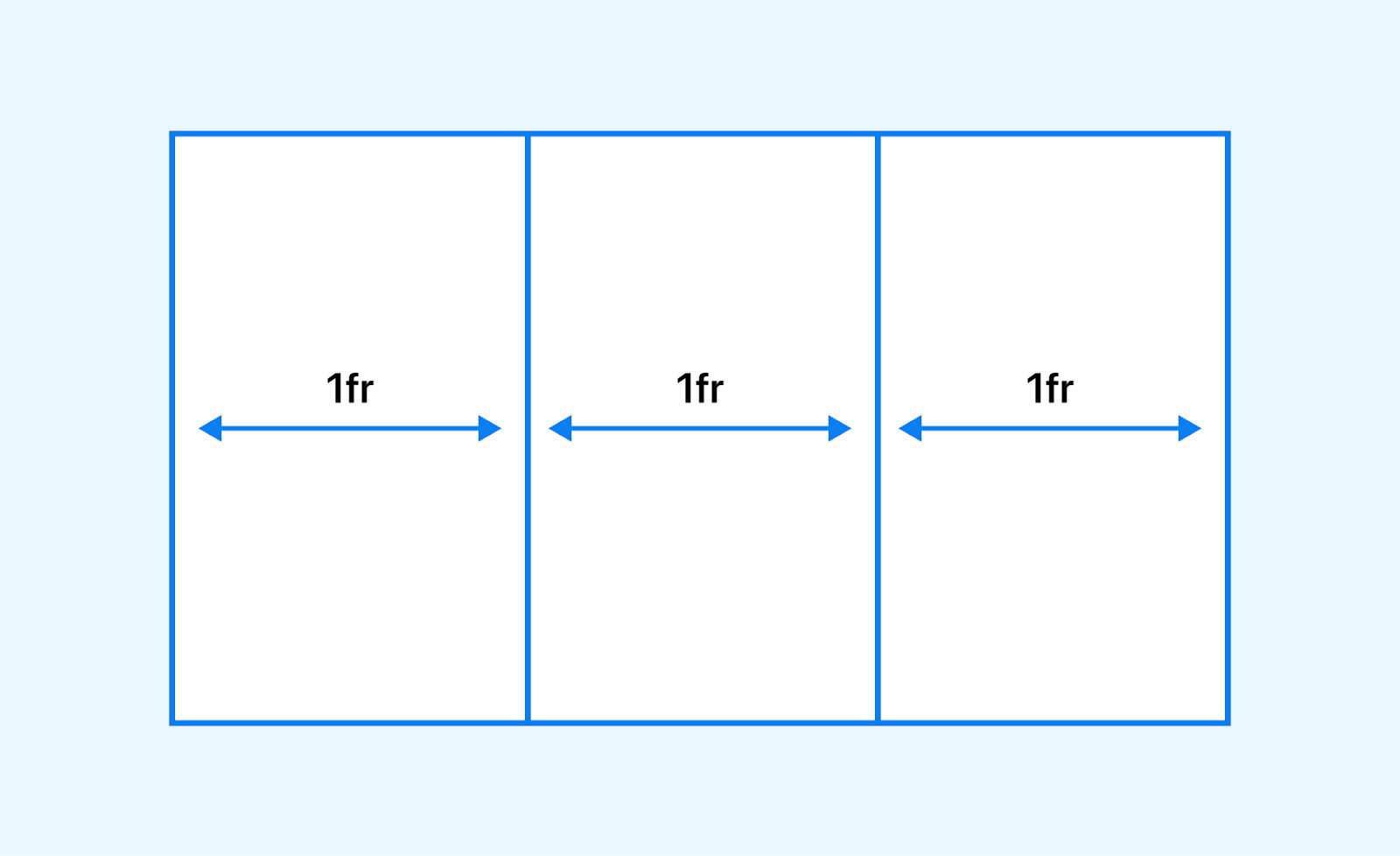
Unlike traditional methods, where you need to calculate and redistribute space for every additional element, CSS fr units simplifies the process.
For instance, if you have a container with a grid template column of 1fr 2fr 1fr, the available horizontal space within the container is divided into four parts.
.grid-container {
  display: grid;
  grid-template-columns: 1fr 2fr 1fr;
}
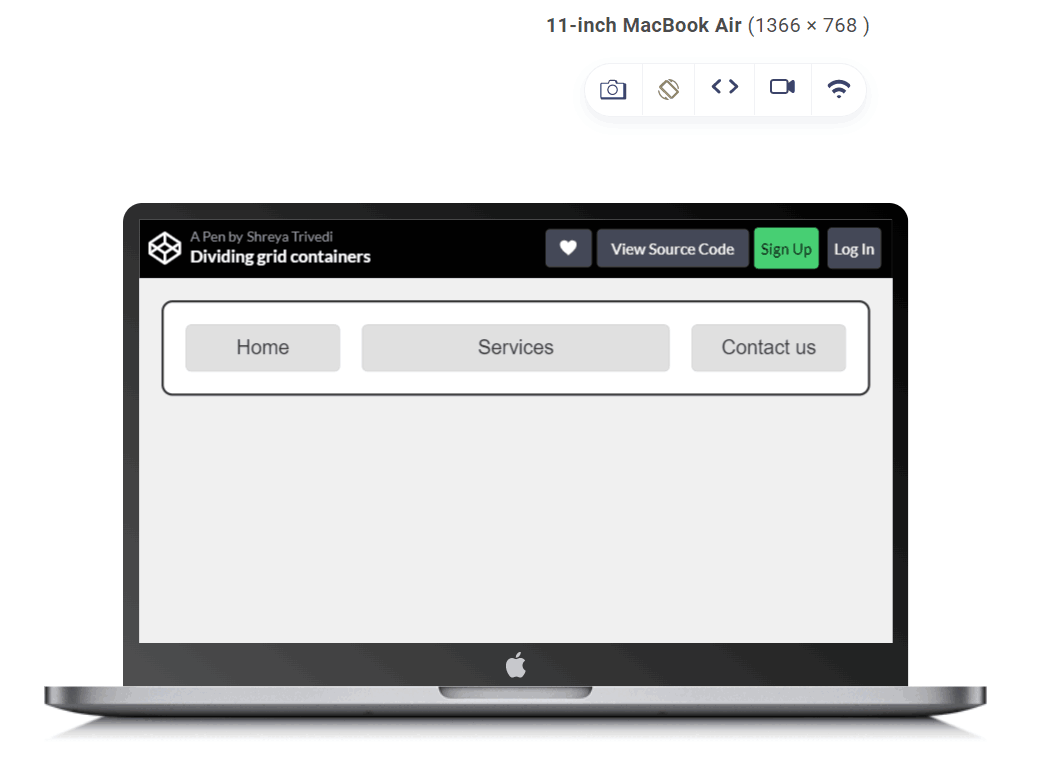
In this example, the grid is divided into three columns. The first and third columns each take up one fractional unit (1fr), and the second column takes up two fractional units (2fr). This means the second column will take up twice as much space as the other columns within the available space.
For a 1200px grid, columns one and three each occupy 300px (1/4th), while the center column takes the remaining 600px (1/2).

Note: Test your CSS grid layouts on the latest desktop and mobile browsers. Try TestMu AI Today!
Why Use CSS fr Units?
Fractional units in CSS provide a flexible and responsive approach to web design. Using CSS fr units, you can create layouts that adapt smoothly to different screen sizes and resolutions, ensuring a consistent and optimal user experience across various devices.
Here is why the CSS fr unit is important to use in your web designs:
Responsive Design
It is one of the crucial aspects of today’s business. Responsive design is essential for a solid web presence. Therefore, your website must adapt to flexible grids, fluid layouts, and different font sizes across mobile screen sizes. The responsiveness of a web design is a critical factor for 94 percent of people when evaluating a website.
Let's explore how CSS enables responsiveness and enhances the usability of websites 🔥
— Shreya Trivedi (@_Shreya_Trivedi) May 24, 2023
👇 pic.twitter.com/w8Dx8Gx73J
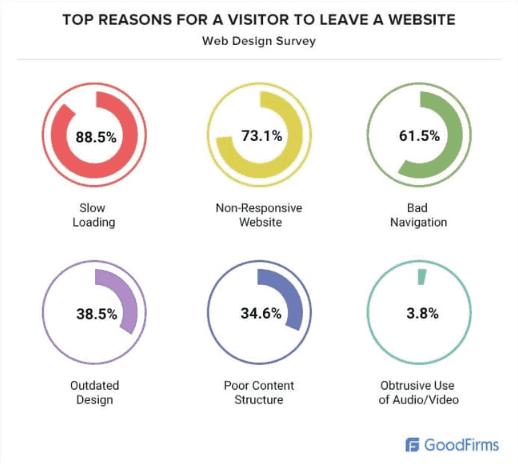
According to GoodFirms, 73.1% of web designers believe that a non-responsive design is the top reason visitors leave a website.
CSS fr units allow elements to scale proportionally based on the available space. As the viewport size changes, the elements automatically adjust their sizes to maintain the desired proportions.
This flexibility ensures your design looks great on devices with different screen dimensions, from small smartphones to large desktop monitors.
Let us take an example to understand this:
HTML:
<!DOCTYPE html>
<html>
<body>
  <h1>Features Of LambdaTest Cypress Cloud</h1>
  <p>LambdaTest fits perfectly in your CI/CD pipelines. Test early, debug accurately, and release faster with LambdaTest</p>
  </br> </br>
  <div class="container">
    <div>
<img src="https://www.lambdatest.com/resources/images/automation/park   .svg">
      <p>End-to-end Test Execution Logs</p>
      Debug each test run with end-to-end test execution logs. Get complete Cypress console logs, video logs, command logs, and much more.
    </div>
    <div>
<imgsrc="https://www.lambdatest.com/resources/images/automation/TunnelandLocalTesting1.svg">
      <p> Enterprise-ready LambdaTest Tunnel
      <p>Test your locally hosted or privately hosted web apps and webpages through our enterprise-ready LambdaTest tunnel feature.</p>
    </div>
    <div>
<imgsrc="https://www.lambdatest.com/resources/images/automation/user.svg">
      <p>Easy NPM Packages to Install and Run</p>
      Easily install and run Cypress-based tests on LambdaTest with a dedicated LambdaTest-Cypress CLI npm package.
    </div>
  </div>
</body>
</html>
CSS:
.container {
  display: grid;
  grid-template-columns: 1fr 1fr 1fr;
  grid-template-rows: auto; /* Remove fixed height to adjust based on
                               content */
  grid-gap: 10px;
}


.container div {

  padding: 1em;
  text-align: center;
}


.container img {
  display: block; /* Add display block to adjust positioning */
  margin: 0 auto; /* Center the images horizontally */
}


h1 {
  text-align: center;

}


p {
  text-align: center;
}
Output:
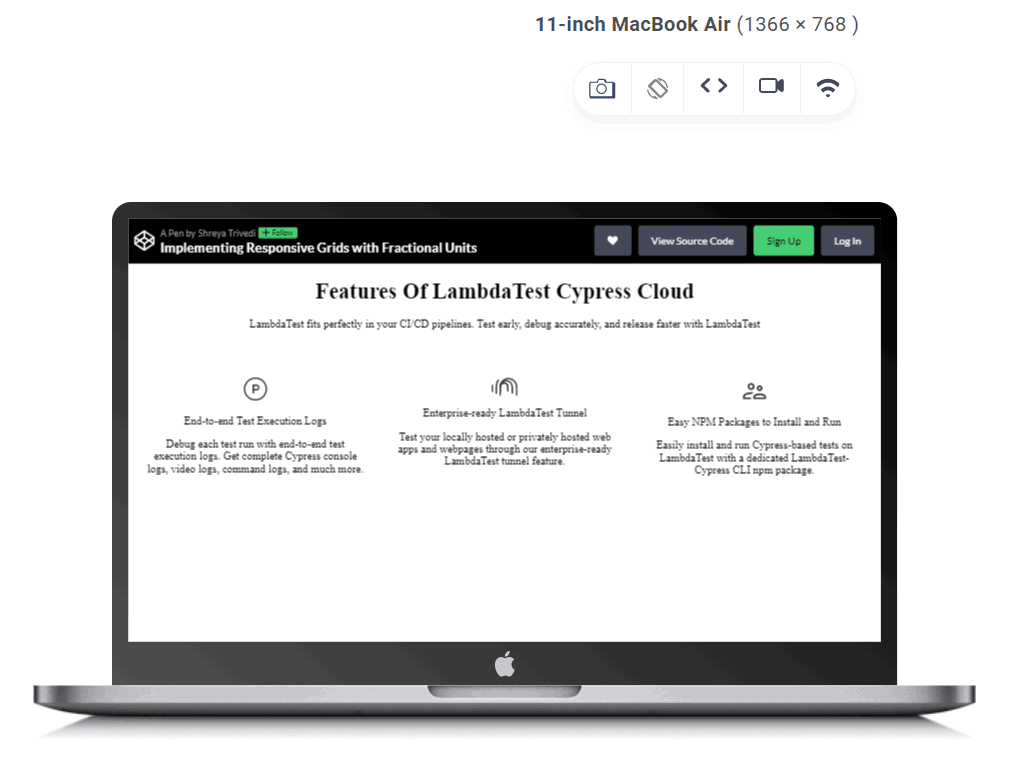
In the above-given example, the grid-template-columns property is set to 1fr 1fr 1fr, meaning each column will occupy an equal fraction of the available space within the grid container. This allows the columns to dynamically adjust their widths based on the size of the container.
Fluid Grid Systems
CSS fr units are particularly useful for creating fluid grid layouts.
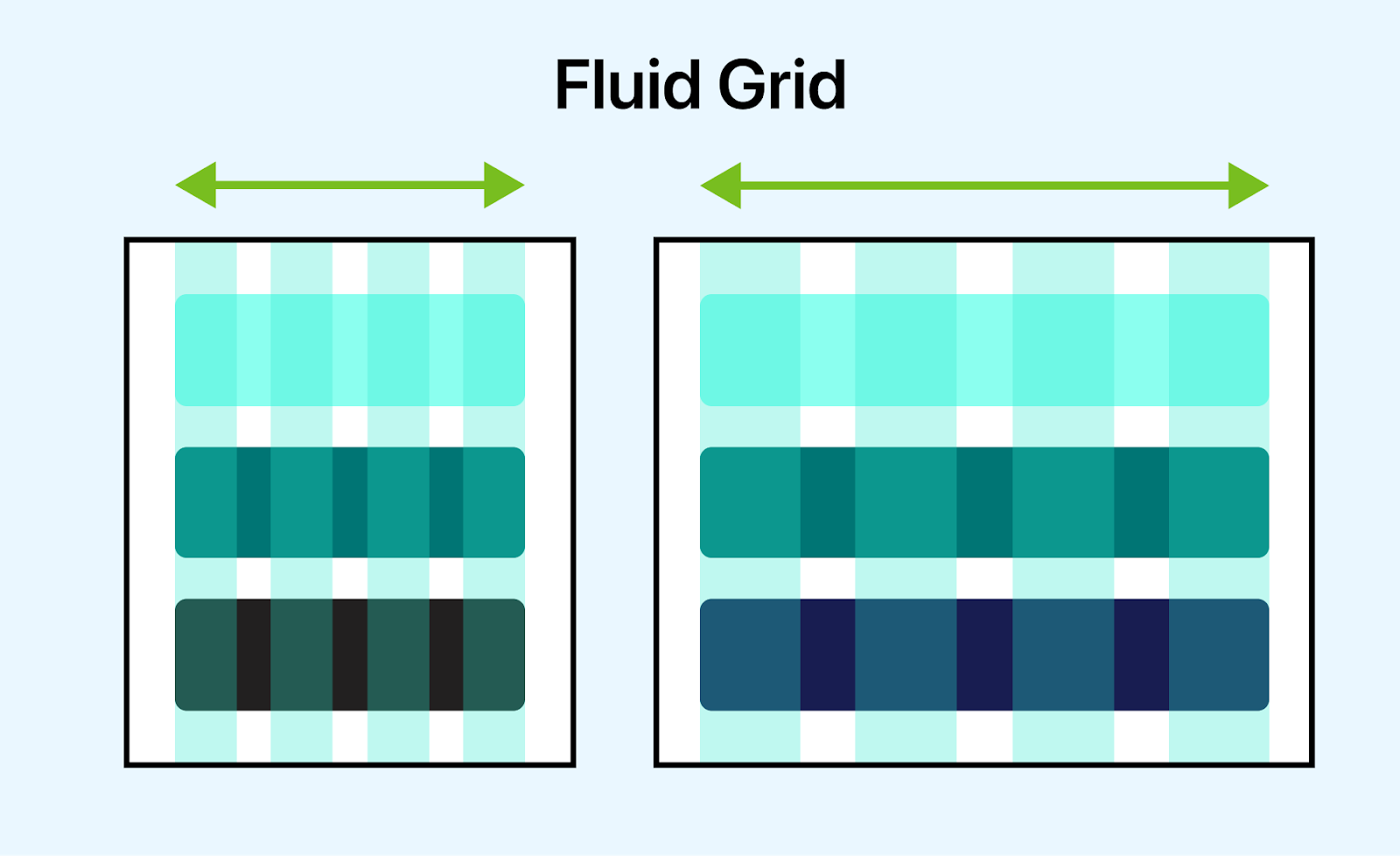
A fluid grid layout is a web design approach that defines the dimensions of elements within a grid using relative rather than fixed units. This allows the layout to adapt and respond dynamically to different screen sizes and devices, providing a consistent user experience across various resolutions.
In a fluid grid layout, the widths and heights of elements are defined proportionally, typically in relation to the dimensions of their parent container or the viewport. This means that as the viewport size changes, the layout adjusts accordingly, with elements expanding or contracting to fill the available space while maintaining their relative positioning within the grid.
By assigning fractions of available space to grid columns or rows, you can achieve a responsive grid system that adapts to the content and the screen size.
To illustrate this, let’s take an example of the McKinsey website that uses CSS fr units to create a responsive grid layout. The grid layout ensures the website’s content is always visually appealing, regardless of the screen size or device.
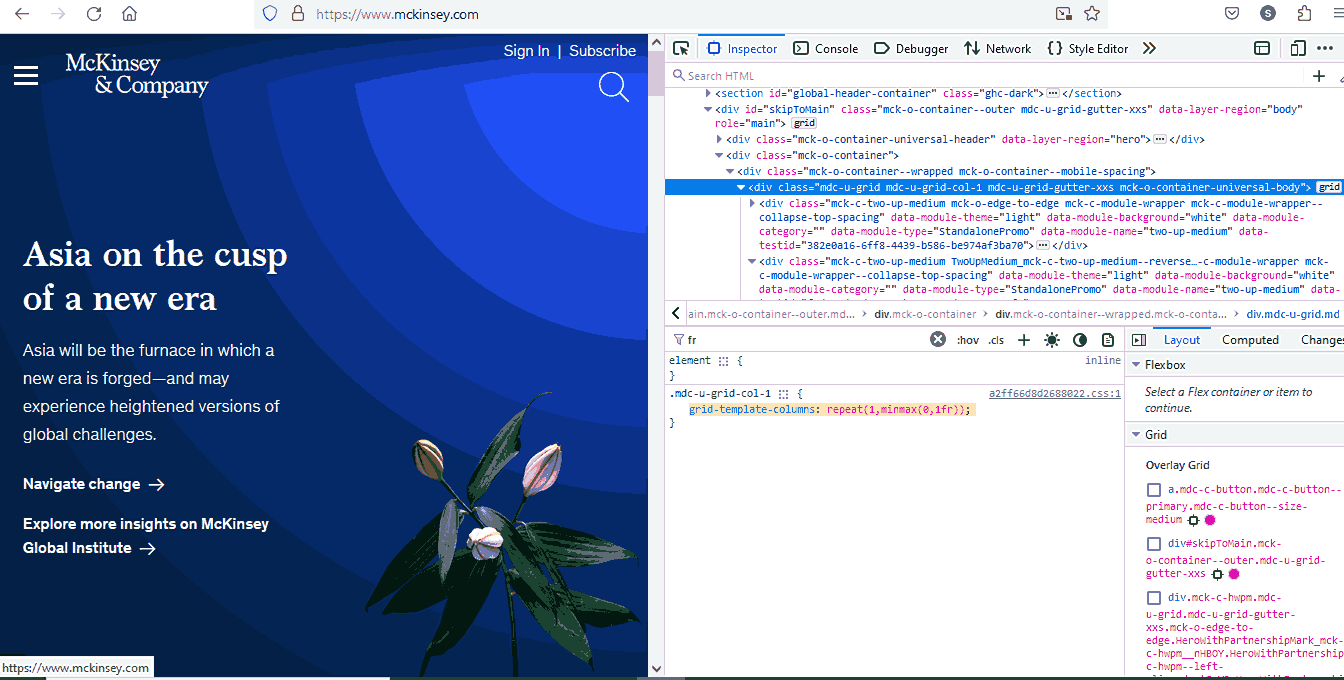
The choice to use 1fr within a minmax function is particularly noteworthy. By allowing the columns to shrink to a minimum size of 0, content within these columns can adapt and scale efficiently. This approach prevents content from becoming overly compressed or overflowing the grid when the viewport size is reduced, ensuring optimal readability and user experience across various devices.
Similarly, GitHub uses CSS fr units to create a responsive grid layout.
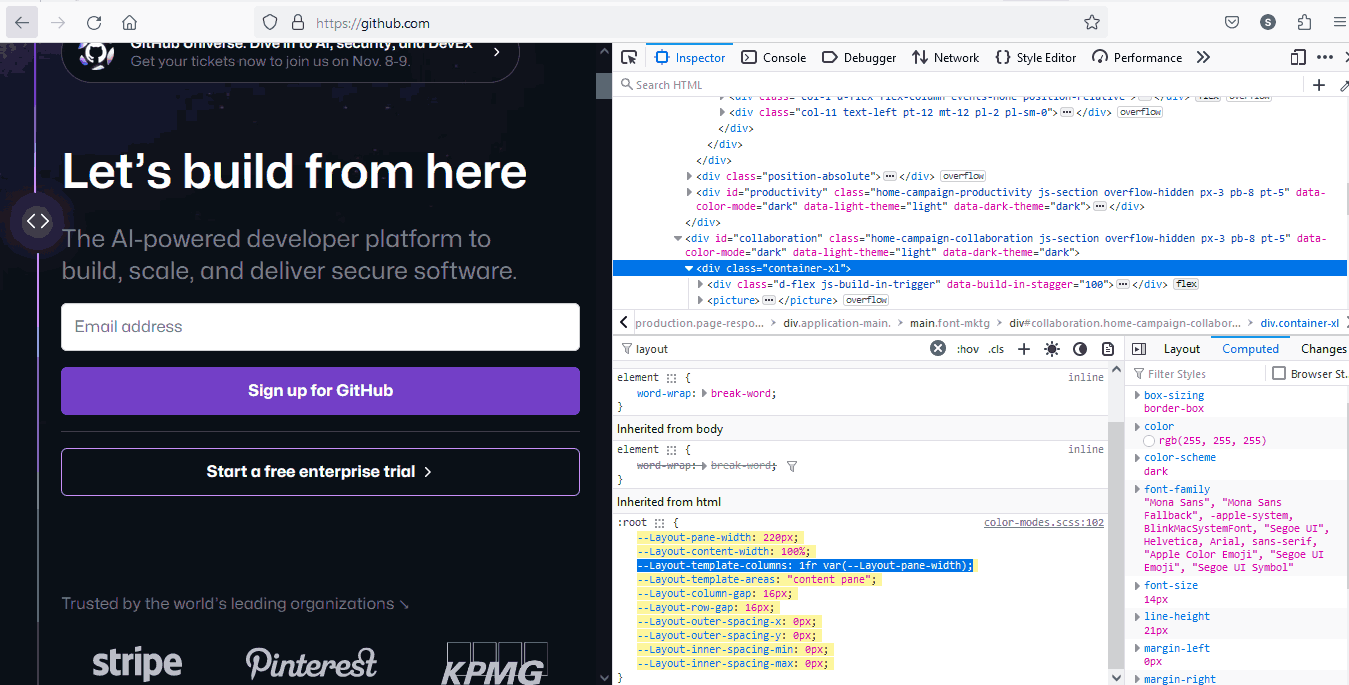
The 1fr value tells the browser to allocate equal space to the first column. The var(–Layout-pane-width) value is a custom CSS variable that specifies the width of the second column.
This code ensures that the second column is always the same width as the sidebar, regardless of screen size or device. This is important because it ensures the website’s main content area is always visible, even on small screens.
Simplified Layout Calculations
If you want to achieve equal spacing using pixel units and the layout becomes more complicated, the calculations can become more challenging, too. Let’s consider a simple example: You want to create a layout with three columns, each with equal spacing between them.
.container {
    display: grid;
    grid-template-columns: 100px 100px 100px;
  }
In this example, each column has a width of 100 pixels, and you want equal spacing between them. To calculate the spacing, you need to subtract the total width of the columns from the total available width and divide the remaining space equally among the gaps.
Let’s consider you have a container with a total width of 400 pixels; the calculation formula for spacing would be:
Total Available Width = 400px
Total Column Width = 100px + 100px + 100px = 300px
Total Spacing = Total Available Width – Total Column Width
= 400px – 300px
= 100px
Number of Gaps = Number of Columns – 1 = 3 – 1 = 2
Spacing Between Columns = Total Spacing / Number of Gaps
= 100px / 2
= 50px
So, add a 50px spacing between each column to achieve equal spacing.
That’s a lot of calculation to do!!! Using CSS fr units can simplify the process of designing responsive layouts. Instead of performing complex calculations or relying on media queries, CSS fr units allow you to directly define proportions and relationships between elements.
This makes the code more intuitive and easier to manage, improving efficiency and reducing development time.
Browser Compatibility of CSS Fractional Units
Browser compatibility is crucial in ensuring a consistent user experience across different platforms in web design. With CSS fractional units, layout creation has become a flexible approach that adapts to varying screen sizes.
However, the effectiveness of these CSS fr units relies heavily on their consistent interpretation across different web browsers. Web developers need to be aware of which browsers support these fractional units and understand how each browser interprets them.

However, if you use CSS fractional units, it’s important to test websites in different browsers to ensure they work as intended. To do this, you can harness cloud-based testing platforms like TestMu AI. It is an AI-powered test orchestration and execution platform that allows you to test websites for cross browser compatibility on an online browser farm of real browsers, devices, and operating systems. You can test from various Windows, macOS, Android, and iOS versions running the latest and legacy browsers.
Using TestMu AI’s Real Time Browser Testing feature, you can perform cross browser testing of your CSS fr units across different browser and OS combinations.
Join the TestMu AI YouTube Channel for tutorials on automation testing, mobile app testing, and more!
Benefits of CSS Fractional Units
Using fractional units in CSS helps you create flexible layouts that adapt to any screen size. Here are some of its benefits and how they can elevate your design process:
- Effortless Responsiveness: Fractional units represent a portion of the available space, so your elements will resize automatically for specific devices.
- Precise Control: Fractional units give you the power to make minute adjustments without relying on rigid pixel values.
- Sustainable Code: CSS fr units promote cleaner, more maintainable code. Your layouts will scale effortlessly as your project grows, saving you time down the road.
- Focus on Accessibility: Fractional units play a crucial role in inclusive design. By ensuring layouts adapt to various screen sizes, you create a user-friendly experience for everyone.
- Modern Design Approach: CSS fr units represent a forward-thinking approach, keeping your projects adaptable and relevant.
- Beyond Responsiveness: The benefits extend beyond responsiveness! You can use fractional units for precise typography control, iterative design refinement, and even optimizing rendering performance for a smoother user experience.

Different Ways of Using CSS fr Units
CSS offers a powerful way to create flexible layouts: fractional units. But how do we leverage them in real-world situations? Let’s explore some common scenarios where fractional units shine.
Proportional Image Sizing Space
When using the fr unit in a CSS grid, space is distributed proportionally among the elements defined with fr values. For instance, if two elements have 1fr each, they will share the available space equally, creating a balanced layout.
Moreover, the CSS fr unit enables responsiveness, adjusting dynamically based on the container’s size. Thus, it is ideal for designing fluid and adaptive web layouts.
Let’s look at an example to understand it in detail.
HTML:
<img src = https://www.lambdatest.com/resources/images/logos/logo.svg>
<div class="container">

<header class="header">Digital Experience Testing Cloud Built For <span> Enterprises </span></header>


<main class="main-content">Our Unified Testing Cloud enables you to deliver <br> world class digital experience with quality releases <br> and help accelerate your release velocity.</main>


</div>
CSS:
.container {
    display: grid;
    grid-template-columns: 1fr;
    grid-template-rows: auto 1fr auto;
    min-height: 100vh;
    font-family: Inter,Arial,sans-serif;
  }
  span {
    background: linear-gradient(91.42deg,#2b56f3 18.38%,#a505d8 62.2%);
    -webkit-background-clip: text;
    -webkit-text-fill-color: transparent;
  }
  .header {
    padding: 20px;
    font-size: 36px;
    font-weight: 800;
    box-sizing: border-box;
    border: 0 solid #fafafa;
  }

  .main-content {

    padding: 20px;
    font-family: Inter,Arial,sans-serif;
    color: #4a4a4a;
    font-weight: 300;
    font-size: 18px;
    display: block;
    margin-block-start: 1em;
    margin-block-end: 1em;
    margin-inline-start: 0px;
    margin-inline-end: 0px;
    --text-opacity: 1;
  }
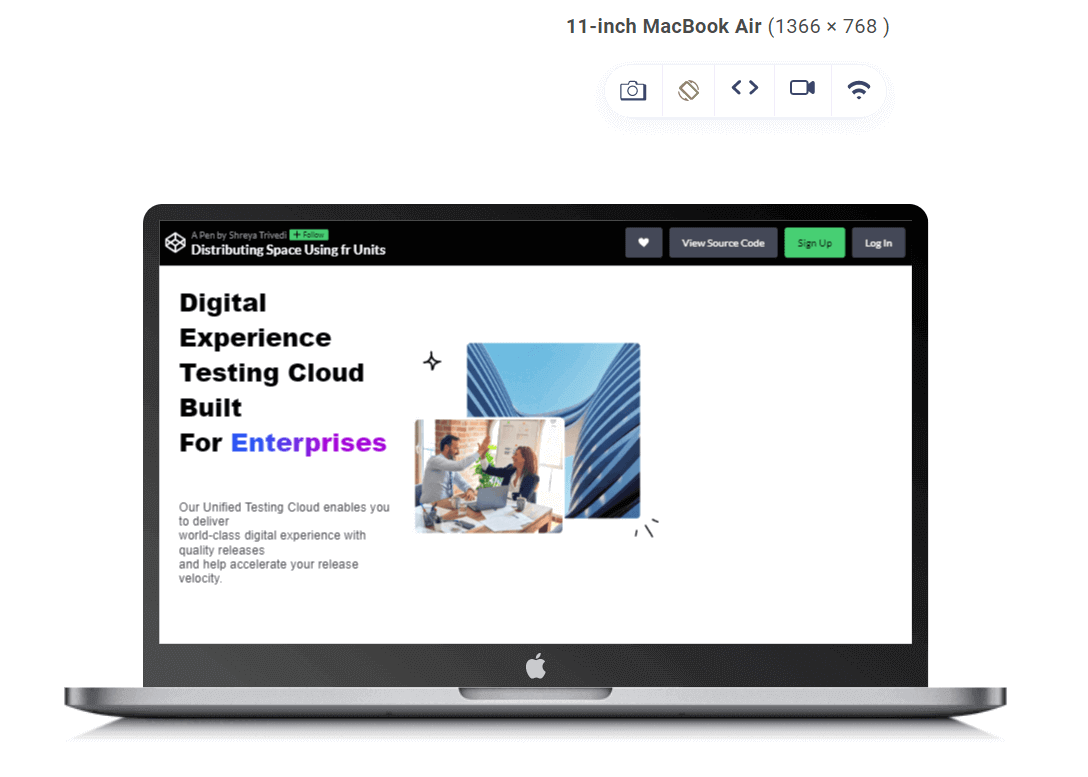
In the above code snippet, the grid-template-rows property is set to auto 1fr auto, meaning:
- The first-row height is determined by its content (auto), allowing it to adjust based on the height of the header.
- The second-row takes up one fraction of the available vertical space (1fr), which means it occupies the remaining space after allocating the heights for other rows. This ensures that the main content area expands to fill the remaining vertical space within the container.
- The third-row height is also determined by its content (auto), allowing it to adjust based on its content, such as footer content if present.
Balanced Content Distribution
The fr unit in CSS grid layouts lets you achieve balanced content distribution due to their inherent flexibility and responsiveness. By assigning fractional values to grid tracks, you can specify how space is allocated within the layout. This allows for precise control over content distribution, ensuring each element receives its fair screen share.
Additionally, CSS fr units promote efficient use of space by dynamically adjusting the size of grid tracks based on their fractional values. This results in optimized content presentation across various devices and screen resolutions.
HTML:
<div class="container">
  <div class="sidebar">

    <h1> Online Selenium Test </br>  Automation on </br> Desktop, Android, </br> and iOS Mobile Browsers </h1>
    <p>
      Run your Selenium test automation scripts </br>  across online Selenium Grid of desktop, </br> Android and iOS mobile browsers. </br>  Develop, test, and deliver faster every </br>  time with automated cross browser </br> testing using LambdaTest online </br> Automation Browser Testing Grid.
    </p>


  </div>
  <div class="main-content">
    <img src ="https://www.lambdatest.com/resources/images/selenium-parallel-testing-index.png">
  </div>
</div>
CSS:
.container {
    display: grid;
    grid-template-columns: 1fr 1fr;
    grid-gap: 20px;
    padding: 20px;
    max-width: 100%;
    box-sizing: border-box;
  }


  .sidebar {
    border-radius: 5px;

    padding: 20px;
  }


  .sidebar h1 {
    font-size: 2rem;
    color: #333;
    margin-bottom: 20px;
  }


  .main-content {
    padding: 20px;
    background-color: #ffffff;
    border-radius: 5px;
  }


  img {
    max-width: 100%;
    height: auto;
    width: 100%;
    border-radius: 5px;
  }


  h1 {
    font-size: 2rem;
    font-weight: 600;
    font-family: Inter, Arial, sans-serif;
    line-height: 1.25;
  }


  p {
    font-size: 1rem;
    font-weight: 400;
    font-family: Inter, Arial, sans-serif;
    line-height: 1.5;
  }
The .container class utilizes a grid layout with grid-template-columns: 1fr 1fr;.
Here, the 1fr represents a fractional unit, indicating that each column should take up an equal share of the available horizontal space within the grid.
In this case, the grid is divided into two columns of equal width, and the content is distributed proportionally.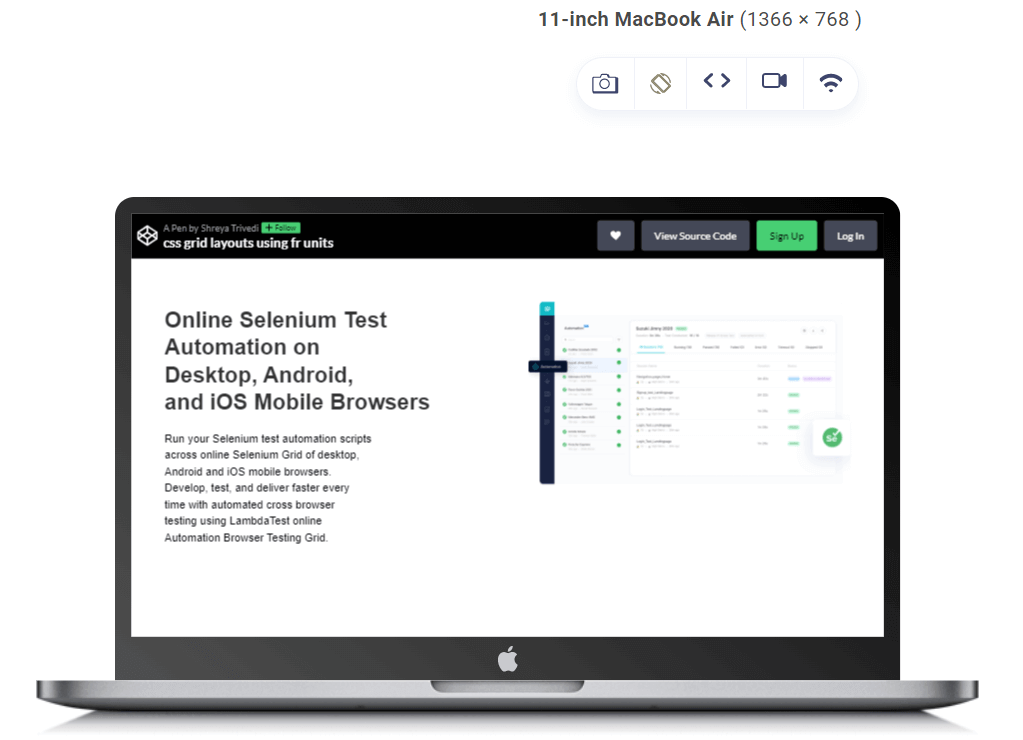
In the given example, the grid-template-columns property is set to 1fr 1fr, meaning each column will occupy an equal fraction of the available horizontal space within the grid container. This allows the sidebar and main content areas to dynamically adjust their widths based on the container’s size. Using CSS fr units helps create a responsive layout where both areas expand or contract proportionally as the viewport size changes.
Simplified Media Queries
CSS media queries are helpful for creating responsive web designs, but they can also be complex and challenging to maintain. CSS fractional units can help simplify media queries by allowing you to develop layouts responsive to different screen sizes without setting fixed breakpoints.
By implementing responsive design best practices, you can create a website that looks great, functions seamlessly, and delivers an optimal user experience across all devices.
Responsive testing tools like LT Browser by TestMu AI can help developers and testers build, test, and debug their websites for responsiveness.
LT Browser is a Chromium-based mobile-friendly browser that allows you to perform responsive testing of your web designs across 50+ pre-installed device viewports, including mobile, tablet, desktop, and laptop.
➂ Media Queries
— Aakash Rao (@Aakash_codes) April 3, 2023
▧ With media queries, we can define completely different styles for different browser sizes.
It can be used to check many things, such as:
⤷ width & height of the viewport
⤷ width & height of the device
⤷ orientation
⤷ resolution pic.twitter.com/bRq89aIxY3
Let’s say you want to create a layout with two columns that are each 50% wide on a desktop screen but resize proportionally on smaller screens. Using fractional units, you can easily create smooth layouts without tricky calculations.
HTML:
<div class="pricing-container">
  <div class="pricing-card">
    <div class="price">$29</div>
    <div class="plan">Basic Plan</div>
    <div class="features">
      <ul>
        <li>Feature 1</li>
        <li>Feature 2</li>
        <li>Feature 3</li>


      </ul>
    </div>
    <button class="btn">Get Started</button>
  </div>

  <div class="pricing-card">
    <div class="price">$49</div>
    <div class="plan">Pro Plan</div>
    <div class="features">
      <ul>
        <li>Feature 1</li>
        <li>Feature 2</li>
        <li>Feature 3</li>
        <li>Feature 4</li>
      </ul>
    </div>
    <button class="btn">Get Started</button>
  </div>
</div>

<div class="pricing-container">
  <div class="pricing-card">
    <div class="price">$29</div>
    <div class="plan">Basic Plan</div>
    <div class="features">
      <ul>
        <li>Feature 1</li>
        <li>Feature 2</li>
        <li>Feature 3</li>
      </ul>
    </div>
    <button class="btn">Get Started</button>
  </div>

  <div class="pricing-card">
    <div class="price">$49</div>
    <div class="plan">Pro Plan</div>
    <div class="features">
      <ul>
        <li>Feature 1</li>
        <li>Feature 2</li>
        <li>Feature 3</li>
        <li>Feature 4</li>
      </ul>
    </div>
    <button class="btn">Get Started</button>
  </div>
</div>
CSS:
body {
  margin: 0;
  height: 100vh;
  display: grid;
  place-items: center;
  background-color: #f9f9f9; /* Background color for the entire page */
}


.pricing-container {
  display: grid;
  grid-template-columns: 1fr 1fr;
  gap: 15vw;/* Adjust the gap between pricing cards using viewport units*/
  padding: 2vw; /* Adjust padding using viewport units */
}


.pricing-card {
  width: 100%;
  background-color: #f2f2f2;
  border-radius: 8px;
  padding: 3vw; /* Adjust padding using viewport units */
  box-shadow: 0 4px 8px rgba(0, 0, 0, 0.1);
  display: grid;
  grid-template-rows: auto 1fr auto;/*Adjusts rows for header, features,          and button */
  justify-items: center; /* Centers the content horizontally within the card */
  align-items: center; /* Centers the content vertically within the card */
}


.price {
  color: #007bff;
  font-size: 2vw; /* Adjust font size using viewport units */
  font-weight: bold;
  margin-bottom: 1.5vw; /* Adjust margin using viewport units */
}


.plan {
  color: #000000;
  font-size: 1.5vw; /* Adjust font size using viewport units */
  font-weight: bold;
  margin-bottom: 1.5vw; /* Adjust margin using viewport units */
}


.features ul {
  list-style: none;
  padding: 0;
}


.features li {
  margin-bottom: 1vw; /* Adjust margin using viewport units */
  font-size: 1.5vw; /* Adjust font size using viewport units */
}


.btn {
  background-color: #007bff;
  color: #ffffff;
  border: none;
  padding: 1.5vw 3vw; /* Adjust padding using viewport units */
  border-radius: 4px;
  cursor: pointer;
}


.btn:hover {
  background-color: #0056b3;
}
The .pricing-container CSS class employs fractional units to create a flexible and responsive grid layout. The grid-template-columns: 1fr 1fr; declaration assigns each column an equal share of available horizontal space, making them responsive to different screen widths.
The use of 1fr as a fractional unit ensures that both columns adapt dynamically, so if the viewport is wider, each column will expand. If it’s narrower, they will shrink accordingly. This responsive design ensures that the pricing container effectively utilizes available space, making it ideal for presenting pricing options that adjust seamlessly to various screen sizes while maintaining a balanced appearance.
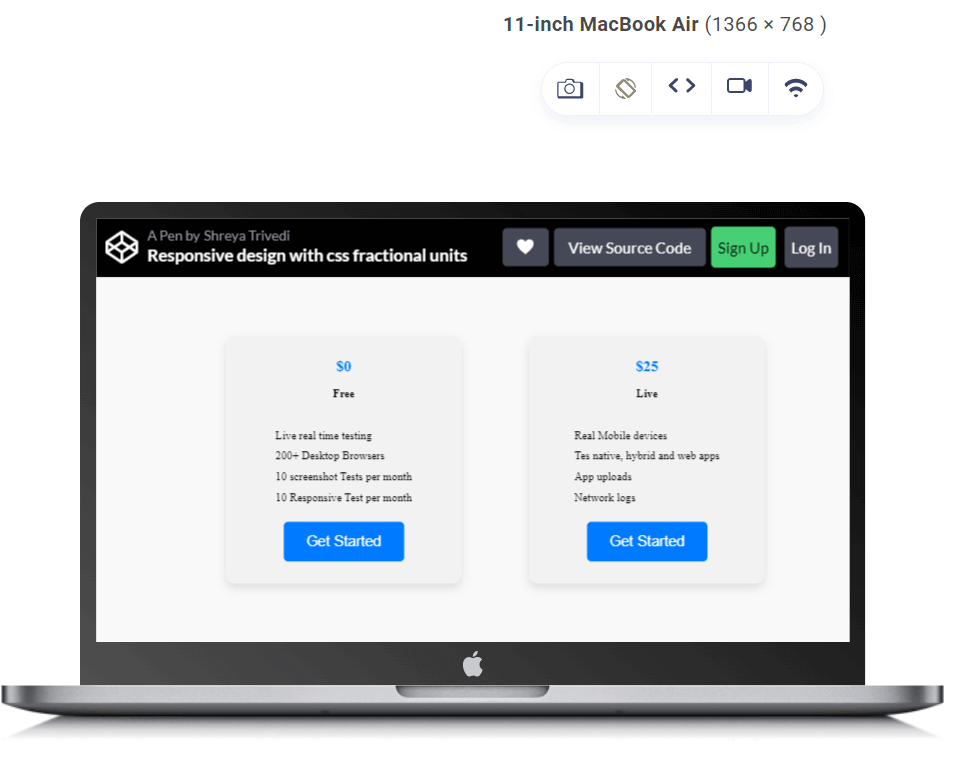
In the above-given example, the grid-template-columns property is set to 1fr 1fr, meaning each pricing card will occupy an equal fraction of the available horizontal space within the pricing container. This ensures that the pricing cards are evenly distributed across the container, regardless of the viewport size. The use of CSS fr units helps create a responsive layout where both pricing cards expand or contract proportionally as the viewport size changes.
Flexible Sidebar
Using CSS fr units allows you to allocate space proportionally, ensuring that the sidebar’s width adapts seamlessly to the available space. This proportional sizing is vital for creating a visually balanced sidebar with the main content area.
As the screen size varies, whether on different devices or by resizing the browser window, the CSS fr unit dynamically adapts the width of the sidebar. This adaptability ensures the sidebar remains functional across various viewport devices and screen dimensions. You can easily define the sidebar width without resorting to fixed or complicated calculations.
Let us understand it with the help of an example:
HTML:
<!DOCTYPE html>
<html lang="en">
<head>
<meta charset="UTF-8">
<meta name="viewport" content="width=device-width, initial-scale=1.0">
<link rel="stylesheet" href="styles.css">
<title>Flexible Layout Example</title>
</head>
<body>
<!-- Header -->
<header>
<h1>Selenium Automation Testing on Cloud</h1>
</header>
<!-- Sidebar -->
<aside>
<ul>
<li><a href="#">Selenium Testing</a></li>
<li><a href="#">Cypress Testing </a></li>
<li><a href="#">Playwright Testing</a></li>
<li><a href="#">Puppeteer Testing</a></li>
<li><a href="#">Appium App Testing</a></li>
<li><a href="#">HyperExecute</a></li>
</ul>
</aside>
<!-- Main Content Area -->
<main>
<h1>Debug in Real-Time with LambdaTest Test Analytics</h1>
<p>Get rid of the dependency on external reporting. Access rich artifacts and get a detailed report on failure reasons to find out exactly what went wrong and get step-by-step drill-downs for fast resolution. You can also easily share your detailed reports with your team saving a lot of time and effort.</p>
<!-- Add more realistic content as needed -->
</main>
<!-- Right Bar -->
<div class="right-bar">
<h2>BROWSER AND DEVICE COVERAGE</h2>
<p>
Run Selenium Scripts on 3000+ Desktop and Mobile Devices</p>
</div>
<!-- Footer -->
<footer>
<p>Cross Browser Testing Cloud Built With <span style="font-size:150%;color:red;">♥</span>
For Testers</p>
</footer>
</body>
</html>
CSS:
body {
  margin: 0;
  display: grid;
  grid-template-columns: 1fr 3fr 1fr; /* Sidebar takes 1 part, Content takes 3 parts, Right Bar takes 1 part */
  grid-template-rows: auto 1fr auto; /* Header takes auto height, Main Content takes 1 part, Footer takes auto height */
  min-height: 100vh; /* Ensure the layout covers the full height of the viewport */
 font-family: system-ui,-apple-system,BlinkMacSystemFont,SegoeUI,Roboto,Helvetica Neue,Arial,Noto Sans,sans-serif,Apple Color Emoji,Segoe UI Emoji,Segoe UI Symbol,Noto Color Emoji;


 line-height: 1.5;
}


header, footer {
  grid-column: span 3; /* Span the full width of the layout */
  background-color: #3498db;
  color: #ecf0f1;
  text-align: center;
  padding: 10px;
}


/* Style for the sidebar */
aside {
  background-color: #2c3e50;
  color: #ecf0f1;
  padding: 20px;
  box-shadow: 3px 0 5px rgba(0, 0, 0, 0.1);
  transition: background-color 0.3s ease;
}


aside h2 {
  font-size: 1.8rem;
  margin-bottom: 15px;
}


aside ul {
  list-style: none;
  padding: 0;
  margin: 0;
}


aside li {
  margin-bottom: 10px;
  display: flex;
  align-items: center;
}


aside a {
  text-decoration: none;
  color: #ecf0f1;
  font-weight: 700;
  font-size: 1.2rem;
  display: flex;
  align-items: center;
  transition: color 0.3s ease;
}


aside a:hover {
  color: #3498db;
}


/* Style for the main content area */
main {
  padding: 40px;
}


main h1 {
  color: #2c3e50;
  font-size: 3rem;
  margin-bottom: 20px;
}


main p {
  color: #555;
  font-size: 1.2rem;
  line-height: 1.6;
}


/* Style for the right bar */
.right-bar {
  background-color: #2c3e50;
  color: #ecf0f1;
  padding: 20px;
  box-shadow: -3px 0 5px rgba(0, 0, 0, 0.1);
}


.right-bar h2 {
  font-size: 1.8rem;
  margin-bottom: 15px;
}


/* Style for the footer */
footer {
  grid-column: span 3; /* Span the full width of the layout */
  background-color: #3498db;
  color: #ecf0f1;
  text-align: center;
  padding: 10px;
}


/* Responsive Media Queries */


@media screen and (max-width: 768px) {
  body {
    grid-template-columns: 1fr; /* Full-width layout for smaller screens */
  }


  aside {
    grid-row: 2; /* Place the sidebar in the second row */
    box-shadow: 0 3px 5px rgba(0, 0, 0, 0.1); /* Adjust shadow for better visibility */
  }


  .right-bar {
    display: none; /* Hide the right bar on smaller screens */
  }

  /* Adjust styles for better readability on small screens */
  aside h2 {
    font-size: 1.5rem;
  }


  aside i {
    font-size: 1rem;
    margin-right: 8px;
  }


  aside a {
    font-size: 1rem;
  }


  main h1 {
    font-size: 2rem;
  }


  main p {
    font-size: 1rem;
  }


  .right-bar h2 {
    font-size: 1.5rem;
  }
}
The grid-template-columns: 1fr 3fr 1fr property defines the columns of the grid layout. It splits the available horizontal space into three columns. The 1fr and 3fr parts indicate how much of that space each column should take.
The first column (for the sidebar) is set to 1fr, meaning it takes up one part of the total available space. The second column (for the main content) is set to 3fr, indicating it takes up three parts. The third column (for the right bar) is again set to 1fr, taking up one part.
The use of fr ensures that each column’s width is flexible and adapts proportionally to the available space. So, if the total width of the screen changes, the sidebar, main content, and right bar adjust their widths accordingly.
The grid-template-rows: auto 1fr auto property defines the rows of the grid layout. It specifies the height of each row.
The first row (for the header) is set to auto, meaning it adjusts its height based on the content. The second row (for the main content) is set to 1fr, indicating it takes one part of the available vertical space. The third row (for the footer) is also set to auto, adjusting its height based on the content.
In the above code, fr values are also adjusted at different breakpoints to create flexible layouts that adapt to various viewports.

Conclusion
CSS fr units have simplified the approach to layout design, making it more flexible and responsive. It helps you create designs that quickly adapt to different screen sizes and resolutions. This simplifies the development process and improves user experience across various device viewports.
By allowing you to specify sizes in fractions of available space, CSS fractional units provide a more intuitive and fluid way to handle spacing. This eliminates the need for fixed pixel values, making designs more adaptable. The responsiveness achieved through fractional units ensures that websites and web applications look and function well on everything from large desktop monitors to small mobile screens.
By leveraging fractional units, you can minimize the need for media queries and breakpoints, streamlining the development process and reducing the overall complexity. This also leads to more scalable and maintainable code.
Adopting CSS fractional units offers an elegant and effective solution to challenges related to layout adaptability, code complexity, and maintenance efforts.


Frequently asked questions
Did you find this page helpful?
More Related Hubs
TestMu AI forEnterprise
Get access to solutions built on Enterprise
grade security, privacy, & compliance
- Advanced access controls
- Advanced data retention rules
- Advanced Local Testing
- Premium Support options
- Early access to beta features
- Private Slack Channel
- Unlimited Manual Accessibility DevTools Tests