

Next-Gen App & Browser Testing Cloud
Trusted by 2 Mn+ QAs & Devs to accelerate their release cycles


On This Page
- What is Black Box Testing?
- Types of Black Box Testing
- Tools for Black Box Testing
- Techniques Used in Black Box Testing
- What is White Box Testing?
- Types of White Box Testing
- Tools for White Box Testing
- Techniques Used in White Box Testing
- Black Box vs White Box Testing: Understanding the Differences
- What is Grey Box Testing?
- Comparing Black Box, White Box, and Grey Box Testing
- Conclusion

Black Box vs White Box Testing: Key Differences and Techniques
Learn about Black Box vs White Box Testing, their techniques, features, tools, and when to apply them for an effective QA strategy.

Poornima Pandey
December 19, 2025
Ensuring the reliability and functionality of a software application is essential for providing a smooth user experience. Black box vs white box testing are two important techniques used to evaluate different aspects of a software application. By understanding when to use each approach, developers and testers can build a more robust QA strategy that can be fit to address both the internal functionality and the user experience of that particular software application.
Overview
Black Box vs. White Box Testing are two important techniques in software testing, each focusing on different aspects of the application.
What is Black Box Testing?
Black Box Testing is a technique where testers evaluate the software’s behavior without knowledge of its internal workings. The focus is entirely on inputs and outputs, ensuring the system meets functional requirements and behaves as expected.
What is White Box Testing?
White Box Testing, on the other hand, requires complete access to the application’s internal code. Testers analyze the system’s internal logic, code structure, and paths to ensure everything functions correctly and efficiently.
Key Features of Black Box Testing
Key features of Black Box Testing include:
- Focus on Functionality: Tests the software from the user’s perspective, ensuring it meets functional requirements.
- Broad Coverage: Includes various test types such as functional, usability, security, and performance testing.
- No Need for Internal Knowledge: Testers don’t need to understand the code or internal structure.
- Works Well with Automation: Easily automated for regression and end-to-end testing.
Key Features of White Box Testing
Key features of White Box Testing include:
- In-Depth Code Analysis: Requires understanding the internal code structure and logic.
- Comprehensive Coverage: Ensures all code paths, conditions, and loops are tested.
- Identifies Logical Errors: Focuses on uncovering hidden bugs and inefficiencies within the code.
- Supports Automation: Ideal for unit and integration test automation.
What is Black Box Testing?
Black Box Testing is a method in software testing where the tester has no knowledge of how the application works internally. Instead, the focus is entirely on how the software behaves, testing its features by providing inputs and observing the outputs.
The tester doesn’t need to understand the code behind the scenes. It’s like using a vending machine: you don’t know what’s happening inside, but you know whether the right snack comes out when you press a button.
Types of Black Box Testing
There are different approaches to Black Box Testing, depending on what you want to check:
- Functional Testing: Verifies if the features of the software work correctly.
- Non-Functional Testing: Checks the performance, how well the software can scale, along its reliability.
- Regression Testing: Makes sure that new changes don’t break existing features.
- UI Testing: Tests how the user interface looks and functions.
- Usability Testing: Focuses on how easy and user-friendly the software application is.
- Ad-hoc Testing: Performs unstructured testing to discover unexpected issues.
- Compatibility Testing: Makes sure the application works across different devices, browsers, and platforms.
- Penetration Testing: Simulates cyberattacks to find security weaknesses.
- Security Testing: Evaluates how secure the software is against threats.
- Localization Testing: Ensures the software adapts to different languages and cultural contexts.
Tools for Black Box Testing
Some popular tools used in Black Box Testing include Selenium, Postman, and TestMu AI. These tools help testers perform cross-browser testing and validate the software’s performance in various environments.

Techniques Used in Black Box Testing
These are some common techniques used in Black Box Testing:
- Boundary Value Analysis: Tests edge cases or extreme values of input to make sure they’re handled correctly.
- Equivalence Partitioning: Groups similar inputs together to reduce the number of tests needed.
- Decision Table Testing: Validates different input combinations and their expected results.
- State Transition Testing: Tests how the software responds when it moves between different states based on inputs.
- Use Case Testing: Ensures the software behaves as expected for specific real-world scenarios.
What is White Box Testing?
White Box Testing, also called Glass Box Testing, is a popular and useful technique where the tester has complete access to the internal workings of the software.
This means the tester can look at the code, understand the system’s logic, and analyze how everything works behind the scenes. It’s like looking inside a car engine to ensure everything is working properly, rather than just testing how the car drives.
White Box Testing helps to uncover hidden bugs, ensure every part of the code is covered by tests, and find problems related to code paths, loops, and logic. It’s more about ensuring the software’s internal structure is solid and efficient.
Types of White Box Testing
White Box Testing focuses on understanding and testing the internal code and logic of a software application. Here’s a breakdown of the different types:
- Unit Testing: Tests individual components or functions of the software to ensure they work as expected.
- Static Code Analysis: Looks at the code without running it to spot potential errors or vulnerabilities.
- Dynamic Code Analysis: Analyzes the code during execution to identify runtime issues like memory leaks or inefficient resource usage.
- Statement Coverage: Ensures every line of code is executed during testing to confirm full code coverage.
- Branch Testing: Focuses on testing decision points in the code (like if-else statements) to make sure all branches are covered.
- Path Testing: Tests all possible paths the software might take to check for logical errors.
- Loop Testing: Ensures that loops in the code (such as “for” and “while” loops) work correctly and don’t cause infinite loops.
Tools Used for White Box Testing
Popular tools used in White Box Testing include JUnit, PyTest etc. These tools help automate the process of checking the code, ensuring quality, and spotting inefficiencies or security risks.
Techniques Used in White Box Testing
Here are some common techniques used to test the internal workings of the software:
- Unit Testing: Checks if each individual part of the code works properly.
- Static and Dynamic Code Analysis: Finds errors or vulnerabilities in the code, both before and during execution.
- Statement and Branch Coverage: Ensures every line and decision point in the code is tested.
- Path Testing: Identifies logic errors by checking all the possible execution paths.
- Loop Testing: Validates that loops in the code are functioning correctly, avoiding problems like infinite loops.

Black Box vs White Box Testing: Understanding the Differences
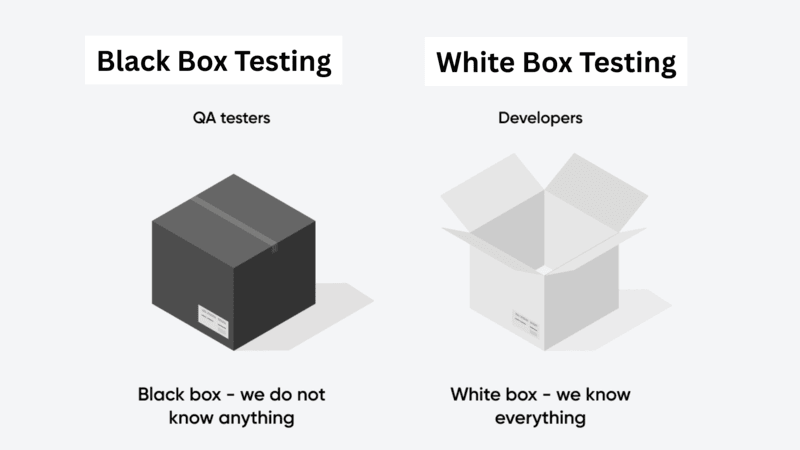
Here’s a simple comparison to help you understand when to use Black Box vs White Box Testing:
| Aspect | Black Box Testing | White Box Testing |
|---|---|---|
| Focus | User-facing functionality and behavior. | Internal code, structure, and logic. |
| Testing Approach | Based on inputs and expected outputs. | Based on analyzing the code, logic, and flow. |
| Test Design | Based on user requirements and how the software should behave. | Based on code structure, algorithms, and internal design. |
| Performed By | QA testers or external testers. | Developers or software engineers in test (SDETs). |
| Level of Testing | Used for system, integration, and acceptance testing. | Primarily used for unit and integration testing. |
| Bug Detection | Finds issues related to functionality and UI. | Identifies logical errors, code issues, and gaps in coverage. |
| Time Required | Easier and faster to design, but can take longer to execute. | Takes longer to design, but helps with quick debugging. |
| Automation | Easily automated for regression and end-to-end testing. | Best suited for unit and integration test automation. |
What is Grey Box Testing?
Grey Box Testing combines elements of both Black Box and White Box Testing. Testers have partial knowledge of the system’s internal code, which helps them to focus on both how the software functions as well as its internal structuring. This makes it especially useful for integration and security testing, where understanding both the internal design and external behavior is extremely crucial.
Comparing Black Box vs White Box Testing vs Grey Box Testing
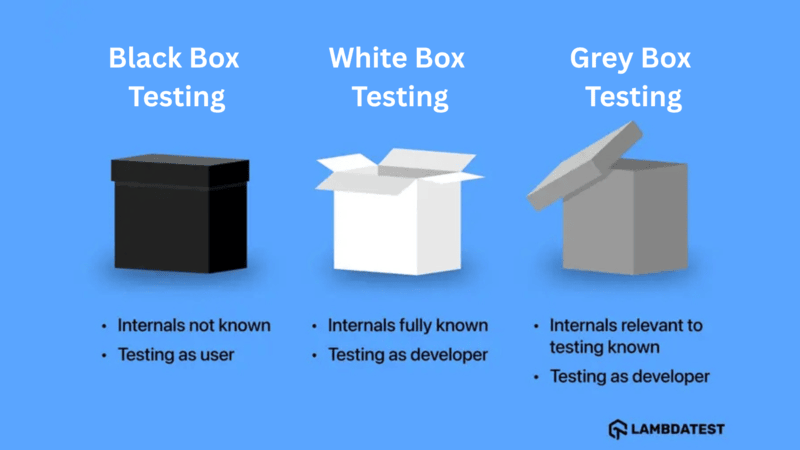 Here’s a quick overview of how Black Box vs White Box Testing vs Grey Box Testing types differ:
| Aspect | Black Box Testing | White Box Testing | Grey Box Testing |
|---|---|---|---|
| Definition | Testing without knowledge of the internal code; focuses on inputs and outputs. | Testing with full knowledge of internal code; focuses on logic, paths, and structures. | A mix of both; tests functionality with some internal knowledge. |
| Focus | User requirements and software behavior. | Internal code, logic, and structure. | Combines functionality with internal design. |
| Knowledge Required | No knowledge of the internal code. | Full understanding of the code. | Partial knowledge of the internal code. |
| Test Basis | Functional specifications, user scenarios. | Source code, algorithms, and internal logic. | Functional requirements with partial access to the code. |
| Types of Tests | Functional, system, and acceptance testing. | Unit, integration, and code coverage analysis. | Integration, security, and system testing. |
| Testing Scope | Broad, focusing on the overall system. | Narrower, focusing on specific code paths and logic. | A mid-level approach, looking at both functionality and internal processes. |
| Test Design | Based on functional requirements and user stories. | Based on code and design documents. | Based on functional needs with some internal insights. |
| Tools Used | Functional testing tools and test management tools. | Debuggers, code analysis tools, unit testing frameworks. | Combination of functional and security testing tools. |

Conclusion
Black Box vs White Box testing, and Grey Box Testing each serve a different purpose and offer unique insights into software quality. Using them together provides a comprehensive approach to testing, covering both the software’s external behavior and its internal logic.TestMu AI supports teams by providing tools that help integrate these approaches, enabling cross-browser, real-device testing, and code validation for a more reliable development process.


Frequently asked questions
Did you find this page helpful?
More Related Hubs
TestMu AI forEnterprise
Get access to solutions built on Enterprise
grade security, privacy, & compliance
- Advanced access controls
- Advanced data retention rules
- Advanced Local Testing
- Premium Support options
- Early access to beta features
- Private Slack Channel
- Unlimited Manual Accessibility DevTools Tests