

Next-Gen App & Browser Testing Cloud
Trusted by 2 Mn+ QAs & Devs to accelerate their release cycles


Appium Doctor: Your Prescription to Seamless Mobile Testing
This article simplifies the installation of Appium Doctor for both Windows and macOS, offers guidance, and also includes its important features.

Upendra Prasad Mahto
December 24, 2025
Appium Doctor is your trusted companion in the world of mobile testing. It delves deep into your system, identifying missing dependencies and configuration. Instead of just flagging problems, it offers practical solutions, sparing you from the frustration of trial-and-error troubleshooting. It saves you valuable time and effort, boosts productivity, and ensures your testing environment is top-notch.
In this article, we’ll take you on a journey through the world of Appium Doctor. We’ll show you how to get the most out of this invaluable tool, look at its features, and explain how to install and run it on Windows and macOS. If you are preparing for an interview you can learn more through Appium Interview Questions.
Overview
Appium Doctor is a diagnostic tool that checks your Appium setup for missing dependencies or configuration issues, ensuring a smooth and error-free mobile testing environment.
Why Does Appium Doctor Matter for Mobile Testers?
Before running automation scripts, verifying your Appium setup saves hours of debugging and ensures reliable test execution.
- Dependency Validation: Detects missing or outdated system dependencies like Node.js, Android SDK, or Xcode components.
- Environment Configuration: Ensures essential environment variables such as JAVA_HOME and ANDROID_HOME are properly set.
- Cross-Platform Readiness: Validates configurations for both Android and iOS testing environments.
- Quick Error Resolution: Provides actionable fixes for detected issues in seconds.
- Pre-Test Assurance: Confirms your system is fully test-ready, reducing runtime failures during automation.
What Are the Core Pillars of Appium Doctor?
These pillars form the foundation of reliable mobile automation by ensuring a stable setup, proper configurations, and seamless execution across Android and iOS environments.
- System Health Check: Scans for missing SDKs, build tools, and dependencies critical for Appium’s performance.
- Node and NPM Validation: Verifies correct installation and versions of Node.js and npm.
- Platform-Specific Setup: Confirms availability of Android SDK, ADB, Xcode Command Line Tools, and Carthage.
- Error Reporting: Generates detailed logs with easy-to-follow resolution steps.
- Seamless Integration: Works alongside Appium Inspector and server tools to validate environment readiness.
Appium Doctor acts as a “health companion” for testers, ensuring your Appium environment is optimized, dependencies are intact, and mobile automation runs flawlessly across platforms.
What is Appium Doctor?
Appium Doctor is a command-line tool for testing and developing mobile applications. Its main purpose is to diagnose and fix problems related to the setup and configuration of the Appium automation framework on your system. Appium is an open-source framework widely used for automating mobile app testing on various platforms. Appium Doctor serves as a diagnostic aid to ensure smooth and trouble-free testing.
Features of Appium Doctor
The features of Appium Doctor are as follows:
- Diagnostics: Appium Doctor thoroughly scans the system and can detect and report missing dependencies, configuration errors, or problems in your Appium setup.
- Assistance: Appium Doctor identifies problems and provides guidance on how to fix them. It often offers valuable suggestions and points you to relevant documentation to help you get your Appium setup on the right track.
- Preparing for Appium: Running Appium Doctor as a first step can help ensure your development or test environment is in top shape before using Appium.
Why is Appium Doctor Required?
Appium Doctor is important for both developers and testers in the world of mobile app development for the following reasons:
- Setup Verification: It verifies the correctness of the setup and configuration required to run Appium. By diagnosing these issues, users can identify and understand the root causes of roadblocks in mobile app testing. This ensures that the users begin their work in an environment that meets the requirements.
- Time and Effort Saving: Appium Doctor diagnoses and reports missing dependencies or configuration issues in Appium. When the users can trust that their Appium setup is correct, they can focus more on actual app development and testing tasks. This saves your valuable time and effort, boosts productivity, and ensures your testing environment is top-notch.
- Platform-Specific Checks: Depending on whether you are testing iOS or Android apps, Appium Doctor can customize its checks to ensure that your environment is properly configured for your target platform. This helps avoid platform-specific compatibility issues.
When upgrading from Appium 2 to Appium 3, it’s important to review and adjust your platform-specific capabilities and dependencies. This ensures smooth test execution and compatibility, much like how Appium Doctor helps verify your setup without forcing all settings to sync automatically.

Installation of Appium Doctor on Windows
Appium Doctor is a tool that allows you to check if your system has everything you need to run Appium smoothly. Let’s go through the installation process:
Prerequisites:
Before we begin, ensure you install Node.js and npm (Node Package Manager) on your computer. For in-depth information, refer to the article, How to Install Appium.
Install Appium Doctor:
Open your command prompt and enter the code below.
npm install appium-doctor -g
The -g flag indicates that this package is installed globally, and you do not need to install it in each project individually.
Console Output:

You can also verify this after the installation is complete by entering the following code at the command prompt:
appium-doctor --version
Console Output:
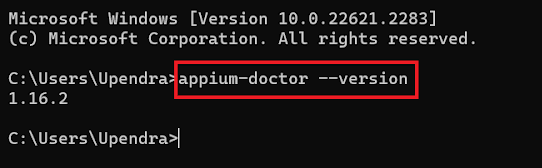
This command should display the installed version of Appium Doctor and confirm that it is ready to use.
How to Run Appium Doctor on Windows
Running Appium Doctor on Windows is straightforward, but it requires using the command prompt or PowerShell. Below are the steps to run Appium Doctor on Windows:
Open a Command Prompt or PowerShell:
Click the Windows Start button, type Command Prompt or PowerShell, and select the appropriate application to open the terminal.
Run Appium Doctor:
In the Command Prompt or PowerShell window, you can run Appium Doctor by typing the following command and then press Enter:
Since a Windows operating system runs Android apps but not iOS apps, we can only run the Appium Doctor command for Android.
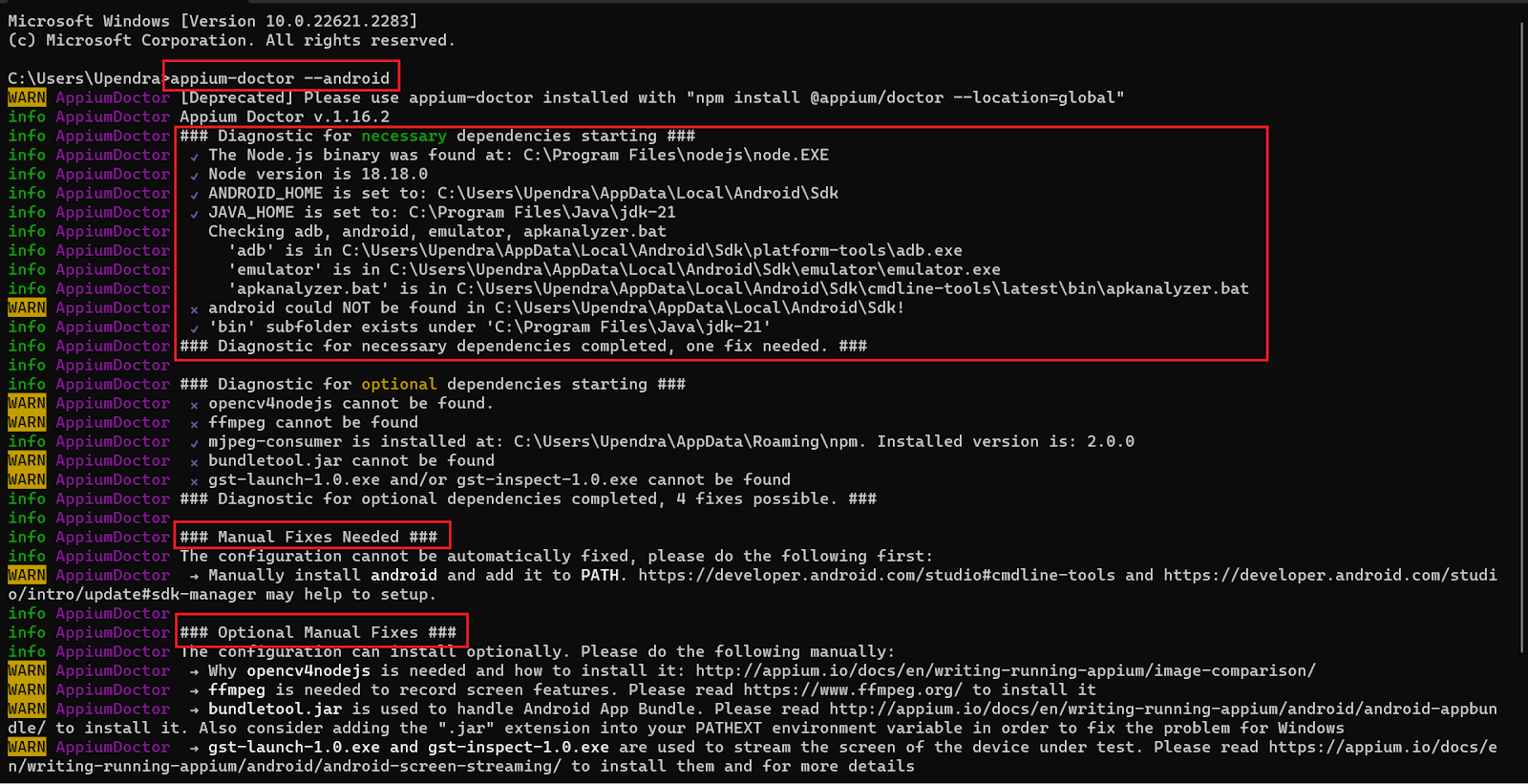
appium-doctor --android
Check the Diagnostic Report:
Appium Doctor will now analyze your system and display a diagnostic report in the terminal. This report will show any problems or missing components related to your Appium setup.
Console Output:
Follow the Recommendations:
Review the diagnostic report carefully. Appium Doctor identifies problems and provides recommendations on how to fix them. Follow the recommendations to resolve any issues. You can refer to the images above, where you’ll find documentation references that guide how to resolve the errors.
Let’s walk through an example where we will address and resolve the error.

You’ll notice that a cross mark indicates the missing dependencies. In this case, we need to address these highlighted dependencies. To do so, we’ll need to install a mjpeg-consumer package globally.

After installing mjpeg-consumer. You can see it gives no error.

Review the Changes:
After making the necessary adjustments based on the recommendations, you can run Appium Doctor again to confirm that your Appium environment is configured correctly.
Installation of Appium Doctor on macOS
Below are the steps to install Appium Doctor on macOS:
Install Appium Doctor:
Open the macOS Terminal to install Appium Doctor and enter the following code to install Appium Doctor globally on your macOS system.
Console Output:
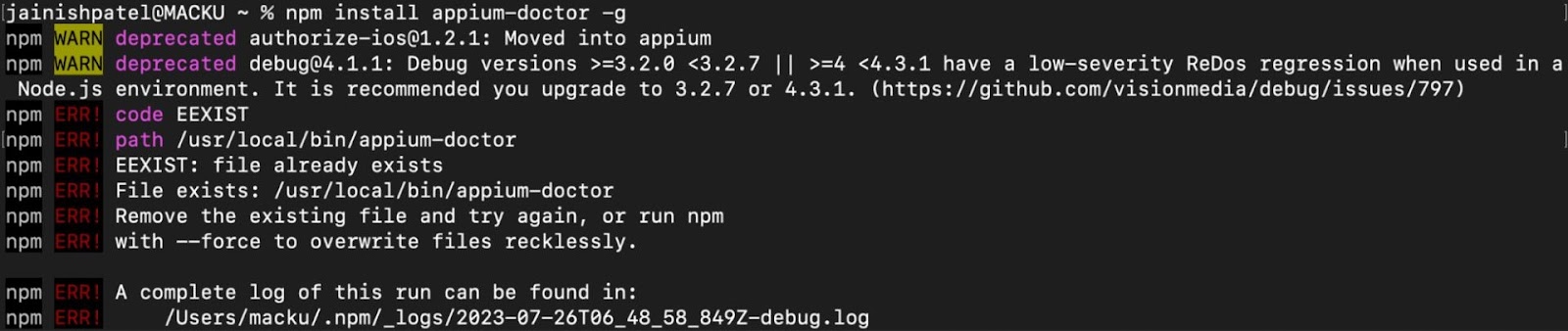
You can use sudo to install the package with elevated privileges.
sudo npm install appium-doctor -g
How to Run Appium Doctor on macOS
Since macOS can run both Android and iOS apps, we will examine both scenarios. First, run the following command to verify the correctness of all settings required to run iOS apps.
appium-doctor --ios
Console Output:
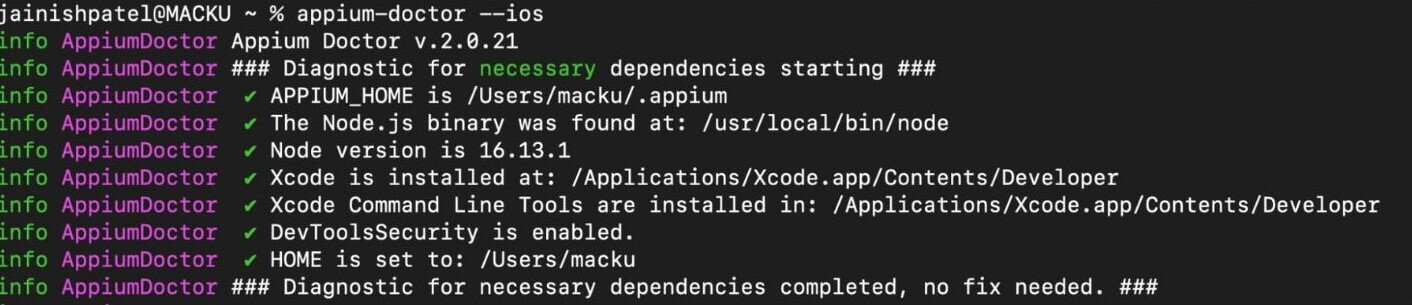
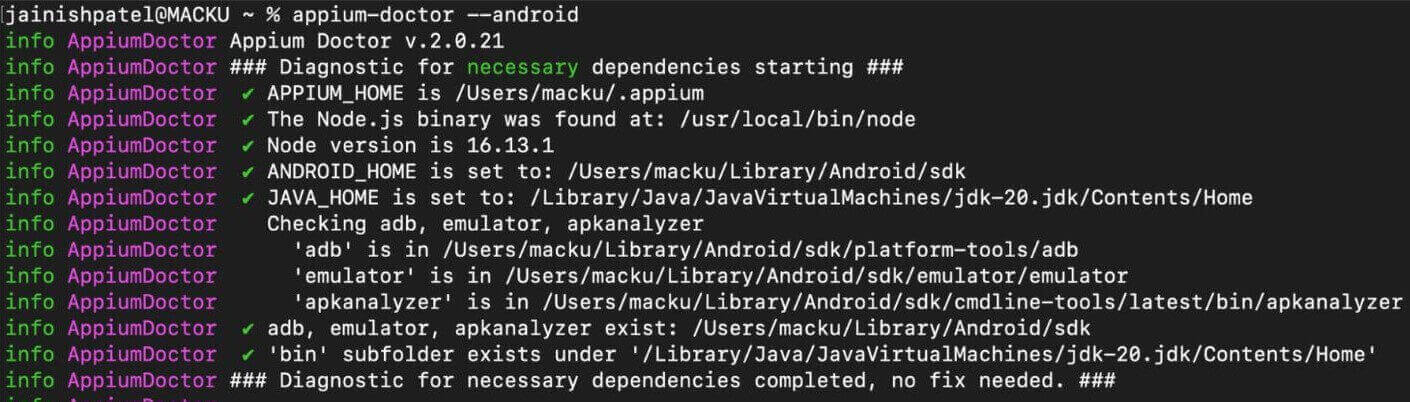
Now, run the following command to verify the correctness of all settings required to run Android apps.
Appium-doctor --android
Console Output:
List of Options in Appium Doctor
A range of commands and options are available for verifying dependencies within a specific test environment before embarking on test automation. These tools and configurations ensure a seamless and reliable testing process.
To get acquainted with the various options of Appium Doctor, simply run the following command in your terminal:
appium-doctor --h
Console Output:
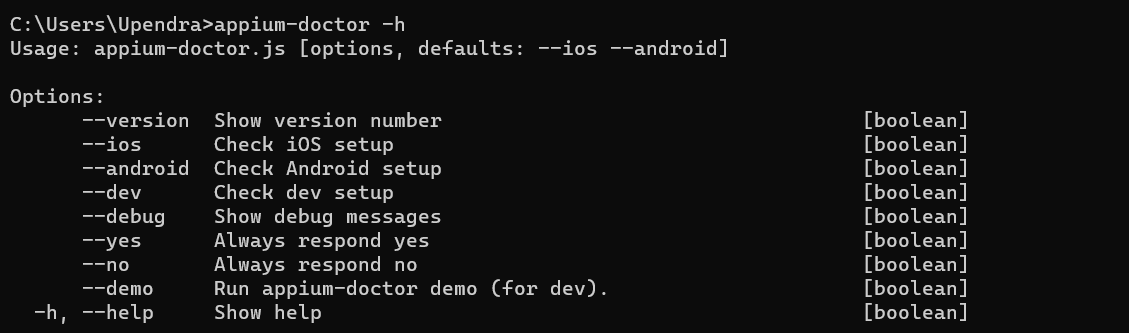
– – ios and – – android:
These options allow you to specify whether you want to check the setup for iOS or Android testing. For example, you can use appium-doctor –ios to focus on iOS-related configurations, and appium-doctor –android to focus on Android-related configurations.
– – dev:Appium Doctor performs checks related to development dependencies when you use the –dev option. This can be useful if you contribute to Appium development or need to ensure that you have all the necessary tools to compile or extend Appium.
– – debug:This option activates the debugging mode for Appium Doctor. When this option is used, the tool provides more detailed information about the checks and diagnostic steps it performs. It helps troubleshoot complex issues with your Appium setup.
– – yes and – – no:These options provide answers to prompts that Appium Doctor may present during its checks. For instance, if Appium Doctor detects a missing dependency and offers to install it, you can use –yes to automatically accept and proceed with the installation or –no to decline it.
– – demo:This option starts Appium Doctor in demo mode. In this mode, the tool demonstrates its capabilities by going through the setup checks and explaining each step without making any actual changes to your system. It’s useful for learning how to use Appium Doctor effectively.
– – help:This option displays a help message that provides information about using Appium Doctor and lists all available options. This option can be handy for a quick reference to the available commands and their descriptions.

Note: Test on 3000+ real devices for Android and iOS, including the latest iPhone 15! Try TestMu AI Today!
Conclusion
From the insights above, it’s evident that Appium Doctor is not merely a tool; it’s a game-changer for both mobile app developers and testers. Its has a exceptional ability to diagnose, provide invaluable guidance, and optimize your setup. Whether your focus is on iOS or Android apps, Appium Doctor streamlines the entire process, making mobile testing a seamless experience.
In this article, we have explored Appium Doctor, delving into its impressive features. After that, we’ve offered a comprehensive step-by-step guide on how to effortlessly install and run it on both Windows and macOS platforms. At last, we have also discussed the different options available for Appium Doctor.
To further strengthen your expertise in mobile app development and mobile testing, be sure to check out our comprehensive guide on top asked mobile testing interview questions. This resource will equip you with the knowledge needed to excel in this dynamic field.


Frequently asked questions
Did you find this page helpful?
More Related Hubs
TestMu AI forEnterprise
Get access to solutions built on Enterprise
grade security, privacy, & compliance
- Advanced access controls
- Advanced data retention rules
- Advanced Local Testing
- Premium Support options
- Early access to beta features
- Private Slack Channel
- Unlimited Manual Accessibility DevTools Tests