

Next-Gen App & Browser Testing Cloud
Trusted by 2 Mn+ QAs & Devs to accelerate their release cycles


What Is AI Debugging? Its Process and How to Fix Bugs Fast
Learn how AI debugging works, explore top tools like KaneAI and GitHub Copilot, and follow a hands-on Node.js walkthrough to find and fix bugs faster in 2026.

Saniya Gazala
March 2, 2026
Research from ACM Queue found that developers spend 35 to 50 percent of their time validating and debugging software. That stat comes from an era of traditional development. Today, AI is reshaping how software is built, tested, and now debugged. Yet the more code AI writes, the more bugs teams have to deal with.
AI debugging steps into that gap. It uses AI to find and fix bugs faster, so developers spend less time on what slows them down and more time on what actually moves the product forward. It reads logs at scale, explains stack traces in plain language, surfaces root causes from noise, and generates test cases after a fix, work that used to take hours of manual effort.
For QA engineers, it means fewer false positives and faster triage. For engineering teams, it means shorter release cycles and fewer production fires.
Overview
How does AI help in debugging software?
AI debugging uses artificial intelligence to detect, analyze, and fix errors in software or models. It works by scanning logs, interpreting issues, and suggesting fixes to speed up debugging.
Why is AI debugging important?
Fixing bugs late in production is expensive and slows delivery. AI debugging improves the lifecycle by enabling faster detection, analysis, and resolution of issues.
- Accuracy: AI detects hidden failure patterns early, reducing faulty logic and protecting data integrity.
- Reliability: Identifies rare and inconsistent issues that are hard to reproduce manually.
- Scalability: Supports large, complex systems without increasing engineering effort proportionally.
- Velocity: Speeds up root cause analysis, enabling faster fixes and release cycles.
- Cost: Early detection minimizes expensive fixes later in the development process.
How is AI-first debugging different from traditional debugging?
Traditional debugging depends on manual inspection and step-by-step tracing, which becomes slow at scale. AI-first debugging uses pattern recognition to quickly detect issues and suggest solutions.
- Log analysis: Manual inspection vs AI grouping similar issues across large datasets.
- Stack trace reading: Developer interprets vs AI highlights key frames with simple explanations.
- Root cause detection: Experience-driven vs AI suggests causes using patterns and context.
- Bug reproduction: Manual recreation vs AI proposes possible reproduction scenarios.
- Test creation: Written after fixes vs AI auto-generates targeted test cases.
- New codebases: Requires onboarding vs AI enables quick navigation using semantic search.
- Confidence level: Human judgment varies vs AI requires validation despite confident outputs.
What Is AI Debugging?
AI debugging is the process of using AI to automatically identify, analyze, and fix bugs in software faster and with more context than a developer working through it manually. It is not a single tool. It is an approach that brings machine learning, large language models, and pattern recognition into the debugging workflow.
The term has two meanings. The first is using AI to debug your code, reading logs, explaining stack traces, classifying failures, and suggesting fixes. The second is debugging AI models themselves, investigating why a model overfits or produces biased output. Tools like TensorBoard and SHAP handle that side.
AI debugging does one thing well: it surfaces the right signal from an overwhelming volume of noise, faster than any developer can do manually.
For a deeper understanding of debugging in software development and testing, refer to this detailed debugging tutorial.

Note: Run tests across 3000+ browsers and OS combinations and debug issues faster. Try TestMu AI today.
Why AI Debugging Matters?
Every bug that reaches production costs more than the one caught during development. Teams spend hours sorting out issues, releases slow down, and trust is reduced. AI debugging streamlines every stage, from detection to fixing and validation.
Here is where it directly changes the outcome.
- Accuracy: AI catches failure patterns in logs and code before bugs reach production, reducing wrong behavior and corrupted data at the source.
- Reliability: Intermittent failures are hard to reproduce manually. AI-powered anomaly detection surfaces them early, while they are still cheap to fix.
- Scalability: As codebases and distributed systems grow, manual debugging cannot keep up. AI code debugging scales coverage without scaling headcount.
- Velocity: Faster root cause analysis means faster fixes and shorter release cycles.
- Cost: According to NIST Planning Report 02-3, over half of software bugs are not found until downstream in the development process, driving high economic costs. AI debugging shifts detection left, where fixing is fastest and cheapest.
How Does the AI Debugging Process Work?
This approach does not replace the traditional debugging lifecycle. It accelerates specific stages within it. The architecture below shows how a modern AI debugging system moves from a live error in production to a fix and back into deployment.
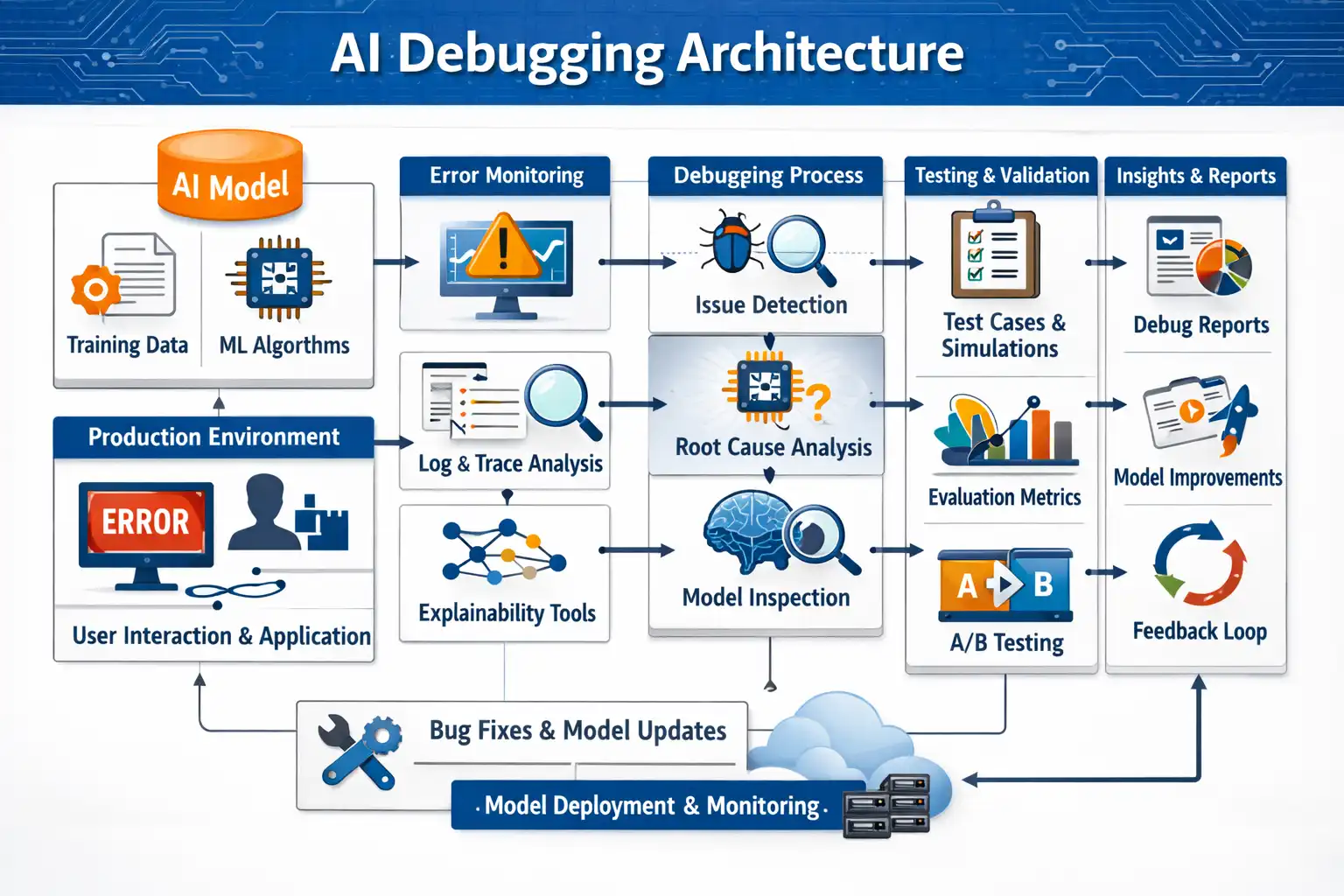
The pipeline runs across five stages, each feeding the next.
Stage 1: Input Sources
- AI Model: Feeds training data and ML algorithms that inform how the system recognizes patterns and anomalies.
- Production Environment: The live source of errors, user interactions, and application behavior that triggers the debugging pipeline.
Stage 2: Error Monitoring
- Log and Trace Analysis: The system continuously reads logs, execution traces, and stack outputs to detect deviations from expected behavior.
- Explainability Tools: Surface why the model or application flagged something, making alerts interpretable rather than just binary signals.
Stage 3: Debugging Process
- Issue Detection: Pinpoints where in the codebase or model the failure originated, narrowing thousands of signals to the relevant ones.
- Root Cause Analysis: The agent analyzes patterns across logs, traces, and code context to generate the most likely explanation for the failure.
- Model Inspection: Examines the internal state of the model or application at the point of failure, confirming or ruling out hypotheses.
Stage 4: Testing and Validation
- Test Cases and Simulations: Targeted tests are generated based on the conditions that caused the original failure.
- Evaluation Metrics: Results are measured against defined quality thresholds to confirm the fix holds.
- A/B Testing: Changes are validated against a baseline to ensure the fix improves behavior without introducing regressions.
Stage 5: Insights and Deployment
- Debug Reports: Structured output of what failed, why, and what was done, creating an auditable record.
- Model Improvements: Findings feed back into the model or codebase as permanent improvements, not one-off patches.
- Feedback Loop: Results from deployment flow back into monitoring, closing the cycle so future failures are caught earlier.
At the bottom of the pipeline, Bug Fixes and Model Updates are deployed through Model Deployment and Monitoring, which feeds observations back into production, restarting the loop on the next incident.
What Are the Components of An AI Debugging Agent?
The five-step process above describes what an AI debugging agent does. The best AI agents for debugging are not single models answering questions. They are coordinated systems of components that work together to move from error to resolution.
Here is how each part contributes.
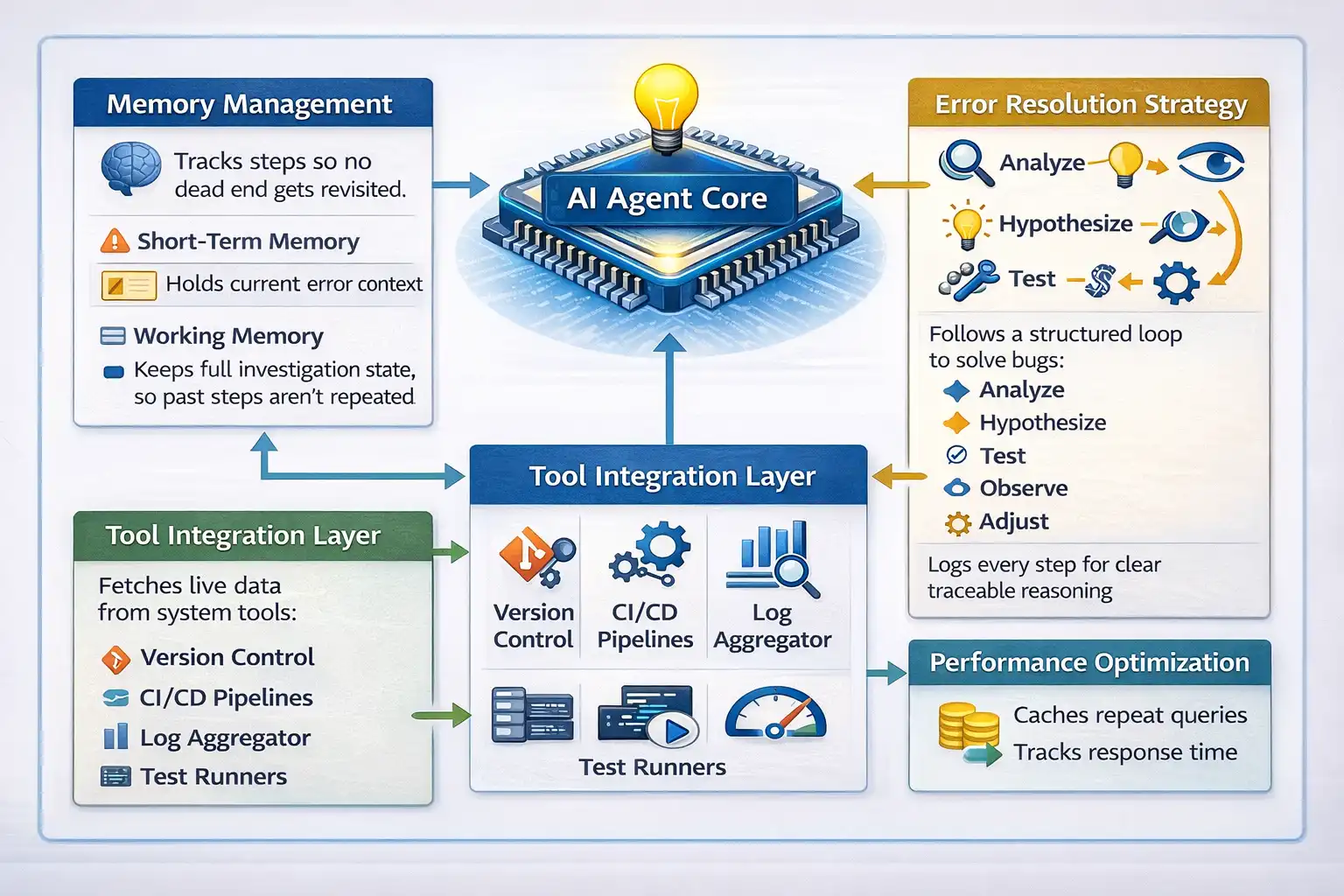
- AI Agent Core: The central reasoning unit. It maintains a session memory stack, tracks every action taken, and adjusts its next move based on what failed.
- Memory Management: Two layers run simultaneously. Short-term holds the current error context. Working memory retains the full investigation state, so nothing already ruled out gets revisited.
- Tool Integration Layer: The agent connects to version control, CI/CD pipelines, log aggregators, and test runners. It pulls live data instead of relying on what a developer manually pastes.
- Error Resolution Strategy: The agent follows a structured loop: analyze, hypothesize, test, observe, adjust. Every step is logged, making the reasoning traceable rather than opaque.
- Performance Optimization: The agent manages token usage, caches repeated queries, and tracks response latency. Without this, agents become too slow and expensive for real team workloads.
Core Difference Between Traditional and AI-First Debugging
Traditional debugging is systematic but slow. Engineers inspect logs, trace execution paths, and write tests to isolate fixes. It works until logs span multiple services, bugs only appear in production, or a single incident generates thousands of similar-looking errors.
AI-first debugging operates at a higher level. Instead of following stack traces frame by frame, developers receive hypotheses backed by patterns across the full dataset.
| Dimension | Traditional Debugging | AI-First Debugging |
|---|---|---|
| Log analysis | Manual, line by line | Semantic clustering across thousands of entries |
| Stack trace reading | The developer reads each frame | AI highlights relevant frames and explains in plain language |
| Root cause hypothesis | Developer forms from experience | AI proposes based on log patterns and code context |
| Reproducing production bugs | Manual reconstruction is often slow | AI generates candidate reproduction scenarios from the runtime context |
| Regression test generation | Written manually after the fix | AI generates targeted test cases from the fix context |
| Unfamiliar codebases | Slow, requires codebase orientation | AI navigates via semantic code search |
| Confidence calibration | Developer-dependent | Requires explicit validation; AI can be confidently wrong |
Traditional debugging practices remain essential for validation. Breakpoints, tracing, and tests are still required to confirm hypotheses and prevent regressions. The value of AI lies in accelerating detection, defect triage, and hypothesis generation.
How to Debug with AI: A Practical Workflow
AI code debugging works best when you follow a repeatable process.
Here is a hands-on walkthrough using a simple Node.js task API you can run locally, no database required. You will debug it manually using Postman and an AI tool such as Claude.
Project and Tools Setup
This project runs entirely on your machine with two dependencies. Before you start, make sure the following are ready.
Prerequisites:
- Node.js: v18 or above, download from nodejs.org
- Postman: Desktop app installed, downloaded from postman.com
- AI tool: GitHub Copilot Chat, Claude, or ChatGPT open in your browser or IDE
- Terminal: Any terminal to start the server
- TestMu AI account: Free account at testmuai.com: needed for the KaneAI track
Test Scenarios:
Three bugs are built into the project intentionally. Each represents a real failure category. The code is written so all three bugs produce observable wrong behavior rather than crashing the server, so you can test all three without restarting.
- Scenario 1: POST
/tasksreturns500with a ReferenceError. Task creation fails every time. - Scenario 2: GET
/tasks/:userIdreturns an empty array even when tasks were just created for that user. - Scenario 3: PATCH
/tasks/:id/completereturns500. The server cannot find the task even when it exists.
Code Implementation:
- Run the Commands: Open your terminal and run the given commands:
1. mkdir task-api  # mkdir (Make directory by name “task-api”)
2. cd task-api  # cd (Using cd to get inside the created directory)
3. npm init -y # Run this command and wait for the libraries to be installed
4. npm install express # Run this command to install Express (a tool for creating backend servers)This code creates a simple Express server with three endpoints to manage tasks. Each endpoint contains a bug that causes observable wrong behavior.
const express = require('express');
const app = express();
app.use(express.json());
const tasks = [];
let nextId = 1;

// Endpoint 1: Create a task
app.post('/tasks', (req, res) => {
  const { title, userId } = req.body;
  try {
    const newTask = {
      id: nextId++,
      title,
      user_id: user_id, // Bug 1: user_id is undefined — should be userId
      completed: false
    };
    tasks.push(newTask);
    res.json(newTask);
  } catch (err) {
    res.status(500).json({ error: err.message, stack: err.stack });
  }
});

// Endpoint 2: Fetch tasks by user
app.get('/tasks/:userId', (req, res) => {
  const { userId } = req.params;
  const userTasks = tasks.filter(t => t.user_id === userId); // Bug 2: "1" !== 1 strict comparison
  res.json(userTasks);
});

// Endpoint 3: Mark a task complete
app.patch('/tasks/:id/complete', (req, res) => {
  const { id } = req.params;
  try {
    const task = tasks.find(t => t.id === id); // Bug 3: "1" !== 1 strict comparison
    task.completed = true;
    res.json(task);
  } catch (err) {
    res.status(500).json({ error: err.message });
  }
});

app.listen(3000, () => console.log('Server running on http://localhost:3000'));
node index.jsResult:
You should see: Server running on http://localhost:3000
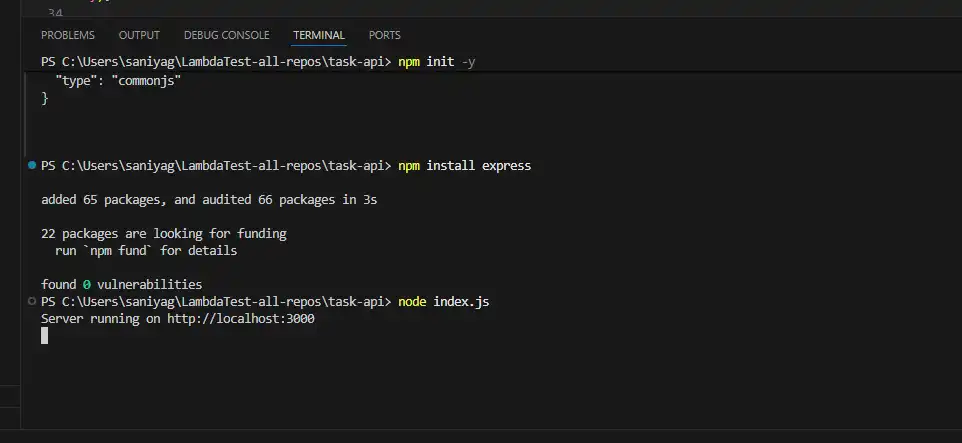
Now that your server is running, to proceed with Scenario 1, you need to use Postman to intentionally create a bug that causes a POST request to return a 500 Internal Server Error.
Scenario 1: Post Method
To do so, follow the steps
- Open Postman: Create a new request based on the parameters below.
- Method: POST
- URL:
http://localhost:3000/tasks - Body: Select raw and JSON, paste.
- Send the post request: Click on the Send button.
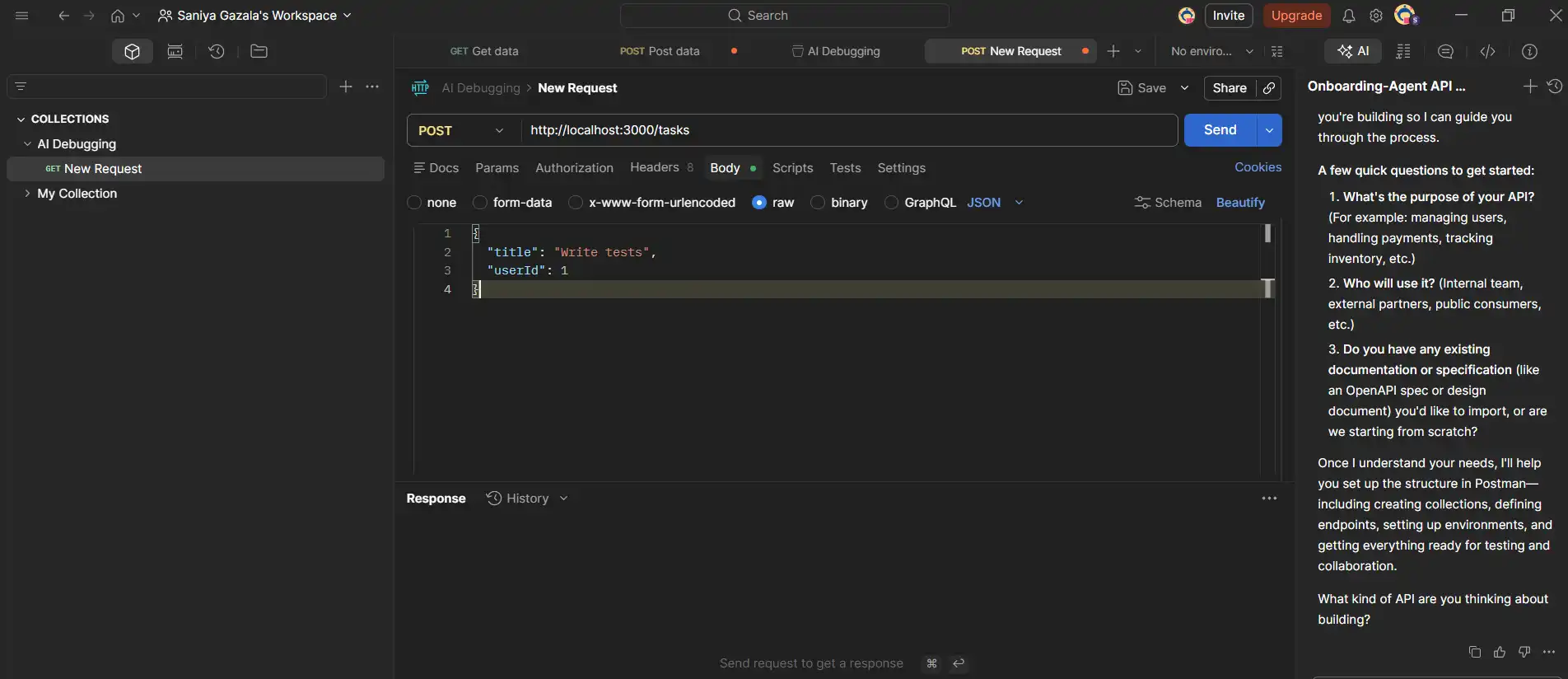
500 response with "error": "user_id is not defined"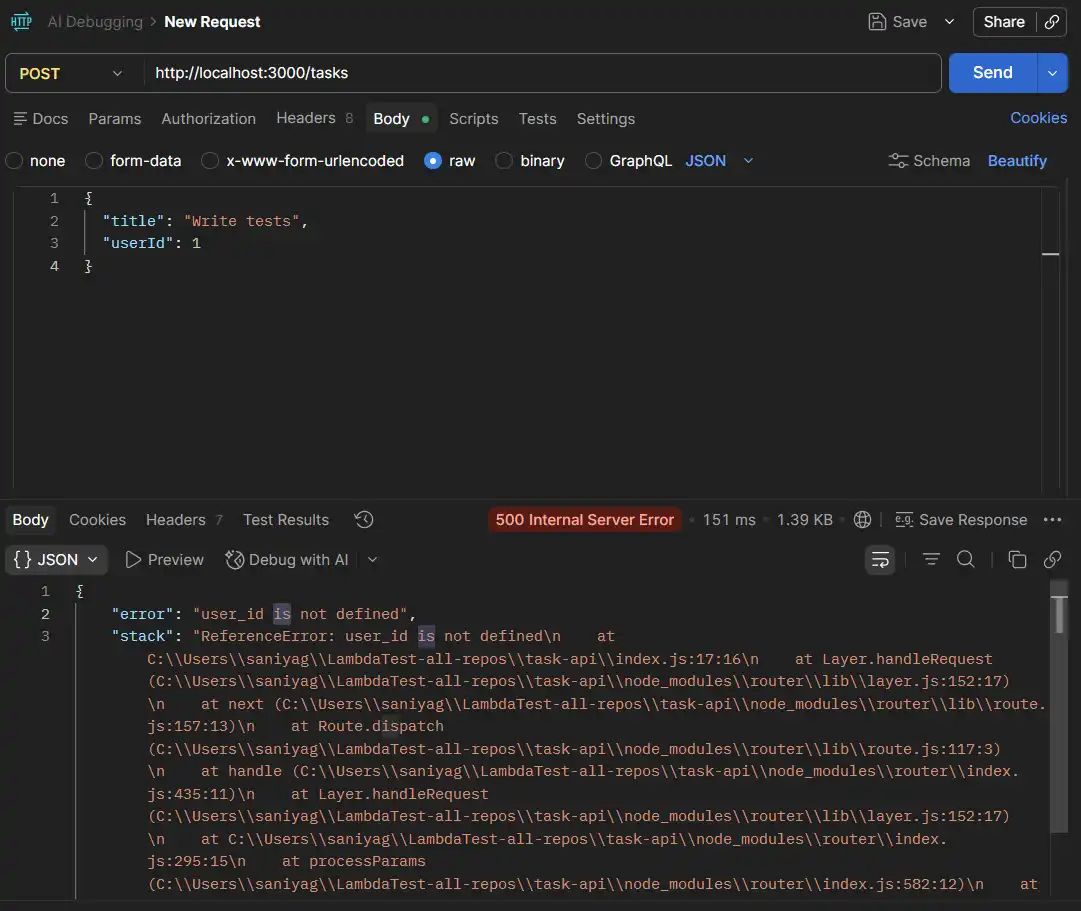
AI Debugging in Action
Copy the full error response. Now open your AI tool; you can use any. I am using Claude, and follow the parameters below.
- Prompt to Use: Paste this into your AI tool exactly:
My Express POST /tasks route returns 500 with this error: ReferenceError: user_id is not defined.
Here is the route handler:
app.post('/tasks', (req, res) => {
  const { title, userId } = req.body;
  try {
    const newTask = {
      id: nextId++,
      title,
      user_id: user_id,
      completed: false
    };
    tasks.push(newTask);
    res.json(newTask);
  } catch (err) {
    res.status(500).json({ error: err.message, stack: err.stack });
  }
});
The request body sends userId as a number. What is the bug and how do I fix it?
user_id was never declared. The destructured variable is userId. Fix: change user_id: user_id to user_id: userId. And ask for it to fix it for you. 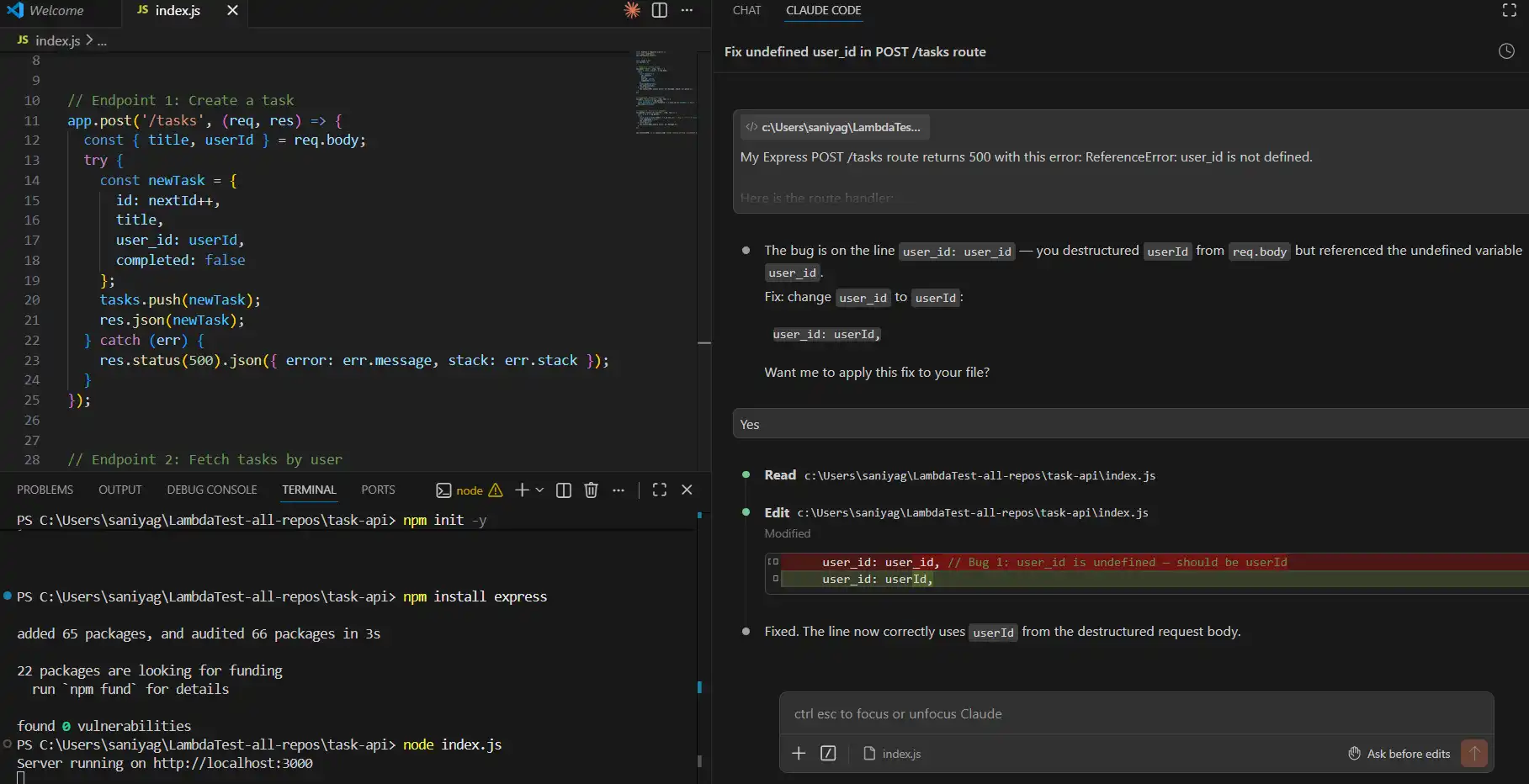
node index.js. Note: If you open http://localhost:3000/tasks directly in your browser, you will see Cannot GET /tasks. That is correct. There is no GET /tasks route in this API. To fetch tasks, you must include a user ID: http://localhost:3000/tasks/1. Always use Postman for testing, not the browser address bar.
Scenario 2: GET Method
First, create a fresh task after the Bug 1 fix and server restart.
Important Note: Any task created before you fixed Bug 1 was stored with user_id: undefined, not 1. When the server restarts, all in-memory tasks are wiped. You must create a new task after restarting for this step to work correctly.
- Method: POST, URL:
http://localhost:3000/tasks - Same body as Scenario 1. You should get a
200with the new task showing"user_id": 1.
Now fetch that user's tasks:
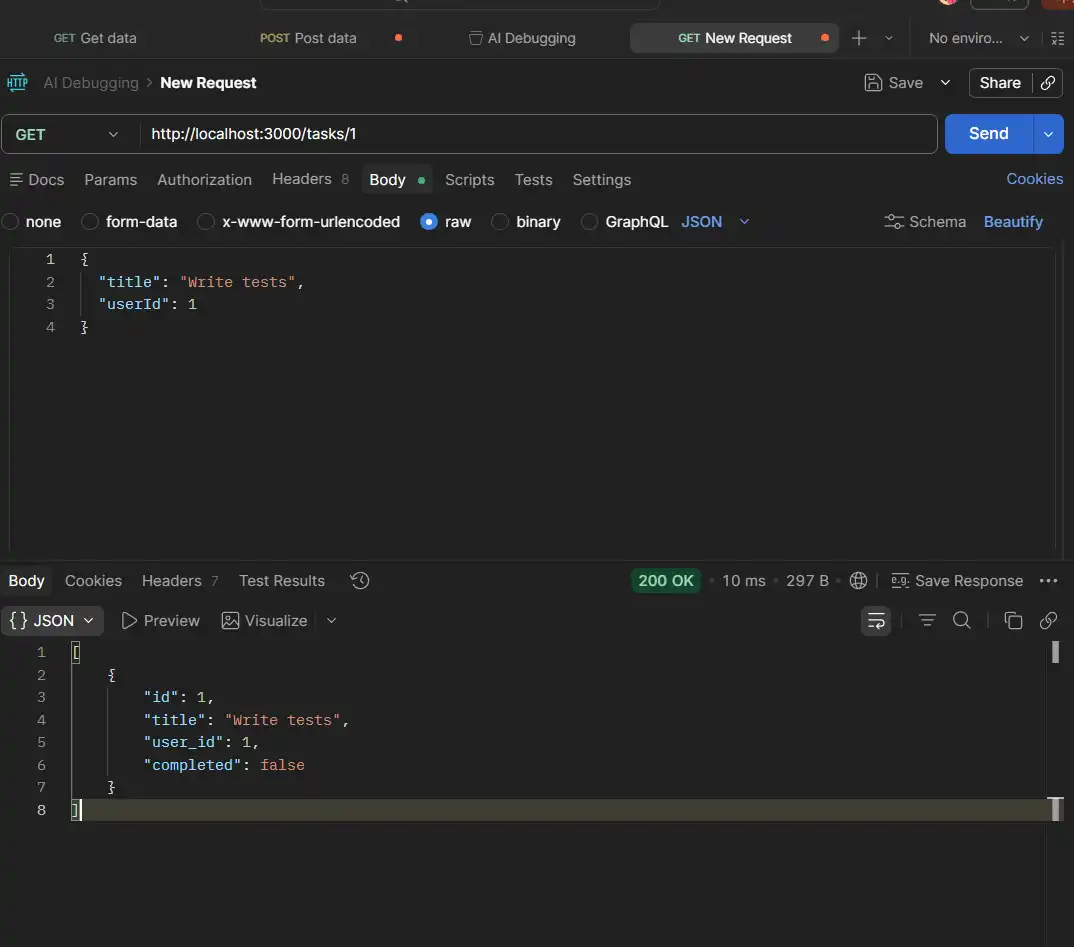
- Method: GET
- URL:
http://localhost:3000/tasks/1 - Click Send
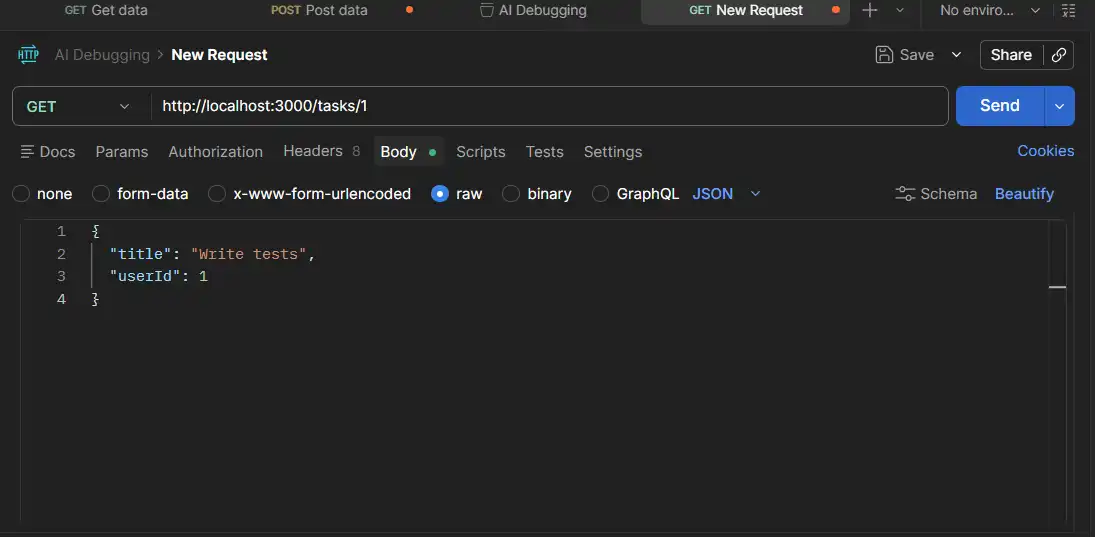
200, but the response is [], an empty array, even though you just created a task.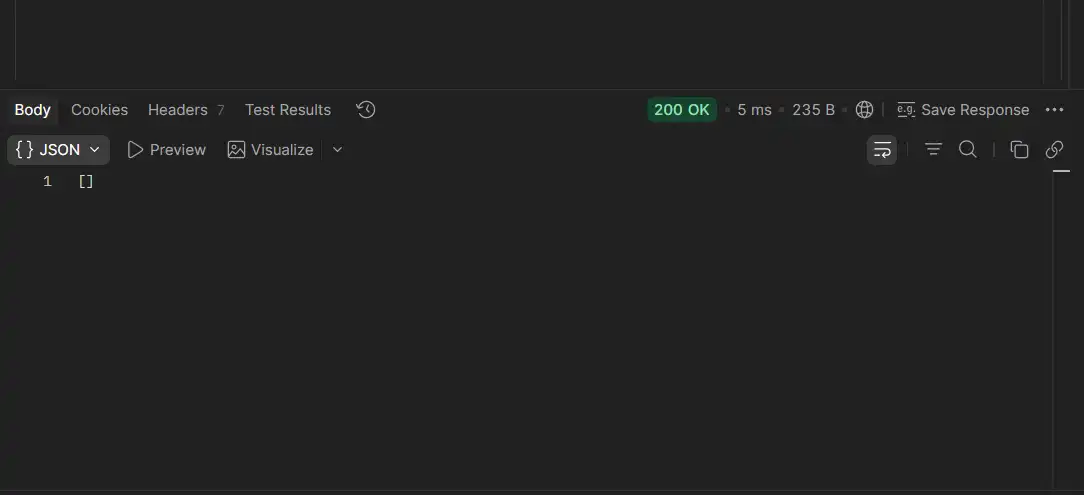
This means no error, no crash. This is harder to debug because nothing looks broken on the surface.
AI Debugging in Action
Copy the full error response. Now open your AI tool; you can use any. I am using Claude, and follow the parameters below.
- Prompt to Use: Paste this into your AI tool exactly:
My GET /tasks/:userId returns an empty array even though I just created a task with userId 1.

Here is the route:

app.get('/tasks/:userId', (req, res) => {
  const { userId } = req.params;
  const userTasks = tasks.filter(t => t.user_id === userId);
  res.json(userTasks);
});

Tasks are stored in memory with user_id set as a number (e.g. 1). What is wrong and how do I fix it?
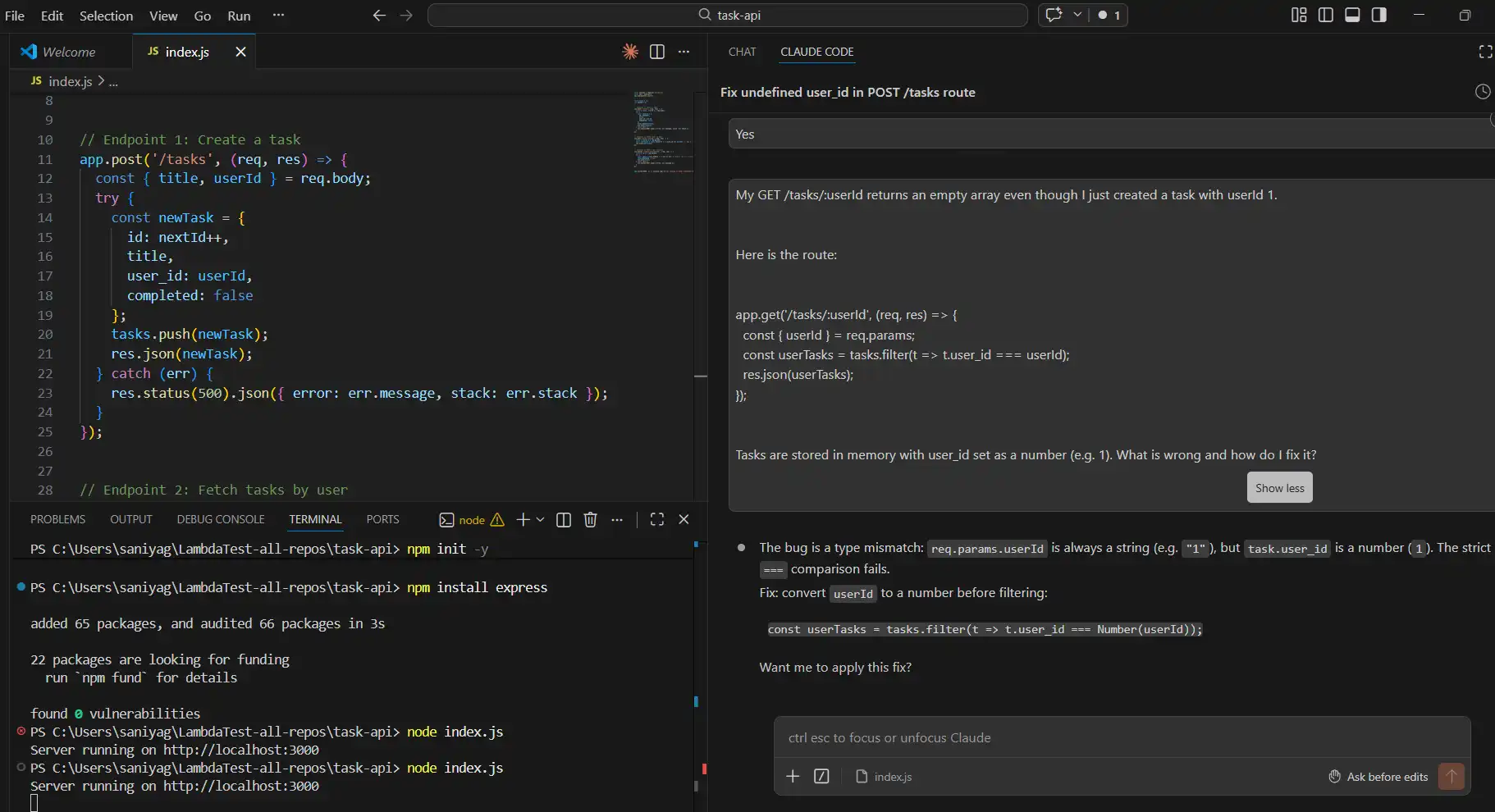
req.params always returns strings. So, userId is "1" (string). ===, which means "1" === 1 is false. parseInt(userId, 10) before the filter.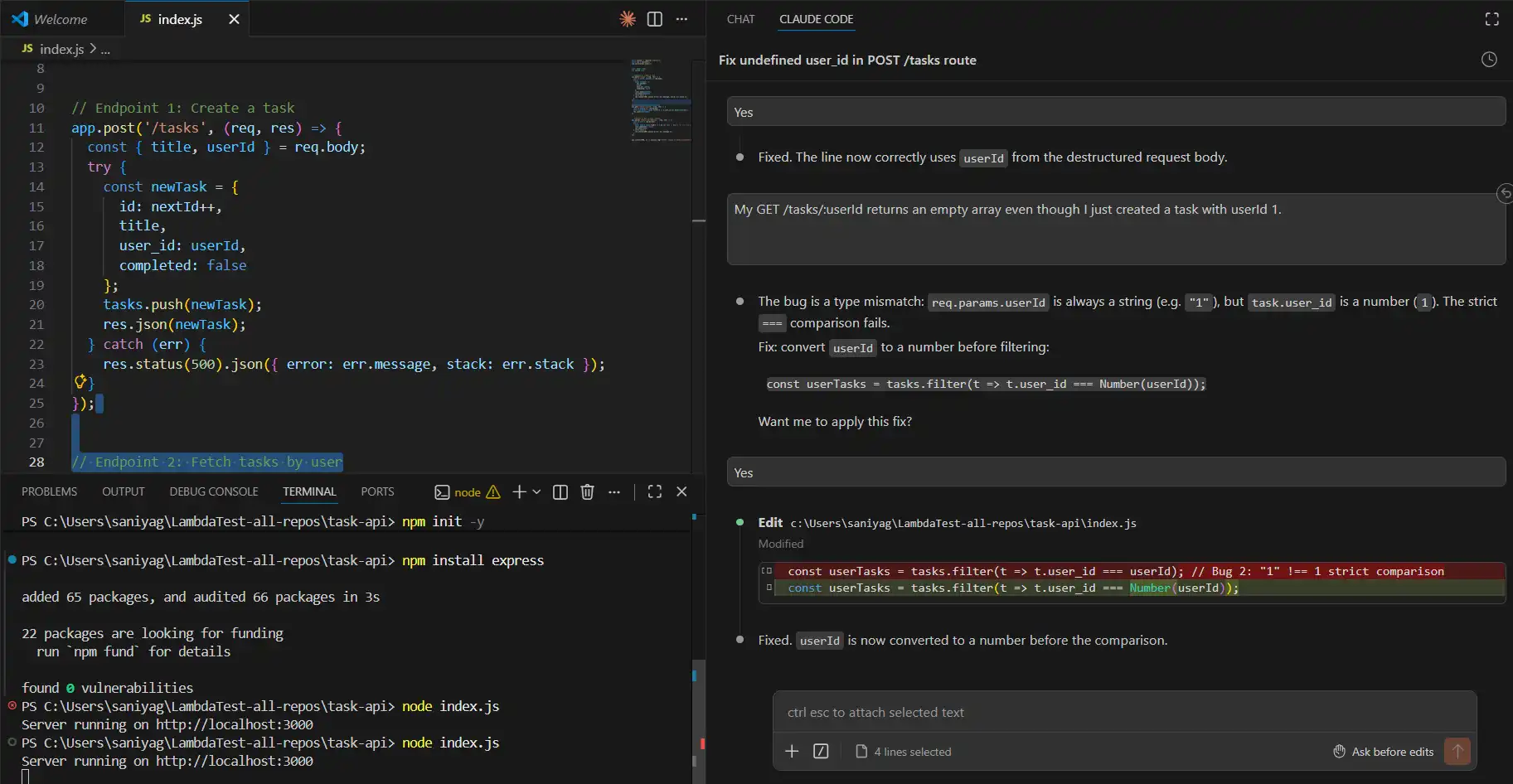
Scenario 3: PATCH Method
First, make sure Bug 2 is fixed and the server is restarted. Then create a fresh task using POST /tasks so there is a task with ID 1 in memory.
Important: The server is in-memory. Every restart wipes all tasks. Always create a new task after each restart before testing the PATCH endpoint.
Now mark it complete:
- Method: PATCH
- URL:
http://localhost:3000/tasks/1/complete - No Body needed. Click Send
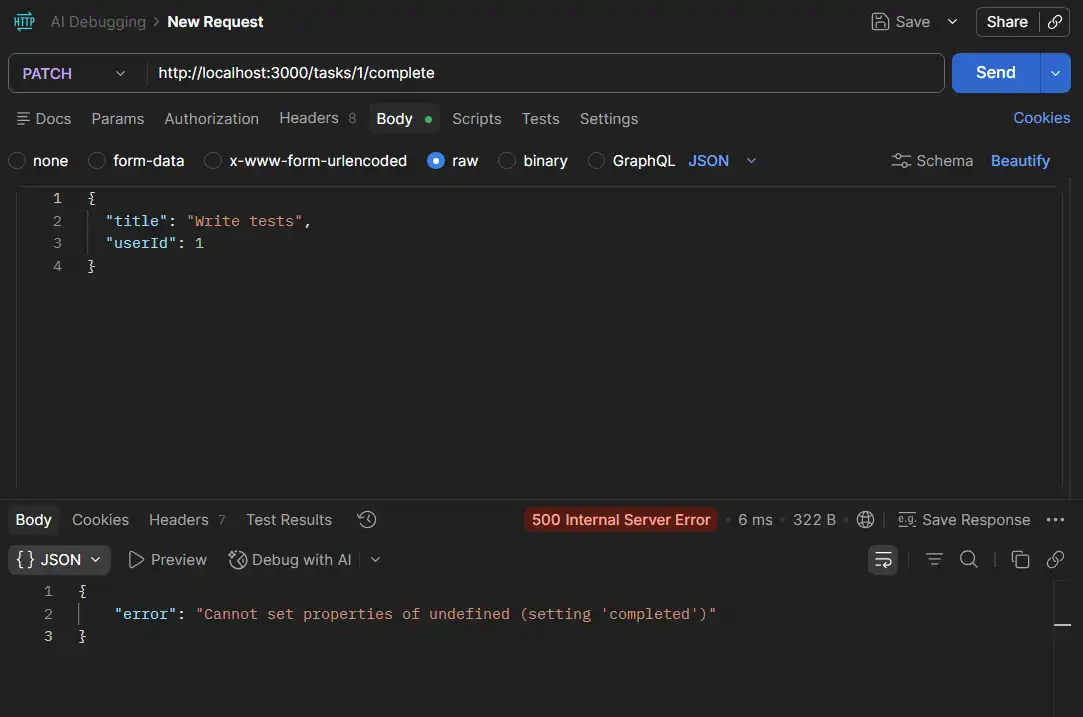
500 with "Cannot set properties of undefined"The AI will suggest a fix immediately. Do not apply it yet. This is the most important step in the whole walkthrough.
AI Debugging in Action
Copy the full error response. Now open your AI tool; you can use any. I am using Claude, and follow the parameters below.
- Prompt to Use: Paste this into your AI tool exactly:
My PATCH /tasks/:id/complete returns 500: Cannot set properties of undefined (setting 'completed').

Here is the route:

app.patch('/tasks/:id/complete', (req, res) => {

  const { id } = req.params;

  try {

    const task = tasks.find(t => t.id === id);

    task.completed = true;

    res.json(task);

  } catch (err) {

    res.status(500).json({ error: err.message });

  }

});

Tasks in memory have numeric IDs assigned by nextId++. What is the root cause?
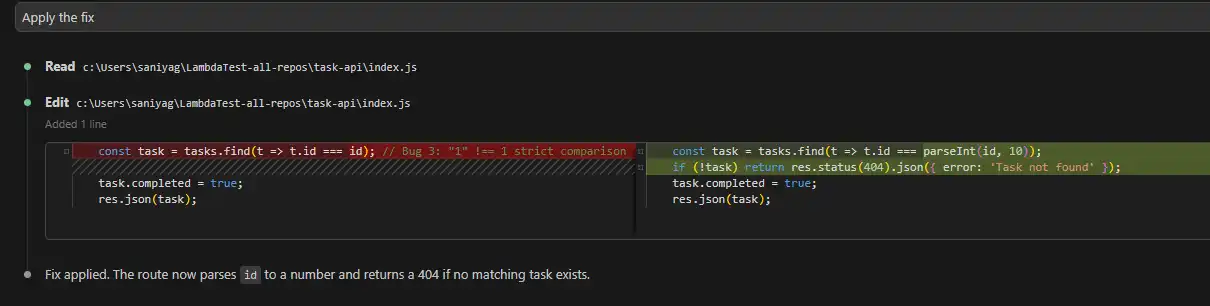
req.params.id is always a string.tasks.find(t => t.id === id) returns undefined because stored IDs are numbers. if (task). parseInt(id, 10) on the find, same as Bug 2. A null check would silently return nothing instead of finding the task.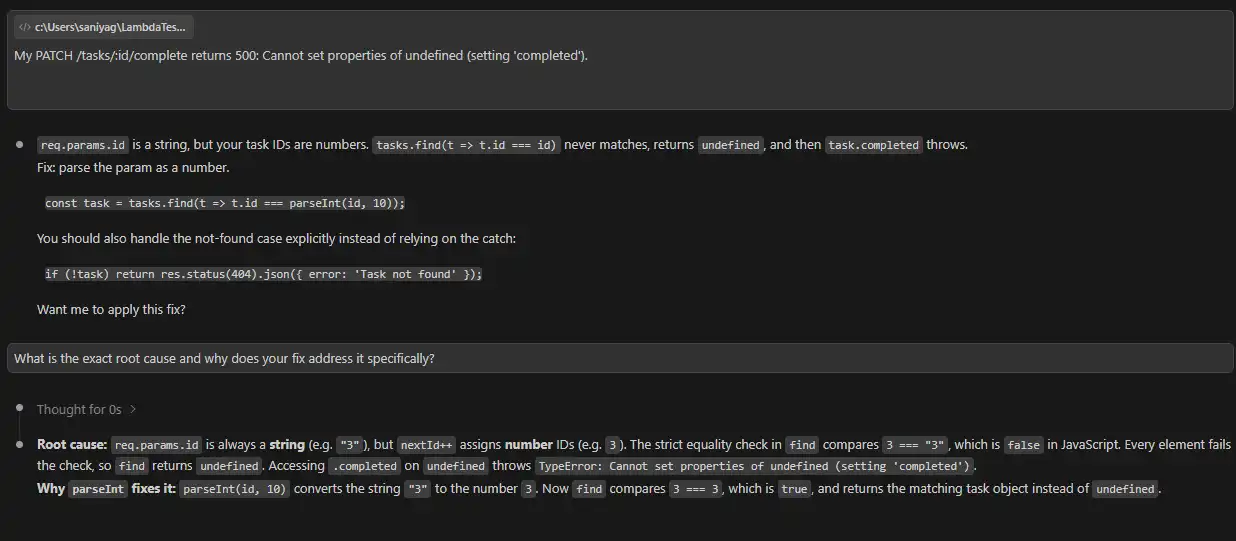
Note: If the AI cannot explain the root cause clearly, do not apply the fix.
Here, the AI explained the RCA, so we applied the fix.
"error": "Task not found"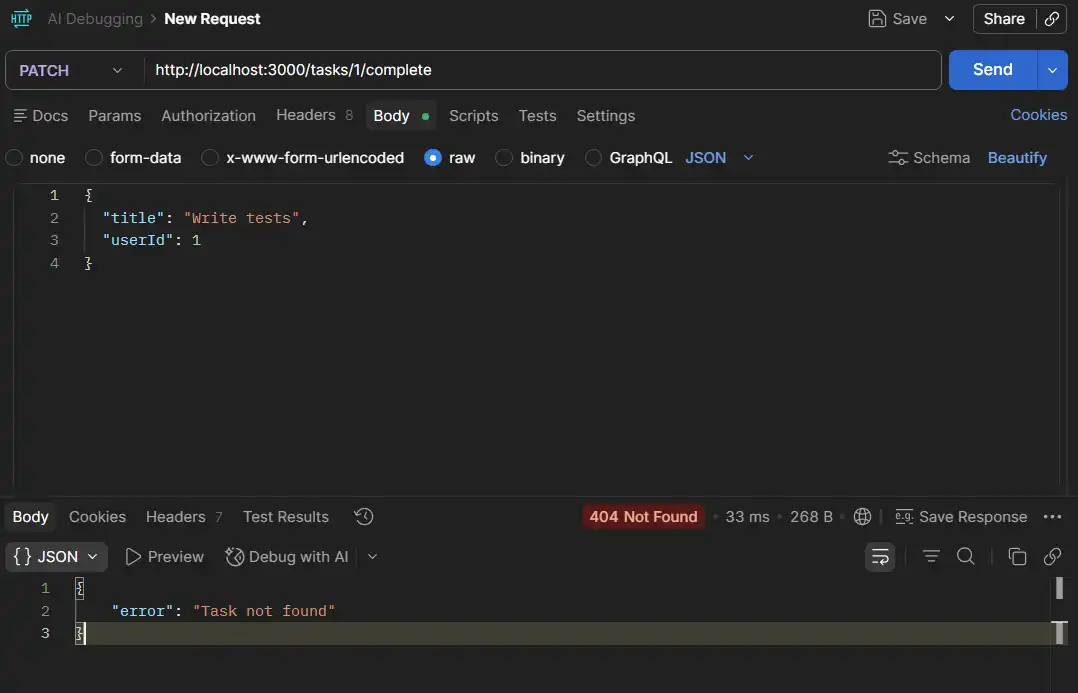
Use AI to Audit What You Cannot See
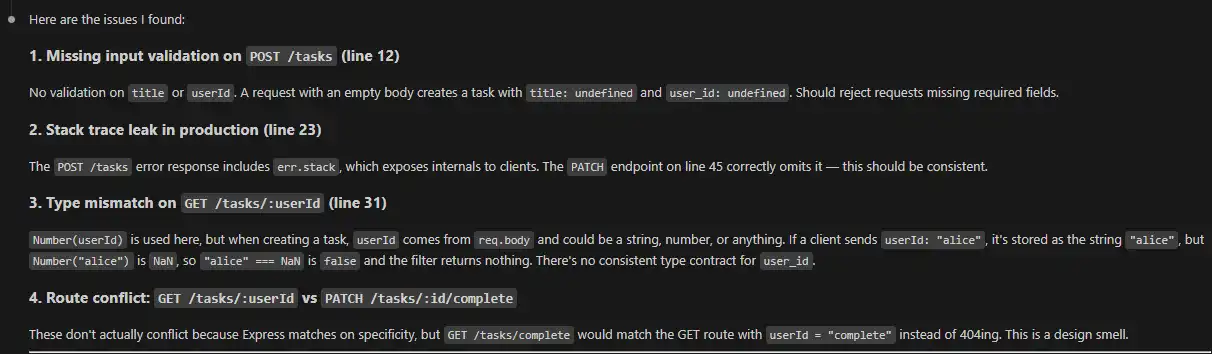
Once all three bugs are fixed, ask the AI to review the whole file proactively.
- Prompt: "Review this entire Express app for type mismatches, missing input validation, or any other bugs you can spot."
- What AI surfaces: No validation on POST
/tasks, sending an empty body would store a task withtitle: undefinedanduser_id: NaNsilently. This is a bug you would only catch in production.
The manual workflow above covers one developer, one bug, one fix. That is the entry point. But debugging in real engineering teams is not a single-developer activity.
Code changes constantly, multiple people push fixes simultaneously, and every fix carries the risk of breaking something that was already working.
Debugging at that scale requires more than an AI tool that explains errors. It requires a system that validates fixes across every layer automatically, before broken code reaches production.
When a bug is fixed in the API, but the same change silently breaks the UI, or when a fix passes unit tests but corrupts database state under concurrent load, a single-layer debugging tool misses it entirely.
This is the gap KaneAI by TestMu AI (formerly LambdaTest) is built to close.
Where KaneAI Fits in AI Debugging?
KaneAI is the world’s first GenAI-native testing agent that simplifies AI test automation by enabling debugging, planning, authoring, and execution through natural language, no technical expertise required.
It covers every layer where a bug can hide in a single workflow:
- API Testing: Assert request payloads, response bodies, and status codes. Capture full HAR logs per run for network-level traceability on failures that only appear under specific API response conditions.
- UI Testing: Author and run end-to-end web and mobile tests in natural language. A fix that passes the API layer but breaks the UI is caught before it reaches users. For teams debugging UI issues on real devices, Chrome remote debugging provides device-level visibility that emulators cannot replicate.
- Database Validation: Verify database state directly against query results. A silent write failure that returns a 200 is not invisible here.
- Self-Healing Tests: When a fix changes a locator, a response field, or a flow, KaneAI updates the affected test steps automatically rather than letting the suite break silently after every code change.
- PR Validation: A single
KaneAI Validate this PRcomment triggers a full agentic testing cycle. - Jira Integration: When KaneAI surfaces a failure, it files the bug to Jira with one click, keeping the entire fix loop inside one workflow rather than switching between tools.
KaneAI analyzes the code diff, generates test cases from the actual business logic, runs them in parallel across browsers and devices, and posts root cause analysis with an approval recommendation directly in the pull request.
The manual track is how you understand a bug. KaneAI is how you confirm the fix is complete, across every layer, on every code change, without a developer running tests by hand each time.
You can explore the Advanced testing offered by KaneAI API Testing & Network Assertions, which allows you to validate both frontend behavior and backend responses in a single test flow.

What Are the Tools Used for AI Debugging?
According to the Stack Overflow 2025 Developer Survey, 84 percent of developers are using or planning to use AI tools rather then tradition debugging tools.
The tools below address both sides of that reality: using AI with traditional debugging practices together to fix faster, while building in the verification step that the data says developers still need.
Core AI Debugging Tools
These AI debugging tools are purpose-built for the debugging lifecycle. Their primary function is bug detection, root cause analysis, and fix generation, not code completion or general assistance.
- ChatDBG: Integrates with Python debuggers like
pdbandlldb. When a program crashes, it explains the root cause in plain language and suggests a fix. Best for stack overflow errors, memory issues, and type failures. - Rookout: Lets developers collect data from live applications without redeploying. It inserts non-breaking breakpoints and uses AI to correlate data with known failure patterns. Best for bugs that only reproduce in production.
- Lightrun: Works similarly to Rookout with dynamic observability instrumentation. Its AI layer generates root cause hypotheses from collected runtime data. Strong integration with IntelliJ and VS Code.
- TestSprite: It is an autonomous debugging and testing platform. It takes product intent from PRDs, generates test plans, and executes them in isolated cloud sandboxes. Built for teams using AI code generation who need a reliable validation loop.
AI-Assisted Code Debugging Tools
These AI debugging tools integrate into the development environment and provide contextual debugging help as developers write and review code.
They do not operate autonomously, but significantly reduce the time to identify and fix issues.
- GitHub Copilot Chat: Provides inline debugging inside VS Code and JetBrains IDEs. Paste an error, ask what went wrong, get a fix in plain language.
According to a 2023 arXiv study by Peng et al., developers using GitHub Copilot completed tasks 55.8% faster (p = 0.0017, 95% CI: 21–89%).
- CodeRabbit: Scans pull requests and leaves contextual comments on bugs, logic errors, and security issues before code merges. Catches issues at the source rather than in production.
- Snyk Code: Scans codebases in real time using semantic analysis and ML-based pattern recognition. Flags security vulnerabilities, logic flaws, and race conditions as developers write code. Integrates directly with GitHub, GitLab, and VS Code.
- Amazon CodeWhisperer: Provides real-time security scans and inline bug suggestions during active development. Best for teams already in the AWS ecosystem.
Case Study: AI Debugging in Action
AI debugging produces measurable results when applied to real engineering problems.
The two case studies below show where it works and where its limits are.
Case Study 1: Financial Services Bot Debugging with LangSmith
A financial services firm used the LangSmith AI Agent Observability tool on their customer support bot. By applying AI trace analysis to identify memory retrieval bottlenecks and inefficient prompt templates, they reduced response time from 5 seconds to 3.5 seconds and cut the error rate from 12 percent to 3 percent. The same analysis done manually would have required weeks of log review.
What made it work: AI trace analysis pinpointed the exact failure points in the execution chain. Engineers reviewed the findings, validated them, and applied targeted fixes. The AI narrowed the search. The engineers closed it.
Case Study 2: Microsoft Research on AI Debugging Limits
A Microsoft Research study published in April 2025 tested nine AI models, including Claude 3.7 Sonnet and OpenAI o3-mini, against 300 real-world debugging tasks from the SWE-bench Lite benchmark.
Even the best-performing models failed more than half the tasks. The gap was attributed to models skipping sequential reasoning in favor of pattern matching and failing to correctly invoke debugging tools step by step.
What it means for teams: AI debugging works reliably on pattern-based bugs such as type mismatches, naming errors, and schema failures. It struggles with bugs that require understanding system behavior, concurrency, or architectural context.
This gap grows in agent-to-agent testing, where one AI validates another, and errors become harder to trace, and verification becomes important.
Where Does AI Debugging Deliver Consistent Results?
AI debugging does not perform equally across all bug types. It excels at pattern-based, repeatable failures where training data provides a strong signal.
The following are where teams see the most reliable gains.
- Real-Time Code Correction: Tools like Cursor and GitHub Copilot catch syntax errors, logic flaws, and security vulnerabilities as code is written, shifting detection to the earliest point in the lifecycle.
- Automated Debugging Agents: Cursor's Debug Mode and Copilot Chat scan codebases, generate multiple hypotheses, and propose fixes. The developer reviews each rather than generating them manually.
- Self-Healing Code: Code Interpreter in ChatGPT writes code, executes it, observes the failure, and revises automatically. Effective for prototyping and script-level work.
- Trace Analysis for AI Agents: Leverages the latest systematic debugging approach introduced by Microsoft using the AgentRx framework that improved failure localization by 23.6 percent and root cause attribution by 22.9 percent over standard prompting by analyzing full execution traces.
- Interactive Debugging: Developers describe bugs conversationally to tools like Copilot Chat and refine the diagnosis through iteration. Particularly effective for developers new to an unfamiliar codebase.
The common workflow across all these tools:
- Detection: AI monitors logs, metrics, or feedback to spot anomalies early.
- Analysis: AI scans code or traces to pinpoint the origin of the issue.
- Fix Proposal: AI suggests a modification with a root cause explanation.
- Verification: Developer reviews and tests the fix. Non-negotiable. The tools that work best make verification easy, not the tools that try to eliminate it.

Conclusion
This technology is not a replacement for engineering expertise. It is a force multiplier for the parts of debugging that are time-consuming rather than intellectually hard: reading thousands of log lines, pattern-matching across error variants, generating regression tests for known failure modes, and explaining unfamiliar stack traces.
The teams getting the most value from AI tools for developers treat AI as the first pass, not the last word. They use it to narrow the search space, generate hypotheses, and surface candidates, then apply engineering judgment to verify, validate, and ship.
Used that way, the results are real. Investigation time drops. Regression coverage expands. Engineers spend less time on the mechanical parts of debugging and more on the problems that actually require human understanding.
The failure mode to avoid is clear: treat AI outputs as conclusions, skip verification, and deploy fixes without understanding why they work. That converts a productivity tool into a liability.
Start with the highest-friction part of your current debugging workflow. If it is log triage, start there. If it is regression test generation after fixes, start there. Teams looking to extend this into load and latency scenarios can explore AI performance testing as a natural next layer. Narrow adoption produces faster feedback than broad deployment.
Citations
- The Debugging Mindset
- 2025 Stack Overflow Developer Survey
- Systematic debugging for AI agents: Introducing the AgentRx framework - Microsoft Research
- AI models still struggle to debug software, Microsoft study shows | TechCrunch
- AI Agent & LLM Observability Platform - LangSmith
- API Testing & Network Assertions | TestMu AI (Formerly LambdaTest)


Frequently asked questions
Did you find this page helpful?
More Related Hubs
TestMu AI forEnterprise
Get access to solutions built on Enterprise
grade security, privacy, & compliance
- Advanced access controls
- Advanced data retention rules
- Advanced Local Testing
- Premium Support options
- Early access to beta features
- Private Slack Channel
- Unlimited Manual Accessibility DevTools Tests