
Power Your Software Testing with AI Agents and Cloud
The Native AI-Agentic Cloud Platform to Supercharge Quality Engineering. Test Intelligently and Ship Faster.


- TestMu AI (Formerly LambdaTest)
- /
- Learning Hub
- /
- Flaky Tests: Root Causes, Detection, and How to Fix Them
Flaky Tests: Root Causes, Detection, and How to Fix Them
Flaky tests pass and fail on the same code. See the research-backed causes, measured flake rates from real runs, and retry and quarantine policies.
Last Updated on:
On This Page
- What Are Flaky Tests?
- What Are the Causes of Flaky Tests?
- How Do You Detect Flaky Tests?
- How Do You Manage Flaky Tests?
- How Do You Fix Flaky Tests?
- How Do You Keep a Test Suite Flake-Free?
- What Does a Flaky Test Dashboard Actually Show You?
- How Is AI Changing Flaky Test Management?
- What Are the Key Takeaways on Flaky Tests?
A flaky test produces different results on the same code, passing on one run and failing on the next, with no change to the application, the test, or the environment.
That non-determinism is what separates a flaky test from a real failure. It is also why a rerun looks like a fix while the underlying cause survives untouched.
The cost is measurable. Atlassian's engineering team traced as much as 21% of master build failures in its Jira Frontend repository to flakiness.
Roughly 15% of Jira backend repo failures came from the same source, forcing reruns that waste over 150,000 hours of developer time each year.
This guide covers where flakiness actually comes from, how to detect it before it reaches your pipeline, and the retry and quarantine policies that keep a suite trustworthy.
Overview
A flaky test passes and fails on identical code. Fix it by removing the source of non-determinism: replace fixed sleeps with condition-based waits, isolate shared state, and control test data. Retries and quarantine buy time to investigate, but only a root-cause fix removes the flake for good.
Where Does Flakiness Actually Come From?
The largest empirical study of the problem classified every fix it found into these categories.
- Async Wait: 45% of studied fixes. The test makes an asynchronous call and reads the result before it arrives.
- Concurrency: 20% of studied fixes. Threads interact badly, and 97% of those failures touched memory objects, not files or databases.
- Test Order Dependency: 12% of studied fixes. Outcome depends on run order, so a suite passes sequentially and fails in parallel.
- Flaky from birth: 78% of studied flaky tests were flaky when first written, making this an authoring defect rather than gradual decay.
How Do You Detect and Contain It at Scale?
Detection is a frequency question, not a single-run question: rank tests by how often they fail across history rather than reacting to one red build. TestMu AI Test Insights does this with failure-frequency analysis and agentic root cause analysis, while HyperExecute absorbs transient failures using regex-scoped retries so real assertion failures still break the build.
What Are Flaky Tests?
A flaky test returns inconsistent results across runs of identical code, passing once and failing the next time, which makes each failure unreliable as a signal about the application itself.
The practical difficulty is not defining flakiness, it is telling it apart from the two things it resembles. Misclassify once and you either chase a bug that does not exist or ship one that does.
| Type | Behaviour on unchanged code | What it is telling you |
|---|---|---|
| Flaky test | Passes sometimes, fails sometimes | The test is non-deterministic. The defect is usually in the test. |
| Genuine failure | Fails consistently | The application is broken, or the assertion is wrong. |
| Brittle test | Passes consistently until a small unrelated change breaks it | The test is over-coupled to implementation detail. It is deterministic, just fragile. |
Brittle and flaky get used interchangeably and should not be. A brittle test gives the same answer every time on the same code, so it is reproducible and straightforward to debug.
Flaky tests will not even reproduce reliably. That is precisely what makes them expensive.
The Fastest Way to Recognize Flaky Tests
Before reaching for tooling, most flakiness announces itself through a handful of recognizable symptoms in CI.
| Symptom you see in CI | What it often indicates | What to do next |
|---|---|---|
| Passes on rerun without code changes | Non-determinism (timing/state/environment) | Confirm the flip rate, then classify the cause |
| Timeouts / "element not ready" | Async wait mistake, unstable UI state | Replace sleeps with condition-based waits |
| Fails only in parallel runs | Shared state, ordering dependency, thread/process interaction | Isolate state + randomize order to surface hidden coupling |
| Hangs / "Jest did not exit" | Leaked async handles (sockets, DB, timers) | Use leak debugging flags; fix teardown |
| UI clicks intercepted / flaky UI actions | Animations, overlays, or an unstable DOM | Use actionability/auto-wait features or explicit waits |
What Are the Causes of Flaky Tests?
Flaky tests come mostly from asynchronous waits, thread concurrency, and test order dependency, which together caused 77% of the flaky-test fixes in the largest empirical study of the problem.
Most articles list causes by intuition. Better evidence exists. In An Empirical Analysis of Flaky Tests, Luo, Hariri, Eloussi and Marinov classified the root cause of every fix they found.
Their sample was 201 commits that fixed flaky tests across 51 Apache Software Foundation projects. Three categories accounted for 77% of the 161 classified commits.
These shares are worth knowing before you start debugging, because they tell you which hypothesis to test first instead of working down a generic checklist. For the end-to-end version of that loop, see debug E2E test failures.
| Root cause | Share of fixes | What it looks like in your suite |
|---|---|---|
| Async Wait | 74 of 161 (45%) | Test makes an async call and reads the result before it lands |
| Concurrency | 32 of 161 (20%) | Threads interact in an undesirable order |
| Test Order Dependency | 19 of 161 (12%) | Outcome depends on the order tests execute in |
| Seven other categories | Remaining 23% | Resource leaks, network, time, randomness, floating point, IO, unordered collections |
1. Async Wait: 45% of Flaky Test Fixes
The test triggers an asynchronous operation, then reads the result without properly waiting for it. A fixed sleep is the usual culprit.
That sleep encodes an assumption about how long the application takes. The assumption breaks the moment CI is busier or the network slower than the day the test was written.
Two findings from the same study make this category unusually tractable. About a third of Async Wait flaky tests (34%) use a simple method call with time delays to enforce ordering.
Separately, 85% of them do not wait on any external resource and involve only a single ordering. Most are therefore fixable by replacing one sleep with one condition.
2. Concurrency: 20% of Flaky Test Fixes
Test non-determinism caused by threads interacting badly, separate from asynchronous calls. The study found 97% of concurrency failures came from concurrent access to memory objects, not files or databases.
Almost all of them reduced to just two threads.
That narrows reproduction considerably. When a test fails only under load, two threads touching one in-memory object is where I start, well before instrumenting the database.
3. Test Order Dependency: 12% of Flaky Test Fixes
The outcome depends on the order in which tests run, so a suite passes sequentially and fails once you parallelize it. Parallel execution does not create this flakiness; it exposes coupling that was always there.
Luo and colleagues found that 47% of test-order-dependency flaky tests were caused by dependency on external resources, which is why cleaning up in-memory state alone often fails to fix them.
4. Environment, Data, and Resource Leaks
The remaining 23% spans resource leaks, network dependence, time and time-zone handling, randomness, floating-point precision, and iteration over unordered collections.
Tests reading shared or mutable fixtures belong here too. If two tests can write the same record, the one running second inherits a different world.
5. Most Flaky Tests Are Flaky From Day One
78% of the flaky tests studied were flaky the first time they were written. They did not decay as the codebase evolved. They shipped broken and stayed that way until someone noticed.
That reframes the problem. Periodic suite audits catch flakiness late and expensively.
Review-time scrutiny of new test cases catches most of it at the cheapest possible moment, specifically checking for fixed sleeps, shared fixtures, and order assumptions.
That single habit does more to prevent flaky tests than any amount of tooling applied after the fact, and it is the one best practice worth enforcing in code review.
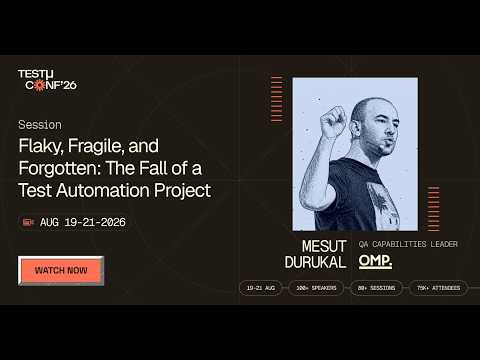
In this TestMu Conf 2026 session, Flaky, Fragile, and Forgotten: The Fall of a Test Automation Project, Mesut Durukal walks through how the tests in his own repository ended up in that state, and how to avoid falling into the same trap.
How Do You Detect Flaky Tests?
Detect flaky tests by rerunning failures on unchanged commits and recording which ones flip to pass, then ranking every test by how often it fails across weeks of execution history.
A flaky test is invisible to any single run, because by definition it sometimes passes. Detection is a question about history, not about the last build.
Every technique below accumulates enough test execution history to tell noise from signal.
- Rerun failures automatically and record which flip to pass on an unchanged commit. The flip rate is your flakiness metric.
- Track failure frequency per test across weeks, not per build. A test failing 4% of runs never looks broken once.
- Randomize execution order on a scheduled job. Order dependency stays hidden while the running order happens to be favourable.
- Run the suite under deliberate resource pressure. Concurrency flakiness surfaces under contention, and a quiet CI machine hides it.
- Annotate known-suspect tests so their history is queryable, tying each annotation to a ticket so the list stays a work queue.
- Wire detection into your CI/CD integrations so the flake report lands where the team already looks.
One caution on rerun-based detection. A test that flips to pass is confirmed flaky, but a test that fails twice is not confirmed genuine.
Environment-dependent flakiness reproduces reliably inside the broken environment. That is exactly why per-browser and per-device breakdowns matter during triage.
How Do You Manage Flaky Tests?
Manage flaky tests with a written policy that reviews new tests at merge time, ranks them by failure rate, and quarantines each one with an owner and a deadline.
Detection tells you which tests are unreliable. Management decides what happens between finding one and genuinely fixing it.
Without a written policy, that gap fills with reruns. The strategies to handle flaky tests below give that policy a shape.
Quarantine is the part of that policy most often applied without rules. Our guide to the quarantine test covers the entry and exit criteria, and why a clean streak alone does not prove a test was fixed.
1. Review New Tests for Flakiness Before They Merge
Because 78% of flaky tests are flaky from the day they are written, code review is the cheapest place to catch them.
Add three questions to your test review checklist. Does this test use a fixed sleep? Does it touch state another test writes? Does it assume a particular run order?
Whether an unreliable test should be allowed to block a merge at all is a separate decision, and it depends on your measured flake rate. Our guide to E2E tests in pull requests maps that rate to whether the suite belongs as a required check, a smaller gating subset, or an advisory one.
2. Rank by Failure Frequency, Not by Yesterday's Build
A single red run says nothing about stability. Rank every test by how often it has failed across execution history, and the chronic offenders separate themselves from the noise.
Whatever surfaces that ranking, treat it as a prioritized candidate list. The fix stays a human decision.
3. Debug Flaky Tests With Correlated Logs
Root cause analysis is hard because flaky failures are not reproducible on demand.
Agentic RCA in Test Insights correlates network, console, and framework logs to propose which step is the probable primary cause and which are cascading symptoms.
Each event in the timeline gets labelled accordingly. Treat the output as a strong lead to confirm, not a verdict.
4. Quarantine With an Expiry Date
When a flaky test cannot be fixed immediately, take it off the CI/CD critical path while it is investigated.
Quarantine only works with a ticket, a named owner, and a deadline attached. A quarantine list with no expiry is a slower way of deleting tests.
5. Document Every Resolution
Capture the root cause, the environment conditions, the fix, and the commit for every resolved flaky test.
The next engineer hitting a similar failure starts from precedent instead of a blank page. Repeated entries in one category expose where the systemic problem sits.
6. Make Ownership Cross-Functional
A timing-dependent test may be reporting an unstable API owned by the backend team. An environment-specific failure may be infrastructure drift.
Assigning every flake to QA guarantees the ones caused elsewhere never get fixed. Route by root-cause category using shared per-browser and per-device breakdowns.

Note: Run your suite across 3,000+ browser and OS combinations and see which tests fail most often. Start free with TestMu AI
How Do You Fix Flaky Tests?
Fix flaky tests by removing non-determinism at its source, replacing fixed sleeps with condition-based waits, isolating shared state between tests, and scoping retries to transient errors.
Fixes map to the cause categories above. Since Async Wait is the largest single category at 45%, the sleep-to-explicit-wait conversion is where most teams get the biggest return. For the design-level version of that mapping, this guide to testing patterns pairs flakiness causes like shared state, hard waits, and brittle selectors with the named pattern that removes each, across 11 patterns with code examples.
Replace Fixed Sleeps With Condition-Based Waits
Here is a flaky test example, using the AJAX form on the Selenium Playground. The test case submits a form, then sleeps for a fixed interval before asserting on the response.
// Flaky: the sleep encodes an assumption about response time
await driver.findElement(By.id("btn-submit")).click();
await driver.sleep(900);
const text = await driver.findElement(By.id("submit-control")).getText();
if (!/successfully/i.test(text)) throw new Error("submission failed, saw: " + text);
What That Sleep Value Actually Does, Measured
I ran this exact test on TestMu AI cloud on Chrome and Windows 11, changing only the sleep duration, five runs per value. The numbers are why tuning a sleep never converges.
| Fixed sleep | Runs passed | Observed flake rate |
|---|---|---|
| 600 ms | 0 of 5 | Deterministic failure, not flaky |
| 900 ms | 3 of 5 | 40% |
| 1200 ms | 4 of 5 | 20% |
| 1500 ms | 5 of 5 | 0% across this sample |
| Explicit wait | 6 of 6 | 0% across this sample |
The failing runs did not throw a cryptic timeout. They read the element successfully and got the intermediate state, "Ajax Request is Processing!", instead of the success text.
That is the Async Wait signature. The assertion ran against a real element at the wrong moment.
Note the shape of the curve. There is no clean boundary between "too short" and "safe", only a band where the test fails sometimes.
A sleep tuned to pass on a developer laptop sits inside that band on a loaded CI runner. That is why this defect surfaces in CI and not locally.
// Stable: wait for the state you actually need, with a generous ceiling
const el = await driver.wait(until.elementLocated(By.id("submit-control")), 15000);
await driver.wait(until.elementTextContains(el, "Successfully"), 15000);
The timeout is a ceiling, not a delay. A condition-based wait returns as soon as the condition is met.
Raising that ceiling to 15 seconds costs nothing on a healthy run while absorbing the slow tail. This version passed 6 of 6 runs on the same infrastructure.
Isolate State Between Tests
Order dependency and concurrency together account for 32% of flaky-test fixes, and both come down to shared state. Isolation is the single highest-value stabilization strategy here.
Give each test case its own fixtures, create the records it needs rather than reusing seeded rows, and tear down what you create. The same applies in pytest, JUnit, or any runner sharing a database.
Since 47% of order-dependency flakiness traces to external resources, in-memory cleanup alone will not be enough.
Randomize execution order in CI. A suite that only passes in one order is coupled, and randomization surfaces that coupling on your terms.
Stabilize the Environment
Every network hop between the test and the browser is a place a run can fail for reasons unrelated to your code.
Mock third-party services you do not own, and pin browser and OS versions so a silent upgrade cannot change behaviour underneath you.
Running on a consistent test environment removes a whole class of failures that look like application bugs.
Retry Narrowly, Never Blindly
A blanket retry makes the dashboard green and hides real regressions. A genuine assertion failure retries exactly as happily as a transient timeout.
Scope retries to error signatures you have already diagnosed as transient, and let everything else fail loudly. The playbook below shows how to configure that.

How Do You Keep a Test Suite Flake-Free?
Keep a suite flake-free with a flake-rate budget per suite, retries scoped to known-transient errors, fail-fast kept separate from flake handling, and every auto-muted test reviewed on a schedule.
Individual fixes do not hold unless the pipeline stops rewarding flakiness. This is the policy layer: what the pipeline does automatically, and what it refuses to paper over.
Step 1: Set a flake-rate budget per suite
Track flake rate as reruns-that-flip divided by total runs, per suite, per week.
Without a number, "we should fix flaky tests" competes with feature work and loses every sprint. With one, crossing the threshold becomes a defined trigger rather than an opinion.
Step 2: Scope Retries to Known-Transient Errors
On HyperExecute test orchestration, retries are declared in hyperexecute.yaml.
The important control is retryOptions, which matches against error output with a regex, so retries fire only for failures you have already classified as transient.
retryOnFailure: true
maxRetries: 2          # accepted range is 1 to 5
Two behaviours are worth knowing before you rely on this. Retries fire only when the test runner command itself exits non-zero.
If your runner exits 0 while marking results failed internally, no retry happens. Configuring Maven with testFailureIgnore set to true causes exactly that, so HyperExecute sees a pass and never retries.
Step 3: Separate Fail-Fast From Flake Handling
Fail-fast aborts a job once consecutive failures cross a threshold, and the counter resets on any pass.
That makes it a tool for catching a uniformly broken run, not an intermittently flaky one. Used as flake protection, it aborts good builds and misses the actual flakes.
Step 4: Auto-Mute Chronic Offenders, With Review
Auto-muting suppresses noise from tests that fail constantly so the signal from everything else survives.
Pair it with the failure-frequency report as a standing review queue. Otherwise muting quietly becomes permanent and coverage erodes without anyone deciding to reduce it.
Step 5: Use Auto-Healing for Locator Drift Only
Auto-Healing regenerates broken locators at runtime from the recorded DOM, enabled as a WebDriver capability rather than a YAML key.
It cannot recover from WebDriver initialization errors, and aggressive healing can mask a genuine bug where an element was supposed to disappear.
Use it to absorb cosmetic locator drift, not functional regressions.
No single flaky-test toggle exists here, and any vendor offering one is overselling. Flakiness is contained by combining scoped retries, auto-muting, auto-healing, and failure-frequency reporting.
Note: Configure retries, auto-muting, and fail-fast from one YAML file with TestMu AI HyperExecute. getting started with HyperExecute
What Does a Flaky Test Dashboard Actually Show You?
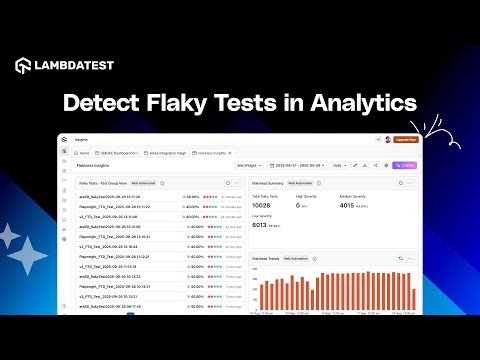
A flaky test dashboard ranks tests by failure frequency across history, clusters similar errors into fixable categories, and correlates logs to localize a likely cause for you to confirm.
The playbook above assumes something is producing that ranking and those correlated logs. On TestMu AI, that test intelligence layer is Test Insights, where applying smart tags to categorize and prioritize unstable tests is part of what it does and does not give you.
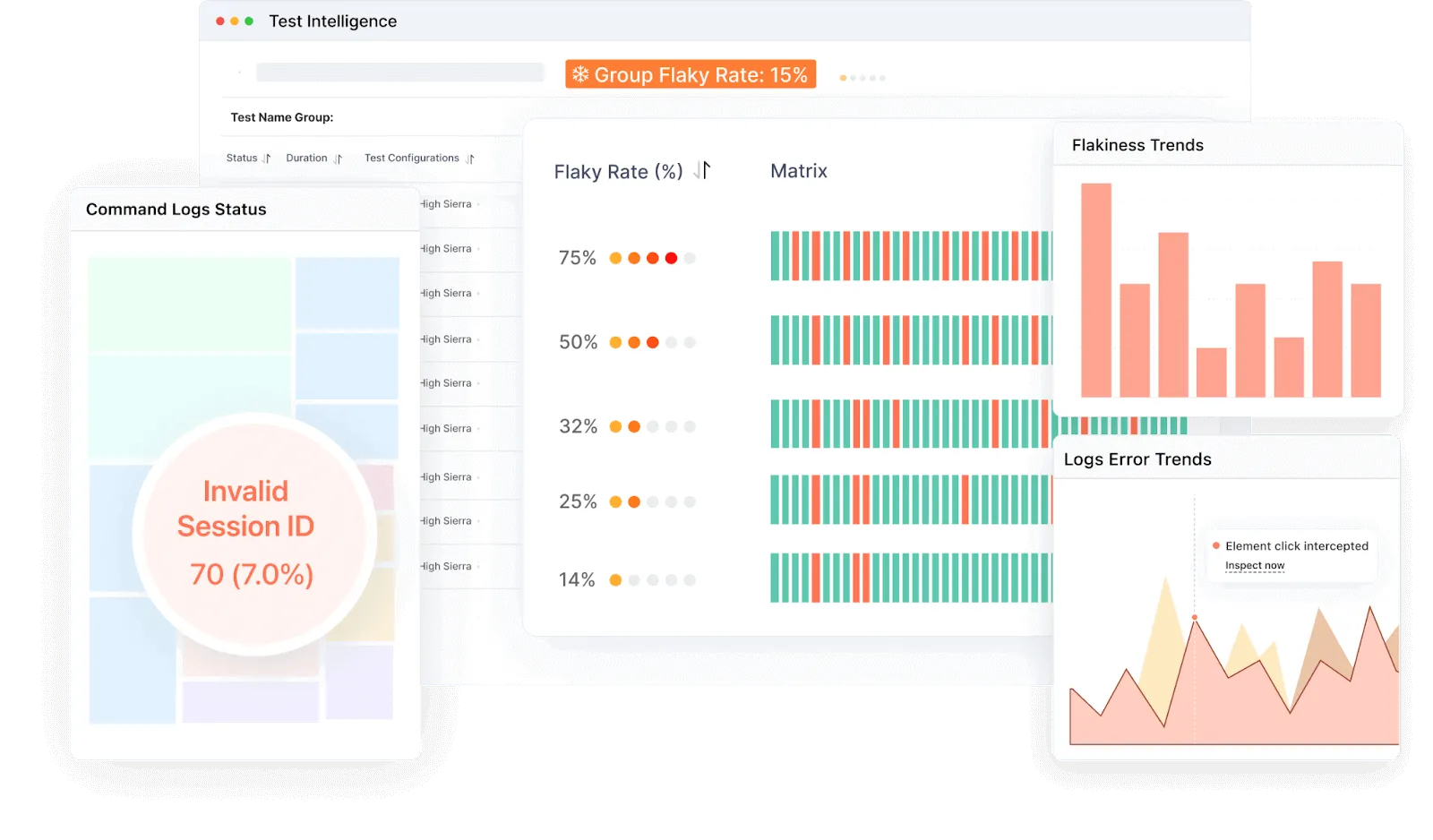
The dashboard above ranks the suite by failure frequency. Five capabilities in that view do the work for flakiness specifically.
- Failure-frequency analysis ranks tests by how often they fail across execution history, which is how chronic instability becomes visible rather than anecdotal.
- Error-message clustering groups similar failures into categories, so forty red tests resolve into two or three fixable buckets instead of forty investigations.
- Agentic root cause analysis correlates network, console, and framework logs, labelling each timeline step a likely cause or effect.
- RCA category trends aggregate those outcomes over time, showing which failure categories keep recurring so cleanup targets the biggest bucket.
- Browser, OS, and device breakdowns answer whether one configuration is failing disproportionately, which separates an environment problem from a test problem.
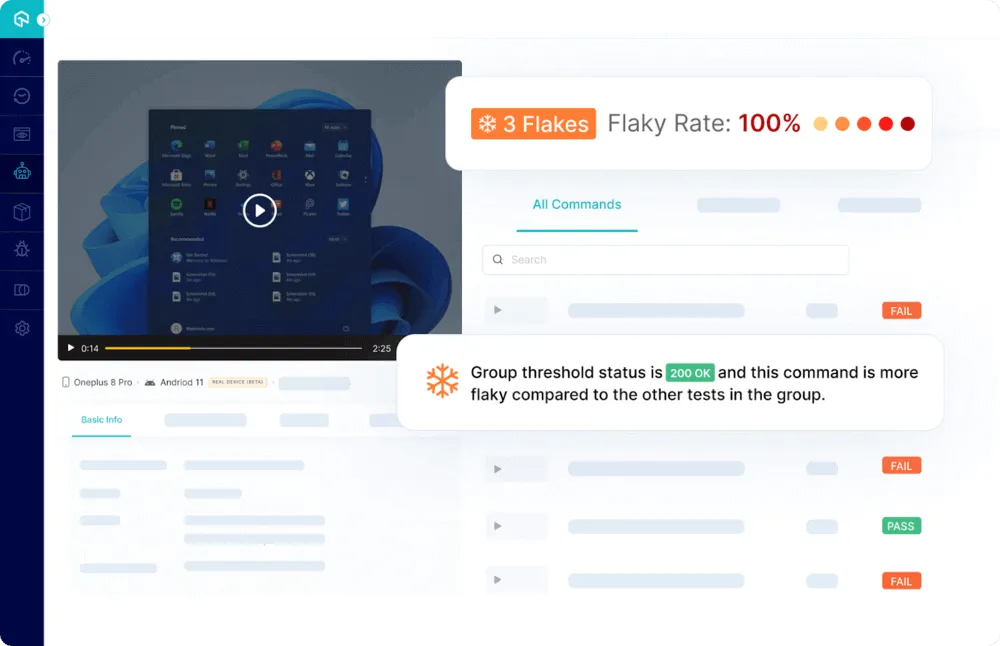
The per-environment view above is the one I reach for first, because a flake isolated to a single browser or OS is usually an environment problem wearing a test's clothing.
Two honest limits are worth stating. RCA is heuristic, producing a fast lead on the likely cause rather than a guaranteed verdict, so confirm before acting on it.
Detection is also where this layer stops. Suppression lives in the execution products, and the actual fix stays a human change to the test.
The analytics dashboard features documentation covers each widget and how to filter it.
On the authoring side, KaneAI test authoring creates and maintains tests from natural language.
Given that most flaky tests are flaky from birth, generated tests carry the same obligation as hand-written ones. Review them for fixed sleeps and shared state before merging.
Start with getting started with KaneAI to see how generated tests handle waits.

How Is AI Changing Flaky Test Management?
AI is changing flaky test management by sorting failures into product bugs, flaky tests, or environment issues, and predicting which tests will turn flaky.
Self-healing locators remove one common source of flakiness, broken selectors after UI changes, while failure clustering groups hundreds of red runs into a handful of root causes a team can act on.
AI can also hide real problems: a healed locator or an auto-retry can mask a genuine race condition. Our roundup of ai tools for preventing flaky tests compares the options.
What Are the Key Takeaways on Flaky Tests?
If you take nothing else from this guide, these are the points that change what you do on Monday.
- A flaky test passes and fails on identical code, which makes a rerun look like a fix when nothing has been fixed.
- Async Wait causes 45% of flaky-test fixes, concurrency 20%, test order dependency 12%, together 77% of studied commits.
- 78% of flaky tests were flaky the first time they were written, so review-time checks beat periodic suite audits.
- Fixed sleeps encode an assumption about response time; condition-based waits with a generous ceiling return as soon as the state is ready.
- Parallel execution does not create order-dependency flakiness, it exposes coupling that was already present.
- Blanket retries hide genuine regressions, so scope them to error signatures already diagnosed as transient.
- Quarantine needs a ticket, an owner, and a deadline, otherwise it is a slow route to deleting coverage.
- Rank by failure frequency across history rather than reacting to whichever test went red in the last build.
- Auto-healing absorbs locator drift but can mask a real bug when an element was genuinely supposed to disappear.
Author

Mythili Raju
Blogs: 56


Mythili is a Community Contributor at TestMu AI with 3+ years of experience in software testing and marketing. She holds certifications in Automation Testing, KaneAI, Selenium, Appium, Playwright, and Cypress. At TestMu AI, she leads go-to-market (GTM) strategies, collaborates on feature launches, and creates SEO optimized content that bridges technical depth with business relevance. A graduate of St. Joseph’s University, Bangalore, Mythili has authored 35+ blogs and learning hubs on AI-driven test automation and quality engineering. Her work focuses on making complex QA topics accessible while aligning content strategy with product and business goals.
Reviewer

Japneet Singh Chawla
Reviewer
Japneet Singh Chawla is an Engineering Manager at TestMu AI, where he leads a team driving HyperExecute, the AI-native Test Orchestration Cloud Platform, and integrations with Cypress, Provar, Tosca, and Selenium, improving test execution efficiency and driving adoption across 500+ enterprise clients. He also spearheaded zero-downtime deployments that cut release-related downtime by 90%, and mentors new engineers into productive contributors. He brings 9+ years of experience building and scaling distributed systems, SaaS platforms, and developer tools, with deep hands-on backend engineering across Golang, Python, Node.js, Kafka, and Redis. Earlier at Sumo Logic he built award-winning developer tools, including a VS Code Parser Linter, and at Indus Valley Partners he was a founding member of the Sentiment Analyzer team, building ML-powered solutions for financial clients. Japneet holds an MCA in Computer Science from GGSIPU.


Flaky Tests FAQs
Did you find this page helpful?
More Related Learning Hubs

TestMu AI forEnterprise
Get access to solutions built on Enterprise
grade security, privacy, & compliance
- Advanced access controls
- Advanced data retention rules
- Advanced Local Testing
- Premium Support options
- Early access to beta features
- Private Slack Channel
- Unlimited Manual Accessibility DevTools Tests