

Next-Gen App & Browser Testing Cloud
Trusted by 2 Mn+ QAs & Devs to accelerate their release cycles


- Home
- /
- Learning Hub
- /
- Selenium WebdriverIO Tutorial: A Comprehensive Guide, with Examples & Best Practices
Selenium WebdriverIO Tutorial: A Comprehensive Guide, with Examples & Best Practices
Learn WebdriverIO for web automation and empower yourself with in-depth knowledge for smooth execution.

Hari Sapna Nair
February 18, 2026
WebdriverIO is an open-source JavaScript-based automation testing framework for mobile and web applications. WebdriverIO allows you to write unit, component and even end-to-end tests directly within the browser to simulate user behavior and interactions.
With 8.6k Stars and 2.4k Forks on GitHub, it is one of the most popular JavaScript testing frameworks.
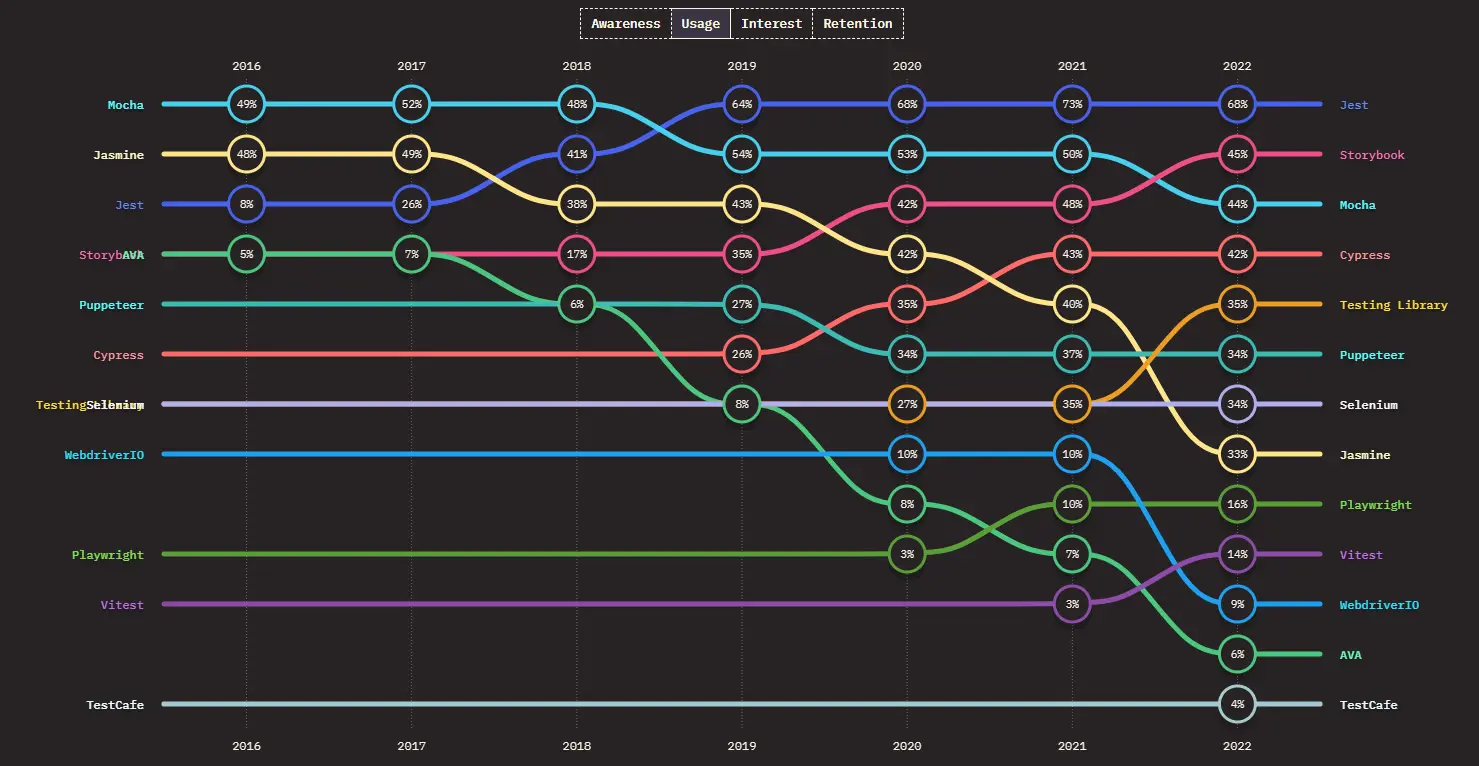
WebdriverIO allows you to run tests based on WebDriver, WebDriver BiDi, Chrome DevTools protocol, and Appium. It extends support to Behavior-Driven Development (BDD) and Test-Driven Development (TDD) frameworks, ensuring flexibility and compatibility with your workflow.
Selenium supports multiple languages like Java, Python, C#, etc., and WebdriverIO is tailored for JavaScript. This makes WebdriverIO a go-to choice for those familiar with JavaScript frameworks. Both frameworks have strengths, and the choice depends on the project's specific needs and the team's expertise.
1. Selenium WebdriverIO Tutorial with Example
WebdriverIO is a JavaScript-based test automation framework for browser and mobile applications, offering simplicity, flexibility, and extensive features. In this blog, we will delve into the core concepts of WebdriverIO, exploring its functionalities, features, architectures, and practical applications through examples.
2. Cross Browser Testing With WebdriverIO
WebdriverIO is a top choice for cross-browser testing due to its versatility, reliability, and comprehensive feature set. With WebdriverIO, testers can effortlessly execute tests across multiple browsers, ensuring consistent functionality and user experience across different platforms. This blog will discuss why WebdriverIO is the preferred choice for cross-browser testing and learn effective implementation techniques.
3. Run Your First Automation Script
Do you know the WebdriverIO setup is easier to follow than the Selenium testing configuration? You can configure many features manually, which is very beneficial for automation testing. In this blog, we'll cover the steps you need to follow to execute your first Test Automation Script using WebdriverIO, guiding you through its straightforward setup, from prerequisites to configuration.
4. Browser Commands For Selenium Testing
WebdriverIO browser commands are used to perform specific actions on the browser directly. In this blog, we will cover the ‘browser’ object and learn to effectively manage browser windows and page loads using WebdriverIO commands. We will also focus on the significant challenges you might face while working on your Selenium automation scripts in WebdriverIO.
5. Handling Alerts & Overlay In Selenium
Alerts and pop-ups are common on websites nowadays. They can be efficiently handled in Selenium with the help of WebdriverIO. In this blog on alert handling in Selenium, we'll show you how to handle alerts & pop-ups and overlay modals in WebdriverIO. We will also cover the alerts you will face during automation and the key points you must follow for alert handling in Selenium using WebdriverIO.
6. How To Use Selenium Locators?
In any automation testing framework, finding elements is the most fundamental activity. We must choose web elements carefully so that automation script execution can handle static and dynamic elements for stable test results. This blog will help you learn how WebdriverIO uses Selenium locators most uniquely.
7. Deep Selectors In Selenium WebdriverIO
Traditional selectors only have visibility into the main document's DOM structure and cannot penetrate the boundaries of the shadow DOM. So, to access elements within modern web applications built with technologies like Polymer or Angular, where shadow DOM encapsulation is commonly used, we use specialized selector strategies like deep selectors.
Follow this blog to learn how to use Deep Selectors in Selenium WebdriverIO.
8. Handling Dropdown In Selenium
Dropdowns are used on various websites to conserve space and guide user selections efficiently. And while performing automated browser testing, there will be plenty of times when you'll have to handle the dropdown menu.
Dive into this blog to master effective dropdown handling techniques and streamline your testing workflows.
9. How To Generate HTML Reports With WebdriverIO?
In test automation frameworks, robust reporting capabilities are indispensable for comprehensive project assessment. A well-rounded framework not only facilitates test case execution but also automates report generation, enabling a holistic view of project implementation. In this blog, we will delve into the intricacies of reporting in WebdriverIO, exploring its types, including Non-HTML Reporting and HTML Reporting.
10. Cypress vs WebdriverIO: Which One To Choose
Cypress and WebdriverIO are the top contenders in automated testing frameworks. While both offer robust functionalities, understanding their nuances is crucial for making an informed decision. This comprehensive blog will delve into Cypress and WebdriverIO, evaluating their features, strengths, and weaknesses to help you determine their suitability for diverse web applications.
Join us as we explore Cypress vs. WebdriverIO and navigate the intricacies of selecting the right automation testing solution for your needs.
11. WebdriverIO Appium Tutorial
WebdriverIO offers the ability to test both web and mobile applications. It is a plug-and-play framework that can be used with Selenium WebDriver for web automation testing and Appium for mobile automation testing. In this tutorial, we'll walk you through the process of automating tests for iOS mobile applications by harnessing the combined capabilities of WebdriverIO and Appium.
12. Certifications
You can unlock the power of automation testing with our comprehensive certification courses! Whether you're a beginner or an experienced professional, we offer a range of options such as Selenium 101, Selenium Java 101, Selenium Advanced, and many more.
These courses are designed to test your automation testing skills and propel your career forward. Explore these certifications today to elevate your expertise!
13. Automated Monkey Testing with Selenium & WebdriverIO
We use a testing strategy called Monkey testing to ensure software resilience against unexpected inputs and usage patterns. In monkey testing, software systems are subjected to random, unpredictable inputs, mimicking the behavior of a "monkey" randomly pressing keys or clicking buttons. In this blog, we will learn about monkey testing along with the implementation.
14. JavaScript Testing with Selenium and WebdriverIO
To expedite JavaScript testing execution, testers employ various methods to optimize the performance by speeding up the test and reducing debugging, execution, and maintenance time. Some optimization techniques include parallel testing, comprehensive error logging, utilization of headless browsers and drivers, etc. In this blog, we will learn about these techniques in detail.
15. Component Testing with WebdriverIO
As technology progresses, the landscape of web development continues to evolve, leading to the emergence of web components as a fundamental building block. With this evolution comes the necessity to refine testing methodologies to ensure robustness and reliability. In this context, WebdriverIO offers a potent solution for component testing to enhance stability and extend test coverage efficiently.
Let's explore how WebdriverIO enables effective testing practices tailored to the dynamic requirements of modern web development.


Frequently asked questions
Did you find this page helpful?
More Related Hubs
TestMu AI forEnterprise
Get access to solutions built on Enterprise
grade security, privacy, & compliance
- Advanced access controls
- Advanced data retention rules
- Advanced Local Testing
- Premium Support options
- Early access to beta features
- Private Slack Channel
- Unlimited Manual Accessibility DevTools Tests