

Next-Gen App & Browser Testing Cloud
Trusted by 2 Mn+ QAs & Devs to accelerate their release cycles


- Home
- /
- Learning Hub
- /
- What is QA Testing? Types, Tools, and Best Practices Explained
What is QA Testing? Types, Tools, and Best Practices Explained
Learn how QA testing helps ensure software quality and user satisfaction by applying various approaches and methodologies for effective QA testing.

Nazneen Ahmad
April 1, 2026
OVERVIEW
QA (Quality Assurance) testing is the part of the software development process that involves verifying and validating the quality of the software applications. It checks whether software applications meet the Software Requirement Specification (SRS) and develops as a bug-free app. This early identification and fixing of bugs reduce the cost of post-release fixes and maintain high-quality standards.
Overview
AI is playing a crucial role in modern QA testing, transforming how organizations approach software quality and testing efficiency. With its ability to automate complex tasks, predict defects, and enhance overall testing strategies, AI is making significant advancements in ensuring the best quality software.
Types of QA Testing Enhanced by AI
- Functional Testing: AI-driven testing tools ensure that all features work as specified by automating repetitive tests and identifying discrepancies.
- Regression Testing: AI helps maintain software integrity after updates by automatically verifying that existing functionality is unaffected by new code.
- Performance Testing: AI analyzes system performance under various conditions, automatically adjusting parameters to identify bottlenecks and performance issues.
- Non-Functional Testing: AI evaluates software's usability, reliability, and security, helping to identify potential vulnerabilities and performance issues before launch.
Best Practices for QA Testing Using AI
- Start Early with Automation: Incorporating AI from the beginning of the development process helps identify issues early, reducing costs in the long run.
- Combine Manual and Automated Testing: While AI automates repetitive tasks, manual testing should still be used for complex scenarios and exploratory testing.
- Use AI for Predictive Analytics: Leverage AI’s ability to predict defect trends and potential problem areas, ensuring a proactive approach to testing.
- Focus on Continuous Integration (CI) & Continuous Deployment (CD): Use AI-powered tools to integrate testing into the CI/CD pipeline, ensuring faster releases without sacrificing quality.
- Scalable Testing: As applications grow, AI allows for scalable testing, handling more devices, browsers, and configurations efficiently.
Key Benefits of AI in QA Testing
- Faster Testing Cycles: AI reduces manual work, enabling faster execution and the ability to run large volumes of tests in a shorter time frame.
- Cost Savings: By preventing defects early in the cycle, AI-driven testing reduces the long-term costs associated with post-release bugs and patching.
- Improved Accuracy: AI tools can process vast amounts of data to detect issues that may go unnoticed by manual testers.
- Enhanced User Experience: AI helps ensure that the application performs well across all environments, resulting in a more seamless and reliable experience for end users.
What Is QA Testing?
QA testing ensures the quality of a software application before release by checking its functionality, preventing issues, and confirming it meets user expectations. Unlike development, it evaluates the final product to ensure it performs as intended. The goal is to meet user requirements, fix bugs, and address specific challenges before launch.
QA Testing ensures software meets user requirements, predicts and corrects defects, verifies functionality, ensures UI/UX quality, and detects issues before release.
Key Benefits of QA Testing:
- Enhances User Experience: Ensure the software meets specified user requirements and expectations.
- Increases Reliability: Reduces software failures and unexpected behavior, boosting user satisfaction.
- Ensures Security: Identifies vulnerabilities to prevent data breaches and improve security.
- Mitigates Risks: Ensures compliance with regulations, reducing legal and security risks.
- Saves Costs: Prevents costly post-release issues, leading to long-term savings.
In a nutshell, QA testing aims to enhance the quality and efficiency of the software development process. Its ultimate purpose is to ensure high-quality applications that adhere to industry standards.

Austin Siewert
CEO, Vercel
Discovered @TestMu AI yesterday. Best browser testing tool I've found for my use case. Great pricing model for the limited testing I do 👏
2M+ Devs and QAs rely on TestMu AI
Deliver immersive digital experiences with Next-Generation Mobile Apps and Cross Browser Testing Cloud

Types of QA Testing
Organizations often combine manual and automation testing to evaluate software application quality. Understanding the various QA testing methods can help develop an effective QA plan.
Here are some QA testing types and their appropriate use in the software development process:
Functional Testing
Functional testing verifies that the software application works correctly and meets specified requirements. It is based on the software's functional specifications and ensures that all features function properly from the user's perspective.
It includes various types of tests, such as
- Unit Testing: This type of testing targets individual units or components of a program. It ensures that each unit functions correctly without errors. Developers typically conduct unit tests on smaller segments, such as a single method or class, while developing the application.
- Integration Testing: This type of testing involves combining multiple components to verify their interaction. Before releasing the software application, it helps identify issues between different modules or components. It also checks for module dependencies and confirms that all features work together properly.
- System Testing: This type of testing evaluates the entire software application to ensure it meets all the specified requirements. It is typically conducted when the software development process is nearing completion. The goal is to verify that the software interacts correctly with the supporting system and functions as expected in a complete and integrated environment.
- Acceptance Testing: It involves the comprehensive evaluation of the entire software application, from its design perspective to its internal functionalities.
- Smoke Testing: This type of testing involves verifying the application's basic functionality to confirm that major features operate as expected. Particularly valuable post-deployment of a new build, smoke tests determine if more comprehensive tests are necessary for the new environment and highlight failures that could cause rejection of a software release.
- Regression Testing: This type of testing validates that the software's intended operations continue to function correctly after enhancements or code adjustments. It ensures that new updates or modifications do not introduce bugs or negatively impact existing functionality.
- Sanity Testing: This type of testing assists testers in determining if new code changes or feature updates meet the required performance standards for extensive testing. If the software application crashes, it indicates instability, requiring additional builds to address the issues.
- Alpha Testing: This type of testing evaluates the quality and technical aspects of the software to ensure alignment with business requirements, ensuring successful software application functionality.
- Beta Testing: This type of testing is performed after alpha testing and before the final deployment. It occurs in real-world environments with a select group of end-users. The purpose is to identify any remaining issues or bugs and to ensure the software meets end-user needs and expectations.
- Risk-Based Testing: This type of testing prioritizes functionality testing based on organization priorities, with higher-priority items receiving testing precedence. High-priority test cases are executed first, followed by medium and low-priority functionality.
Non-Functional Testing
Non-functional testing helps perform tests unrelated to specific functions or features. It helps validate the software's performance, usability, reliability, and other quality attributes. This testing focuses on various conditions and ensures that it meets the specific standards or requirements that impact the user experience.
It includes various types of tests, such as
- Performance Testing: This type of testing ensures that the software application meets specified performance goals, like response time and throughput. It recognizes elements that impact performance, such as network latency, database transaction processing, data rendering, and server load balancing.
- Usability Testing: This type of testing involves reviewing the functionality of a website, app, or digital product by observing real users as they perform tasks. Usually performed by organization researchers, these tests occur in person or through remote sessions to gain insights into user behavior.
- Security Testing: This type of testing falls under software testing and identifies vulnerabilities within the system to ensure data and resources remain protected from potential intruders. Its purpose is to safeguard the software system and application, ensuring they are free from threats or risks that could result in loss.
- Load Testing: This type of testing ensures software application stability under different loads, equivalent to or less than the intended user load.

Note: Validate your application's quality over 3000+ browsers and OS combinations. Try TestMu AI Now!
Key Components and Metrics of QA Testing
Key components of QA testing contribute to high-quality and functional software applications. These components work together to provide a structured approach to QA testing.
- Test Strategy: A plan establishing principles to guide the entire software testing procedure. It provides a systematic method for the whole QA team to reach testing goals efficiently.
- Test Plan: It is a detailed and thorough document outlining the strategy, goals, timeline, resources, and overall approach needed to finish a project. Its core, a test plan, acts as a project's blueprint.
- Test Cases: It is a specific collection of inputs created to confirm software requirements. This manual gives in-depth guidance on writing effective test cases.
- Test Scripts: This is a set of instructions to verify the software's functionality. It is a component of automation testing, where automated tests are executed based on specific test scripts.
- Test Data: It refers to the input provided to a software program during test execution. This data interacts with the software and is used for positive testing to ensure functions produce expected results and negative testing to assess the software's ability to handle unusual or unexpected inputs.
QA metrics are crucial in QA testing as they provide a quantitative evaluation of the quality and effectiveness of the software development and testing process. The QA metrics lifecycle plays a key role in assessing the progress of the software development journey by analyzing, communicating, evaluating, and reporting the results from testing outcomes.
These metrics allow for simple QA task monitoring, enabling team efficiency verification to optimize the entire Software Development Life Cycle (SDLC).
Some of the significant QA metrics are as follows:
- Derivative Metrics: It plays a crucial role in identifying specific areas within the software testing process that require attention, allowing teams to implement effective strategies to enhance accuracy and overall effectiveness.
- Defect Category: It evaluates various aspects of software quality, including usability, performance, functionality, stability, and dependability. These metrics reveal the distribution of flaws across different quality criteria.
- Defect Severity Index (DSI): It verifies the impact of flaws on software development or specific components, helping evaluate software quality and the efficiency of testing team efforts.
- Test Coverage: It evaluates the extent to which the software's functionality is covered by testing, indicating the completion of testing activities and serving as a criterion for concluding testing.
- Defect Density: It's a metric that reveals the total defect count within a software application per unit of measurement, such as components, lines of code, function points, etc.
- Percentage of Critical Defects: It calculates the proportion of defects categorized as critical among the total defect count. These metrics provide insights into the severity of reported issues on the software application's functionality, usability, and safety.
- Percentage of Passed Test Cases: It measures the proportion of successfully passed test cases out of the total executed ones. It reflects the efficiency of the test cases that have uncovered bugs and showcases the software application's quality.
The QA metrics mentioned above are just a few; other QA metrics must be considered in the QA testing process. When the QA test process progresses, QA metrics guide the execution phase using quantitative measurements.
The testers use these metrics to measure the effectiveness of the test. When the QA test is completed, the metric’s results are combined into test reports that give a comprehensive overview of the QA test process.
Key Approaches to QA Testing
QA testing employs various approaches and testing techniques to ensure software quality. It is used to verify that the software aligns with functional, non-functional, and other business requirements.
Below are the two main approaches:
- Manual Testing
- Automated Testing
Manual Testing
In manual testing, there is no use of automation testing tools; rather, testers involved in the QA testing create test cases manually, evaluate the software, and deliver a final report. This approach takes a lot more time and is prone to error. To avoid such a problem, the QA analysts must actively participate in tasks like developing and running test cases.
There are various steps to achieve the manual testing process in QA testing:
- Test Planning: This is the initial phase where the QA testers familiarize themselves with user requirements and design documents. With this step, they determine how to identify test objectives, define the testing approach, and create a complete test plan. This plan overviews the testing methods, essential resources, and deadlines.
- Test Case Development: Subsequently, testers proceed to create the test cases. The manual test cases include explaining the steps to be followed, the expected outcomes, and any prerequisites or data requirements for testing.
- Configuration of Test Environment: Following the design of test cases, it becomes important to establish the test environment. This involves configuring the hardware, software, and network settings necessary for conducting the tests. It also involves installing applications, databases, web servers, or other components essential for test execution.
- Test Execution: With careful planning and setup completed, testers execute the test cases. They interact with the software application's user interface, ensuring its behavior aligns with the expected outcomes specified in the user documentation.
- Reporting and Analysis: Any issues detected during testing are documented and communicated to the relevant teams for resolution. Reports include screenshots, testing conditions, and detailed descriptions of the identified issues. Developers analyze the assigned issues and determine strategies for their prompt resolution.
- Test Closure: This is the final phase, where the testers evaluate the test execution results, analyzing the achievement of testing objectives. They re-evaluate issues addressed by developers and close them upon resolution. They then generate comprehensive test summary reports that depict test coverage, defect count, and other metrics for stakeholders.
Automated Testing
Automation testing tools are used to execute test cases, speeding up the process and reducing human error. Testers create scripts that automate test execution, which are collections of commands run on specific platforms to verify functionality or expected results.
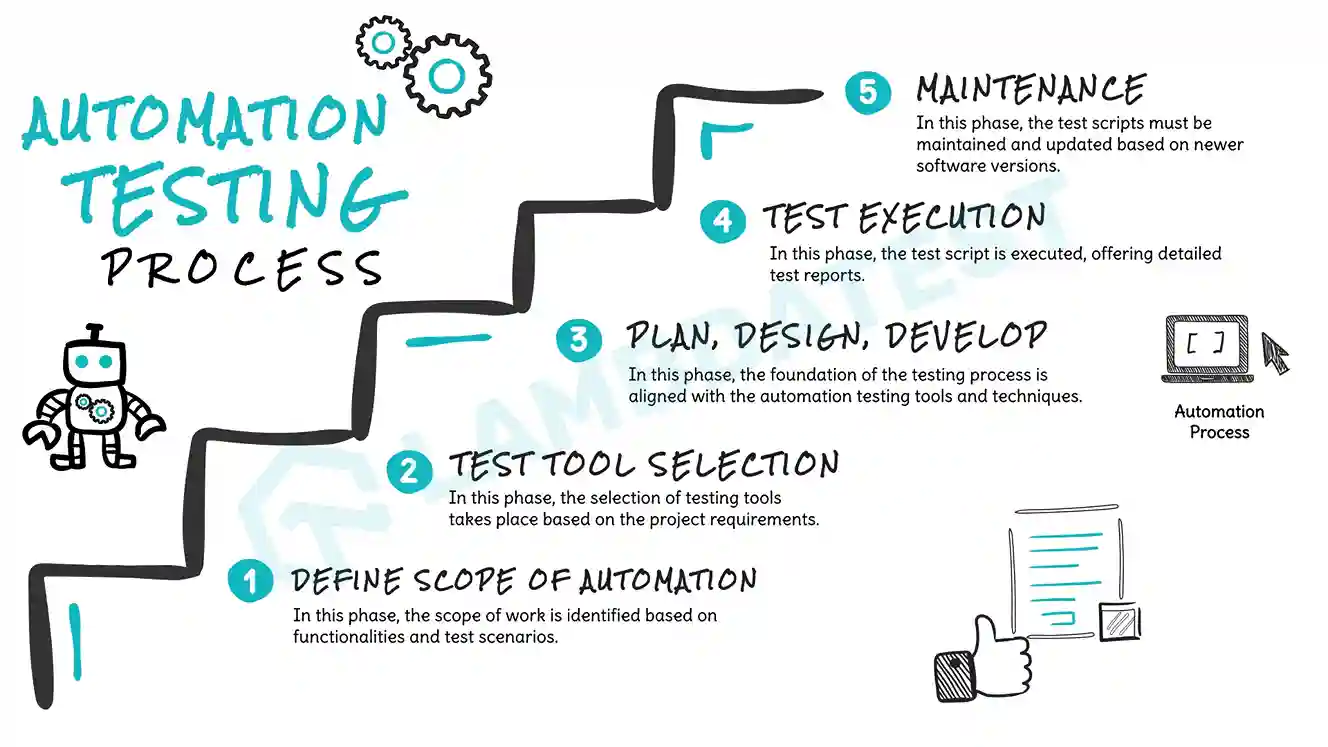
There are various steps to achieve QA automation in QA testing:
- Define Scope: You must clearly outline the scope of your automation testing efforts. Identify specific functions and sections of your application where automation will be most beneficial.
- Select the Correct Automation Testing Tools: To automate the test, select the tool that meets your project needs and works well with your platforms.
- Plan, Design, Develop: Develop a comprehensive plan that outlines the scope and goals of your testing. Design your automation code focusing on reusability and maintainability, and write automation scripts targeting the specific functions identified.
- Test Execution: Run your automated tests thoroughly to cover the specified scope. Carefully monitor the test runs to ensure accurate results. Quickly address any issues that arise and update the scripts as necessary.
- Maintenance: This is needed for automation suites to adjust to software changes. Consistently upgrade and improve your automation suite to adapt to changing project needs, ensuring its durability and efficiency.
QA Testing Methodologies
QA testing follows different methodologies that offer a standard framework to find and fix any flaw in the software application. You must understand the crucial methods of QA testing so that you can choose the right one that best meets your requirements for a software project. Some important QA testing methodologies are as follows:
- Waterfall Model: This methodology is a conventional, sequential method for developing software applications. It breaks down the overall procedure into separate stages, each having defined objectives and outcomes. The outcome of each step is used as the starting point for the next, establishing a continuous progression from collecting requirements to implementing and sustaining the final software applications.
- Agile Model: This methodology mainly focuses on flexibility, adaptability, and continuous user feedback through an iterative and incremental approach. It requires teamwork with diverse skills and divides the development process into smaller cycles known as iterations.
- Spiral Model: This methodology integrates iterative development with a systematic, controlled risk-based strategy. It has similarities with the Agile Model due to its iterative approach and focus on detecting defects early.
- V Model: This methodology is often considered an extension of the Waterfall Model. In this model, development and testing activities are performed side by side in a V shape. Development and testing phases run in parallel, with testing starting at the unit level and progressing towards system integration.
- Iterative Model: This methodology does not require a complete set of requirements at the outset. The development process begins with the requirements for a functional part, which can be extended later. The process is repeated, allowing for new product versions with each cycle. Each iteration develops a portion of the system and then integrates with the previously developed components.
It is important to note that the QA testing models mentioned are not one-size-fits-all. Each SDLC model has its benefits, limitations, and purposes. Therefore, when selecting the right SDLC models for your project, you should consider its nature, user requirements, project schedule, and specific needs.
QA Testing Tools
Software testing tools are specialized applications that help in different parts of the software testing process. These tools offer a structured environment and features that help develop, execute, and manage test cases and analyze test results.
Below are some top test automation tools for running your tests. The selection of an automation tool, however, should be guided by the unique testing needs of your project.
- TestMu AI: It is a cloud-based AI-native test execution platform that lets you conduct manual and automated tests at scale with over 3000+ browsers, real devices, and OS combinations. With this platform, you can test websites on different browsers, which supports various automation testing frameworks for web and mobile app testing. It seamlessly integrates with popular frameworks like Selenium, Playwright, Cypress, Puppeteer, Appium, Espresso, XCUITest, and more.
Why prefer TestMu AI over other cloud platforms:
- Faster Execution: It offers 70% faster execution with its HyperExecute feature.
- Browser Compatibility: It allows you to test on various browsers, ensuring browser compatibility.
- Automation Support: Run your automation test scripts using multiple automation testing frameworks.
- Comprehensive Testing Platform: Provides developer debugging tools like LT Debug and validates application functionality and appearance across 53+ viewports with LT Browser.
- Adoption of GenAI: Helps write effective test cases with a unified test manager.
- Constant Innovation: Regularly releases new features to help QA testers cover all aspects of software application testing.
- Selenium is one of the most popular web-based automation testing frameworks, combining three crucial components- Selenium IDE, Selenium Grid, and Selenium WebDriver. With this automation tool, you can perform web application testing across various browsers as it supports different browsers like Safari, Google Chrome, etc. It also allows parallel testing, web element handling, and recording and replay facilities.
- Cypress: This QA testing tool is specially designed for front-end developers to automate the test of web applications. It is built on top of Selenium WebDriver and Node.js. You can test your apps across browsers like Mozilla Firefox, MS Edge, etc. You can also execute snapshot tests, offer test scripting, and debug directly from developer tools.
- Playwright: Playwright is a widely used open-source automation framework developed by contributors from Microsoft. It employs a Node.js library to automate Chromium, Firefox, and WebKit browsers through a unified API. It supports multiple programming languages, including C#, Java, Node.js, and Python.
- Appium: Appium is a mobile automation framework that allows you to perform Android automation testing for all types of mobile applications across any device and platform. It operates based on the WebDriver protocol and API, which helps automate web browsers. Appium supports multiple programming languages, including Java and Ruby, making it versatile for various testing needs.
- Espresso: Espresso is a specialized mobile automation framework made specifically for Android apps. Created by Google, it smoothly integrates with the Android SDK. It provides various functions that make writing, executing, and managing UI tests for Android apps easier.

To learn more about using popular automation frameworks on the cloud and to kickstart your QA testing process, subscribe to the TestMu AI YouTube channel for complete video tutorials on automation testing.
Note: To choose the right QA testing tools, consider certain factors. For example, you have to look for specific testing types that you will be performing, the nature of the software applications, check user-friendly testing tools, and how it is compatible with the test environment. You can also consider its offerings, such as integration with other tools, reporting and analysis, and scalability.
Best Practices for QA Testing
Here are some best practices for performing QA testing:
- Use the Right Testing Tools: Ensure you have the appropriate testing platforms and tools before starting. For instance, test management tools help organize your test cases, while code coverage tools verify that your test cases cover all parts of the program.
- Early Tests: Testing typically starts after the development phase is complete. However, with an agile approach, you should start testing and tracking as soon as the project begins to achieve the best quality.
- Combine Manual and Automated Testing: Combining manual and automated testing can enhance test coverage. Automation is beneficial for lengthy, repetitive test sets and can save time. Complex software with extensive development processes may require automated testing.
- Bug Analysis: Understanding the root cause of bugs is crucial. This can improve the current testing approach to prevent similar bugs in the future, saving time and resources in the long run.
- Choose or Develop a Good Team: Experienced QA testers are invaluable during testing. Having knowledgeable staff can help detect and resolve errors more quickly.
- Don’t Be Afraid of Automation: Implementing automated tests can be challenging. However, they can save significant time and effort in the long run once properly set up.
- Be Realistic with Your Timeline: The testing process might uncover more errors than expected. It's better to delay slightly and release a high-quality product rather than rush and disappoint users.
- Ensure Testing is Scalable: As the software grows with additional features, the current testing tools should handle these new features in terms of scalability, meaning the strategies must support more complex tests.
Future Trends in QA Testing
QA testing is experiencing several impactful trends that will shape the future as technology advances. QA testers need to stay ahead by actively engaging with these emerging trends.
- Test Automation (Scriptless): Scriptless test automation is gaining popularity, allowing developers and testers to run tests automatically without coding issues, improving scalability.
- IoT-Based Testing: IoT-driven software testing ensures seamless integration across operating systems, communication protocols, and devices, ensuring everything works in sync.
- Regression Testing: Regression testing ensures software continues to perform well after changes or new feature integration.
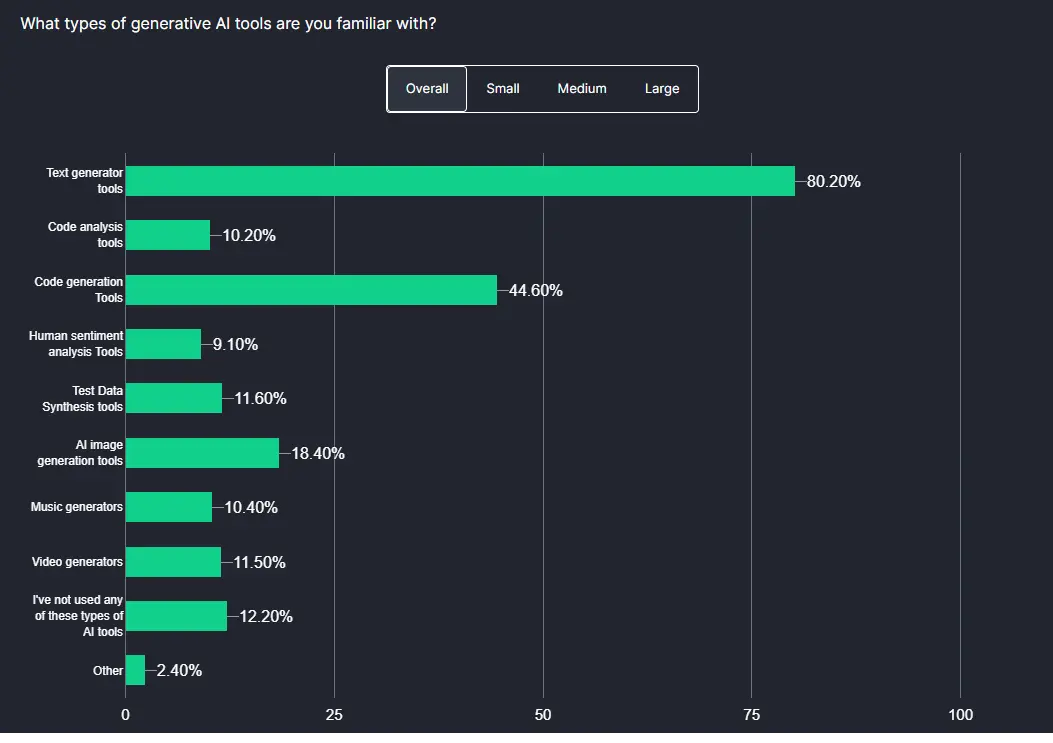
- AI and ML Testing: AI and ML tools are transforming testing by automating test case creation, execution, and maintenance. Over 50% of teams use AI for test data generation, with medium and large organizations also valuing AI for test case creation.
According to the Future of Quality Assurance Survey, the most significant use of Generative AI (GenAI) is in test data generation, with over 50% of teams leveraging AI.
- Cloud-Based Cross-Browser Testing Cloud-based platforms like TestMu AI enable efficient cross-browser and cross-device testing without heavy infrastructure investment, offering broader test coverage.
Conclusion
QA testing is a crucial part of the software development process that needs to be integrated from its initial phase until the post-launch of the software applications. Although QA testing helps fix bugs, it is also essential in requirement analysis, creating detailed test plans, reporting bugs, etc. They use both manual and automated testing approaches that eventually help detect bugs and errors before they reach the users. This, in turn, ensures a seamless user experience.


Frequently asked questions
Did you find this page helpful?
More Related Hubs
TestMu AI forEnterprise
Get access to solutions built on Enterprise
grade security, privacy, & compliance
- Advanced access controls
- Advanced data retention rules
- Advanced Local Testing
- Premium Support options
- Early access to beta features
- Private Slack Channel
- Unlimited Manual Accessibility DevTools Tests