

Next-Gen App & Browser Testing Cloud
Trusted by 2 Mn+ QAs & Devs to accelerate their release cycles


On This Page
- What is Data Flow Testing?
- How to Use Data Flow Testing?
- Data Flow Testing Example
- What Are The Types of Data Flow Testing?
- 4 Advantages of Data Flow Testing
- 4 Disadvantages of Data Flow Testing
- Difference Between Control Flow Testing and Data Flow Testing
- Data Flow Testing Coverage
- Data Flow Testing with TestMU AI

- Home
- /
- Learning Hub
- /
- Data Flow Testing: Types, Examples & Techniques
Data Flow Testing: Types, Examples & Techniques
Data flow testing focuses on one thing: making sure your data behaves as expected. By tracing how variables are defined and used, it helps find silent bugs that traditional path testing often misses. Let's take a closer look at exactly what it is.

Deepak Sharma
March 18, 2026
Data flow testing (DFT) is a white box testing technique that examines how variables are defined and used throughout your code. It's a powerful method for uncovering bugs by tracing the path of data as it moves through your program.
Unlike black box testing, which only looks at inputs and outputs, data flow testing gives you visibility into the internal logic and code structure.
DFT has become vital because it can discover hidden problems and weaknesses in how data moves through software programs. Numbers show that issues related to data flow are still a big worry for developers and organizations.
Overview
What Is Data Flow Testing?
Data Flow Testing is a white-box testing technique that focuses on how variables are defined, modified, and used within a program. Instead of only checking execution paths, it ensures that data moves correctly through the code without errors.
Why It Matters?
Many defects are not logic failures but data-related issues, such as uninitialized variables, unused assignments, or improper redefinitions. Data Flow Testing helps uncover these subtle bugs before they impact production.
How It Works?
It analyzes definition-use (def-use) relationships, builds data flow graphs, and creates test cases that validate how each variable travels through different control flow paths.
What is Data Flow Testing?
Think of it as tracking a package from warehouse to doorstep, but instead of a package, you're following your data through every line of code.
The core objective of data flow testing is to detect anomalies such as incorrect definitions or unused variables, ensuring that every variable is properly handled throughout the program.
Data flow testing is solely concerned with the points in your code where variables receive values and where those values are referenced. It maps the relationship between variable definitions and their usage to derive meaningful test paths.
When variables and their values interact within a program, data flow testing helps uncover three common issues:
- A variable is defined but never used or referenced anywhere in the code.
- A variable is used before it has been defined.
- A variable is defined more than once before it is ever used.
By generating test cases that cover the control flow paths around these definition-use pairs, data flow testing ensures that data moves through your modules exactly as intended.
Key Takeaway: Data Flow Testing focuses on how variables are defined, used, and managed throughout a program. By tracing definition-use pairs, it helps uncover hidden data-related defects that traditional logic-based testing may overlook.
How to Use Data Flow Testing?
Step 1: Analyze the Program Code
Start by going through the source code to identify every point where a variable is defined (assigned a value) and where it is used. You can do this manually by reading through the code, or speed things up using static analysis tools like SonarQube, SpotBugs, PMD, or CodeClimate. These tools scan your codebase and generate detailed reports showing exactly where variables are declared, assigned, and referenced.
Step 2: Build a Data Flow Graph
Once you've mapped out the definitions and uses, create a data flow graph to visualize how data moves through the program. Each node in the graph represents a point where a variable is defined or used, and each edge represents the path between them. This makes it much easier to spot potential problem areas. You can build these graphs manually or use tools like CFG generators, Visual Paradigm, or yEd Graph Editor.
Step 3: Identify Def-Use (DU) Chains
This is the most critical step. A DU chain traces the path from where a variable is defined to where it is used, without being redefined in between. Walk through each chain carefully to confirm that every variable definition reaches its intended use correctly. Tools like FlowDroid and CodeSonar can help automate this analysis, especially in larger codebases.
Step 4: Create and Run Test Cases
Finally, use the DU chains to design test cases that cover every possible path a variable takes through the program. Each test should verify that the variable behaves as expected from the definition to use. Frameworks like JUnit (Java), NUnit (.NET), or TestNG help you automate and execute these tests efficiently.
Key takeaways: Applying Data Flow Testing involves analyzing variable definitions, mapping their flow, identifying def-use chains, and designing targeted test cases. This structured approach ensures data moves correctly through your application and prevents subtle runtime errors.
Data Flow Testing Example
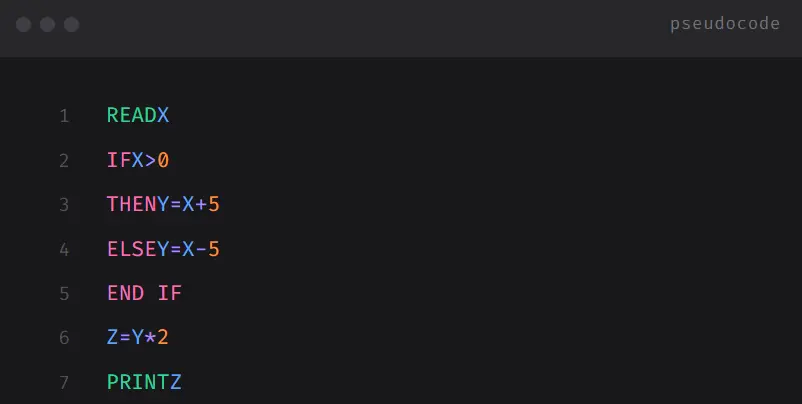
Let us take an example of the block of code below, from where we would create the control flow graph and then evaluate data flow testing.
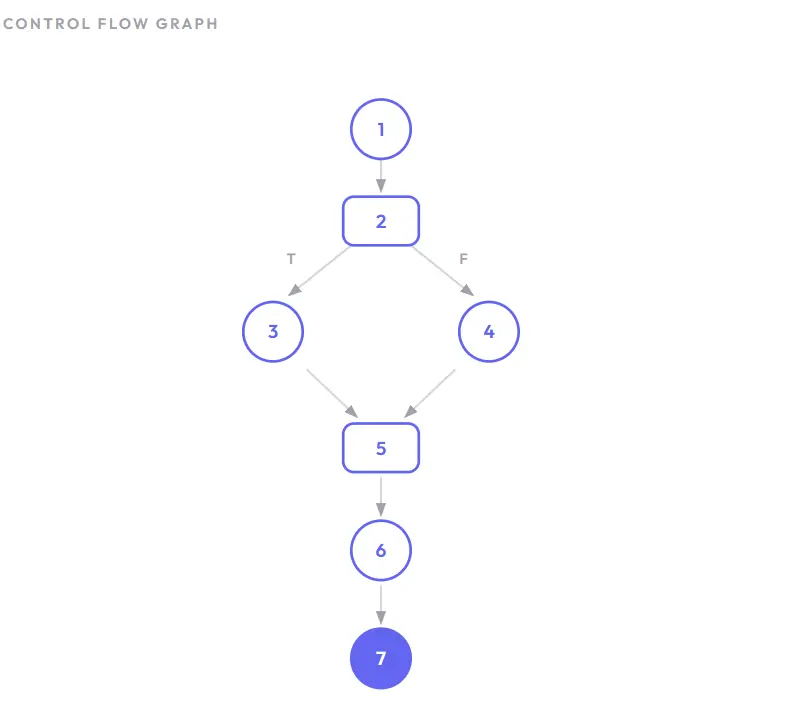
The control flow graph of the above lines of code has been described below -
The use and definition of variables at the various nodes in the control flow graph for the above example are illustrated in the below table:
From the above table, it is concluded that every variable (X, Y, and Z) has been properly defined before being used. Variable X is defined at Node 1 and used at Nodes 2, 3, and 4. Variable Y is defined at Nodes 3 and 4, and used at Node 6. Variable Z is defined at Node 6 and used at Node 7. This indicates there are no data flow anomalies in this program.
What data-flow-testing-codeare the types of Data Flow Testing?
Data flow testing comes in several forms, each targeting a different aspect of how variables behave across your code. Here's a quick breakdown.
1. All-Definition-Use Paths (All-Du-Paths) Testing: The most exhaustive type, it traces every possible path from where a variable is defined to where it's used. Thorough but resource-heavy, best for critical modules.
2. All-Du-Path Predicate Node Testing: Focuses only on paths passing through decision points like if, while, or switch. Useful for validating variable behavior under different conditions without full path coverage.
3. All-Uses Testing: Covers every instance where a variable is referenced - in computations, conditions, or outputs. It's the most practical and commonly used technique for mid-complexity modules.
4. All-Definitions (All-Defs) Testing: Ensures every variable definition reaches at least one use. A lightweight check for catching dead code or logic errors early.
5. All-P-Uses Testing: Tests every path where a variable appears inside a condition that controls program flow. Ideal when branching logic is your primary concern.
6. All-C-Uses Testing: Tests paths where variables participate in calculations. Critical for domains like finance or science where computational accuracy matters.
7. All-I-Uses Testing: Targets variables that receive values from external inputs - user forms, APIs, or databases. Essential for apps with heavy user interaction.
8. All-O-Uses Testing: Tests paths where variables contribute to outputs like UI displays, API responses, or reports. Valuable for compliance-heavy industries.
9. Definition-Use Pair Testing: Isolates specific definition-use pairs as individual test cases. A targeted approach for high-risk variables identified through code reviews.
10. Use-Definition Path Testing: Works backward - from where a variable is used to where it was defined. Powerful for debugging when you know the output is wrong and need to trace the root cause.
Key Takeaway: There are 10 types ranging from exhaustive (All-Du-Paths) to targeted (Definition-Use Pair Testing). Choose based on what matters most - branching logic, computations, inputs, outputs, or full path coverage.
4 Advantages of Data Flow Testing
Data flow testing goes beyond surface-level code inspection, helping uncover critical issues that impact software reliability and performance.
- Detecting Unused Variables: DFT identifies variables that are declared but never used. These clutter the code, reduce readability, and may signal design errors. Flagging them keeps the codebase clean and efficient.
- Uncovering Undeclared Variables: It catches cases where variables are used without proper declaration, a fundamental violation that can lead to runtime errors and ambiguity.
- Managing Variable Redefinition: DFT spots variables defined multiple times before being used, reducing confusion and subtle bugs while promoting code clarity.
- Preventing Premature Deallocation: It ensures variables aren't released from memory before being fully utilized, preventing memory access violations and unpredictable behavior.
Key Takeaway: Data flow testing catches unused variables, undeclared references, redundant definitions, and premature memory deallocation, all issues that surface-level testing typically misses.
4 Disadvantages of Data Flow Testing
- Time-Consuming and Costly: Examining data flow paths, creating test cases, and debugging results demands significant time and resources, which can strain tight budgets and deadlines.
- Requires Programming Proficiency: Testers need deep knowledge of the programming language being tested, including variable declarations, assignments, and usage patterns. This can be a barrier when testers lack domain expertise.
- Limited Scope: DFT focuses strictly on data flow and doesn't cover functional correctness, UI testing, or performance. It works best when combined with other testing techniques.
- Complexity in Large Systems: As software grows, the number of possible data flow paths can become overwhelming, which makes it impractical to achieve full test coverage.
Key Takeaway: Data flow testing can be time-consuming, requires strong programming knowledge, has a limited scope beyond data flow, and becomes impractical in large systems with too many possible paths.
Difference Between Control Flow Testing and Data Flow Testing
When testing software, two common white-box techniques are Control Flow Testing (CFT) and Data Flow Testing (DFT). Both analyze the internal structure of code, but they focus on different things.
Here's a clear breakdown.
What is Control Flow Testing?
Control Flow Testing focuses on the execution paths of a program.
It checks:
- Which statements are executed
- Which branches (if/else, switch) are taken
- How loops behave
- Whether all possible paths are covered
The goal is to ensure that every logical path in the code works correctly.
It is based on the Control Flow Graph (CFG), where:
- Nodes = statements or blocks
- Edges = flow of control
What is Data Flow Testing?
Data Flow Testing focuses on how data moves through the program.
It checks:
- Where variables are defined
- Where they are used
- Whether variables are used before being initialized
- Whether unused variables exist
The goal is to ensure that data is handled correctly throughout execution.
Data Flow Testing vs Control Flow Testing (Key Differences)
| Aspect | Data Flow Testing (DFT) | Control Flow Testing (CFT) |
|---|---|---|
| Focus | Variable definition and usage | Execution paths and decisions |
| Based On | Definition-Use Chains | Control Flow Graph (CFG) |
| Detects | Uninitialized or unused variables | Logical errors, missing branches |
| Concern | How data moves through code | How code executes |
| Test Coverage | Def-use coverage | Path and branch coverage |
Key takeaway: Control flow testing checks which execution paths your code takes while Data flow testing checks how variables behave along those paths. One tracks logic flow, the other tracks data movement.
5 Types of Data Flow Testing Coverage
Data flow testing uses different coverage strategies to check how variables move through your program. Each one focuses on a specific part of the data's journey, from where it's created to where it's used. Here's what they look like in practice:
- All Definition Coverage: Ensures that every variable's definition point connects to at least one of its uses. Think of it as a basic check, making sure data actually goes somewhere after it's created.
- All Definition-C Use Coverage: Takes it further by tracing every definition to all its computational uses - places where the variable is part of a calculation or transformation. This catches issues in how your data gets processed.
- All Definition-P Use Coverage: Shifts focus to predicate uses, where variables appear inside conditions like if or while statements. It verifies that every definition reaches every decision point it influences, so your program's control flow stays reliable.
- All Use Coverage: Combines the two above. It maps every definition to every use, whether computational or predicate. Nothing slips through the cracks here.
- All Definition Use Coverage: Simplifies things by tracking direct paths from each definition to every use, without distinguishing between use types. It's a practical choice when you want solid coverage without overcomplicating things.
Key Takeaway: Coverage strategies in data flow testing range from basic (All Definition) to comprehensive (All Use). Each level adds more rigor by tracing definitions to computational uses, predicate uses, or both.
Data Flow Testing with TestMU AI
To ensure that data flow is seamless and robust, testing scenarios must encompass a wide range of data conditions. This is where synthetic test data generation comes into play, offering a controlled and comprehensive way to assess the software's performance under various data conditions.
To enhance DFT, consider leveraging synthetic test data generation with TestMu AI's integration with the GenRocket platform. This integration offers a potent approach to simulate diverse data scenarios and execute comprehensive tests, ensuring robust software performance.

Austin Siewert
CEO, Vercel
Discovered @TestMu AI yesterday. Best browser testing tool I've found for my use case. Great pricing model for the limited testing I do 👏
2M+ Devs and QAs rely on TestMu AI
Deliver immersive digital experiences with Next-Generation Mobile Apps and Cross Browser Testing Cloud



Frequently asked questions
Did you find this page helpful?
More Related Hubs
TestMu AI forEnterprise
Get access to solutions built on Enterprise
grade security, privacy, & compliance
- Advanced access controls
- Advanced data retention rules
- Advanced Local Testing
- Premium Support options
- Early access to beta features
- Private Slack Channel
- Unlimited Manual Accessibility DevTools Tests