

Next-Gen App & Browser Testing Cloud
Trusted by 2 Mn+ QAs & Devs to accelerate their release cycles


Speed Up Accessibility Testing With TestMu AI And Evinced
Automate Accessibility testing across 3000+ browsers and operating systems with TestMu AI and Evinced. Debug easily and quickly with comprehensive test execution details. Integrate now!

Salman Khan
March 7, 2026
In this fast-paced digital ecosystem, the speed of software development is crucial. To leverage the full potential of websites, it is essential to consider their accessibility and quality to ensure that they are usable to all users regardless of disability.
So what’s the best way to ensure your website is accessible?
Incorporating Automated Accessibility testing into your testing strategies is a viable option to amplify the overall testing process and ensure your visual content is accessible to all Internet users.
We at TestMu AI, are excited to be partnered with Evinced – a platform for modern agile teams to perform Accessibility testing and find issues before they slip into production.
What is Evinced?
Evinced is a digital accessibility platform for enterprise-level software development teams. It enables you to incorporate accessibility into all aspects of software development, including design, development, automated testing, quality assurance testing, and production monitoring. Evinced detects and pinpoints accessibility issues and suggests solutions using advanced rule-sets, computer vision, and AI algorithms.
Evinced uses three approaches to identify screen reader and keyboard interaction challenges: Computer vision/AI algorithms, context-based code inspection, and component grouping.

Note: Execute Real-time Web Accessibility tests across 3000+ browsers and OS. Try TestMu AI Now!
Why Use Evinced?
Evinced comes with a range of Accessibility testing kits for web applications that you can use in your Software Development Life Cycle (SDLC).
Let’s look at some of the features offered by Evinced platform.
- It provides browser extensions, integration SDKs with automated tests, and scanning solutions for pre-production and production on Web and Mobile environments.
- It offers Accessibility test tools for web apps like Flow Analyzer, Automation for Web, Site Scanner, and Dev Debugger.
- In addition to web apps, it also provides Accessibility test tools for Mobile apps like Flow Analyzer and Automation for Mobile.
- It utilizes computer vision and AI to identify and narrow down difficult screen reader and keyboard interaction issues.
- It is trusted by large enterprises for accessibility engineering operations.
How TestMu AI and Evinced can help you?
Running Web Accessibility tests with automation testing tools like Selenium requires different accessibility scans and managing dozens of separate test reports.
But lucky for us, Evinced solves this challenge. Its auto-test SDK and Selenium integration eliminate the need to modify individual test code, and you generate a single test report with comprehensive fixes. In addition, Evinced’s computer vision approach allows you to detect critical accessibility issues that typically require manual testing quickly.
With TestMu AI, you can run automated tests on a fast, reliable online Selenium Grid and get comprehensive reports of your Selenium test execution like videos, logs, command logs, screenshots, HAR files, and more.

Shown below is the sample of Java-TestNG test scripts running on TestMu AI real browsers and operating systems. You can visit our Desired Capability Generator for generating Selenium capabilities.
//imports...

public class LambdaTest {
  private String testName;
  public static final String demoPage = "https://demo.evinced.com/";
  private RemoteWebDriver webDriver;
  private String Status = "failed";

  @BeforeMethod
  public void setup(Method m, ITestContext ctx) throws MalformedURLException {
    String username = System.getenv("LT_USERNAME");
    String authkey = System.getenv("LT_ACCESS_KEY");
    String hub = "@hub.lambdatest.com/wd/hub";

    DesiredCapabilities caps = new DesiredCapabilities();
    caps.setCapability("platform", "Windows 10");
    caps.setCapability("browserName", "Chrome");
    caps.setCapability("version", "92.0");
    caps.setCapability("resolution", "1024x768");
    caps.setCapability("build", "TestNG With Java");
    caps.setCapability("name", m.getName() + this.getClass().getName());
    caps.setCapability("plugin", "git-testng");
    String[] Tags = new String[] {
      "Feature",
      "Magicleap",
      "Severe"
    };
    caps.setCapability("tags", Tags);
    webDriver = new RemoteWebDriver(new URL("https://" + username + ":" + authkey + hub), caps);
  }

  @AfterMethod
  public void tearDown() {
    webDriver.quit();
  }

  @Test
  public void evincedTrvlTest() {
    webDriver.get(demoPage);
    // Click "Your New Home" dropdown
    driver.findElement(By.cssSelector("div.filter-container > div:nth-child(1) > div > div.dropdown.line")).click();
    // Click "Where" dropdown
    webDriver.findElement(By.cssSelector("div.filter-container > div:nth-child(2) > div > div.dropdown.line")).click();
    // Click "When" date picker
    webDriver.findElement(By.cssSelector(".react-date-picker")).click();
    // Click on the "Search" Button
    webDriver.findElement(By.className("search-btn")).click();
    // Assert we have navigated to the results page
    Assert.assertEquals("Page two | Evinced, Demos site", driver.getTitle());
  }
}
The below test script shows the – @BeforeMethod. Here, we configure the EvincedWebDriver class and then launch the Evinced engine evStart() to track the DOM changes and capture accessibility flaws.
private EvincedWebDriver driver;

  @BeforeMethod
  public void setup(Method m, ITestContext ctx) throws MalformedURLException {

      String username = System.getenv("LT_USERNAME");
      String authkey = System.getenv("LT_ACCESS_KEY");
      String hub = "@hub.lambdatest.com/wd/hub";

      DesiredCapabilities caps = new DesiredCapabilities();
      caps.setCapability("platform", "Windows 10");
      caps.setCapability("browserName", "Chrome");
      caps.setCapability("version", "92.0");
      caps.setCapability("resolution", "1024x768");
      caps.setCapability("build", "TestNG With Java");
      caps.setCapability("name", m.getName() + this.getClass().getName());
      caps.setCapability("plugin", "git-testng");
      String[] Tags = new String[] { "Feature", "Magicleap", "Severe" };
      caps.setCapability("tags", Tags);

      webDriver = new RemoteWebDriver(new URL("https://" + username + ":" + authkey + hub), caps);
      driver = new EvincedWebDriver(webDriver);
      driver.manage().timeouts().implicitlyWait(20, TimeUnit.SECONDS);
      driver.evStart();
  }
Next, in the @AfterMethod, we use the evStop() method to stop the Evinced engine, and you’ll get the accessibility reports (both in JSON and HTML formats.)
@AfterMethod
public void tearDown() {
    // Stop the Evinced engine and generate the report object
    Report report = driver.evStop();
    // Export the report - JSON
    EvincedReporter.writeEvResultsToFile("Evinced-LambdaTest-A11y-JSONReport", report, EvincedReporter.FileFormat.JSON);
    // Export the report - HTML
    EvincedReporter.writeEvResultsToFile("Evinced-LambdaTest-A11y-HTMLReport", report, EvincedReporter.FileFormat.HTML);
    driver.quit();
}
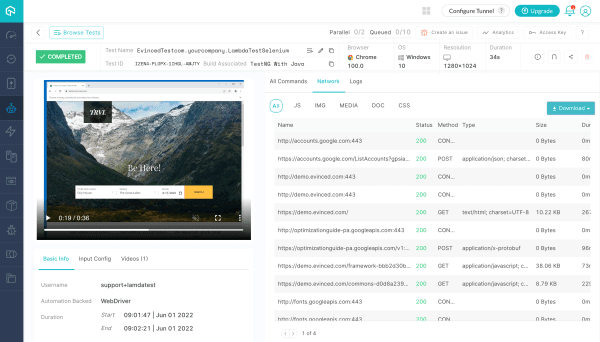
Now visit TestMu AI Automation Dashboard to view your test results. In addition, you can view the comprehensive reports of your Selenium test execution like videos, logs, command logs, screenshots, HAR files, and more.
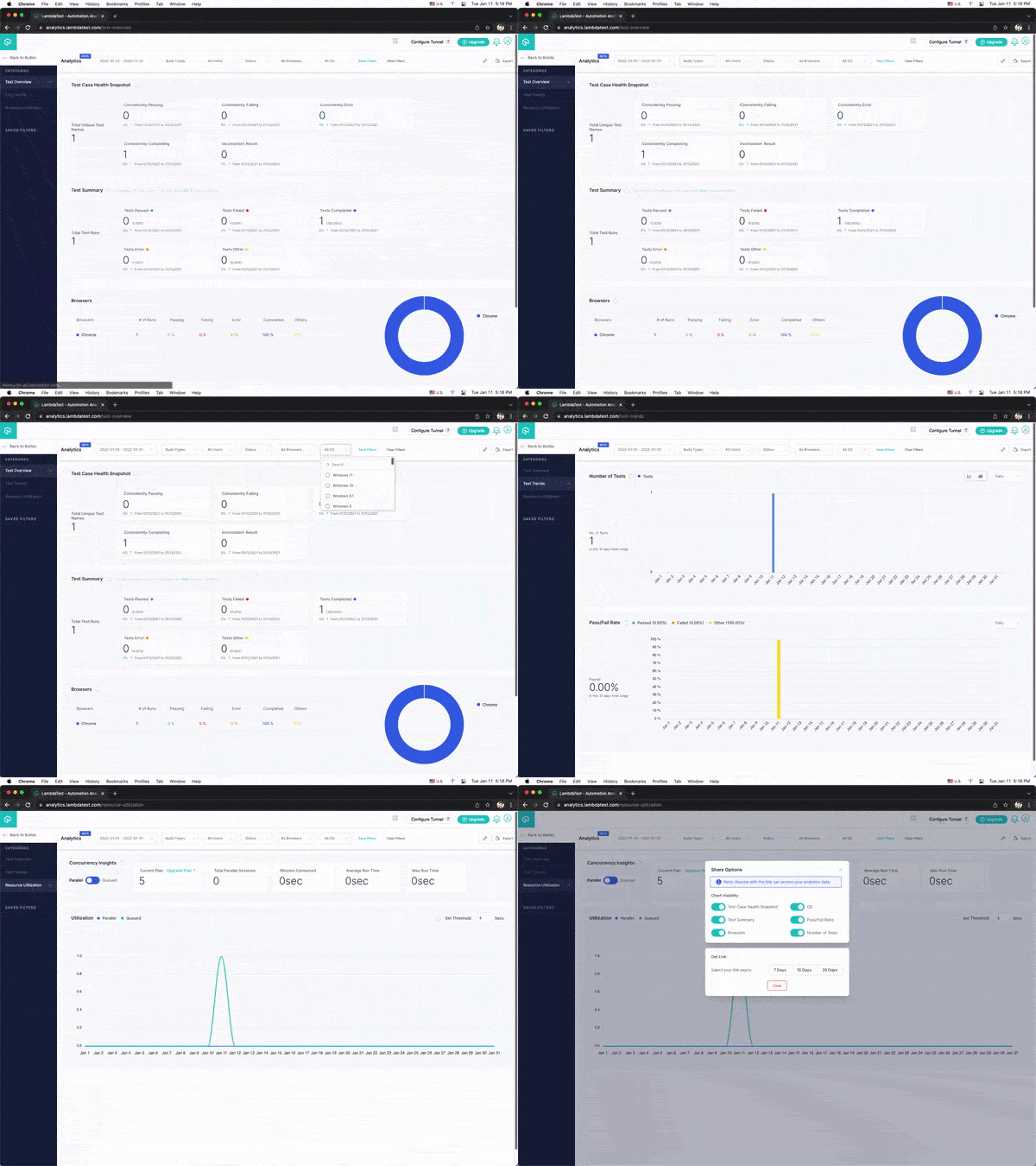
You can also go to TestMu AI Analytics Dashboard to analyze the performance of your executed tests. With TestMu AI’s detailed test insights, you can quickly and easily debug your functional test.
Note: Get faster release velocity with blazing fast test automation on cloud. Try TestMu AI Now!
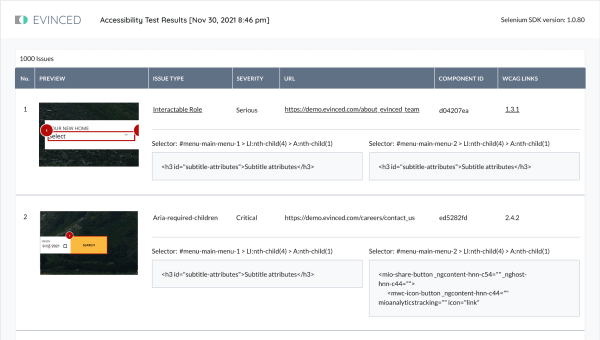
Furthermore, you will also receive a comprehensive Evinced HTML/JSON accessibility report with all issues logged, severity levels, descriptions, and actionable suggestions on how to fix them.
A Final Word!
With TestMu AI integration with Evinced, you can run web accessibility tests across different browsers, devices, and operating systems. Moreover, you can debug your tests using actionable test insights such as screenshots, video logs, and passed/failed tests and improve the overall effectiveness of your tests.
Try our newest integration with Evinced and share your thoughts on the TestMu AI Community. You can also contact us through our chat portal or by email at [email protected].
Happy Testing 😀


Did you find this page helpful?
More Related Hubs
TestMu AI forEnterprise
Get access to solutions built on Enterprise
grade security, privacy, & compliance
- Advanced access controls
- Advanced data retention rules
- Advanced Local Testing
- Premium Support options
- Early access to beta features
- Private Slack Channel
- Unlimited Manual Accessibility DevTools Tests