

Next-Gen App & Browser Testing Cloud
Trusted by 2 Mn+ QAs & Devs to accelerate their release cycles


15 Prompting Techniques Every Tester Should Know [2026]
Learn 15 prompting techniques for testers, from direct instruction to prompt chaining. Each includes a prompt example you can copy and adapt immediately.

Salman Khan
March 16, 2026
Prompting techniques are structured ways of writing LLM inputs so the output is actually usable. For testers, that means test cases in your team's format, edge cases that reflect real failure modes, bug reports that include everything a developer needs, and test data that covers boundary values without manual calculation.
Overview
What Are the Different Prompting Techniques for Testers
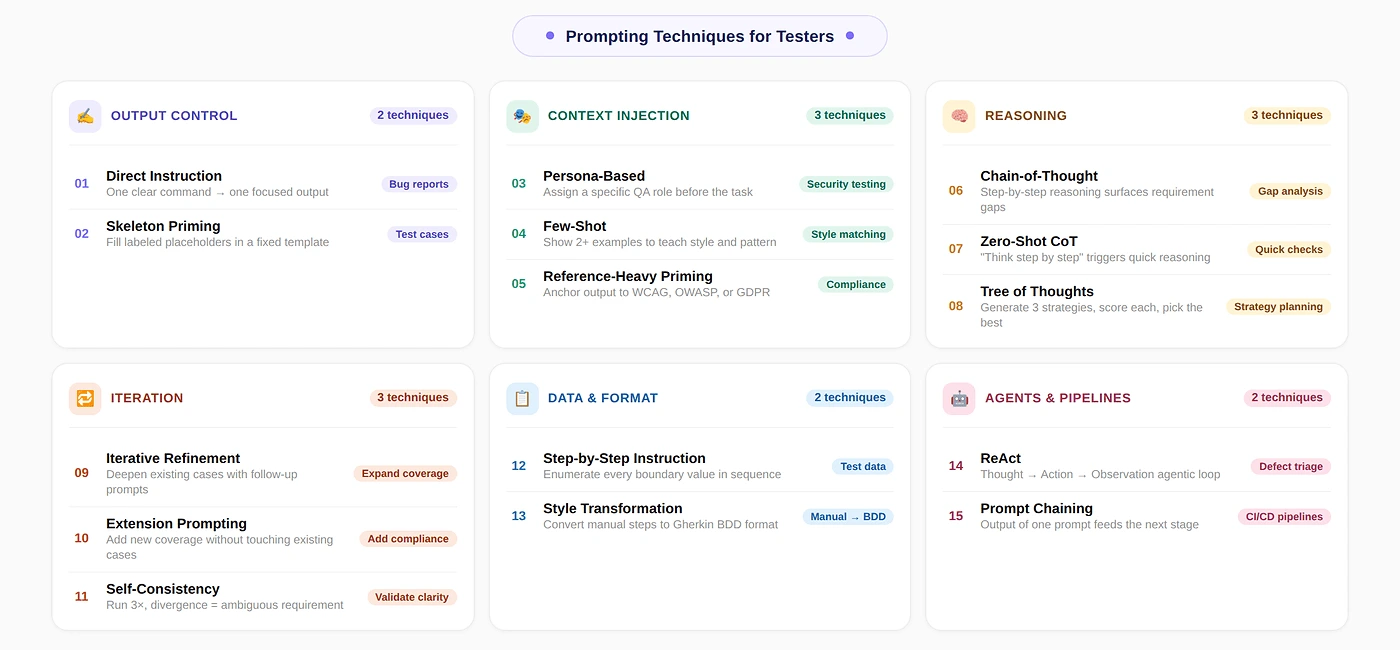
Testers use specific prompting techniques to control how LLMs generate test artifacts. Each technique targets a different QA task, from writing bug reports to running agentic test cycles.
- Direct Instruction: Give the model one clear command with constraints to produce a single focused output like a bug report or test summary.
- Skeleton Priming: Supply a template with labeled placeholders so every generated test case follows the exact same structure consistently.
- Persona-Based Prompting: Assign a specific QA role such as security engineer or accessibility specialist to shift focus toward specialized failure modes.
- Few-Shot Prompting: Provide example test cases in the desired format so the model learns the pattern before generating new ones.
- Chain-of-Thought: Instruct the model to reason step by step before producing output to surface gaps and ambiguities in requirements.
- Step-by-Step Instruction: Ask the model to enumerate every value in a test data set sequentially covering valid, invalid, and boundary inputs.
- ReAct: Alternate between reasoning and action in a loop so an AI agent can run tests, inspect failures, and form hypotheses autonomously.
- Zero-Shot Chain-of-Thought: Append "think step by step" to trigger structured reasoning without constructing examples or full prompts.
- Iterative Refinement: Improve an existing test suite through focused follow-up prompts that systematically add depth, edge cases, and coverage.
- Prompt Chaining: Connect multiple prompts sequentially where each output feeds the next input to build end-to-end test generation pipelines.
How to Combine Prompt Techniques for Software Testing
Layer Chain-of-Thought first for requirement analysis, then Skeleton Priming for structured test case generation, and Persona-Based prompting for security or accessibility coverage. For regression suites, pair Few-Shot with Persona-Based to match style and surface edge cases. For agentic execution, combine ReAct with Skeleton Priming.
What Are the Best Prompting Techniques for Testers
The best prompting techniques for testers include Direct Instruction, Skeleton Priming, Persona-Based, Few-Shot, Chain-of-Thought, ReAct, and Prompt Chaining.
1. Direct Instruction
Issue a clear command with specific constraints. The model produces one focused output: a bug report, a test summary, or a one-line test description. No examples or predefined structure needed, just one precise instruction given.
Best suited for narrow, well-defined tasks. It fails when the output format must stay consistent across runs or when the task has multiple parts. For anything more complex, combine it with the structured techniques below.
Where testers use this most
- Writing a bug report from a failed test run.
- Generating a one-line summary of what a test covers.
- Asking whether a given requirement is testable.
The one thing most testers get wrong
Omitting format constraints is the most common mistake. Adding explicit fields like Title, Steps to Reproduce, Expected Result, Actual Result, and Severity ensures every generated bug report is consistent and ready for your defect tracker.
Prompt example: bug report
You are a QA engineer writing a defect report.

Write a bug report for the following failure:
Login fails with a valid email and password when the
email contains uppercase letters (e.g., [email protected]).
The system shows 'Invalid credentials' instead of logging in.

Format:
Title: [one-line summary]
Steps to Reproduce: [numbered list]
Expected Result: [what should happen]
Actual Result: [what actually happened]
Severity: [Critical / High / Medium / Low]
Environment: [browser, OS, version if known]
Note: Automate QA using natural language prompts with KaneAI. Try TestMu AI Now!
2. Skeleton Priming
Provide a predefined template with labeled placeholders and instruct the model to fill each one in. Every output follows the exact same structure because the prompt explicitly defines it, rather than relying on model guessing.
This technique solves the biggest problem when you generate test cases with AI: inconsistent formatting that makes every single case hard to review, import into test management tools, or hand off to other testers reliably.
Where testers use this most
- Generating test cases for a new feature from a user story or requirement.
- Creating regression test cases for existing functionality.
- Onboarding a new tester who needs to match the team's test case style.
The one thing most testers get wrong
Brackets left in the output. The model sometimes fills placeholders literally. Add this instruction: Replace every bracketed placeholder with real content. Do not leave any brackets. This single line eliminates the most common formatting failure.
Prompt example: test case generation
You are a QA engineer writing test cases for a user story.

User Story:
As a registered user, I want to reset my password via email
so that I can regain access to my account.

Generate 5 test cases using this template.
Replace every bracketed placeholder with real content.
Do not leave any brackets in the output.

Test Case ID: TC-[number]
Title: [one-line description of what is being tested]
Preconditions: [what must be true before the test runs]
Test Steps: [numbered list of actions]
Expected Result: [what should happen if the feature works correctly]
Test Type: [Positive / Negative / Boundary]
Define this template once in a shared doc. Every tester on the team uses the same prompt with the same template. This is how you get consistent test cases across the entire sprint without a review cycle just to standardize the format.
3. Persona-Based Prompting
Assign the model a very specific QA role before giving it the task. A security-focused QA engineer persona shifts attention toward failure modes, attack vectors, and boundary conditions that a generic prompt would completely miss.
Use this whenever a feature involves authentication, payments, or user data. A security testing persona generates SQL injection, session hijacking, and privilege escalation scenarios that default happy-path prompts never surface on their own at all.
Where testers use this most
- Security Testing: Assign a security engineer persona to surface attack vectors.
- Accessibility Testing: Assign an accessibility specialist to surface WCAG gaps.
- Performance Testing: Assign a load testing engineer to surface concurrency issues.
- Edge Case Generation: Assign a senior QA engineer who specializes in finding bugs in a specific domain.
The one thing most testers get wrong
Vague personas produce generic output. Specify the experience level, domain expertise, and specific focus area. For example, a senior QA engineer with ten years testing financial transaction systems yields far more targeted and relevant results.
Prompt example: edge case generation with persona
You are a senior QA engineer specializing in security testing
for web applications, with expertise in OWASP Top 10 vulnerabilities.

Feature: User login with email and password.
The system locks the account after 5 failed attempts.

Generate 8 test cases that focus on security and edge cases.
Do not include basic happy-path cases.

Use this format:
- Test ID
- Scenario
- Input
- Expected Result
- Risk if this fails
4. Few-Shot Prompting
Show the model example test cases demonstrating your desired format before requesting new ones. Brown et al. (2020) established Few-Shot as a reliable method for controlling output. The model learns patterns from examples, not instructions.
Skeleton Priming enforces structure while Few-Shot teaches style and tone. Use Few-Shot when phrasing must match your existing test suite. For foundational concepts behind these patterns, explore prompt engineering principles and practical applications in depth.
Where testers use this most
- Generating test cases that must match existing cases in your test management tool.
- Onboarding LLM output into a team that already has a strong test writing style.
- Producing cases that a specific stakeholder (auditor, product manager) needs to be able to read.
The one thing most testers get wrong
Using only one example teaches the model a single instance, not the pattern. Provide at least two examples that vary in scenario type. One positive and one negative case together produce significantly better overall coverage.
Prompt example: few-shot test case generation
Generate 3 more test cases following the exact style and
detail level of these examples:

Example 1:
TC-001 | Valid login with correct credentials
Steps: 1. Navigate to /login. 2. Enter valid email.
3. Enter correct password. 4. Click Sign In.
Expected: User is redirected to /dashboard.
Type: Positive

Example 2:
TC-002 | Login blocked after 5 failed attempts
Steps: 1. Enter valid email. 2. Enter wrong password 5 times.
Expected: Account locked message shown. Login button disabled.
Type: Negative

Feature to generate cases for:
[Paste your feature description here]
5. Chain-of-Thought Prompting
Ask the model to reason step by step before producing output. Wei et al. (2022) showed this improves accuracy on multi-step tasks. For testers, it surfaces ambiguities, missing acceptance criteria, and untestable statements in requirements.
The output is not test cases but a structured reasoning trace that reveals what is clear, what is ambiguous, and what is missing. Use this at every sprint start to flag requirement gaps before committing.
Where testers use this most
- Reviewing a user story or requirement before test planning.
- Identifying missing acceptance criteria before a sprint starts.
- Producing a test strategy rationale that can be shared with stakeholders.
The one thing most testers get wrong
Asking for test cases inside the CoT prompt is the single most common mistake. The strength of chain-of-thought is the reasoning analysis itself. Generate cases separately using Skeleton Priming or Few-Shot once requirements are clarified.
Prompt example: requirement gap analysis
You are a senior QA engineer reviewing a requirement
before test planning begins.

Requirement:
Users should be able to upload a profile picture.

Reason through this requirement step by step:
1. What is clearly specified and testable?
2. What is ambiguous or undefined?
   (file formats, size limits, dimensions, error messages)
3. What is missing that a tester needs to know?
4. What are the most likely failure points?

Then summarize: what questions must be answered before
test cases can be written?
6. Step-by-Step Instruction
Ask the model to enumerate every value in a test data set sequentially: valid inputs, invalid inputs, boundary values, and special characters. This approach ensures completeness so no critical boundary value is missed during testing.
Manual test data generation consumes time under sprint pressure. Testers default to few representative cases. An LLM generates comprehensive sets fast. Teams using generative AI for test data generation apply Step-by-Step Instruction to standardize output.
Provide the field constraints explicitly: data type, length limits, allowed formats, and the specific validation standard being tested. Without these constraints, the model generates plausible-looking data that may not actually exercise the real validation rules.
Where testers use this most
- Generating boundary value analysis inputs for form fields.
- Creating equivalence partition data sets for dropdown menus or status fields.
- Producing SQL injection and XSS test strings for security validation.
- Generating internationalization test data: Unicode, RTL text, special characters.
Prompt example: test data generation
Generate a complete test data set for a 'Phone Number' input field.
The field accepts international phone numbers.
It is required. Maximum 15 digits (E.164 standard).

Provide data in this order:
1. Valid inputs (at least 5, covering different country formats)
2. Boundary values (minimum and maximum length)
3. Invalid formats (letters, special characters, spaces)
4. Edge cases (empty, null, leading zeros, country code only)
5. Security test strings (SQL injection, script injection)

For each value, note: the input and the expected system response.
Save your test data prompt templates by field type. A 'Date Field' template, an 'Email Field' template, a 'Currency Field' template. Reuse them across sprints. The investment in writing one good prompt pays back every time that field type appears in a new feature.
7. ReAct
ReAct alternates reasoning and action: Thought, Action, Observation, then repeat. Yao et al. (2022) introduced this for tool-using agents. For testers, it powers AI agent testing that runs tests, inspects failures, and forms hypotheses autonomously.
Most testers encounter ReAct through agentic platforms rather than writing prompts directly. Understanding this pattern helps you configure agents correctly, interpret their unexpected output, and write precise tool definitions that effectively prevent any wrong actions.
Where testers use this most
- AI agent testing platforms where the agent runs tests and triages failures.
- Automated regression runs where the agent decides which tests to re-run after a failure.
- Defect root cause analysis, where the agent inspects logs and narrows down the failure point.
The one thing most testers get wrong
Not defining available tools explicitly is the key mistake here. The agent must know exactly what it can call, like run_test or get_logs, and what each tool returns. Without clear definitions, it invents non-executable actions.
Prompt example: ReAct for defect triage
You are a QA agent triaging a test failure.
Use this format for every step:

Thought: [What do you need to figure out?]
Action: [Tool to call]
Observation: [What the tool returned]
... repeat until you have a conclusion ...
Final Answer: [Root cause and recommended fix]

Task: The checkout_total() test fails intermittently.
It passes 8 out of 10 runs. No obvious pattern.

Available tools:
run_test(name) -> test result and error trace
get_logs(service, n) -> last n log lines
check_test_data(test_id) -> input data used in that run

Begin.
8. Zero-Shot Chain-of-Thought
Appending "Think step by step" triggers structured reasoning without examples. Kojima et al. (2022) showed this instruction improved reasoning benchmark accuracy. For testers, it delivers quick analytical output from requirements without constructing full CoT prompts.
Use this when you need the model to reason through a requirement quickly but lack time for writing numbered reasoning steps. It is less controlled than full Chain-of-Thought but takes only seconds to set up.
Where testers use this most
- Rapid requirement sanity checks at the start of a sprint.
- Assessing whether a new feature has testability risks before writing any cases.
- Getting a quick second opinion on a test plan before review.
The one thing most testers get wrong
Placing the instruction at the end of a long prompt weakens it. The model weights beginning instructions more heavily. Put "Think step by step" at the very top of your message, before the feature description.
Prompt example: quick requirement sanity check
You are a QA engineer.
Think step by step before answering.

Requirement: Users with a free plan can export up to
3 reports per month. Paid users have unlimited exports.

Identify: what is testable, what is ambiguous,
and what questions must be answered before testing starts.
9. Iterative Refinement
Improve an existing test suite through focused follow-up prompts instead of regenerating everything from scratch. Begin with your base test cases, then use subsequent prompts to systematically add depth, edge cases, and additional coverage scenarios.
This mirrors real QA work where you start with core flow coverage, then add boundary and negative tests. Prompting follows the same pattern. Each refinement pass builds on already validated output rather than starting over.
Today, generative AI testing tools like TestMu AI KaneAI let testers apply these prompting techniques directly inside an agentic workflow. It allows you to plan, author, and execute end-to-end tests using natural language prompts. See the KaneAI guide to get started.
- Natural Language Test Authoring: Write test cases in plain English and get structured, executable output.
- Contextual Input Support: Convert PRDs, Jira tickets, PDFs, and images into organized test scenarios.
- Exportable Automation Code: Generate automation scripts for Playwright, Selenium, Cypress, and Appium.
- AI-Native Self-Healing: Tests adapt automatically to UI changes without manual maintenance.
- Reusable Test Modules: Convert common flows like login into reusable blocks for efficient scaling.

Where testers use this most
- Adding edge cases to a test suite that was generated with Skeleton Priming.
- Expanding a smoke test set into a full regression suite over multiple iterations.
- Adding security or accessibility cases to an existing functional test set.
The one thing most testers get wrong
Iterating more than three rounds without stepping back to review. After several refinement cycles, the model produces variations of existing cases rather than new coverage. Review every two rounds and redirect when outputs become repetitive.
Prompt example: expanding a test suite
Here are the test cases I have so far for the login feature:
[Paste your existing test cases]

The current suite covers happy-path and basic negative cases.
Add 5 test cases focused specifically on session management:
concurrent sessions, session expiry, and forced logout.

Use the same format as the existing cases.
Do not repeat any scenario already covered above.
10. Extension Prompting
Add new test coverage to an existing suite without rewriting what is already there. Where iterative refinement deepens existing cases, extension prompting adds an entirely new category of test coverage alongside your current test suite.
For example, you have a complete functional test suite for a checkout flow. A new GDPR consent tracking requirement appears. Extension prompting adds those specific compliance cases without modifying any of your existing functional tests.
Where testers use this most
- Adding compliance test cases alongside existing functional coverage.
- Introducing mobile-specific test cases to a desktop test suite.
- Adding API-level test cases to a UI test suite for the same feature.
The one thing most testers get wrong
Not passing the full existing suite as context. If you summarize or omit cases, the model generates duplicates or conflicts. Always paste the complete set, then specify what to add and what must remain unchanged.
Prompt example: adding compliance coverage
Here is the existing test suite for the user registration flow:
[Paste your existing test cases]

Extend it to add 4 test cases specifically covering GDPR
consent requirements: consent capture, withdrawal,
data export request, and deletion request.

Do not modify any existing test cases.
Use the same format as the existing cases.
11. Self-Consistency
Run the same prompt multiple times and pick the most common output. Wang et al. (2023) showed this improves reasoning accuracy. For testers, it reveals whether the model interprets an ambiguous requirement consistently across runs.
If you run the same requirement analysis three times and get three different interpretations, that requirement needs clarification before writing any test cases. The disagreement itself is the most valuable output, not the individual answers.
Where testers use this most
- Verifying whether a requirement is interpreted consistently before committing to a test plan.
- Checking whether a generated test verdict (pass/fail criteria) is stable or ambiguous.
- Validating that a complex test scenario is reproducible before adding it to the regression suite.
The one thing most testers get wrong
Running only two iterations. Two runs give no majority on disagreement. Run at least three. A 2-1 split flags a borderline interpretation, while 3-0 agreement gives reasonable confidence. More than five runs rarely adds value.
Prompt example: ambiguity check on a requirement
You are a QA engineer.
Think step by step.

Requirement: The system must validate the order total
before processing payment.

What does 'validate' mean in this context?
List the specific checks a tester would need to verify.

[Run this 3 times and compare. Divergent answers = ambiguous requirement.]
12. Tree of Thoughts
Generate multiple testing strategies, evaluate each, and select the best one. Yao et al. (2023) showed this outperforms linear reasoning for planning tasks. For testers, it supports strategy decisions balancing coverage, effort, and risk trade-offs.
Use this when you are planning how to test a complex feature and are unsure whether to prioritize functional coverage, performance, security, or accessibility. Generate and score three distinct strategies before committing to one approach.
Where testers use this most
- Test strategy planning at the start of a major release cycle.
- Deciding between exploratory, scripted, and automated approaches for a new feature.
- Risk-based testing decisions when time is constrained, and you cannot cover everything.
The one thing most testers get wrong
Skipping the scoring step. Without explicit scoring criteria, the model lists strategies without recommending one. Add: 'Score each strategy 1-10 for coverage, effort, and risk reduction. Select the highest score.' This forces a concrete recommendation.
Prompt example: test strategy planning
You are a senior QA lead planning the test strategy
for a new payment gateway integration.

Generate 3 distinct testing strategies.
For each strategy:
- Describe the approach in 2 sentences
- List 2 strengths and 2 limitations
- Score 1-10 for: coverage, effort required, risk reduction

Then select the strategy with the best overall score
and justify the choice in 2 sentences.
13. Reference-Heavy Priming
Anchor the model's output to a specific standard or regulation. This works best for generating compliance test cases against specifications like WCAG 2.1 for accessibility testing, OWASP Top 10 for security, ISO 25010, or GDPR.
Without a reference, the model generates plausible-sounding test cases that may miss specific compliance criteria. With an explicit reference, the output directly maps to documented requirements and becomes defensible during regulatory audits and stakeholder reviews.
Where testers use this most
- Accessibility testing against WCAG 2.1 or 2.2 criteria.
- Security testing against OWASP Top 10 or CWE categories.
- Data privacy compliance testing against GDPR or CCPA requirements.
- Performance testing against SLA or SLO specifications.
The one thing most testers get wrong
Naming the standard without specifying sections. 'Based on WCAG' is too broad. 'Based on WCAG 2.1 Level AA, Success Criteria 1.4.3 and 2.4.7' gives the model enough specificity to produce targeted and verifiable test cases.
Prompt example: WCAG accessibility test cases
You are a QA engineer specializing in accessibility testing.
Use WCAG 2.1 Level AA as your reference.

Feature: A login form with email and password fields,
a 'Show password' toggle, and a Submit button.

Generate 6 test cases covering these specific criteria:
- 1.4.3 Contrast Minimum
- 2.4.7 Focus Visible
- 4.1.2 Name, Role, Value

For each case, reference the specific criterion it tests.
Include expected results a tester can objectively verify.
14. Style Transformation
Convert existing test cases from one format to another without changing coverage. The most common tester use case is converting manual test cases written in plain steps into Gherkin testing BDD syntax for automation handoff.
This saves significant time when teams transition from manual to automated testing or when clients require a specific test case format for their management system. The coverage stays identical while only the format itself changes.
Where testers use this most
- Converting plain-step manual test cases to Gherkin testing format (Given/When/Then) for Cucumber or SpecFlow.
- Converting Gherkin scenarios back to plain English for non-technical stakeholder review.
- Reformatting test cases from one test management tool's format to another during a migration.
The one thing most testers get wrong
Asking for reformatting without providing the exact target format. 'Convert to BDD' produces inconsistent Gherkin. Provide one complete example of your expected Gherkin output and use it as a few-shot example alongside the conversion instruction.
Prompt example: manual to Gherkin conversion
Convert the following manual test cases to Gherkin BDD format.
Use exactly this structure:

Scenario: [title]
  Given [precondition]
  When [action]
  Then [expected result]
  And [additional assertion if needed]

Test cases to convert:
TC-001: Navigate to login page. Enter valid email.
Enter correct password. Click Submit.
Expected: User is redirected to /dashboard.

TC-002: Enter valid email. Enter wrong password 5 times.
Expected: Account is locked. Error message displayed.
15. Prompt Chaining
Connect multiple prompts sequentially where one prompt's output becomes the next prompt's input. This pattern drives end-to-end test generation pipelines: analyze requirements, generate test cases, create test data, and produce automation code in structured sequence.
Each stage uses a different technique with output formatted for the next. The chain works as a system: CoT for requirements, Skeleton Priming for test cases, Step-by-Step for test data, and Style Transformation for Gherkin.
Where testers use this most
- End-to-end test generation pipelines from requirement to automation-ready Gherkin.
- Regression suite generation for a new feature across multiple test types in sequence.
- Automated QA workflows in CI/CD where each pipeline stage calls a different prompt.
The one thing most testers get wrong
Not validating between stages. If stage 1 produces ambiguous output and stage 2 accepts it unreviewed, errors propagate through every subsequent stage. Add a validation check after each stage and regenerate if needed before proceeding.
Prompt example: 4-stage test generation chain
Stage 1 (CoT): Analyze this requirement for gaps.
[Paste requirement. Review output before Stage 2.]

Stage 2 (Skeleton): Generate test cases using this template:
[Paste your template. Review output before Stage 3.]

Stage 3 (Step-by-Step): Generate test data for each case.
Include valid, invalid, and boundary values.
[Review output before Stage 4.]

Stage 4 (Style Transformation): Convert all test cases
to Gherkin BDD format for Cucumber.
How to Choose the Right Prompt Technique for Your Testing Task
Match your current task to the right technique based on your goal, whether it is generating test cases, reviewing requirements, or converting formats.
| Your Testing Task Right Now | Prompt Technique to Use |
|---|---|
| Writing a bug report from a failed test | Direct Instruction |
| Generate test cases for a feature or user story | Skeleton Priming |
| Your test cases keep missing edge cases | Persona-Based + Chain-of-Thought |
| Need consistent test case format across the whole team | Few-Shot Prompting |
| Reviewing requirements for gaps before writing tests | Chain-of-Thought |
| Generating test data: valid, invalid, and boundary values | Step-by-Step Instruction |
| Running automated test cycles with an AI agent | ReAct |
| Quick requirement sanity check, no time to write examples | Zero-Shot CoT |
| Adding depth to an existing test suite | Iterative Refinement |
| Adding new coverage type without touching existing cases | Extension Prompting |
| Requirement is ambiguous, need to verify interpretation | Self-Consistency |
| Planning which test strategy to use for a complex feature | Tree of Thoughts |
| Testing against WCAG, OWASP, GDPR, or another standard | Reference-Heavy Priming |
| Converting manual test cases to Gherkin or another format | Style Transformation |
| End-to-end pipeline from requirement to automation-ready tests | Prompt Chaining |
If you are new to prompting, start with ready-made ChatGPT prompts for software testing or try Skeleton Priming. Both generate immediately usable test cases and teach you why structure matters before tackling more advanced techniques.
How to Combine Prompt Techniques in a Testing Workflow
Combine prompt techniques by layering Chain-of-Thought for analysis, Skeleton Priming for generation, and Persona-Based for coverage across testing workflows.
Here are the three patterns I use most for new features, existing regression suites, and agentic test execution.
For a New Feature: Analysis Then Generation
- Chain-of-Thought first to surface gaps and ambiguities in the requirement. Do not skip this step.
- Skeleton Priming second to generate test cases once the requirement is confirmed.
- Persona-Based on top of Skeleton Priming for a second pass focused on security or accessibility.
For an Existing Feature With a Regression Suite
- Few-Shot to match your existing test case style exactly.
- Persona-Based added to the same prompt to surface edge cases the existing suite misses.
For Agentic Test Execution
- ReAct as the agent loop for execution and triage.
- Skeleton Priming to format each test result output consistently for the defect tracker.
- Direct Instruction for the final bug report when the agent concludes.
The key principle of AI prompt engineering is layering. Use Skeleton Priming alone first. When format is right, add Persona-Based for edge coverage. Then add Few-Shot for style matching. Stacking all three from the start makes debugging harder.
Common Mistakes That Make Prompts Less Useful for Testing
Common mistakes are skipping requirement analysis, accepting happy-path-only output, rewriting prompts from scratch, and not validating against actual requirements.
- Pasting the Requirement Without Reading It First: If the requirement is ambiguous, the LLM fills gaps with assumptions that will not match your system's actual behavior. Run Chain-of-Thought on every requirement before generating test cases to prevent costly full suite regeneration later.
- Accepting the First Output Without Checking Coverage: LLMs default to happy-path coverage. The first output from any technique produces more positive cases than negative ones with almost no boundary or security cases. Always add a Persona-Based instruction and regenerate for missing coverage.
- Writing a New Prompt Every Time: The highest-value habit in AI in software testing is building a prompt library with Skeleton Priming templates for common features. Each template embeds the team's format, persona, and coverage expectations for consistently high output quality.
- Using the Output Without Validating Against the Actual Requirement: An LLM generates plausible output, not correct output for your system. Every generated test case requires tester verification against actual feature behavior and product specifications. The model handles volume and structure; the tester ensures correctness.


Frequently asked questions
Did you find this page helpful?
More Related Hubs
TestMu AI forEnterprise
Get access to solutions built on Enterprise
grade security, privacy, & compliance
- Advanced access controls
- Advanced data retention rules
- Advanced Local Testing
- Premium Support options
- Early access to beta features
- Private Slack Channel
- Unlimited Manual Accessibility DevTools Tests