

Next-Gen App & Browser Testing Cloud
Trusted by 2 Mn+ QAs & Devs to accelerate their release cycles

On This Page
- AI Agents in Intelligent AI Automation
- Model Context Protocol (MCP) for AI Agents
- MCP and AI Agents in Intelligent Automation
- Architecture of MCP-Based AI Agent Systems
- AI Agents Working with Model Context Protocol
- MCP in AI Testing and QA Automation
- AI Agent Decision-Making in Automation
- AI-Driven Testing with TestMu AI MCP Server
- MCP for AI-Driven Developer Automation
- Risks and Limitations of MCP and AI Agents
- Best Practices for MCP-Based AI Agents
- Conclusion

MCP and AI Agents: Connecting Intelligent Agents to Testing Tools
Learn how MCP and AI agents enable intelligent automation by connecting AI systems with testing tools, APIs, CI/CD pipelines, and developer workflows.

Chandrika Deb
March 6, 2026
MCP and AI agents are becoming essential components for building advanced intelligent workflows. AI agents function as independent decision-making systems that understand user requirements, generate insights, and execute tasks autonomously.
The Model Context Protocol (MCP) provides a standardized way for AI systems to access tools, data sources, and contextual information through structured interfaces. This enables agents to discover capabilities, invoke tools, and exchange results in a consistent and reliable format.
Together, MCP and AI agents enable teams to build reliable automation systems that operate consistently across multiple tools while reducing unpredictable behavior and integration failures.
Overview
What Are MCP and AI Agents?
MCP and AI agents work together to enable intelligent automation. AI agents perform reasoning, planning, and task execution, while MCP provides a standardized interface that allows these agents to securely interact with external tools, APIs, and data sources.
What Are AI Agents?
AI agents act like digital coordinators, analyzing complex inputs and executing multi-step workflows without human intervention. They dynamically adjust operations based on changing system states, making them capable of handling unpredictable environments efficiently.
What Is MCP?
MCP standardizes how agents share and receive context, creating a reliable channel for information across tools. It allows AI agents to adapt their actions in real-time while preserving consistency across multi-tool operations.
How MCP and AI Agents Enhance Intelligent Automation Workflows?
By combining structured context with autonomous reasoning, MCP and AI agents enable efficient, reliable, and scalable automation.
- Context-Aware Operations: MCP continuously delivers current system and project information, helping agents make smarter, real-time decisions.
- Secure and Controlled Access: Agents can only interact with authorized tools and APIs, reducing security risks in automation workflows.
- Consistent and Interpretable Outputs: Standardized tool results allow agents to reliably act across multi-step tasks without confusion.
- Stable Decision-Making: Structured context ensures coherent, predictable actions throughout complex workflows, maintaining automation reliability.
Why MCP Matters for Developer Workflows?
MCP provides a structured interface that helps developers integrate AI agents with testing and automation tools seamlessly.
- Simplified Integration: Developers can connect AI agents to multiple systems without writing custom APIs for every tool.
- Consistent Interactions: AI agents can reliably access code repositories, CI/CD pipelines, and testing frameworks using a standardized protocol.
- Reduced Complexity: MCP lowers integration overhead, allowing teams to focus on intelligent test automation rather than wiring systems together.
- Scalable Workflows: Structured context management enables AI automation tools to handle multi-step processes efficiently across projects.
What Are AI Agents in AI Automation?
AI agents are software systems that operate autonomously. They receive input, maintain context, make decisions, and execute actions toward defined goals. These systems are increasingly used in AI automation workflows where complex processes require reasoning, planning, and tool execution.
Agents span multiple steps of reasoning, planning, execution, and evaluation. This makes them suitable for complex tasks that require coordination, decisions based on state, or multi-stage interactions.
An AI agent typically performs the following steps:
- Understand the Goal: The agent analyzes contextual information from user requests and system state to determine objectives, constraints, and expected outcomes.
- Break Goals into Actionable Steps: The agent decomposes large objectives into smaller tasks that can be executed sequentially or in parallel.
- Select Tools or APIs: The agent identifies appropriate external services, APIs, or tools required to execute each task efficiently.
- Execute Tasks: The agent invokes tools or APIs, provides required inputs, and performs operations necessary to complete each task.
- Evaluate Outcomes: The agent reviews results after every step, validating outputs against goals and adjusting plans when outcomes differ.
Unlike single-prompt AI models, agents operate across multiple steps and maintain state through memory systems or structured context.
This enables them to execute complex workflows, adapt to environmental changes, and make decisions based on evolving system conditions.
What Is Model Context Protocol (MCP) for AI Agents?
The MCP provides a structured method for AI agents to exchange contextual information with external tools and systems.
In AI agent workflows, context can include user inputs, system state, tool outputs, permissions, and environmental constraints.
Without MCP, many agent systems rely on improvised prompt engineering or ad-hoc integrations to manage context and tool interactions. This often leads to unpredictable behavior, security risks, and difficulty testing complex multi-step agent workflows.
MCP addresses these challenges by introducing standardized rules for how context is structured, transmitted, and updated during execution.
Key responsibilities of MCP include:
- Standardize Context Exchange: MCP defines how contextual data is formatted, transmitted, and updated between AI agents and external systems.
- Control Tool Access: The protocol enforces permissions that determine which tools, APIs, or services an AI agent can access.
- Manage Context Evolution: MCP tracks how context changes during execution as agents interact with tools and produce new outputs.
- Maintain System Consistency: Structured context prevents uncontrolled prompt growth and reduces inconsistencies across multi-step reasoning workflows.
- Improve Observability and Testing: Standardized context flows make AI agent behavior easier to audit, debug, and validate during system testing.
This structured approach enables AI agents to perform multi-stage reasoning and automation workflows while maintaining predictable and verifiable system behavior.

Note: Use TestMu AI MCP server to integrate AI assistants directly with software testing workflows. Try TestMu AI today!
Why MCP and AI Agents Power Intelligent Automation?
AI agents and MCP solve complementary problems in intelligent automation. Agents need structured context to make reliable decisions across multi-step workflows, while MCP standardizes how that context is shared and updated.
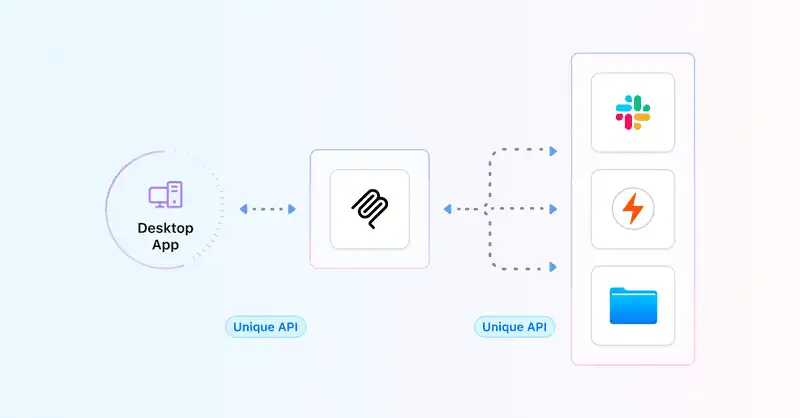
Key advantages include:
- Provide Relevant Context: MCP ensures agents receive structured, up-to-date context, including system state, user inputs, and operational constraints.
- Control Tool Access: MCP enforces permissions so AI agents can access only authorized tools, APIs, and external services.
- Enable Structured Results: Tools return standardized outputs that agents can interpret consistently across automation workflows.
- Maintain Decision Consistency: Structured context helps agents make stable decisions across multi-step reasoning and complex automation processes.
For example, a QA team using MCP-based agent orchestration was able to consolidate functional, visual, and accessibility testing into a single automated workflow.
Instead of maintaining three separate integrations, the team connected all testing tools through MCP servers, reducing pipeline configuration overhead and improving test execution consistency across environments.
What Does the Architecture of MCP-Based AI Agent Systems Look Like?
The architecture of MCP-based AI agent systems separates reasoning, context management, and tool execution into independent layers.
This separation allows MCP and AI agents to support scalable AI automation and intelligent automation workflows without tightly coupling agents to specific tools.
Typical MCP-based systems include the following architectural components:
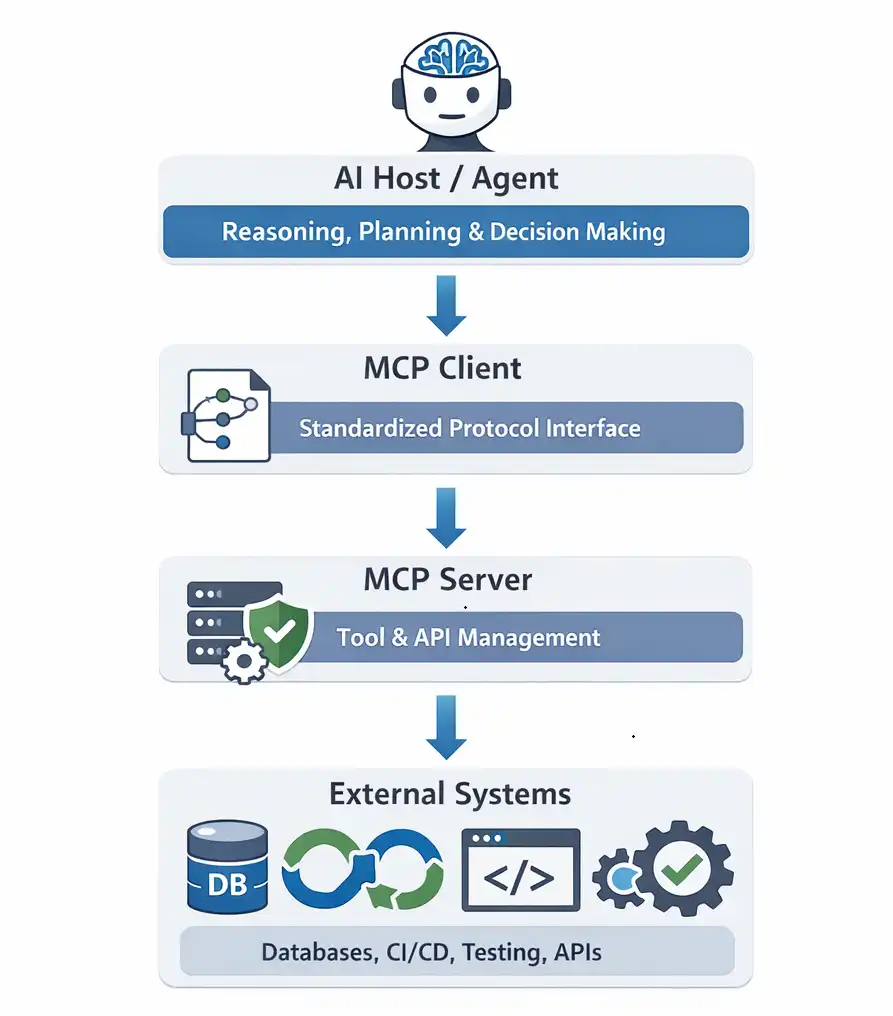
- AI Host / Agent: Handles reasoning, planning, and decision-making while analyzing context, interpreting user requests, and determining which actions or tools to invoke.
- MCP Client: Converts AI agent decisions into standardized MCP protocol requests, enabling structured communication between the agent and external systems.
- MCP Server: Exposes tools, APIs, and data sources through structured interfaces that allow AI agents to securely discover and invoke capabilities.
- External Systems: Includes databases, CI/CD pipelines, testing platforms, and enterprise services that MCP servers connect with to execute tasks.
This architecture allows AI agents to interact with multiple tools without building custom integrations for each system.
After understanding the architecture of MCP-based systems, the next step is to examine how AI agents interact with MCP servers during runtime.
How AI Agents Work with MCP?
MCP enables AI agents to interact with tools through structured context exchange. It defines how information moves between agents and external systems.
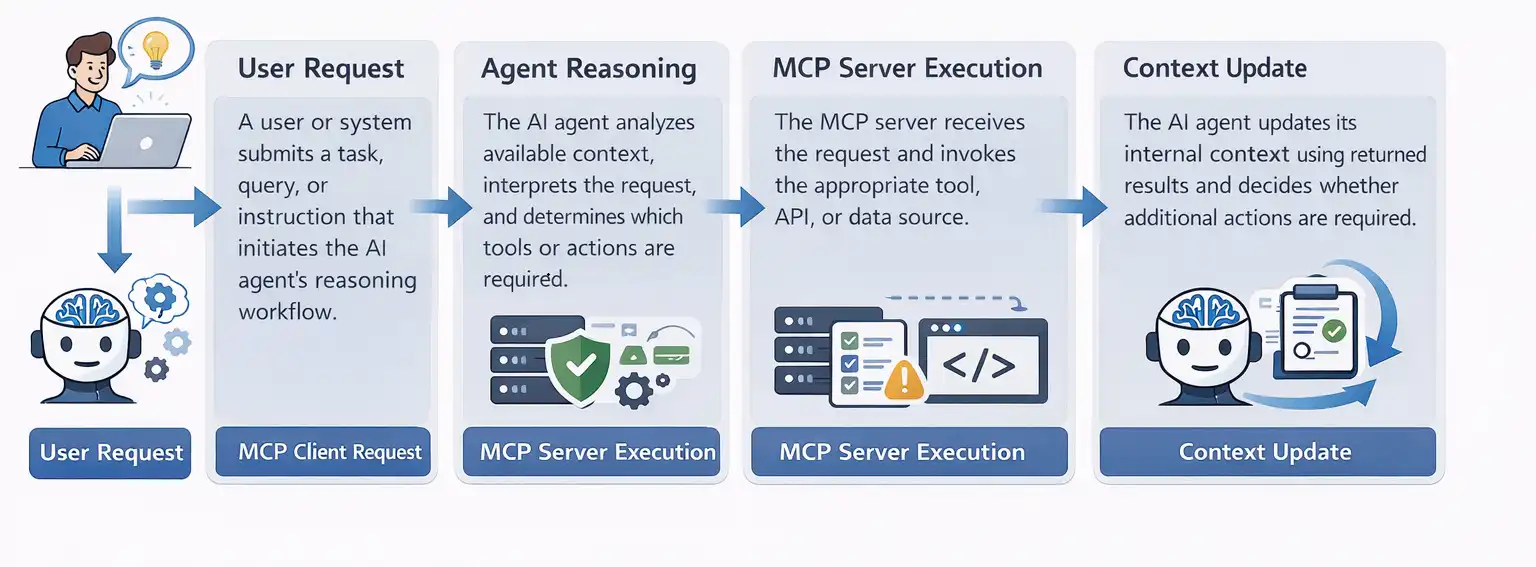
The typical workflow includes the following stages:
- User Request: A user or system submits a task, query, or instruction that initiates the AI agent's reasoning workflow.
- Agent Reasoning: The AI agent analyzes available context, interprets the request, and determines which tools or actions are required.
- MCP Client Request: The agent sends a structured request through the MCP client to access approved tools, APIs, or services.
- MCP Server Execution: The MCP server receives the request and invokes the appropriate tool, API, or data source.
- Structured Response: The MCP server returns structured results containing outputs, status updates, or errors generated during tool execution.
- Context Update: The AI agent updates its internal context using returned results and decides whether additional actions are required.
MCP separates decision-making from context storage and tool execution, enabling controlled, observable, and testable AI automation workflows.
How Is MCP Used in AI Testing and QA Automation?
AI testing platforms increasingly use MCP and AI agents to orchestrate automated testing workflows. Instead of manually triggering test suites in CI pipelines, an AI QA agent can evaluate contextual signals and decide when testing should run.
These signals may include:
- Recent code changes
- Build or deployment status
- Commit history
- Historical test failures
Based on this context, the agent determines which validation steps are required. For example:
- Backend changes may trigger functional regression tests.
- UI updates may initiate visual comparison and accessibility validation.
According to industry data aggregated by Gitnux from multiple QA and DevOps surveys, AI adoption in software testing is accelerating. Aggregated findings indicate that 67% of QA professionals use AI tools daily for test automation, while 82% of DevOps teams have integrated AI-based testing into CI/CD pipelines.
Using MCP servers, the agent interacts with testing tools through a standardized interface. Each MCP server exposes specific testing capabilities, such as:
- Automation test execution
- Visual regression analysis
- Accessibility scanning
- Large-scale parallel test orchestration
Because MCP provides a consistent interface, AI testing platforms can scale automation across multiple environments without creating custom integrations for every testing framework or tool.
As a result, testing workflows can move from static CI triggers to context-aware automation, where AI agents dynamically decide when and how validation should occur.
How an AI Agent Decides When to Run Automation?
Before triggering automated tests, an AI agent evaluates contextual signals from the development environment. These signals may include recent code changes, build status, commit history, or historical test failures.
Using this context, the agent determines whether automation should run and which tests are relevant. For example, backend code changes may trigger functional regression tests, while documentation-only changes may not require any testing.
This decision layer is critical for efficient AI-driven testing. Instead of executing every test suite for every change, the agent selectively triggers automation based on contextual signals.
By combining contextual reasoning with MCP-enabled tool access, AI agents can orchestrate testing workflows while keeping CI/CD pipelines efficient and responsive.
In practical implementations, these decisions are executed through MCP-connected testing systems. TestMu AI (formerly LambdaTest) is a full-stack AI quality engineering platform designed to support intelligent, agent-driven testing workflows.
This platform exposes testing capabilities through MCP servers, enabling AI agents to plan, execute, and analyze software tests using structured tool interactions.
The TestMu AI MCP Server provides multiple MCP tools such as automation, HyperExecute, SmartUI, and Accessibility. Through these MCP tools, AI agents can trigger functional automation, perform visual comparisons, run accessibility scans, and scale execution across multiple environments.
Through these MCP tools, AI agents can coordinate different testing workflows without directly integrating with each testing framework.
In practice, I found that implementing MCP-based agent orchestration reduced integration overhead significantly. Instead of maintaining separate API connections for functional, visual, and accessibility testing, a single MCP interface allowed agents to coordinate all three workflows through one consistent protocol.
The following real-world demonstration shows how an AI agent connects to the TestMu AI MCP Server, analyzes a project, generates a test configuration, and orchestrates automated testing using MCP.
Demo: AI-Driven Testing Orchestration Using TestMu AI MCP Server
In AI-driven testing environments, developers can use the Model Context Protocol (MCP) to connect AI agents with testing platforms and automate complex validation workflows.
The following demonstration shows how an AI agent connects to the TestMu AI MCP Server, analyzes a project, generates a test configuration, and orchestrates functional, visual, and accessibility testing across MCP-connected systems.
1. Connect the AI Agent to the MCP Server: The AI agent first connects to the TestMu AI MCP server, which exposes testing capabilities through the Model Context Protocol.
MCP configuration:
{
  "mcpServers": {
    "mcp-lambdatest": {
      "disabled": false,
      "timeout": 60,
      "type": "stdio",
      "command": "npx",
      "args": [
        "mcp-remote@latest",
        "https://mcp.lambdatest.com/mcp"
      ]
    }
  }
}
Once authenticated, the AI agent can discover available MCP tools such as:
- HyperExecute MCP Server for large-scale test orchestration
- Automation MCP Server for functional test execution
- SmartUI MCP Server for visual regression testing
- Accessibility MCP Server for accessibility validation
2. Ask the AI Agent to Analyze the Project: After connecting to the MCP server, the developer interacts with the AI agent using natural language through an MCP-compatible assistant such as Cline.
Example prompt:
Analyze the project and create a TestMu AI YAML file using the MCP TestMu AI server.
The AI agent then:
- Analyzes the project structure
- Detects the testing framework and dependencies
- Identifies test files and execution commands
This allows the agent to automatically determine the correct testing workflow.
3. Automatically Generate Test Configuration: Based on the project analysis, the AI agent generates a TestMu AI YAML configuration file that defines how tests should run.
Example generated configuration:
run:
  framework: selenium
  language: java
  command: mvn test
  parallelism: 5
environment:
  browser: chrome
  os: windows
This configuration specifies the testing framework, execution command, and target environment for automated testing. You can review or modify the configuration before execution if needed.
4. Execute Functional Automation: If backend or application logic changes are detected, the AI agent invokes the Automation MCP Server to run functional tests.
The MCP server manages test execution and returns structured results, including:
- Execution status
- Failed test cases
- Logs and debugging artifacts
The agent evaluates these results to determine whether retries, additional validation, or escalation is required.
5. Trigger Visual and Accessibility Testing: If the agent detects UI-related changes, it invokes additional MCP tools.
- The SmartUI MCP Server performs visual snapshot comparisons to detect UI regressions.
- The Accessibility MCP Server scans pages for accessibility violations.
Both tools return structured reports that allow the agent to evaluate severity and determine follow-up actions.
6. Scale Execution Across Environments: For broader validation or release builds, the AI agent invokes the HyperExecute MCP Server.
HyperExecute enables large-scale testing by running tests in parallel across multiple browsers, operating systems, and environments.
The agent aggregates results from these executions to assess overall system stability.
7. Act on Test Outcomes: After all testing workflows are complete, the AI agent consolidates results across functional, visual, and accessibility testing.
Based on the results, the agent may:
- Generate execution summaries
- Notify developers or QA teams
- Recommend retries or fixes
- Determine release readiness
In this workflow, the AI agent focuses on reasoning and decision-making while MCP servers handle tool execution and system interaction.
This architecture allows organizations to scale agentic testing while keeping reasoning, context management, and execution layers modular and loosely coupled.
Why MCP Is Crucial for AI-Driven Developer Automation?
For developers building AI tools for developers, integrating AI agents with various development systems can be complex. Traditionally, each service, code repositories, CI/CD pipelines, testing frameworks, or monitoring systems requires custom API connections.
The MCP simplifies this integration. By exposing capabilities through MCP servers, developers enable AI agents to communicate with multiple tools using a consistent, standardized interface.
This reduces integration complexity, speeds up workflow automation, and ensures reliable operations across platforms.
Using MCP, AI agents can:
- Access code repositories and version control systems securely.
- Trigger automated tests in CI/CD pipelines.
- Retrieve monitoring data from infrastructure or application performance tools.
- Orchestrate multi-tool workflows without hard-coded integrations.
According to the Pragmatic Engineer AI Tooling Survey (March 2026), AI has already become a core part of the developer workflow.
In a survey of 906 software engineers, 95% reported using AI tools weekly or more, with 75% using AI for at least half of their engineering work. These findings confirm that AI-assisted development has moved from early adoption to a professional standard.
As a result, MCP helps teams build scalable AI developer platforms, where agents coordinate tasks such as testing, debugging, deployment validation, and system monitoring through a consistent interface. Using MCP, AI tools for developers can operate efficiently, reliably, and at scale.
What Are the Limitations and Risks of MCP and AI Agents?
While MCP and AI agents provide structure, they also introduce challenges:
- System Complexity: Multi-step workflows require careful design and strict contracts.
- Context Misconfiguration: A poorly defined context can cause leakage or inconsistencies.
- Overreliance on Context: Agents may fail if inputs do not match expected patterns.
- Debugging Challenges: Multiple context states across tools complicate tracing errors.
- Performance Overhead: Context updates and validation can slow response times.
- Schema Drift: Changes in context or tool interfaces can break workflows.
- Security Risks: Incorrect permissions may expose sensitive data or allow unauthorized access.
- False Sense of Safety: Structure does not prevent agents from reasoning incorrectly.
Understanding these risks is crucial for building resilient, reliable MCP-based systems.
Best Practices for Building Agent Systems with MCP
When building AI agent systems with MCP, following best practices ensures scalable, reliable, and efficient automation workflows:
- Define Clear Context Boundaries: Always specify what context data is relevant to the agent. Proper context scoping reduces errors and enables AI test automation to remain consistent across environments.
- Use Modular Agent Design: Separate reasoning, tool execution, and context management. Modular design supports intelligent test automation and allows the integration of new AI automation tools without breaking workflows.
- Implement Robust Logging and Observability: Track context updates, agent decisions, and tool outputs. Observability is critical when using the best AI agents to debug or optimize multi-step automation.
- Maintain Backward Compatibility: Ensure context schema and tool interfaces evolve without breaking existing agent workflows. This preserves reliability for long-term AI automation initiatives.
- Enforce Security and Access Controls: Use MCP to define permissions for agents and tools. Correct access management is essential when deploying AI automation tools in production environments.
- Start Small, Scale Gradually: Begin with a few critical workflows and incrementally expand. This approach allows teams to validate intelligent test automation before scaling to more complex pipelines.
- Continuously Evaluate Agent Decisions: Regularly review agent outputs and feedback. Continuous evaluation improves accuracy and ensures your best AI agents learn and adapt effectively.
Following these practices allows teams to harness the full potential of MCP while leveraging AI agents for robust, scalable, and intelligent test automation.
Conclusion
MCP and AI agents provide a structured framework for building autonomous systems. AI agents make decisions and operate over time, while MCP ensures context information is organized, structured, and securely managed.
Together, they enable reliable AI automation across multiple tools and environments, producing consistent, predictable results. This combination is a key enabler for AI-driven software testing, IT operations, and business process automation.
To build robust agent systems that perform effectively in production, it is essential to implement proper design, clear context contracts, controlled permissions, and strong observability.


Frequently asked questions
Did you find this page helpful?
More Related Hubs
TestMu AI forEnterprise
Get access to solutions built on Enterprise
grade security, privacy, & compliance
- Advanced access controls
- Advanced data retention rules
- Advanced Local Testing
- Premium Support options
- Early access to beta features
- Private Slack Channel
- Unlimited Manual Accessibility DevTools Tests