

Next-Gen App & Browser Testing Cloud
Trusted by 2 Mn+ QAs & Devs to accelerate their release cycles


What Is Machine Learning Automation (AutoML)
Explore machine learning automation (AutoML), its importance, working process, support for different data types, key ML tasks to automate, its role in testing, and popular AutoML tools.

Harish Rajora
March 2, 2026
Machine learning automation, or AutoML, is a technique used to automate the process of design, training, optimization, and deployment of machine learning models.
AutoML techniques help stakeholders create ML models and deploy them efficiently, even for those without deep expertise. Various tools streamline the machine learning pipeline to implement automation.
Overview
AutoML (Automated Machine Learning) is a technology that automates the complete machine learning pipeline including data preprocessing, feature engineering, model selection, hyperparameter tuning, training, and deployment, enabling faster and more accurate model development without requiring deep expertise in algorithms.
How does AutoML work step by step?
- Collect Quality Data : The process begins with gathering relevant and reliable datasets, since the performance of any ML model depends directly on the quality of the data it learns from.
- Define the Objective Clearly : The user specifies whether the goal is classification, regression, forecasting, or NLP so the tool can select the most suitable modeling approach.
- Automatically Preprocess Data : The system cleans, transforms, and structures raw data to make it ready for training without requiring manual scripting.
- Configure Parameters : Users can fine-tune optimization settings, or allow the tool to automatically adjust hyperparameters for better performance.
- Train Multiple Models : The platform runs several algorithms on the same dataset to evaluate and compare their effectiveness.
- Select the Best Model : Models are ranked using evaluation metrics such as accuracy, and the most suitable one is selected based on performance.
- Review and Deploy : The chosen model is validated and then integrated into the software backend for real-world use.
What are the key machine learning techniques used in AutoML?
- Supervised Learning : Uses labeled datasets to train models for tasks such as classification and regression.
- Unsupervised Learning : Detects hidden patterns, clusters, and anomalies in data without predefined labels.
- Reinforcement Learning : Improves model decisions over time through reward-and-penalty feedback mechanisms.
- Deep Learning CNNs/RNNs : Enables advanced capabilities such as image recognition, speech processing, and sequential data analysis.
What are the real-world applications of AutoML in testing and ML tasks?
- Test Case Generation : It can generate structured test cases automatically from natural language instructions, reducing manual authoring effort.
- Test Data Generation : It produces large volumes of diverse and boundary-covering datasets within seconds to support robust testing.
- Visual Testing : It detects pixel-level UI differences and visual anomalies across builds with high precision.
- Defect Prediction : It analyzes patterns in code and historical data to predict potential failures before they reach production.
- Classification & Forecasting : It automates tasks like spam detection, fraud detection, and time-series predictions using structured datasets.
What Is Machine Learning in Automation?
Automated machine learning, or machine learning automation, involves automating the process of developing a machine learning model. A machine learning model is the final result of a long chain of sequential processes, where the output from one process goes to another.
For instance, a machine learning model first preprocesses the data, prepares the data for training, trains on the data, tests on the testing data, uses an algorithm based on the goal of the product (such as a classifier), and then repeats all these steps on different models to check highest compatibility.
All these steps have to be performed each time a model needs to be developed, and they consume a lot of time. AutoML or machine learning automation automates all these processes and provides a final model ready to be incorporated into the software backend.
Why Is Automated Machine Learning Important?
Automated machine learning provides a lot of benefits to the team working on it:
- Since AutoML automates all the manual work to develop the models, non-experts in machine learning can also use AutoML to achieve the same outputs.
- Big tech giants use AutoML tools with a dedicated team that works only on machine learning. They constantly tune their machine learning automation process and include high-quality algorithms with greater accuracy.
- When it comes to time savings, AutoML saves a lot of time, as almost all the work is done by AutoML tools.
It enables easy access to machine learning development for all individuals, which is also known as the “democratization” of machine learning.
Using AutoML tools improves the output and performance of the resulting models. This is applicable to both functional and non-functional requirements.
Moreover, since human resources are not involved in the machine learning model development process, the time saved can be utilized in other processes, such as model integration, enhancing the team’s productivity. Hence, the software can be built in less time, which means the cost involved will also be less.
How Does AutoML Work?
AutoML works in various steps, the end of which generates a model for implementation in the software application.
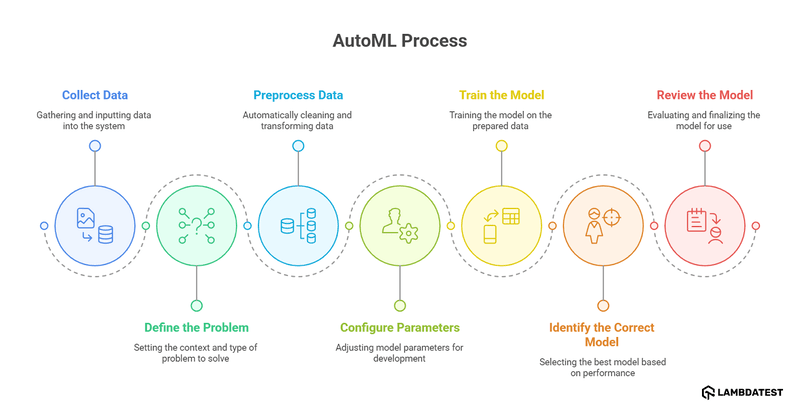
- Collect Data: The first step in AutoML is data collection. This step is manual and testers are expected to either search for a dataset or create their own (not recommended as it takes a lot of time).
- Define the Problem: In this step, a problem is defined within the AutoML tool, enabling it to understand the context, relate it to the data, and generate the most suitable model. Examples of this are classification and forecasting.
- Preprocess Data: The next step is the preprocessing of data which is done by the AutoML tool automatically. In this step, the data is cleaned and transformed according to the requirements of machine learning automation. While this process is done by AutoML tools, it is highly recommended to manually preprocess the data as well for higher quality.
- Configure Parameters: The AutoML tool provides various parameters to tweak during the model development process. Developers can provide the values and alter the default values based on their requirements.
- Train the Model: In the next step, the AutoML tool trains a model on the submitted data, determining its performance and accuracy based on various parameters.
- Identify the Correct Model: The data is then trained using various models. This step determines the best model according to the data and the problem defined.
- Review the Model: The model leaderboard is then generated and presented to the user with results that include parameters like accuracy. The team can review the model, test it using different data, and if satisfied, start using it in their software application.
It is an extremely crucial step as all the AutoML steps are performed after it considers data for their execution. If the data quality is inappropriate, the model will also show anomalies. The collected data is then fed to the AutoML system as input.
Except for the data collection and defining the problem, everything is taken care of by the AutoML tool.
AutoML for Different Data Types
Machine learning models are created for different purposes and each of those purposes is satisfied by only a certain type of input data.
For instance, if you want to create a model that can detect fraudulent transactions in a banking system, you have to train that model using financial transaction data where each transaction is labeled as “Fraud” or “Legitimate.”
Users leveraging AutoML tools can work with various data types, including:
Image Data
Computer vision is a discipline of machine learning in which the model can recognize and classify an object according to pre-defined labels based on the training data.
When machine learning automation is brought into the picture, it takes over the identification tasks of certain features that will guide the model in classifying that particular object without manual intervention.
The quality of data, however, plays a key role in the training of the model. The images used should be diverse, including the object requiring classification.
Video Data
Image-based categorization can be extended to video data, incorporating additional factors for analysis. AutoML tools working on video data can generate models that can identify objects in a video, analyze their actions, and understand voice commands.
However, it is worth noting that AutoML tools with video support are not currently commonly available due to their higher complexities and low accuracy.
Tabular Data
Tabular data provides information in the tabular form, where the identifier is the class to which each data point belongs. The main goal behind training with the tabular data using AutoML is categorizing the new data into pre-defined classes.
For instance, the team can provide the data based on identifiers that result in declaring an email as spam or not spam. These identifiers can be words used, emails used, etc. When the same process is done on numerical values, it is called regression. In this data, the final classes are not categories but numerical values.
Another branch of tabular data is time-series forecasting. In this process, the goal is to forecast a certain value in the future based on current trends and past values.
Time-series forecasting is kept as a separate discipline because of its dynamicity and involvement of a high number of variables, such as seasonality and changing trends with time.
Due to such variables, a large number of quality models often fail to work on time-series, and AutoML is often the recommended path to follow.
Textual Data
Textual data is used to train machine learning models primarily for natural language processing. In this discipline, AutoML tools aim to understand the text and make sense of it.
It is done by training the model with appropriate text with pre-defined categorization of information. AutoML tools are expected to include high-quality Bidirectional Encoder Representations from Transformers (BERT)-based models that are finely tuned and work with very high efficiency when it comes to natural language processing.
The type of data to use depends on the problem the team is trying to solve. The team should take its time collecting data, as the quality and type of this data, will determine the quality and type of subsequent phases, resulting in a better model.
Role of Machine Learning in Automation Testing
The inclusion of machine learning in automation testing has played a critical role in revolutionizing how a tester used to perform tasks earlier. It has seeped into almost every task associated with testing, bringing immense benefits to the team.
Machine learning in test automation includes:
- Supervised Learning: It uses labeled datasets to assess risks.
- Unsupervised Learning: It detects errors and patterns in data.
- Reinforcement Learning: In this, neural networks improve through a reward-and-punishment system to minimize flaws.
Here are the use cases of using machine learning in test automation:
Test Case Generation
Machine learning can also generate test cases automatically when a context is given to it.
For instance, providing input such as “test login functionality on www.abcwebsite.com/login” can generate all the steps automatically in the English language without any manual interruption.
Let’s take an example of an AI-native unified Test Manager platform by TestMu AI. It comes with integrated test case authoring and execution capabilities that centralize all test case-related information.
Test Data Generation
Many domains of automation testing require extensive, diverse, and boundary-scenario-covering high-quality data. Defining, collecting, and arranging such data takes a lot of time, as the table can sometimes expand to hundreds of rows. However, machine learning can perform all these steps within a few seconds.
Depending on the model on which the tool is developed using AutoML, generating high-quality data is often just a simple query away as “generate data for login functionality where the password needs to be alphanumeric and contain one special character”.
It is also essential to know that the better your prompts are structured, the better the model will understand the context. You can learn more about the best AI/ChatGPT prompts for software testing.
Test Generation
Authoring and maintaining tests (especially complex ones) has been one of the most time-consuming tasks of automation testing. They require specific programming skills and tools to conduct testing.
Machine learning has been a savior and most widely implemented technology when it comes to test authoring or when you have to generate tests. The NLP branch of machine learning can eliminate the use of programming language, take the script input in the English language, and understand the context (or intent) behind it.
For instance, GenAI native test agents like KaneAI by TestMu AI leverage natural language processing to generate tests effortlessly through natural language command instructions.

To get started, refer to this getting started guide on KaneAI.
With the rise of AI in testing, its crucial to stay competitive by upskilling or polishing your skillsets. The KaneAI Certification proves your hands-on AI testing skills and positions you as a future-ready, high-value QA professional.
Visual Testing
Identifying visual anomalies manually on a web page is difficult. The testers have to go through each pixel and match it to the base image to verify the page’s correctness.
When manual inspection is completed, the pixels are often matched through scripted programming for each web page on the website. This takes a lot of time and if a bug is found, the whole process has to repeat.
Machine learning automation can identify pixel differences (down to single pixel differences) within a few seconds. They are the most efficient solution to this problem and can also be included in regression test suites and run hundreds of times daily.
For example, AI-native platforms like SmartUI offer smart visual UI testing to check websites and mobile apps for visual deviations.
Defect Prediction
Machine learning automation lets you predict future failures in the current code or infrastructure. This helps identify potential bugs (and defects) in code that have passed regression and functional tests but will raise issues in the future.
Such bugs have the highest probability of breaking the production and spoiling the user experience. That’s why having models that can predict failures is a valuable asset to the team.
What ML Tasks Should You Automate?
Machine learning automation can be used in different domains to accomplish a variety of tasks. Some of the tasks where the users can opt for AutoML are as follows:
- Text-based content is all over the Internet and serves as a great medium to communicate with the reader. However, when automated tools like chatbots interact with such content, they may not understand the intent and emotion of the text. This results in straightforward, machine-like responses that can be frustrating for the end-user.
- Analyzing images is one of the most common use cases of machine learning. When there is a task where images are to be analyzed, and certain objects are to be identified in them, it is best to automate these tasks with finely tuned models available.
- Prediction and forecasting help in getting future value based on past data, current trends, and other variables. Such predictions and forecasting are extremely valuable in strategizing before the time and getting a glimpse of the future to evaluate it.
- Classification is one of the most focused areas of machine learning due to its wide usage across different domains. No matter what field the team is working on, they can easily spot an area where classification can fit perfectly.
Automating intent detection with ML models can improve user interactions. For example, in a custom support tool or system, these models can automatically recognize the intent of the messages (positive, negative, or urgent) and prioritize tickets accordingly for faster resolution.
A team should always consider AutoML models when such requirements arise. Since these are common scenarios, AutoML tools can identify such problems and update their algorithms according to new research.
Due to this, there have been many researches and refinements on algorithms working for the classification of different data. This is a bonus as the team doesn’t need to update their algorithms or be updated about recent advancements in the model development.
They can choose the right AutoML tool, and there is a very high chance that it will have the latest classification arrangement already set to be tested against the data. Therefore, if you are in a situation where the answer lies in classifying the data into different classes, it is always better to turn to AutoML tools.
Machine Learning Automation Tools
To take advantage of machine learning automation, you need to adapt to the right tool built for building models.
The most commonly used tools for AutoML are as follows:
- Google Cloud AutoML: It offers tailored machine learning models for different needs such as AutoML Image for image-based tasks, AutoML Translation for language translation, and more. It follows the same process Google uses, making it a reliable and scalable choice for projects of any size.
- Amazon SageMaker Autopilot: SageMaker Autopilot builds ML models with full transparency, handling tasks like classification, regression, and prediction. It can process incomplete datasets, fill in missing values, and rank models based on key metrics like accuracy.
- Azure Machine Learning: Azure’s AutoML supports classification, regression, vision, and NLP while integrating with Spark Cluster for scalable cloud-based processing. It also lets users deploy pre-trained models from OpenAI, Hugging Face, Meta, and Cohere.
- IBM AutoAI: It extends AutoML by adding features like model testing, scoring, code generation, and risk management. It streamlines AI lifecycle management, embeds ModelOps into workflows and cuts costs by automating the entire process.
- H2O AutoML: It supports hyperparameter tuning, iterative modeling, and feature engineering. It works with R, Python, and a no-code GUI and integrates seamlessly with Hadoop, Spark, and Kubernetes for scalable model development.
Conclusion
Artificial intelligence has become a mandatory technology in our software today. It not only brings a lot of benefits, such as cutting down time and costs for each task but also helps in being competitive and ahead of competitors.
However, the road to this integration is not an easy one. It requires multiple time-consuming steps ranging from data collection, pre-processing, running data on multiple models, feature generation, and many more. Moreover, all this can only be done by an expert in AI who themselves costs a lot of money to the company.
AutoML is the answer to all these problems, bringing machine learning model development into the automation world where each of the above processes can be completed without any manual intervention or monitoring. These software are designed to compare multiple models and provide the best possible solution to the users.
Citations
- Automated machine learning: https://en.wikipedia.org/wiki/Automated_machine_learning


Frequently asked questions
Did you find this page helpful?
More Related Hubs
TestMu AI forEnterprise
Get access to solutions built on Enterprise
grade security, privacy, & compliance
- Advanced access controls
- Advanced data retention rules
- Advanced Local Testing
- Premium Support options
- Early access to beta features
- Private Slack Channel
- Unlimited Manual Accessibility DevTools Tests