

Next-Gen App & Browser Testing Cloud
Trusted by 2 Mn+ QAs & Devs to accelerate their release cycles


Handle Synchronization In Selenium PHP Using Implicit and Explicit Wait
Implicit and Explicit wait in Selenium can be used to overcome issues like synchronization in Selenium. They are also instrumental in managing long-running tests with wait commands in Selenium.

Himanshu Sheth
December 24, 2025
One of the significant challenges with automation testing is dealing with web elements that are loaded dynamically through AJAX (Asynchronous JavaScript And XML) and JavaScript. The Selenium WebDriver does not hold the responsibility of tracking the DOM’s real-time and active state (Document Object Model). Handling synchronization in Selenium becomes important with dynamically loaded web elements as they may load at different time intervals. That’s also where Implicit and Explicit Wait in Selenium comes into play.

All of us are aware that intermittent connectivity (or internet) problems could break so-called well-designed test-cases, possibly resulting in ‘no such element found’ or ‘element not clickable’ exceptions! The asynchronous nature of web platforms poses challenges concerning synchronization in Selenium test automation.
In this Selenium PHP tutorial: How To Handle Synchronization In Selenium PHP Using Implicit and Explicit Wait, we deep dive into the usage of mechanisms involving synchronization in Selenium by resolving timing-related issues (or rather, wait commands in Selenium) that can occur in Selenium test automation.
If you are preparing for an interview you can learn more through Selenium interview questions.
Introduction to Wait Commands in Selenium
The Selenium WebDriver does not track the state of the DOM in real-time since the Selenium WebDriver generally has to block APIs, whereas the web platform is of asynchronous type.
Synchronization issues occur when operations are performed on a web element that is not yet present in the DOM, or it is not a state to accept commands (e.g., not visible, not clickable, etc.).
The possibility of race conditions with Selenium test automation implementation is likely when the user has instructed the browser to navigate to a particular page, and an ElementNotVisibleException is encountered when trying to locate a web element. The occurrence of race conditions between the browser and the Selenium WebDriver script can be averted using Selenium’s wait commands.
Synchronization in Selenium can be handled using wait commands where you wait for a particular duration or wait on a specific condition to occur. In further sections of this tutorial, we look into the different types of wait commands in Selenium PHP for handling timing (and synchronization) related issues during web automation testing.

Why Do We Require Wait Commands in Selenium?
Most modern-day websites use frameworks (or libraries) such as React, Angular, etc., for front-end development. With these frameworks, the contents on a web page are updated dynamically with interface components. The components are calculated using JavaScript interactions or AJAX requests that are sent to the server.
Though selective and dynamic loading of web elements on a page reduces the page-load time, web automation tests can fail when operations are performed on web elements that are still loading or not visible or not enabled. Interacting with such elements would result in Selenium throwing exceptions (e.g. ElementNotInteractableException, ElementNotVisibleException, etc.).
In the code snippet shown below, we execute the following test scenario:
- Open the test URL.
- Locate the ‘Get it on Google Play’ button.
- Click on the button.
- Assert if the Google Play window is not open.
FileName – WhyWaitTest.php
<?php
require 'vendor/autoload.php';

use PHPUnitFrameworkTestCase;
use FacebookWebDriverRemoteDesiredCapabilities;
use FacebookWebDriverRemoteRemoteWebDriver;
use FacebookWebDriverWebDriverBy;
use FacebookWebDriverWebDriverExpectedCondition;

class WhyWaitTest extends TestCase
{
  protected $webDriver;

  public function build_browser_capabilities(){
    $capabilities = DesiredCapabilities::chrome();
    return $capabilities;
  }

  public function setUp(): void
  {
    $capabilities = $this->build_browser_capabilities();
    $this->webDriver = RemoteWebDriver::create('http://localhost:4444/wd/hub', $capabilities);
  }

  public function tearDown(): void
  {
    $this->webDriver->quit();
  }
  /*
  * @test
  */
  public function test_Why_Wait()
  {
    $test_url = "https://phptravels.com/demo/";
    $title = "Demo Script Test drive - PHPTRAVELS";
    $gplay_xpath = "//p[.='Get it on  Google Play']";
    $driver = $this->webDriver;

    $driver->get($test_url);
    $driver->manage()->window()->maximize();
    $win_title = $driver->getTitle();
    echo ("
Title of the window 0 is " . $win_title);
    $this->assertEquals($win_title, $title);

    $link = "window.scrollTo(0, 800)";
    $this->webDriver->executeScript($link);

    $elem_play_button = $this->webDriver->findElement(WebDriverBy::XPath($gplay_xpath));
    $elem_play_button->click();

    $HandleCount = $this->webDriver->getWindowHandles();
    echo ("
Total number of window handles are " . sizeof($HandleCount));

    if ((sizeof($HandleCount)) == 2)
    {
        echo ("
Automation test is successful
");
        /* Close the newly opened Window and return to the old window */
        $driver->close();
    }
    else
    {
        echo ("
Automation test is not successful
");
    }
    echo ("
Why Wait test completed
");
  }
}
?>
We used the PHPUnit framework for test automation. On the first run, the test execution was successful, whereas the second run resulted in ElementNotInteractableException. Hence, there is no guarantee about the test scenario’s behavior (i.e., it could pass or raise ‘different types’ of exceptions).
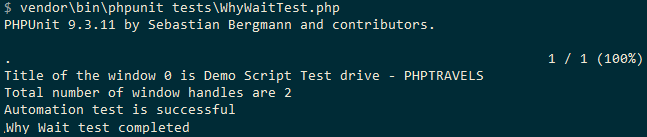
Successful test execution
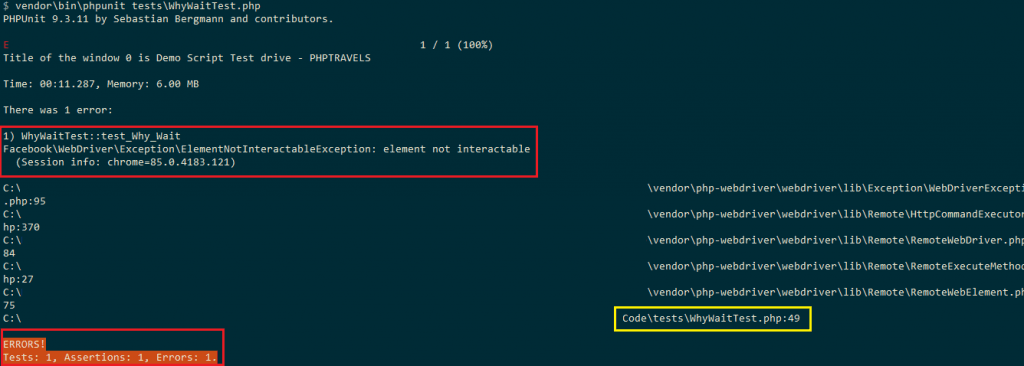
Test Execution resulting in ElementNotInteractableException
This Selenium WebDriver script might be intermittent as there is no assurance about the web elements or events that are triggered asynchronously, without blocking or explicitly waiting on those events. This is where wait commands in Selenium PHP testing can come handy since it helps resolve issues with synchronization in Selenium web automation.
Types of Waits for Handling Synchronization in Selenium PHP
Implicit and Explicit Wait in Selenium are the two major types of waits supported in PHP. Irrespective of the type of wait being used, the major intent of using the wait is to have the Selenium web automation task execution elapse a certain duration before the script execution proceeds to the next step.
You can also learn how To handle waits in Selenium from the below video.
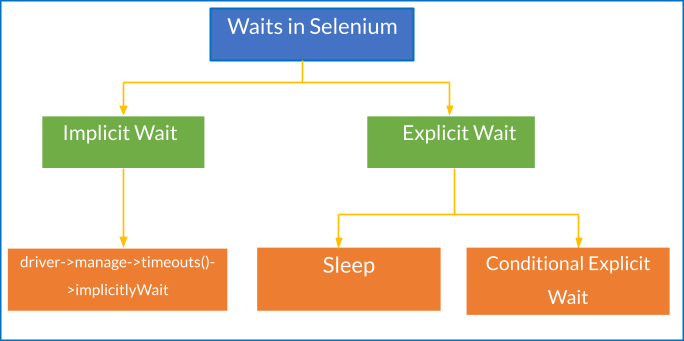
Waits in Selenium
Explicit Wait in Selenium PHP
Explicit Waits (also termed ‘smart waits’) in Selenium halt the program execution or freeze a thread until the occurrence of a certain condition. The status of the condition is checked at a certain frequency until the wait timeout has elapsed. If the condition is satisfied, the execution proceeds to the next step; else, it results in a timeout.
Sleep is also a type of Explicit Wait, but it sets the condition to an exact time period to wait. This is irrespective of whether the required condition (e.g., presence of web element in DOM, visibility of web element, etc.) is satisfied or not. We would not recommend using sleep() for synchronization in Selenium since it elongates the test execution time.
In Selenium PHP, the explicit wait is possible with prepared conditions that can be passed to the until() method. It is also possible to use callable methods with the until() method to use ‘custom conditions’ instead of prepared conditions.
Some of the sample conditions for explicit wait in Selenium WebDriver are:
- Waiting for the web element that is present in the DOM to be visible (i.e., visibilityOfElementLocated)
- Waiting for the web element to be clickable (i.e., elementToBeClickable)
- Waiting for the presence of the web element on the DOM of a page (i.e., presenceOfElementLocated)
Here is the sequence of steps that occur when an explicit wait is triggered:
- The Wait Time, Frequency for condition checking, and Condition are entered as a part of the explicit wait command.
$driver->wait(wait-time, frequency-in-ms)->until(WebDriverExpectedCondition::condition(WebDriverBy::web-locator));
The major difference between implicit and explicit wait in Selenium is that implicit wait is applicable till the time Selenium WebDriver instance is alive, whereas explicit wait is applicable on the requisite web element on the page. As explicit waits allow waiting for the condition to occur, they are better-suited for synchronization of the state between the browser and DOM and the Selenium WebDriver script.
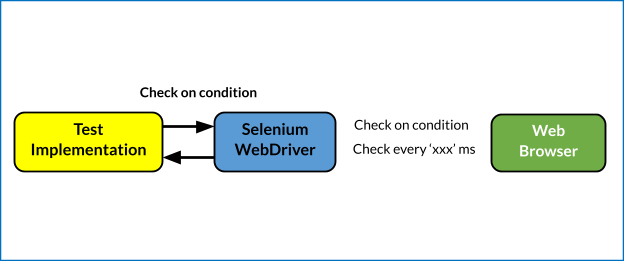
Explicit Wait in Selenium
WebDriverWait and WebDriverExpectedCondition in Selenium PHP
WebDriverExpectedCondition and WebDriverWait are the key facilitators for realizing explicit wait with PHP and Selenium. For PHP, the expected conditions are available in the WebDriverExpectedCondition class. The Selenium WebDriver looks for the web element along with the occurrence of conditions at the frequency configured in the explicit wait command.
In case of a potential issue with the web element, an exception is thrown. Below are some of the common exceptions that occur when synchronization in Selenium is not handled properly:
- NoSuchElementException – The required web element is not a part of the DOM.
- ElementNotVisibleException – The required web element is present in the DOM, but the element is not ready for any operation (e.g., click) as it is not yet visible.
- ElementNotSelectableException – The required web element is present in the DOM, but it cannot be selected. Hence, the element cannot be interacted with.
- NoSuchFrameException – This exception is thrown when the Selenium WebDriver cannot find the frame on the page to which it needs to switch.
- StaleElementReferenceException – This exception is thrown when reference is made to a web element whose state is stale. The element is no longer on the DOM of the page.
- NoAlertPresentException – This exception is thrown when the Selenium WebDriver tries switching to an alert that is no longer available (or present).
- NoSuchWindowException – Selenium WebDriver is attempting to switch to a window that is invalid or no longer available.
Become an expert in PHP, you can acquire a benchmark industry certification specializing in core PHP programming skills and expand your opportunities to advance your career in PHP automation testing.

‘Available Conditions’ to Wait for in Selenium PHP
The WebDriverExpectedCondition class in Selenium PHP contains a set of conditions that can be used with WebDriverWait in WebDriver tests. Here are some of the methods that are a part of the WebDriverExpectedCondition class in PHP:
WebDriverExpectedCondition | Explanation |
|---|---|
Wait for Title | |
titleIs | Exception for checking the title of the page. |
titleContains | Exception for checking the substring of the page title. |
titleMatches | Exception for checking if the page title matches a given regular expression. |
Wait for URL | |
urlIs | Exception for checking the URL of the page |
urlContains | Exception for checking if the URL of a page contains a particular substring. |
urlMatches | Exception for checking if the URL matches with the given regular expression |
Elements and their text | |
presenceOfElementLocated | Exception for checking if the element is present in the DOM. Even if the web element is present, it does not necessarily mean that the element is visible. |
presenceOfAllElementsLocatedBy | Exception for checking if there is at least one web element present on the page. |
elementTextMatches | Exception for checking if a certain regular expression matches with the text in the web element. |
elementTextIs | Exception for checking if the particular text ‘exactly matches’ with the text present in the specified web element. |
elementTextContains | Exception for checking if the particular text is present in the specified web element. |
Elements visibility and invisibility | |
visibilityOfElementLocated | Exception for checking if the element is not only present in the DOM but is also visible. The element’s height and weight should be greater than zero. |
visibilityOf | Exception for checking if the required element that is present in the DOM is visible as well. |
invisibilityOfElementLocated | Exception for checking if the web element is either not in the DOM or not visible. |
invisibilityOfElementWithText | Exception for checking if the web element with the specified text is either not in the DOM or not visible. |
Frames, Windows, Elements, and Alerts | |
frameToBeAvailableAndSwitchToIt | Exception for checking if the particular iFrame exists or not. If it exists, the focus shifts to that particular iFrame. |
elementToBeClickable | Exception for checking if the web element is present, visible, and enabled in the DOM so that ‘click’ operation can be performed on it. |
alertIsPresent | Exception for checking if an alert box is present. |
numberOfWindowsToBe | Exception for checking the number of opened windows. |
Special conditions | |
elementValueContains | Exception for checking if a particular text is present in the ‘values’ attribute of the specified web element. |
elementSelectionStateToBe | Exception for checking if a particular web element is selected. |
elementToBeSelected | Exception for checking if a particular web element is selected. |
stalenessOf | Wait till the time the specified web element is no longer attached to the DOM. |
not | Exception to perform the logical opposite of the given condition. |
WebDriverExpectedCondition
Explanation
Explanation
Wait for Title
titleIs
Exception for checking the title of the page.
titleContains
Exception for checking the substring of the page title.
titleMatches
Exception for checking if the page title matches a given regular expression.
Wait for URL
urlIs
Exception for checking the URL of the page
urlContains
Exception for checking if the URL of a page contains a particular substring.
urlMatches
Exception for checking if the URL matches with the given regular expression
Elements and their text
presenceOfElementLocated
Exception for checking if the element is present in the DOM. Even if the web element is present, it does not necessarily mean that the element is visible.
presenceOfAllElementsLocatedBy
Exception for checking if there is at least one web element present on the page.
elementTextMatches
Exception for checking if a certain regular expression matches with the text in the web element.
elementTextIs
Exception for checking if the particular text ‘exactly matches’ with the text present in the specified web element.
elementTextContains
Exception for checking if the particular text is present in the specified web element.
Elements visibility and invisibility
visibilityOfElementLocated
Exception for checking if the element is not only present in the DOM but is also visible. The element’s height and weight should be greater than zero.
visibilityOf
Exception for checking if the required element that is present in the DOM is visible as well.
invisibilityOfElementLocated
Exception for checking if the web element is either not in the DOM or not visible.
invisibilityOfElementWithText
Exception for checking if the web element with the specified text is either not in the DOM or not visible.
Frames, Windows, Elements, and Alerts
frameToBeAvailableAndSwitchToIt
Exception for checking if the particular iFrame exists or not. If it exists, the focus shifts to that particular iFrame.
elementToBeClickable
Exception for checking if the web element is present, visible, and enabled in the DOM so that ‘click’ operation can be performed on it.
alertIsPresent
Exception for checking if an alert box is present.
numberOfWindowsToBe
Exception for checking the number of opened windows.
Special conditions
elementValueContains
Exception for checking if a particular text is present in the ‘values’ attribute of the specified web element.
elementSelectionStateToBe
Exception for checking if a particular web element is selected.
elementToBeSelected
Exception for checking if a particular web element is selected.
stalenessOf
Wait till the time the specified web element is no longer attached to the DOM.
not
Exception to perform the logical opposite of the given condition.
Shown below is a sample snippet that shows the usage of the expected condition titleIs. The expected condition is that the page title of https://lambdatest.github.io/sample-todo-app/ should match ‘Sample page – lambdatest.com’
Snippet: Usage of titleIs with default wait of 30 seconds
/* Wait for the page title to be 'My Page'.  */

/* Default wait (= 30 sec) */
$webDriver->get("https://lambdatest.github.io/sample-todo-app/");
$webDriver->wait()->until(
    WebDriverExpectedCondition::titleIs('Sample page - lambdatest.com')
);
Snippet: Usage of titleIs with wait of 10 seconds and condition checking frequency set to 500 ms
* Wait for at most 20 seconds and retry every 500ms if it the title is not correct. */
$webDriver->get("https://lambdatest.github.io/sample-todo-app/");
$webDriver->wait(10, 500)->until(
    WebDriverExpectedCondition::titleIs('Sample page - lambdatest.com')
);
For more detailed information, refer to the WebDriverExpectedCondition of the Selenium PHP WebDriver document.
‘Custom Conditions’ to Wait for in Selenium PHP
Custom conditions for the explicit wait in Selenium PHP use callable methods (or functions) as a part of the until() method.
Snippet: Usage of custom conditions for explicit wait
$webDriver->wait(10, 500)->until(
        function () use ($webDriver) {
            $elements = $webDriver->findElements(WebDriverBy::XPath("//p[.='Get it on  Google Play']"));

            return count($elements) > 2;
        },
        'Could not locate more than 2 web elements'
    );
In the code snippet shown above, the custom condition will work until more than two elements with the specified XPath appear on the page. If the elements are not found within the specified time duration (i.e., 10 seconds), the error ‘Could not locate more than 2 web elements’ will be displayed on the screen.
Explicit Wait for Achieving Synchronization in Selenium
To demonstrate the use of Explicit Wait for synchronization in Selenium PHP testing, we would perform the tests on cloud-based Selenium provided by TestMu AI. To get started, create an account on TestMu AI and note the user-name & access-key from the profile section on TestMu AI. The browser capabilities are generated using the TestMu AI capabilities generator.
The PHPUnit framework is used for testing. For downloading the necessary packages for testing, we create composer.json in the project’s root folder.
FileName – composer.json
{
   "require":{
      "php":">=7.1",
      "phpunit/phpunit":"^9",
      "phpunit/phpunit-selenium": "*",
      "php-webdriver/webdriver":"1.8.0",
      "symfony/symfony":"4.4",
   }
}
Run composer require in the terminal and press Enter button twice to install the necessary packages.
composer require
Here is the test scenario that we will use for demonstrating the usage of available conditions and custom conditions in explicit wait for achieving synchronization in Selenium PHP.
Test Scenario
- Navigate to the URL https://phptravels.com/demo/ in Chrome on Windows 10.
- Click on the ‘Get it on Google Play’ button present on the page.
- Compare the Window title with the expected title.
- Assert if the titles do not match.
- Locate the web element with the link ‘Learn More.’
- Assert if the window title of the resultant page does not match with the expected title.
Implementation (Explicit Wait with Available Conditions)
FileName – Explicit_WaitTest.php
<?php
require 'vendor/autoload.php';

use PHPUnitFrameworkTestCase;
use FacebookWebDriverRemoteDesiredCapabilities;
use FacebookWebDriverRemoteRemoteWebDriver;
use FacebookWebDriverWebDriverBy;
use FacebookWebDriverWebDriverExpectedCondition;

$GLOBALS['LT_USERNAME'] = "user-name";
# accessKey:  AccessKey can be generated from automation dashboard or profile section
$GLOBALS['LT_APPKEY'] = "access-key";
$GLOBALS['ELEM_STATUS'] = False;

class Explicit_WaitTest extends TestCase
{
  protected $webDriver;

  public function build_browser_capabilities(){
    /* Local Selenium Grid */
    /* $capabilities = DesiredCapabilities::chrome(); */
    $capabilities = array(
      "build" => "[PHP] Demonstration of Explicit Wait with available conditions",
      "name" => "[PHP] Demonstration of Explicit Wait with available conditions",
      "platform" => "Windows 10",
      "browserName" => "Chrome",
      "version" => "85.0"
    );
    return $capabilities;
  }

  public function setUp(): void
  {
    $url = "https://". $GLOBALS['LT_USERNAME'] .":" . $GLOBALS['LT_APPKEY'] ."@hub.lambdatest.com/wd/hub";
    $capabilities = $this->build_browser_capabilities();
    /* Local Selenium Grid */
    /* $this->webDriver = RemoteWebDriver::create('http://localhost:4444/wd/hub', $capabilities); */
    $this->webDriver = RemoteWebDriver::create($url, $capabilities);
  }

  public function tearDown(): void
  {
    $this->webDriver->quit();
  }
  /*
  * @test
  */
  public function test_Explicit_Wait()
  {
    $test_url = "https://phptravels.com/demo/";
    $title = "Demo Script Test drive - PHPTRAVELS";
    $resultant_play_url = "https://play.google.com/store/apps/details?id=com.phptravelsnative";
    $title_2_str = "PHPTRAVELS Native";
    $gplay_xpath = "//p[.='Get it on  Google Play']";
    $this->webDriver->get($test_url);
    $this->webDriver->manage()->window()->maximize();

    $HandleCount = $this->webDriver->getWindowHandles();
    echo ("
Total number of window handles are " . sizeof($HandleCount));
    echo ("
Window 0: " . $HandleCount[0]);

    $win_title = $this->webDriver->getTitle();
    echo ("
Title of the window 0 is " . $win_title);
    $this->assertEquals($win_title, $title);

    $driver = $this->webDriver;

    $link = "window.scrollTo(0, 800)";
    $this->webDriver->executeScript($link);

    /* Check if the web element is visible */
    /* Being visible does not necessarily mean that the element is clickable */
    $element = $driver->wait(10, 500)->until(WebDriverExpectedCondition::visibilityOfElementLocated(WebDriverBy::XPath($gplay_xpath))
    );

    /* Check if the required web element is clickable */
    $element = $driver->wait(10, 500)->until(WebDriverExpectedCondition::elementToBeClickable(WebDriverBy::XPath($gplay_xpath)));

    /* Since the element is  clickable, we perform the click operation, else the control wouldn't have reached here
       as the Clickable operation would have timed out
    */
    $element->click();
    $HandleCount = $this->webDriver->getWindowHandles();
    echo ("
Total number of window handles are " . sizeof($HandleCount));
    echo ("
Window 1: " . $HandleCount[1]);

    /* Go the window opened in the next tab */
    $this->webDriver->switchTo()->window($HandleCount[1]);
    $win_title_2 = $this->webDriver->getTitle();
    echo ("
Title of the window 1 is " . $win_title_2);

    /* Check if the Window Title contains the Expected Sub-String */
    $driver->wait(10, 500)->until(
        WebDriverExpectedCondition::titleContains($title_2_str)
    );

    /*** If a click has to be performed on the Link that contains text 'Visit website', use the following commands ***/
    $driver->wait(10, 500)->until(
        WebDriverExpectedCondition::presenceOfElementLocated(WebDriverBy::XPath("//a[.='Learn More']"))
    )->click();

    /* Check if the Window Title contains the Expected Sub-String */
    echo ("
Title of the window 1.1 is " . $this->webDriver->getTitle());
    $driver->wait(10, 500)->until(
        WebDriverExpectedCondition::titleContains("Games content ratings on Google Play")
    );

    /* Close the newly opened Window and return to the old window */
    $this->webDriver->close();

    /* As two more windows are open, we switch to the Window-0 */
    $this->webDriver->switchTo()->window($HandleCount[0]);

    echo ("
Explicit Wait test completed
");
  }
}
?>
Code Walkthrough
Line (22 – 28): The create method of Remote WebDriver takes two parameters – the browser capabilities array which was generated using the TestMu AI capabilities generator and the TestMu AI Grid URL [@hub.lambdatest.com/wd/hub] on which the tests would be executed.
$url = "https://". $GLOBALS['LT_USERNAME'] .":" . $GLOBALS['LT_APPKEY'] ."@hub.lambdatest.com/wd/hub";
$capabilities = $this->build_browser_capabilities();
$this->webDriver = RemoteWebDriver::create($url, $capabilities);
Line (68 – 69): Once the test URL https://phptravels.com/demo/ is open, we perform a vertical scroll by executing the JavaScript command window.scrollTo(0, 800).
$link = "window.scrollTo(0, 800)";
$this->webDriver->executeScript($link);
Line (73 – 74): An explicit wait for 10 seconds is set with the wait being performed on the condition visibilityOfElementLocated for the web element with XPath – //p[.=’Get it on Google Play’].
We used the POM Builder Extension in Chrome to fetch the details of the required web element.
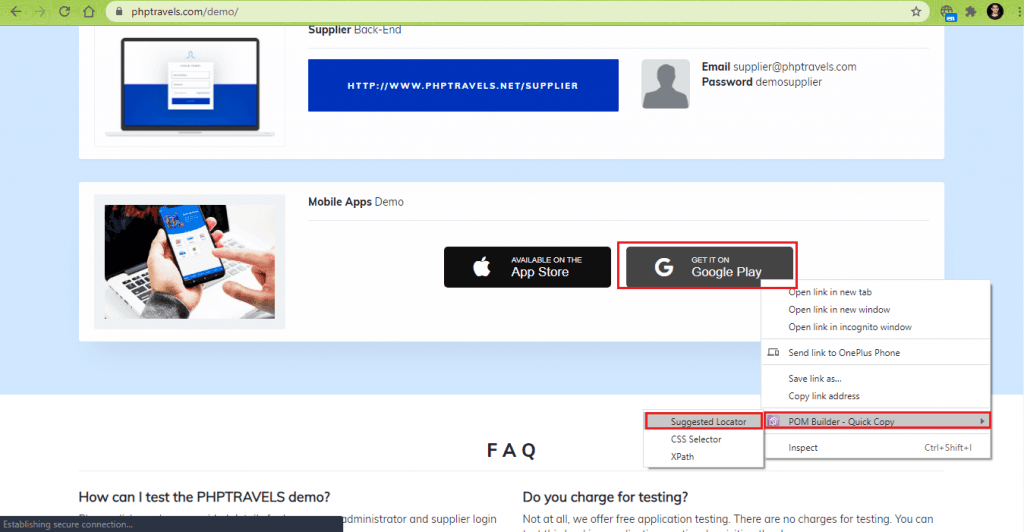
The frequency at which the condition is checked is set to 500 ms.
$gplay_xpath = "//p[.='Get it on  Google Play']";

$element = $driver->wait(10, 500)->until(WebDriverExpectedCondition::visibilityOfElementLocated(WebDriverBy::XPath($gplay_xpath)));
Line (77): In the previous step, we used explicit wait with available conditions to ensure that the element is in the DOM and it is visible.
Since the element is visible, we now wait on the expected condition elementToBeClickable for the same element (i.e., Get it on Google Play button). This is to ensure that the click operation performed in the subsequent step works as expected.
$element = $driver->wait(10, 500)->until(WebDriverExpectedCondition::elementToBeClickable(WebDriverBy::XPath($gplay_xpath)));
Line (82): As we have already checked for the clickability of the web element, the ‘Get it on Google Play’ button is clicked.
$element = $driver->wait(10, 500)->until(WebDriverExpectedCondition::elementToBeClickable(WebDriverBy::XPath($gplay_xpath)));
$element->click();
Line (93 – 95): With the focus on the newly opened window with URL https://play.google.com/store/apps/details?id=com.phptravelsnative, we use explicit wait of 10 seconds with titleContains condition. It waits on the condition till the title does not contain the sub-string ‘PHPTRAVELS Native.’
If the title of the window under focus does not have the required sub-string, the wait will result in a timeout, thereby halting the execution.
* Check if the Window Title contains the Expected Sub-String */
$driver->wait(10, 500)->until(
        WebDriverExpectedCondition::titleContains($title_2_str)
);
Line (98 – 100): On the current page, we explicitly wait for 10 seconds on the available condition presenceOfElementLocated for the web element with XPath – //a[.=’Learn More’]. A click operation is performed on the ‘Learn More’ link.
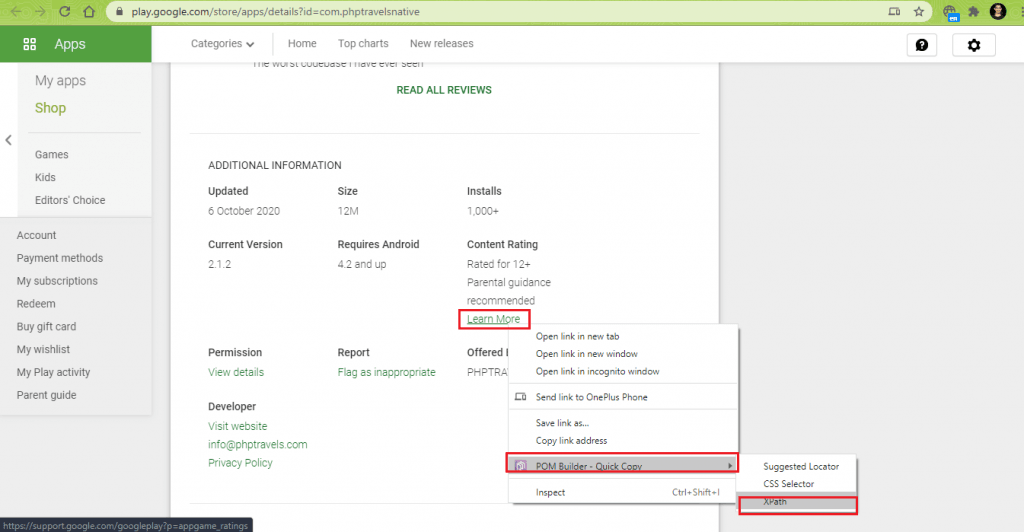
$driver->wait(10, 500)->until(
        WebDriverExpectedCondition::presenceOfElementLocated(WebDriverBy::XPath("//a[.='Learn More']"))
)->click();
Line (104 – 106): The click on the ‘Learn More’ link opens the Support Page for Google Play. An explicit wait of 10 seconds with titleContains condition is passed to the until() method. The execution proceeds to the next step when the window contains the substring ‘Games content ratings on Google Play.’
$driver->wait(10, 500)->until(
        WebDriverExpectedCondition::titleContains("Games content ratings on Google Play"));
Execution
Run the following command on the terminal:
vendorinphpunit testsExplicit_WaitTest.php
As seen in the output snapshot, the test was successfully executed. The execution steps can be witnessed by visiting the Logs on TestMu AI for the particular Test ID and Build ID.
Implementation (Explicit Wait with Custom Conditions)
FileName – Custom_Explicit_WaitTest.php
<?php
require 'vendor/autoload.php';

use PHPUnitFrameworkTestCase;
use FacebookWebDriverRemoteDesiredCapabilities;
use FacebookWebDriverRemoteRemoteWebDriver;
use FacebookWebDriverWebDriverBy;
use FacebookWebDriverWebDriverExpectedCondition;

$GLOBALS['LT_USERNAME'] = "user-name";
# accessKey:  AccessKey can be generated from automation dashboard or profile section
$GLOBALS['LT_APPKEY'] = "access-key";
$GLOBALS['ELEM_STATUS'] = False;

class Custom_Explicit_WaitTest extends TestCase
{
  protected $webDriver;

  public function build_browser_capabilities(){
    /* Local Selenium Grid */
    /* $capabilities = DesiredCapabilities::chrome(); */
    $capabilities = array(
      "build" => "[PHP] Demonstration of Explicit Wait with custom conditions",
      "name" => "[PHP] Demonstration of Explicit Wait with custom conditions",
      "platform" => "Windows 10",
      "browserName" => "Chrome",
      "version" => "85.0"
    );
    return $capabilities;
  }

  public function setUp(): void
  {
    $url = "https://". $GLOBALS['LT_USERNAME'] .":" . $GLOBALS['LT_APPKEY'] ."@hub.lambdatest.com/wd/hub";
    $capabilities = $this->build_browser_capabilities();
    /* Local Selenium Grid */
    /* $this->webDriver = RemoteWebDriver::create('http://localhost:4444/wd/hub', $capabilities); */
    $this->webDriver = RemoteWebDriver::create($url, $capabilities);
  }

  public function tearDown(): void
  {
    $this->webDriver->quit();
  }
  /*
  * @test
  */
  public function test_Custom_Explicit_Wait()
  {
    $test_url = "https://phptravels.com/demo/";
    $title = "Demo Script Test drive - PHPTRAVELS";
    $resultant_play_url = "https://play.google.com/store/apps/details?id=com.phptravelsnative";
    $title_2_str = "PHPTRAVELS Native";
    $gplay_xpath = "//p[.='Get it on  Google Play']";

    $this->webDriver->get($test_url);
    $this->webDriver->manage()->window()->maximize();

    $HandleCount = $this->webDriver->getWindowHandles();
    echo ("
Total number of window handles are " . sizeof($HandleCount));
    echo ("
Window 0: " . $HandleCount[0]);

    $win_title = $this->webDriver->getTitle();
    echo ("
Title of the window 0 is " . $win_title);
    $this->assertEquals($win_title, $title);

    $driver = $this->webDriver;
    $this->webDriver->wait(10, 500)->until(
    function () use ($driver) {
        $gplay_xpath = "//p[.='Get it on  Google Play']";
        $link = "window.scrollTo(0, 800)";
        $driver->executeScript($link);

        $elem_play_button_cnt = $driver->findElements(WebDriverBy::XPath($gplay_xpath));
        if ($elem_play_button_cnt > 0)
        {
            echo("
Google Play Element is located
");
            $GLOBALS['ELEM_STATUS'] = True;
        }
        return count($elem_play_button_cnt) > 0;
    },
    'Error locating the Google Play button'
    );

    if ($GLOBALS['ELEM_STATUS'] == False)
    {
        /* Close the newly opened Window and return to the old window */
        $this->webDriver->close();
    }
    else
    {
        $element = $driver->wait(5, 1000)->until(WebDriverExpectedCondition::elementToBeClickable(WebDriverBy::XPath($gplay_xpath)));
        $element->click();
        $HandleCount = $this->webDriver->getWindowHandles();
        echo ("
Total number of window handles are " . sizeof($HandleCount));
        echo ("
Window 1: " . $HandleCount[1]);

        /* Go the window opened in the next tab */
        $this->webDriver->switchTo()->window($HandleCount[1]);
        $win_title_2 = $this->webDriver->getTitle();
        echo ("
Title of the window 1 is " . $win_title_2);

        /* $this->assertEquals($win_title_2, $title_2); */
        if(strpos($win_title_2, $title_2_str) !== false)
        {
            echo "
Play Store window for PHP Native is open";
        }
        else
        {
            echo "
Play Store window for PHP Native is not open";
        }
        /*** If a click has to be performed on the Link that contains text 'Learn More', use the following commands ***/
        $driver->wait(10, 500)->until(
        WebDriverExpectedCondition::presenceOfElementLocated(WebDriverBy::XPath("//a[.='Learn More']"))
        )->click();

        /* Check if the Window Title contains the Expected Sub-String */
        echo ("
Title of the window 1.1 is " . $this->webDriver->getTitle());
        $driver->wait(10, 500)->until(
        WebDriverExpectedCondition::titleContains("Games content ratings on Google Play")
        );
        /* Close the newly opened Window and return to the old window */
        $this->webDriver->close();
    }
    echo ("
Custom Explicit Wait test completed
");
  }
}
?>
Code Walkthrough
Lines (67 – 69): The use keyword (in the callable function for implementing custom conditions) lets you access the Selenium WebDriver (i.e. $driver) inside the closure {…}
$driver = $this->webDriver;

$this->webDriver->wait(10, 500)->until(
    function () use ($driver) {
Lines (70 – 83): In the closure (i.e., the function implemented under the until condition), the findElements Selenium API is used for checking the count of the element with XPath – //p[.=’Get it on Google Play’]
On successful execution, the element count should be 1. Since variables inside the closure are not accessible outside of this namespace, we use the global variable $GLOBALS[‘ELEM_STATUS’] to set the status. If the required web element is not found within the wait time of 10 seconds, an error message ‘Error locating the Google Play button’ is displayed, and execution is stopped.
$gplay_xpath = "//p[.='Get it on  Google Play']";
        $link = "window.scrollTo(0, 800)";
        $driver->executeScript($link);

        $elem_play_button_cnt = $driver->findElements(WebDriverBy::XPath($gplay_xpath));
        if ($elem_play_button_cnt > 0)
        {
            echo("
Google Play Element is located
");
            $GLOBALS['ELEM_STATUS'] = True;
        }
        return count($elem_play_button_cnt) > 0;
    },
    'Error locating the Google Play button'
    );
Lines (104 – 111): The strpos() function is used for finding the occurrence of the string “PHPTRAVELS Native” inside the current window title.
if(strpos($win_title_2, $title_2_str) !== false)
{
  echo "
Play Store window for PHP Native is open";
}
else
{
  echo "
Play Store window for PHP Native is not open";
}
Rest of the implementation is the same as the one used for the demonstration of ‘Explicit Waits with available conditions’.
Execution
Here is the execution snapshot, which indicates the tests executed successfully.
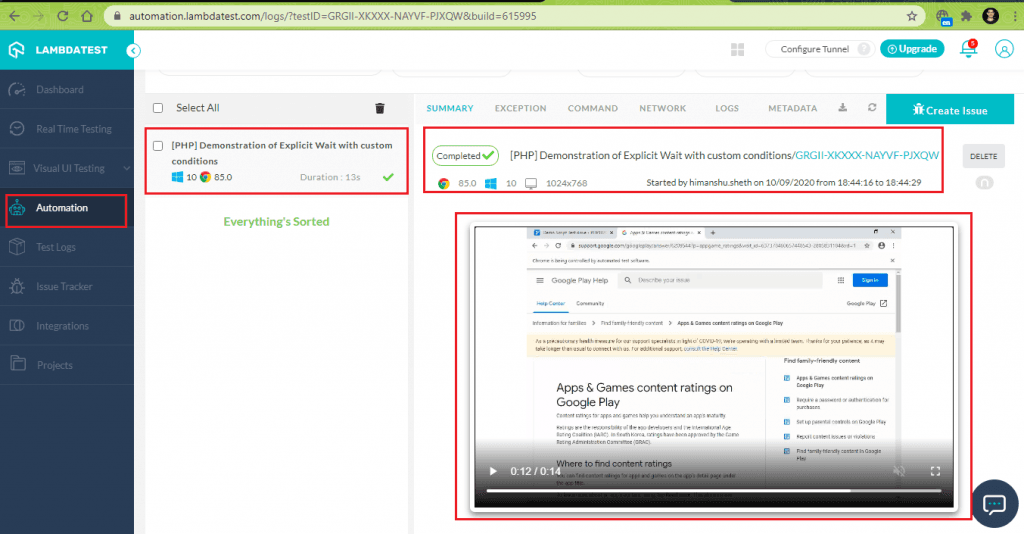
Implicit Wait in Selenium PHP
Implicit wait tells the Selenium WebDriver to poll the DOM for a certain element(s) if the element(s) is/are not immediately available. If the web element is not found in the DOM, a “No such element” exception is thrown.
The default setting for the implicit wait is 0. Implicit and Explicit wait in Selenium differs in terms of how they are set for the lifetime of the WebDriver object instance. Here is the syntax of the implicit wait, which is used for synchronization in Selenium:
$web_driver->manage()->timeouts()->implicitlyWait(time-in-seconds);
Implicit Wait for Achieving Synchronization in Selenium
For demonstrating the use of Implicit Wait commands in Selenium, we use the following test scenario:
Test Scenario
- Navigate to the URL https://phptravels.com/demo/ in Chrome on Windows 10.
- Locate the ‘Blog’ link on the page.
- Compare the Window title with the expected title.
- Assert if the titles do not match.
Implementation
FileName – Implicit_WaitTest.php
<?php
require 'vendor/autoload.php';

use PHPUnitFrameworkTestCase;
use FacebookWebDriverRemoteDesiredCapabilities;
use FacebookWebDriverRemoteRemoteWebDriver;
use FacebookWebDriverWebDriverBy;
use FacebookWebDriverWebDriverExpectedCondition;

$GLOBALS['LT_USERNAME'] = "user-name";
$GLOBALS['LT_APPKEY'] = "access-key";
$GLOBALS['ELEM_STATUS'] = False;

class Implicit_WaitTest extends TestCase
{
  protected $webDriver;

  public function build_browser_capabilities(){
    /* Local Selenium Grid */
    /* $capabilities = DesiredCapabilities::chrome(); */
    $capabilities = array(
      "build" => "[PHP] Demonstration of Implicit Wait",
      "name" => "[PHP] Demonstration of Implicit Wait",
      "platform" => "Windows 10",
      "browserName" => "Chrome",
      "version" => "85.0"
    );
    return $capabilities;
  }

  public function setUp(): void
  {
    $url = "https://". $GLOBALS['LT_USERNAME'] .":" . $GLOBALS['LT_APPKEY'] ."@hub.lambdatest.com/wd/hub";
    $capabilities = $this->build_browser_capabilities();
    /* Local Selenium Grid */
    /* $this->webDriver = RemoteWebDriver::create('http://localhost:4444/wd/hub', $capabilities); */
    $this->webDriver = RemoteWebDriver::create($url, $capabilities);
  }

  public function tearDown(): void
  {
    $this->webDriver->quit();
  }
  /*
  * @test
  */
  public function test_Implicit_Wait()
  {
    $test_url = "https://phptravels.com/demo/";
    $title = "Demo Script Test drive - PHPTRAVELS";

    $blog_xpath = "//div[@class='yx-njp']//a[.='Blog']";
    $title_2_str = "PHPTRAVELS Blog";

    $driver = $this->webDriver;

    $driver->get($test_url);
    $driver->manage()->window()->maximize();

    $HandleCount = $driver->getWindowHandles();
    echo ("
Total number of window handles are " . sizeof($HandleCount));
    echo ("
Window 0: " . $HandleCount[0]);

    $win_title = $driver->getTitle();
    echo ("
Title of the window 0 is " . $win_title);
    $this->assertEquals($win_title, $title);

    $driver->manage()->timeouts()->implicitlyWait(20);
    $elem_blog_button = $this->webDriver->findElement(WebDriverBy::XPath($blog_xpath));

    if ($elem_blog_button)
    {
        $elem_blog_button->click();
        $HandleCount = $this->webDriver->getWindowHandles();
        echo ("
Total number of window handles are " . sizeof($HandleCount));
        echo ("
Window 1: " . $HandleCount[1]);

        /* Go the window opened in the next tab */
        $this->webDriver->switchTo()->window($HandleCount[1]);
        $win_title_2 = $this->webDriver->getTitle();
        echo ("
Title of the window 1 is " . $win_title_2);

        /* $this->assertEquals($win_title_2, $title_2); */
        if(strpos($win_title_2, $title_2_str) !== false)
        {
            echo "
Blog is open";
        }
        else
        {
            echo "
Opening the blog not successful";
        }
    }

    /* Close the newly opened Window and return to the old window */
    $this->webDriver->close();
    echo ("
Implicit Wait test completed
");
  }
}
?>
Code Walkthrough
Lines (69 – 70): The ‘blog’ web element on the test URL is located using the XPath //div[@class=’yx-njp’]//a[.=’Blog’].
An implicit wait of 20 seconds is added before the search for the element is triggered.
$driver->manage()->timeouts()->implicitlyWait(20);
$elem_blog_button = $this->webDriver->findElement(WebDriverBy::XPath($blog_xpath));
Lines (70 – 74): A click operation is performed on the web element, which leads to the opening of the PHP Travels Blog Page.
if ($elem_blog_button)
{
        $elem_blog_button->click();
	........................................
	........................................
Lines (80 – 93): Test is marked as ‘Fail’ if the window title of the blog page does not contain the sub-string ‘PHPTRAVELS Blog.’
$title_2_str = "PHPTRAVELS Blog";

$this->webDriver->switchTo()->window($HandleCount[1]);
$win_title_2 = $this->webDriver->getTitle();

if(strpos($win_title_2, $title_2_str) !== false)
	........................................
	........................................
Execution
Here is the execution snapshot that demonstrated the usage of Implicit Wait for synchronization in Selenium:
Difference between Implicit and Explicit Wait in Selenium
Though implicit and explicit wait in Selenium are used for resolving issues related to synchronization in Selenium, there is a vast difference between the two options. Here are some of the salient features of Explicit Wait when it comes to Selenium web automation:
- Explicit wait is not only documented but also has a guaranteed and defined behavior. Behavior with Implicit Wait is not guaranteed and can vary in certain test scenarios.
- Explicit wait executes on the local part of Selenium. On the other hand, implicit wait works on the part that controls the web browser (i.e., remote part of Selenium).
- Explicit wait lets you use WebDriverWait in combination with WebDriverExpectedCondition (i.e., wait on the occurrence of a certain condition). On the other hand, Implicit wait tells the Selenium WebDriver to poll the DOM for a certain time when trying to find web element(s) that are not immediately available.
- Explicit wait can be effectively used for checking the absence of web element(s) on the page.
- Customizing timeouts in Implicit Wait is done through global timeouts, whereas timeouts and polling frequency (for condition) in Explicit Wait can be customized for every explicit wait command used in the code.

It’s a Wrap

Synchronization in Selenium has significant value as it is instrumental in overcoming exceptions that can arise due to timing-related issues. In this Selenium PHP tutorial: How To Handle Synchronization In Selenium PHP Using Implicit and Explicit Wait, we had an extensive look at the mechanisms of implicit and explicit wait in Selenium and their usage in test automation.
Sleep is a form of unconditional synchronization, which should be avoided since it increases the chance of unnecessary wait. Implicit and Explicit wait in Selenium are forms of conditional synchronization. Explicit wait lets you wait on the occurrence of a certain condition which is not possible with implicit wait in Selenium. When looking for options to achieve synchronization in Selenium PHP, the recommendation is to use explicit wait over implicit wait & sleep.


Frequently asked questions
Did you find this page helpful?
More Related Hubs
TestMu AI forEnterprise
Get access to solutions built on Enterprise
grade security, privacy, & compliance
- Advanced access controls
- Advanced data retention rules
- Advanced Local Testing
- Premium Support options
- Early access to beta features
- Private Slack Channel
- Unlimited Manual Accessibility DevTools Tests