

Next-Gen App & Browser Testing Cloud
Trusted by 2 Mn+ QAs & Devs to accelerate their release cycles


16 Best Generative AI Tools in 2026: Ranked by Use Case
Compare 16 best generative AI tools in 2026 across text, code, image, video, audio, and AI testing. Features, pricing, and use cases for every major category.

Saniya Gazala
March 2, 2026
Generative AI tools produce original content from a prompt, including text, code, images, audio, video, and even complete test suites. Generative AI tools are transforming how people create, design, and solve problems by enabling machines to generate new content based on patterns learned from large datasets.
Unlike traditional software that follows explicit rules, generative AI systems use advanced models, often based on deep learning, to produce outputs that closely resemble human-created work.
This blog covers 16 Generative AI tools across every major output category, organized by use case, so you can easily find the right tool without going through ones that are meant for other types of work.
Overview
What Is the Role of Generative AI Tools?
Generative AI tools create original content across text, images, audio, and video. They automate creative tasks, enhance productivity, and help teams generate ideas faster.
How Do Generative AI Tools Create Content?
Generative AI leverages learned patterns and prompts to produce creative outputs efficiently across domains.
- Training on Diverse Data: Models analyze vast datasets to detect patterns and correlations for predictive content generation.
- Contextual Understanding: AI interprets input prompts contextually, ensuring outputs align with user intent and nuances.
- Probabilistic Output Generation: Models generate content by sampling from possible outcomes rather than relying on fixed rules.
- Adaptive Fine-Tuning: AI can be specialized for specific tasks, improving relevance in niche domains or industries.
- Efficiency in QA: Generative AI accelerates testing workflows by automatically suggesting scenarios and validating outcomes.
Which Generative AI Tools are Best for Business, Creative, and Technical Use?
Generative AI tools serve specialized needs, writing, testing, marketing, coding, and media, helping teams work faster and smarter.
- KaneAI by TestMu AI: Automates full QA cycles, maintaining tests autonomously while adapting to live app updates across environments.
- ChatGPT: A multi-modal assistant that handles text, images, code, and tasks, with customizable assistants for any workflow.
- Claude: Processes long documents and complex codebases while reducing errors through context-aware reasoning and multi-step analysis.
- Jasper: Generates marketing content consistently, aligning output to brand voice while integrating visuals and SEO workflows.
- Grammarly: Real-time writing assistant improving clarity, tone, and originality across emails, documents, and web content seamlessly.
What Are Generative AI Tools?
Generative AI tools are typically powered by large language models (LLMs), diffusion models, or other generative architectures that create entirely new content in response to user prompts. Unlike classical AI systems that classify or predict from existing data, these tools produce original outputs across text, code, images, audio, and video.
According to Precedence Research, the global generative AI market size is calculated at USD 37.89 billion in 2025 and is predicted to increase from USD 55.51 billion in 2026 to approximately USD 1,206.24 billion by 2035.
This estimate could nearly double if generative AI is integrated into existing software used for other tasks beyond these use cases.
The key architectural families behind today's tools:
- LLMs (Large Language Models): Transformer-based models trained on vast text corpora. Power tools like ChatGPT, Claude, Gemini, and GitHub Copilot.
- Diffusion Models: Progressively denoise random noise into coherent images guided by text prompts. Power tools like Midjourney, DALL-E 3, Stable Diffusion, and Adobe Firefly.
- Generative Adversarial Networks (GANs): A generator and discriminator trained in competition. Less dominant in 2026 but still used in video synthesis pipelines.
- Multimodal Models: Handle text, image, audio, and video in the same model. Power tools like Gemini, GPT-4o, and Claude.

Note: Plan, author and evolve tests using GenAI-native testing tool KaneAI. Try TestMu AI now.
How Generative AI Works?
Understanding how these tools function helps you evaluate their outputs more critically and choose the right model for your workload.
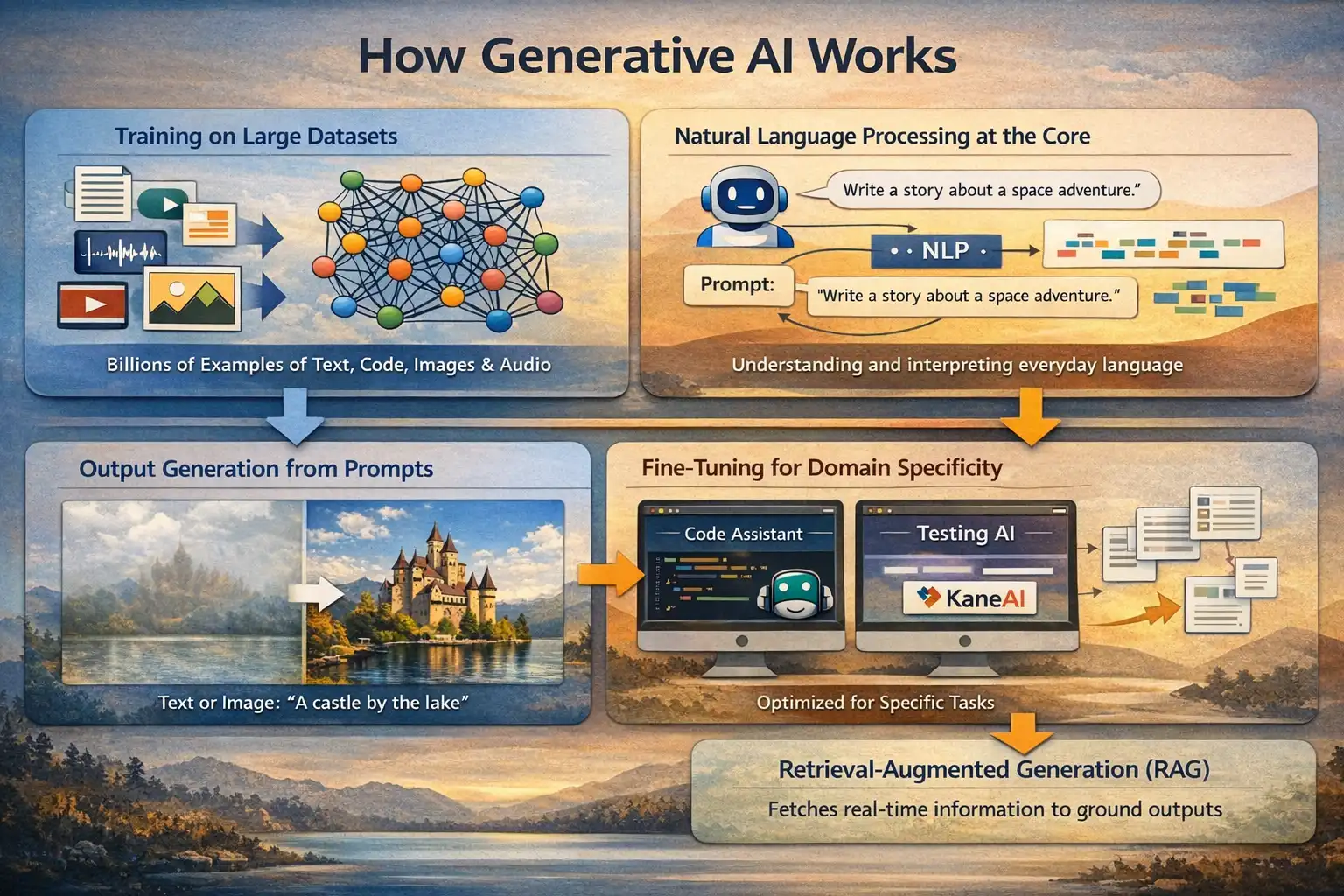
- Training on Large Datasets: Generative AI models are trained on billions of examples of text, code, images, or audio. Through this process, the model learns statistical relationships and structural patterns in data. GPT-4, for example, was trained on an estimated 1 trillion tokens of text. Training runs for frontier models now cost tens of millions of dollars in compute.
- Natural Language Processing at the Core: For language models, natural language processing (NLP) allows the model to interpret prompts written in everyday language and generate coherent, context-appropriate responses. The model predicts likely next tokens based on learned probability distributions, not predefined rules.
- Output Generation from Prompts: At inference time, a user provides a prompt or instruction. The model applies its learned patterns to generate output. For image diffusion models, this means progressively denoising a random field into a coherent image guided by the text prompt. For language models, it means sampling from a probability distribution over possible next tokens.
- Fine-Tuning for Domain Specificity: Base models can be fine-tuned on domain-specific datasets, which is why tools like GitHub Copilot (fine-tuned on code repositories) or KaneAI (fine-tuned on QA and testing workflows) significantly outperform general-purpose models on their target tasks. Fine-tuning narrows the model's output distribution toward domain-relevant patterns.
- Retrieval-Augmented Generation (RAG): Many enterprise tools now combine LLMs with real-time document retrieval. Instead of relying solely on training data, the model pulls relevant chunks from a connected knowledge base before generating a response. This reduces hallucinations and keeps outputs grounded in current, organisation-specific information.
Generative AI helps QA teams reduce manual effort, improve test coverage, catch regressions earlier, and keep tests up to date with minimal maintenance.
To better understand its role in testing and the benefits it offers, explore this detailed Generative AI testing guide.
Generative AI Tools Comparison Table
This core comparison of generative AI tools will help you quickly identify which fits your needs. Each tool is optimized for specific tasks like writing, coding, design, or media generation. Use the table below to evaluate key features, use cases, and pricing at a glance.
| Tool | Category | Best For | Free Tier | Starting Price |
|---|---|---|---|---|
| KaneAI by TestMu AI | Testing | QA automation | No | $299/month billed annually |
| ChatGPT | Writing / General | General productivity | Yes | $24/month |
| Claude | Writing / Analysis | Long-context analysis | Yes | $17–$20/month |
| Jasper | Writing / Marketing | Content marketing teams | No | $59/month |
| Grammarly | Writing / Editing | Real-time writing assistance | Yes | $12/month |
| Writer | Writing / Enterprise | Enterprise content teams | No | Custom ($20+/seat/month approx) |
| Midjourney | Image generation | Creative and design teams | No | $10/month |
| Adobe Firefly | Image generation | Adobe Creative Cloud users | Yes (limited) | $10/month |
| DALL-E 3 | Image generation | ChatGPT Plus users needing quick visuals | Yes (limited) | Included in ChatGPT Plus (~$24/month) |
| Stable Diffusion | Image generation | Developers and technical teams | Yes (open-source) | Free (open-source) |
| Runway ML | Video | Marketing video content | Yes | $15/month |
| Synthesia | Video | Training and L&D video | No | $18/month |
| ElevenLabs | Voice / Audio | Content and media teams | Yes | $5/month |
| GitHub Copilot | Code | Software development teams | Yes (limited) | $10/month |
| Canva Magic Studio | Design | Non-designer marketing teams | Yes | $48/year ($4/month) |
| Google Gemini | Productivity | Google Workspace teams | Yes | $5/month (Plus) |
What Are the Best Generative AI Tools by Category?
Generative AI tools are rapidly evolving, with specialized solutions designed for different use cases like content creation, coding, design, and automation. Choosing the right tool depends on your specific needs, workflow, and level of expertise.
Below is a categorized list of the best generative AI tools to help you find the right fit.
AI Testing Tools
AI in software testing has evolved from simple script generation to full autonomous execution. The best AI testing tools today handle the entire QA lifecycle: authoring, running, analyzing, and self-healing tests without manual intervention between steps.
Unlike general-purpose coding assistants, purpose-built AI testing tools understand QA workflows, execute against live applications, and maintain tests as the application changes.
1. KaneAI by TestMu AI
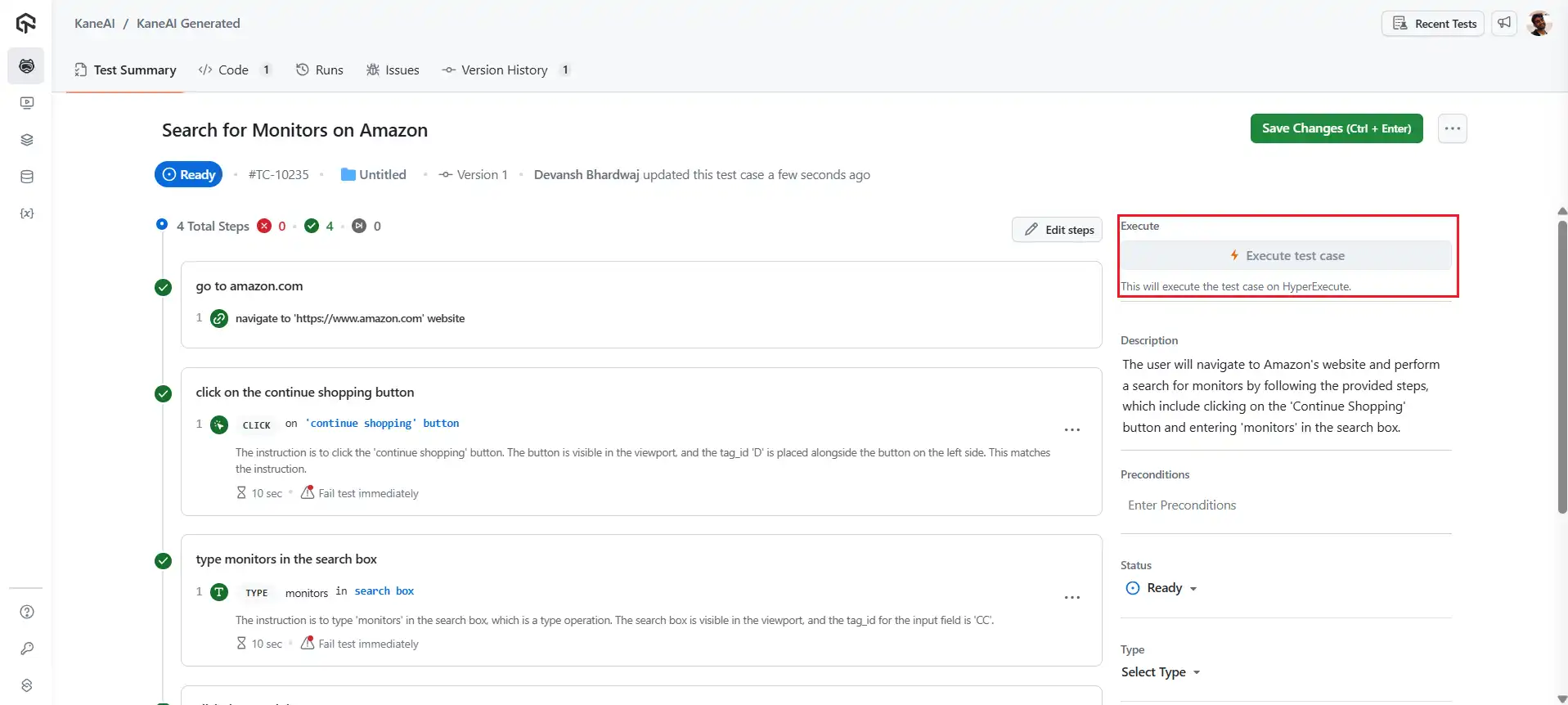
KaneAI by TestMu AI (formerly LambdaTest) is a GenAI native QA Agent-as-a-Service platform that generates, runs, and evolves end-to-end test cases from natural language instructions.
Unlike general-purpose coding assistants that generate test scripts but leave execution and maintenance to the team, KaneAI handles the complete loop autonomously.
Our hands-on experience: I used KaneAI internally for regression testing across our web platform. The natural language test authoring genuinely reduces the time from test idea to executable test; a test case that previously took a senior SDET 30–45 minutes to script can be authored in plain English in under 5 minutes.
The self-healing feature has been the most impactful for maintenance: when our UI updated a button label and selector, KaneAI detected the broken step and corrected it automatically without manual intervention.
Best for: QA teams and SDETs who need AI automation tools for web and mobile applications, with autonomous execution and self-healing built into the CI/CD pipeline.
Key features:
- Natural Language Test Authoring: Describe what to test in plain English; KaneAI generates the test.
- Autonomous Execution: Runs tests against live applications and reports failures with root cause detail.
- Self-healing Tests: Detects and corrects broken test steps when the application UI changes.
- CI/CD Integration: Runs tests automatically on every build through your existing pipeline.
- Cross-environment Coverage: Executes across real devices and browsers via the TestMu AI platform.
To get started with this generative AI tool, follow this support documentation on Why do we need KaneAI?
Pricing: Kane AI (Mobile + Web) $299/month billed annually.
AI Writing Tools
AI writing tools generate and refine text for content creation, marketing copy, documentation, and research. The five tools below cover general-purpose generation, brand voice enforcement, real-time editing, enterprise content operations, and productivity-embedded assistance.
2. ChatGPT
ChatGPT is OpenAI's conversational AI platform and the most widely adopted generative AI tool globally. It handles text generation, code assistance, image generation, data analysis, and multi-step agentic task execution from a single interface.
Best for: General-purpose content creation, research, coding assistance, and productivity workflows across any team size.
Key features:
- Multi-modal Generation: Text, images, voice, code, and file analysis from one interface.
- Custom GPTs: Configure persistent task-specific assistants without writing code.
- Code Interpreter: Runs Python inline, analyzes uploaded data, and produces charts.
- Canvas: Iterative document and code editing in a side-by-side workspace.
- Web Browsing: Live research against current sources during a session.
Pricing: Free plan available for basic use. Go at $4/month for increased limits. Plus at $24/month for advanced features and higher usage. Pro at $240/month for full access, maximum limits, and premium capabilities.
3. Claude
Claude is Anthropic's generative AI platform, built for extended reasoning, long-context processing, and factually reliable output. Its 200,000 token context window accommodates large codebases, lengthy reports, and multi-document analysis in a single session.
Best for: Long document analysis, technical writing, code review, and workflows where output consistency matters across an extended context.
Key features:
- 200K Token Context: Processes full codebases and lengthy documents without truncation.
- Artifacts Panel: Produces and iterates on code, documents, and interactive apps in a side view.
- Projects: Persistent context and instructions across multiple conversations.
- API Access: Embed Claude into custom applications with full model control.
- Low Hallucination Rate: Consistently reliable on factual and technical prompts.
Pricing: Free plan available. Pro at $17/month (or $20 monthly). Max from $100/month. Team starts at $20/seat/month. Enterprise from $20/seat/month plus usage-based pricing.
4. Jasper
Jasper is an AI content creation platform purpose-built for marketing teams. It combines generative AI with brand voice configuration and campaign workflow tools, reducing the editing overhead that typically follows general-purpose AI output.
Best for: Marketing teams producing high volumes of blog posts, ad copy, social captions, and email campaigns with brand consistency.
Key features:
- Brand Voice: Analyzes your uploaded content samples to match tone, style, and humor in new outputs.
- 50+ Templates: Structured starting points for blogs, ads, product descriptions, and social posts.
- SEO Mode: Keyword integration guidance built into the content creation workflow.
- Approval Workflows: Built-in review and collaboration for team content pipelines.
- Image Generation: AI visuals produced within the same content workspace.
Pricing: Pro starts at $59–$69/month per seat with core AI marketing features and customization. Business offers custom pricing with advanced automation, unlimited customization, API access, and enterprise-grade controls.
5. Grammarly
Grammarly is an AI writing assistant that provides real-time spelling, grammar, clarity, tone, and style feedback across documents, emails, and browser-based writing. Its generative AI layer now extends into content drafting alongside correction.
Best for: Professionals who write extensively and need real-time editing, tone control, and AI-assisted drafting within their existing tools.
Key features:
- Real-time Suggestions: Grammar, spelling, and clarity corrections as you type.
- Tone Detection: Identifies and adjusts tone across formal, casual, and neutral registers.
- Generative Rewrite: Rewrites, shortens, or expands selected text from a brief instruction.
- Plagiarism Detection: Checks generated or written content against web sources.
- Integrations: Browser extension plus native support for Google Docs and Microsoft Word.
Pricing: Free plan available with basic writing support. Pro at $12/month (billed annually) or $30 monthly with advanced AI features. Enterprise offers custom pricing with security, control, and organization-wide capabilities.
6. Writer
Writer is an enterprise generative AI platform built for content teams that need brand-consistent output at scale. It combines a large language model with a proprietary knowledge graph built from your company's own content, style guides, and terminology.
Best for: Enterprise content and marketing teams that need AI output consistently aligned with brand voice, internal terminology, and compliance standards.
Key features:
- Knowledge Graph: Built from your company documents, product pages, and style guidelines.
- Style Guide Enforcement: Applies brand tone, terminology, and formatting rules to every output.
- Co-pilot Mode: Edits and improves existing content in line with configured brand rules.
- API Access: Embeds Writer into existing content operations and publishing workflows.
- Compliance Controls: Configurable guardrails for regulated industries, including finance and healthcare.
Pricing: Starter plan with a 14-day free trial for small teams with limited users and features. Enterprise offers custom pricing with unlimited users, advanced workflows, full integrations, and enterprise-grade governance.
AI Image Generation Tools
AI image generation tools produce original visuals from text prompts. The four tools below differ in commercial safety, customization depth, and platform integration. Choosing between them depends on whether you need artistic quality, commercial safety, self-hosted control, or fast, accessible generation.
7. Midjourney
Midjourney is an AI image generation platform accessed via Discord. It consistently ranks among the highest-quality options for artistic and aesthetic output, particularly for creative campaigns, design concepts, and marketing assets.
Best for: Designers, creative teams, and content creators who need high-quality AI-generated images with strong aesthetic output.
Key features:
- Text-to-image Generation: Strong detail, atmosphere, and composition across artistic styles.
- Style Parameters: Control stylization intensity, chaos, and image quality per prompt.
- Aspect Ratio Control: Generates at any dimension for social, web, or print use.
- Image Remix and Variation: Generate controlled variations from any output.
- Pan and Zoom: Extend or explore generated images beyond the original frame.
Pricing: Plans start at $10/month for basic usage. Standard at $30/month and Pro at $60/month offer higher GPU time and features. Mega at $120/month provides maximum performance, concurrency, and advanced capabilities.
8. Adobe Firefly
Adobe Firefly is a generative AI image and design tool embedded in Adobe Creative Cloud. It is the only major AI image generator trained exclusively on licensed content, which makes every output commercially safe without additional copyright review.
Best for: Professional designers and creative teams in the Adobe ecosystem who need AI generation integrated into existing editing workflows without copyright risk.
Key features:
- Generative Fill: Adds, removes, or replaces objects in Photoshop images using text prompts.
- Generative Expand: Extends images beyond their original borders with AI-generated content.
- Text Effects: Generates typographic treatments directly from a style description.
- Vector Art Generation: Creates and recolors vector elements in Illustrator.
- Commercial Safety: Trained exclusively on licensed Adobe Stock and public domain content.
Pricing: Firefly Standard at $10/month, Pro at $20/month, Premium at $200/month. Creative Cloud Pro starts at $18/month (discounted) or $33/month regular.
9. DALL-E 3
DALL-E 3 is OpenAI's image generation model, integrated directly into ChatGPT and accessible via API. It generates high-resolution images from detailed text prompts with strong fidelity to complex, multi-element descriptions and reliable text rendering within images.
Best for: Users already on ChatGPT Plus who need quick visual mockups, blog headers, or campaign graphics without a separate image tool subscription.
Key features:
- Prompt Fidelity: Follows complex, multi-element descriptions more accurately than earlier versions.
- Text in Images: Renders legible, styled text within generated visuals reliably.
- Iterative Refinement: Adjusts generated images through follow-up instructions in the same chat session.
- API Access: Developers integrate DALL-E 3 image generation directly into applications.
- Broad Accessibility: Free limited access via Microsoft Copilot; included in ChatGPT Plus at no extra cost.
Pricing: Free plan available with limited generations and features. Gold at $15/month offers faster generation, more usage, and commercial rights. Platinum at $20/month provides higher limits, ultra-fast generation, and advanced capabilities.
10. Stable Diffusion
Stable Diffusion is an open-source AI image generation model deployable locally or through cloud platforms. It is the only widely adopted AI image tool that runs on your own hardware, giving teams complete data control and no per-generation cost.
Best for: Technical teams and developers who need self-hosted, customizable AI image generation with full data privacy and no usage-based pricing.
Key features:
- Local Deployment: Runs on consumer-grade GPUs without sending data to external servers.
- Custom Model Checkpoints: Train fine-tuned models on your own image datasets.
- ControlNet: Precise control over image composition, pose, and structure.
- Inpainting and Outpainting: Modify or extend existing images within the same pipeline.
- Plugin Ecosystem: Extensible via Automatic1111 and ComfyUI interfaces.
Pricing: Free and open-source. Cloud access via Stability AI at credit-based pricing.
AI Video Tools
AI video generation tools reduce the production effort required to create professional video content. The two below cover the two most common enterprise needs: short-form visual content and presenter-led instructional video.
11. Runway ML
Runway ML is a generative AI platform for video creation and visual content production. Its Gen-3 model produces coherent short-form video clips from text or image prompts, making it a practical tool for marketing teams and creative agencies with content volume requirements.
Best for: Marketing agencies, social video teams, and product teams building demo or explainer content without a full video production setup.
Key features:
- Gen-3 text-to-video: Generates short video clips from written prompts or image references.
- Image-to-video: Animates a static image into a moving clip with directional control.
- Background Removal: Removes or replaces video backgrounds without a green screen.
- Style Transfer: Applies a consistent visual style across multiple clips.
- Team Projects: Shared workspace with version control for collaborative video production.
Pricing: Free plan available with limited credits and features. Standard at $15/user/month offers more tools and credits. Pro at $35/user/month adds advanced features and storage. Unlimited at $95/user/month enables unrestricted generation. Enterprise offers custom pricing with security, support, and scalability.
12. Synthesia
Synthesia is an AI video platform that produces professional-quality videos using AI avatars reading from a provided script. It eliminates cameras, actors, recording equipment, and post-production for presenter-format video content.
Best for: L&D teams, customer success departments, and marketing teams producing presenter-led videos at scale without a dedicated production budget.
Key features:
- 230+ AI Avatars: Diverse presenter styles across multiple languages and ethnicities.
- Custom Avatar: Create a photorealistic avatar from a short recorded video clip.
- 140+ Language Voices: Natural-sounding narration across global markets.
- Screen Recording Integration: Embed screen captures into AI-presented tutorial videos.
- Brand Kit: Custom backgrounds, color palettes, and logo placement per workspace.
Pricing: Free plan available with limited video minutes. Starter at $18/month offers downloads and AI features. Creator at $55/month adds advanced avatars, API, and more usage. Enterprise offers custom pricing with unlimited video, translations, and team features.
AI Voice and Audio Tools
AI voice tools synthesize realistic speech from text at a production scale. ElevenLabs leads this category for voice quality, cloning capability, and API depth.
13. ElevenLabs
ElevenLabs is a generative AI audio platform that converts text to realistic speech in 29 languages. It produces studio-quality voice-overs with precise control over emotional register, pace, and tone variation within a single script.
Best for: Content creators, publishers, and video teams that need high-quality AI voice-over at production scale.
Key features:
- 3,000+ Synthetic Voices: Natural prosody across 29 languages and regional accents.
- Voice Cloning: Creates a custom voice from a 60-second audio sample.
- Sentence-level Emotion Control: Applies distinct tone, emphasis, and mood per sentence.
- Conversational AI Voices: Build interactive voice applications and AI agents.
- API access: Integrates voice generation into custom applications and pipelines.
Pricing: Free plan available with basic audio features. Starter at $5/month adds commercial use and voice cloning. Creator at $11/month (promo) offers higher quality and more credits. Pro at $99/month provides advanced audio output and full capabilities.
AI Coding Tools
AI coding tools assist at different stages of the development workflow. GitHub Copilot handles inline code completion, test generation, and PR tooling inside the IDE.
14. GitHub Copilot
GitHub Copilot is an AI code completion and generation tool that integrates into VS Code, JetBrains IDEs, Neovim, and GitHub. It is built by GitHub and OpenAI on a model trained specifically on public code repositories.
Best for: Software development teams who need real-time code assistance, test generation, and pull request tooling inside their existing development environment.
Key features:
- Inline Code Completion: Real-time suggestions for lines, functions, and entire modules as you type.
- Natural Language to Code: Generates implementations from plain English comments.
- Copilot Chat: Ask questions about your codebase inline without leaving the IDE.
- Pull Request Summaries: Auto-generates PR descriptions and review notes.
- Copilot Workspace: Multi-step task execution from a GitHub issue through to committed code.
Pricing: Free plan available with limited usage. Pro at $10/user/month adds advanced coding features and higher limits. Pro+ at $39/user/month offers full model access and significantly expanded usage.
AI Design and Productivity Tools
Design-focused generative AI tools bring content creation and visual production to non-designers. This category has expanded rapidly as major platforms like Canva and Google have embedded generative capabilities into their existing interfaces.
15. Canva Magic Studio
Canva Magic Studio is a suite of generative AI tools embedded in the Canva design platform. It covers copy generation, layout creation from prompts, object-level image editing, and text-to-image generation within Canva's existing template ecosystem.
Best for: Marketing teams and non-designers who need AI-assisted visual content that is immediately ready for social media, presentations, and branded assets.
Key features:
- Magic Design: Generates a complete design layout from a text prompt or uploaded image.
- Magic Write: Produces copy for social posts, presentations, and marketing content.
- Magic Edit: Adds, removes, or replaces elements in an image using a text description.
- Magic Media: Text-to-image generation built into the design workflow.
- Background Remover: One-click background removal for product and portrait images.
Pricing: Free plan available with basic design tools. Pro at $48/year unlocks premium content and AI features. Business at $82/year per user adds collaboration and advanced controls. Enterprise offers custom pricing with security, scalability, and dedicated support.
16. Google Gemini
Google Gemini is a multi-modal generative AI model integrated natively across Google Workspace. It processes text, images, audio, video, and code, with direct access to Gmail, Google Docs, Sheets, Drive, and Calendar.
Best for: Google Workspace teams who need generative AI embedded across their existing document, email, and collaboration tools without a separate platform.
Key features:
- Workspace Integration: Operates directly inside Docs, Sheets, Gmail, Drive, and Meet.
- Deep Research: Conducts multi-step information synthesis with cited sources.
- NotebookLM: AI-powered research and Q&A against uploaded documents and files.
- Gemini Advanced: Access to Google's most capable models for complex reasoning tasks.
- Multi-modal Input: Processes text, images, audio, video, and PDFs in the same session.
Pricing: Free plan available with basic AI features. AI Plus at $5/month offers enhanced access and more credits. AI Pro at $24/month adds higher limits and advanced tools. AI Ultra at $300/month provides maximum access, the highest limits, and premium features.
How to Choose a Generative AI Tool?
With a wide range of options available, it's important to evaluate tools not just on features, but on real-world usability and scalability.
The following factors can help guide a practical and informed decision.
- Output Type Match: Identify your primary output need. Use various AI tools for developers that are designed for tasks like code completion and test generation, while other tools focus on content creation. Choosing the right fit is the first step.
- Integration into Existing Workflows: Look for tools that offer native integrations or API access to minimize manual effort. This is especially important in CI/CD pipelines, where AI in software testing needs to connect with build triggers, test runners, and reporting systems. Tools that work in isolation rarely scale in team environments.
- Data Privacy and Compliance: Free-tier tools often use prompt and output data for model training unless you opt out. Enterprise plans typically provide data processing agreements, opt-out options, and regional data residency. This is especially important when using generative AI in software testing with customer data or proprietary code.
- Trial on Your Actual Workload: General benchmarks do not predict performance on your specific tasks. Run prompts that reflect your real use cases before selecting a paid tier.
- Agentic Capability: As tools evolve beyond single-step outputs, evaluating relevant best AI agents becomes essential. AI tools that can plan, execute, and self-correct across workflows deliver more long-term value than those that simply generate output.
- Cost Structure: Per-token API pricing suits high-volume production workflows. Flat monthly subscriptions suit individual or team use with moderate generation volume.
Generative AI for Enterprise: Governance and Compliance
For teams in regulated industries, such as finance, healthcare, legal, and government, adopting generative AI requires not just the tools themselves, but a robust governance and compliance framework.
According to the Gartner Marketing Survey, 50% of consumers prefer brands that avoid using generative AI in consumer-facing content, highlighting the importance of careful oversight and ethical AI deployment in enterprises.
Key governance considerations:
- Data Residency and Sovereignty: Where is your data processed and stored? Tools with EU data residency options include Claude (via Anthropic API), OpenAI (Azure OpenAI Service), and Writer. For healthcare organizations subject to HIPAA, confirm BAA availability before deployment.
- Model Transparency: Can you audit what model version generated a given output? Enterprise tiers of most tools provide model version logging. This matters for regulated outputs where the generation chain needs to be documented.
- Output Review Workflows: No generative AI output should bypass human review in high-stakes contexts. Build approval workflows into any deployment where AI output reaches customers, regulators, or legal documents.
- Tools With the Strongest Enterprise Governance: Writer, Claude (Enterprise), ChatGPT Enterprise, and GitHub Copilot Enterprise offer the most robust data isolation, access controls, and compliance documentation. KaneAI's QA-specific workflows include audit logging of test execution for regulated software environments.
- Responsible AI and Accessibility Considerations: All tools in this list produce outputs that reflect biases in their training data. Establish an internal AI usage policy that specifies which tasks are appropriate for AI assistance, what human review is required, and how errors are caught and corrected.
Incorporating AI and accessibility ensures that outputs are usable and inclusive for people with diverse needs, aligning governance with both compliance and ethical design standards.
Conclusion
Generative AI tools are transforming how teams create, build, and scale across content, code, design, and testing. With specialized solutions for every use case, organizations can improve productivity, accelerate workflows, and unlock new levels of innovation. Choosing the right tool depends on aligning capabilities with your specific business needs and integrating them effectively into existing systems.
At the same time, enterprise adoption requires strong governance, human oversight, and responsible AI practices. Prioritizing data privacy, transparency, and review workflows, along with incorporating AI and accessibility, ensures outputs are inclusive, compliant, and trustworthy while enabling organizations to innovate confidently at scale.


Frequently asked questions
Did you find this page helpful?
More Related Hubs
TestMu AI forEnterprise
Get access to solutions built on Enterprise
grade security, privacy, & compliance
- Advanced access controls
- Advanced data retention rules
- Advanced Local Testing
- Premium Support options
- Early access to beta features
- Private Slack Channel
- Unlimited Manual Accessibility DevTools Tests