

Next-Gen App & Browser Testing Cloud
Trusted by 2 Mn+ QAs & Devs to accelerate their release cycles


Master Your Test Suite: Unveiling Enhanced Flaky Test Detection & Customization!
Revolutionize your test suite with Flaky Test Detection & Customization. Leverage detailed test histories and customizable settings for reliable, insightful testing.

Devansh Bhardwaj
January 10, 2026
Hey Testers!
Our team of talented developers recently unveiled the AI-driven Test Intelligence Platform with a standout feature: Flaky Test Detection. Now, we’re enhancing it further with the Customization of Flaky Test Detection and Flaky Test Analytics.
Flaky Test Detection identifies unpredictable tests in your suite and highlights the reasons behind their inconsistent behavior.
What sets it apart? It offers a detailed history for each flaky test, allowing you to understand its past performance and failure patterns. Moreover, with customizable settings, Flaky Test Detection can be fine-tuned to meet your specific testing environment and requirements, ensuring you have total control over flaky test management.
Without further ado, let’s dive in!
Before understanding how Flaky Test Detection works, we should understand what flaky tests are.
Flaky Tests refer to inconsistent results when run multiple times in the same environment. These tests may unpredictably pass or fail without any modifications to the application or the test script. Such inconsistency in behavior makes Flaky Tests a challenge to handle, as they do not provide a stable and reliable measure of the right application’s functionality with your automation testing.
Recognizing and addressing Flaky Tests is vital for maintaining a robust and reliable testing suite, supporting your software development process effectively.

Note: To learn more about Flaky Test Detection, check out our detailed support doc here .
So How Does Flaky Test Detection Work?
Flaky Test Detection employs WebDriver command logs to pinpoint flaky tests identified with a flake icon. These command logs represent the steps executed by the test script during the test.
The detection process involves an algorithm that identifies tests showing inconsistent behavior, marked by changes in their status within a sequence of test runs. The threshold of the flakiness depends on the transition between statuses (from Passed to Failed or vice versa) based on user-specified configurations.
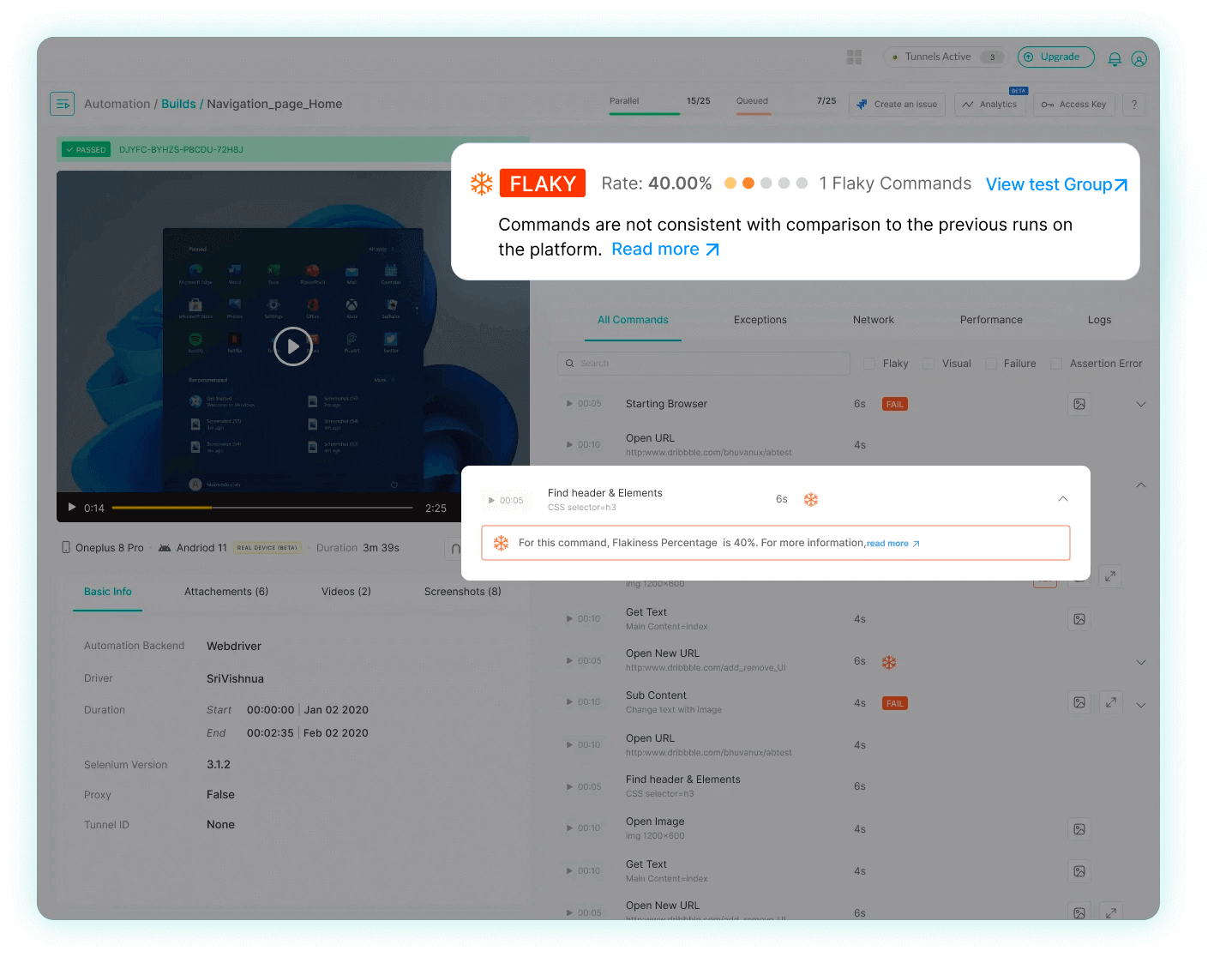
For instance, a test sequence showing Passed -> Failed -> Passed indicates two status transitions in the three most recent executions. The algorithm also analyzes individual test commands and their statuses, providing a detailed view of potential flakiness sources at the command level.
To detect flakiness, it’s important to identify where it occurs. Watch this video to gain insights into the common sources of flakiness.
Note: Currently, this feature only supports Selenium-based tests for Web Automation and HyperExecute subscribers.
Customization of Flaky Test Detection
With the revolutionary Custom Flaky Test Detection, you can customize and manage flaky tests effortlessly. With options to adjust grouping mechanisms, sliding window size, and flake rate thresholds, our updated settings offer a tailored detection process to meet your unique testing needs, ensuring a streamlined and efficient testing experience.
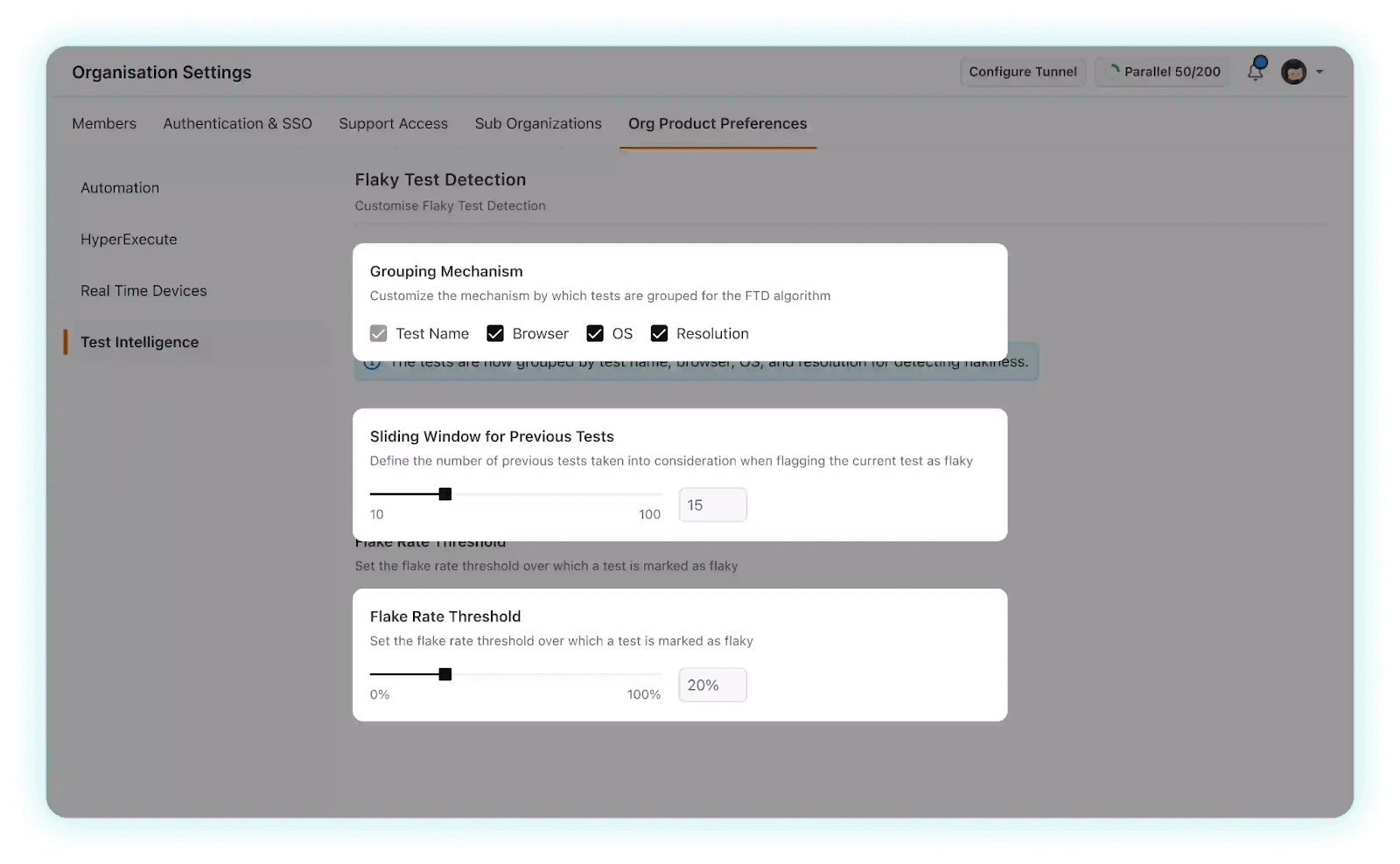
Now let’s learn how you can use the Custom Flaky Test Detection settings:
- Grouping Mechanism: The grouping mechanism in Flaky Test Detection allows you to set the criteria for how tests are categorized for flakiness. By default, tests are grouped by the testing environment details provided in the capabilities, such as test name, browser, operating system (OS), and resolution.
- Sliding Window: The sliding window feature considers a set number of previous tests when evaluating a test’s likelihood of being flaky. By default, it analyzes the last 10 tests. Adjusting this number allows you to customize the amount of past data that should be used in the evaluation. A larger sliding window offers a broader view of historical data, helping to identify subtle trends or variations in test results.
- Flake Rate Threshold: The flake rate threshold determines when a test is labeled as flaky. Adjusting this rate allows for precise control over flakiness detection sensitivity. A lower threshold will identify more flaky tests, capturing even minor inconsistencies, while a higher one offers tolerance to minor variations, highlighting only significant discrepancies in test results.
While the test name is the main grouping criterion, you can adjust the grouping to meet your needs by selecting or deselecting environment variables. This customization lets you define test categorization with precision.
Carefully choosing the right threshold ensures that the detection of flaky tests aligns perfectly with your specific testing requirements.
Note: Identify and mitigate future test issues with AI-native test intelligence insights. Try Now!
Expanding The Power Of Flaky Test Detection
We are actively working on extending the Flaky Test Detection capabilities to popular testing frameworks like Cypress, Playwright, Puppeteer, and Appium. This expansion will empower users to assess and manage test reliability across a broader spectrum of testing scenarios in web and app-based tests, enhancing the overall testing experience. Stay tuned for updates on the availability of Flaky Test Detection support for these frameworks.
All In All!
In conclusion, our enhanced Flaky Test Detection and Customization tool is a game-changer for managing inconsistent tests in your suite. It not only identifies and provides insights into flaky tests but also allows for detailed historical analysis and customization to fit your specific testing needs. With upcoming support for additional testing frameworks, this tool is set to offer comprehensive assistance for both web and app testing scenarios, making your testing process more efficient and reliable.
Happy Testing!


Did you find this page helpful?
More Related Hubs
TestMu AI forEnterprise
Get access to solutions built on Enterprise
grade security, privacy, & compliance
- Advanced access controls
- Advanced data retention rules
- Advanced Local Testing
- Premium Support options
- Early access to beta features
- Private Slack Channel
- Unlimited Manual Accessibility DevTools Tests