

Next-Gen App & Browser Testing Cloud
Trusted by 2 Mn+ QAs & Devs to accelerate their release cycles


February’24 Updates: Test Apple Pay, New Frameworks Support in SmartUI SDK, and More!
Check out what’s new at TestMu AI in February 2024.

Salman Khan
January 27, 2026
Test smarter, not harder! Last month, we brought you a powerful combination of features, including Apple Pay testing, getting flaky test insights, exporting the Test Analytics dashboard as PDFs, and more.
Let’s look at what’s new at TestMu AI in February 2024.
Automate Apple Pay Testing on Private Cloud Devices
Testing Apple Pay is critical to ensure a secure and efficient user experience. The test also reveals any bugs or performance issues that could hinder payments and provides confidence that the app will work flawlessly in the chosen environment.
We at TestMu AI now support Apple Pay testing on our private real iOS device cloud so that developers and testers can ensure a secure and seamless Apple Pay experience for their users in real-world scenarios.
With Apple Pay testing on our private real device cloud, you can,
- Use real Apple devices within a controlled environment, replicating the user experience with Apple Pay integration. This allows testing functionality like card selection, confirmation prompts, and passcode authentication.
- Uncover issues that might arise on different devices due to security configurations or OS versions.
- Verify a seamless Apple Pay experience within the organization’s private cloud infrastructure.

Test With SmartUI SDK Using New Frameworks
Sometime back, we launched SmartUI SDK for web developers and testers to automate and streamline their visual regression testing process. This ensures a consistent and visually appealing user experience across browsers and devices.
After rolling out the support for the Selenium framework in SmartUI SDK, we have released visual testing with SmartUI SDK using Playwright, Puppeteer, and TestCafe.
To get started with visual regression testing using these new frameworks, hop on the to the following guides:
Get Flakiness Insights With Test Intelligence in Analytics
Flaky test analytics are important because they provide confidence in test results and software quality. Identifying these unreliable tests allows developers to focus on real errors, producing higher-quality software applications.
TestMu AI Test Analytics has launched flaky test analytics for web automation with Selenium on real devices. With our Test Intelligence feature, you can identify flaky tests, gain insights into what is causing your test runs to fail, and help you fix those flaky tests.
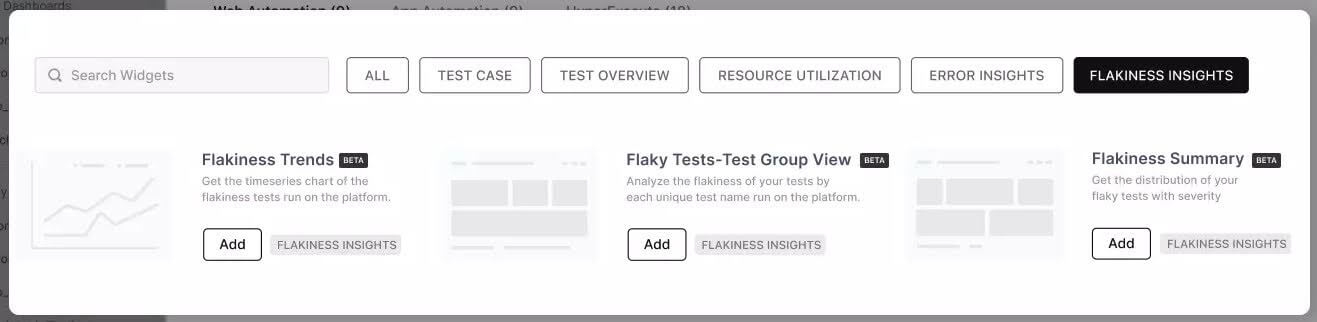
Here is what you get with flaky test analytics:
- Flakiness Trends: Shows historical trends of flaky, passed, and failed tests.
- Flakiness Tests – Test Group View: Analyzes flaky tests by their associated test groups. This helps testers identify which test groups have the most flaky tests and understand how flakiness is distributed across different test areas.
- Flakiness Summary: Categorizes flaky tests based on their flake rate, prioritizes fixing flaky tests based on their impact, and focuses on tests causing the most failures.
Export Analytics Dashboard as a PDF
You can now export the Test Analytics dashboard as a PDF. This helps testers with various advantages beyond simply viewing the data within the platform:
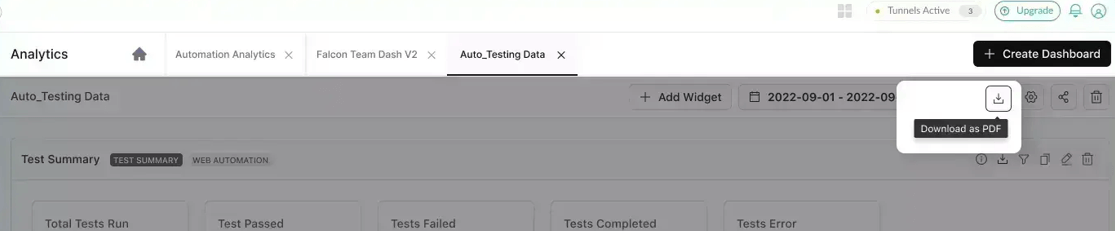
- Share insights with anyone, regardless of their access to the analytics platform. This is crucial for team members, customers, or stakeholders needing the necessary permissions.
- PDFs are portable and adaptable for various scenarios. You can easily integrate them into team meeting agendas, client presentations, internal reports, or project documentation.
- PDFs enable offline analysis. This is beneficial for team members with limited or no Internet access or those who prefer to review data without being online.
- Export dashboards as PDFs allow you to easily archive historical data snapshots within project documentation for future reference, providing a valuable record of past performance and trends.
New Flags in HyperExecute: differentialUpload and ignoreDOM
HyperExecute has released two new flags, differentialUpload and ignoreDOM, to enhance your UI testing experience. Let’s look at what each flag does.
differentialUpload
Uploading your codebase to HyperExecute for testing can sometimes take longer than expected. This can be caused by several factors, like network issues, large codebases, or many files being zipped together.
To address this challenge, HyperExecute offers the differentialUpload flag. This flag is particularly helpful when making incremental changes to your codebase, as it only uploads the changed or new parts. This significantly reduces upload times, letting you get back to testing faster.
ignoreDOM
When performing SmartUI testing with HyperExecute, you can use the ignoreDOM flag to specify which parts of your webpage (identified by ID, class, or other selectors) should be excluded from the visual UI comparison.
Bonus: In addition to the above updates, we have rolled out new user interfaces across all TestMu AI products. Also, in the future, we’ll roll out the new UI in phases to ensure a seamless transition. This way, you’ll experience minimal disruption to your workflow, and we can gather your valuable feedback to continuously improve the new interface. 🙂

Summing Up
We’re always working on new features to help you be more productive and stay ahead of the game. Amid all these, your voice matters! We value your feedback. So, join the vibrant TestMu AI Community and share your thoughts.
Until then, watch for updates and improvements—the TestMu AI Changelog will have all the details.


Did you find this page helpful?
More Related Hubs
TestMu AI forEnterprise
Get access to solutions built on Enterprise
grade security, privacy, & compliance
- Advanced access controls
- Advanced data retention rules
- Advanced Local Testing
- Premium Support options
- Early access to beta features
- Private Slack Channel
- Unlimited Manual Accessibility DevTools Tests