

Next-Gen App & Browser Testing Cloud
Trusted by 2 Mn+ QAs & Devs to accelerate their release cycles


On This Page
- What Is eCommerce Website Development?
- Why an eCommerce Website Matters?
- Key Features of an eCommerce Website
- 7 Steps to Build an Effective eCommerce Website
- UX and Conversion Best Practices for eCommerce Success
- Choosing the Right eCommerce Platform
- How to Test Your eCommerce Website Effectively?
- Future Trends in eCommerce Website Development

What Is eCommerce Website Development: A Complete Guide
Explore the ecommerce website development process, best practices, and trends to build a standout store that boosts sales and engages customers.

Zikra Mohammadi
December 19, 2025
If you’re a small business owner or an entrepreneur launching a new brand, eCommerce website development plays a critical role in building a platform that attracts customers and drives sales. In today’s digital age, having a strong online presence is crucial for any business, and eCommerce websites are at the heart of online retail.
Overview
eCommerce website development is process of creating online platforms for selling products or services, with features like product listings, carts, payments, and security.
Steps to Build an eCommerce Website
- Define Your Business Model and Audience: Identify your product type, target customers, and their needs to guide your site’s features and design.
- Choose the Right eCommerce Platform: Select a platform that matches your budget, technical skills, and feature requirements.
- Register a Domain and Set Up Hosting: Pick a memorable domain and reliable hosting to ensure speed, security, and uptime.
- Design Your Website: Create a responsive, fast, and visually consistent layout with intuitive navigation and clear calls to action.
- Add Products and Create Content: Write detailed descriptions, use high-quality visuals, and include essential pages like About, FAQs, and policies.
- Set Up Payment, Shipping, and Tax Options: Offer secure payment methods, clear shipping rules, and automated tax calculations.
- Test and Launch Your Website: Check functionality, performance, and responsiveness across devices before going live.
What Is eCommerce Website Development?
eCommerce website development is the process of creating an online platform that enables businesses to sell products or services directly to consumers over the Internet.
This involves designing a user-friendly interface, integrating secure payment systems, and ensuring the website is optimized for performance and scalability.
Key components include:
- Frontend Development: Focuses on the visual aspects and user experience, including product pages, navigation, and checkout processes.
- Backend Development: Handles server-side operations like database management, order processing, and integration with payment gateways.
- Integrations: Incorporates third-party tools such as CRM systems, ERP solutions, and marketing tools to enhance functionality.
Why an eCommerce Website Matters?
A solid eCommerce website allows your business to reach a global audience, adapt to rapid market shifts, and meet customers where they want to shop. In today’s fast-paced landscape, your website often defines whether you grow or fall behind.
Here are the key reasons it holds such importance:
- Skyrocketing Sales Volume: By 2025, eCommerce sales are projected to hit between $7.4 to $7.5 trillion. – Amra and Elma
- Growing Share of Retail: Online shopping now accounts for around 21% of all retail purchases, and by 2027, it is expected to be nearly 23%. – Opensend
- Mobile Dominance: In 2024, mobile devices accounted for 44% of U.S. eCommerce revenue, totaling approximately $564 billion. – Red Stag Fulfillment
Key Features of an eCommerce Website
An eCommerce website is the digital storefront for businesses, requiring a blend of functionality, security, and user experience to drive conversions and customer satisfaction.
Key Features:
- Responsive Design: Ensures the website adapts seamlessly across devices, enhancing user experience on desktops, tablets, and smartphones.
- Intuitive Navigation: Organized menus and search functionalities help users find products effortlessly, reducing bounce rates.
- Secure Payment Gateways: Integration of trusted payment methods like credit cards, PayPal, and digital wallets to facilitate safe transactions.
- Product Pages with High-Quality Images: Detailed product descriptions and multiple images provide customers with comprehensive information, aiding in decision-making.
- Customer Reviews and Ratings: Displaying user-generated content builds trust and assists potential buyers in evaluating products.
- Efficient Checkout Process: A streamlined, multi-step checkout process reduces cart abandonment rates.
- SEO-Friendly Architecture: Optimized code and structure improve search engine rankings, driving organic traffic.
- Order Tracking System: Allows customers to monitor their purchases, enhancing transparency and satisfaction.
- Customer Support Integration: Live chat, FAQs, and contact forms provide assistance, resolving issues promptly.

Note: Test eCommerce websites across 3000+ real environments. Try TestMu AI Today!
7 Steps to Build an Effective eCommerce Website
Building an eCommerce website requires a systematic approach. Each stage, from planning to launch, is critical to creating a platform that not only attracts visitors but converts them into loyal customers.
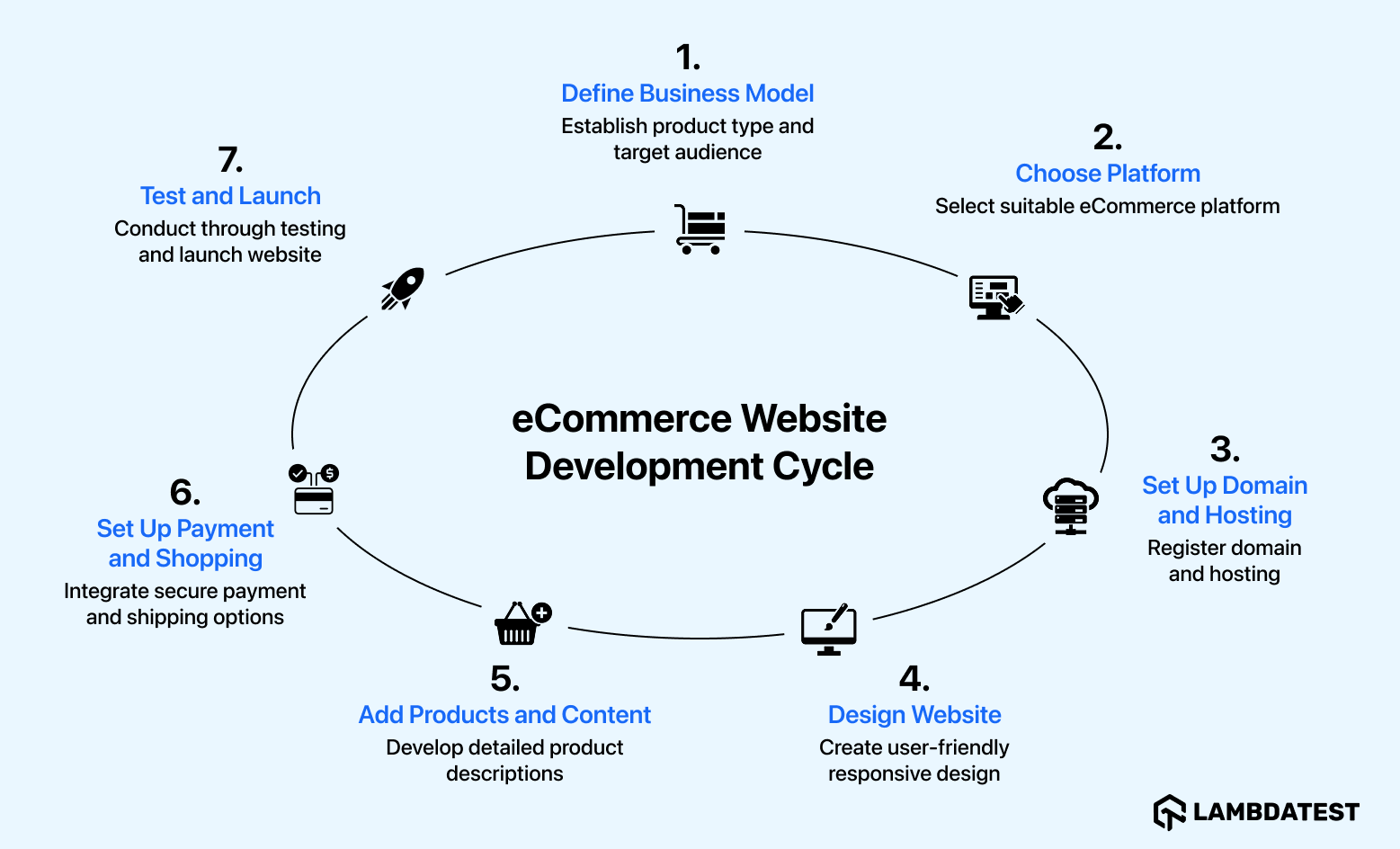
Here are 7 steps to help you through the eCommerce website development process, ensuring your website is optimized for performance, usability, and growth.
1. Define Your Business Model and Target Audience
Before development, clearly establish whether you sell physical products, digital goods, or services. This influences essential site features such as inventory management or instant product delivery.
Equally important is understanding your target audience, their demographics, shopping behaviors, and challenges, to tailor your website’s design, content, and marketing efforts accordingly.
Key points to consider:
- Type of products or services you offer.
- Customer demographics and preferences.
- Customer pain points and buying behavior.
- How your site will address these needs to improve conversion.
2. Choose the Right eCommerce Platform
Your platform choice determines your website’s flexibility, ease of use, and scalability. Popular platforms like Shopify, WooCommerce, and BigCommerce each have strengths suited to different business sizes and technical skills. Larger or highly specialized stores may require custom-built solutions.
Evaluate based on:
- Budget constraints.
- Technical expertise available.
- Product catalog size and complexity.
- Features needed (multi-currency, SEO, analytics).
- Hosting requirements: fully hosted vs. self-hosted options.
3. Register a Domain Name and Set Up Hosting
Your domain name is your brand’s online address. Choose one that is easy to remember, spell, and closely tied to your brand identity. If your platform does not provide hosting, select a reliable provider that guarantees fast load speeds, robust security, and the ability to handle traffic spikes without downtime.
Remember:
- Domain should enhance brand credibility.
- Hosting affects site speed, security, SEO, and uptime.
- Avoid cheap or unreliable hosting providers.
4. Design Your Website
Design goes beyond aesthetics; it defines the user experience. Organize product categories and filters logically, create a smooth checkout process, and ensure your website is fully responsive for mobile devices. Incorporate your brand’s colors, typography, and imagery to maintain consistency.
Critical design elements include:
- Mobile responsiveness.
- Fast page load times.
- Visible search functionality.
- Clear calls to action.
- Trust signals such as customer reviews and secure payment badges.
5. Add Products and Create Content
Accurate, detailed product descriptions help customers understand your offerings and reduce purchase hesitation. High-quality images and videos are crucial for visualization. Transparency about pricing, specifications, and stock levels builds trust.
You also need to develop essential site content: About Us, FAQs, Contact information, and policies (shipping, returns, privacy). This content supports informed purchasing decisions and improves SEO.
6. Set Up Payment, Shipping, and Tax Options
Offering multiple secure payment options increases convenience and reduces cart abandonment. Ensure all payment gateways are PCI DSS compliant to protect customer data.
Shipping setup requires defining delivery areas, costs, and expected timelines. Clear policies and automated tax calculations based on geographic locations keep you compliant and prevent checkout surprises.
Key considerations:
- Multiple payment methods (PayPal, Stripe, local options).
- PCI compliance for security.
- Transparent shipping and return policies.
- Automated, region-specific tax calculations.
7. Test and Launch Your Website
Before launching, thoroughly test all website elements including navigation, checkout process, forms, and responsiveness. Use AI testing platforms like TestMu AI to perform cross browser and device testing on a remote test lab, ensuring your site performs consistently on all platforms.
Automate repetitive tests to speed up quality assurance. Resolving bugs and optimizing user experience before launch maximizes customer satisfaction and conversion rates. You can explore these 50+ eCommerce test cases to ensure your website performs flawlessly at every step.
UX and Conversion Best Practices for eCommerce Success
Creating an eCommerce website that looks good is important, but designing for a seamless user experience (UX) and high conversion rates is what truly drives sales.
Here are key best practices to keep in mind.
UX/UI
- Responsive Design: According to OuterBox, 70% of eCommerce traffic coming from mobile devices. Therefore, your site must be fully mobile-friendly. This means adapting layouts, images, and buttons to work smoothly on smaller screens without sacrificing speed or functionality.
- Intuitive Navigation: Simplify your product categories and ensure customers can easily find what they’re looking for. Use clear menus, filters, and a powerful search feature that supports autocomplete and error tolerance.
- High-Quality Visuals: Use sharp, high-resolution images and product videos to give shoppers a closer look. Multiple angles, zoom capabilities, and lifestyle shots help buyers make confident decisions.
Conversion Optimization
- Streamlined Checkout: Reduce the number of steps required to complete a purchase. Offer guest checkout options and auto-fill forms to minimize friction and prevent cart abandonment.
- Trust Signals: Display security badges prominently to reassure customers their data is safe. Include genuine customer reviews, ratings, and clear return policies to build credibility and reduce hesitation.
Want to avoid common pitfalls that can hurt your online store’s performance? Check out some common eCommerce mistakes you must avoid to ensure your website is optimized for success.
Choosing the Right eCommerce Platform
The platform you select sets the tone for your entire online business operation. It influences everything from day-to-day management to long-term scalability. The right choice should align with your growth plans, technical resources, and customer expectations.
Popular eCommerce Platforms
- Shopify Plus: A hosted solution designed for simplicity and performance, Shopify Plus delivers powerful commerce features without the need to manage servers or security updates. Its extensive app store and native integrations make it a strong option for brands prioritizing speed to market.
- Magento: Known for its open architecture and extensive customization potential, Magento suits enterprises with complex catalogs, multi-store needs, or advanced workflow requirements. It’s ideal for teams that have dedicated development resources.
- BigCommerce: Positioned between ease-of-use and deep configuration, BigCommerce supports a variety of sales models while keeping the platform manageable for mid-sized businesses. It includes built-in SEO, multi-currency capabilities, and strong API support.
Decision Criteria
When comparing options, focus on:
- Capacity to scale with your product range, order volume, and traffic.
- Customization depth to tailor the experience to your processes and brand identity.
- Integration flexibility with ERP, CRM, or marketing systems.
- Total operational costs, including licensing, extensions, hosting, and maintenance.
- User experience for administrators, ensuring daily management remains efficient.
How to Test Your eCommerce Website Effectively?
If you are aiming to streamline eCommerce testing without juggling multiple platforms, TestMu AI offers a unified ecosystem. It is an AI testing platform allows you perform manual and automation testing across different browsers, real devices and operating systems.
Features:
- Manual and Automation Testing: Supports both manual and automation testing to validate features like search, cart, and checkout across thousands of browser and OS combinations, without maintaining your own infrastructure.
- Responsive Testing: Using LT Browser by TestMu AI, you can run responsive tests online and preview your eCommerce website on 50+ device viewports, pinpoint layout inconsistencies, and ensure a consistent user experience on any screen size.
- Performance Testing: HyperExecute by TestMu AI accelerates test execution and load simulations, helping you uncover and fix bottlenecks before they affect customers.
- Accessibility Testing: Make sure to perform accessibility testing for evaluating your eCommerce website against WCAG guidelines. This includes testing screen reader compatibility, keyboard navigation, color contrast, and alternative text for images to create an inclusive shopping experience.
- AI-Native Testing: TestMu AI KaneAI, a Generative AI testing tool, lets you author, evolve, and debug tests using natural language commands.

Future Trends in eCommerce Website Development
Here are some trends in eCommerce website development worth considering:
- Smarter Shopping with AI: Online stores are increasingly using AI technology to enhance the shopping experience. It recommends products based on customers’ preferences and helps them find what they want faster, improving both user experience and conversion rates.
- Flexible Website Architecture: Headless commerce separates design from backend functions, enabling teams to update the site without disruptions and deliver a smoother experience across devices and channels.
- Focus on Sustainability: Shoppers are more conscious of eco-friendly choices. Brands offering recycled packaging, low-emission delivery, or transparent sourcing gain more trust and add value beyond just price or speed.
- Design for Everyone: Inclusive websites work well for all users, including those with disabilities. Following accessibility guidelines improves usability, boosts credibility, and reflects a brand’s commitment to all customers.
- Voice and Image Search: Supporting voice commands or image uploads makes shopping easier and faster, appealing to users who prefer these modern search methods.
- Try Before You Buy with AR: Augmented reality allows customers to visualize products in real life, such as trying on glasses virtually or placing furniture in their room, building confidence before purchase.
Watch the tutorial below by Anton Angelov to learn how you can automate your eCommerce website testing using tools like Selenium.
Anton is a widely recognized leader in the global QA community, serving as Managing Director, Co-Founder, and Chief Test Automation Architect at Automate The Planet, a leading consulting firm specializing in test automation strategy, implementation, and enablement.
Conclusion
Building and maintaining an eCommerce website is more than just creating a digital storefront, it’s about delivering a secure, engaging, and intuitive experience that keeps customers coming back. Success depends on combining responsive design, robust features, and a clear understanding of your audience with the agility to adopt emerging trends like AI, AR, and headless commerce.
Continuous testing, optimization, and a focus on accessibility ensure your site remains competitive. In a rapidly changing digital market, businesses that invest in innovation and customer-centric strategies will be positioned to thrive, grow, and adapt to evolving consumer expectations worldwide.
Citations
- Building and Developing E-commerce Website: https://www.researchgate.net/publication/346109460_Building_and_Developing_E-commerce_Website


Frequently asked questions
Did you find this page helpful?
More Related Hubs
TestMu AI forEnterprise
Get access to solutions built on Enterprise
grade security, privacy, & compliance
- Advanced access controls
- Advanced data retention rules
- Advanced Local Testing
- Premium Support options
- Early access to beta features
- Private Slack Channel
- Unlimited Manual Accessibility DevTools Tests