

Next-Gen App & Browser Testing Cloud
Trusted by 2 Mn+ QAs & Devs to accelerate their release cycles


Cypress vs Playwright: Key Differences and When to Use Each
Compare Playwright vs Cypress test stability. Learn how auto-wait and retry mechanisms affect flakiness in real-world projects.

Ioan Solderea
March 16, 2026
When it comes to modern web automation, the Playwright vs Cypress comparison is one of the most discussed among testers. Having worked with both frameworks in production for over a decade, I can say the landscape has shifted significantly since 2025.
Playwright surpassed Cypress in weekly NPM downloads in mid-2024. As of early 2026, Playwright averages 20 to 30 million weekly downloads. Whereas Cypress is known for its easy-to-use syntax and integrated test runner, ideal for end-to-end and component testing.
Playwright stands out with support for multiple programming languages, a comprehensive API, and an out-of-process architecture designed for complex, scalable test suites.
This shift reflects a broader industry move toward cross-browser reliability, free native parallelization, and CI-friendly architectures.
Overview
What Is the Cypress Testing Framework?
Cypress runs directly in the browser, giving you native access to DOM events and network traffic, ideal for debugging frontend behavior in real time.
What Is the Playwright Testing Framework?
Playwright is an open-source framework that helps you simulate complex user journeys, including permissions, geolocation, and device emulation, in automated tests.
What Are the Differences Between Playwright vs Cypress?
When comparing Playwright vs Cypress, both frameworks aim to simplify end-to-end testing but differ in approach and flexibility. Playwright focuses on cross-browser scalability and fine-grained control, while Cypress emphasizes simplicity, real-time feedback, and an integrated developer experience.
- Cross-Origin Testing: Playwright allows seamless testing across different domains in a single test flow, while Cypress has limitations due to its strict same-origin policy.
- Mobile Emulation: Playwright includes built-in support for device emulation (viewport, user-agent, touch support), whereas Cypress requires third-party plugins or manual setups.
- Debugging Tools: Playwright provides tools like Tracer Viewer and execution timeline for deep debugging, while Cypress focuses more on live browser previews and command logs.
- Test Isolation: Cypress automatically clears state between tests for isolation, whereas Playwright offers full control, leaving test cleanup to the developer.
- CI Integration: Playwright offers built-in GitHub Actions templates and detailed artifacts (screenshots/videos/traces), while Cypress integrates well but relies more on plugins or its dashboard service.
Which End-to-End Testing Framework to Choose?
Choosing between Playwright vs Cypress depends on your testing goals, team expertise, and project scale. Both frameworks are capable, but their strengths serve different priorities. Playwright focuses on flexibility and coverage, while Cypress shines in developer experience and simplicity.
- Choose Playwright When: You need deep automation control, multi-browser and mobile testing, or advanced handling of multiple sessions and contexts. It's ideal for complex, large-scale, or enterprise-level testing environments.
- Choose Cypress When: You prioritize quick setup, fast feedback, and an intuitive, visual testing experience. It's best suited for frontend-heavy projects, smaller teams, or rapid development workflows centered on Chrome-based browsers.
Can I Use Either Tool for Mobile Web Testing?
Both tools support responsive testing by simulating different viewports. However, for real mobile device testing (e.g., iOS Safari or Android Chrome), you'd need to integrate them with cloud-based device platforms.
What Is Cypress?
Cypress is a front-end testing framework built for modern JavaScript applications. It runs directly in the browser, allowing developers to write and execute end-to-end tests that operate within the same execution loop as the application.
Explore its key features and learn how to get started with Cypress in this comprehensive Cypress tutorial.
What Is Playwright?
Playwright is a modern test automation framework by Microsoft built for reliable, scalable end-to-end testing. It enables realistic browser interactions across multiple roles, browsers, and platforms with advanced debugging and control capabilities.
To know more in detail about Playwright, its core capabilities and key features, follow this guide on Playwright tutorial.

Note: Run your Cypress and Playwright automated tests at scale across 3000+ real browsers and OS combinations. Try TestMu AI Today!
Playwright vs Cypress: Detailed Comparison
When comparing Cypress vs Playwright, both frameworks offer powerful capabilities for modern end-to-end web testing but differ in architecture, scalability, and browser support.
While Cypress focuses on developer experience with an in-browser execution model, Playwright provides broader cross-browser coverage and protocol-level automation.
Understanding the Cypress vs Playwright differences helps teams choose the right framework for their testing strategy and CI/CD workflows.
| Aspect | Playwright | Cypress |
|---|---|---|
| Execution Model | Out-of-process via WebSocket/DevTools Protocol | In-process, runs inside the browser |
| Browser Support | Chromium, Firefox, WebKit (Safari) | Chromium-based browsers, Firefox |
| Language Support | JavaScript, TypeScript, Python, C#, Java | JavaScript, TypeScript only |
| Multi-Tab/Multi-Domain | Native support | Not supported; single-tab context |
| Parallelization | Free, native across workers and machines | Requires paid Cypress Cloud for optimal scaling |
| Dependency Footprint | 1 dependency; core features built-in | 160+ dependencies; relies on plugin ecosystem |
| Device Emulation | Full profiles with metrics and touch events | Basic viewport resizing only |
| Test Generation | Records actions into scripts in multiple languages | Cypress Studio is deprecated |
| Async Model | Native async/await | Custom command queue; async/await not directly supported |
| Browser Extensions | Can load and test extensions | No built-in support |
| Trace/Debugging | Interactive Trace Viewer with DOM snapshots, logs, and network timing | Time-travel debugging with live DOM snapshots |
| Media Capture | Supports WebRTC, audio/video streams | No native webcam/microphone support |
While this table focuses on Playwright vs Cypress, Selenium remains a key player for teams working with older systems. Many teams compare Playwright vs Selenium vs Cypress to decide which framework best aligns with their tech stack.
How Do Cypress vs Playwright Architecture Differ?
The feature differences stem from fundamentally different architectures. Understanding this explains every trade-off in the comparison above.
Cypress: In-Browser Execution
In Cypress vs Playwright comparisons, Cypress's architecture favors simplicity and real-time interactivity, while Playwright's external control model enables broader browser and protocol-level capabilities.
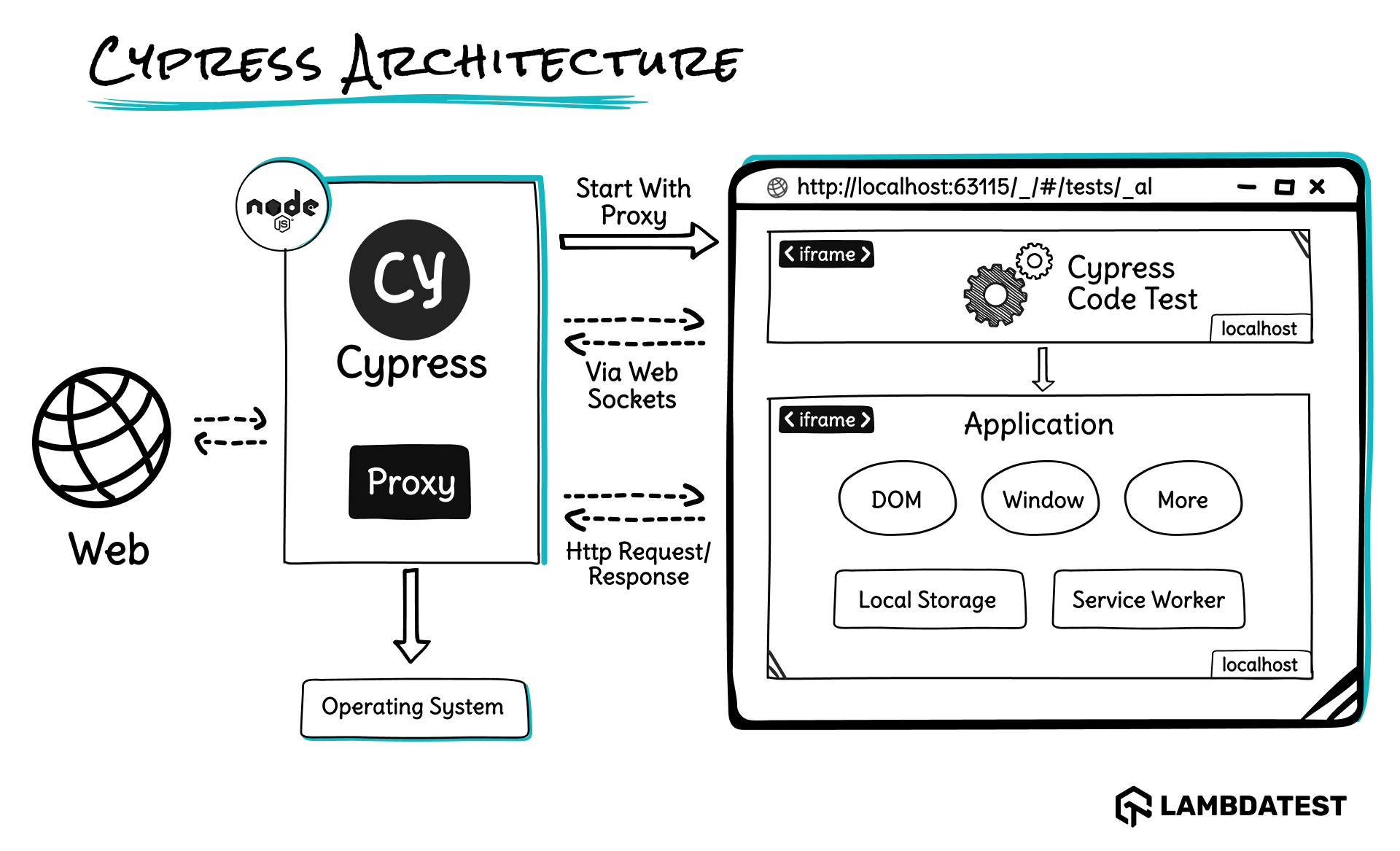
Core Components of Cypress Architecture:
- Test Runner: Executes test cases directly in the browser alongside the application code.
- Cypress CLI: A command-line interface for initializing, running, and configuring Cypress tests.
- Application Under Test (AUT): The actual web app being tested, rendered within the Cypress-controlled browser.
- Command Queue: Cypress queues all commands and executes them in order with automatic waiting and retry logic.
- Network Layer: Allows stubbing, spying, and intercepting HTTP requests with built-in utilities like cy.intercept().
- Dashboard Service (optional): Provides CI visibility, video recording, and parallelization when connected to Cypress Cloud.
Cypress executes tests directly inside the browser process, giving it native access to the DOM and network layer. This design offers faster debugging and real-time reloading but limits flexibility for multi-browser or cross-platform automation, where Playwright's out-of-process model performs better.
Playwright: Protocol-Level Control
Playwright runs tests outside the browser entirely. It communicates with browser engines (Chromium, Firefox, WebKit) via persistent WebSocket connections to the browser's DevTools Protocol.
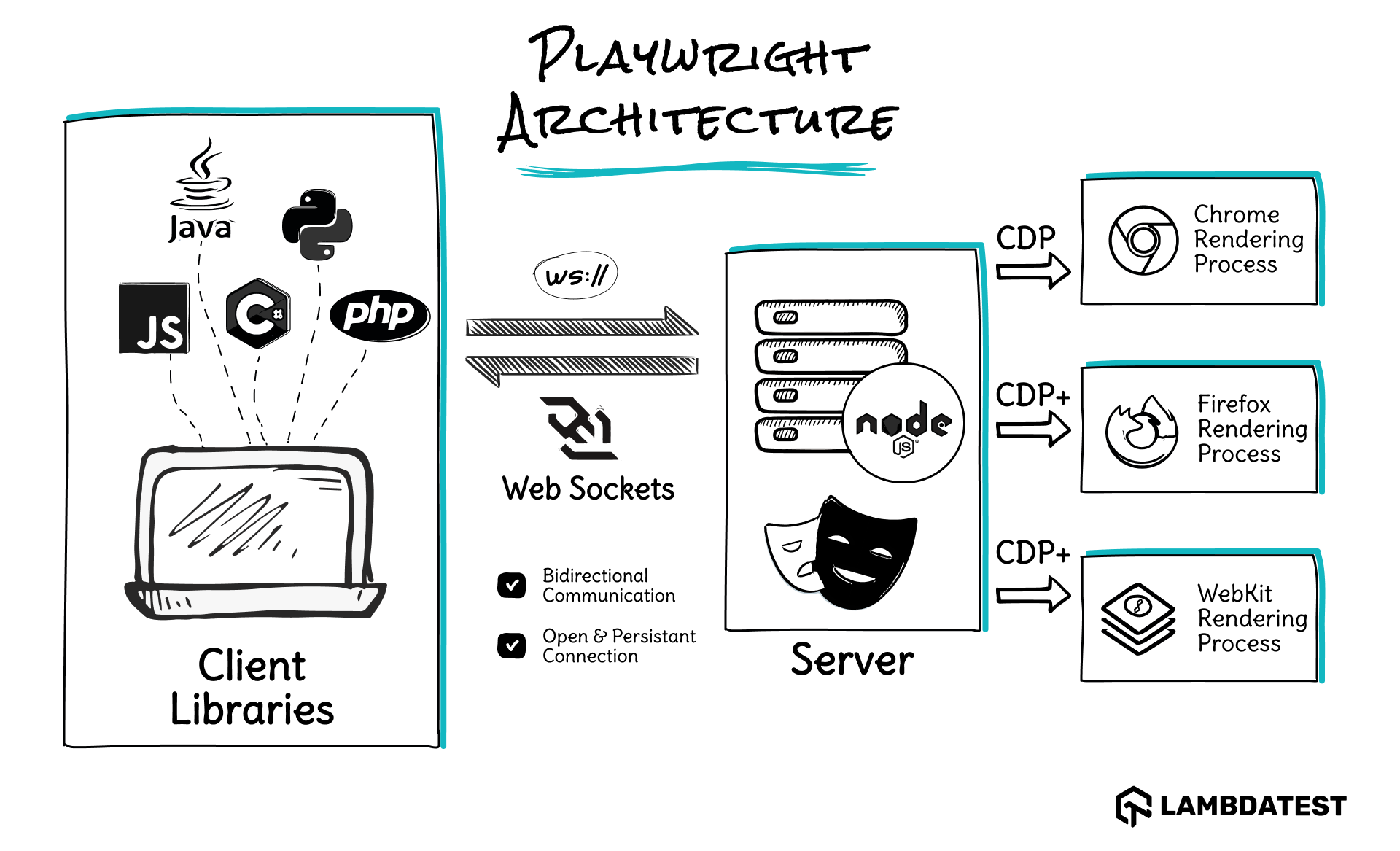
Core Components of Playwright Architecture:
- Client (Test Runner): Executes your Playwright scripts and sends commands to the browser.
- Driver (Playwright CLI): A lightweight bridge that communicates between test code and the browser.
- Browser Server: Launches and controls browser processes (Chromium, Firefox, WebKit).
- Browser Contexts: Enable multiple isolated sessions within the same browser instance.
- Page Objects: Represent individual tabs or windows where automation tasks are performed.
- Protocol Layer: Handles communication between the test runner and browser over WebSocket or pipe.
When comparing Playwright vs Cypress, Playwright's external architecture allows broader access and multi-browser support, while Cypress's in-browser model simplifies setup but limits control.
Why Understanding Their Architecture Matters for Your Decision?
If your application is a single-domain SPA and your team values visual debugging during development, Cypress's in-browser architecture is a genuine advantage. If your application spans multiple domains, requires multi-tab workflows, or needs to run thousands of tests in CI with minimal cost, Playwright's protocol-level architecture is the stronger foundation.
Playwright vs Cypress: Which Performs Better in 2026?
Feature comparisons alone do not capture the practical impact of choosing one test automation framework over the other. Production benchmark data from independent sources reveals measurable differences in speed, flakiness, and resource efficiency.
Execution Speed: Playwright vs Cypress
Understanding execution speed differences is critical when comparing Cypress vs Playwright for short or long test suites in CI pipelines.
- Cypress: Runs inside the browser through a proxy layer that bundles, injects, and routes test code. This adds approximately 5 to 7 seconds of startup latency before any test logic begins. The overhead amortizes across longer suites but disproportionately slows shorter runs.
- Playwright: Communicates with browsers over a persistent WebSocket connection. Every action is a single message with no HTTP overhead and no proxy process. This results in near-zero startup latency and consistently fast test execution across Chromium, Firefox, and WebKit.
Test Flakiness: Playwright vs Cypress
Test flakiness is a key factor when deciding between Playwright vs Cypress for reliable automation across dynamic applications.
- Cypress: Uses a command queue and built-in retry-ability to handle asynchronous operations. Commands and assertions are retried until they succeed or time out, which helps mitigate instability caused by dynamic content. However, this model can exhibit slightly higher variability in test outcomes compared to Playwright's auto-wait behavior.
- Playwright: Auto-wait aligns with actual browser rendering events, reducing false failures caused by dynamic content or timing mismatches. Across thousands of real-world projects, aggregated flakiness data shows that Playwright tests average a 0.72% flakiness rate, with tighter variability, compared to 0.83% for Cypress, which exhibits wider fluctuations in instability.
Memory and Resource Efficiency
Resource usage can significantly affect CI/CD costs, a consideration when evaluating Cypress vs Playwright for large test suites.
- Cypress: Uses one browser per suite but adds its own proxy and bundling overhead on top. This results in higher per-suite resource consumption, especially when running multiple suites in parallel.
- Playwright: Browser contexts share a single browser process across multiple lightweight isolated sessions. This model minimizes memory consumption and maximizes throughput in CI environments where resource efficiency directly affects cost.
Parallel Execution at Scale
Scalability differs significantly, and understanding it is vital when comparing Cypress vs Playwright for enterprise-level testing.
- Cypress: Splits tests across machines but runs exactly one test per machine at a time. Optimal parallel distribution requires the paid Cypress Cloud subscription, which scales linearly with team size.
- Playwright: Runs multiple tests simultaneously across workers within a single machine and shards natively across machines. Free, built-in parallelization with no paid service required.
Cypress vs Playwright: How Do CI/CD Costs Compare?
When running end-to-end tests at scale, costs extend beyond the framework itself. CI compute time, parallelization infrastructure, dashboard subscriptions, and developer wait time all contribute.
Comparing Cypress vs Playwright helps teams understand which framework offers better cost efficiency and resource management in continuous integration pipelines.
Cypress: Paid Parallelization at Scale
The core Cypress end-to-end testing framework is open-source, but scaling parallel execution reliably requires the Cypress Cloud dashboard service. This introduces a per-user or per-parallelism-stream subscription that scales linearly with team size and testing volume.
For enterprise teams with 50+ QA engineers needing 20+ parallel streams, the annual subscription cost can become a significant line item, potentially exceeding $30,000 per year based on 2026 pricing projections.
Third-party alternatives like Currents.dev or Sorry Cypress reduce this cost but add integration complexity and maintenance overhead.
Playwright: Free Native Parallelization
Playwright offers built-in parallel execution on any self-hosted CI pipeline, including GitHub Actions, Jenkins, Azure DevOps, and GitLab CI. No paid service required. The primary cost is compute time on CI workers, which is typically a fixed or existing expense.
Teams running 1,000+ tests can expect a 40 to 60% reduction in CI time compared to single-threaded Cypress execution.
Which Teams Are Affected?
The table below highlights how team size, test volume, and costs vary across Playwright and Cypress, helping you make quick, informed decisions without reading every paragraph.
| Team Size | Test Volume | Cost Impact |
|---|---|---|
| Small (under 10 engineers) | Fewer than 200 tests | Negligible. Both frameworks work within free CI tiers. |
| Mid-size (10 to 50 engineers) | 500+ tests | Moderate. Playwright's free parallelization savings start to compound. |
| Enterprise (50+ engineers) | Thousands of tests | Substantial. Total cost of ownership difference becomes a budget-level decision. |
How Does the Same Test Compare in Cypress vs Playwright?
Running identical tests in both frameworks highlights differences in syntax, execution flow, and reliability. This comparison helps teams understand how Cypress vs Playwright handle automation, retries, and dynamic content under real-world conditions.
Cypress
Cypress lets you write and run tests in JavaScript with direct access to the browser and application under test. Its built-in GUI runner allows real-time execution, debugging, and visualization of test steps for fast issue identification.
describe('Login Flow', () => {
  it('should log in successfully and redirect to dashboard', () => {
    cy.visit('https://example.com/login');
    cy.get('#username').type('user1');
    cy.get('#password').type('securePassword');
    cy.get('button[type="submit"]').click();
    cy.url().should('include', '/dashboard');
  });
});
In the above example, the Cypress test automatically waits for elements and navigations, so no manual waits are needed. Cypress runs this test in the actual browser window, allowing full visual feedback.
Following Cypress best practices, such tests should focus on user flows rather than implementation details, avoid unnecessary waits, and ensure each test is isolated for reliable execution.
In contrast to Playwright, Cypress delivers a more visual and interactive testing experience right out of the box. This distinction often defines the trade-off between the two frameworks.
Between Cypress vs Playwright, Cypress syntax feels like working directly within the browser console, making it especially intuitive for frontend-focused teams.
Playwright
Playwright enables end-to-end testing with concise, readable scripts. Below is a basic test case that opens a browser, navigates to a page, performs an action, and asserts a result.
const { test, expect } = require('@playwright/test');

test('Verify login functionality', async ({ page }) => {
  await page.goto('https://example.com/login');
  await page.fill('#username', 'user1');
  await page.fill('#password', 'securePassword');
  await page.click('button[type="submit"]');
  await expect(page).toHaveURL('https://example.com/dashboard');
});
To start writing and running Playwright tests like the one above, you'll first need to install Playwright. It comes with support for all major browsers and can be set up with just a single command.
Compared to Cypress, Playwright allows testing across multiple browsers and tabs in a single run. This makes Playwright automated testing ideal when scalability and browser diversity are key priorities, giving it a clear edge in complex, cross-browser scenarios.
When to Migrate Between Cypress and Playwright (and When Not To)?
Deciding whether to switch frameworks involves more than personal preference. Migrations are usually incremental; you don't need to move every test at once. Cypress and Playwright tests can coexist in the same repository, enabling a phased rollout of new test suites.
The decision should consider technical limitations, long-term maintenance, language support, and CI/CD requirements.
Migrate from Cypress to Playwright When
Successful transitions consider test syntax differences, async handling, API routing changes, and CI configuration updates. The community-driven resource, Cypress to Playwright Migration Guide, provides structured mappings, real examples, and conversion patterns, helping automate common transformations between frameworks.
- You need Safari or WebKit testing that Cypress cannot cover.
- Multi-tab, multi-domain, or multi-context workflows require workarounds in Cypress that are native in Playwright.
- Cypress Cloud costs have become a significant line item for parallelization.
- Your team works in Python, Java, or C# and cannot integrate Cypress into the existing stack.
- CI execution times are too long due to Cypress's startup latency and single-threaded parallelism.
Stay with Cypress When
- Your application is a single-domain SPA where Cypress's constraints do not apply.
- Your team is highly productive with Cypress and not hitting architectural limitations.
- You have a significant investment in custom Cypress commands, plugins, and CI integrations.
- Migration effort and retraining cost outweigh the benefits for your team size.
Migrate from Playwright to Cypress When
Cypress and Playwright tests can coexist, allowing a phased migration. Consider maintaining visual debugging, SPA constraints, and team expertise with JavaScript. For a smooth migration from Playwright to Cypress, follow their official guidance on Migrating from Playwright to Cypress.
- Your team is JavaScript-only and values the visual debugging experience over cross-browser breadth.
- Test authoring speed and instant feedback loops matter more than multi-language or multi-context support.
- Your project scope is frontend-focused with no Safari, multi-tab, or cross-origin requirements.
- Playwright's async/await model is creating a steep learning curve for a junior frontend team.
Stay with Playwright When
- Your CI pipelines depend on free native parallelization across multiple workers and machines.
- Your test suite spans multiple browsers, domains, or browser contexts.
- Your team uses Python, Java, C#, or .NET alongside JavaScript for test coverage.
- You rely on protocol-level features like WebRTC testing, service workers, or browser extension automation.
While Cypress and Playwright cover end-to-end testing, most projects also need a unit testing framework alongside them. For help choosing between the two leading JavaScript unit test runners, see our Vitest vs Jest comparison.
How to Run Playwright and Cypress Tests at Scale
Cloud-based testing platforms handle infrastructure, enable cross-browser execution, and support true parallelism at scale. Whether you use Playwright, Cypress, or Selenium, these platforms let you run more reliable tests across more environments.
TestMu AI supports both Playwright and Cypress cloud testing. It lets you run tests across 3,000+ browser and OS combinations and 10,000+ real devices, debug using logs and video replays, and integrate with popular CI tools.

Key features:
- Parallel Testing: Run multiple tests simultaneously to reduce CI/CD cycle time.
- Cross-Browser Coverage: Test on 3,000+ browser and OS combinations.
- Real Device Testing: Access 10,000+ real desktop and mobile devices.
- Native Playwright and Cypress Support: No additional setup required.
- Smart Debugging Tools: Logs, network capture, video replays, and step-by-step screenshots.
- CI/CD Integrations: Jenkins, GitHub Actions, GitLab, Bitbucket, CircleCI, and more.
- Test Insights: Track flaky tests, performance trends, and coverage in one dashboard.
To get started, follow the support documentation for setting up Playwright testing with TestMu AI and Cypress testing with TestMu AI. These guides walk you through the setup, configuration, and best practices to run your tests smoothly on the cloud.

Wrapping Up
The Playwright vs Cypress landscape has evolved considerably. In 2026, Playwright leads in NPM downloads, cross-browser coverage, CI cost efficiency, and architectural flexibility. Cypress retains its strengths in developer experience, visual debugging, and frontend-focused simplicity.
Cypress is an excellent choice for developers who value simplicity in setup and usage. Its growing community and active ecosystem mean most challenges can be resolved through shared solutions and documentation. The time-travel debugging and interactive test runner remain unmatched for frontend development workflows.
Playwright, developed by Microsoft, offers a high-quality tool with strong backing. With built-in features like screen recording, video capture, and Trace Viewer, Playwright provides everything needed to optimize your testing workflow. The framework continues to mature rapidly, setting new benchmarks for scalability and cross-browser reliability.
For new projects starting in 2026, Playwright's trajectory, free parallelization, and broader feature set make it the default recommendation. For teams already productive with Cypress and not hitting its limitations, there is no urgent reason to migrate. Carefully evaluating their capabilities, architecture, costs, and alignment with your team's workflow will help you make an informed decision.
Just as the choice between Cypress and Playwright depends on your testing needs, selecting the right AI-powered development platform matters for your build workflow. If you're evaluating AI app builders, our Lovable vs Replit comparison covers the key differences.


Frequently asked questions
Did you find this page helpful?
More Related Hubs
TestMu AI forEnterprise
Get access to solutions built on Enterprise
grade security, privacy, & compliance
- Advanced access controls
- Advanced data retention rules
- Advanced Local Testing
- Premium Support options
- Early access to beta features
- Private Slack Channel
- Unlimited Manual Accessibility DevTools Tests