

Next-Gen App & Browser Testing Cloud
Trusted by 2 Mn+ QAs & Devs to accelerate their release cycles


A Complete Guide To CSS Text Orientation
Learn how to use CSS text orientation effects to creatively manipulate text orientation, including vertical and rotated text.

Mbaziira Ronald
January 29, 2026
As the Internet connects people from diverse linguistic backgrounds and cultures, ensuring that websites’ content is user-friendly and understood by all is vital. Presenting a website’s text in a way that caters to different languages improves its accessibility and inclusivity.
You can use CSS text orientation properties to improve a website’s text readability, layout, and navigation, such as text-orientation. Similarly, you can use the same properties to improve the website’s responsiveness.
Furthermore, in the case of a customer-facing website (e.g., B2C/B2B/B2B2C), reaching a wider audience means widening the potential customers for your product. However, people in other parts of the world should first be able to contextually understand your website’s content to be considered potential customers. This is where CSS text orientation proves to be very powerful.
In this blog, we’ll see how you can use CSS text orientation properties to improve the accessibility, inclusivity, and overall responsiveness of your website.
What is CSS Text Orientation?
CSS text orientation refers to using CSS properties to determine the direction or positioning of lines or individual text characters on a webpage.
The two main properties for controlling CSS text orientation are the writing-mode and text-orientation properties. The writing-mode property lets you align lines of text vertically or horizontally, whereas you can rotate or flip text characters with the text-orientation property.
Let’s first look at some of the salient use cases of this particular CSS property.
Use Cases of CSS Text Orientation
As several use cases of CSS text orientation exist, we will limit the content to only the major ones:
Responsive web layouts
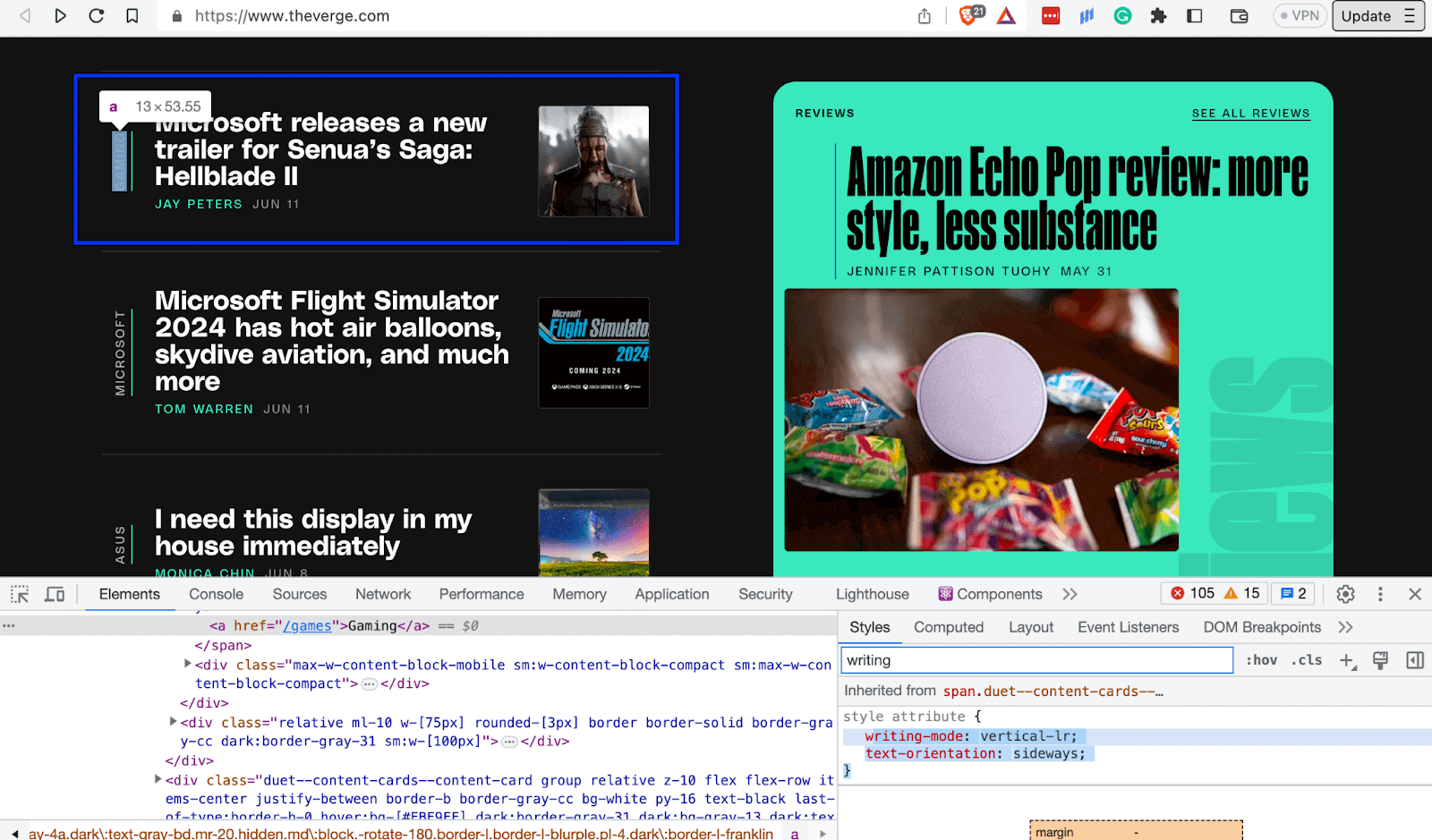
You can make web pages responsive using CSS text orientation, mainly when screen real estate is limited, like on mobile devices. You can do this by putting text vertically and returning it to a horizontal position when there is more screen real estate.
In the image below, on TheVerge’s website, the category words GAMING are vertically positioned sideways, utilizing the small screen real estate.
Similarly, CSS text orientation can be convenient on mobile devices with limited screen real estate. The word Tech is also vertically positioned sideways to utilize the limited space.
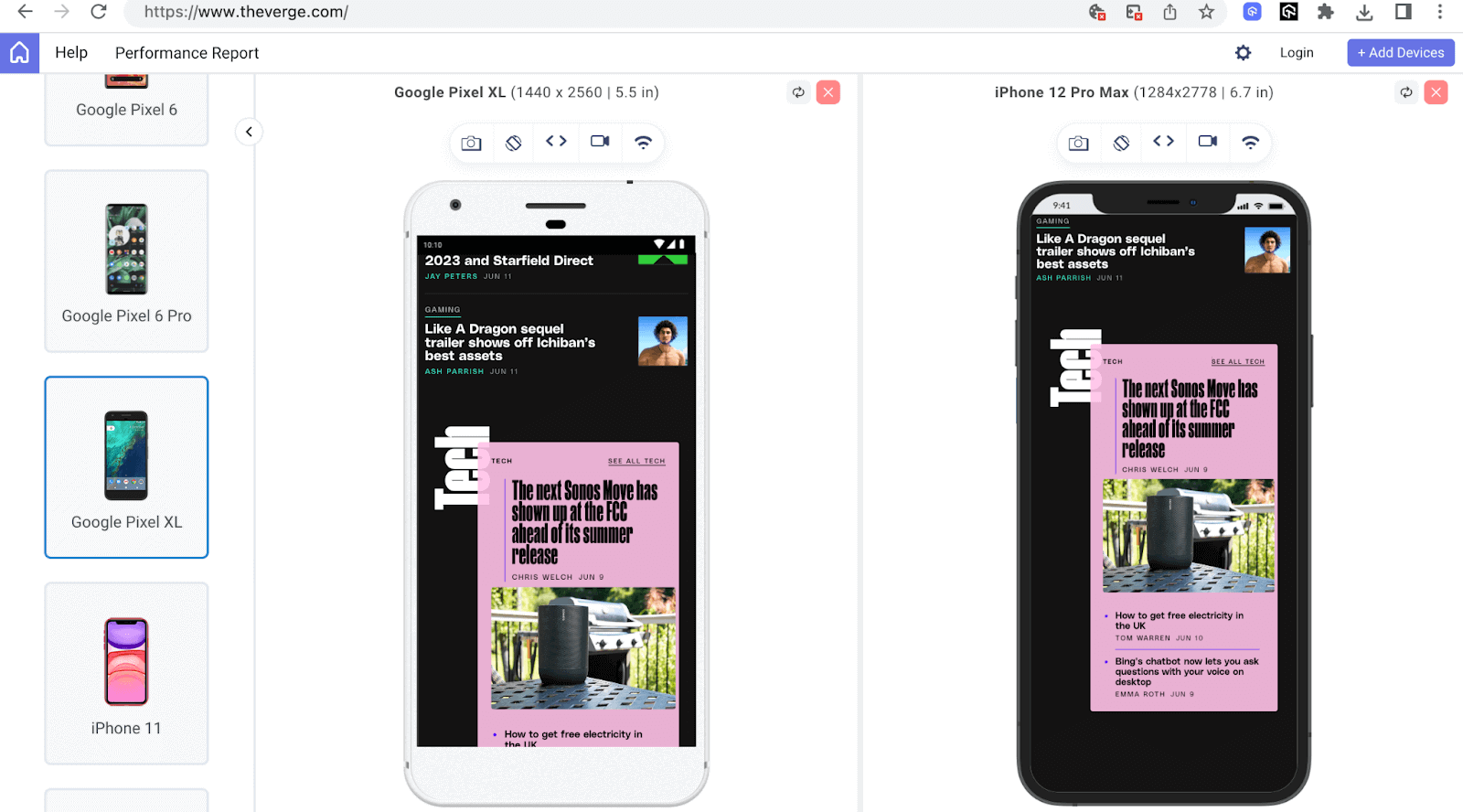
In the above mobile view of TheVerge’s website, I have used LT Browser 2.0 to render the website.
LT Browser 2.0 is a dev-friendly mobile next-generation browser built by TestMu AI to test your responsive web layout for CSS text orientation across 53+ pre-installed viewports for mobile, tablet, desktop, and laptops. This lets you ensure that text orientation does not break even if the webpage is rendered on various screen resolutions.
To get additional details about LT Browser 2.0, refer to our below video tutorial.
Catch up on the latest testing tutorials around Selenium automation, Cypress testing, and more. Subscribe to the TestMu AI YouTube Channel for quick updates.
Readability
Appropriately oriented text can improve text contrast and readability. By giving the text, such as headings and subheadings, a different directional flow, you can visually separate the content, making navigating through the content effortless and finding information quicker.
The below example on Elegantseagulls directs the user to navigate orderly through the vertically oriented navigation items from Creative to Research.

Note: Unleash the potential of your CSS-based web apps on real devices. Try TestMu AI Today!
Localization and multilingual web support
Website localization refers to adapting a website to a specific culture or region of its language, content, date and time, and other aspects. Language localization, in particular, means translating a website’s content to the local language of a specific region or country in a contextually accurate manner.
If you are new to localization and want to know its role in the testing landscape, please check this localization testing tutorial.
In contrast, multilingual web support refers to a website’s ability to render and function appropriately in multiple languages.
Language localization and multilingual web support was major factor in the introduction of CSS text orientation properties such as writing-mode, as evidenced by the words of Dr. Jun Murai, a W3C steering committee member, “Thanks to incredible internationalization work and the help of many Asian countries working together, we have reached the momentous point where CSS enables international writing modes on the web.”
For example, when adapting a website in English to languages supporting vertical scripts like Chinese and Japanese, the website’s writing-mode can be changed from horizontal-tb to vertical-rl. CSS text orientation properties aid in making the above possible.
Content hierarchy and structure
You can use CSS text orientation to clearly show your content’s hierarchy flow, thus making it easy for the reader to follow and understand.
Once the readers find the content easy to follow and understand, there is a higher chance of returning to the same website for more content or a similar user experience.
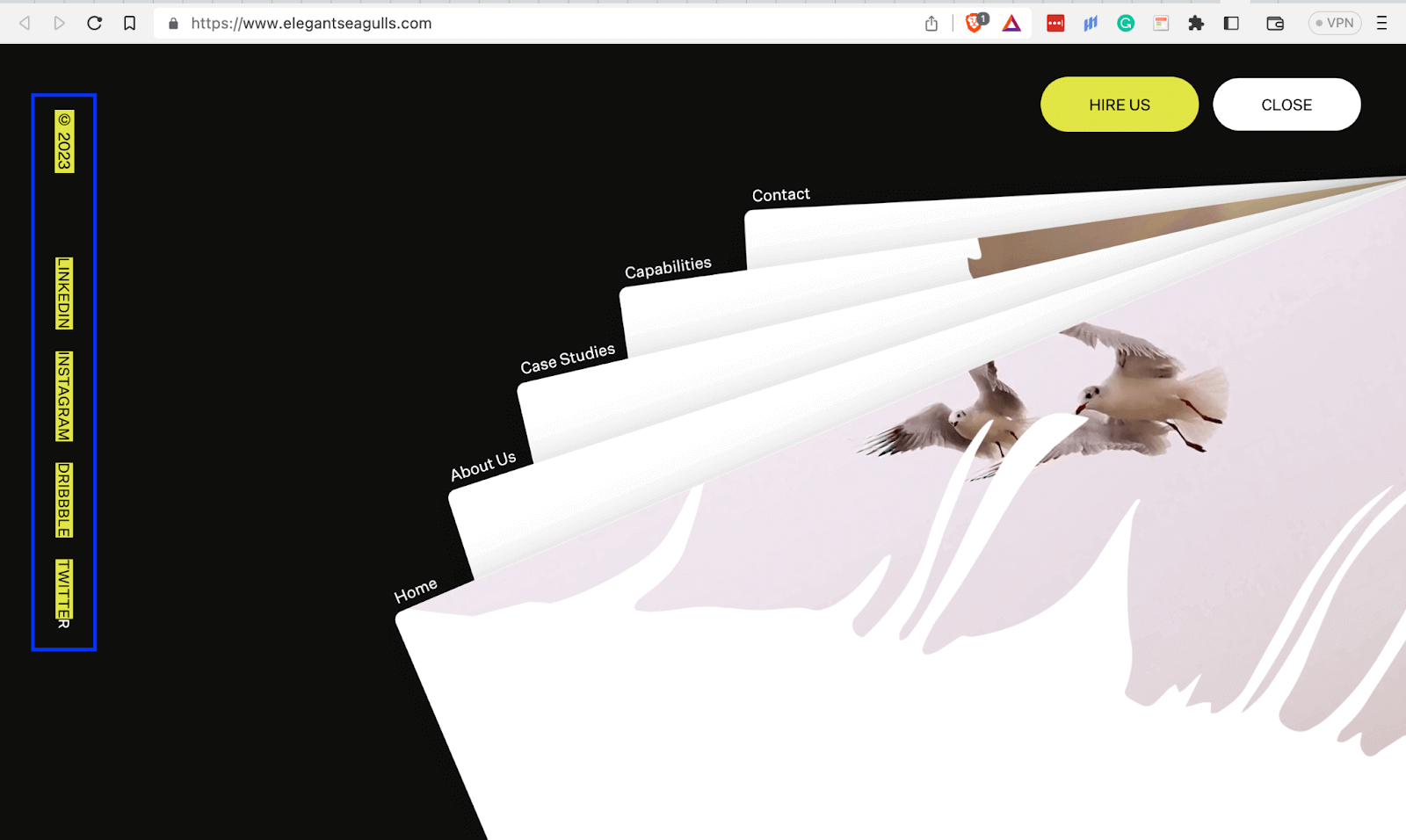
Due to having a vertical orientation, the social media links on the left below clearly stand out from the rest of the text on the page. This makes them easy to find and helps the user navigate to their destination.
Browser Compatibility for CSS Text Orientation Effects
Before implementing CSS text orientation effects, you need to know the cross browser compatibility of the properties to ensure your content renders correctly and to provide a good user experience to the website visitors.
All the latest versions of major browsers like Chrome, Safari, and Firefox support the CSS text orientation properties. Look at the images below to get a clear view of the support of these properties.
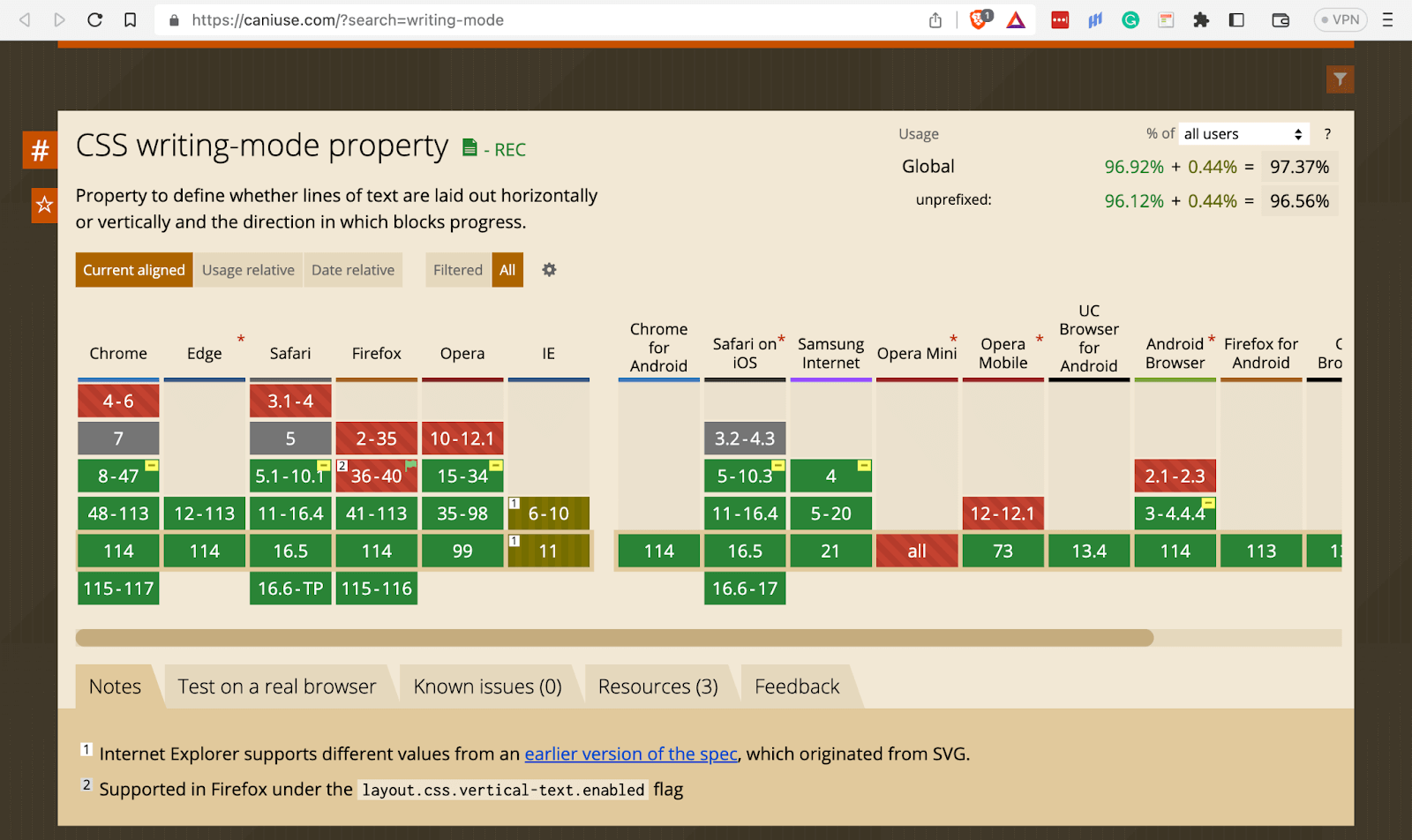
Browser Compatibility – CSS writing-mode property
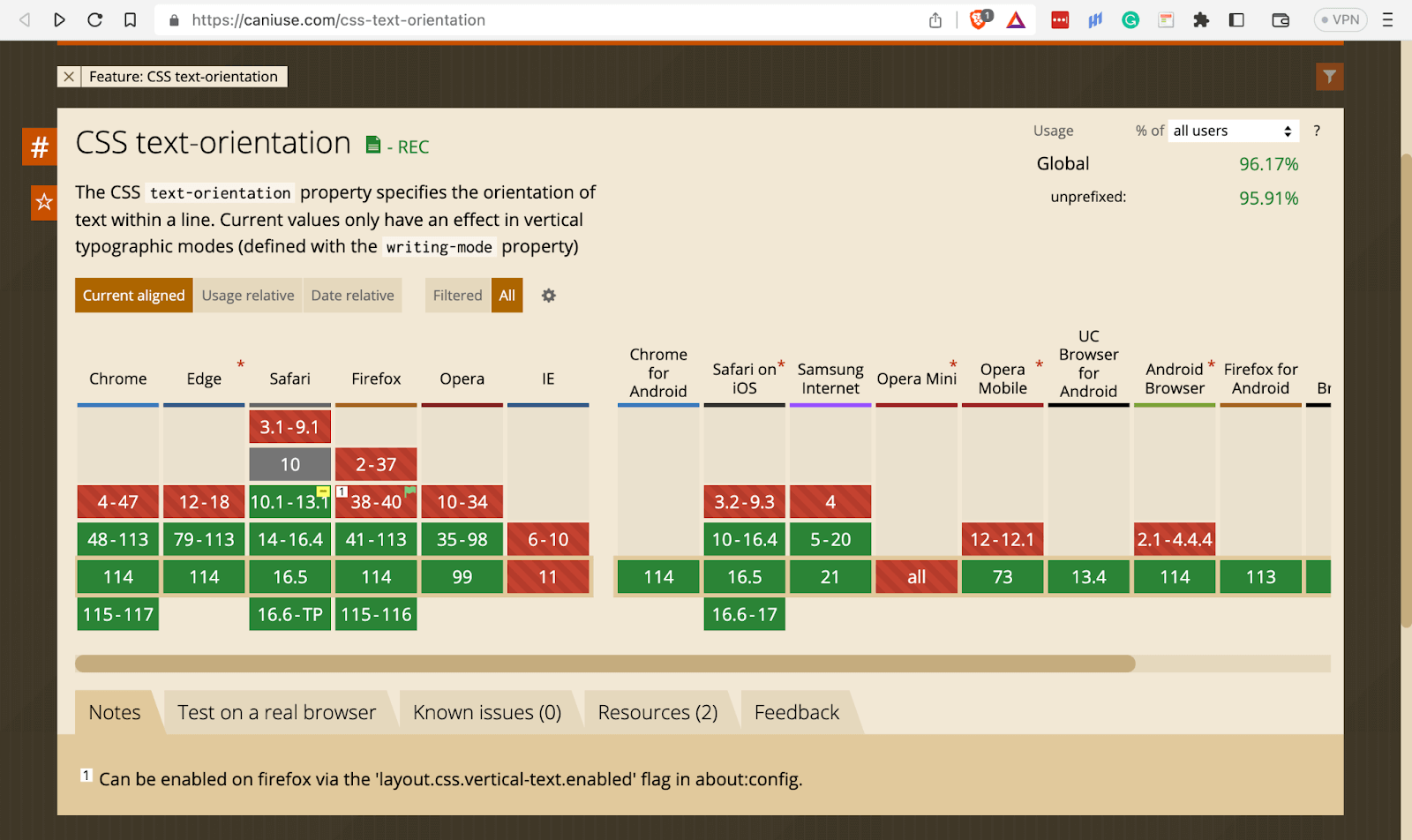
Browser Compatibility – CSS writing-mode property

Getting Started with CSS Text Orientation
CSS provides several properties you can use to orient text. However, we shall limit the scope of this blog to two major properties, writing-mode and text-orientation.
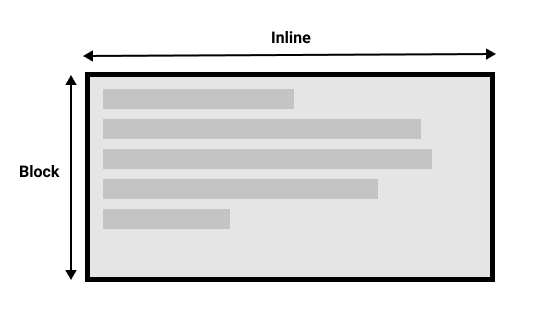
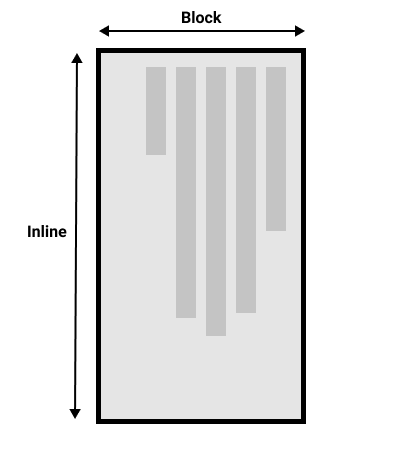
Before we look at the above two properties in detail, let me familiarize you with an essential concept of writing modes regarding block flow direction and inline base direction.
Block flow direction refers to the horizontal (RTL or LTR) and vertical (top to bottom) direction in which block-level boxes and line boxes stack within a block container. For languages, it refers to how lines of text stack.
For example, English has a top-to-bottom block flow direction, whereas traditional Japanese has an LTR block flow direction.
To know more about this, read the blog on CSS logical properties.
Inline base direction refers to the primary direction of content in each line of text. It can be horizontal or vertical. For example, Mongolian has a top-to-bottom inline base direction, whereas English has a left-to-right.
Image 1 below shows the Inline base and block flow direction of left-to-right text content, while image 2 shows the block flow and Inline base direction of right-to-left text content.
One reason for orienting text is to cater to different writing systems, and the CSS Writing Modes Specification can handle four writing systems. Let’s brief them.
Latin-based systems
The system includes all languages that use the Latin alphabet, such as German, Spanish, and English. Their text runs horizontally from left to right (LTR). The Latin-based system also includes Greek and Cyrillic systems with languages such as Greek and Russian.
Arabic-based systems
The text for Arabic-based systems runs horizontally from right to left. It includes languages such as Arabic, Hebrew, and Persian.
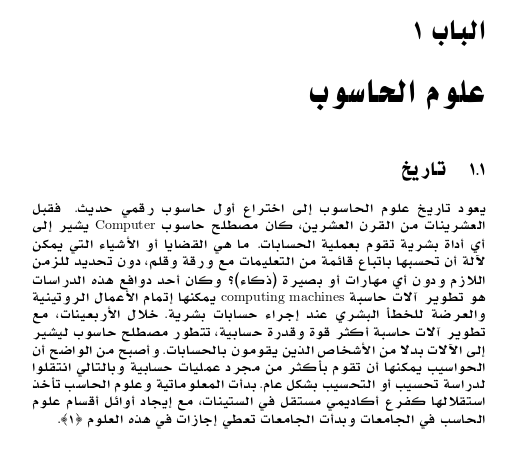
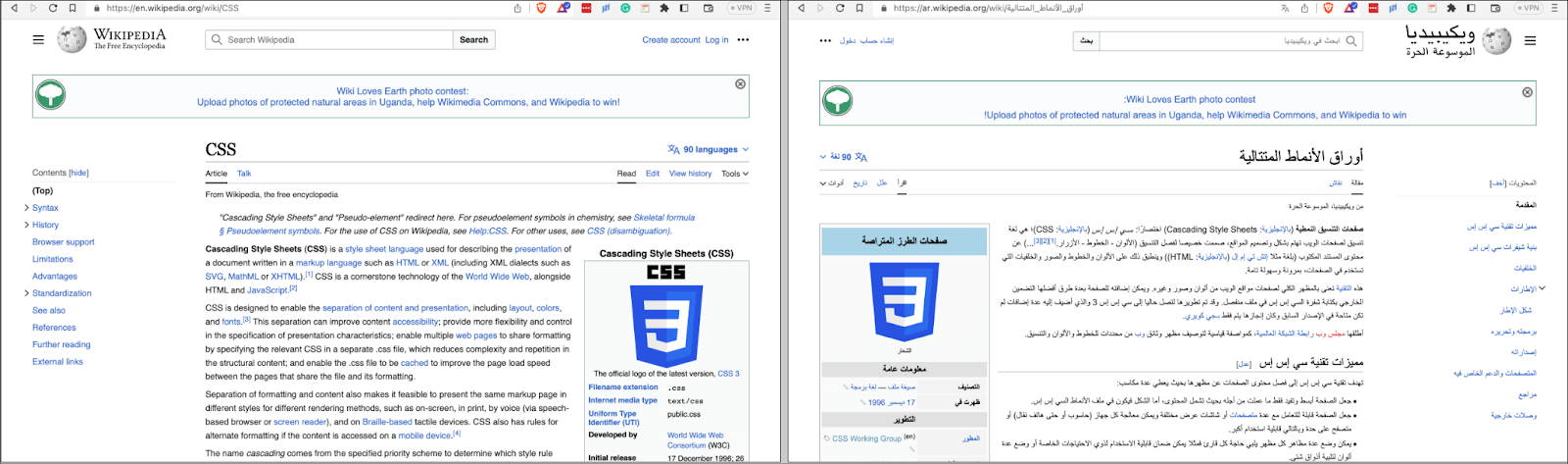
Below is a side-by-side image of a CSS Wikipedia page, one in English and the other in Arabic, showing how LTR and RTL languages compare.
Mongolian-based systems
Text runs vertically from left to right with a top-to-bottom inline base direction. It mainly includes the Mongolian language.

Han-based systems
This system includes languages such as Chinese, Japanese, and Korean. You can lay out these languages like Latin-based ones. However, they are traditionally written vertically from right to left.
 The image above shows page 13 of the Meiji Constitution of Japan. The writing goes from LTR, going from top to bottom.
Now that we have seen the writing modes and systems, let’s explore the CSS text orientation properties of writing-mode and text-orientation.
CSS writing-mode property
The writing-mode property defines the horizontal and vertical layout of lines of text or block flow direction.
The property has three values:
- horizontal-tb
- vertical-lr
- vertical-rl
Syntax
writing-mode: horizontal-tb | vertical-lr | vertical-rl | sideways-lr | sideways-rl;
The two writing-mode property values of sideways-lr and sideways-rl are experimental as of the date of writing this blog and have little browser support. Thus, you shouldn’t use them in production.
Let’s explore the above three property values and how they work
Horizontal-tb
This value defines a vertical block flow direction for lines of text going from top-to-bottom. It is the default value of the writing-mode property, and one does not need to define it when using horizontal script languages like English on a website.
HTML:
<!DOCTYPE html>
  <html lang="en">
    <head>
      <meta charset="UTF-8" />
      <meta name="viewport" content="width=device-width, initial-scale=1.0" />
      <link rel="stylesheet" href="styles.css" />
      <title>CSS writing-mode property - horizontal-tb</title>
    </head>
    <body>
      <main>
        <div class="title-and-description">
          <h1>More Reasons To Love LambdaTest</h1>
          <p>
            Along with 3000+ browsers and devices combinations to test we provide
            you <br />
            additional features to make sure you give your users a perfect
            experience.
          </p>
        </div>
        <div class="cards">
          <div class="card">
            <img src="https://www.lambdatest.com/resources/images/headset.svg" alt=""/>
            <div class="card-text-content">
              <h3>24/7 Support</h3>
              <p>
                Got questions? Throw them to our 24/7 in-app customer
                <a href="https://www.lambdatest.com/#none">Chat support</a> or
                email us on
                <a href="mailto:support@testmuai.com">support@testmuai.com</a>
              </p>
            </div>
          </div>
          <div class="card">
            <img src="https://www.lambdatest.com/resources/images/Integration-logo.svg" alt=""/>
            <div class="card-text-content">
              <h3>Third-Party Integrations</h3>
              <p>
                With a single click, push bugs in your choice of project
                management tools, directly from LambdaTest platform.
              </p>
            </div>
          </div>
          <div class="card">
            <img src="https://www.lambdatest.com/resources/images/header/LambdaTest-Documentation.svg" alt=""/>
            <div class="card-text-content">
              <h3>Documentation</h3>
              <p>
                Step-by-step
                <a
                  href="https://www.lambdatest.com/support/docs/supported-languages-and-frameworks/">documentation</a>
                for various test automation frameworks to help you run your first
                Selenium script.
              </p>
            </div>
          </div>
        </div>
      </main>
    </body>
  </html>
CSS:
*,
  *::before,
  *::after {
      margin: 0;
      padding: 0;
      box-sizing: border-box;
  }

  body {
      font-family: "Inter", sans-serif;
      font-size: 0.938;
      line-height: 1.6;
      font-weight: 400;
      letter-spacing: 0.013rem;
      color: #242424;
  }

  main {
      min-height: 100vh;
      padding: 4rem;
      display: flex;
      justify-content: center;
      align-items: center;
      flex-direction: column;
      gap: 5rem;
      background: #eef5ff;
  }

  .title-and-description {
      text-align: center;
      writing-mode: horizontal-tb;
  }

  .cards {
      display: grid;
      grid-template-columns: repeat(auto-fit, minmax(300px, 1fr));
      gap: 1rem;
  }

  .card {
      background-color: #fff;
      padding: 3rem;
      display: flex;
      flex-direction: column;
      align-items: center;
      gap: 2rem;
  }

  .card a {
      color: #2563eb;
  }

  .card-text-content {
      text-align: center;
  }

  .card-text-content h3 {
      font-weight: 500;
  }

  .card-text-content p {
      color: rgb(75 85 99);
  }
Output:
Browser Preview:
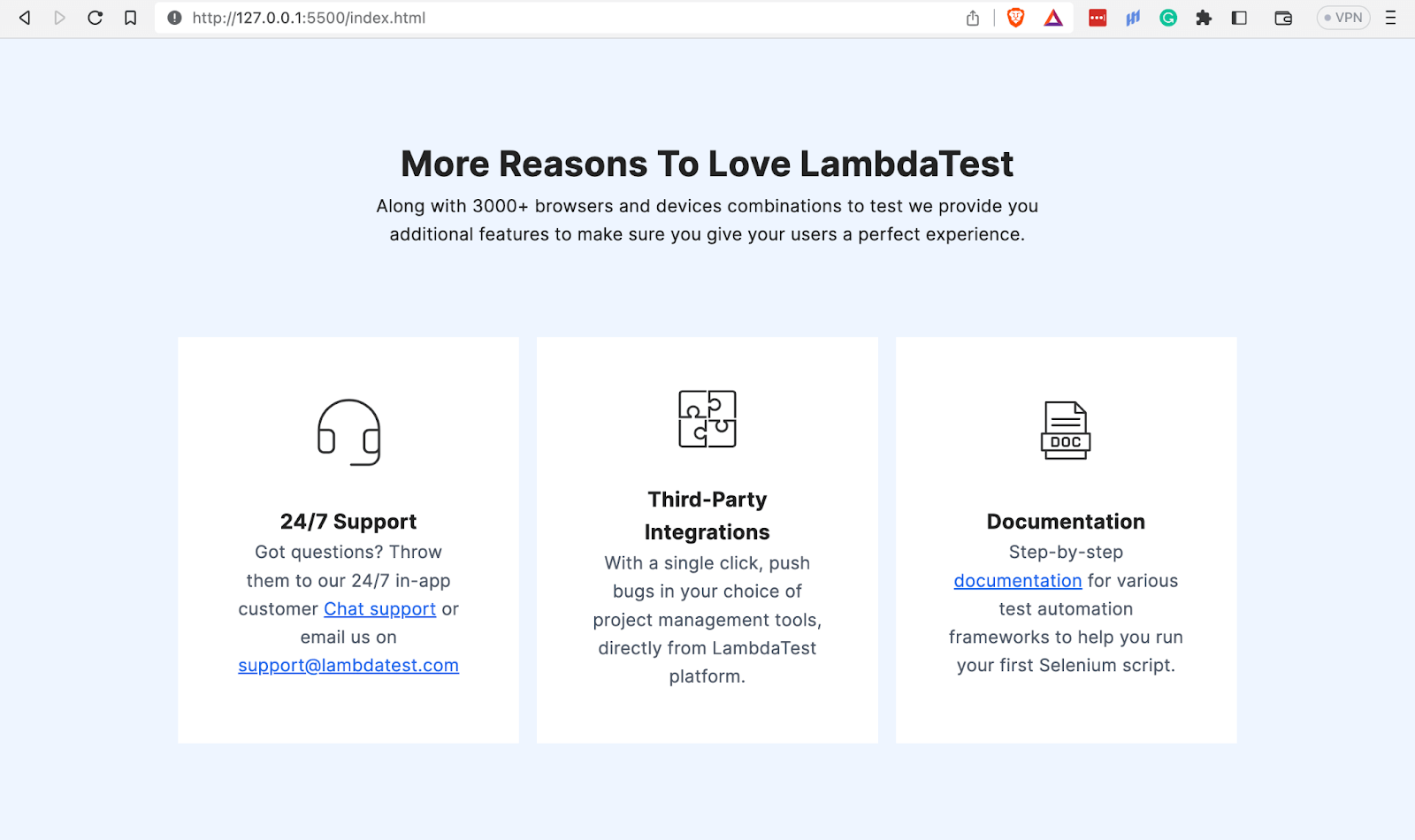
In the above browser output, you will notice that horizontal-tb does not affect our page title and description since English is a horizontal script language.
Vertical-lr
The vertical-lr value stacks lines of text horizontally, from left to right. The start of the line is at the top, while its end is at the bottom. The Mongolian language uses this layout.
The value applies the same effect when you use it on horizontal script languages.
HTML:
<!DOCTYPE html>
  <html lang="en">
    <head>
      <meta charset="UTF-8" />
      <meta name="viewport" content="width=device-width, initial-scale=1.0" />
      <link rel="stylesheet" href="styles.css" />
      <title>CSS writing-mode property - vertical-lr</title>
    </head>
    <body>
      <div class="header">
        <h1>LAMBDATEST BLOG</h1>
        <p style="color: #656565">
          Our blog on Selenium automation testing, browser compatibility testing,
          web development, and updates
        </p>
      </div>
      <!-- Blogs -->
      <main>
        <!-- 1 -->
        <div class="blog">
          <div class="category">
            <p>Selenium</p>
          </div>
          <div class="content">
            <img
              src="https://www.lambdatest.com/blog/wp-content/uploads/2023/06/How-To-Use-Python-For-Random-String-Generation.png"
              alt=""
            />
            <h2>How To Use Python For Random String Generation</h2>
            <p>
              An unpredictable and non-repetitive string of characters is referred
              to as a random string. In programming, random strings are crucial
              for several tasks, including the creation of test data, the
              development of unique IDs, the encryption of data, and the
              implementation of randomization-required algorithms.
            </p>
          </div>
        </div>
        <!-- 2 -->
        <div class="blog">
          <div class="category">
            <p>Cypress</p>
            <div class="dot"></div>
          </div>
          <div class="content">
            <img
              src="https://www.lambdatest.com/blog/wp-content/uploads/2023/06/Cypress-library.png"
              alt=""
            />
            <h2>Cypress Testing Library: Getting Started Tutorial</h2>
            <p>
              Writing maintainable tests for web user interfaces is critical for
              ensuring the reliability and stability of applications. As the
              software evolves and changes, it's vital to have tests that can be
              easily maintained and updated to reflect the latest changes in the
              code.
            </p>
          </div>
        </div>
        <!-- 3 -->
        <div class="blog">
          <div class="category">
            <p>Selenium</p>
          </div>
          <div class="content">
            <img
              src="https://www.lambdatest.com/blog/wp-content/uploads/2023/06/How252525252520To252525252520Use252525252520Arrays.asList252525252520In252525252520Java25252525252025252525255BWith252525252520Examples25252525255D.png"
              alt=""
            />
            <h2>How To Use Arrays.asList() In Java [With Examples]</h2>
            <p>
              Test automation can be quite challenging sometimes when dealing with
              complex test cases. Although there are multiple ways available in
              any programming language to solve a particular problem, you need to
              be vigilant that your solution follows the best and the most
              efficient coding practices.
            </p>
          </div>
        </div>
        <!-- 4 -->
        <div class="blog">
          <div class="category">
            <p>Web Dev</p>
          </div>
          <div class="content">
            <img
              src="https://www.lambdatest.com/blog/wp-content/uploads/2023/06/Complete-Guide-To-CSS-Cascade-Layers.png"
              alt=""
            />
            <h2>A Complete Guide To CSS Cascade Layers</h2>
            <p>
              "Design is not just what it looks like and feels like. Design is how
              it works," - Steve Jobs. These words perfectly capture the essence
              of creating captivating websites that not only appear visually
              appealing but also function seamlessly.
            </p>
          </div>
        </div>
        <!-- 5 -->
        <div class="blog">
          <div class="category">
            <p>Cypress</p>
          </div>
          <div class="content">
            <img
              src="https://www.lambdatest.com/blog/wp-content/uploads/2023/06/How-to-upload-and-download-files-in-Cypress.png"
              alt=""
            />
            <h2>How To Use Cypress For File Upload and Download</h2>
            <p>
              On web applications, downloading and uploading files are operations
              we normally do, mainly for activities like banking, social media
              platforms, etc. In an online banking system, customers may need to
              upload documents such as income statements, bank statements, or
              identification proofs as part of a loan application process.
            </p>
          </div>
        </div>
        <!-- 6 -->
        <div class="blog">
          <div class="category">
            <p>Automation</p>
          </div>
          <div class="content">
            <img
              src="https://www.lambdatest.com/blog/wp-content/uploads/2023/06/How252520To252520Use252520Robot252520Framework252520For252520Parallel252520Test252520Execution.png"
              alt=""
            />
            <h2>How To Use Robot Framework For Parallel Test Execution</h2>
            <p>
              Over the years, there have been monumental changes in the processes
              used for developing, testing, and delivering software. Development &
              release cycles have become considerably short, with Continuous
              Integration and Continuous Delivery (CI/CD) catalyzing these
              changes.
            </p>
          </div>
        </div>
      </main>
    </body>
  </html>
CSS:
*,
  *::before,
  *::after {
      margin: 0;
      padding: 0;
      box-sizing: border-box;
  }

  body {
      padding: 4rem 5rem;
      font-family: 'Inter', sans-serif;
      font-size: 0.938;
      line-height: 1.6;
      font-weight: 400;
      letter-spacing: 0.013rem;
      background-color: #f4f4f4;
  }

  .header {
      text-align: center;
      padding-bottom: 2rem;
  }

  .header > h1 {
      font-size: 1.875rem;
  }

  main {
      display: grid;
      grid-template-columns: repeat(auto-fit, minmax(300px, 1fr));
      gap: 2rem;
      padding: 0 6rem;


  }

  .blog {
      background: #0ebac5;
      padding: 1.5rem 2rem;
      padding-left: 0.6rem;
      border-radius: 10px;
      display: flex;
      gap: 1rem;
  }

  img {
      height: auto;
      width: 100%;
  }

  .blog > .category {
      display: flex;
      justify-content: center;
      align-items: center;
      flex-wrap: wrap;
      writing-mode: vertical-lr;
  }

  .category > p {
      color: #2b56f3;
      background-image: -webkit-linear-gradient(0deg, #2b56f3 18%, #a505d8 62%);
      background-clip: text;
      -webkit-background-clip: text;
      text-fill-color: transparent;
      -webkit-text-fill-color: transparent;
  }

  .blog>.content {
      display: flex;
      flex-direction: column;
      row-gap: 1rem;
  }

  h2 {
      color: #ededed;
      font-size: 1.4rem;
  }
Output:
Browser Preview:
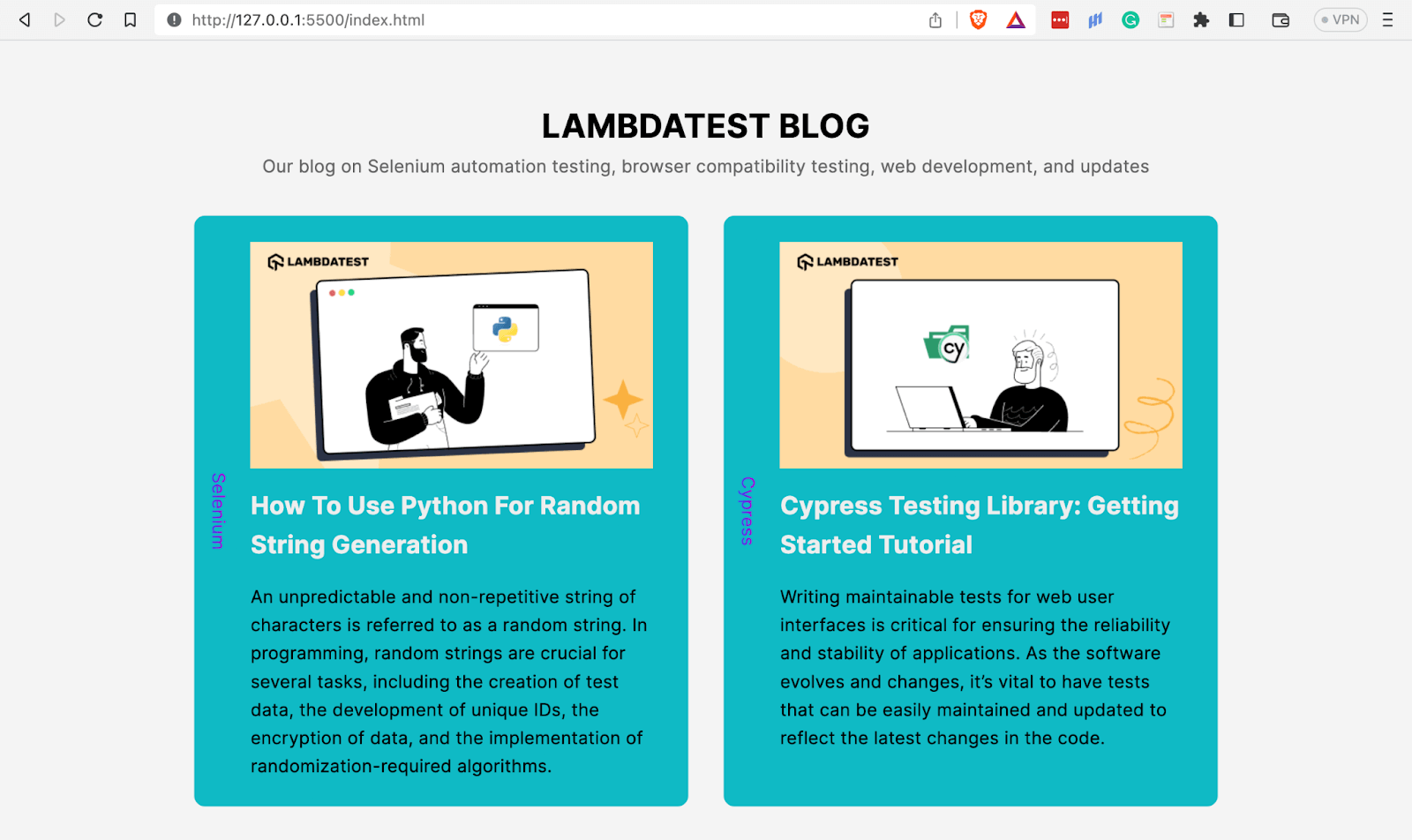
In the above example, we have laid each blog article’s category vertically from top-to-bottom.
Vertical-rl
The vertical-rl value stacks lines of text horizontally, going from right to left. It is most common in Chinese, Korean, and Japanese languages.
Take a look at the example below for a better understanding.
HTML:
<!DOCTYPE html>
  <html lang="en">
    <head>
      <meta charset="UTF-8" />
      <meta http-equiv="X-UA-Compatible" content="IE=edge" />
      <meta name="viewport" content="width=device-width, initial-scale=1.0" />
      <link rel="stylesheet" href="styles.css" />
      <title>CSS writing-mode - vertical-rl</title>
    </head>
    <body>
      <div class="container">
        <div class="div-one">
          <h1>LambdaTest Learning Hub</h1>
          <p>
            Load testing serves as a crucial pillar of performance testing, aiming
            to create a mirror of the likely load on any given software,
            application, or website. Its principal goal is to highlight and tackle
            any performance choke points prior to a software product becoming
            publicly accessible or before a system is fully operational.
          </p>
          <p>
            Dynamic testing is defined as the test involving analysis of the
            dynamic behavior of code in the software application. In this test
            process, it is crucial to provide input and output values as per the
            expectation while running a test case. This test case can be run both
            by manual and automation approaches. It's also important to compile
            and run the software code for this.
          </p>
          <p>
            Web application testing is the process of evaluating and assessing all
            aspects of a web application's functionality, like detecting bugs with
            usability, compatibility, security, and performance. This testing
            practice ensures the quality of the web application and its working as
            per the end-user requirements.
          </p>
          <p>
            Regression testing is a software testing approach that re-runs
            functional and non-functional tests to confirm that a software code
            continues to perform as intended following any code changes, updates,
            revisions, enhancements, or optimizations.
          </p>
        </div>
        <div class="div-two">
          <h1>ラムダテスト・ラーニング・ハブ</h1>
          <p>
            負荷テストは、パフォーマンステストの重要な柱として機能し、任意のソフトウェア、アプリケーション、またはウェブサイトにかかる可能性のある負荷のミラーを作成することを目的としています。その主な目的は、ソフトウェア製品が一般に公開される前、あるいはシステムが完全に運用される前に、パフォーマンス上の障害となるポイントを浮き彫りにし、それに対処することです。
          </p>
          <p>
            動的テストとは、ソフトウェア・アプリケーションにおけるコードの動的挙動の分析を含むテストと定義される。このテストプロセスでは、テストケースの実行中に、期待通りの入力値と出力値を提供することが重要です。このテストケースは、手動と自動化の両方のアプローチで実行することができます。このためには、ソフトウェアコードをコンパイルして実行することも重要です。
          </p>
          <p>
            ウェブアプリケーションのテストは、ユーザビリティ、互換性、セキュリティ、パフォーマンスなどのバグを検出
            するように、ウェブアプリケーションの機能のすべての側面を評価し、査定するプロセスです。このテストプラクティスは、ウェブアプリケーションの品質と、エンドユーザの要求通りに動作することを保証します。
          </p>
          <p>
            回帰テストは、機能テストと非機能テストを再実行し、コードの変更、更新、改訂、機能強化、最適化後にソフトウェアコードが意図したとおりに実行され続けることを確認するソフトウェアテストのアプローチである。
          </p>
        </div>
      </div>
    </body>
  </html>
CSS:
*,
  *::before,
  *::after {
      padding: 0;
      margin: 0;
      box-sizing: border-box;
  }

  body {
      font-family: "Inter", sans-serif;
      font-size: 0.938;
      line-height: 1.6;
      font-weight: 400;
      letter-spacing: 0.013rem;
  }

  .container {
      display: flex;
      gap: 2rem;
  }

  .div-one {
      width: 50vw;
  }

  .div-two {
      width: 50vw;
      writing-mode: vertical-rl;
      background: #f0f0f0;
  }

  .div-one,
  .div-two {
      display: flex;
      flex-direction: column;
      gap: 1.5rem;
      padding: 2rem;
  }
Browser Preview:
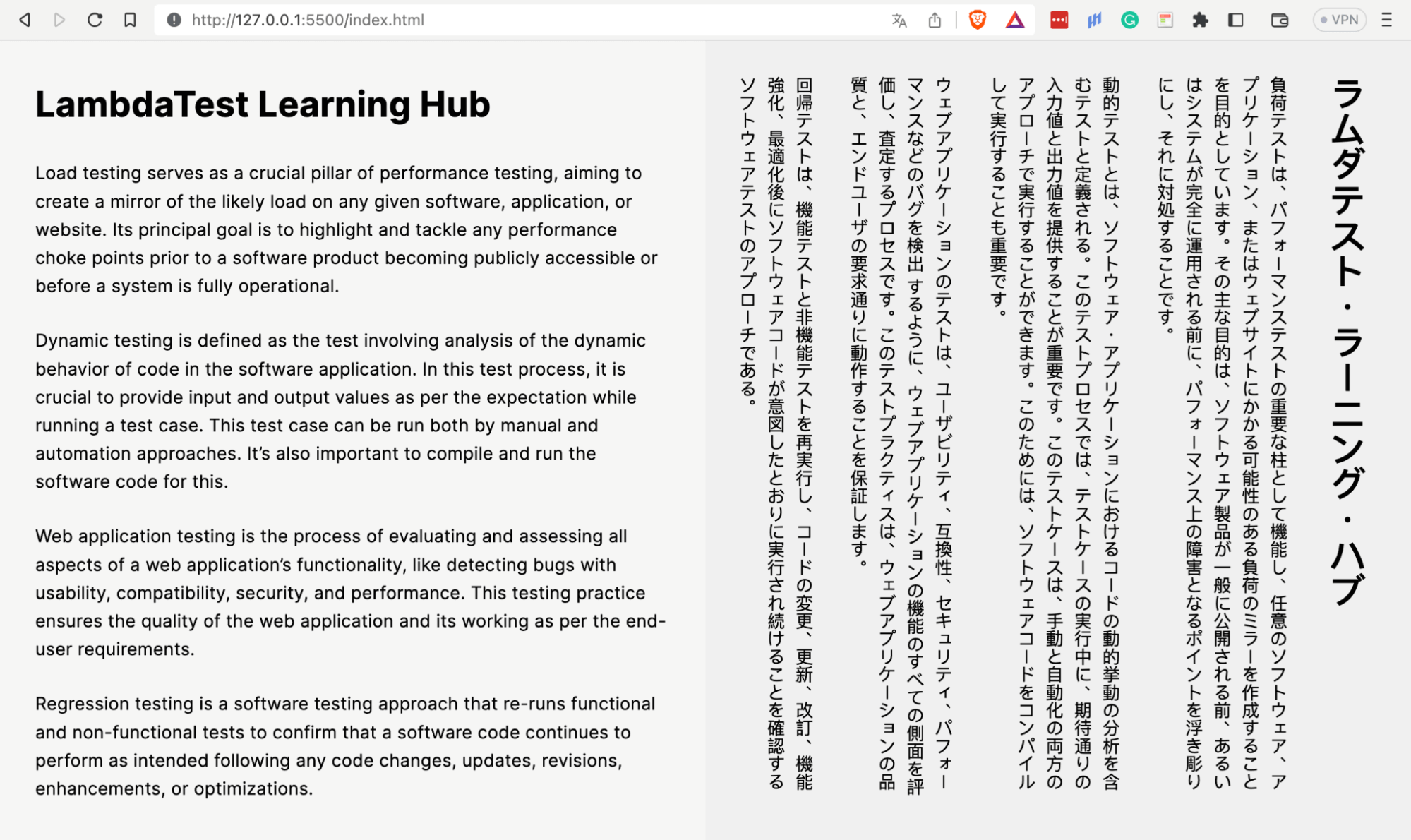
The above browser output shows on the left different types of testing on TestMu AI Learning Hub and the same in Japanese on the right. Notice how Japanese text lines vertically run from right to left.
I have used an online free language translator, DeepL, on demos of vertical script languages to translate TestMu AI’s content in those languages.
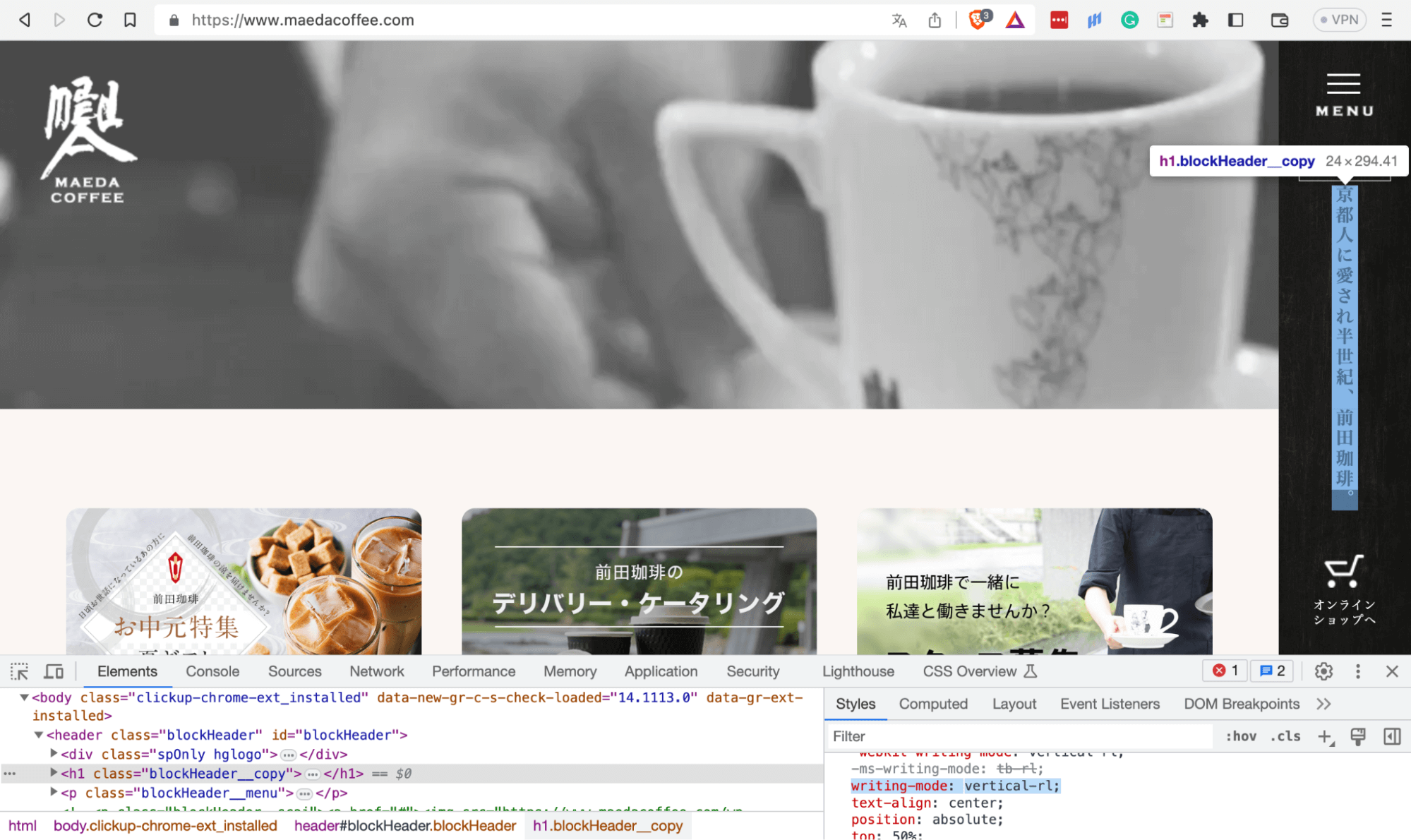
The image below shows how vertical-rl lays the h1 vertically on the right side of the page. It saves time and leads to a more responsive website layout as you can lay out text vertically where screen real estate is limited.
CSS text-orientation property
The CSS text-orientation property defines the orientation or bearing of text characters in a line. The property only works when the value of the writing-mode property is not horizontal-tb.
The property has three values mixed, upright, and sideways.
Syntax
text-orientation: mixed | upright | sideways;
Let’s examine how each of the above three values works.
Mixed
The mixed value rotates the text characters of horizontal scripts by 90° and lays out those of vertical scripts normally. It is the default value of the text-orientation property.
Let’s take a look at this value in action.
HTML:
<!DOCTYPE html>
  <html lang="en">
    <head>
      <meta charset="UTF-8" />
      <meta http-equiv="X-UA-Compatible" content="IE=edge" />
      <meta name="viewport" content="width=device-width, initial-scale=1.0" />
      <title>CSS text-orientation - mixed</title>
    </head>
    <body>
      <div class="container">
        <div class="div-one">
          <h1>LambdaTest: HyperExecute</h1>
          <div class="paragraphs">
            <p>
              HyperExecute platform comes with feature-packed hosted runners for
              every major OS including Windows, MacOS, and Linux containers. The
              runners come with pre-installed support for all major programming
              languages and frameworks including Java, Node.js, Python, PHP, GO,
              C#, Rust, and Ruby.
            </p>
            <p>
              Through a simple YAML file, HyperExecute allows you to group and
              distribute tests intelligently across runner environments. The
              AI-powered test orchestration takes into account past test run data,
              and automatically reorders the test runs to surface failures faster
              and cuts down developer feedback time.
            </p>
            <p>
              In legacy test clouds you get separate terminal and test execution
              logs, stitching them together is an ETL nightmare. With
              HyperExecute, you get a single automation dashboard view with both
              terminal logs of test commands and complete test execution logs. All
              test execution logs like terminal logs, test run video, network log,
              commands, exceptions, and more, all available in a single intuitive
              dashboard.
            </p>
            <p>
              With all test execution data available in a single place,
              HyperExecute enables developers and testers to truly analyze the
              quality of their builds on a single platform through AI-powered
              automatic reports generated for each build run. Eliminate the need
              of gathering data from multiple sources and building extensive
              reporting frameworks.
            </p>
          </div>
        </div>
        <div class="div-two">
          <h1>ラムダテスト:ハイパーエグゼキュート</h1>
          <p>
            HyperExecuteプラットフォームには、Windows、MacOS、Linuxコンテナを含むすべての主要OS用の機能満載のホストされたランナーが付属しています。ランナーには、Java、Node.js、Python、PHP、GO、C#、Rust、Rubyを含むすべての主要なプログラミング言語とフレームワークのサポートがプリインストールされています。
          </p>
          <p>
            シンプルなYAMLファイルを通じて、HyperExecuteはランナー環境間でインテリジェントにテストをグループ化し、分散することができます。AIを活用したテストオーケストレーションは、過去のテスト実行データを考慮し、テスト実行の順序を自動的に変更することで、失敗をより早く発見し、開発者のフィードバック時間を短縮します。
          </p>
          <p>
            レガシーのテストクラウドでは、ターミナルログとテスト実行ログが別々に取得され、それらをつなぎ合わせるのはETLの悪夢です。HyperExecuteを使用すると、テストコマンドのターミナルログと完全なテスト実行ログの両方を含む単一の自動化ダッシュボードビューを得ることができます。ターミナルログ、テスト実行ビデオ、ネットワークログ、コマンド、例外など、すべてのテスト実行ログが、単一の直感的なダッシュボードで利用可能です。
          </p>
          <p>
            HyperExecuteは、すべてのテスト実行データを単一の場所で利用できるため、開発者とテスト担当者は、ビルドの実行ごとに生成されるAIを活用した自動レポートを通じて、単一のプラットフォーム上でビルドの品質を真に分析することができます。複数のソースからデータを収集し、大規模なレポートフレームワークを構築する必要がなくなります。
          </p>
        </div>
      </div>
    </body>
  </html>
CSS:
*,
  *::before,
  *::after {
      padding: 0;
      margin: 0;
      box-sizing: border-box;
  }

  body {
      font-family: "Inter", sans-serif;
      font-size: 0.938;
      line-height: 1.6;
      font-weight: 400;
      letter-spacing: 0.013rem;
  }

  .container {
      display: flex;
      gap: 2rem;
  }

  .div-one {
      width: 50vw;
      display: grid;
      grid-template-columns: 0.5fr 4fr;
      padding: 2rem;
      gap: 1rem;
  }

  .div-one h1 {
      writing-mode: vertical-rl;
      text-orientation: mixed;
  }

  .div-one .paragraphs {
      display: flex;
      flex-direction: column;
      gap: 1.5rem;
  }

  .div-two {
      width: 50vw;
      background: #f0f0f0;
      display: flex;
      flex-direction: column;
      gap: 1.5rem;
      padding: 2rem;
      writing-mode: vertical-rl;
      text-orientation: mixed;
  }

  @media only screen and (max-width: 1036px) {
      .container {
          display: flex;
          flex-direction: column;
      }

      .div-one,
      .div-two {
          width: 100%;
      }

      .div-two {
          height: 100vh;
      }
  }
Browser output:
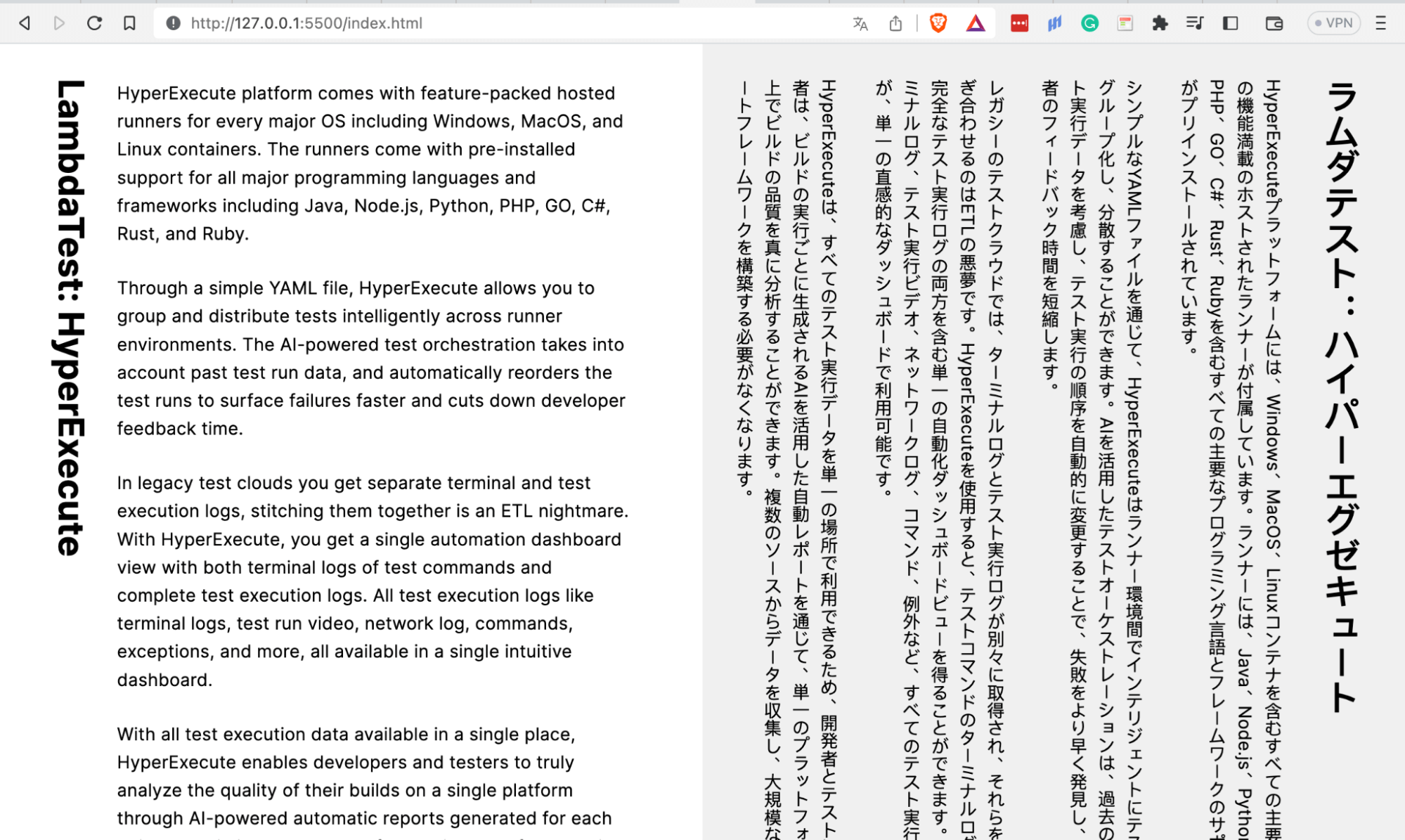
In the image above, the effect on the title, TestMu AI: HyperExecute, by the text-orientation: mixed, may not appear visible as it was already in vertical mode. The content in Japanese on the right lies naturally.
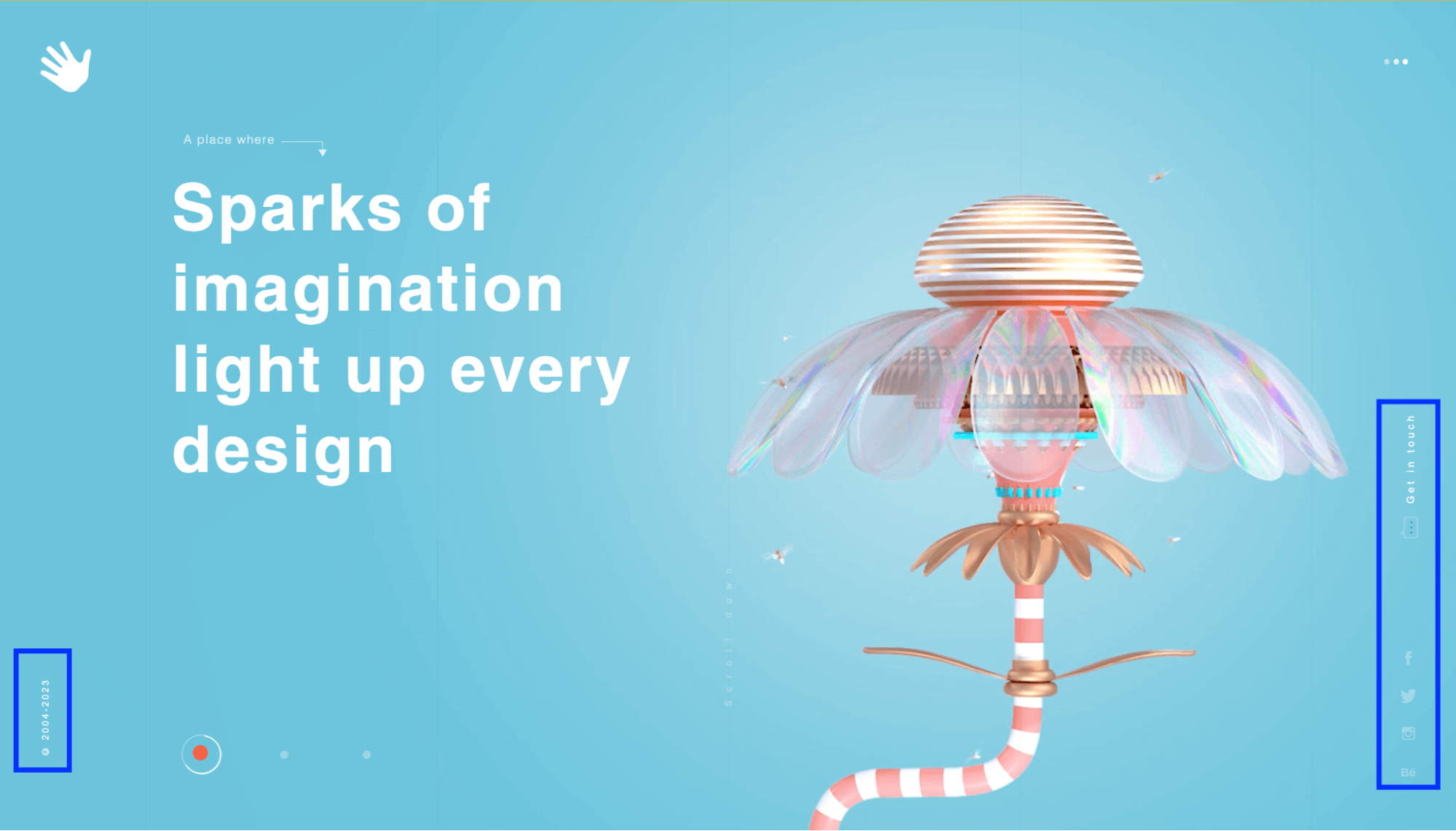
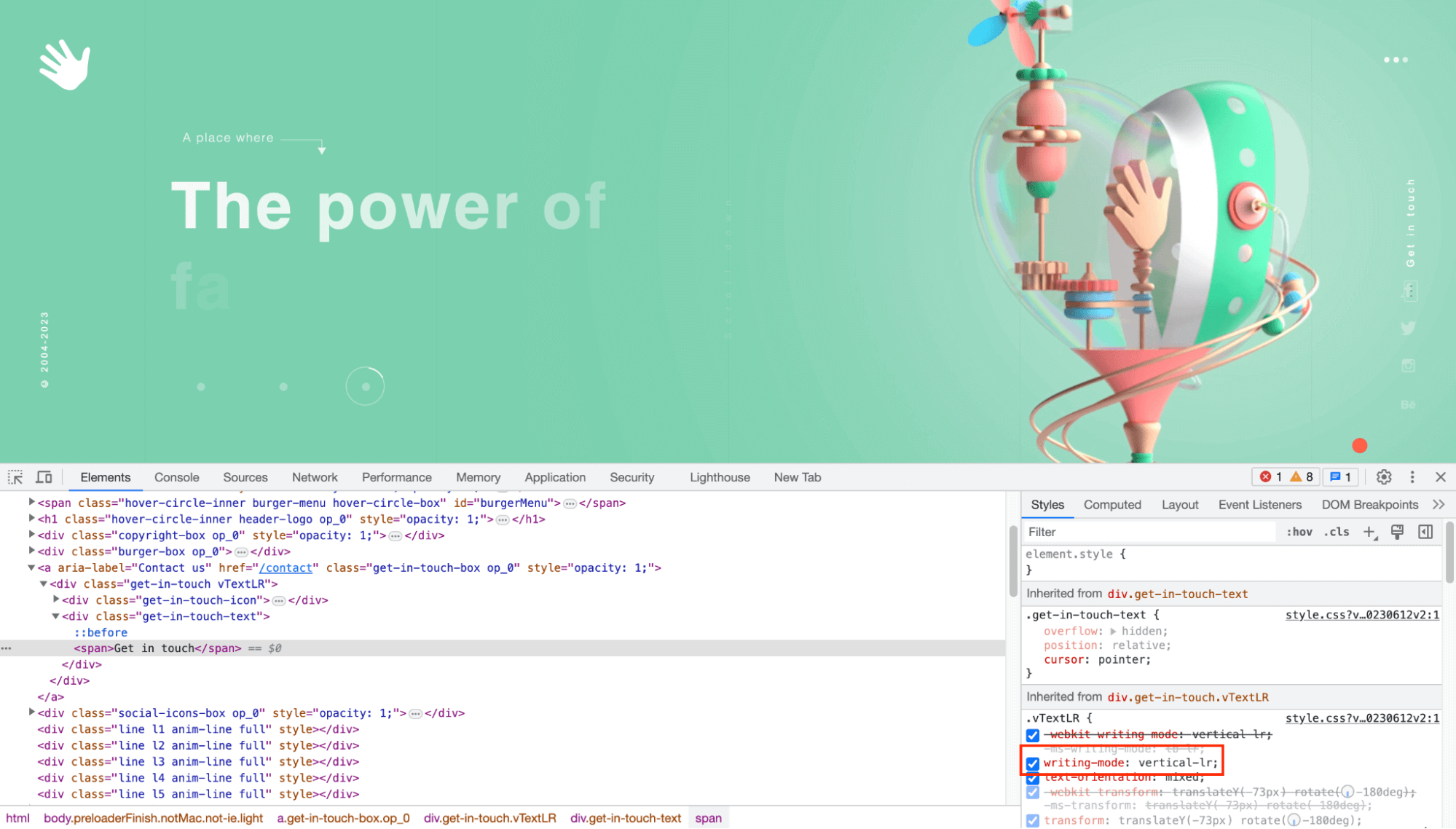
In the image below, Edesigninteractive gives the company’s copyright a CSS text orientation of mixed after giving it a vertical orientation mode, clearly communicating the agency’s aim to create and merge innovative ideas with beautiful designs.
Upright
The writing-mode property value of upright lays out characters of horizontal script languages naturally. It considers all characters, even vertical characters, to be LTR.
The example below shows what it can do.
HTML:
<!DOCTYPE html>
  <html lang="en">
    <head>
      <meta charset="UTF-8" />
      <meta name="viewport" content="width=device-width, initial-scale=1.0" />
      <link rel="stylesheet" href="styles.css" />
      <title>CSS text-orientation - upright</title>
    </head>
    <body>
      <div class="header">
        <h1>LAMBDATEST BLOG</h1>
        <p style="color: #656565">
          Our blog on Selenium automation testing, browser compatibility testing,
          web development, and updates
        </p>
      </div>
      <!-- Blogs -->
      <main>
        <!-- 1 -->
        <div class="blog">
          <div class="category">
            <p>Automation</p>
          </div>
          <div class="content">
            <img
              src="https://www.lambdatest.com/blog/wp-content/uploads/2023/06/How252520To252520Use252520Robot252520Framework252520For252520Parallel252520Test252520Execution.png"
              alt=""
            />
            <h2>How To Use Robot Framework For Parallel Test Execution</h2>
            <p>
              Over the years, there have been monumental changes in the processes
              used for developing, testing, and delivering software. Development &
              release cycles have become considerably short, with Continuous
              Integration and Continuous Delivery (CI/CD) catalyzing these
              changes.
            </p>
          </div>
        </div>
        <!-- 2 -->
        <div class="blog">
          <div class="category">
            <p>Cypress</p>
          </div>
          <div class="content">
            <img
              src="https://www.lambdatest.com/blog/wp-content/uploads/2023/06/How-to-upload-and-download-files-in-Cypress.png"
              alt=""
            />
            <h2>How To Use Cypress For File Upload and Download</h2>
            <p>
              On web applications, downloading and uploading files are operations
              we normally do, mainly for activities like banking, social media
              platforms, etc. In an online banking system, customers may need to
              upload documents such as income statements, bank statements, or
              identification proofs as part of a loan application process.
            </p>
          </div>
        </div>
        <!-- 3 -->
        <div class="blog">
          <div class="category">
            <p>Selenium</p>
          </div>
          <div class="content">
            <img
              src="https://www.lambdatest.com/blog/wp-content/uploads/2023/06/How252525252520To252525252520Use252525252520Arrays.asList252525252520In252525252520Java25252525252025252525255BWith252525252520Examples25252525255D.png"
              alt=""
            />
            <h2>How To Use Arrays.asList() In Java [With Examples]</h2>
            <p>
              Test automation can be quite challenging sometimes when dealing with
              complex test cases. Although there are multiple ways available in
              any programming language to solve a particular problem, you need to
              be vigilant that your solution follows the best and the most
              efficient coding practices.
            </p>
          </div>
        </div>
        <!-- 4 -->
        <div class="blog">
          <div class="category">
            <p>Web Dev</p>
          </div>
          <div class="content">
            <img
              src="https://www.lambdatest.com/blog/wp-content/uploads/2023/06/Complete-Guide-To-CSS-Cascade-Layers.png"
              alt=""
            />
            <h2>A Complete Guide To CSS Cascade Layers</h2>
            <p>
              "Design is not just what it looks like and feels like. Design is how
              it works," - Steve Jobs. These words perfectly capture the essence
              of creating captivating websites that not only appear visually
              appealing but also function seamlessly.
            </p>
          </div>
        </div>
        <!-- 5 -->
        <div class="blog">
          <div class="category">
            <p>Cypress</p>
          </div>
          <div class="content">
            <img
              src="https://www.lambdatest.com/blog/wp-content/uploads/2023/06/Cypress-library.png"
              alt=""
            />
            <h2>Cypress Testing Library: Getting Started Tutorial</h2>
            <p>
              Writing maintainable tests for web user interfaces is critical for
              ensuring the reliability and stability of applications. As the
              software evolves and changes, it's vital to have tests that can be
              easily maintained and updated to reflect the latest changes in the
              code.
            </p>
          </div>
        </div>
        <!-- 6 -->
        <div class="blog">
          <div class="category">
            <p>Selenium</p>
          </div>
          <div class="content">
            <img
              src="https://www.lambdatest.com/blog/wp-content/uploads/2023/06/How-To-Use-Python-For-Random-String-Generation.png"
              alt=""
            />
            <h2>How To Use Python For Random String Generation</h2>
            <p>
              An unpredictable and non-repetitive string of characters is referred
              to as a random string. In programming, random strings are crucial
              for several tasks, including the creation of test data, the
              development of unique IDs, the encryption of data, and the
              implementation of randomization-required algorithms.
            </p>
          </div>
        </div>
      </main>
    </body>
  </html>
CSS:
*,
  *::before,
  *::after {
      margin: 0;
      padding: 0;
      box-sizing: border-box;
  }


  body {
      padding: 4rem 5rem;
      font-family: 'Inter', sans-serif;
      font-size: 0.938;
      line-height: 1.6;
      font-weight: 400;
      letter-spacing: 0.013rem;
      background-color: #f4f4f4;
  }

  .header {
      text-align: center;
      padding-bottom: 2rem;
  }

  .header>h1 {
      font-size: 1.875rem;
  }

  main {
      display: grid;
      grid-template-columns: repeat(auto-fit, minmax(300px, 1fr));
      gap: 2rem;
      padding: 0 6rem;
  }

  .blog {
      background: #0ebac5;
      padding: 1.5rem 2rem;
      padding-left: 0.6rem;
      border-radius: 10px;
      display: flex;
      gap: 1rem;
  }

  img {
      height: auto;
      width: 100%;
  }

  .blog>.category {
      display: flex;
      justify-content: center;
      align-items: center;
      flex-wrap: wrap;
      writing-mode: vertical-lr;
      text-orientation: upright;
  }

  .category>p {
      color: #2b56f3;
      background-image: -webkit-linear-gradient(0deg, #2b56f3 18%, #a505d8 62%);
      background-clip: text;
      -webkit-background-clip: text;
      text-fill-color: transparent;
      -webkit-text-fill-color: transparent;
  }

  .blog>.content {
      display: flex;
      flex-direction: column;
      row-gap: 1rem;
  }

  h2 {
      color: #ededed;
      font-size: 1.4rem;
  }
Browser Preview:
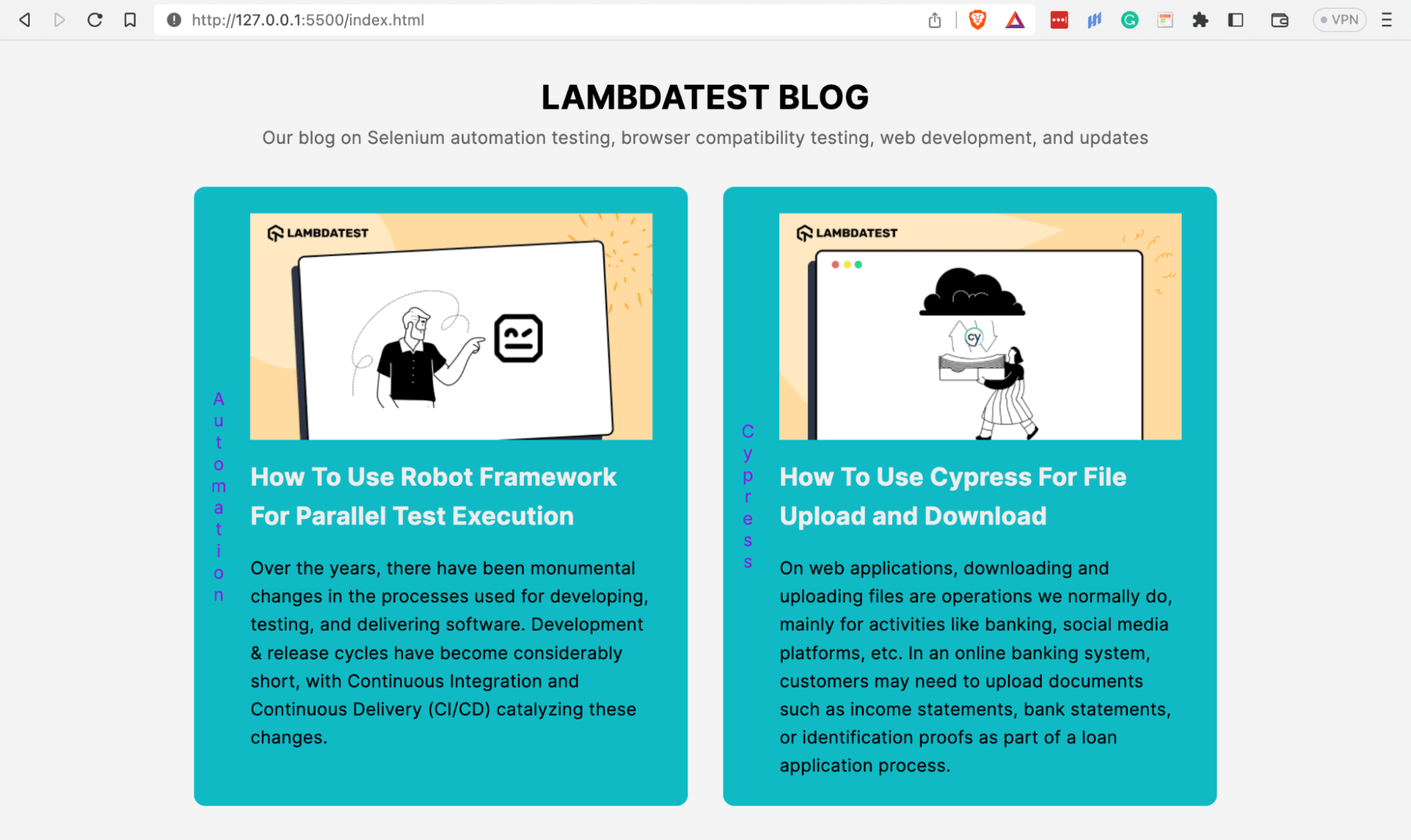
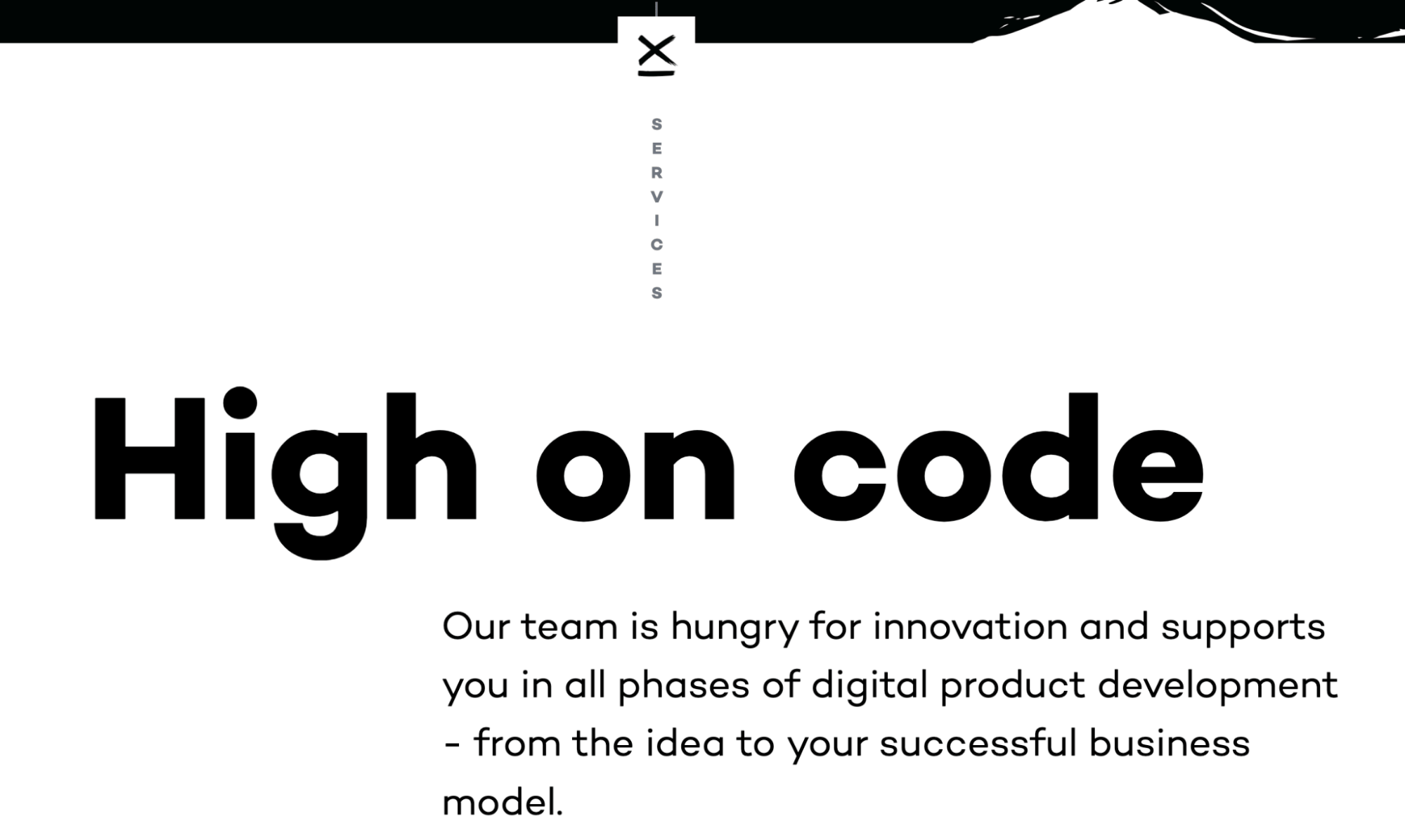
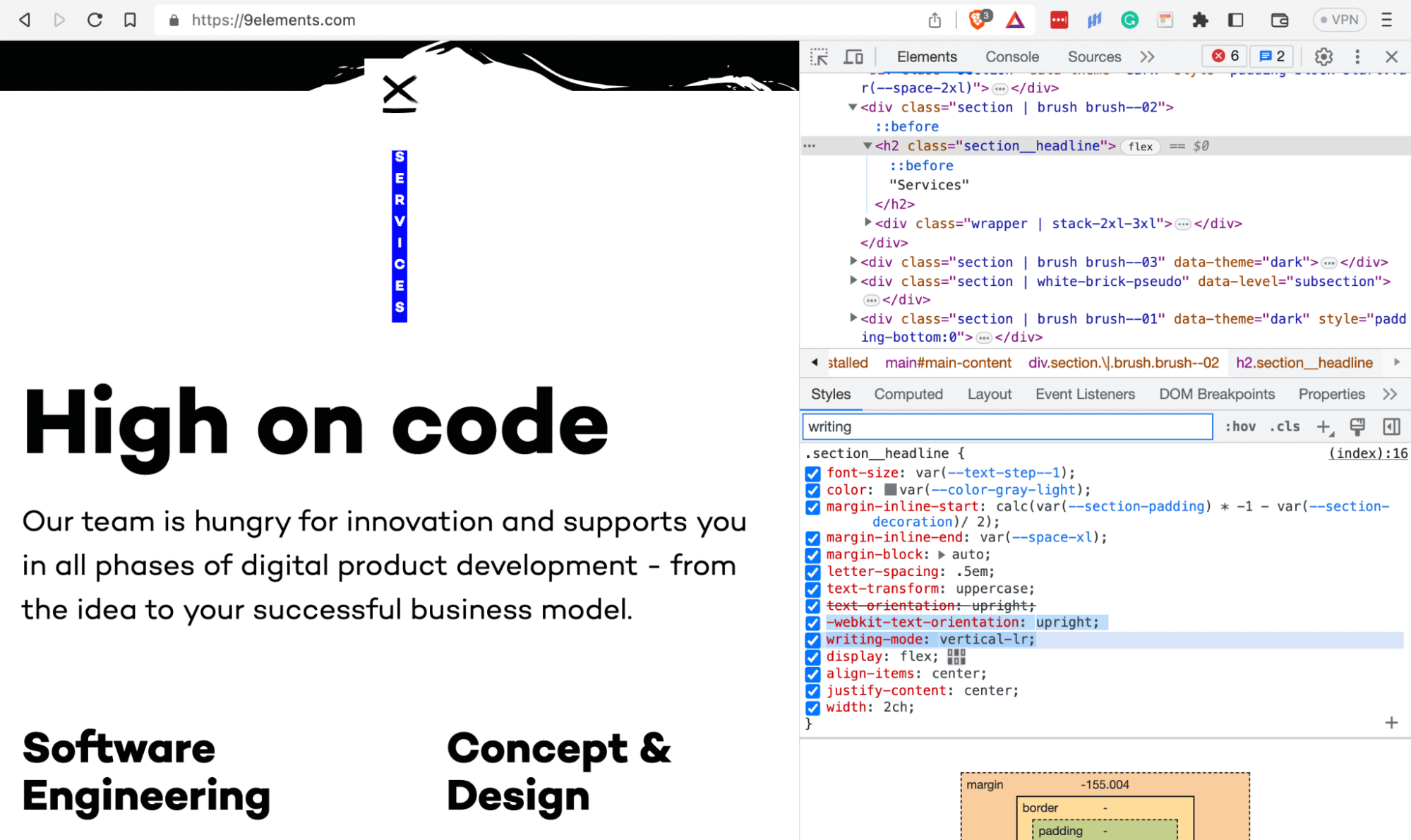
The eye-catching effect below on 9elements.com uses an upright CSS text orientation on its section headings.
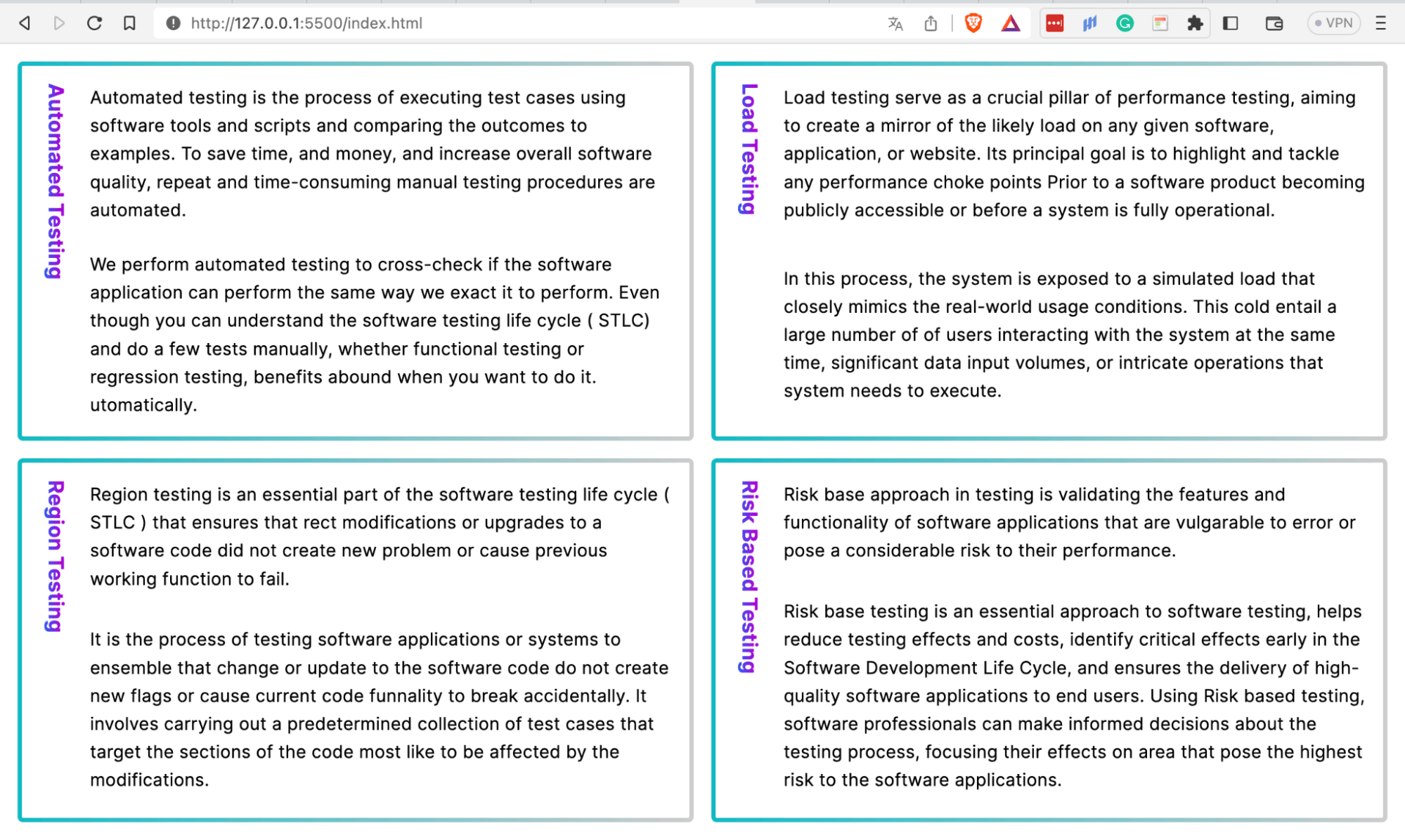
The sideways value lays characters as they should be horizontal, with the entire line rotated 90°. This value has an alias of sideways-right used for browsers that don’t yet support this value.
HTML:
<!DOCTYPE html>
  <html lang="en">
    <head>
      <meta charset="UTF-8" />
      <meta http-equiv="X-UA-Compatible" content="IE=edge" />
      <meta name="viewport" content="width=device-width, initial-scale=1.0" />
      <link rel="stylesheet" href="styles.css" />
      <title>CSS text-orientation property - sideways</title>
    </head>
    <body>
      <div class="container">
        <div class="content-box">
          <h3>Automated Testing</h3>
          <div class="paragraphs">
            <p>
              Automated testing is the process of executing test cases using
              software tools and scripts and comparing the outcomes to
              expectations. To save time, and money, and increase overall software
              quality, repetitive and time-consuming manual testing procedures are
              automated.
            </p>
            <p>
              We perform automated testing to cross-check if the software
              application can perform the same way we expect it to perform. Even
              though you can understand the software testing life cycle (STLC) and
              do a few tests manually, whether functional testing or regression
              testing, benefits abound when you want to do it automatically.
            </p>
          </div>
        </div>
        <div class="content-box">
          <h3>Load Testing</h3>
          <div class="paragraphs">
            <p>
              Load testing serves as a crucial pillar of performance testing,
              aiming to create a mirror of the likely load on any given software,
              application, or website. Its principal goal is to highlight and
              tackle any performance choke points prior to a software product
              becoming publicly accessible or before a system is fully
              operational.
            </p>
            <p>
              In this process, the system is exposed to a simulated load that
              closely mimics the real-world usage conditions. This could entail a
              large number of users interacting with the system at the same time,
              significant data input volumes, or intricate operations that the
              system needs to execute.
            </p>
          </div>
        </div>
        <div class="content-box">
          <h3>Regression Testing</h3>
          <div class="paragraphs">
            <p>
              Regression testing is an essential part of the software testing life
              cycle (STLC) that ensures that recent modifications or upgrades to a
              software code did not create new problems or cause previously
              working functionality to fail.
            </p>
            <p>
              It is the process of retesting software applications or systems to
              ensure that changes or updates to the software code do not create
              new flaws or cause current code functionality to break accidentally.
              It involves carrying out a predetermined collection of test cases
              that target the sections of the code most likely to be affected by
              the modifications.
            </p>
          </div>
        </div>
        <div class="content-box">
          <h3>Risk Based Testing</h3>
          <div class="paragraphs">
            <p>
              Risk based approach in testing is validating the features and
              functionality of software applications that are vulnerable to error
              or pose a considerable risk to their entire performance.
            </p>
            <p>
              Risk based testing is an essential approach to software testing,
              helps reduce testing efforts and costs, identify critical defects
              early in the Software Development Life Cycle, and ensures the
              delivery of high-quality software applications to end users. Using
              Risk based testing, software professionals can make informed
              decisions about the testing process, focusing their efforts on areas
              that pose the highest risk to the software applications.
            </p>
          </div>
        </div>
      </div>
    </body>
  </html>
CSS:
*,
  *::before,
  *::after {
      padding: 0;
      margin: 0;
      box-sizing: border-box;
  }

  body {
      height: 100vh;
      padding: 1rem;
      font-family: "Inter", sans-serif;
      font-size: 0.938;
      line-height: 1.6;
      font-weight: 400;
      letter-spacing: 0.013rem;
      background: #f3f3f3;
  }

  .container {
      height: 100%;
      display: grid;
      grid-template-columns: 1fr 1fr;
      grid-template-rows: 1fr 1fr;
      gap: 1rem;
  }

  .content-box {
      display: flex;
      gap: 1rem;
      padding: 1rem;
      background: linear-gradient(white, white) padding-box,
          linear-gradient(to right, #0ebac5, #ccc) border-box;
      border-radius: 5px;
      border: 4px solid transparent;
  }

  .content-box h3 {
      writing-mode: vertical-lr;
      text-orientation: sideways;
      color: #2b56f3;
      background-image: -webkit-linear-gradient(0deg, #2b56f3 18%, #a505d8 62%);
      background-clip: text;
      -webkit-background-clip: text;
      text-fill-color: transparent;
      -webkit-text-fill-color: transparent;
  }

  .content-box .paragraphs {
      display: grid;
      gap: 1.5rem;
  }

  @media only screen and (max-width: 990px) {
      .container {
          grid-template-columns: repeat(auto-fit, minmax(400px, 1fr));
      }
  }
Browser Preview:
Testing CSS Text Orientation for Cross Browser Compatibility
CSS text orientation enables businesses and organizations to expand and cover more ground as they use its properties to localize their websites’ content to cater to the different languages of countries and regions they have grown to.
However, after implementing the CSS text orientation designs and effects, one needs to know how the many different browsers and devices will render these effects the website users utilize to ensure everything is as expected, and this is where cloud-based digital experience testing platforms like TestMu AI come in. It allows you to test CSS text orientation effects on an online browser farm of 3000+ real browser environments.
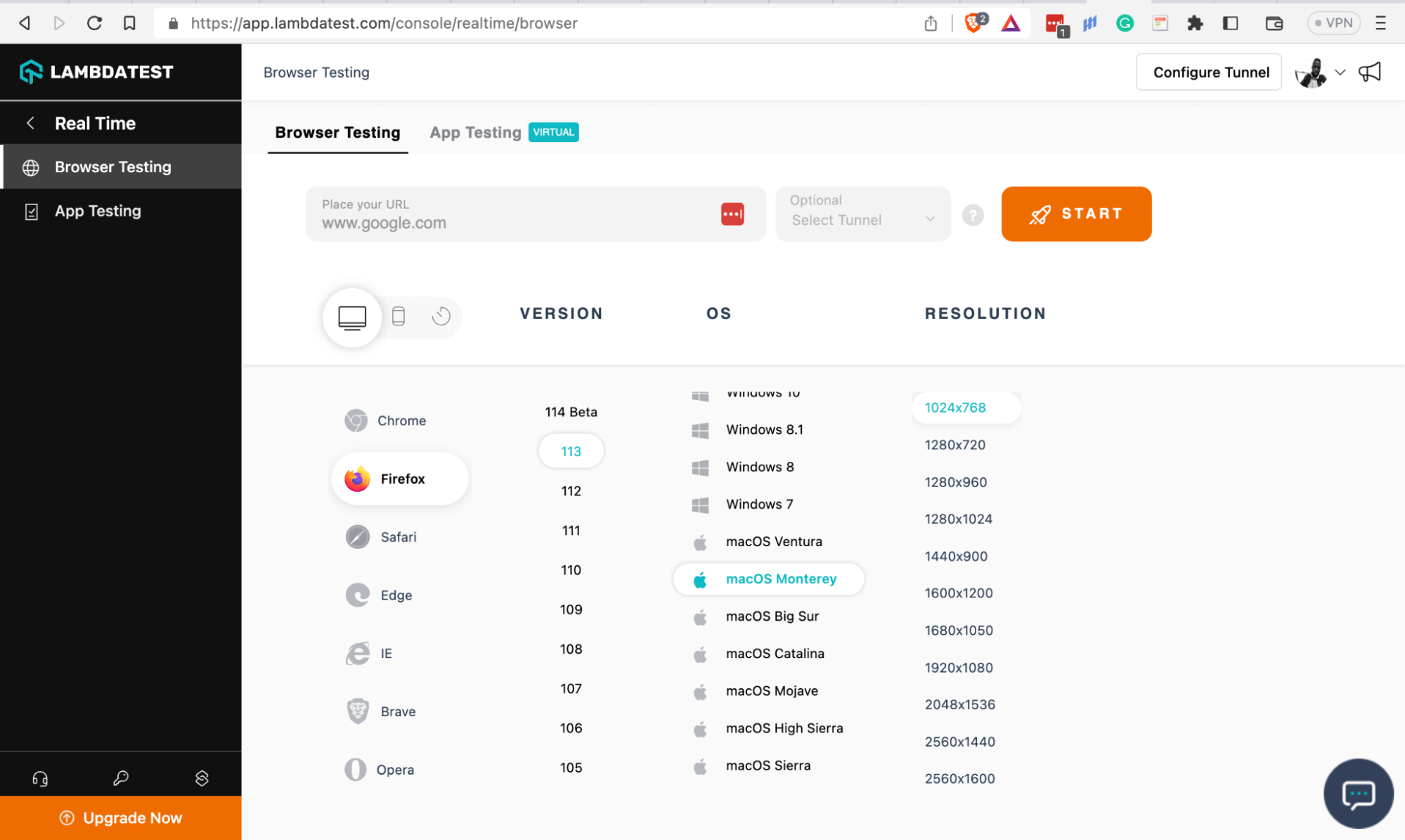
With TestMu AI, you can do different types of testing, such as cross browser compatibility, responsive testing, and real time testing.
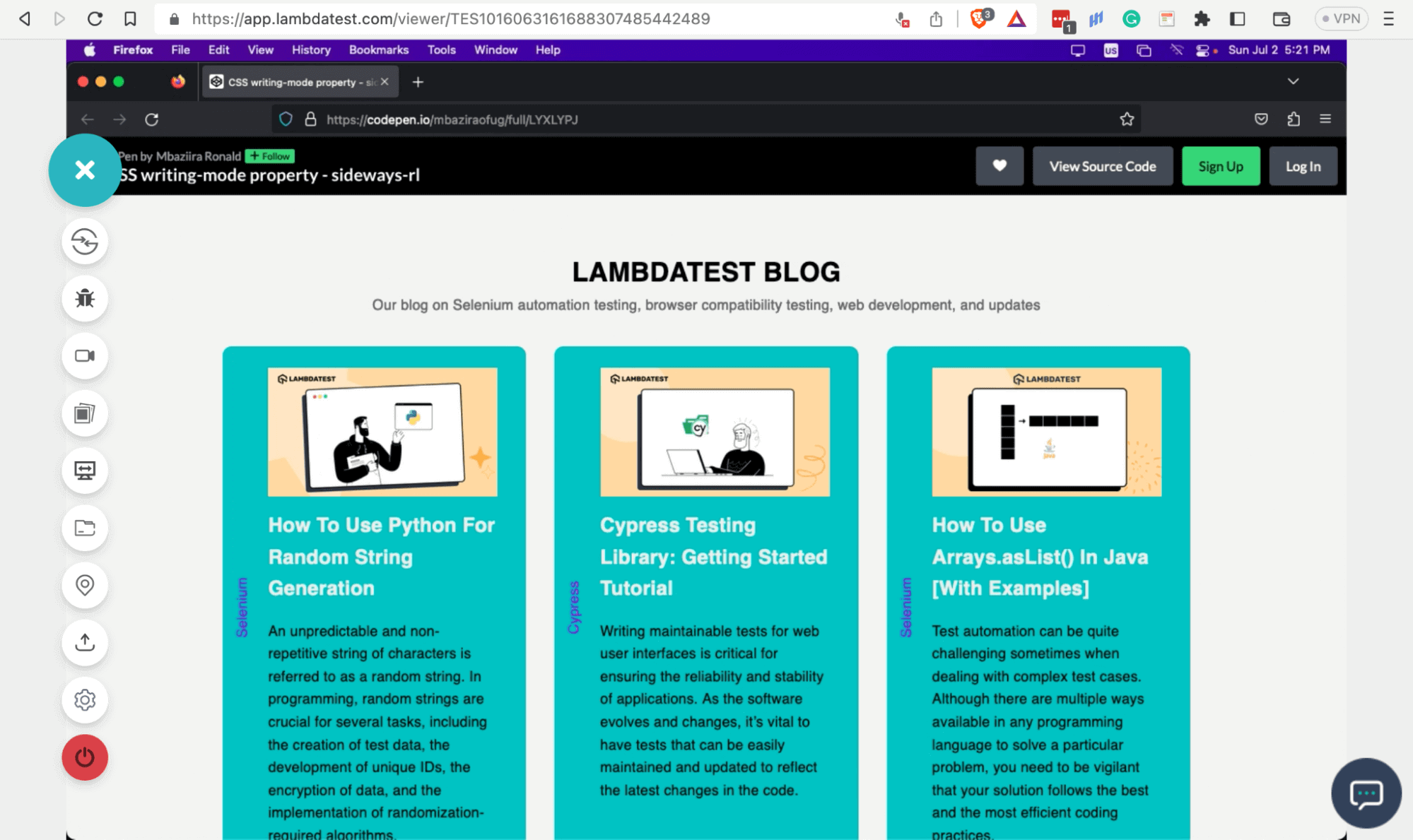
For example, while doing real-time cross browser testing, I found out that the experimental value of the text-orientation property, sideways-lr, is supported by the latest version of Firefox.
The sideways-lr makes the blog categories more readable without having to rotate the text after giving it a vertical writing mode and orienting it.
Overall, carrying out manual or automated testing to determine which browsers and devices support the various CSS text orientation effects you plan to implement gives you a better chance of addressing any inconsistencies that can occur to the website when in production.
Read More: What Is ETL Testing: A Comprehensive Guide With Examples And Best Practices
Wrapping Up!
Orienting text using CSS is a tremendous jump start in improving your website’s inclusivity and accessibility. Not only does CSS text orientation help you cover more ground as a business or website owner, but it also creates eye-catching web designs that give users an experience they would crave again.
It is crucial to recall that a vertical writing mode can affect readability while working with horizontal scripts like English. Hence, you should use it modestly.
In this blog, you have learned how to use CSS text orientation properties to create an accessible, inclusive, and responsive website. Please use the knowledge you have gained here to improve the responsiveness & robustness of your website.



Frequently asked questions
Did you find this page helpful?
More Related Hubs
TestMu AI forEnterprise
Get access to solutions built on Enterprise
grade security, privacy, & compliance
- Advanced access controls
- Advanced data retention rules
- Advanced Local Testing
- Premium Support options
- Early access to beta features
- Private Slack Channel
- Unlimited Manual Accessibility DevTools Tests