

Next-Gen App & Browser Testing Cloud
Trusted by 2 Mn+ QAs & Devs to accelerate their release cycles


The Ultimate Guide to Testing Beta Apps
In this blog, you will learn all about beta testing apps, best practices and a step by step guide on beta testing your app.

Harish Rajora
January 27, 2026
The ultimate goal of beta testing apps is to expose your app to real users and get their feedback for improvisation. The journey from ideation to beta testing apps is a complex process.
The technological world has become extremely dynamic, with changes happening frequently. The market is competitive, and people have many options to choose from. Such a competitive market leaves no room for mistakes for the developers, testers and business owners. Businesses need to be extremely careful and ensure that their application is defect free. Beta testing apps is like a soft launch where your real users get to try the application and then tell what needs to be added and removed.
Mobile app beta testing plays an important role in ensuring a seamless experience for your end-users. However, application owners are often stressed to devise new mobile app testing strategies and find app beta testing platforms to shape their mobile applications. In this blog, we will learn all about beta testing apps.
Beta Testing Apps
Beta testing apps ensure that the application you develop aligns with the user’s interest. It is a method to validate your idea and ensure that you move in the correct direction. We have crafted this post to inform you of this interesting concept of mobile app beta testing, why it is so important today, how to perform it, and some of the best practices to follow while in the process.
Beta testing is an application testing method that includes people from outside the organization to test the product and provide feedback. Beta testers install your application, use it as a regular user and provide their feedback. In addition, organizations take advantage of the real-time performance data of the application collected during the mobile app beta testing phase.

Austin Siewert
CEO, Vercel
Discovered @TestMu AI yesterday. Best browser testing tool I've found for my use case. Great pricing model for the limited testing I do 👏
2M+ Devs and QAs rely on TestMu AI
Deliver immersive digital experiences with Next-Generation Mobile Apps and Cross Browser Testing Cloud

Beta testing is often a follow-up of alpha testing. Alpha testing, also known as the first stage of user acceptability testing, is done by the developers and testers involved in the application development. The process is similar to mobile app beta testing. Once the developers and testers are satisfied, they release the product for real users, termed mobile app beta testing. The conclusion of beta testing apps leads to the final release of the stable product for all the users.
Types Of Beta Testing
Releasing a new app or a feature to an existing app can be stressful. As a result, most organizations skip beta testing apps for new features and directly launch the application. However, when it comes to mobile application development, beta tests must be planned as soon as the acceptance test is completed.
Mobile app beta testing is classified into two:
- Open beta testing: The first type of mobile app beta testing is open beta testing. It does not restrict the number of people interested in the testing process. So if you want to test the application as a beta user, you can either download the application directly or raise a request to get the executable file from the organization—for example, the Google Chrome beta testing app.
- Closed beta testing: Closed beta testing apps are restricted by the organization. Only those users invited by the organization can download and use the product as a beta tester. There are various reasons for such restrictions, which we will discuss throughout the post. Google Task Mate is an example of a closed beta testing app. The application is available for everyone but cannot be used without Googe’s invitation.
You might also find a few more divisions of beta testing apps other than these two – technical beta test apps, focused beta test apps etc. They are nothing but the child elements of open and closed beta testing and differ very slightly in nature. Most organizations just term their mobile app beta testing as open or closed.
Why Is Beta Testing Apps Important?
When the developers and testers are satisfied after testing the product in the alpha testing phase, they release it for beta testing. So, the first question is, is this process important even after people from the organization have tested it manually after being tested multiple times?
The greatest strength of the beta testing apps is that we get to know the user’s perspective even before releasing the product. Since this testing is done outside the testing environment with parameters on the will of a beta app tester, you get extremely accurate performance results. Also, apart from these obvious reasons, beta testing apps can help you in a few more ways.
- Hidden and corner case detection – Beta testing apps can help you identify corner cases that could have been harder to find while manually testing inside testing labs. Since different users take a different approach to use the mobile application, you can be assured that most bugs will be identified while performing mobile app beta testing.
- Cost-effective solution – Beta testing apps are cost-effective, and the process ensures that the app meets the product design and development as intended. The tester passes the application and gives it a green flag to move to production. When this application is released to the user, suddenly, many people start finding bugs. According to a study by IBM, a bug detected during the testing phase will cost you $15, whereas the same bug, when detected in production, can cost you $100, which is almost 150 times more.
- Diversifies the device matrix – Beta testing apps require the user to use the application on their device till a certain point in time. Since they are using their own devices, our mobile application can be run and tested on many devices that could have been hard to find in the lab. It is not that cannot be done in house. Cloud based mobile app testing tools such as TestMu AI can provide popular operating systems running on various OS versions to test the mobile application. It is necessary to perform cross browser testing or cross device testing to identify bugs related to responsiveness and compatibility. Delivering the app directly to the beta testers can result in unexpected behavior, which should always be avoided.
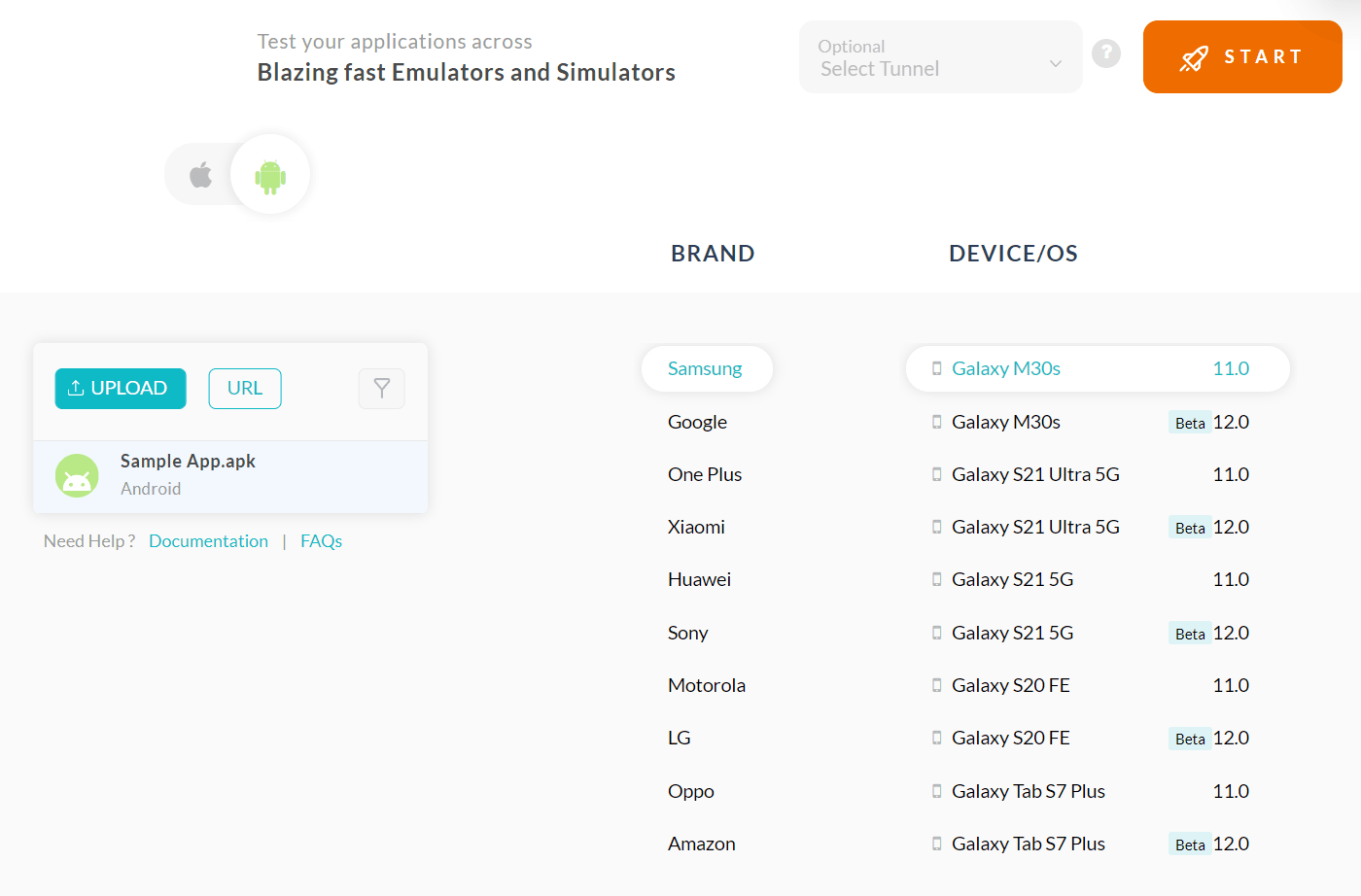
Mobile app testing on TestMu AI. Automate your mobile app testing on Apple or Android for free. Here is a short glimpse of cloud based mobile app testing offered by TestMu AI:
- Increase application quality – Beta testing apps increases the number of parameters involved in the testing domain. Once we are done with the mobile app beta testing and have rectified all the feedback received from the testers, we get a high-quality application at our end. When we release the product into the market, it becomes a smooth ride for the end-user, the developers and the testers.
- Localization and geolocation testing – Geolocation testing is testing the application from various locations to be sure that our data complies with the regional rules. On the other hand, localisation testing may include testing our application’s behaviour in various regions and if it is presented correctly or not. A good example can be displaying the regional language and local time on the application. Furthermore, beta testing apps enable users to download and use the application wherever they are located. This brings an excellent use case for us to perform the localisation testing.
- Increased application security – Security is a subcategory of enhancing the overall quality of the application that has been described above. The security can be enhanced by either analyzing the application logs or pushing a trigger by yourself and verifying any leaks in the overall infrastructure.
- Business goals – The application is developed keeping in mind the business goals of the organization. A lot of the research and money shapes the application as per the organization’s goals. Beta testing apps results can help understand how many users worked towards the business goals without telling them anything about it or the process.
Also Read – How to test mobile applications manually?
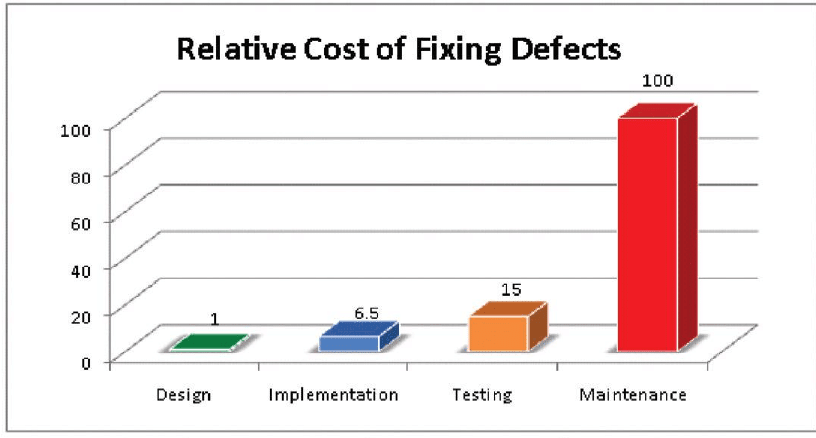
Production bugs are always costly to correct. With beta testing, you can easily identify and rectify these bugs in the testing environment.
Also read – Key challenges in mobile app testing
Benefits of Using an App Beta Testing Platform
Mobile app beta testing platforms help you scale faster and reach the target market sooner than planned. The primary goal of any app beta testing platform is to ensure app quality and to check if the app is working as it is intended to.
A good app beta testing platform should allow you to:
- Scale and maintain the number of beta testers
- Allow users to test applications on different real devices and use virtual platforms such as Android emulator online or iOS simulator.
- Make better product decisions by testing on different versions
- Accelerate time to market
- Be cost-effective
- Improve performance

Also read – The difference between emulator and simulator in mobile app testing
Steps To Perform Mobile App Beta Testing
Now that we have read about the benefits of using an app beta testing platform, let us see the steps involved in mobile app beta testing. Performing mobile beta app testing is a very simple process. There are just two sets of people involved – the developers & testers who need to analyze the application behavior, the beta app testers who just have to use the application regularly.
The following needs to be kept in mind while beta testing apps:
1. Design
The first step in beta testing apps is to design the mobile application. Designing is an initial phase that is done before any development on our application starts or we have any renders of the application. Designing is often done considering the market, the business goals, the scope of the business etc.
2. Planning
Once we have the design ready, we move to the planning phase. The planning phase lays down the step-wise structure of moving forward with beta testing apps. Considering the application and its business goals, we need to segregate different sections very clearly while moving ahead with careful analysis. For example, we need to jot down the timelines for which we will run each phase of beta testing. What kind of questions are we looking to ask the beta testers? How can we minimize the incorrect data from the beta testers? Or what type of beta testers do we want – random, technical or any other specific group?
3. Finalize the beta testers
The next step is finalizing the beta testers for your application. Since you have already planned what type of beta testers you are looking for, you just need to find or develop a platform to connect them with you. There are many web applications made just to connect you with the right set of audiences.
4. Make your pool of testers
Now that you have reached out to all the potential testers, wait for them to reply and accept your proposal. Send your mobile app beta testing link on Play Store/Apple Store or downloadable link to them and inform them of all the things you are looking for. Also, note that you don’t need to tell the beta testers everything you have planned to analyze here. This might temper the data, which can result in poor quality applications.
5. Take feedback – Work on them
The next step is taking continuous feedback from the beta testers and working on them regularly. This feedback can be constructive or destructive, but it will surely help shape your application according to the target audience. Also, remember that you don’t need to work on each feedback. You only need to consider the feedback that falls under your design and meets the business goals. If you have an eCommerce application that sells books, then feedback for uploading more products should not be considered. This is purely a business and marketing decision. Beta testing should find out missing bugs, enhance the business goals and improve the quality of the existing application.
6. Reward the testers
Once you complete beta testing apps (or maybe in between), you can reward your testers in whichever way you want. You can either give them coupons or a sneak-peek at the latest features before everyone else. This topic will be revisited in the next section in detail.
Also read – The ultimate mobile app testing checklist.

Best Practices
Taking the above steps with reference, we can follow a few best practices of beta testing apps to improve our overall testing process. These best practices are listed below.
☑️ Always decide the number of testers beforehand: The number of people who test your application before release plays an important role in beta testing apps. Too low and you don’t get results that can drive your functionalities in any direction, too high and the data gets corrupted with inaccurate results and a wider distribution curve. Many organizations press on taking the beta testers between 300 to 500.
☑️ Diverse your testing pool: Always diverse your testing pool with people presenting at least one difference among each other. These differences can be minor such as varying RAM, or major such as different geographical locations. The more diverse your beta testers are, the better quality product you will release later. You can always use an app beta testing platform to test your apps on different devices.
☑️ Try to host your beta app on the authorized platform: Installing from non-authorized application hosting platforms gives a security warning in the Android running devices as follows:
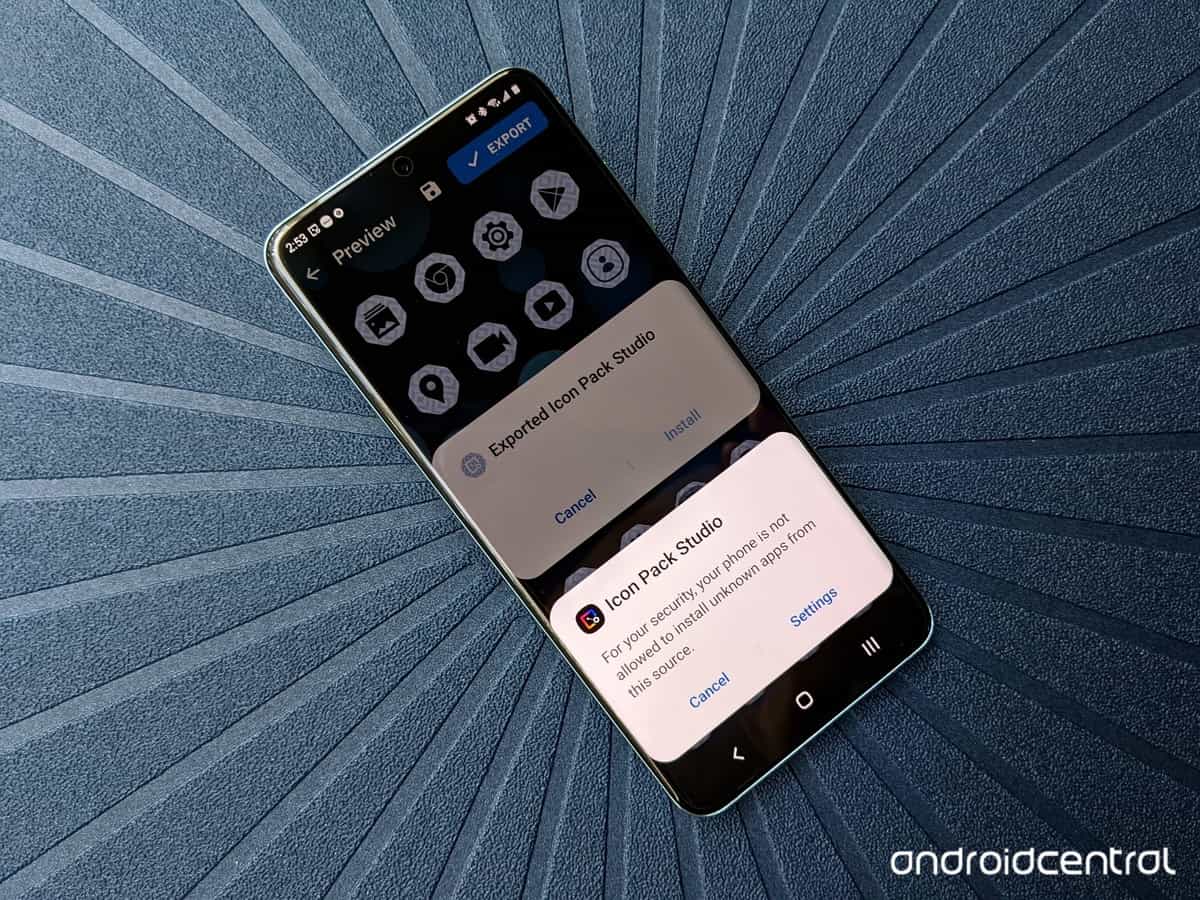
The application is then required to be forcefully installed by allowing third-party apps from the settings. This warning often creates suspicion among beta app testers. Since your application is not authorized, they can fear foul play or virus injection and refrain from continuing beta testing. Google play store offers a separate section for hosting beta apps and has always been very vocal in advising never to install apps from unknown sources. Developers and testers should take advantage of the beta section to gain trust from the developers and not miss out on good testers.
☑️ Ask for additional comments: A good practice in mobile app beta testing is to ask for additional comments, suggestions or features that the tester would love to see in the app as a user. You do not have to consider all of them and stick to the business goals, but a few will surely be considered for the next phase. For example, if your application gives credits for the purchase and currently you do that after the delivery of the product, you might get a suggestion of doing it instantly. This enhances user experience and is considerable. This practice becomes even more important if there already are applications in the same niche to stay in the race.
☑️ Do not overload the testers with big forms: Forms are the main source of getting feedback from the testers during the mobile app beta testing. Forms are said to increase the friction with each field. Beta app testers may abandon the form or provide incorrect data just to end the process. Such actions will affect the quality of the application. Always construct smaller forms, preferably with MCQs and an optional text field for the user’s input.
☑️ Remember good testers: Good beta testers are an asset to your organization. They help you find genuine bugs, give honest opinions and improve the quality of the application just like an employee. When you notice a few testers in your pool doing great work, it is important to keep a record of them in the database. In the future release or any other application, you can again take these efficient testers and save much time recreating your pool.
☑️ Acknowledge the testers regularly: A little while back, I used to work on the Google Maps contribution section creating a database of places with great details and images/videos. Like any other application of Google, it was a long process in development. To keep encouraging the contributors, Google used to pay special travel coupons that kept everyone motivated.
This small gesture works wonders with beta app testers as it encourages them to provide genuine feedback from their side and feel they are part of the overall process. This is important for collecting accurate data from them. Once they feel they are doing a favor, the data gets corrupted. So make sure they are acknowledged from time to time. The acknowledgements need not be monetary or coupons.
☑️ Put A/B testing into the mix (low priority): A few organizations mix beta testing apps with A/B testing to ensure which option people would like the best. Often a beta app tester is uninformed about it, and only his actions are observed. If the developers and testers in the organizations feel there has been an increased interaction with the module they were testing, it goes into the final release.
A/B testing, if done, should be done phase-wise. Start with colors on a couple of buttons or links, and then after finalizing them, move ahead with other modules. Testing with drastic changes can create confusion as to which option led to increased interaction from the user. So instead of providing a new look to the application, make minimal changes. A beta app tester shouldn’t even notice the changes. This method is not so popular in beta testing apps because the pool size is too small. A/B testing is better analyzed after the application has been released and millions interact with it over a long time (like a month).
Looking to perform Android and iOS app testing on Real Device Cloud, check out our video below –
What’s next?
From this post, I hope you have understood the importance of beta testing apps, the benefits of app beta testing platforms and how to perform beta tests. You cannot risk a misaligned CTA button position in such a high competition. So, after this careful analysis, what’s next to beta testing and alpha testing? Is there gamma testing too?
Actually, yes, there is. Gamma testing is the final stage when the employees test the application once it is ready for release. They do not test for the overall functionality, nor is any QA activity involved. The people just focus on specific specifications and technicalities. If there is any feedback, they are noted down for the next releases. There is no update on the locked application after beta testing unless there is a high priority bug.
The next step is the beta release to the entire world or releasing the stable version instead. Both work fine and are completely dependent on the developers, marketing, analysts etc. If there is any feedback, they are implemented, and then the complete cycle starts again.
I hope this post took you through the depth of beta testing and provided deep insights into how to do it and the best practices to follow. For any suggestions and feedback, please comment down below.



Frequently asked questions
Did you find this page helpful?
More Related Hubs
TestMu AI forEnterprise
Get access to solutions built on Enterprise
grade security, privacy, & compliance
- Advanced access controls
- Advanced data retention rules
- Advanced Local Testing
- Premium Support options
- Early access to beta features
- Private Slack Channel
- Unlimited Manual Accessibility DevTools Tests