

Next-Gen App & Browser Testing Cloud
Trusted by 2 Mn+ QAs & Devs to accelerate their release cycles


Overcome Flaky Tests And Unexpected Failures With TestMu AI Auto-Healing!
Enhance your Selenium testing experience by overcoming flaky tests and unexpected failures with the all-new TestMu AI Auto Healing!

Devansh Bhardwaj
February 17, 2026
Automated testing tools have been used commonly for their ability to speed up testing processes, ensure consistent results, and save valuable time and effort. However, like any powerful tool, it comes with its own challenges. Flaky tests, unexpected failures, and the need for constant maintenance can hinder the full potential of automation testing.
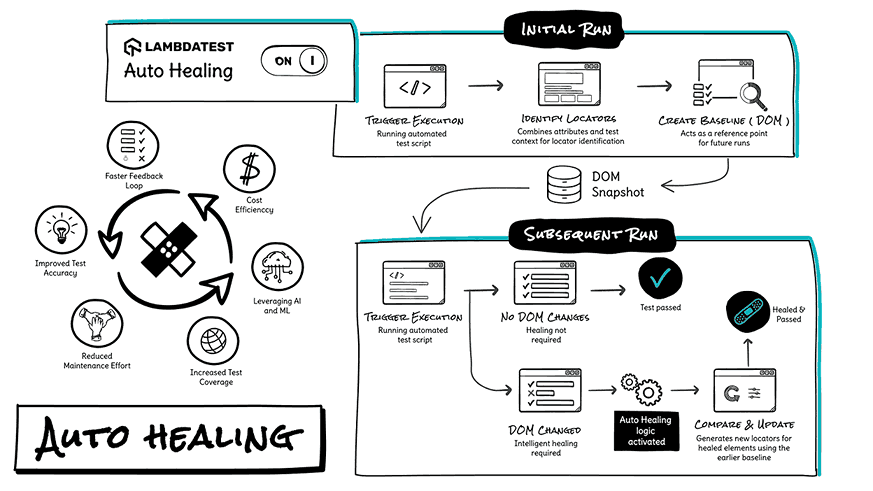
The AutoHealing process in software testing streamlines the detection and resolution of flaky tests and unexpected failures by automatically identifying issues and implementing corrective actions without human intervention. It employs sophisticated algorithms to analyze test results in real-time, swiftly pinpointing problematic areas and executing remedial measures, ensuring smoother test execution and higher reliability in software development cycles.
By Sathwik Prabhu
Watch this video to discover the all-new Auto Healing feature by TestMu AI and transform your Selenium testing journey.
To deal with such issues, our team of driven developers has come up with the all-new Auto Healing feature to transform your Selenium testing journey. It is a game-changing feature that automatically empowers your tests to recover from certain failures, making your test suite more robust and reliable.
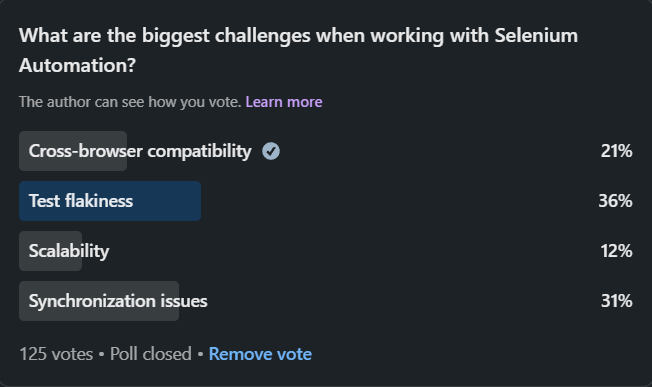
As we delve into the solutions for overcoming flaky tests and unexpected failures, it’s insightful to look at what the broader community of developers and testers thinks about these challenges. We recently conducted a poll on social media asking professionals, The results were quite revealing and align closely with the issues we are addressing through the Auto Healing feature.
So buckle up as we dive into the nitty-gritty of the Auto Healing feature, its reliability, and how it can effortlessly handle changes in web elements without breaking a sweat.
Enhanced Robustness For Your Test Suite
Test flakiness and unexpected errors can be frustrating challenges in automation testing. With the Auto Healing feature enabled, these issues become a thing of the past. The feature proactively handles unexpected situations and errors, improving the overall reliability of your test suite.
To benefit from the Auto Healing feature, all you need to do is pass the “autoHeal: true” capability in your WebDriver configuration. It’s that simple! Here’s an example of how to enable Auto Healing in your test setup:
Note: The given below code snippet is in JavaScript. However, you can use the below code in your preferred programming language.
const capability = {
    "browserName": "Chrome",
    "browserVersion": "114.0",
    "LT:Options": {
        "platformName": "Windows 10",
        "project": "Untitled",
        "username": "Your Username",
		"accessKey": "Your access key",
        "w3c": true,
        "plugin": "node_js-node_js",
        "autoHeal": true // Enable autoheal
    }
}
If you wish to learn more about the Auto-Healing feature, check out our detailed support documentation.
Automatic Detection of New Locator
In web applications, elements can change their locators due to updates. But don’t worry! The Auto Healing feature is equipped to handle this seamlessly. It automatically detects new locators and continues test execution without any manual intervention. Here’s a simple test case to demonstrate the Auto Healing feature in action:
import { Builder, By } from 'selenium-webdriver';

describe('Amazon Search Box Test', function () {
    // Test setup code here...
    it('should change id of search box and find element', async function () {
        // Test steps here...
    });
});
If you wish to have the Auto-healing feature enabled on your TestMu AI account, please connect with our AM or Support team at: [email protected]
Addressing the Limitations
While the Auto Healing feature is a powerful addition to your testing arsenal, there are certain limitations to keep in mind:
- Non-recoverable Errors: Auto Healing cannot recover from all types of errors, such as WebDriver initialization or system-level failures. However, it effectively handles a wide range of issues.
- Test Accuracy: While Auto Healing reduces test flakiness, reviewing the logs and understanding why a test needs healing is essential. This ensures that any real issues are properly addressed.
- Performance Impact: Enabling Auto Healing may impact test execution time due to additional checks and recovery mechanisms. However, the benefits far outweigh the minimal impact.
Additionally, the Auto-healing feature is currently supported on all browsers and the latest browser versions except IE.
Remember, while the Auto Healing feature is valuable, it does not replace good test design and error-handling practices. Ensuring your tests are well-designed and have proper error handling in place is crucial.
With the Auto Healing feature, Selenium web automation becomes even more resilient and efficient, allowing you to focus on delivering high-quality applications with confidence.
Join comprehensive technical sessions on accelerating your testing with TestMu AI Cloud. Participate in bootcamp live, hands-on training, and compete for exciting prizes and swag giveaways.
All In All!
With Auto Healing, your automated tests gain the power to recover from certain failures automatically. This makes your test suite stronger and more reliable, leaving behind the days of troublesome flaky tests and unexpected errors. Now, you can focus on delivering excellent applications with confidence.
Whether you’re new to automation testing or an expert, Auto Healing is the ultimate tool to overcome test flakiness and enhance the reliability of your test suite.
So, enable Auto Healing in your test suite and experience the difference for yourself!
Happy testing!



Did you find this page helpful?
More Related Hubs
TestMu AI forEnterprise
Get access to solutions built on Enterprise
grade security, privacy, & compliance
- Advanced access controls
- Advanced data retention rules
- Advanced Local Testing
- Premium Support options
- Early access to beta features
- Private Slack Channel
- Unlimited Manual Accessibility DevTools Tests