

Next-Gen App & Browser Testing Cloud
Trusted by 2 Mn+ QAs & Devs to accelerate their release cycles


April’24 Updates: Teams Management, Test Summary Hyperlinks in HyperExecute, and More
The April edition of TestMu AI product updates includes Teams management features, the latest features in HyperExecute and SmartUI, and much more.

Salman Khan
January 10, 2026
We at TestMu AI work behind the scenes to enhance the productivity and efficiency of your software development and testing processes.
Look at our latest releases, including the Teams feature for effective collaboration, Test Summary Hyperlinks and Lambda Masking in HyperExecute, SmartUI testing on mobile viewports, and a few more.
Enhance Your Collaboration With Teams Management
If you are facing challenges in keeping your automation testing efforts coordinated and efficient, then our all-new Teams feature is here to help your teams collaborate and streamline the testing process.
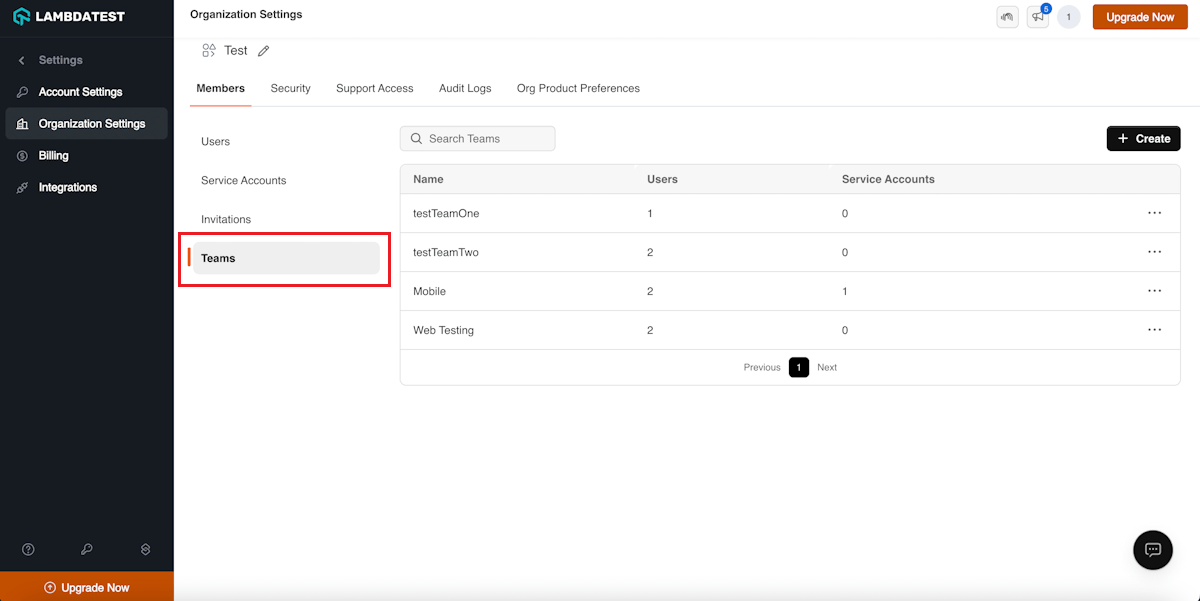
The Teams management feature lets you work seamlessly on assigned projects by creating isolated testing environments for each project. This means:
- You can group users and their corresponding tests based on projects, teams, or departments. This fosters a well-structured and efficient testing environment where everything is easy to find.
- Administrators can gain granular control over user access to specific test data, ensuring sensitive or confidential test data remain protected from unauthorized access.
- You can overcome the communication gaps and promote knowledge sharing within teams. The Teams feature provides a collaborative environment, leading to a more informed and integrated testing process.
Currently, the Teams feature is available for Web Automation, App Automation, and HyperExecute.
Note: From April 15, 2024, all users within an organization can view all test results run by any team member. However, with the Teams feature in place, only authorized users can access specific tests, securing sensitive information.
HyperExecute: Supercharge Testing With the Latest Features
Let’s delve into the latest enhancements and features that will take your testing experience with HyperExecute to new heights.
Quick Insights Access Using Test Summary Hyperlinks
Now, you can click directly on test statuses within your summary using hyperlinks. These links will automatically take you to the relevant section of the automation dashboard.
There, you’ll find detailed information about the specific test you clicked on. So, no more hunting around – the dashboard opens the required tab for you, making it easier than ever to get the test insights you need.
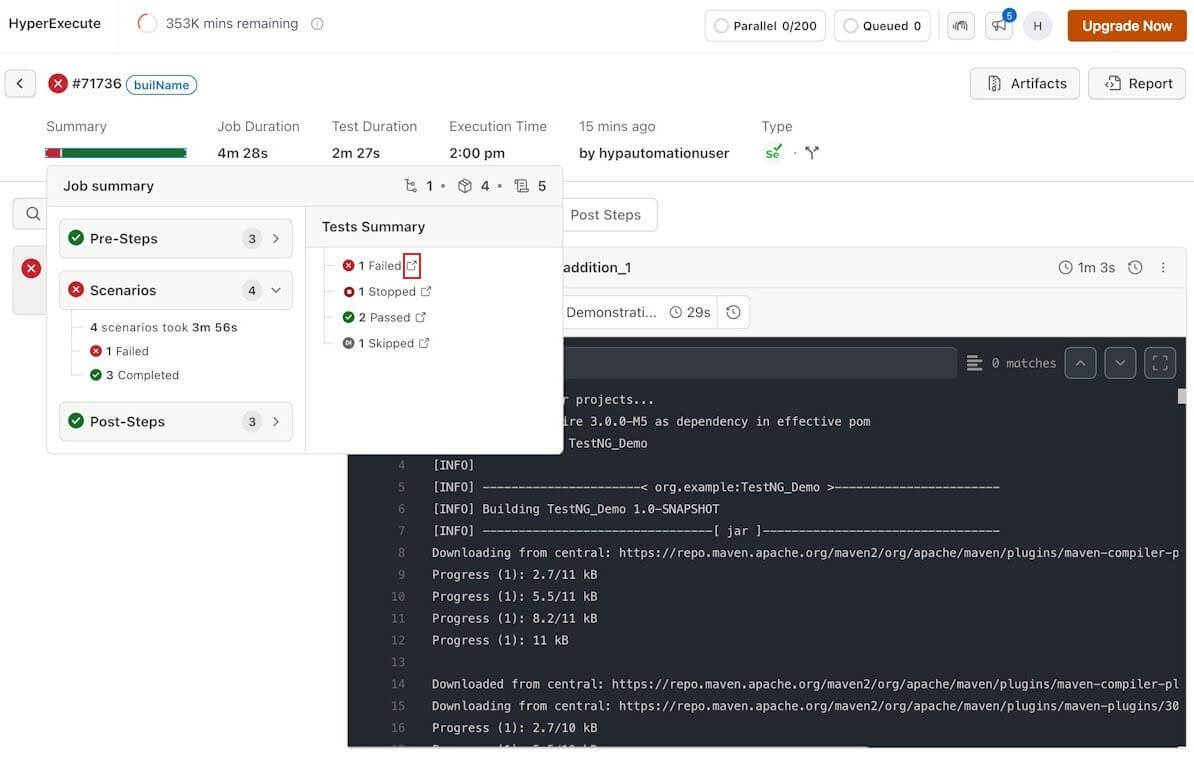
Check out our guide on Test Summary Hyperlinks and learn how to activate it.
Run Katalon Tests Across Versions With HyperExecute
HyperExecute just got much more productive for Katalon users. You can now leverage the capabilities of the HyperExecute platform to run tests written with multiple versions of Katalon. This will help you achieve greater flexibility and better adaptation to your specific testing needs.
To run Katalon tests on HyperExecute, you need to specify a runtime flag in the YAML file:
runtime:
 - language: katalon
   version: 8.6.5
Hide Sensitive Test Details Using Lambda Masking
Test recordings are helpful for debugging purposes. However, they may inadvertently capture sensitive data like passwords, location details, etc. This data exposure can be a security nightmare.
To tackle this challenge, HyperExecute now provides a Lambda Masking feature. For this, you need to provide the lambdaMaskCommands key in your test scripts.
For more information, please refer to the documentation – Playwright capabilities.
SmartUI: Capture Screenshots and Test on Mobile Viewports
In SmartUI, you can now test on mobile device viewports using SmartUI SDK. Along with that, SmartUI SDK allows you to take screenshots of elements. Plus, you can also capture screenshots in native mobile apps on a real device cloud.
Test on Mobile Viewports Using SmartUI SDK
You can now configure settings for mobile viewports in the JSON configuration file of SmartUI SDK. This includes options for taking full-page screenshots and controlling device orientation. With these customizable settings, you can perform end-to-end visual testing on web and mobile viewports.
In desktop environments, we’re emulating mobile viewports. When it comes to Android devices, the screenshots will be displayed using Chrome, while for iOS devices, it’ll be Safari.
Note: We are in the process of rolling out the support for simulation on iOS devices.
Take Screenshots of Elements With SmartUI SDK
Now, you can capture screenshots of elements on your web applications. You can easily specify the element you want to capture using ID, Class, XPath, or other locators. This ensures performing visual regression testing of different components of your web applications.
You can pass the following locators to capture the screenshots of an element.
ID:
let options = {
      element: {
          id: 'Required ID',
      }
  };
        await driver.get('Required URL');
        await smartuiSnapshot(driver, 'Screenshot Name', options);
Class:
let options = {
      element: {
          class: 'Required Class',
      }
  };
        await driver.get('Required URL');
        await smartuiSnapshot(driver, 'Screenshot Name', options);
XPath:
let options = {
      element: {
          xpath: 'Required Xpath',
      }
  };
        await driver.get('Required URL');
        await smartuiSnapshot(driver, 'Screenshot Name', options);
CSS Selector:
let options = {
      element: {
          cssSelector: 'Required CSS Selector',
      }
  };
        await driver.get('Required URL');
        await smartuiSnapshot(driver, 'Screenshot Name', options);
Capture Full-Page Screenshots on Real Devices
You can now take full-page screenshots in native apps. This allows developers and testers to efficiently capture comprehensive screenshots of entire pages, helping you perform detailed testing across various devices and screen sizes.
To capture full-page screenshots on real devices, you need to specify the webhook:
Map<String, Object> config = new HashMap<>();
config.put("screenshotName", "<Your Screenshot Name>");
config.put("fullPage", true);
config.put("pageCount", 15); // Enter the number of pages for the Full Page screenshot (Minimum 1, Maximum 20)
((JavascriptExecutor)driver).execute("smartui.takeScreenshot", config);
For optimal results with your full-page screenshots, it’s recommended to use a page count value within the range of 1 to 20, tailored to suit your specific use case.
[Important Update] Supported Versions of Appium
Starting June 1st, 2024, we’re implementing changes to the supported versions for real device testing with Appium. Therefore, we recommend you check your test scripts accordingly to ensure seamless compatibility and performance.
Shown below are the supported versions of Appium:
| Platform Versions | Supported Versions | Default Version | Latest Version |
|---|---|---|---|
| Android (all) | 1.21.0, 1.22.0, 1.22.3, 2.0.0, 2.1.3, 2.2.1 and 2.3.0 | 2.2.1 | 2.3.0 |
| iOS 12, 13, 14 | 1.22.3, 2.0.0, 2.1.3, and 2.2.1. | 2.2.1 | 2.2.1 |
| iOS 15, 16, 17 | 1.22.3, 2.0.0, 2.1.3, 2.2.1, and 2.3.0. | 2.2.1 | 2.3.0 |
- Latest Version: We’re introducing ongoing updates to support the latest stable releases of Appium versions for both Android and iOS platforms. This ensures that your testing environment stays current with the latest advancements and improvements in Appium technology.
- Default Version: Additionally, we’re introducing a new default version, 2.2.1, which will be automatically supported when you do not explicitly specify a version. This default version offers stability and reliability for your testing needs.
For detailed information on the supported Appium versions and how to update your test scripts, please refer to our guide – Supported Appium Versions.
Wrapping Up
The above features aim to enhance your collaboration efficiency and optimize your testing workflow. From Teams management to quick insights access with Test Summary Hyperlinks, there are plenty of features to explore. Try out these features today to streamline your testing processes and boost productivity!
You can visit TestMu AI Changelog to stay updated with the latest product features and announcements.


Did you find this page helpful?
More Related Hubs
TestMu AI forEnterprise
Get access to solutions built on Enterprise
grade security, privacy, & compliance
- Advanced access controls
- Advanced data retention rules
- Advanced Local Testing
- Premium Support options
- Early access to beta features
- Private Slack Channel
- Unlimited Manual Accessibility DevTools Tests