

Next-Gen App & Browser Testing Cloud
Trusted by 2 Mn+ QAs & Devs to accelerate their release cycles


How do I write and run test scripts in Selenium?
You can write and execute Selenium scripts with different programming languages and frameworks. However, for demonstration, we will take an example of Java programming. Besides, you must ensure the following things are configured on your machine.
- Java development environment
- IDE (Integrated Development Environment)
- Drivers and Grids to run the test in different environments. (if you are running tests on cloud, you can skip this step)
Following are the steps to write and run test scripts in Selenium Java.
- Create a Java Project
- Download Maven, add the MAVEN HOME system variable, and update it with the maven installed folder location.
- In the pom.xml file, add all the dependencies needed to create and run the Selenium script.
- Add the following Selenium dependencies to create your tests.
     org.Seleniumhq.Selenium
     Selenium-java
     3.141.59
Test Scenario: The script launches the TestMu AI login page (https://accounts.TestMu AI.com/login), enters a valid name and password, clicks on the Login button and verifies the page’s title to ensure the user logged in successfully and then routed to the TestMu AI home page.
Shown below is the test script for the above test scenario.
Package MyTests;

 import org.openqa.Selenium.By;
 import org.openqa.Selenium.WebDriver;
 import org.openqa.Selenium.WebElement;
 import org.openqa.Selenium.chrome.ChromeDriver;
 import org.testng.Assert;

 import java.util.concurrent.TimeUnit;

 public class SimpleTest {
     public static void main(String[] args) {

         System.setProperty("webdriver.chrome.driver",
         "C:\Users\Shalini\Downloads
         \chromedriver_win\chromedriver.exe");
         WebDriver driver = new ChromeDriver();

         String url = "https://accounts.{BrandName}.com/login";

         driver.get(url);
         driver.manage().window().maximize();
         driver.manage().timeouts().pageLoadTimeout
         (10, TimeUnit.SECONDS);


         WebElement email = driver.findElement(By.id("email"));
         WebElement password = driver.findElement(By.id("password"));
         WebElement loginButton = driver.findElement
         (By.id("login-button"));

         email.clear();
         email.sendKeys("[email protected]");

         password.clear();
         password.sendKeys("abc@123");

         loginButton.click();

         String title = "Welcome - {BrandName}";

         String actualTitle = driver.getTitle();

         Assert.assertEquals(actualTitle,title,
            "Page title doesnt match");


 System.out.println("User logged in successfully");


 driver.quit();
     }
 }
To implement the above Login scenario, you need to
- Identify web elements to enter the email and password and click the Login button. You can use Selenium locators to do this.
- Right-click on the particular element and click Inspect, which helps identify that specific element’s locator.
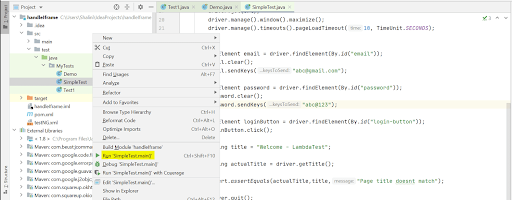
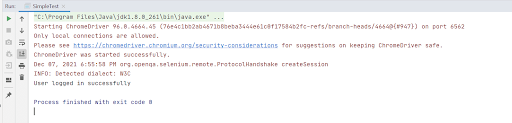
Once tests are executed, you can see the results in the IDE console.

KaneAI - Testing Assistant
World’s first AI-Native E2E testing agent.



Start your journey with LambdaTest
Get 100 minutes of automation test minutes FREE!!