

Next-Gen App & Browser Testing Cloud
Trusted by 2 Mn+ QAs & Devs to accelerate their release cycles


- Home
- /
- Learning Hub
- /
- State Transition Testing: A Comprehensive Guide to Optimizing Test Coverage
State Transition Testing: A Comprehensive Guide to Optimizing Test Coverage

Rajas Nawar
December 28, 2025
State transition testing is one of the most crucial black-box testing techniques used to validate how a system behaves as it moves between different states in response to inputs, triggers, or events. Unlike traditional testing approaches that check isolated functions or components, state transition testing ensures the flow of the entire system works as expected, covering all possible states and transitions.
For systems where different states and transitions are integral, such as user authentication, financial transaction systems, or multi-step workflows, state transition testing becomes indispensable. This testing technique helps ensure that the system responds correctly to a variety of user inputs and system events while also identifying potential issues like incorrect state changes or unhandled scenarios.
Overview
State transition testing is a black-box technique used to validate how a system moves between different states based on user actions or events. It ensures each state and transition behaves correctly, especially in workflows where one step directly impacts the next.
What is state transition testing, and how does it work?
State transition testing models a system using states, events, and transitions to verify how it responds when actions occur. States represent conditions like “logged out” or “logged in,” while events such as entering credentials trigger transitions. This approach helps ensure systems like login flows, checkout processes, or ATM operations handle valid and invalid transitions consistently.
It is especially useful for identifying unexpected behavior, missing validations, or incorrect state rules in complex, multi-step workflows.
How to design effective state transition test cases?
Designing state transition tests begins with identifying all possible states and determining events that cause state changes. Testers use state diagrams or transition tables to map valid and invalid paths, then create test cases to validate transitions, loops, guards, and sequences.
This method helps uncover issues such as incorrect state handling or missing error conditions early in the testing cycle.
Coverage strategies in state transition testing
Common strategies include All-States Coverage, ensuring every state is tested at least once, and All-Transitions Coverage, verifying each allowed transition. Advanced techniques test transition pairs or complete round-trip flows to ensure sequence accuracy and reveal edge-case failures.
These coverage strategies boost behavioral accuracy and ensure that complex workflows handle all scenarios predictably.
Why state transition testing matters for complex systems
Multi-step systems like authentication, payments, or multi-page transactions depend on precise state handling. State transition testing helps catch issues such as skipped steps, improper error handling, or missing guards while offering a clear visualization of system behavior.
This approach reduces logic gaps, enhances reliability, and ensures smoother end-to-end workflow performance before deployment.
What Is State Transition Testing?
State transition testing is a black box testing technique where a system is treated as a finite state machine (FSM). In FSMs, a system can exist in different states, and these states can transition in response to specific events. State transition testing focuses on verifying that the system correctly transitions between various states as intended when triggered by certain actions or events.
For instance, a login system may have three states:
- Logged Out (initial state)
- Logging In (processing the user credentials)
- Logged In (successful authentication)
A transition occurs when a user enters credentials, and the system moves between the states. State transition testing checks to ensure that these transitions occur smoothly, correctly, and consistently under various conditions.
Key Concepts in State Transition Testing:
- State: Represents the condition or situation of the system at a given moment.
- Event: Triggers that cause a state change. These can be user actions or system events.
- Transition: The actual change in state that occurs when an event happens.
- Action: The activities the system performs when transitioning between states (e.g., updating a status or sending a notification).
- Guard: A condition that must be true for a transition to occur.
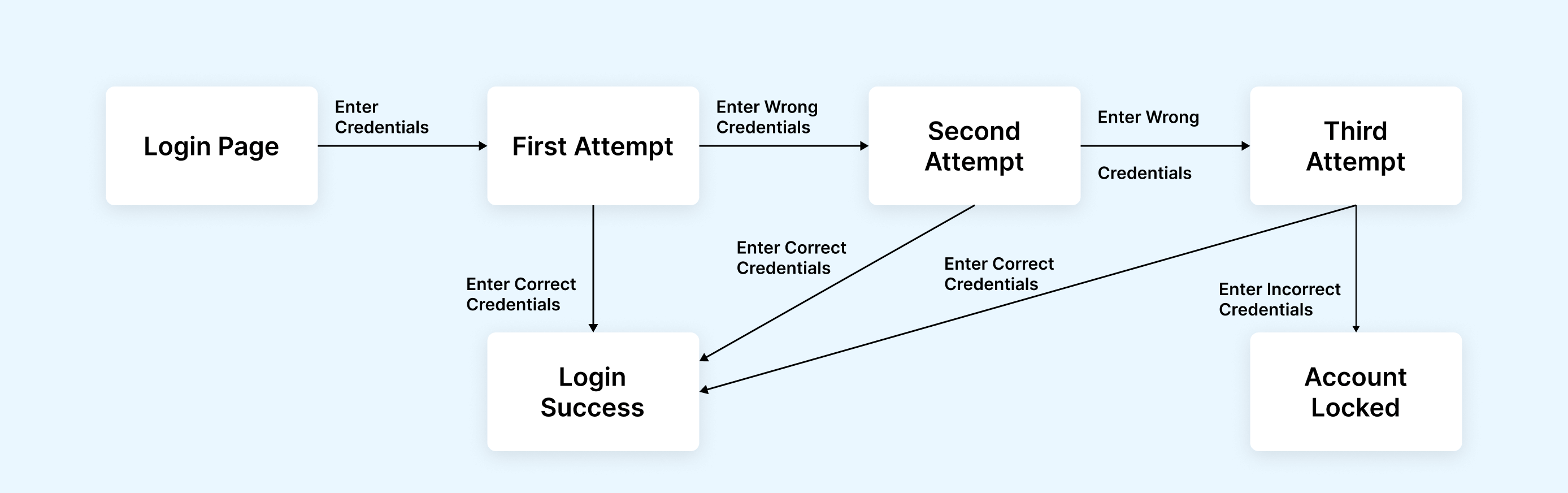
Why State Transition Testing Matters
State transition testing is especially vital for systems that handle multiple states and require precise handling of each state transition. Common issues like inconsistent state handling or incorrect transitions are often hard to catch with other testing techniques, but can have severe consequences in applications.
For example, in an e-commerce platform, the state transitions might involve the shopping cart, checkout, payment processing, and order confirmation. If a user is mistakenly allowed to skip the payment step or proceed to order confirmation without providing valid payment details, it may lead to a failed transaction, loss of customer trust, or security issues.
By covering all possible transitions, state transition testing ensures that all expected and unexpected states are properly handled, both during normal and edge-case scenarios.
Key Terminologies: States, Events, Guards, Actions
To get a firm grasp of state transition testing, it’s essential to understand the key terminologies:
- State: A specific condition or situation that the system is in (e.g., logged in, logged out).
- Event: A trigger or action that causes the system to transition from one state to another (e.g., clicking the "Login" button).
- Guard: A condition that must be met for a transition to occur (e.g., entering valid credentials).
- Action: What happens when a state transition occurs (e.g., a user session is created after logging in).
- Entry/Exit Actions: Actions performed when entering or exiting a state (e.g., displaying a welcome message when entering the logged-in state).
Designing State Transition Test Cases
Designing state transition test cases requires a well-structured approach that systematically identifies system states, defines triggering events, models state changes, and builds test scenarios to validate valid flows, negative transitions, and critical edge cases.
Steps to Perform State Transition Testing
Designing effective state transition tests requires following a systematic approach. Here's a step-by-step guide to help you create comprehensive state transition test cases:
- Identify States: Identify all the possible states in the system. These could be the different conditions a system can exist in.
- Define Events: Recognize the events that can trigger transitions between states.
- Model Transitions: Use a state transition diagram or table to map the relationships between states, events, and transitions.
- Generate Test Cases: Based on the state transition model, generate test cases for valid transitions, invalid transitions, and boundary conditions.
- Execute Tests: Run the test cases and observe if the system behaves as expected across all transitions.
This approach ensures comprehensive test coverage and helps identify potential failures in transitions that may not be obvious through other testing methods.
Coverage Criteria and Test Selection Strategies
When designing state transition tests, you’ll need to determine the level of coverage required. The most common strategies include:
- All States Coverage: Ensures that each state in the system is visited at least once.
- All Transitions Coverage: Ensures that each valid transition between states is tested.
- All Transition Pairs: This strategy tests all sequences of two transitions, ensuring that the system handles consecutive state changes correctly.
- Round-Trip Coverage: Ensures that the system can return to its initial state after completing a series of transitions.
While "All States Coverage" and "All Transitions Coverage" are the most basic strategies, more advanced methods like Transition Pair Testing and Round-Trip Coverage ensure thorough testing of the state machine.
Test Sequence Generation (Paths, State-pairs, Loops)
Generating test sequences for state transition testing is a critical part of the process. These sequences ensure that all transitions are tested, including loops (where a state transitions back to itself) and state pairs (where two transitions occur in sequence).
For instance, in a banking application, you may need to test the sequence where a user moves from logged in to transaction pending, then to transaction completed, and finally logged out. These paths and their permutations must be validated.
Handling Invalid / Negative Transitions
State transition testing is not just about verifying valid transitions, it’s also about testing invalid transitions. For example, a user might attempt to log in without providing credentials or might try to access a system function that’s not available in the current state.
By designing tests for these invalid transitions, you can ensure that the system handles error states properly, such as displaying error messages or logging out users after multiple failed attempts.
Advanced Topics in State Transition Testing
As applications grow in complexity, testing state transitions becomes more challenging and often requires advanced approaches and automation. The following areas outline how these challenges can be effectively addressed.
Handling Complex / Hierarchical States
As systems grow more sophisticated, states may become hierarchical or include parallel processes. For instance, in a banking system, a user might transition between logged-in, account settings, and admin states. Proper testing must account for these hierarchical transitions and ensure that transitions between parent and nested states occur correctly.
Extended / Parameterized Transitions (EFSMs)
Extended Finite State Machines (EFSMs) introduce parameters and guard conditions that make the system’s behavior more dynamic. For example, a game system might have a player transition from game over to scoreboard based not only on the game’s state but also on the player’s score.
Designing tests for EFSMs requires a more advanced understanding of parameterized transitions, as the system’s state may depend on specific input values, such as user behavior or environmental factors.
Automation and Tool Support
Automation of state transition testing can drastically increase the efficiency of your testing process. TestMu AI’s AI-native platform allows you to seamlessly automate your state transition tests across real devices and browsers. With tools like HyperExecute for test orchestration, you can run automated tests with faster execution times, even optimizing for failed tests via retries and intelligent workflows.
TestMu AI’s KaneAI brings natural language processing to the testing process, helping generate tests and perform automated analysis of your state transition models, reducing manual effort and improving accuracy.
Real-World Examples of State Transition Testing
Understanding state transition testing becomes easier when applied to real systems. The examples below show how state transitions work in both simple and more complex application scenarios.
Simple Example: Login System
Let’s look at a simple login system to understand how state transition testing works. This system might involve states such as:
- Logged out (initial state)
- Logging in (after credentials are entered)
- Logged in (successful authentication)
State transition tests would ensure that a valid login successfully transitions the system from logged out to logged in, while invalid credentials should trigger a return to the logged out state.
Complex Example: E-commerce Checkout Flow
An e-commerce platform involves a more complex state transition scenario, where users go through states like shopping cart, checkout, payment processing, and order confirmation. State transition testing here would cover valid transitions (e.g., from cart to checkout) and ensure that invalid transitions (e.g., skipping payment details) trigger appropriate error handling.
Conclusion
State transition testing is an essential technique for ensuring the accuracy of systems with multiple states. By following best practices, using proper test design techniques, and incorporating automation tools like TestMu AI, you can ensure comprehensive coverage and identify potential errors early in the development process. TestMu AI's AI-native platform supports end-to-end state transition testing across real devices and browsers. With HyperExecute, you can optimize your test execution times by 70% and ensure that state transitions are automatically validated in both positive and negative test scenarios.


Frequently asked questions
Did you find this page helpful?
More Related Hubs
TestMu AI forEnterprise
Get access to solutions built on Enterprise
grade security, privacy, & compliance
- Advanced access controls
- Advanced data retention rules
- Advanced Local Testing
- Premium Support options
- Early access to beta features
- Private Slack Channel
- Unlimited Manual Accessibility DevTools Tests