

Next-Gen App & Browser Testing Cloud
Trusted by 2 Mn+ QAs & Devs to accelerate their release cycles


How to Update iOS Devices
Apple often releases updates to keep their devices up-to-date and safe. Therefore, it’s essential to update iOS devices (iPhones and iPads) to get new features, better security, and improved performance.

Bhawana
January 12, 2026
Apple often releases updates to keep their devices up-to-date and safe. Therefore, it’s essential to update iOS devices (iPhones and iPads) to get new features, better security, and improved performance.
This blog walks you through everything you need to know about updating your iOS devices.
Prerequisites to Follow for Updating iOS Devices
Before you actually start updating your iOS device, you should always make sure it’s fully ready for a smooth upgrade experience.
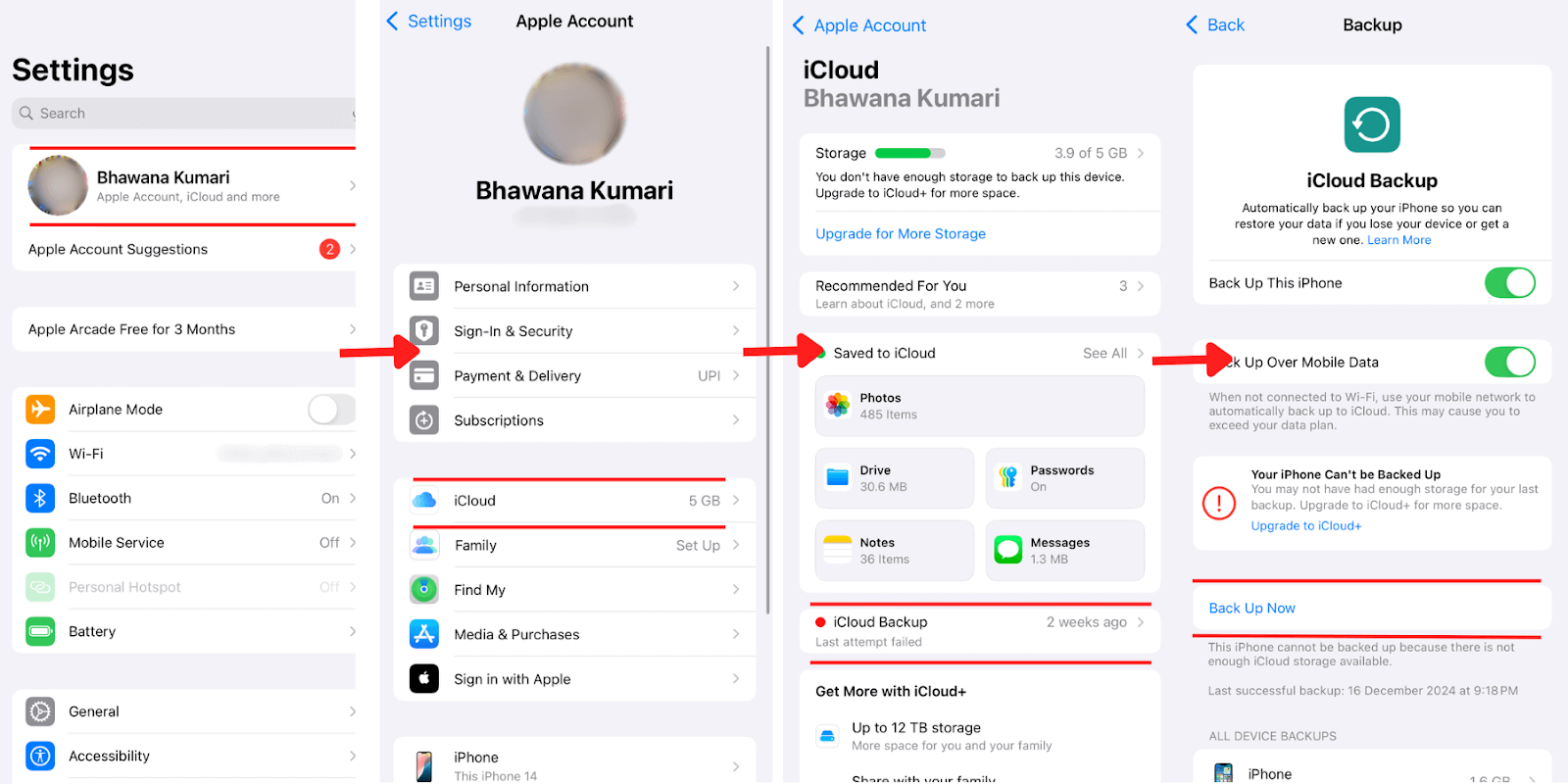
- Before updating, make sure all of your data is securely stored in the cloud. Navigate to Settings > [Your Name] > iCloud > iCloud Backup > Back Up Now.
- To check if you have adequate storage for the update, navigate to Settings > General > iPhone Storage. The majority of upgrades require at least 5GB of free space.
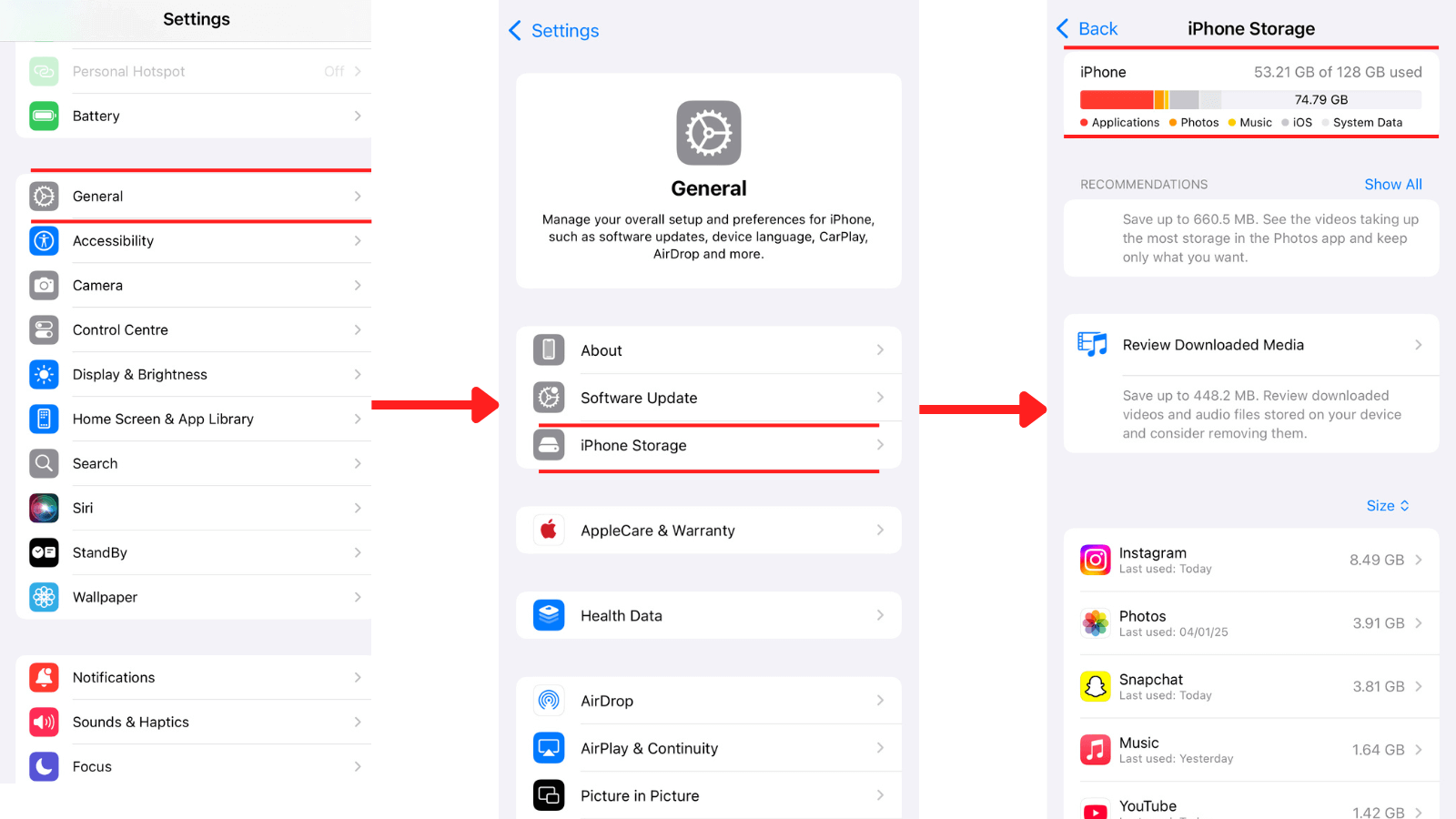
If necessary, remove unnecessary programs, pictures, or large files. Always charge your device. It should have at least 50% battery to avoid interruptions during the update.
- Updates can be large, so ensure you’re connected to a stable Wi-Fi network to download the update quickly and avoid data charges.

Note: Test your mobile apps on real iOS device versions. Try TestMu AI Today!
Steps to Update iOS Devices
Here are steps to update iOS devices such as iPhones and iPads:
- Navigate to Settings > General > Software Update to check if there is any update available or not.
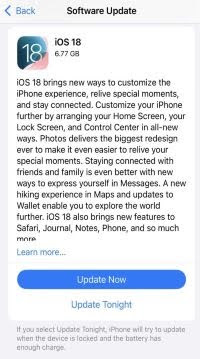
- Tap Update Now or Update Tonight, depending on your choice. If a popup comes up, enter your passcode and wait for the download to complete. The time required depends on the update size and your Internet speed.
- Once the download is complete, tap on Install Now. Your iPhone or iPad will restart and begin the installation. Do not power off your device during this process.
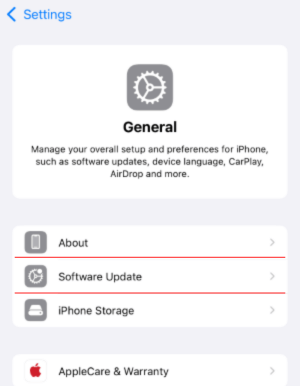
After the update, navigate to Settings > General > About and confirm whether your device is running on the latest iOS version.
Steps to Update iOS Devices Automatically
You can keep your iPhone and iPad updated without putting in any manual effort by setting automatic updates.
Here’s how to set up automatic updates:
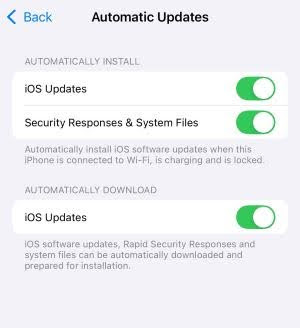
- Settings > General > Software Update > Automatic Updates to enable automatic updates on your iPhone or iPad.
- In the AUTOMATICALLY INSTALL section, toggle on iOS Updates and in the same way, in the AUTOMATICALLY DOWNLOAD section, toggle on iOS Updates.
Should I Update iOS or Not?
Usually, updating your iOS device is recommended as it gives you access to the latest features and bug fixes and prevents security loopholes. Apple often releases updates to fix bugs and improve functionality.
However, always ensure that your smartphone is compatible with the latest version of iOS before updating, and read reviews to avoid any possible performance issues, particularly with legacy iOS models.
Keep in mind that major updates can sometimes cause app crashes or unexpected bugs. Waiting a week or two after the release allows Apple to address any early glitches its users report.
If you wish to download and install the latest software updates on your iOS device, it will get updated with new features and security enhancements. However, it’s important to know whether the latest iOS version is compatible with your iPhone or iPad to help you decide whether to upgrade to the latest version.
The latest version of iOS at the time of writing this blog is 18.2. In the next section of this blog, we will look at various iOS devices that support the latest iOS 18.2 version.
Which Devices Support iOS 18.2?
Apple maintains a broad compatibility list for its iOS updates, but older devices may not always support the latest version.
Here’s a quick compatibility overview for iOS 18.2 for iPhones before iPhone 16:
iPhones:
- iPhone 15 Pro Max, 15 Pro, 15, 15 Plus
- iPhone 14 Pro Max, 14 Pro, 14, 14 Plus
- iPhone 13 Series
- iPhone 12 Series
- iPhone SE (2nd and 3rd generation)
- iPhone 11 Series
- iPhone XR, XS, and XS Max
iPads:
- iPad Pro (all generations)
- iPad Air (3rd generation and later)
- iPad (7th generation and later)
- iPad Mini (5th generation and later)

Conclusion
Updating iOS is straightforward and very user-friendly. However, you should always prepare your device before updating and check its compatibility. Although updating iOS is always a good idea, consider your device’s age and performance before updating to the newest version. Keeping your iOS devices updated will allow you to take advantage of all that Apple has to offer.


Frequently asked questions
Did you find this page helpful?
More Related Hubs
TestMu AI forEnterprise
Get access to solutions built on Enterprise
grade security, privacy, & compliance
- Advanced access controls
- Advanced data retention rules
- Advanced Local Testing
- Premium Support options
- Early access to beta features
- Private Slack Channel
- Unlimited Manual Accessibility DevTools Tests