

Next-Gen App & Browser Testing Cloud
Trusted by 2 Mn+ QAs & Devs to accelerate their release cycles


Cross Browser Typography Compatibility Testing
Improve Your Website's Typography Compatibility Across Different Browsers with TestMu AI's Comprehensive Guide. Learn How to Achieve Consistent Typography Across Multiple Devices and Browsers for Enhanced User Experience.

Deeksha Agarwal
December 19, 2025
Colors, icons, images, content, layout, design elements, animations, functionalities, hover elements, buttons, lines, and typography all come together in a unique blend of harmony to make the web design a work of art. It’s a collection of thousands of different web elements coming together to convey a message in the most innovative way possible. In this symphony, Typography plays a major role. A good font can drastically change the whole design.
But sometimes amidst of using beautiful fonts we forget to take care of their compatibility. Font formats that we use are not always compatible with every browser. So if a font is looking beautiful in Mozilla doesn’t imply that will look the same in Opera too because may be Opera doesn’t support the underlying tag itself.
So, while going for selecting a font format, you need to be sure that the one that you’re going to use is compatible with all browsers and will render the same irrespective of the browser used.
How to make sure which font format to use and when?
Well, there are many types of font formats available with the most common ones like EOT, OTF, TTF, WOFF, SVG. You may find it very amazing to select from a huge palette but it isn’t as simple as it sounds because there is not even a single font format that is supported in all the browsers. So you have to somehow use the combinations of font formats to make it support in all browsers.
What are the font format choices you have?
You’ll find a wide choice of font formats while designing your website. The various file extensions that you’ll come across include:
| Extension | File Type |
|---|---|
| .ABF | Adobe Binary Screen Font File |
| .ACFM | Adobe Composite Font Metrics File |
| .AFM | Adobe Font Metrics File |
| .AMFM | Adobe Multiple Font Metrics File |
| .BDF | Glyph Bitmap Distribution Format |
| .CHA | Character Layout File |
| .CHR | Borland Character Set File |
| .COMPOSITEFONT | Windows Composite Font File |
| .DFONT | Mac OS X Data Fork Font |
| .EOT | Embedded OpenType Font |
| .ETX | TeX Font Encoding File |
| .EUF | Private Character Editor File |
| .F3F | Crazy Machines Font File |
| .FEA | AFDKO Feature Definitions File |
| .FFIL | Mac Font Suitcase |
| .FNT | Windows Font File |
| .FON | Generic Font File |
| .FOT | Font Resource File |
| .GDR | Symbian OS Font File |
| .GF | METAFONT Bitmap File |
| .GLIF | Glyph Interchange Format File |
| .GXF | General CADD Pro Font File |
| .LWFN | Adobe Type 1 Mac Font File |
| .MCF | Watchtower Library Font File |
| .MF | METAFONT File |
| .MXF | Maxis Font File |
| .NFTR | Nintendo DS Font Type File |
| .ODTTF | Obfuscated OpenType Font |
| .OTF | OpenType Font |
| .PCF | PaintCAD Font |
| .PFA | Printer Font ASCII File |
| .PFB | Printer Font Binary File |
| .PFM | Printer Font Metrics File |
| .PFR | Portable Font Resource File |
| .PK | Packed METAFONT File |
| .PMT | PageMaker Template File |
| .SFD | Spline Font Database File |
| .SFP | Soft Font Printer File |
| .SUIT | Macintosh Font Suitcase |
| .TFM | PageMaker Template File |
| .TTC | TeX Font Metric File |
| .TTE | TrueType Font Collection |
| .TTF | Private Character Editor File |
| .TXF | Celestia Font Texture File |
| .UFO | Unified Font Object File |
| .VFB | FontLab Studio Font File |
| .VLW | Processing Font File |
| .VNF | Vision Numeric Font |
| .WOFF | Web Open Font Format File |
| .WOFF2 | Web Open Font Format 2.0 File |
| .XFN | Ventura Printer Font |
| .XFT | ChiWriter Printer Font |
| .YTF | Google Picasa Font Cache |
Out of all these formats, the most common ones are EOT, OTF, TTF, WOFF, SVG. So, I’ll focus around the compatibility of these formats.
EOT (Embedded Open Type Font)
EOT font type font was discovered by Microsoft 15 years back. This font format is supported on only Internet explorer.
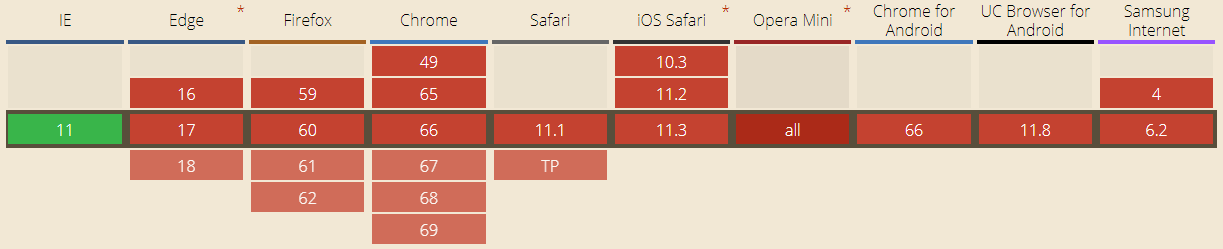
TTF( TrueType Font)
TTF was developed by Apple and Microsoft late in 1980s. It is the most common font format for both Windows and Macintosh operating systems.
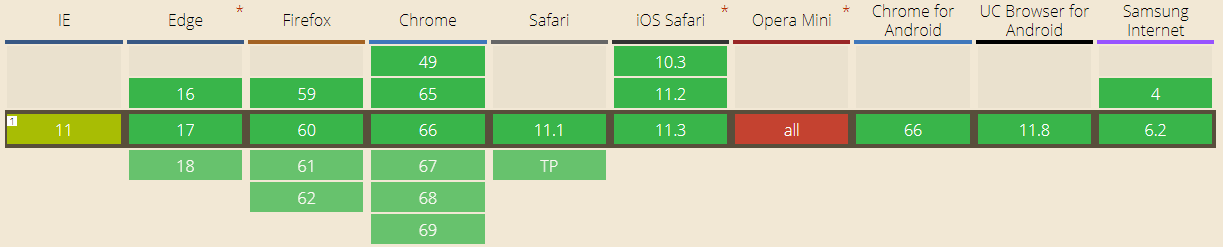
OTF(OpenType Font)
An evolution of TTF, OTF is developed by combined efforts of Adobe and Microsoft. Supported in Mac and Windows OS OTF provides support for various platforms and has expanded character sets. It support is same for browsers as of TTF.
WOFF( Web OpenFont Format)
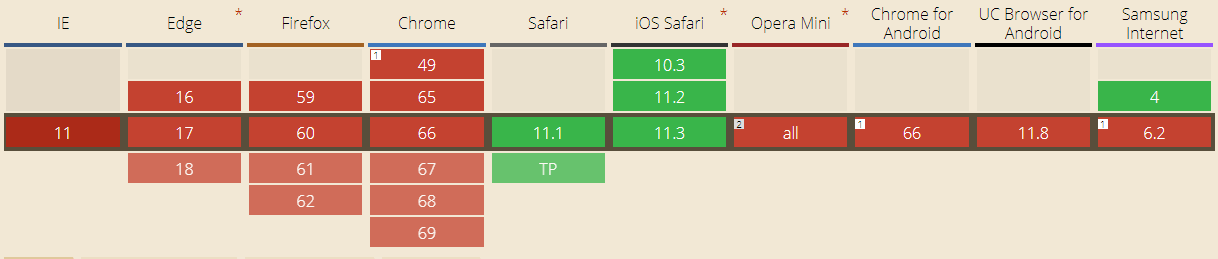
As the name suggests, WOFF is an essential font format for web pages. The major feature that WOFF provides is fast loading web pages since it uses the compressed versions of TTF and OTF fonts. Developed by Mozilla in 2009, WOFF is now a W3C recommendation.
The upgraded version of WOFF, WOFF2 has support for different browser sets:
SVG(Scalable Vector Graphics Font)
SVG fonts files contain the glyph outlines which are generally represented as standard SVG elements and attributes, just like they were single vector objects in the SVG image. These files have pretty large size and are uncompressed unlike EOT, WOFF.
Browsers And Font Format Support
The major issue that you might face is your font don’t render properly in all browsers so you have to make sure that you add font files to your web code. To make sure of this, you need to be aware the font format support in various browsers. Table depicts the support for various font types in different desktop browsers.
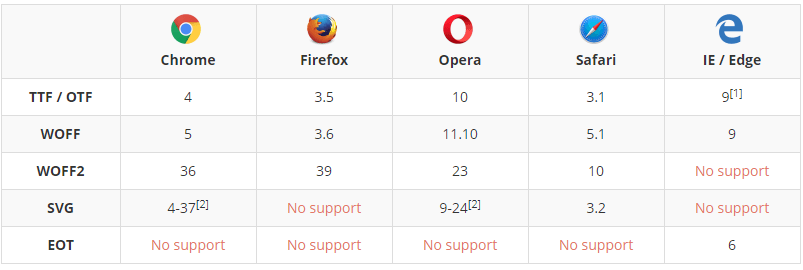
For mobile browsers the font format support goes as follows:
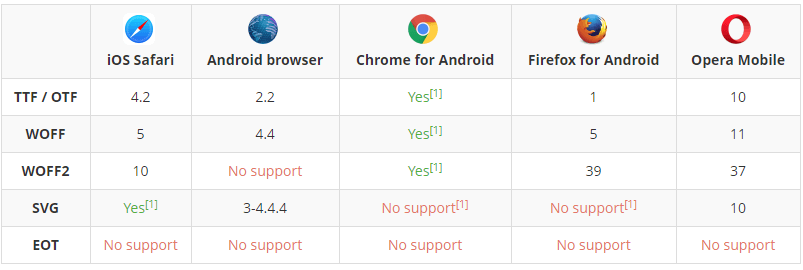
So, there is no single font format that is supported in all browsers and browser versions. As you may notice, TTF and WOFF file formats are supported in nearly all latest web browsers (except opera mini). As a developer it would make your life quite easier if you use TTF and WOFF web formats. But still, you would need to have a combinations of font formats to make all the fonts supported in all browsers.
You can use caniuse to find out version support in font formats based on your cross browser support strategy.
How To Avoid Browser Font Incompatibility?
Knowing which browsers support a font family is one thing and making them support is another. So to make sure that your font family is rendered properly in every browser even if the user doesn’t have the font family installed on his local computer is to use @font-face in CSS style.
Addition of @font-face allows a webpage to download the font from the hosted location and display it in the CSS as specified.
Add the code to use stylesheet before any styles:
@font-face {
  font-family: 'MyWebFont';
  src: url('webfont.eot'); /* IE9 Compat Modes */
  src: url('webfont.eot?#iefix') format('embedded-opentype'), /* IE6-IE8 */
       url('webfont.woff2') format('woff2'), /* Super Modern Browsers */
       url('webfont.woff') format('woff'), /* Pretty Modern Browsers */
       url('webfont.ttf')  format('truetype'), /* Safari, Android, iOS */
       url('webfont.svg#svgFontName') format('svg'); /* Legacy iOS */
}
Once you make sure to add the above code, you can use it to style elements like this:
body {
  font-family: 'MyWebFont', Fallback, sans-serif;
}
If you want to style a heading, this code format can be used:
h1 {
font-family: DeliciousRoman, Helvetica, Arial, sans-serif;
}
You can see a working example of how you can use it on w3schools.
Using a bold font:
@font-face {
    font-family: myFirstFont;
    src: url(sansation_bold.woff);
    font-weight: bold;
}
This might help you make support font formats in all browsers.
Fixed? Now It’s Time For Some Cross Browser Testing.
Having made sure that your browsers render all the fonts properly in all browsers you need to test them if it is fixed or not. For this, you need to .
Now with TestMu AI, You can perform cross browser testing on various mobile devices such as test on MotoG 2nd and test on Xperia Tipo 4.
Font rendering is a part of visual appeal. You can use TestMu AI’s Visual UI testing feature to test visual appearance of your website. Take screenshots on various browsers and compare them if they look the same.
So, it’s time you checked your website if the fonts render properly for your users too or it just looks perfect for you.



Did you find this page helpful?
More Related Hubs
TestMu AI forEnterprise
Get access to solutions built on Enterprise
grade security, privacy, & compliance
- Advanced access controls
- Advanced data retention rules
- Advanced Local Testing
- Premium Support options
- Early access to beta features
- Private Slack Channel
- Unlimited Manual Accessibility DevTools Tests