

Next-Gen App & Browser Testing Cloud
Trusted by 2 Mn+ QAs & Devs to accelerate their release cycles


Enabling Hassle-Free Local Testing With TestMu AI Tunnel Docker Extension
Simplify your local testing efforts with TestMu AI Tunnel Docker Extension. Perform cross browser testing on over 3000+ environments in a single click. Try it now!

Salman Khan
March 7, 2026
Local website testing allows developers to test their websites locally, either manually or automatically. Once the developer and QA team ensure the website functions correctly locally, it is pushed to a production environment.
Digital experience testing platforms like TestMu AI enables developers and the QA team to test in local environments by providing remote access to real browsers and operating systems without the need for complex local test environments.
To further enhance your local testing experience, we are introducing TestMu AI Tunnel Docker Extension, which allows you to perform cross browser testing of locally hosted websites and web applications across 3000+ browser and OS environments, eliminating the need to launch the tunnel through the CLI manually.
What is TestMu AI Tunnel Docker Extension?
Docker Extensions help you develop and integrate software applications into your existing workflows. With TestMu AI Tunnel as a Docker Extension, you can run local tests across an online device farm of 3000+ real browsers, devices, and OS combinations, without launching the tunnel from the command line interface.

Let’s see how this Docker extension helps you:
- Hassle-Free Setup: It makes it easy to set up the TestMu AI tunnel in a single click without requiring it to launch from the CLI.
- Secure SSH Tunnel: The TestMu AI Tunnel Docker extension provides a secure tunnel between your local machine and the TestMu AI cloud servers. This ensures your data is protected during testing.
- Access to Large Browser Farm: With the TestMu AI Tunnel Docker extension, you can test your websites and web applications on various browser and operating system combinations without setting up your test infrastructure.
- Advanced Configurations: TestMu AI Tunnel Docker Extension helps you leverage advanced tunnel features like Proxy Port, Environment, Local File Server Directory, Info API Ports, and more.

Note: Test your local websites across 3000+ environments. Try TestMu AI now!
Why use TestMu AI Tunnel Docker Extension?
Testing a website, especially in a production environment, can be time-consuming and resource-intensive. This leads to a slower development process and makes it more challenging to identify and address issues early, thereby delaying developer feedback.
That’s why developers and QAs test websites and web apps beforehand to debug quickly and fix obvious bugs in their code. By running tests locally, developers can get faster feedback on their code commits, enabling them to make changes and improvements more quickly, improving the overall development process.
However, QA teams can leverage the true potential of local testing using TestMu AI Tunnel Docker Extension on a cloud-based infrastructure. Devs and testers can test locally hosted web applications or websites on cloud-based real machines with TestMu AI Tunnel Docker Extension, a secure and easy-to-use encrypted tunneling feature. It establishes a secure connection between the user’s local and cloud machines.
TestMu AI Tunnel Docker Extension connects securely to TestMu AI cloud servers, even behind corporate firewalls. It allows you to test locally hosted websites or web applications across various browsers, devices, and operating systems. TestMu AI Tunnel Docker Extension can test web files written in HTML, CSS, PHP, Python, or similar languages.
If you want to get into the TestMu AI Tunnel, check out the below tutorial:
Getting Started with TestMu AI Tunnel Docker Extension
It’s easy to start with local website testing using TestMu AI Tunnel Docker Extension. Before you begin, ensure you have a TestMu AI account and Docker Desktop installed on your system.
Step 1: Install the TestMu AI Tunnel Docker Extension
Install the TestMu AI Tunnel Extension from the Docker Extensions Marketplace.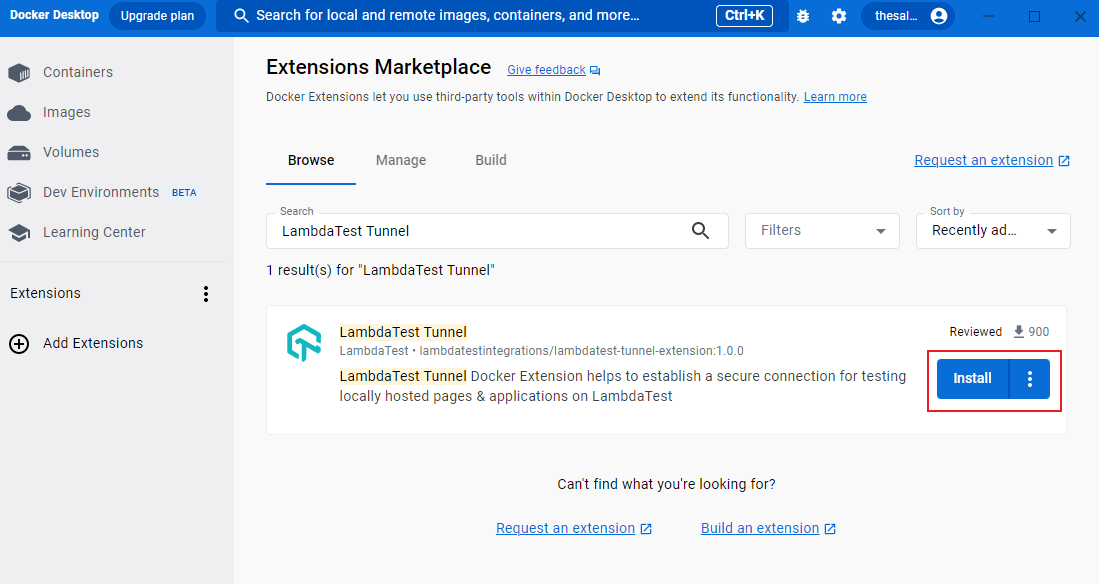
Step 2: Setup the TestMu AI Tunnel Docker Extension
Configure the TestMu AI Tunnel Docker Extension by providing your TestMu AI Username, Access Token, and Tunnel Name.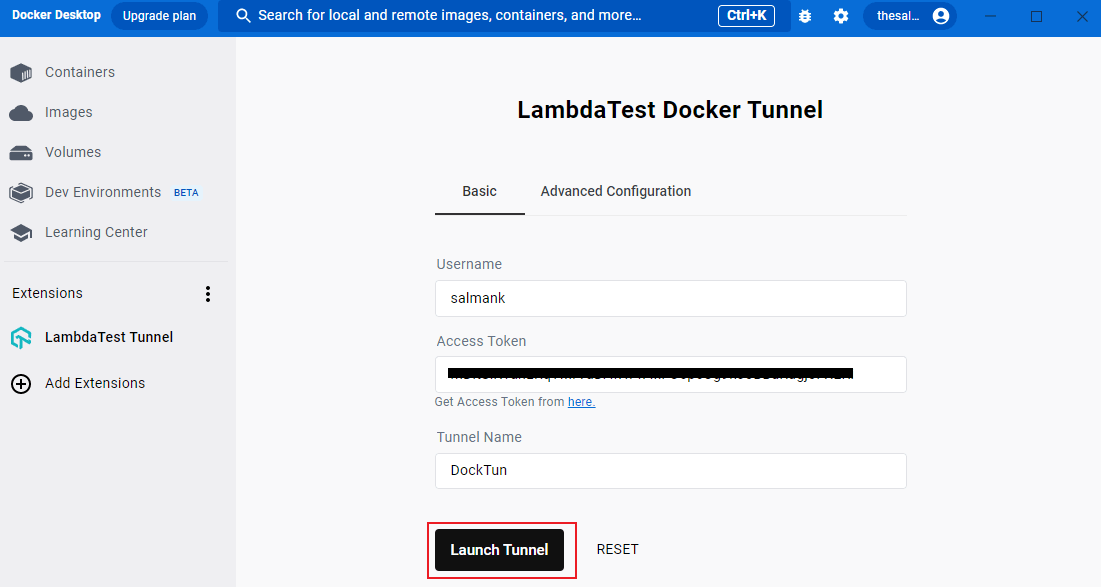
Step 3: Launch the TestMu AI Tunnel Docker TunnelOnce the TestMu AI Tunnel is up, you can notice different running tunnel logs. Post that, you can start your local testing.
Note: For more details, check out our documentation: TestMu AI Docker Tunnel Extension
The Final Word
With the TestMu AI Tunnel Docker Extension, launching the tunnel from the command line is no longer a challenge, making it easier to perform local testing. Additionally, by leveraging an online cloud grid, you need not worry about the challenges of local test infrastructure.
If you need any assistance with TestMu AI Tunnel Docker Extension, we are here 24×7 to help you. You can reach out to us at [email protected] or via our In-App Chat Support.
Happy Local Testing



Did you find this page helpful?
More Related Hubs
TestMu AI forEnterprise
Get access to solutions built on Enterprise
grade security, privacy, & compliance
- Advanced access controls
- Advanced data retention rules
- Advanced Local Testing
- Premium Support options
- Early access to beta features
- Private Slack Channel
- Unlimited Manual Accessibility DevTools Tests