

Next-Gen App & Browser Testing Cloud
Trusted by 2 Mn+ QAs & Devs to accelerate their release cycles


TestMu AI Now Integrates With Backlog
TestMu AI integration with Backlog is now live to help you log bugs directly from TestMu AI on your Backlog project, in just a single click. We also upgraded our Devtools to provide you with an enhanced view.

Harshit Paul
March 7, 2026
Howdy testers? Christmas is just around the corner and we got a little gift for you. Today, we go-live with a new TestMu AI integration for project management tools. We bring you TestMu AI integration with Backlog to help you log bugs directly from TestMu AI on your Backlog project, in just a single click. That is not all! We have also enhanced our dev tools on iOS simulators to help you debug your web-application with much more ease.
What Is Backlog?
The backlog is a renowned project management tool on-cloud with the vision to help you collaborate better and deliver your development projects faster. With Backlog, you can track tasks assigned to different individuals on your team, along with the ability to track the overall progress of your project. You also get a bunch of attractive features such as issue tracker, Gantt chart, file sharing, file sharing, and more, to help you manage your projects with ease.
TestMu AI Integration With Backlog
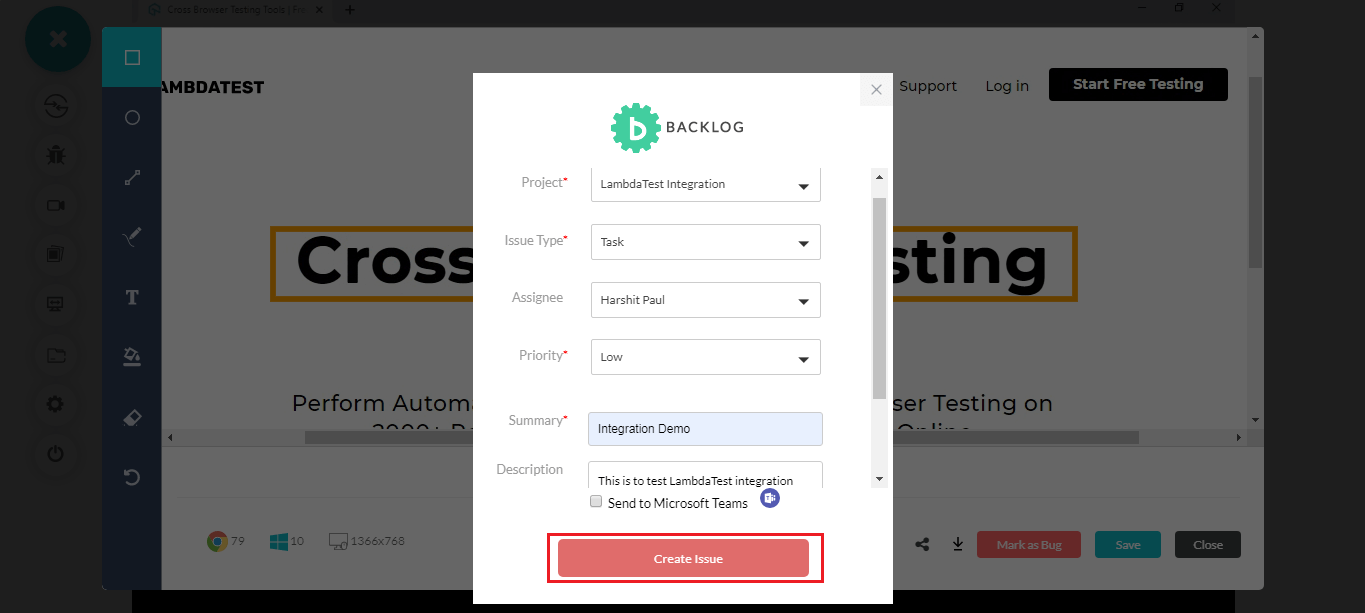
By integrating your TestMu AI account with your Backlog project, you will be able to generate a task on Backlog directly from TestMu AI, should you come across any cross browser issue.
That way you can highlight a bug while cross browser testing and report it to your colleagues over Backlog. You can provide specific details about the bug on TestMu AI while filing the bug. These details would automatically be reflected over Backlog, along with the screenshot you highlighted on TestMu AI.
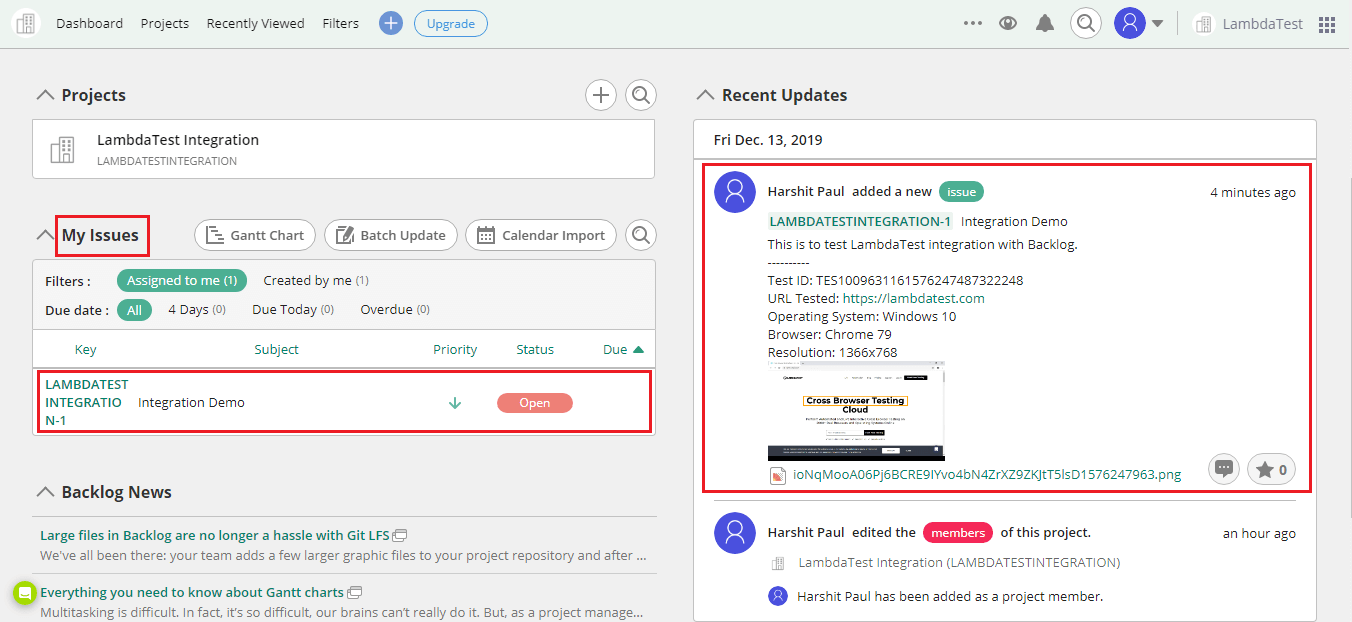
If you are already using Backlog then make sure to integrate TestMu AI with your Backlog account to experience seamless cross browser testing.
Follow our step-by-step guide to log your first bug from TestMu AI to Backlog
Why Backlog Is A Favourite For Project Management?
Configure Milestone – Break down your development project into various milestones and set them accordingly to your sprints.
Stay updated 24/7 – Backlog has native applications for iOS and Android which are free to use and help you synchronize your Backlog project. That way, you get to know about everything going on in the project.
Integrations – Like TestMu AI, Backlog also provides integrations with CI/CD tools such as Jenkins, instant messaging tools such as Slack, and more.
Version Control – Backlog allows you to set up private repositories and commit code changes, along with the ability to roll back in case things go south. You can also keep track of all the code commits, comment on pull requests, and document all of your project details.
Intuitive Gantt Chart – Backlog offers an easy to comprehend Gantt chart to help you reflect on your project’s overall progress and look into the bigger picture.
User Roles – You can invite your teammates on a project and assign them different user roles such as Administrator, Normal User, Reporter, and Guest Reporter. That way, you can maintain authoritative access to your project. For example, users assigned as Reporters cannot edit issues.
Bonus Update: Enhanced View For Developer Tools In iOS Simulators
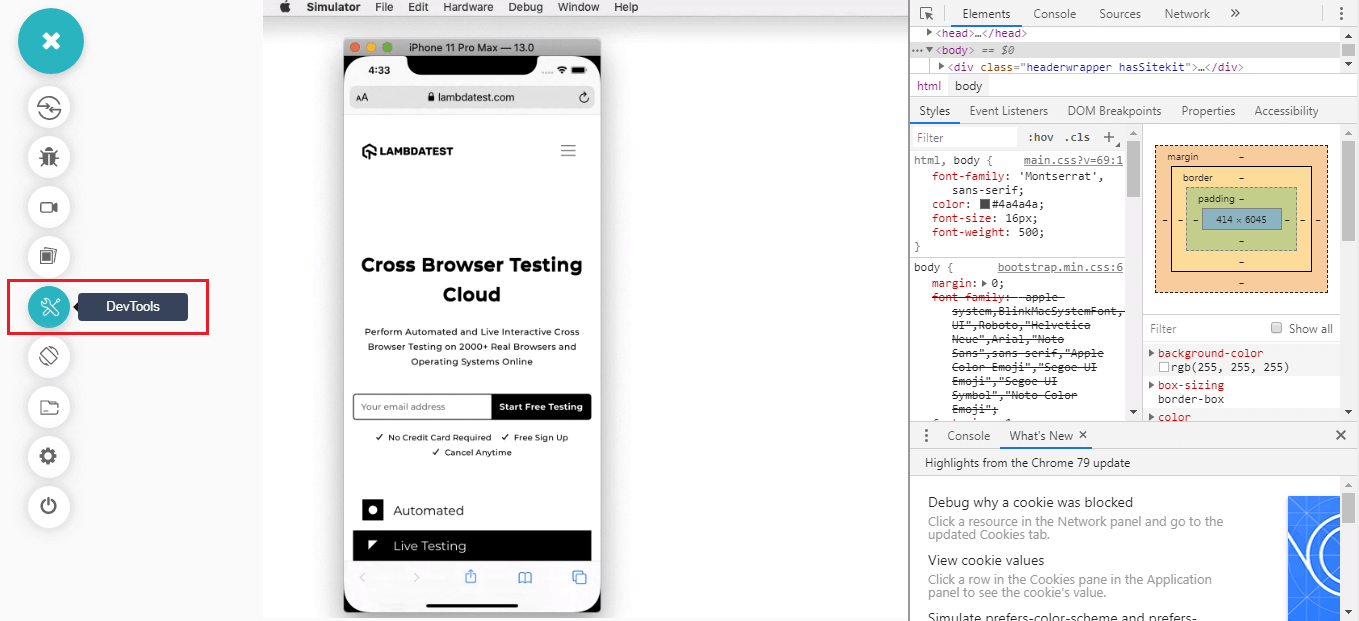
We have upgraded our Developer tools in iOS simulators to provide you with a more intuitive view to debug your browser compatibility testing issues. Earlier, when you clicked on the DevTools icon in iOS simulators than the developer tools used to open in a new window inside the browser and at times, they used to overlap the mobile devices being simulated. Not anymore!
Now, we have dedicated the right side of the screen for developer tools. That way, you can perform cross browser testing by viewing the device on left and easily debug your web application from the developer console on the right.
Stay Tuned For More Christmassy Updates!
That just about sums up everything for now. We are looking forward to bringing you more thrilling updates and integrations on our cloud-based browser compatibility testing tool. Meanwhile, you can give these new product updates a try and share your thoughts with us. We are always eager to hear more suggestions from your end. Feel free to drop them to our 24/7 customer chat support experts or by emailing to [email protected]. Lastly, don’t forget to hit the subscribe bell to hear about our upcoming product updates, blogs, and more. Stay Christmassy and happy testing! 🙂



Did you find this page helpful?
More Related Hubs
TestMu AI forEnterprise
Get access to solutions built on Enterprise
grade security, privacy, & compliance
- Advanced access controls
- Advanced data retention rules
- Advanced Local Testing
- Premium Support options
- Early access to beta features
- Private Slack Channel
- Unlimited Manual Accessibility DevTools Tests