

Next-Gen App & Browser Testing Cloud
Trusted by 2 Mn+ QAs & Devs to accelerate their release cycles


Test On Firefox 78, Chrome 84, Opera 69, Edge 84, Beta Browsers & An Enhanced LT Browser
Now cross-browser test over Google Chrome 84 & 85 Beta, Mozilla Firefox 78 & 79 Beta, Opera 69 & 70 Beta & Edge 84 browser. Also, leverage an enhanced LT Browser for faster responsive testing.

Harshit Paul
January 29, 2026
Being a cross browser testing cloud, we are always looking out for the release of new browser versions and adding them to our platform so you could ensure cross browser compatibility of your website. This week we have expanded our browser collection by adding the latest stable & beta versions of multiple browsers to our real time testing.
You can now perform cross browser testing over:
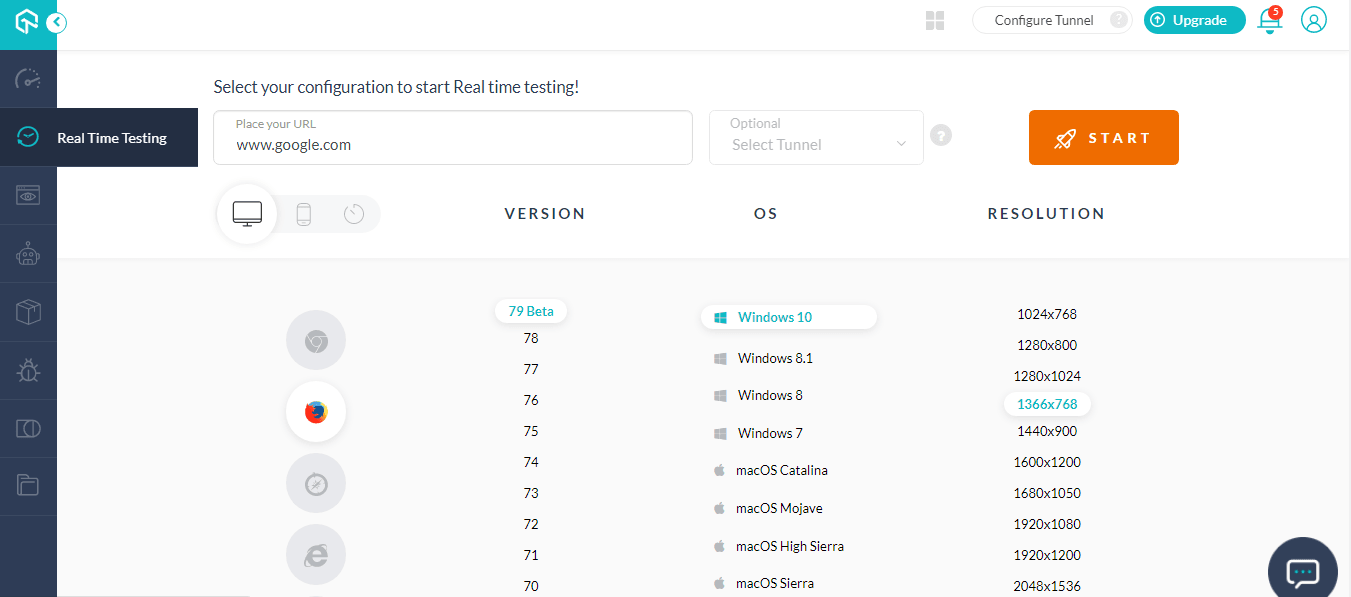
These browser versions can be found in our real time testing.
Test On Google Chrome 84 & 85 Beta
Google Chrome 84 released on July 14, 2020 and has a version 8.4 of the V8 JavaScript engine. You can find the list of changes from th V8 blog. I am going to point out some of the exciting features that might concern your cross browser compatibility.
What’s New In Google Chrome 84?
Google Chrome 84 has introduced “App Icon Shortcuts” using which users will be able to perform basic actions of an application by right clicking on the icon from desktop or long pressing the icon from an Android.
You can easily incorporate App Icon Shortcuts in your PWA by invoking a shortcuts property.
Web Animations API support just got better in Google Chrome 84.
You can now leverage animation.ready & animation.finished with the latest Chrome 84. The Chrome 84 also promises better performance as the browser can now perform cleanup and remove old animations to save up the memory. For more information, read this article on Web Animations API improvements in Chrome 84.
Deprecations and Removals In Chrome 84 – @import rules if incorporated within the replace() call will now throw an exception. Also, TLS 1.0 & TLS 1.1 has been deprecated in Chrome 84.
You can find all the deprecations & removal in the ChromeStatus.com.
What To Expect From Google Chrome 85 Beta?

The @property comes into the play.
CSS Houdini has been a game-changer for the CSS world. As it presented a set of low-level APIs that allows developers to relay to the browser how it should read and parse custom CSS defined on your website, even if those features are not natively implemented by the browser vendor.
One of the most pivotal API offered by CSS Houdini is the CSS Properties and Values API which allows developers to define custom CSS properties with default values, type checking, and the ability for properties to be inherited. This API was first supported in Google Chrome 78 through CSS.registerproperty(). This can now be invoked through stylesheets with the help of @property.
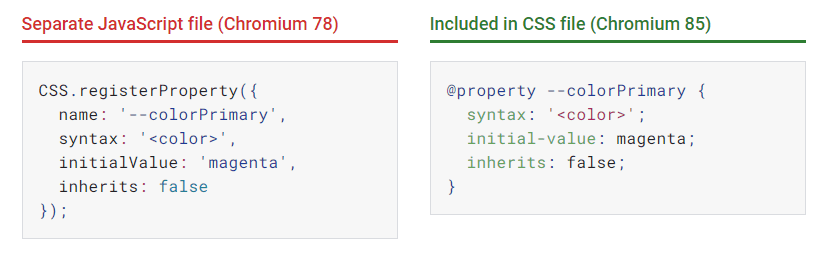
Read more about this from @property: giving superpowers to CSS variables.

For more information, refer to Chromium Blog.
Test On Mozilla Firefox 78 and 79 Beta
Let us look at some of the pivotal changes and fixes brought in the latest version of Mozilla Firefox.
Picture-in-picture support is now available in the latest Firefox version.
An improved WebRTC for smooth web-conferencing and video-calling experience as the screen saver won’t be interrupted anymore.
Firefox 78 has kept a major focus on improving accessibility. In previous versions of Firefox, the Screen readers used to lag when a user would open their microphone, camera, or share their screen. This has been taken care of in Firefox 78. For users with migraine & epilepsy, Firefox 78 has reduced numerous animations that triggered on a motion like a tab hover, search bar expansion, etc.
Like Google Chrome, Mozilla Firefox has also deprecated TLS 1.0 & TLS 1.1. With that said, let’s take a look at some of the differences from cross browser compatibility perspective between Chrome 84 & Firefox 78.
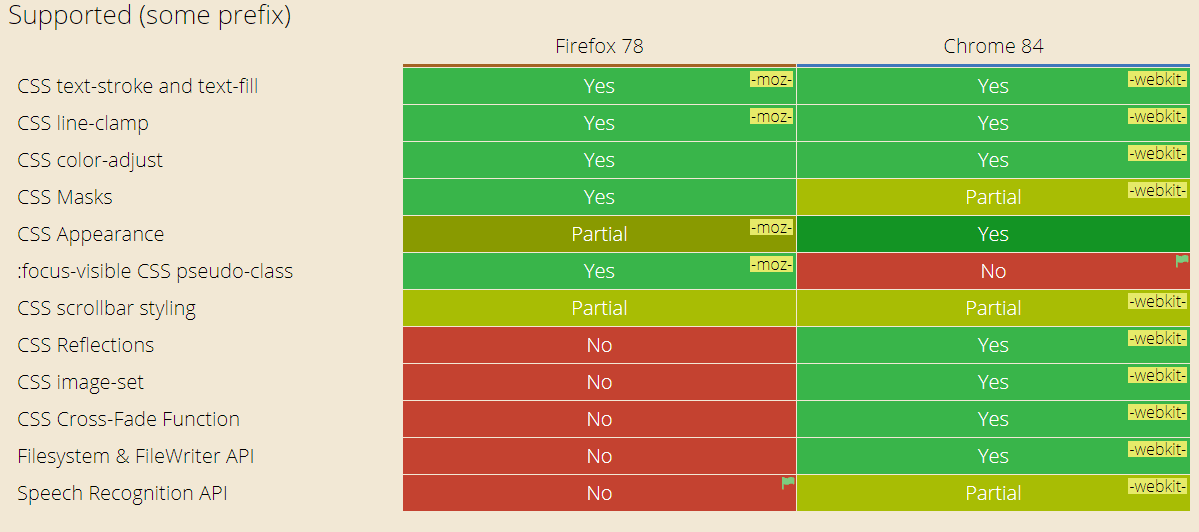
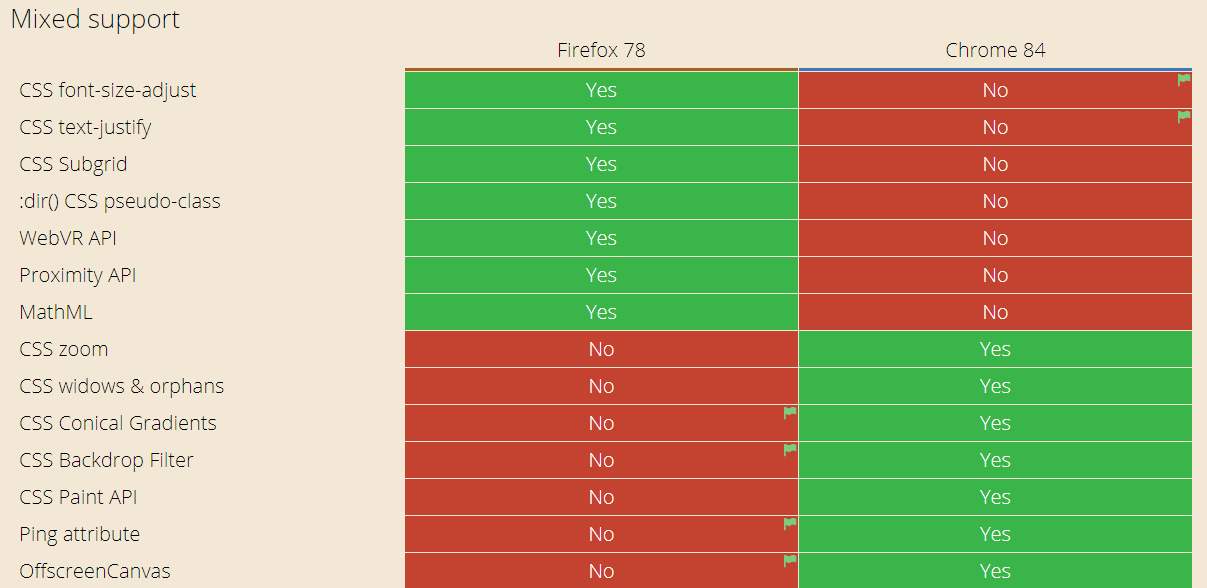
For a detailed difference, refer to CanIUse.
There is a lot more to Firefox 78, read it from their release notes. You can also read what’s new in Firefox 79 beta from this release note.
Just on a side note, you can also test on Firefox 20 to make sure your websites functions on legacy browsers.
Don’t miss out on exploring the importance of translating Firefox Browser Compatibility.
Test On Opera 69 and 70 Beta
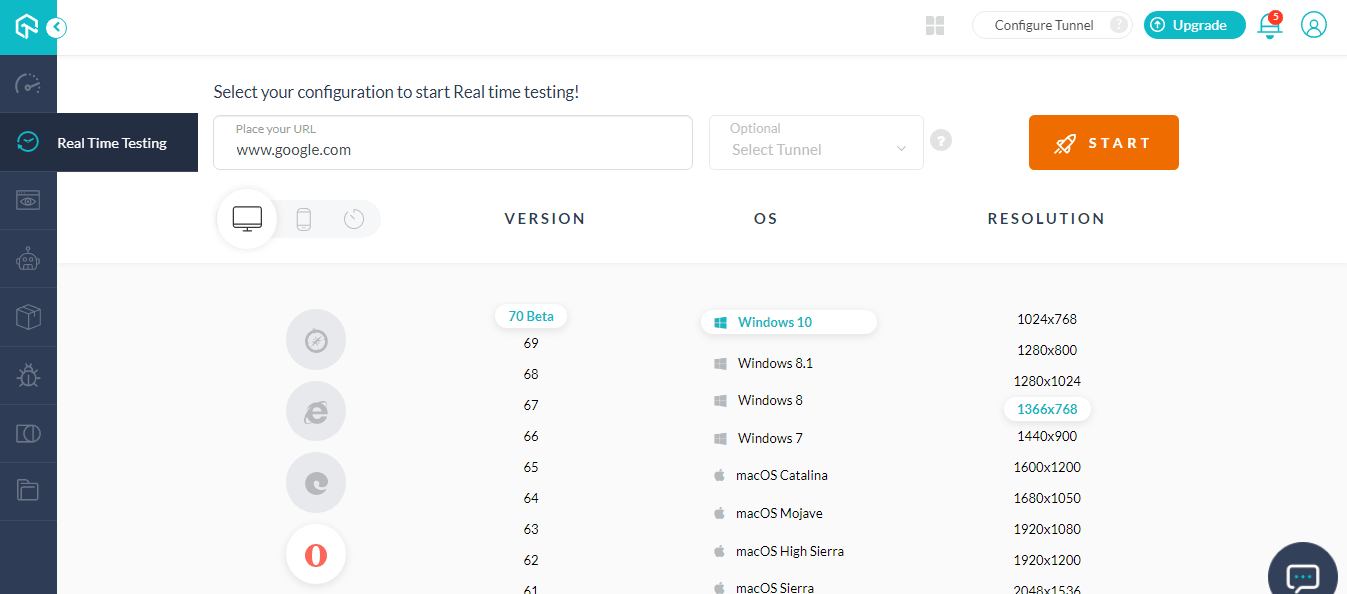
After providing built-in support for Instagram, Telegram, Facebook Messenger, WhatsApp, and VKontakte in earlier releases. Opera 69 desktop browser now allows users to have a better twitter experience. The latest browser has a built-in twitter on the browser UI.
There is also an improved visual tab cycler which now offers more tabs in the view. You can trigger the Visual tab cyler by using Ctrl + Tab simultaneously.
There are also improvements made to Workspaces and you now get a new weather widget in Opera 69.
Opera 69 is based on Chromium 82. Here is the difference between Chrome 84 & Opera 69.
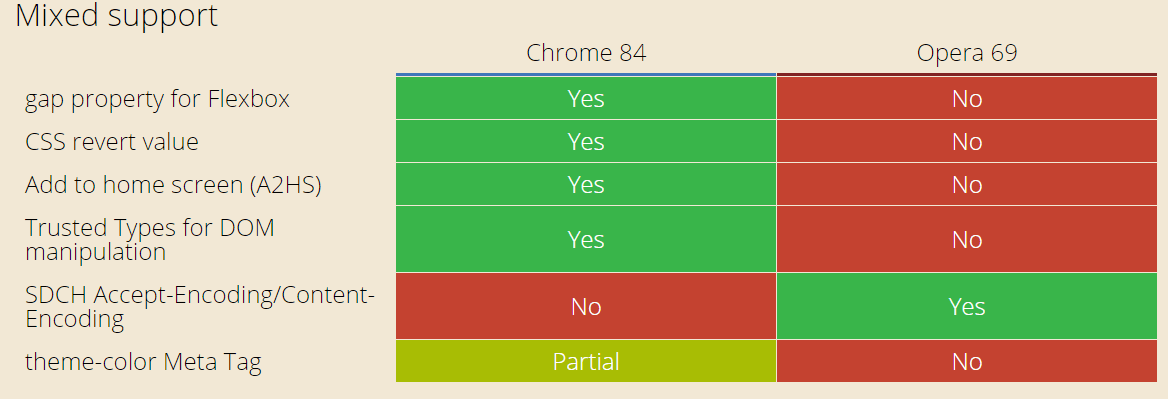
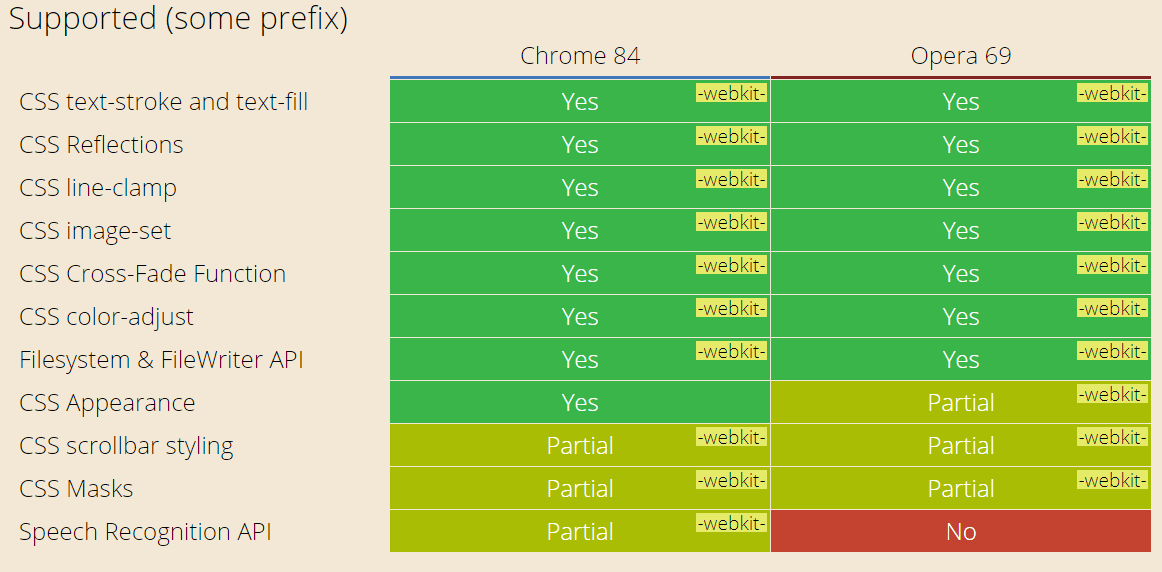
Image source: https://caniuse.com/#compare=chrome+84,opera+69
For more information, refer to Opera 69 Changelog.
Latest version of opera 70 beta is also based on Chromium 84 and offers better UI with workspaces with the convenience to easily access closed tabs. You can also dig deeper into search history with a wider search field panel inside History. The search within tabs has also improvised based on the content.
Test On Microsoft Edge 84
Microsoft Edge has been back in popularity ever since it incorporated a Chromium-based browser engine. In fact, if we look at the last 3 months then Microsoft Edge ranks number 2 in the browser market share after Google Chrome. With Microsoft Edge having 8.07% market share and Google Chrome dominating the chart with 70.19%. However, Edge is number 2 and that happened only after the Chromium Edge was introduced in January 2020.
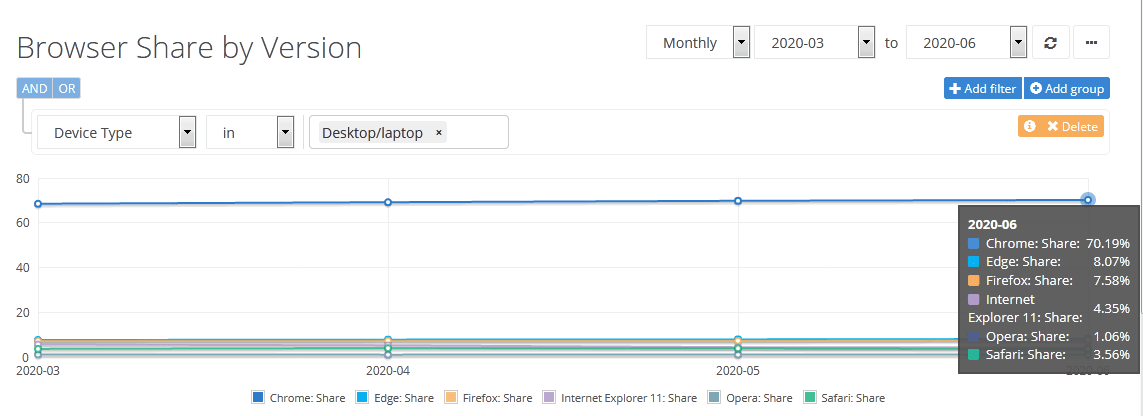
Now since both Microsoft Edge 84 & Google Chrome 84 are based out of the same Chromium version. Are there any rendering difficulties or cross browser compatibility issues between the two?
Well, the majority of the features are equally supported by both browsers however there are a few differences.


Image source: https://caniuse.com/#compare=edge+84,chrome+84
So what does the new Microsoft Edge have to offer?
Microsoft Edge 84 offers full-screen mouse support where users can leverage the mouse to switch tabs, access the address bar, and more while they are in full-screen mode.
Users can now nickname the saved credit or debit cards for convenient online purchasing.
TLS 1.0 and TLS 1.1 are disabled by default. However, users can re-enable them according to SSLVersionMin policy which won’t be available after Microsoft Edge 88 goes live.
Microsoft Edge 84 allows users to listen to PDF content while browsing through Read Aloud for PDF. The feature also helps visually impaired users facilitate easy learning.
Other than that there have been few policy updates and few policy deprecation. Read them all from Microsoft Edge stable channel release notes.
Enhancements To LT Browser
We introduced LT Browser in June 2020 and have received a great response from our beloved users. LT Browser is a dev-friendly browser dedicated to fast-track responsive testing and mobile view debugging with out-of-the-box features.
With LT Browser you can view and interact with mobile view of the website on 25+ mobile browsers and viewports. You can compare two different mobile views at the same time, side by side with mirrored interactions and navigation.
You can also type in your localhost URL to test a locally hosted web application.
From constructive feedback, we have improved the UI for the LT browser to help you perform responsive testing even faster. Here are the changes in the LT browser.
You Can Now Zoom Into Any Mobile View
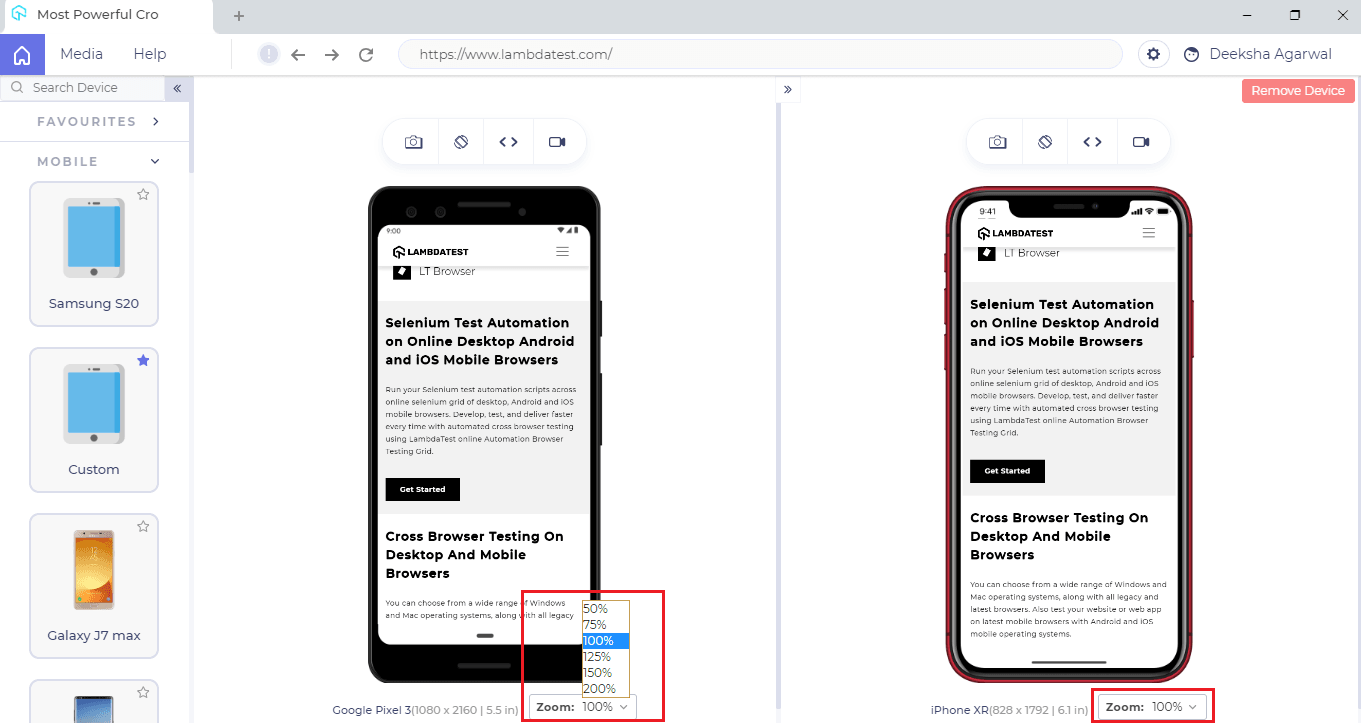
Earlier, you couldn’t zoom into one mobile view which affected the readability and accessibility of a website. However, this is now resolved as we have embedded a zoom-in menu which will allow you to zoom any mobile device.

Austin Siewert
CEO, Vercel
Discovered @TestMu AI yesterday. Best browser testing tool I've found for my use case. Great pricing model for the limited testing I do 👏
2M+ Devs and QAs rely on TestMu AI
Deliver immersive digital experiences with Next-Generation Mobile Apps and Cross Browser Testing Cloud

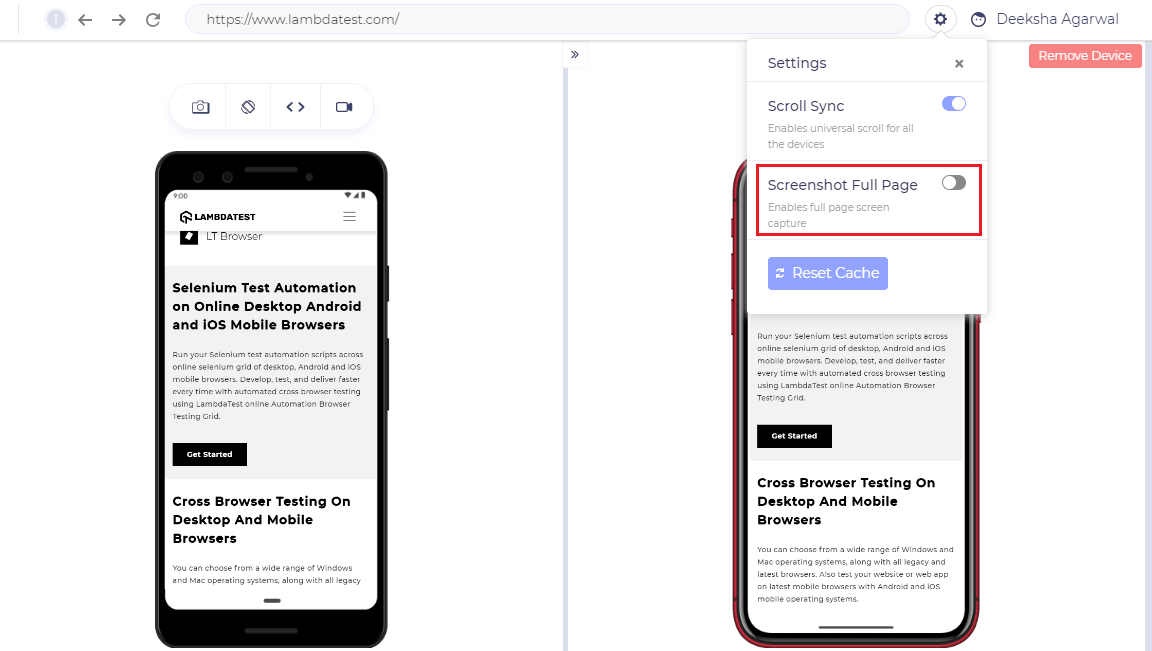
You Can Now Capture Full Page Screenshots With LT Browser
Earlier you could only capture screenshots of the area visible in the mobile view while capturing the camera icon. Now, you can also capture full-page screenshots using the toggle from settings.
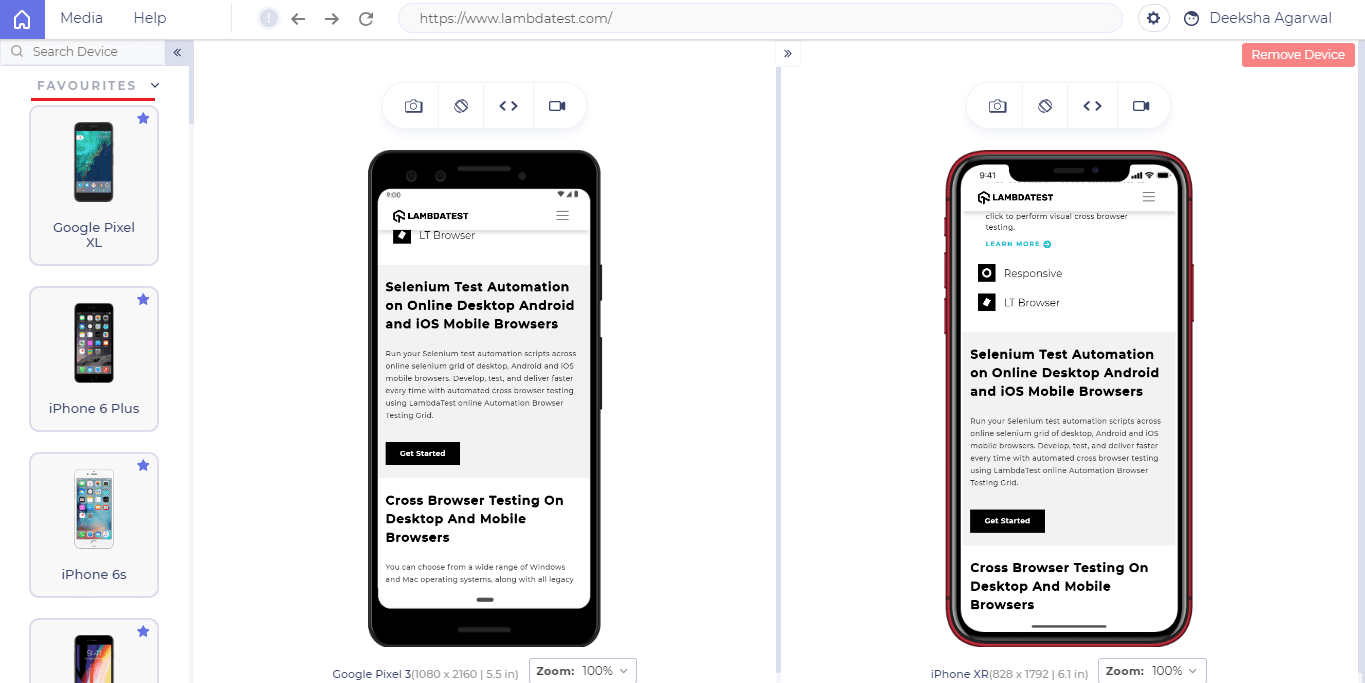
You Can Now Add Devices To Favourites
You can now save your favorite devices using the star icon in the left panel menu.
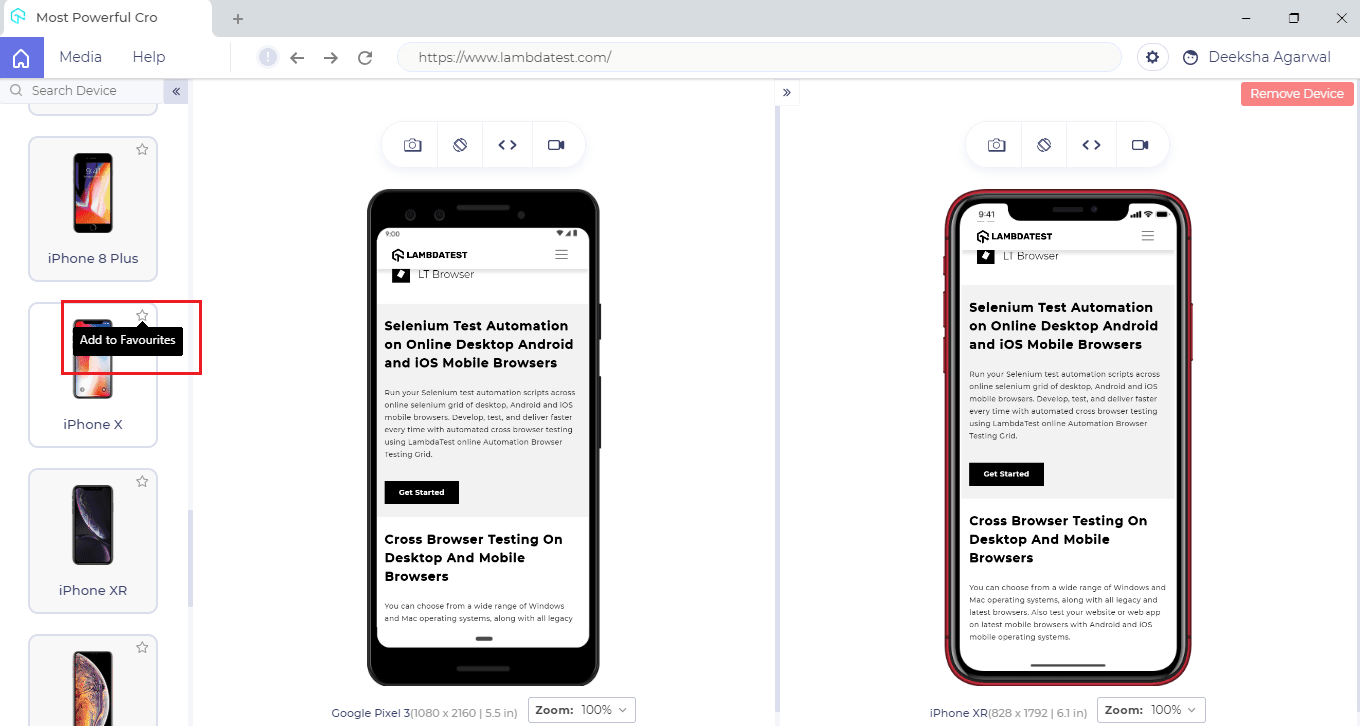
Once you start a device, it gets reflected under the favorites menu. The favorites menu is reflected on top.
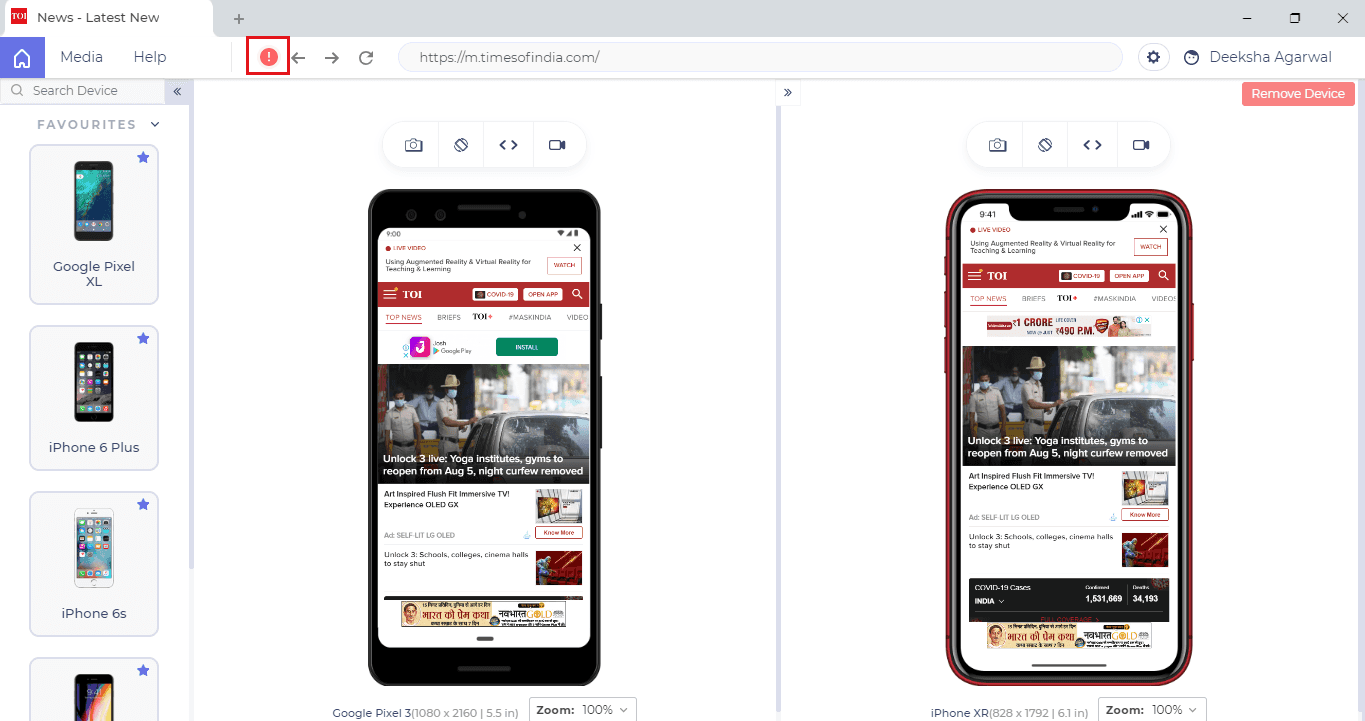
Get An Error Report If A URL Isn’t Rendered Properly
If there is any error on your URL then it would now be highlighted with an exclamation mark near the address bar.
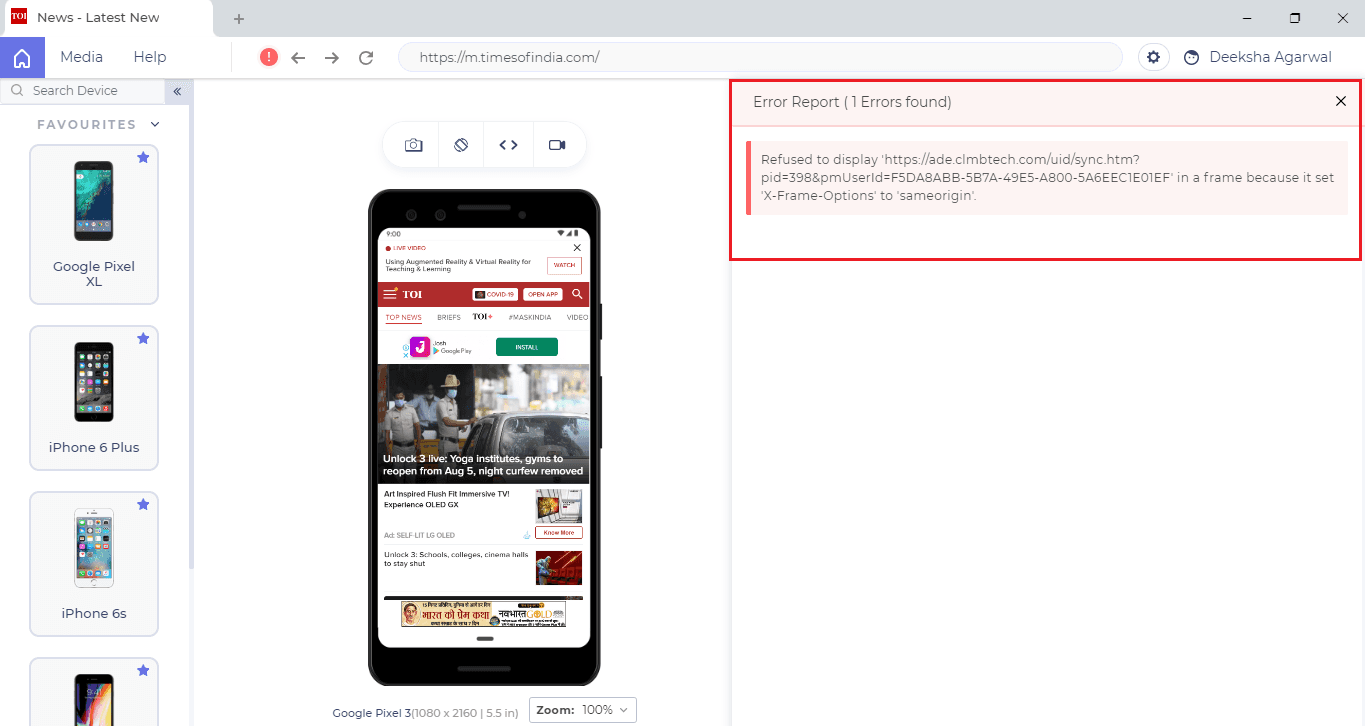
If you click on the exclamation mark, you will find a report related to the error. These errors are reflected directly from the developer tools of the mobile device.
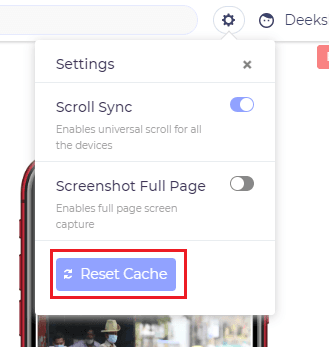
Reset Cache In Just A Single Click
We have incorporated a button under settings that will help you clear cache in a single click.
That Was All
We hope you like the latest additions made to the LT browser as you test your website over the latest browser introduced on our cloud. Do give these features and browsers a spin and share your valuable feedback with us.
You can drop your feedback or concerns to [email protected] or you could drop us a hello through our 24/7 customer chat support. We’re always here to hear you out.
Stay safe and happy testing. 🙂
Austin Siewert
CEO, Vercel
Discovered @TestMu AI yesterday. Best browser testing tool I've found for my use case. Great pricing model for the limited testing I do 👏
2M+ Devs and QAs rely on TestMu AI
Deliver immersive digital experiences with Next-Generation Mobile Apps and Cross Browser Testing Cloud


Did you find this page helpful?
More Related Hubs
TestMu AI forEnterprise
Get access to solutions built on Enterprise
grade security, privacy, & compliance
- Advanced access controls
- Advanced data retention rules
- Advanced Local Testing
- Premium Support options
- Early access to beta features
- Private Slack Channel
- Unlimited Manual Accessibility DevTools Tests