

Next-Gen App & Browser Testing Cloud
Trusted by 2 Mn+ QAs & Devs to accelerate their release cycles


Perform Live Interactive Testing On Chrome 76, 77 Beta, and 78 Dev
TestMu AI is live with new Chrome browsers to expand your cross browser testing coverage, along with a significant update on our machines for faster launch time.

Harshit Paul
January 30, 2026
Well, hi there! It is the first day of this week and we all are trying to cope up with the Monday blues, asking our colleagues about their weekend, figuring out what’s new to look forward to. Well, we got good news! Today, we have added more browsers on TestMu AI to help you expand your cross browser testing coverage. We also performed significant updates on our machines to fasten their launch times. So buckle up for a speedy testing experience!
New Google Chrome Browsers Added In Real-Time Testing
What do you think is the most pivotal metric for Cross browser testing? Well, as the word suggests, we believe it to be the browser coverage. A thorough cross browser testing is performed on the latest & legacy browsers over different operating systems. Any tool that helps you in such testing, should, of course, have all the latest browsers.
Keeping that in mind, we try our best to keep our platform updated with latest browser versions, including the Dev and Beta browsers. And today, we are out with latest Google Chrome browsers to help you expand the browser coverage in your testing workflows. You can now perform cross browser testing on the below Google Chrome versions.
- Google Chrome 76
- Google Chrome 77 Beta
- Google Chrome 78 Dev
Let us look at some images to understand the cross browser compatibility differences between these three Google Chrome browser versions.
- Supported elements
- Partially supported elements
- Elements that are not supported
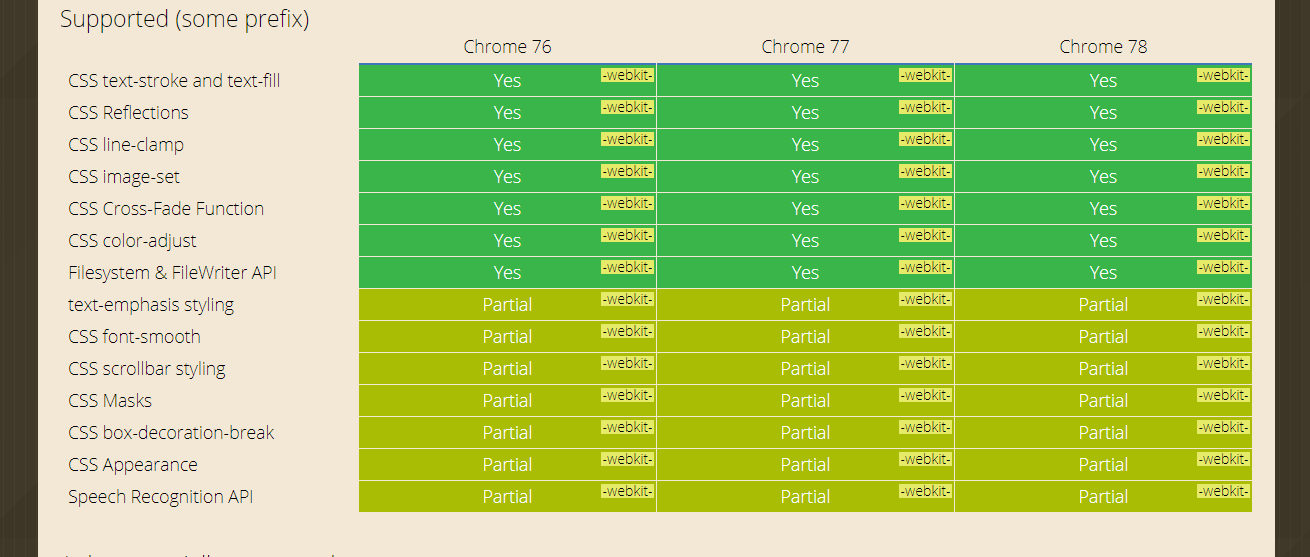
Source: http://bit.ly/2kqdpWB
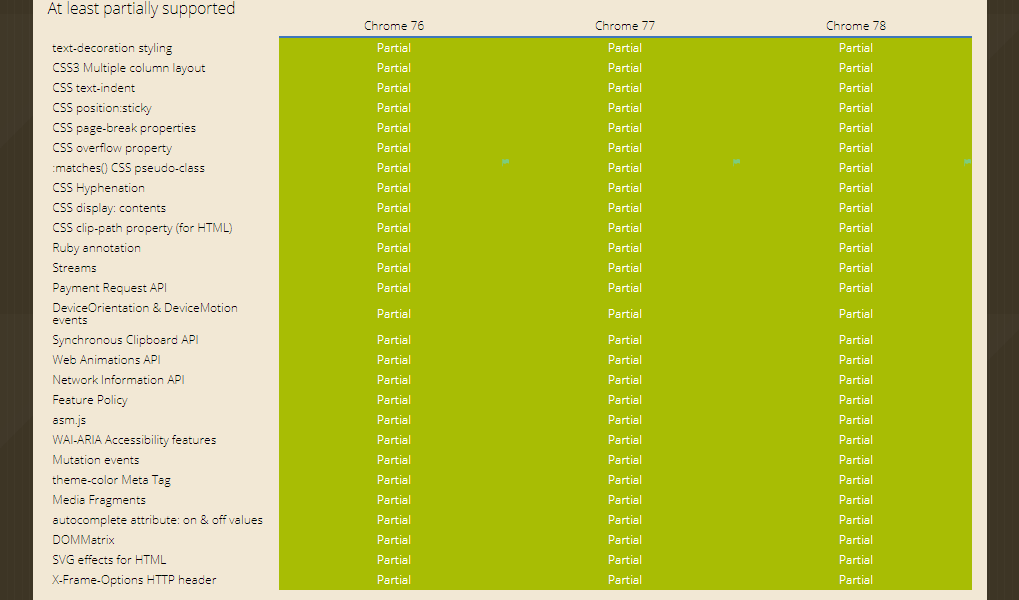
Source: http://bit.ly/2kqdpWB
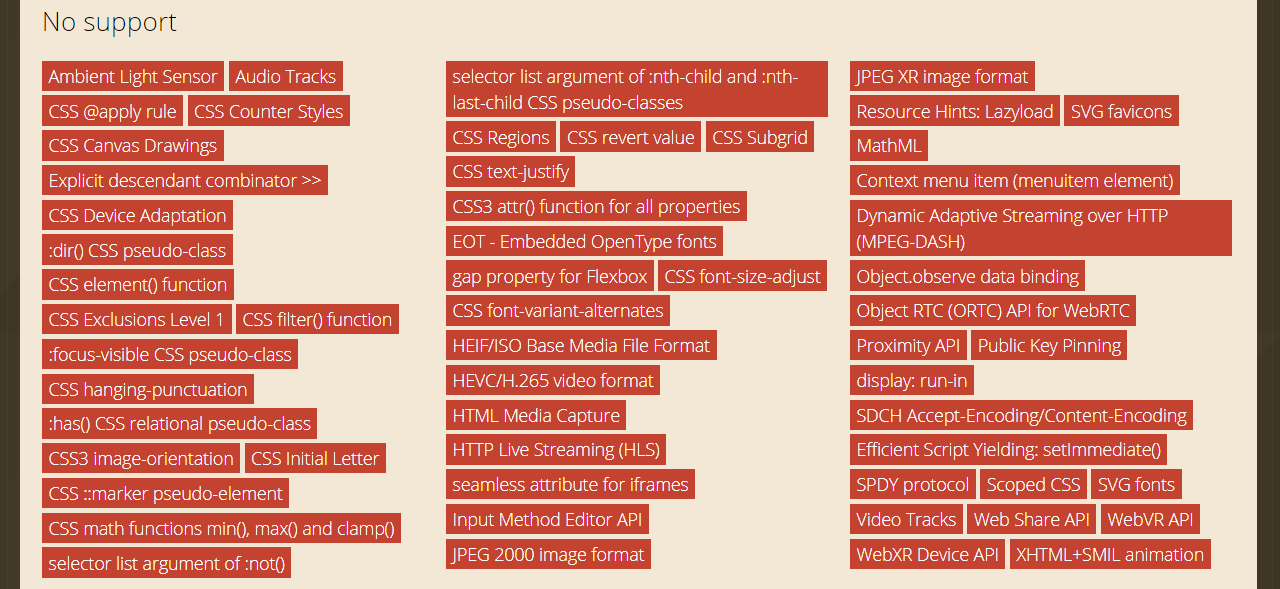
Source: http://bit.ly/2kqdpWB
That should give you a clear picture regarding what you need to ensure while cross browser compatibility testing, depending upon which web elements are being used in your website.
Improved Launch Time For Live Interactive Testing
Speed is one thing which is targeted by every project manager. This is especially true, in the age of modern SDLCs(Software Development Life Cycles), such as Agile, where the release windows often come knocking sooner than expected.
If your developers fail to deliver the project on time then that means your testers will have to overtime to cover up for the loss in time. Cross browser testing is an activity which tends to be time-consuming, and we know that very well. Which is why we always aimed to deliver a faster testing experience. We were already delivering a machine under a jiffy but now we have it optimized even further, leading the launch time to be 2 times faster than before.
Don’t believe us?? Give our real-time testing a spin and see for yourself !!
More Features To Come
We aim to bring you latest browsers as soon as they are released but that is not all we deliver. We also work on introducing more TestMu AI integrations with third-party tools for project management, CI-CD, instant messaging, and more. Last week itself, we went live with Breeze integration to TestMu AI. We are rigorously working on adding more features to our platform as we look forward to growing with you. Don’t forget to include the newly introduced Chrome browsers on your cross browser testing checklist.
Let us know in case you have any questions, drop us an email to [email protected] or simply give us a shout. We are here to help you speed your test suites 24/7. Happy testing! 🙂



Did you find this page helpful?
More Related Hubs
TestMu AI forEnterprise
Get access to solutions built on Enterprise
grade security, privacy, & compliance
- Advanced access controls
- Advanced data retention rules
- Advanced Local Testing
- Premium Support options
- Early access to beta features
- Private Slack Channel
- Unlimited Manual Accessibility DevTools Tests