

Next-Gen App & Browser Testing Cloud
Trusted by 2 Mn+ QAs & Devs to accelerate their release cycles


Revolutionize PDF Testing With SmartUI: Enhance Accuracy And Efficiency!
Validate PDFs with precision, detect layout and text differences, and generate detailed reports for seamless testing. Elevate your PDF testing with SmartUI's robust features. Try now!

Devansh Bhardwaj
January 10, 2026
Hola Testers!
A while ago, we introduced the SmartUI platform to enhance your visual regression testing experience. We’ve been constantly collecting feedback to improve and expand more on the SmartUI platform. Today, we’re thrilled to announce a long-awaited feature to our visual regression testing cloud, i.e. SmartUI’s PDF Testing!
With this addition, you can elevate your testing capabilities and ensure the quality and accuracy of PDF documents. You can now validate PDF files by detecting text, layout, graphics, or other element differences and generate detailed reports, providing a seamless and effective PDF testing experience.
No More Distorted PDFs With PDF Rendering
Now overcome the challenge of distortion of visual representations during the conversion process. With SmartUI’s PDF testing, achieve the desired level of precision and clarity when converting PDF pages into images.
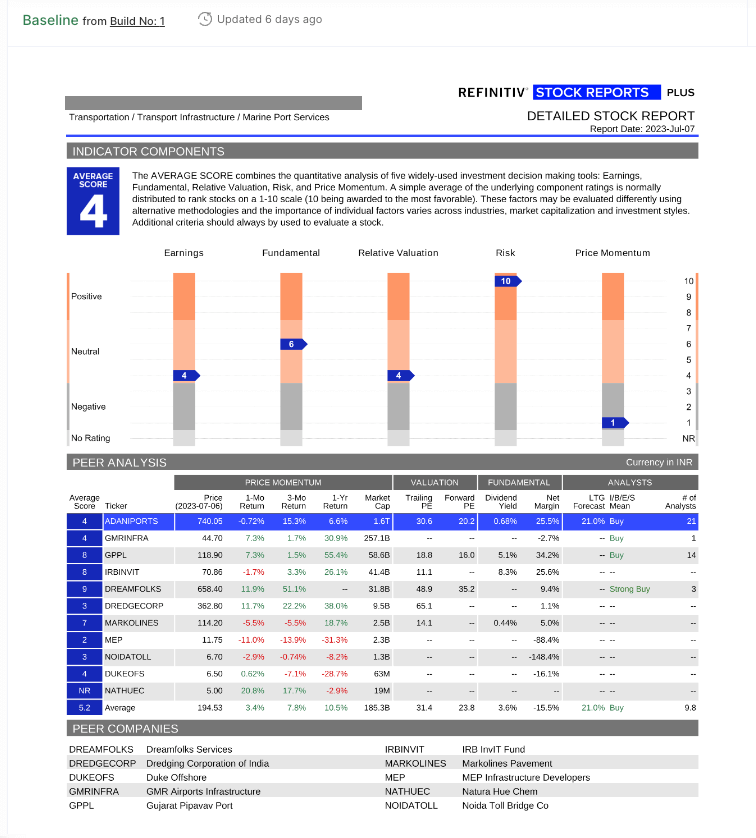
Here’s what more you can do:
- Convert PDF pages into images with our reliable PDF rendering engine, ensuring the accuracy of layout, font, and graphical elements.
- Benefit from compatibility with various PDF versions and embedded content, handling even complex documents easily.
- Easily compare rendering results by unzipping and extracting the PDF files for straightforward verification.
- Flexible integration options: Capture the PDF using your preferred frameworks like Selenium, Cypress, or CDP, or effortlessly upload through our API.
PDF Mismatch Detection
Highlight specific regions within PDF pages where mismatches occur of the documents carrying vital information and demanding closer scrutiny.
Delve into these additional functionalities:
- Define specific regions within PDF pages to focus on the
mis-matches. - Support for multiple ROIs per page and the ability to show the pages with the
mis-matches. - Adjust ROI settings for precision and flexibility, such as the ability to
ignore or selectareas usingboundingboxes.

Note: Want to know more about PDF Comparison with SmartUI? Check out our detailed support documentation
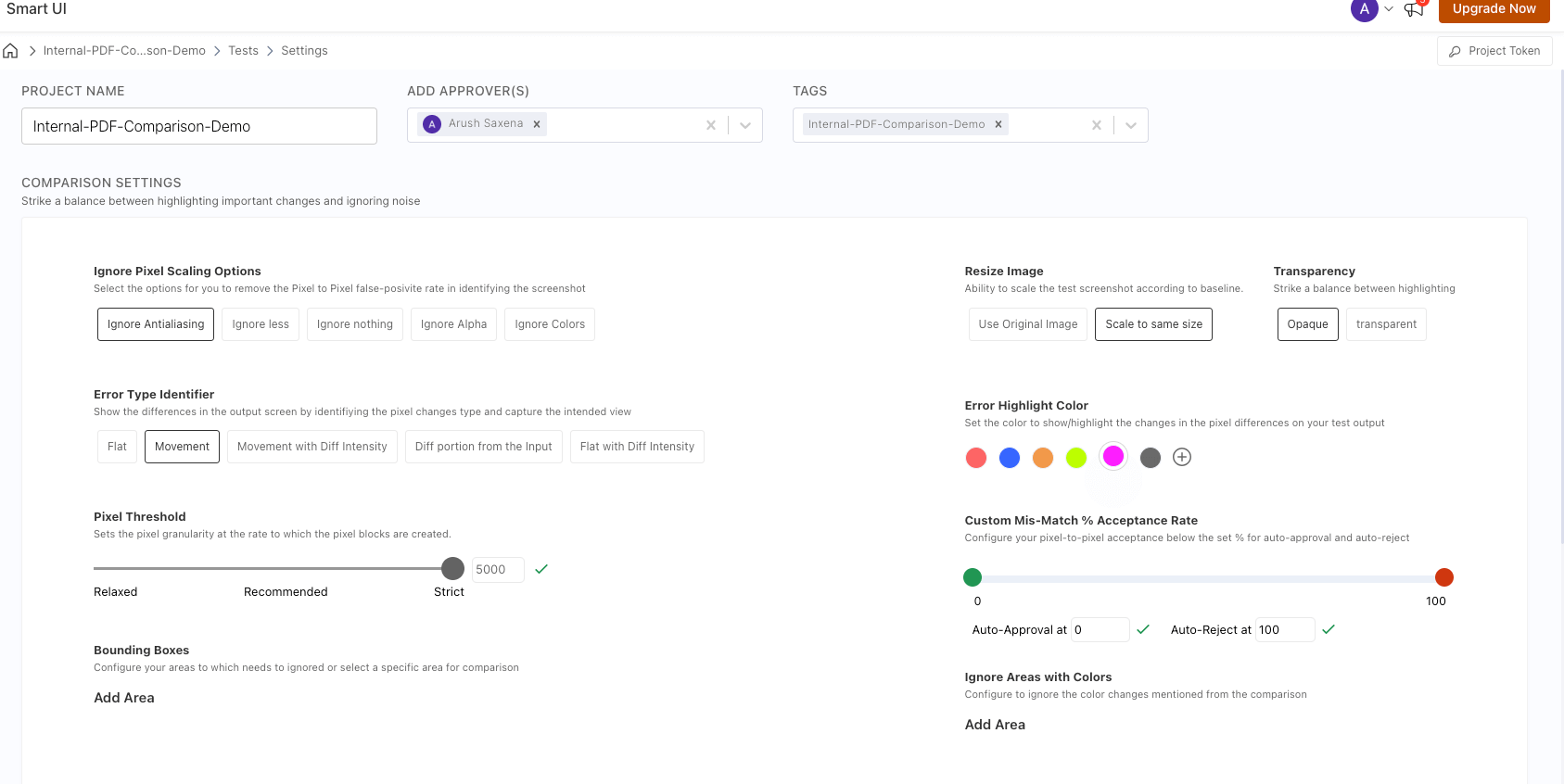
Define Threshold Settings
Now get control over threshold settings while testing your PDF files. Additionally, you can:
- Set thresholds for detecting differences.
- Get support for pixel-based or percentage-based differences.
- Customize sensitivity settings to filter out minor differences.
Comprehensive Comparison View UI
Now generate detailed comparison reports encompassing side-by-side comparisons, lists of differences, and visual overlays pinpointing where discrepancies occur.
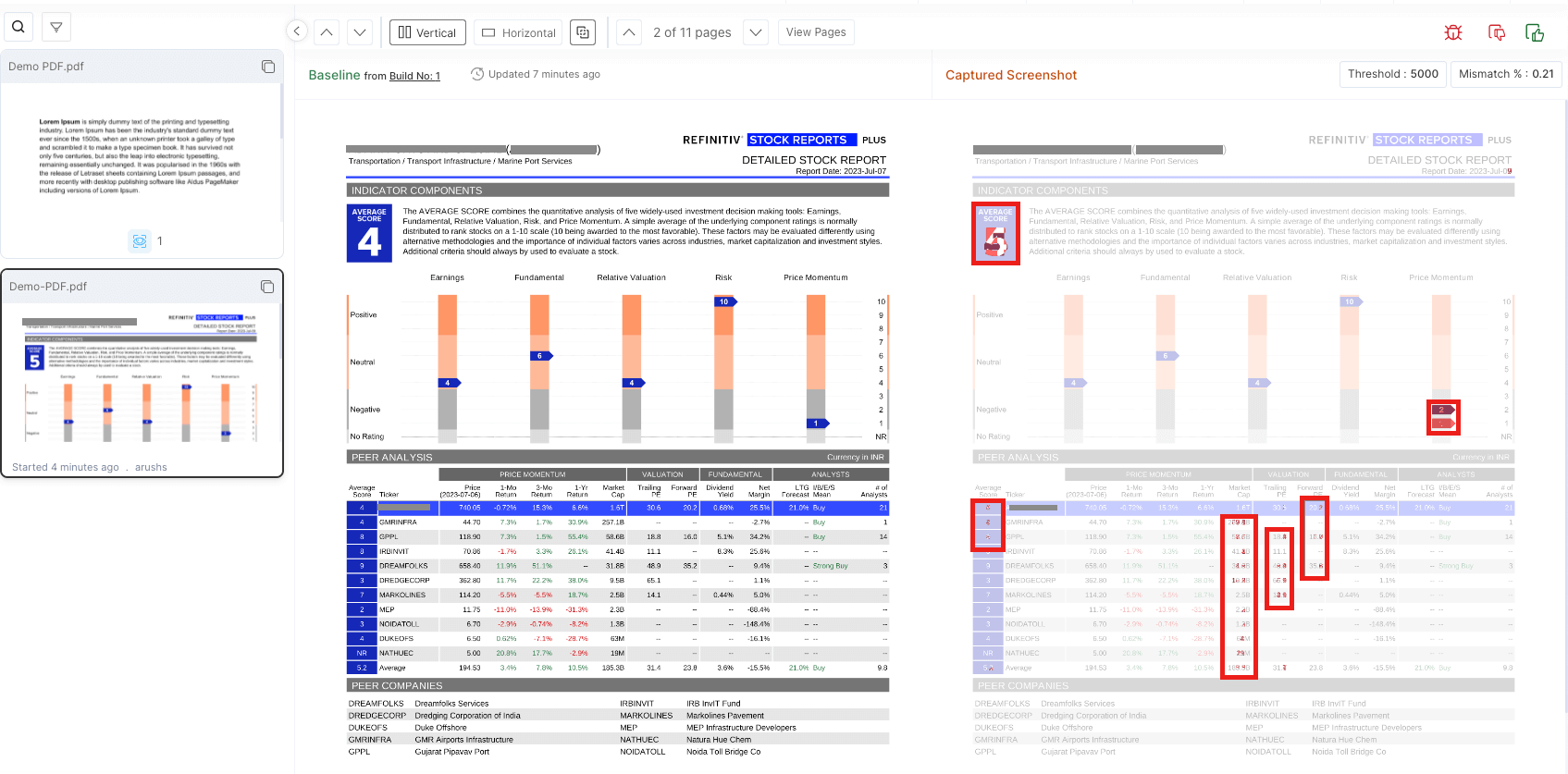
Uncover these additional features:
- View each page with the page count of the
PDFpages. - Highlight the
colorspecified in theProjectsettings for themis-matches. - An improved project creation process for PDF comparison, including clear instructions and intuitive steps to set up a new project for PDF comparison.
- A new project type, enabling specific functionalities tailored to PDF comparison needs.
- Additional filter options specific to PDF attributes, such as page numbers, metadata, or document properties.
- Ability to toggle between different pages of the PDF document within the comparison view.
- Stats of the entire page are displayed at the top of the active cards and the bottom of the inactive cards in the card panel.
- On the PDF page selection, the header shows PDF-specific details.
Note: Try now, + Your first 2000 screenshots/month are on us. Give it a shot.
Clear Insights On Build Status
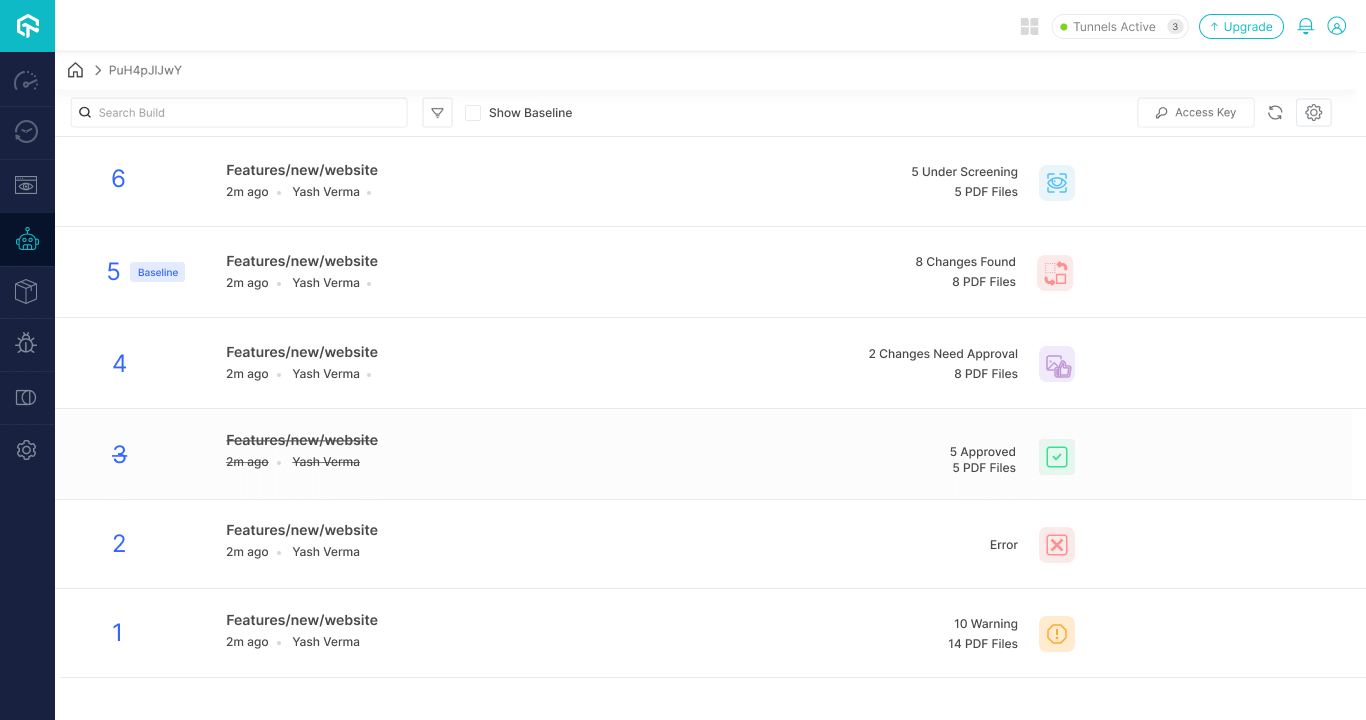
Overcome the challenge of lack of visibility into the status of comparison results. Now get direct access to the comparison status on the SmartUI dashboard and through API results.
Support For Parallel File Processing
Trim down your overall test execution time by leveraging parallel testing. Parallel testing lets you execute multiple test cases concurrently across various combinations of browsers, operating systems, and devices. Now run multiple files simultaneously and compare them all simultaneously while performing PDF testing.
Here’s what more you can do:
- Automation features for bulk PDF comparison tasks.
- Progress monitoring and error handling.
Effectively Manage Different PDFs Versions
Now track and manage different versions of PDF files with a clear and organized system in place. Here’s what more you can do:
- Integrate with popular version control systems (e.g., Git, SVN).
- Visualize changes between document versions.
- Ability to revert or view the changes in a specific PDF file version.
Note: SmartUI will soon support testing other document formats such as Excel, Docs, and more.
All In All!
SmartUI’s new PDF testing feature is a game-changer for users seeking efficient and accurate PDF testing. With robust capabilities like PDF rendering, image comparison, region of interest settings, and customizable threshold adjustments, SmartUI empowers users to achieve pixel-perfect results and identify even the subtlest differences in their PDF files.
By choosing SmartUI for PDF testing, users can confidently tackle the challenges associated with PDF testing, making it easier to maintain document integrity and meet quality standards.
Note: Try now, + Your first 2000 screenshots/month are on us. Give it a shot.
Happy Testing!


Did you find this page helpful?
More Related Hubs
TestMu AI forEnterprise
Get access to solutions built on Enterprise
grade security, privacy, & compliance
- Advanced access controls
- Advanced data retention rules
- Advanced Local Testing
- Premium Support options
- Early access to beta features
- Private Slack Channel
- Unlimited Manual Accessibility DevTools Tests