

Next-Gen App & Browser Testing Cloud
Trusted by 2 Mn+ QAs & Devs to accelerate their release cycles


How To Run Cypress Tests In Azure DevOps Pipeline
Learn to run Cypress tests in Azure DevOps pipelines with this guide. Discover setup steps, test scenarios, and enhance your CI/CD workflows.

Kailash Pathak
December 24, 2025
This article is a part of our Content Hub. For more in-depth resources, check out our content hub on Cypress Tutorial.
Traditional software development models like Waterfall have given way to DevOps, which enhances collaboration between development and operations teams. This shift enables faster, more reliable updates and integrates continuous feedback into the development cycle.
With cloud platforms like Azure, AWS, and GCP supporting various automated testing tools, integrating Cypress tests in Azure DevOps pipeline provides a streamlined solution for automating tests. This integration helps ensure high code quality and accelerates deployment, meeting the growing demands for rapid, reliable software delivery.
Overview
Running Cypress tests in an Azure DevOps pipeline automates end-to-end testing within your CI/CD workflow, ensuring faster feedback and higher code quality. Integrating cloud platforms enables scalable, cross-browser test execution with real-time reporting.
Why Run Cypress Tests in Azure DevOps?
Integrating Cypress tests into Azure DevOps enables seamless automation within your CI/CD workflow.
- Ensures continuous validation of application quality.
- Detects issues early in the development cycle.
- Simplifies test execution across environments with integrated reporting and analytics.
Setting Up Cypress Tests in Azure DevOps Pipeline
To get started, set up a dedicated pipeline for Cypress testing:
- Install Node.js and Cypress dependencies.
- Configure the YAML pipeline to include test commands.
- Define environment variables and specify agents for execution.
This setup enables repeatable, automated test execution every time code changes are committed.
Running Cypress Tests in Azure DevOps Pipeline
Once configured, the pipeline runs Cypress tests automatically on every commit or pull request. Tests can be executed in headless mode for speed, with results logged and visual reports generated for analysis.
Running Cypress Tests in Azure DevOps Pipeline on Cloud
Integrating cloud platforms like TestMu AI allows Cypress tests to run across multiple browsers and operating systems in parallel. This ensures better scalability, faster execution, and comprehensive test coverage.
Why To Run Cypress Tests in Azure DevOps?
Cypress is a popular end-to-end testing framework that can be integrated into Azure DevOps to enhance your CI/CD workflows. Integrating Cypress tests in Azure DevOps helps automate the testing process, improving the efficiency and reliability of your CI/CD workflows.
Below are some of the benefits of running Cypress tests in Azure DevOps.
- Robust CI/CD Pipelines: Running Cypress tests in Azure DevOps provides powerful CI/CD pipelines that allow for continuous integration and deployment. By integrating Cypress, you can ensure that your application is thoroughly tested at each stage before deployment, catching issues early in the development process.
- Scalability and Parallel Execution: Running Cypress tests in Azure DevOps offers scalable infrastructure, enabling Cypress tests to be run across various projects and parallelized across multiple agents. This improves test efficiency and reduces overall test execution time.
- Centralized Reporting: Running Cypress tests in Azure DevOps makes test results centralized, allowing developers and testers to access detailed reports and dashboards from a single location. This centralization aids in tracking test outcomes, analyzing trends, and making informed decisions.
- Collaborative Testing: Running Cypress tests in Azure DevOps supports a collaborative approach to testing. It allows for the seamless inclusion of both component tests and end-to-end tests in your pipelines, fostering better coordination between development and testing teams.

Note: Run your Cypress tests across 3000+ browsers and OS combinations. Try TestMu AI Now!
Setting Up Cypress Tests in Azure DevOps Pipeline
To explain how you can set up Cypress in Azure DevOps pipeline to run test cases, we will be using a typical e-commerce site, TestMu AI eCommerce Playground.
You can follow the steps mentioned below to create a new Cypress project:
Step 1: Create a folder and generate package.json.
- Create a project by the name Cypress_Lambdatest.
- Create a package.json file using the npm init command in the terminal.
Step 2: Install Cypress.
Run this command in the newly created folder to install Cypress.
npm install cypress —save-dev
yarn add cypress --dev
This will install Cypress locally as a dev dependency for your project.
Cypress version 9.2.0 is reflected once this is installed, as seen below. The most recent version of Cypress is 13.13.2.
{
    "name": "cypress_lambdatest",
    "version": "1.0.0",
    "description": "",
    "main": "index.js",
    "scripts": {
      "cy:report": "cypress run"
    },
    "author": "Kailash Pathak",
    "license": "ISC",
    "devDependencies": {
      "cypress": "^9.2.0"
    }
   }
Step 3: Once you have added the Cypress dependencies, you must create a new folder named cypress_lambdatest under the integration folder. Again, inside the cypress_lambdatest folder, create another folder named lambdatest.
Within the lambdatest folder, create the following test spec files:
- login_searchproduct.spec.js
- ScrollAnd_ClickProduct.spec.js
With Cypress installed, let’s proceed to understand how Cypress works by demonstrating a simple test scenario.
Test Scenario:
- Open the URL TestMu AI eCommerce Playground.
- Enter your email address.
- Enter the password.
- Click on the Login button.
- Search for the product “VAIO.”
- Verify the correct product is searched.
- Logs out from the application.
Add the following test script to the login_searchproduct.spec.js file you created earlier. This script handles logging into the application, searching for a product, and verifying that the correct product is displayed after the search.
it("Open the Url", () => {
  cy.visit(
    "https://ecommerce-playground.lambdatest.io/index.php?route=account/login"
  );
  });
  it("Login into the application", () => {
  cy.get('[id="input-email"]').type("[email protected]");
  cy.get('[id="input-password"]').type("lambdatest");
  cy.get('[type="submit"]').eq(0).click();
  });
  it("Search the Product", () => {
  cy.get('[name="search"]').eq(0).type("VAIO");
  cy.get('[type="submit"]').eq(0).click();
  });
  it("Verify Product after search ", () => {
  cy.contains("Sony VAIO");
  });

Below is the complete code walkthrough for the above test script.
Code Walkthrough:
- The first step opens the target URL using cy.visit().
- The second it() block logs into the application by entering the email and password. The email field is located using the id attribute.
- In the third it() block, the script searches for a product by interacting with the search input and submitting the query.
- The final it() block verifies that the correct product is displayed after the search.
Let’s look into another test scenario to further understand how Cypress works, focusing on functionalities like scrolling and clicking.
Test Scenario:
- Open the URL TestMu AI eCommerce Playground.
- Enter your email address.
- Enter the password.
- Click on the Login button.
- Now, Scroll to the bottom of the application.
- Click on a particular product.
< Add the following test script to the ScrollAnd_ClickProduct.spec.js file you created earlier. This script handles logging into the application, scrolling through the product list, clicking on a product, and verifying that the correct product is displayed after the click.
it("Open the Url", () => {
  cy.visit(
    "https://ecommerce-playground.lambdatest.io/index.php?route=account/login"
  );
  });
  it("Login into the application", () => {
  cy.get('[id="input-email"]').type("[email protected]");
  cy.get('[id="input-password"]').type("lambdatest");
  cy.get('[type="submit"]').eq(0).click();
  });
  it("Click on Lambdatest Logo", () => {
  cy.get('[title="Poco Electro"]').click();
  cy.wait(5000);
  });
  it("Scroll to the bottom and Click on product 'Nikon D300' ", () => {
  cy.get('[title="Nikon D300"]').eq(0).scrollIntoView().click();
  });
Below is the complete code walkthrough for the above test script.
Code Walkthrough:
- The first step uses cy.visit() to navigate to the e-commerce site.
- The second it() block handles logging into the application by entering the email and password.
- The third it() block ensures you are redirected to the home page after clicking on the TestMu AI logo.
- In the final it() block, the script scrolls to the bottom of the page and clicks on a specific product.
- In the screenshot below, you can see how to inspect elements. We have located the Login button by its type attribute using the Cypress command.
- This command selects the first element with the type attribute set to “submit” and performs a click action on it.
Now that you understand how Cypress works, let’s move on to running Cypress tests in Azure DevOps pipeline. First, let’s understand the basics of DevOps and its core components.
Running Cypress Tests in Azure DevOps Pipeline
In the traditional Software Testing Life Cycle(SDLC), QA teams had to wait for code deployments to test functionality and give final approval. With modern cloud platforms like Azure DevOps, this process is streamlined. Azure Pipelines automate code deployment and testing, running the pipeline automatically whenever code is pushed.
To integrate Cypress with Azure DevOps Pipelines, follow these steps:
- Set Up Azure Pipeline: Configure the pipeline to deploy your code automatically.
- Run Cypress Tests: Use the pipeline to execute your Cypress test cases.
By setting up this integration, you ensure consistent, quality code is delivered rapidly to users.
To get started with running Cypress tests in Azure DevOps Pipelines, let’s look at the prerequisites to run Cypress tests in Azure DevOps Pipeline.
- Cypress code has already been pushed into the GitHub repository.
- Azure free account already created.
- The user is already logged into Azure DevOps.
Once you have the prerequisites in place to get started to run the Cypress tests in Azure DevOps Pipeline, you must follow the below steps to create and set up the Azure DevOps pipeline.
- Click on Pipelines from the left navigation and then click on New Pipeline.
- Click on Use the classic editor to create a pipeline without YAML from the above screen. The classic editor walks you through using a wizard-like process that guides you as you create your build.
- Click the GitHub icon to select the repository.
- Select the repository and branch name from the existing repository.
- Click on the Continue button, the below page is open.
- Select the template as an Empty job. After clicking on “Empty job” on the next screen, you can see under the Tasks tab three options: Pipeline, Get Source, and Agent job. By default, the pipeline is selected.
- On the right side:
- Enter the Name of the pipeline, e.g., Cypress Lambdatest Project.
- In the Agent pool: Select ‘Azure Pipelines’ from the drop-down.
- In the Agent Specification: Select OS ‘window-latest’ (Test cases are run in this OS).
- Configure the Get Source under the Task tab and make sure the correct repository and build are selected.
- Configure Agent Job under the Task tab and enter the following information.
- Enter the Display Name of the pipeline, e.g., Cypress Lambdatest.
- In the Agent pool: Select ‘Azure Pipelines’ from the drop-down.
- In the Agent Specification: Select Agent ‘window-latest’ (test cases are run in this agent).
- Click the (+) icon against the Project, search for “npm” and click the Add button.
- After adding “npm,” from the left side, click on npm install. Enter/Select the below data (on the right side) to install the Cypress and other dependencies.
- Enter the Display name, e.g., npm install.
- In the Command: Enter ‘install.’
- In the Control Options: Select Check Box ‘Enabled’ and Check Box ‘Continue on error’.
- Now, click the (+) icon, search for “npm” again, and click the Add button. Click on npm install from the left side (See below screenshot). On the right side, enter /select the below data to install Cypress and other dependencies.
- Enter the Display name, e.g., Run Cypress Lambdatest.
- In the Command: Enter ‘custom’.
- In the Command and arguments: Enter run cy:report.
- Click on ‘Save & queue.’ As you click on Save & queue, this will open a dialogue box as below. Select the agent pool, agent, and the branch from which Azure DevOps needs to execute the build.
- Click on Save and run.
Azure DevOps Pipeline Process:
As you click on Save and Run, the Job starts executing.
- In the first step, the job is initialized.
- In the second step, code is pulled from the repository. In this case, the code pulls from .github.
- In the third step, the npm command runs to install the package.
- 4. In the fourth step, the Cypress test case starts executing. In the screenshot below, You can see using the command cy:report (Which we have given in package.json) test case starts executing.
- In the fifth and sixth steps, we have to purge the repository, and the job is finished.
While Azure DevOps Pipelines is a CI server that automates the build and deployment process of your web apps, cloud testing platforms like TestMu AI offer easy integration to run Cypress tests in Azure DevOps pipelines.
Running Cypress Tests in Azure DevOps Pipeline on Cloud
You can leverage the TestMu AI cloud to enhance Cypress’s capabilities. TestMu AI allows you to run tests in parallel, integrate with various other CI/CD tools, and build a robust pipeline for seamless Cypress automation.
TestMu AI is an AI-powered test execution platform that enables testers to perform both manual web testing and automated browser testing at scale across 3,000+ browsers, operating systems, and device emulators. It supports manual web testing as well as automated browser testing.
With TestMu AI, you can execute and analyze Cypress test scripts online as part of the build process. It enables continuous testing, building, and deploying of iterative code changes, helping catch failures early in the development cycle and addressing them before reaching production.
On this platform, you can perform Cypress UI testing on various browsers and versions, including headless browsers. In addition to Cypress, TestMu AI also offers Selenium automation testing through the Azure Marketplace.
To simplify, let’s execute the test scenarios mentioned earlier in this blog, showing how to run Cypress tests in the Azure DevOps pipeline and run them in parallel on TestMu AI’s Cypress Grid.
Before getting started with Cypress and integrating the Azure DevOps pipeline with TestMu AI, ensure you have the following information in place.
- You must have an Azure CI account.
- You must have a Git or GitHub repository to store your code.
- You need a TestMu AI account and your account credentials, specifically your username and access key, to initialize and authenticate your TestMu AI setup. You can find your username and access key by navigating to Profile > Account Settings > Password & Security.
The steps to integrate Azure Pipelines with TestMu AI and run Cypress tests in the Azure DevOps pipeline are explained below.
- Create a new project, click on New Project, and fill in the required field.
- Once the project is created, you must now create the pipeline by clicking on Create Pipeline.
- If you have your code repository in GitHub, then select the option for GitHub from the values.
- Once you choose an option for code repository, now you will be asked to log in. Once you have logged in, you need to choose the specific repository. Here, the repository that was picked is the azure-pipelines.yml file.
# Node.js
# Build a general Node.js project with npm.
# Add steps that analyze code, save build artifacts, deploy, and more:
# https://docs.microsoft.com/azure/devops/pipelines/languages/javascript


trigger:
- master


pool:
vmImage: ubuntu-latest
variables:
LT_USERNAME: "<LT_USERNAME>"
LT_ACCESS_KEY: "<LT_ACCESS_KEY>"


steps:
- task: NodeTool@0
  inputs:
    versionSpec: "10.x"
  displayName: "Install Node.js"


- script: |
    npm install
    npm install -g lambdatest-cypress-cli
    npm run cy:report
  displayName: "npm install and Run Cypress test case in lambdatest cloud"
Yaml file explanation:
- trigger: Under trigger, You can specify the full name of the branch (for example, master).
- pool: Under the pool, we can mention the name of the agent where we want to run your test case.
- variable: Under variable, you can add TestMu AI credential.
- steps: Under steps, you can add various tasks here. We added a task to install the node with the specific version.
- script: Under the script, you can mention the package you want to install using npm and run the test cases using npm.
Next, by using the lambdatest-config file, you need to provide the credential, run_setting, and browser with the version in which you want to run your test cases.
{
"lambdatest_auth": {
  "username": "<username>",
  "access_key": "<access_key>"
},
"browsers": [
  {
    "browser": "Chrome",
    "platform": "Windows 10",
    "versions": ["latest"]
  },
  {
    "browser": "Chrome",
    "platform": "Windows 10",
    "versions": ["latest-1"]
  },
  {
    "browser": "Firefox",
    "platform": "Windows 10",
    "versions": ["latest"]
  },
  {
    "browser": "Firefox",
    "platform": "Windows 10",
    "versions": ["latest-1"]
  }
],
"run_settings": {
  "cypress_config_file": "cypress.json",
  "build_name": "build-name",
  "parallels": 4,
  "specs": "./cypress/integration/lambdatest/*.spec.js",
  "ignore_files": "",
  "feature_file_suppport": false,
  "network": false,
  "headless": false,
  "reporter_config_file": "",
  "npm_dependencies": {
    "cypress": "9.2.0"
  }
},
"tunnel_settings": {
  "tunnel": false,
  "tunnel_name": null
}
}
For demonstrating the test scenario mentioned earlier, we will be using Cypress version 9.2.0. You can also use the same setup with the latest Cypress version, 13.13.2. Simply update the version in your configuration from “cypress”: “9.2.0” to “cypress”: “13.13.2”.
Azure DevOps Pipeline Process:
- As the build in Azure DevOps Pipeline starts, the first step job is initialized.
- In the second step, code is pulled from the repository. In this case, code pulled from .github.
- In the third step, the node is installed.
- In the fourth step, npm installs various packages, and finally, the cypress test cases start executing.
- In the screenshot below, you can see that the command cy:report (Which we have given in package.json) test case starts executing in the TestMu AI platform.
Result:
In the screenshot below, you can see test cases start running in four browsers parallelly (Browser details given above in File: lambdatest-config.json).
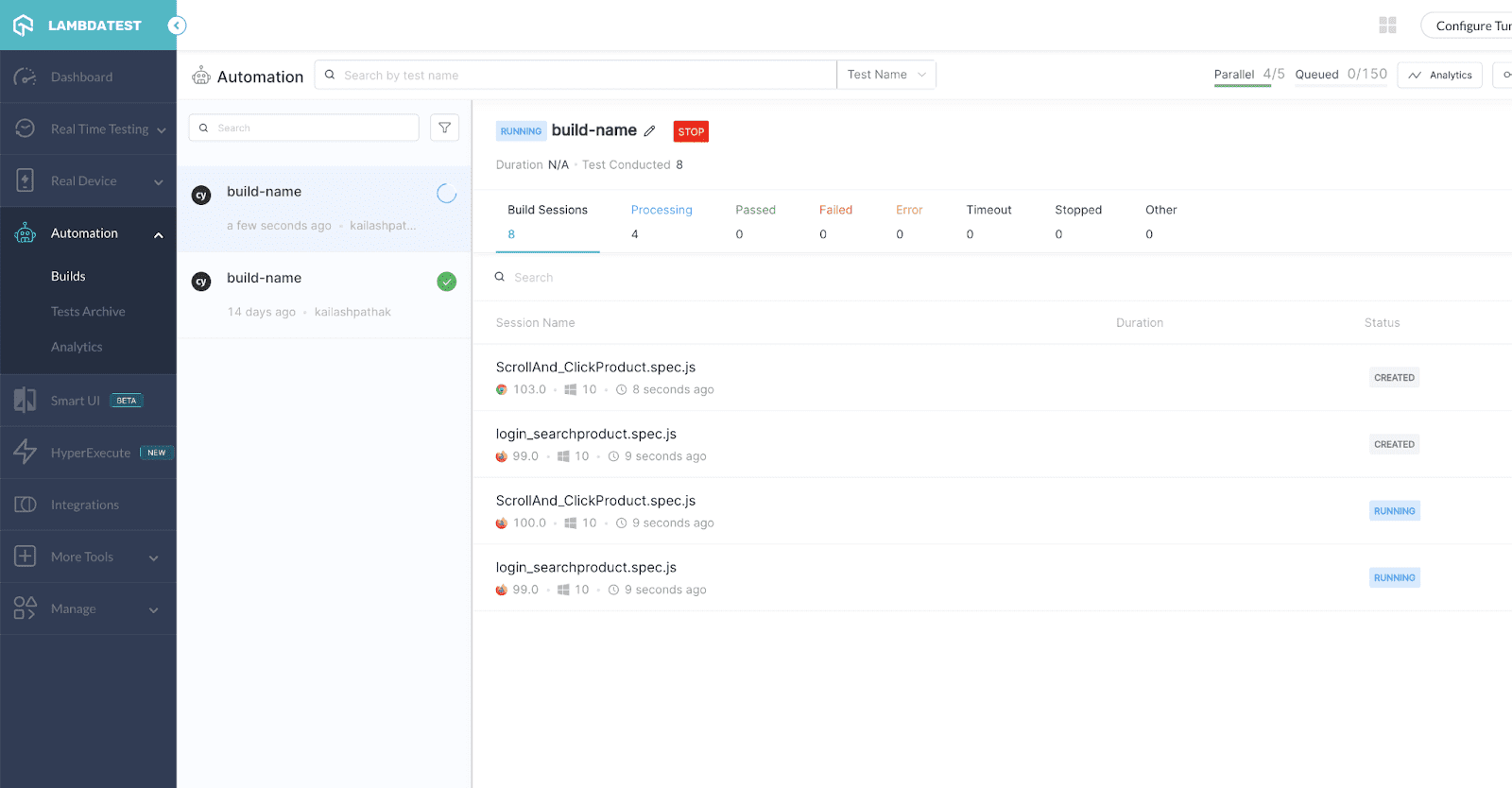
In the screenshot below, you can see the test cases are passed in Firefox, and in Chrome browser, test cases are running.
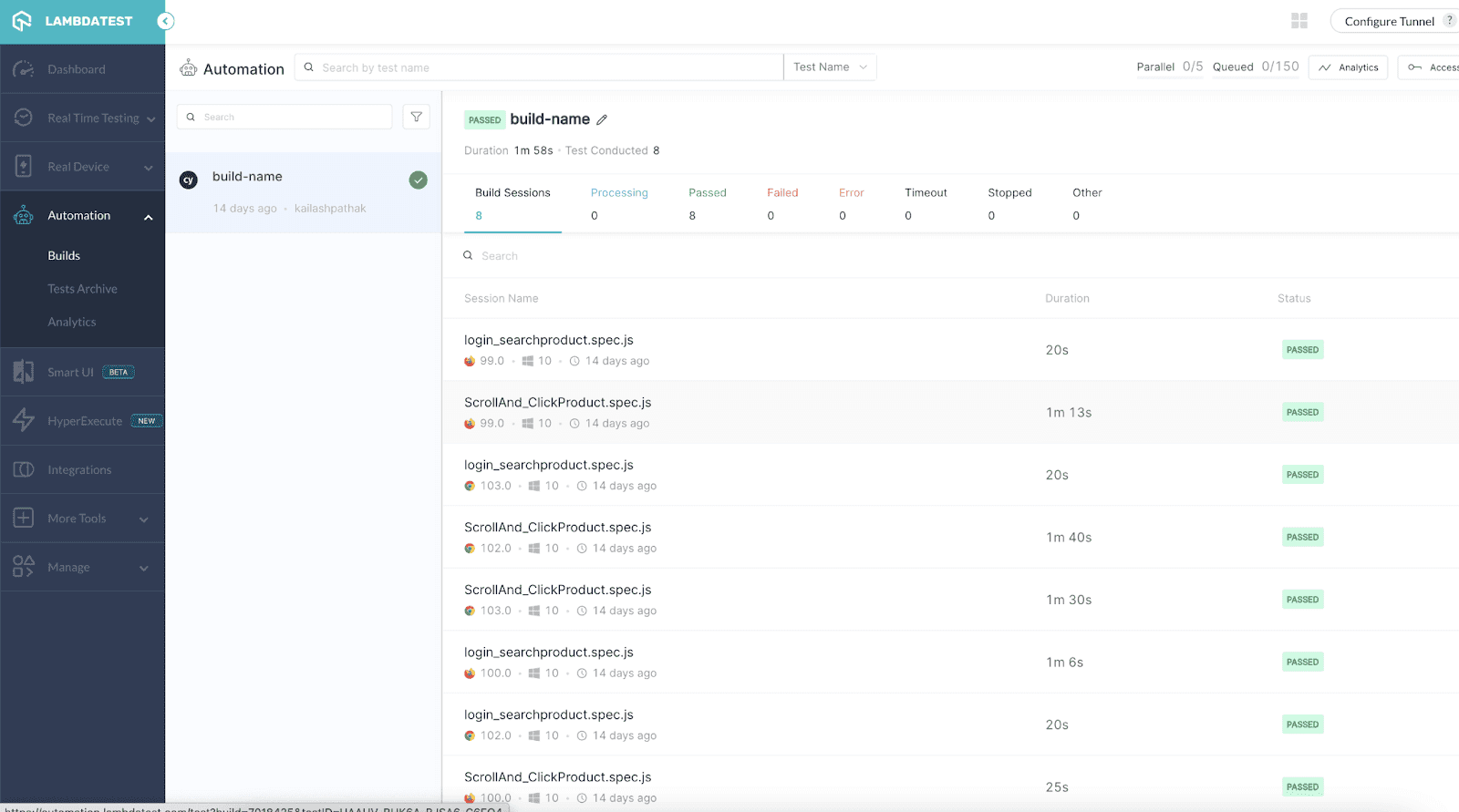
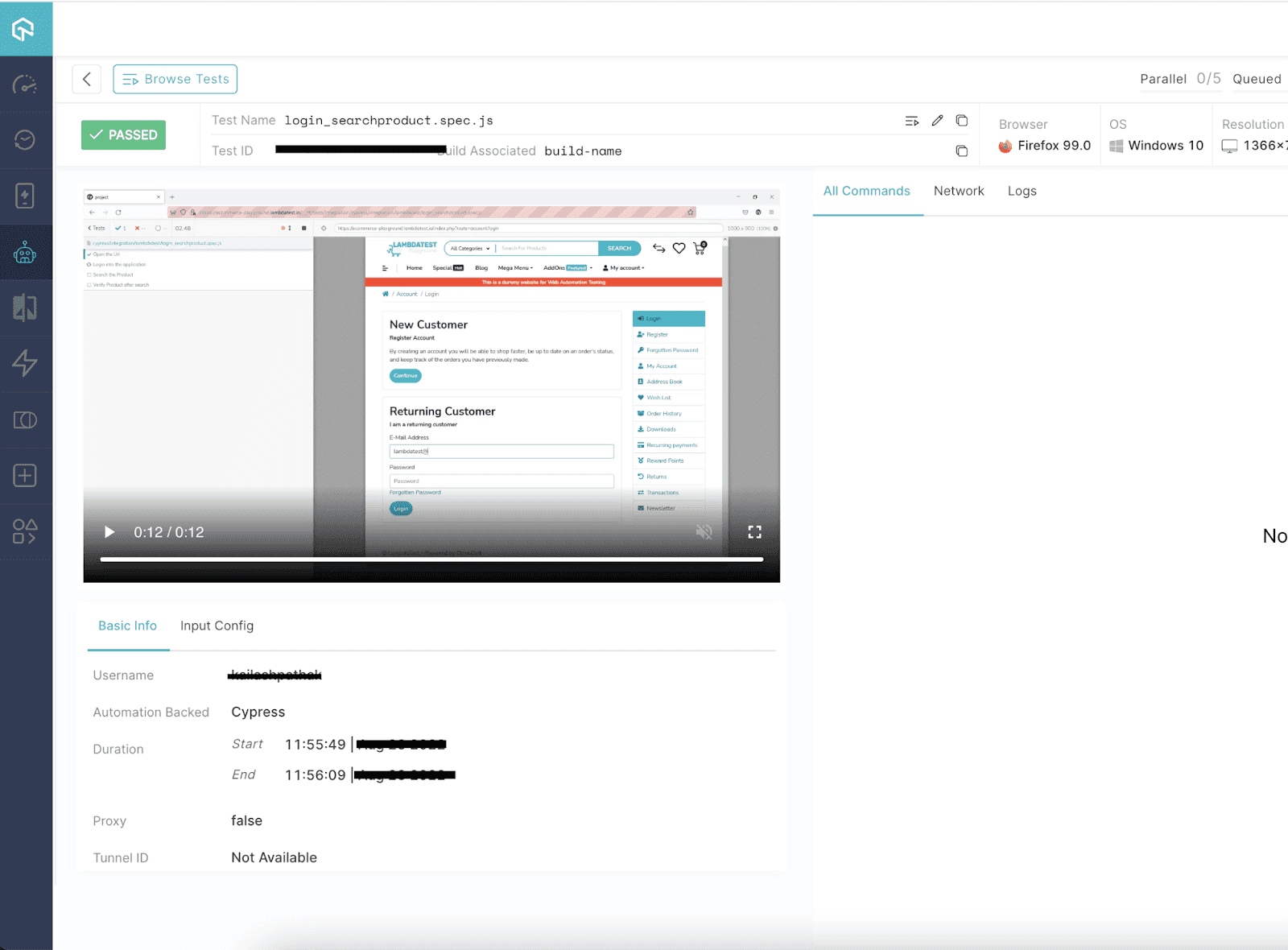
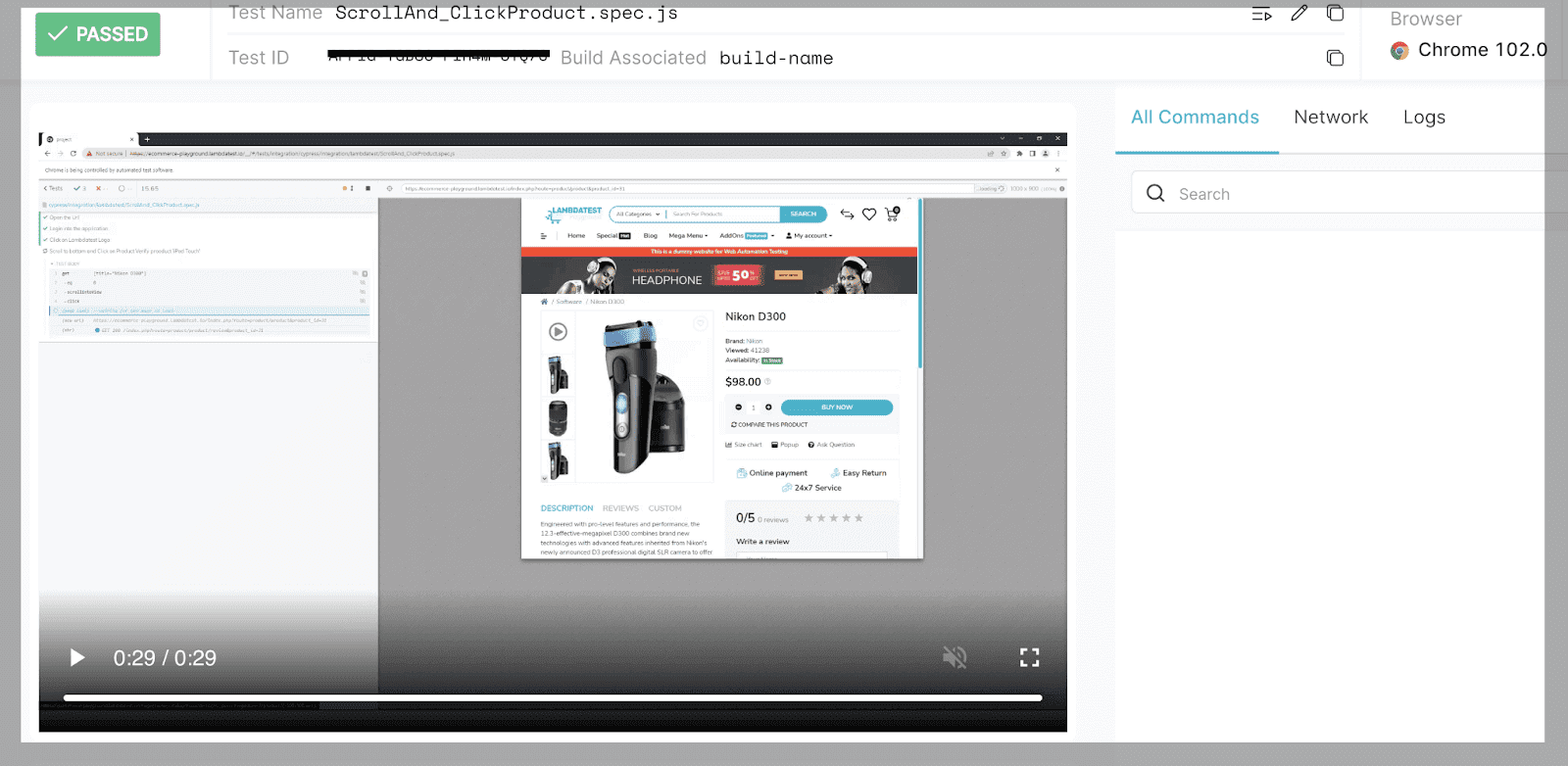
In the screenshot below, you can see that both test cases are passed in different browsers.
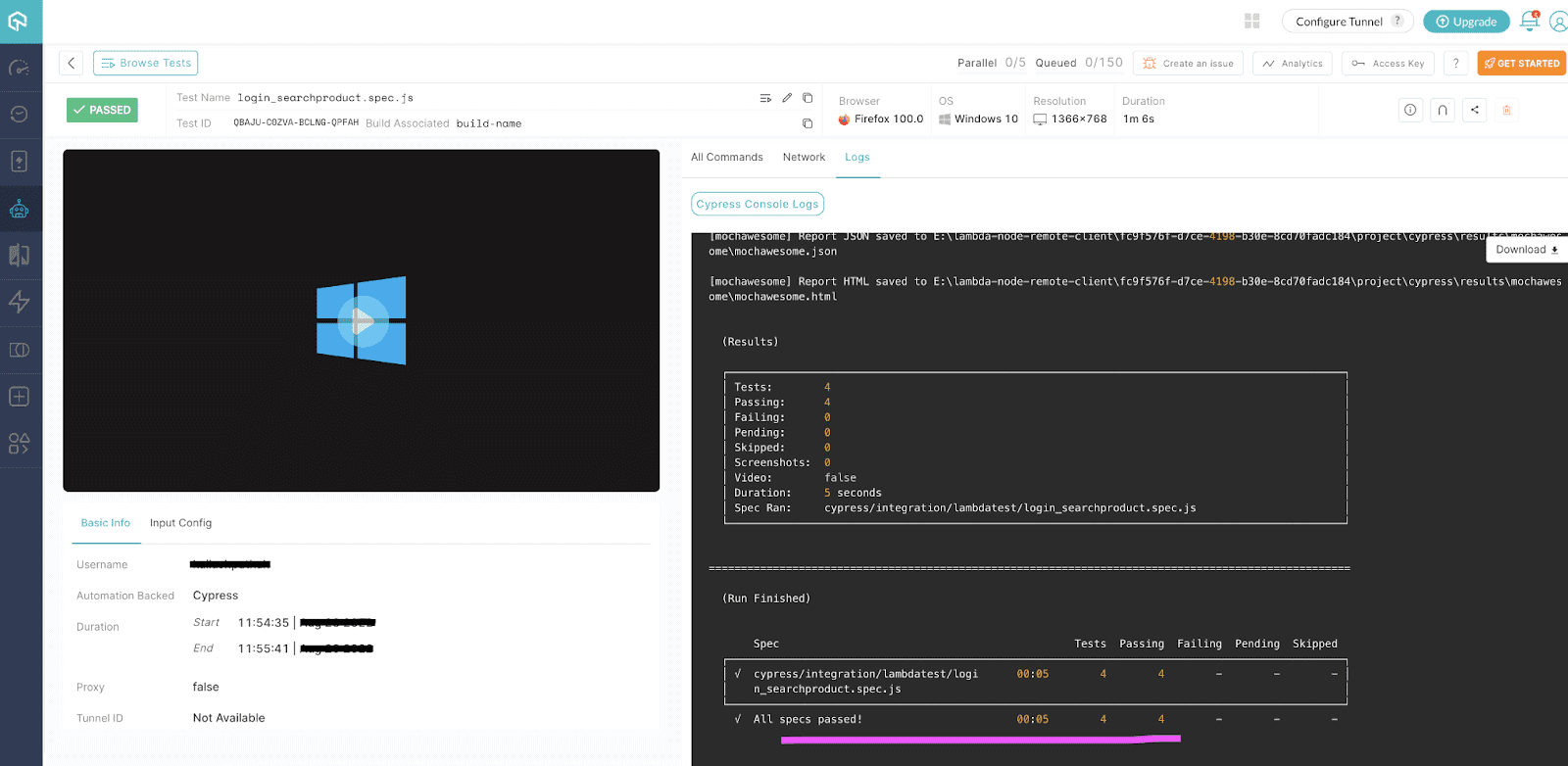
Here are the logs that are generated when the test cases are run successfully.
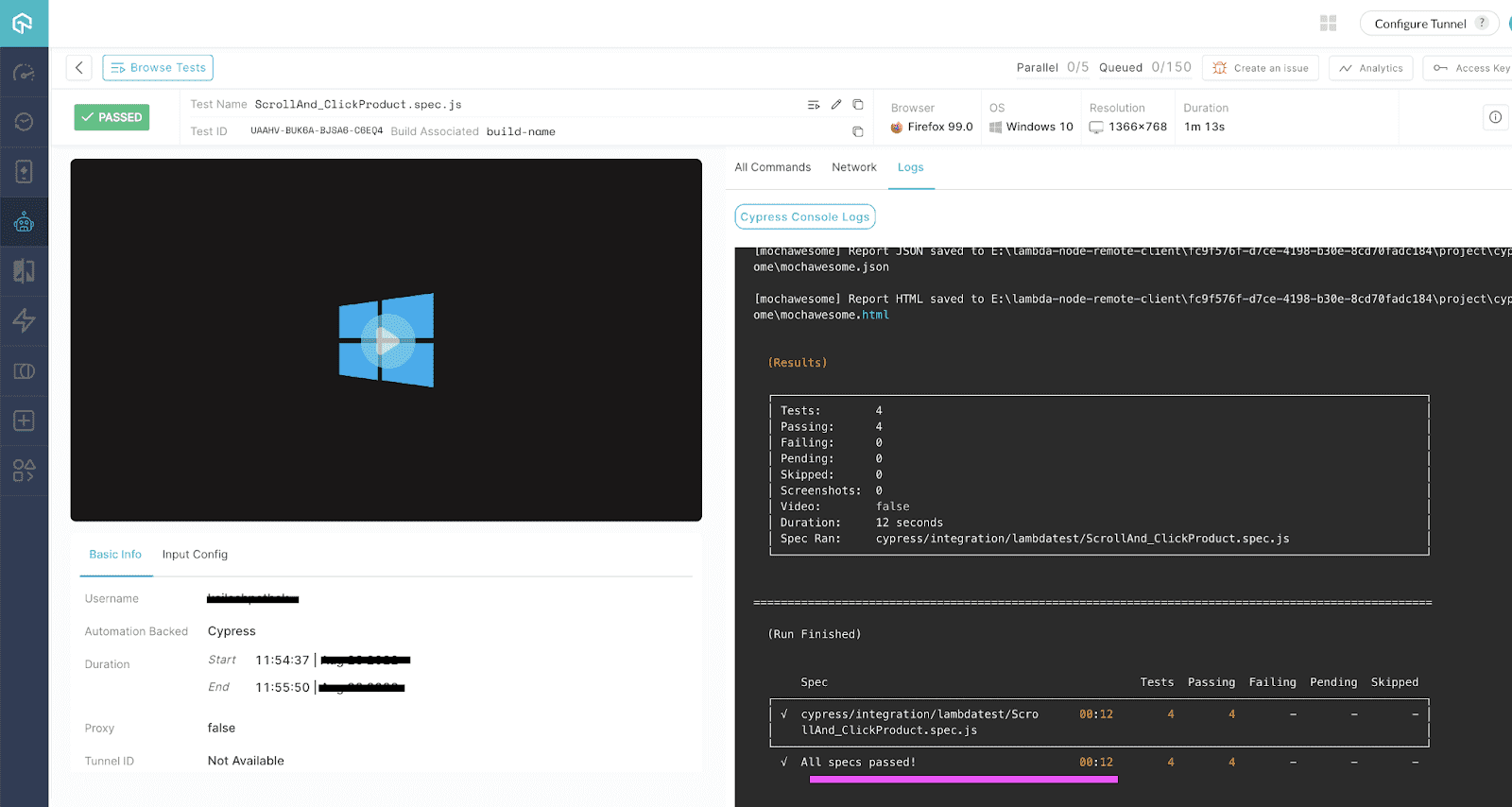
In the screenshot below, you can see that video products are loading.
In the screenshot below, you can see after scrolling to the bottom product is clicked.
To learn more about Cypress and running Cypress tests on TestMu AI, watch the video given below.
You can also subscribe to the TestMu AI YouTube Channel to get more video tutorials on Selenium testing, cross browser testing, and more.
Wrapping Up
Integrating Cypress tests in Azure DevOps pipelines offers a streamlined, efficient way to enhance your CI/CD workflows. By automating end-to-end tests, ensuring scalability, and providing centralized reporting, this setup not only improves code quality but also accelerates software delivery. Leveraging platforms like TestMu AI further enhances the testing process, enabling parallel execution across different browsers and devices ensuring reliable and robust software development.


Frequently asked questions
Did you find this page helpful?
More Related Hubs
TestMu AI forEnterprise
Get access to solutions built on Enterprise
grade security, privacy, & compliance
- Advanced access controls
- Advanced data retention rules
- Advanced Local Testing
- Premium Support options
- Early access to beta features
- Private Slack Channel
- Unlimited Manual Accessibility DevTools Tests