

Next-Gen App & Browser Testing Cloud
Trusted by 2 Mn+ QAs & Devs to accelerate their release cycles


On This Page
- What Are Mocks?
- What Is Python unittest.mock Library?
- Key Components of Python unittest.mock Library
- Setting Up Python unittest.mock Library
- Creating Mock Objects
- How to Use Python unittest.mock Library?
- Real-World Use Cases of Mocking
- Common Mocking Mistakes to Avoid
- Best Practices for Implementing Mocking

Getting Started With Python unittest.mock Library
Learn Python unittest.mock for effective testing. This blog covers Mock, MagicMock, AsyncMock, patch(), and more to simplify test automation.

Ini Arthur
December 28, 2025
Testing software applications involves dealing with external dependencies like APIs, databases, or third-party services. However, these dependencies can sometimes present challenges, such as slow test execution, inconsistent test results, and other factors.
In such scenarios, the mocking mechanism can simulate these dependencies, allowing you to isolate software application logic and write efficient and reliable test scripts. Programming languages like Python further simplify this process with libraries like unittest.mock. Python unittest.mock library allows you to create mock objects that mock certain external APIs and dependencies.
In this blog, we will learn how to use the built-in Python unittest.mock library in automated testing.
What Are Mocks?
A mock object mimics the behavior of a real object that is the subject of a test in isolation. Mocks or mock objects are used when it is impractical to include real objects or external dependencies during the test execution (unit testing).
The essence of a mock test is to isolate the object under test from its dependencies to validate that it works as expected when called or triggered. It allows testing to be completed in a shorter period, even without external dependencies, in a developer-controlled environment.
Scenarios where mock tests are used include testing codebase with dependencies such as external APIs, databases, and other third-party web services. An example will be an online store that uses a third-party payment gateway to process customers’ payments. A tester will mock the payment API in the test environment to simulate pending, failed or successful transactions.
What Is Python unittest.mock Library?
Python unittest.mock library is used for creating mock objects when it becomes impractical to test real objects. At its core, Python unittest.mock library provides a Mock class for creating mock objects. This Mock class simulates functions, libraries and many other external dependencies. After creation, it sets attributes and returns values for the mock objects. You can assert which method or attribute was called, how many times it was called and with which specific argument.
The Python unittest.mock library provides the patch() decorator, which is used for temporarily patching modules, classes, and specific attributes within a given test suite. It can also be used as a context manager to control the scope of the object being mocked during testing. Objects are cleaned up after the context manager’s scope is exited.
MagicMock is part of the Python unittest.mock library. It is a subclass of the Mock class that implements most of Python’s magic methods. Unlike the Mock class, MagicMock can be used without configuring magic methods. The AsyncMock is another subclass of Mock, a specialized class for mocking asynchronous functions. AsyncMock makes it easy to test Python’s async functions and coroutines, ensuring that mocked objects are awaited.

Note: Run Python tests using mocks across 5000+ environments. Try TestMu AI Now!
Key Components of Python unittest.mock Library
Here are the components of the Python unittest.mock library that lets you isolate your code for testing by replacing dependencies, ensuring reliable and independent test results.
- Mock Class: Use this to create mock objects for replacing real components in your tests. It dynamically creates attributes and methods as needed.
Syntax:
Mock(spec=None, side_effect=None, return_value=DEFAULT, wraps=None, name=None, spec_set=None, unsafe=False, **kwargs)
Syntax:
MagicMock()
Syntax:
AsyncMock()
Syntax:
patch(target, new=DEFAULT, spec=None, create=False, spec_set=None, autospec=None, new_callable=None, **kwargs)
Setting Up Python unittest.mock Library
In older versions of Python, the mock module was a standalone library. From version 3.3, the Python unittest.mock library was added to the standard library. If you use version < 3.3 of Python, you can install mock via the following command:
pip install mock
However, we’ll use unittest.mock as part of the Python standard library. Let’s outline the steps to set up the basic structure of a Python test using unittest and mock.
- Import the Mock and MagicMock classes or the patch() decorator function from unittest.mock library where necessary as follows:
import unittest
from unittest.mock import Mock, MagicMock, patch
A typical test class will look like this:
class TestExampleClass(unittest.TestCase):
Creating Mock Objects
Mocks can be used to represent real objects in your test code. They are also callable, and attributes are created as new mocks when accessed.
- The Mock and MagicMock classes can be used interchangeably, but for most of this blog, we will create mock objects using the MagicMock class.
from unittest.mock import Mock, MagicMock

# A simple mock object using Mock
mock = Mock(spec=None, side_effect=None, return_value=DEFAULT, wraps=None, name=None, spec_set=None, unsafe=False, **kwargs)

# Using MagicMock
sample_object = ExampleClass()
sample_object.method = MagicMock()
from unittest.mock import MagicMock

# Setting a return value
magic_mock = MagicMock()
magic_mock.some_method.return_value = "A mock object"
print(magic_mock.some_method())  # Outputs: "A mock object"

# Set an attribute
mock.some_attribute = 42
print(mock.some_attribute)  # Outputs: 42

# Set a side effect to raise an exception
mock.some_method.side_effect = Exception("Oops, encountered an error")
The patch() decorator replaces the object targeted in ‘package.module.ClassName.attribute’ with a unique placeholder value sentinel.attribute during the test.
A module or class is also unpatched automatically. The patch() can be used with the with statement to create a context manager. This applies the patch to the scope of the with statement. As a context manager, the patched object is bound to the name after as and only accessible within the scope.
Here is an example of mocking a class with the patch() method as a context manager:
from unittest.mock import patch

with patch('module_name.ClassName') as MockClass:
    instance = MockClass.return_value
    instance.method.return_value = "Mocked class"

    # Outputs: "Mocked class"
    print(instance.method())
The patch() method is used as function decorator:
from unittest.mock import patch

@patch('package.module.ClassName.attribute', sentinel.attribute)
def test_function():
    from package.module import ClassName
    assert ClassName.attribute == sentinel.attribute
from unittest.mock import MagicMock

# Create the class instance
sample_object = ExampleClass()

# Replace the method with a MagicMock
sample_object.method = MagicMock()

# Call the method
sample_object.method("testing")

# Assert it was called with the expected argument
sample_object.method.assert_called_with("testing")
from unittest.mock import AsyncMock
import asyncio

# Setting a return value for an async method
async_mock = AsyncMock()
async_mock.some_async_method.return_value = "An async mock object"

# Since it's an async method, it must be awaited
async def main():
    result = await async_mock.some_async_method()
    print(result)

asyncio.run(main())
How to Use Python unittest.mock Library?
To demonstrate the use of the Python unittest.mock library, we’ll cover examples of creating mocks to mimic an API response, form submission and the Selenium browser automation framework’s explicit wait processes.
First, we’ll write a normal test case without mocks and then refactor it with mock objects. Before we begin, we’ll set up a remote connection to test on a cloud testing platform such as TestMu AI.
TestMu AI is an AI-native test execution platform that lets you perform automation testing with Python due to its cloud-based infrastructure, seamless integration with Python testing frameworks like pytest and unittest, and support for parallel testing across diverse environments.
To get started, check out this documentation to run Python unittest tests on TestMu AI.
We will also create a simple fixture class that will be used throughout each of our test cases. Copy your Username and Access Key from your TestMu AI account. Then, create a file for your TestMu AI automation capabilities and fixture class. You can generate capabilities from the TestMu AI Automation Capabilities Generator.
Now, update the fixture file with the code below:
Filename: mock_fixtures.py
import os
import unittest
from selenium import webdriver
from selenium.webdriver.chrome.options import Options as ChromeOptions


username = os.getenv("LT_USERNAME")  # Replace the username
access_key = os.getenv("LT_ACCESS_KEY") # Replace the access key


options = ChromeOptions()
options.browser_version = "129"
options.platform_name = "Windows 10"
lt_options = {}
lt_options["username"] = username
lt_options["accessKey"] = access_key
lt_options["build"] = "Python Mock Build"
lt_options["project"] = "Untitled 1"
lt_options["name"] = "Python Unittest Mock"
lt_options["w3c"] = True
lt_options["plugin"] = "python-python"
options.set_capability('LT:Options', lt_options)


class BaseTestCase(unittest.TestCase):
   driver = None
   def setUp(self):
       """This method is called before each test."""
       self.driver = webdriver.Remote(
           command_executor="http://{}:{}@hub.lambdatest.com/wd/hub".format(
               username, access_key
           ),
           options=options,
       )


   def tearDown(self):
       """This method is called after each test."""
       self.driver.quit()  # Clean up and close the browser


if __name__ == "__main__":
   unittest.main()

Code Walkthrough:
Import all needed modules and dependencies. Retrieve the TestMu AI Username and Access Key from the environment variables.
Now configure Chrome browser options and set TestMu AI Selenium capabilities. You can generate them using the Automation Capabilities Generator. Set values for the TestMu AI capabilities dictionary lt_options keys like username, access, build, etc.
Define a BaseTestCase class, which will inherit other test sub-classes. After that, define a setUp method that gets executed before any test case. A driver object is instantiated using the webdriver.Remote() constructor which creates a remote connection to TestMu AI.
The webdriver.Remote() takes command_executor and options as arguments. The hub URL for command_executor takes a combination of username and access-key as arguments.
Define a tearDown method that gets executed after each test case. The tearDown method cleans the resources by quitting the driver instance.
Mocking an API Response
In this section, we’ll show how to mock an API response. For this example, we’ll use the JSON placeholder user endpoint. We’ll also mock the Selenium WebDriver, the response object and other dependencies.
It is important to note that mocking dependencies and real objects should only be done in testing environments, while the actual dependencies should be used when in a production environment.
Test Scenario:
- Access the JSON placeholder user endpoint.
- Locate the pre-tag element that contains the JSON data.
- Extract users’ JSON data and parse.
- Convert JSON string to Python dictionary.
- Make assertion statements to verify that returned data matches expectations.
Implementation: A mocked test case for the API success response will look like this:
Filename: tests/test_mock_api_response.py
import unittest
from unittest.mock import MagicMock, patch
from mock_fixtures import BaseTestCase
from sample.api_response import fetch_users_api


class TestFetchUsersAPI(BaseTestCase):
   @patch('sample.api_response.WebDriverWait')
   @patch('sample.api_response.By')
   def test_fetch_users_api(self, mock_by, mock_webdriver_wait):
       # Create a mock driver
       mock_driver = MagicMock()


       # Create a mock element to simulate the 'pre' element containing JSON data
       mock_pre_element = MagicMock()
       mock_pre_element.text = '[{"id": 1, "name": "John Doe"}, {"id": 2, "name": "Jane Smith"}]'

       # Set up the mock for WebDriverWait and its return value
       mock_wait_instance = MagicMock()
       mock_wait_instance.until.return_value = mock_pre_element
       mock_webdriver_wait.return_value = mock_wait_instance

       # Call the function under test
       users = fetch_users_api(mock_driver)

       # Assert that the returned users match the expected result
       expected_users = [{"id": 1, "name": "John Doe"}, {"id": 2, "name": "Jane Smith"}]
       self.assertEqual(users, expected_users)


       if len(users) > 0:
           self.driver.execute_script("lambda-status=passed")
       else:
           self.driver.execute_script("lambda-status=failed")


       # Verify that driver.get was called with the correct URL
       mock_driver.get.assert_called_once_with('https://jsonplaceholder.typicode.com/users')

       # Verify that WebDriverWait was called correctly
       mock_webdriver_wait.assert_called_once_with(mock_driver, 10)


if __name__ == '__main__':
Outside a test environment where mocks are used for testing, a real test case will look like this:
Filename: tests/test_api_response.py
import unittest
from sample.api_response import fetch_users_api
from mock_fixtures import BaseTestCase


class TestFetchUsersWithSelenium(BaseTestCase):
   def test_fetch_users(self):
       # Call the function to fetch users
       users = fetch_users_api(self.driver)


       print(users)
       user_count = len(users)

       # Validate basic expectations
       self.assertIsNotNone(users)
       self.assertEqual(len(users), 10)


       if user_count == 10:
           self.driver.execute_script("lambda-status=passed")
       else:
           self.driver.execute_script("lambda-status=failed")


       # Check first user structure
       first_user = users[0]
       self.assertIn('id', first_user)
       self.assertIn('name', first_user)
       self.assertIn('username', first_user)

       # Validate specific user properties
       self.assertEqual(first_user['id'], 1)
       self.assertEqual(first_user['name'], 'Leanne Graham')


if __name__ == '__main__':
   unittest.main(verbosity=2, buffer=True)
Code Walkthrough:
Create mock objects mock_by and mock_webdriver_wait from the By and WebDriverWait classes using the patch() decorator. The patch() decorator mocks only the By and WebDriverWait classes imported in the api_response.py file, not the entire global namespace.
Define a method, test_fetch_users_api(), where our mocked API response will be tested. In the method definition, the mocked objects mock_by and mock_webdriver_wait are passed as parameters.
Create a mock object, mock_driver, to mimic the remote Selenium WebDriver. Another mock object, mock_pre_element, is created for the DOM element that holds the users’ JSON data. A JSON string is assigned to the mock_pre_element.text attribute.
Now, create a mock_wait_instance mock with a method until and a return value of mock_pre_element assigned to it. Assign the return value for mock_webdriver_wait to mock_wait_instance. These mock objects created mimic Selenium wait and the DOM pre element being waited for.
Call the fetch_users_api function passing mock_driver as an argument. The function returns a list of users when called. Post that, call the assert_called_once_with() on the get method to verify it was called only once with the correct URL.
Test Execution:
Run the below-given command to run the test:
python3 -m unittest tests/test_mock_api_response.py
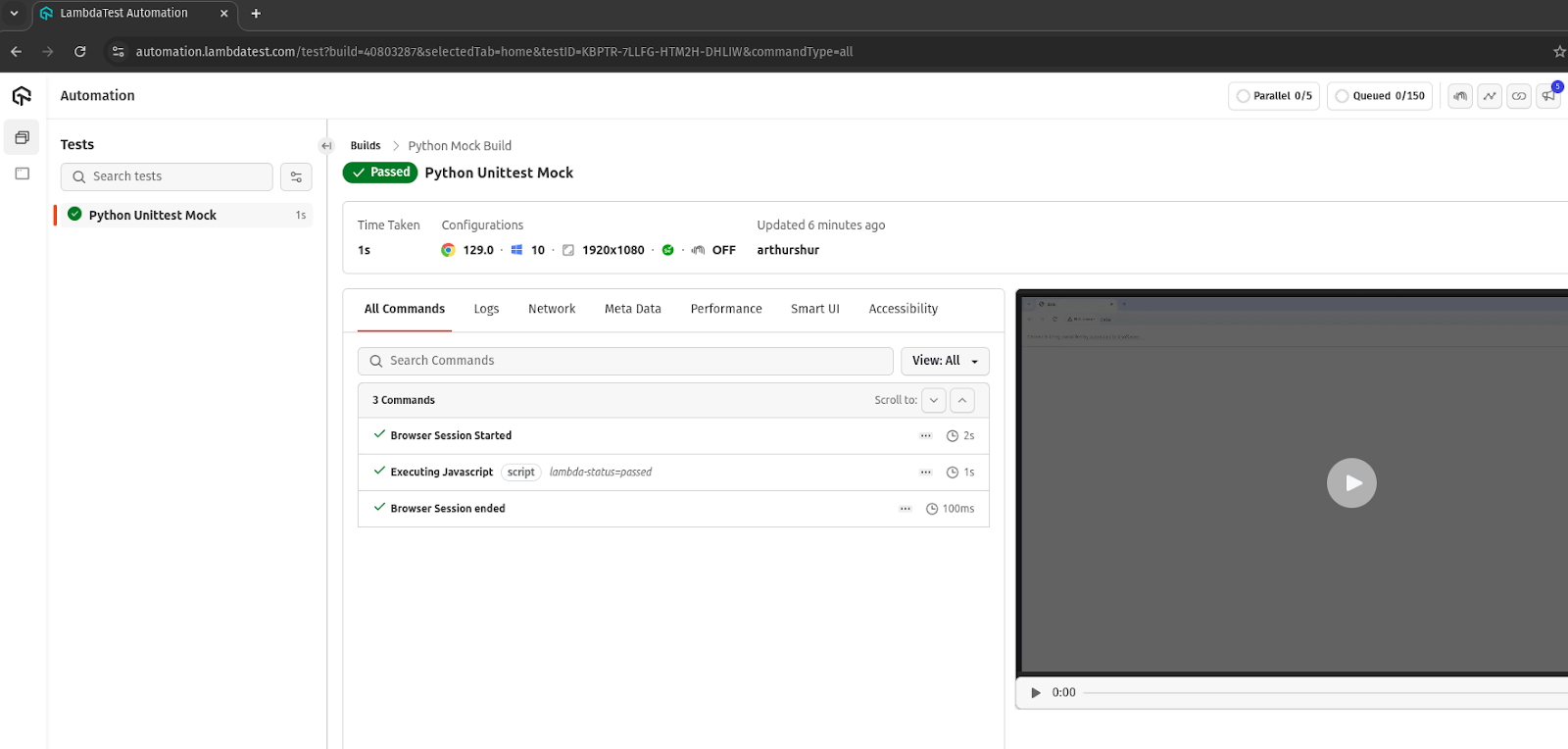
You can view your test results from the TestMu AI Web Automation dashboard:
Mocking a Form Submission Process
You can mock the form submission process to validate that the web application correctly collects, processes, and sends form data without needing a real browser or front-end setup. It allows you to verify that the correct data was captured and sent to the server.
Test Scenario:
- Navigate to the Form Submission Demo page of the TestMu AI Selenium Playground.
- Locate the title input and description textarea fields.
- Populate the title input and description area fields with the provided title and description.
- Locate the submit button and click.
- Assert that the page title returned matches the expected page title.
Implementation: A mocked test case for the submit_form function looks like this:
Filename: tests/test_mock_submit_form.py
import unittest
from unittest.mock import patch, MagicMock
from mocks.submit_form import submit_form
from selenium.webdriver.common.by import By
from mock_fixtures import BaseTestCase


class TestSubmitFormFunction(BaseTestCase):
   @patch('mock_fixtures.webdriver.Remote')  # Patch Remote WebDriver
   def test_submit_form(self, mock_webdriver):
       # Create a mock WebDriver instance
       mock_driver = MagicMock()
       mock_webdriver.return_value = mock_driver

       # Mock find_element and get to prevent opening a real browser
       mock_driver.find_element.return_value = MagicMock()
       mock_driver.get.return_value = None
       mock_driver.title = "Selenium Grid Online | Run Selenium Test On Cloud"


       # Call the function with test inputs
       title = submit_form(mock_driver,"home", "homepage")


       if title:
           self.driver.execute_script("lambda-status=passed")
       else:
           self.driver.execute_script("lambda-status=failed")


       # # Assert that the correct elements were interacted with
       mock_driver.find_element.assert_any_call(By.ID, "title")
       mock_driver.find_element.assert_any_call(By.ID, "description")
       mock_driver.find_element.assert_any_call(By.ID, "btn-submit")


       # Assert that the driver navigated to the correct page
       mock_driver.get.assert_called_once_with("https://www.lambdatest.com/selenium-playground/ajax-form-submit-demo")


       # Assertions
       self.assertEqual(title, "Selenium Grid Online | Run Selenium Test On Cloud")


if __name__ == '__main__':
   unittest.main()
A real test case without mock will look like this:
Filename: test/test_submit_form.py
Code Walkthrough:
Use the patch() decorator to mock the webdriver.Remote class. The mock_fixtures.webdriver.Remote string defines the path where the webdriver.Remote class was imported from. The string indicates where the Remote WebDriver is used. The patch() decorator creates a mock object mock_webdriver.
Create a mock_driver mock object from the MagicMock() class. Set the return_value of mock_webdriver to mock_driver. It means that the patched webdriver.Remote class will return the mock object mock_driver.
Call the submit_form function under test with the mocked webdriver.Remote instance and other arguments. It means that the operation is done entirely on the mocked object and not a real browser.
Make assertion calls to validate that the code works as expected. As the code snippet shows, the assert_any_call() method asserts that the mock has been called with the specified arguments. The assert_called_once_with() method asserts that the mock was called once.
Test Execution:Run the below-given command to run the test:
python -m unittest tests/test_mock_submit_form.py
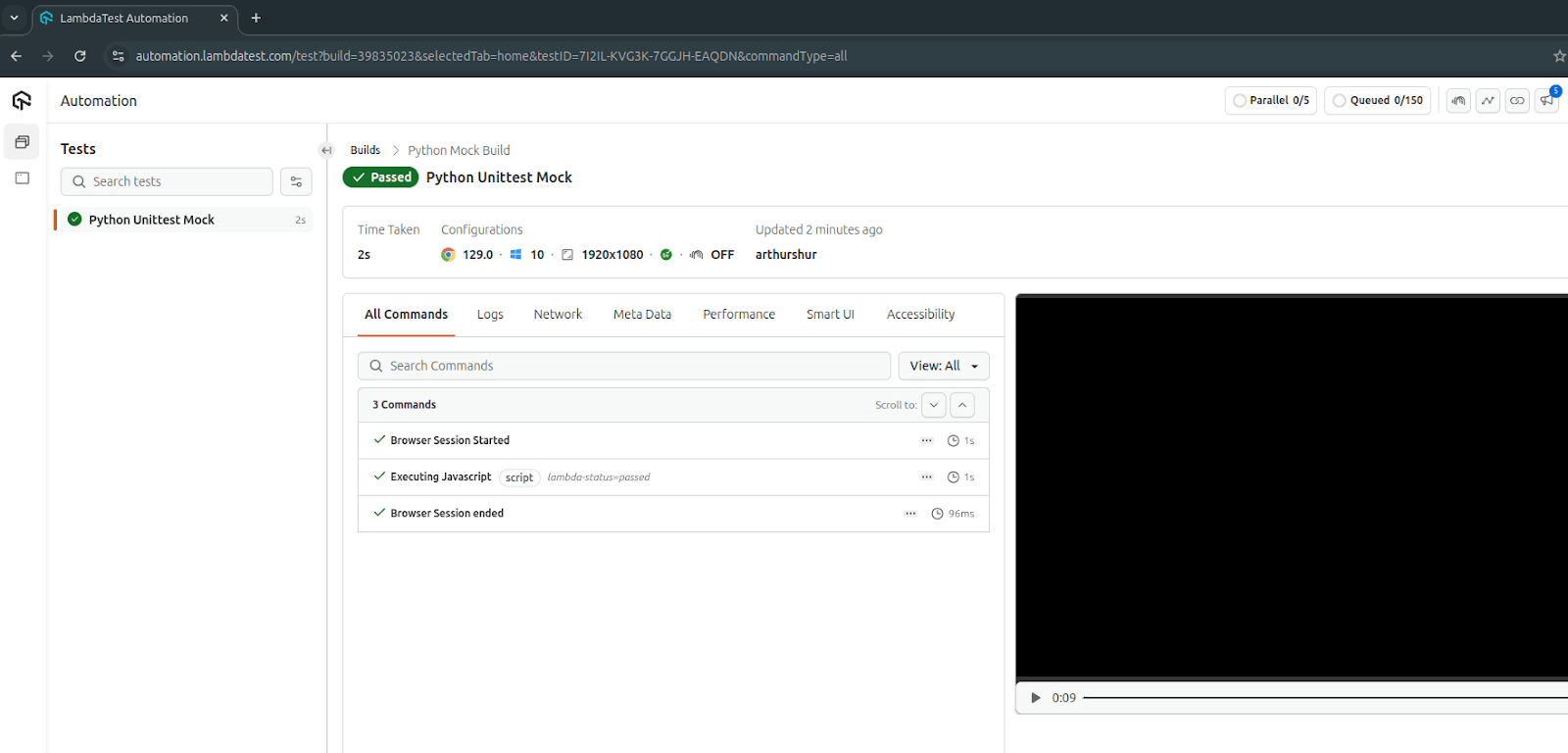
You can view your test results from the TestMu AI Web Automation dashboard:
Mocking the Selenium Explicit Wait
The Selenium framework is well-known for its implicit and explicit waiting strategies. These strategies are mostly deployed when interacting with websites that have dynamic content and elements that may not be available until an action is triggered.
In this section, we’ll explore how to mock the Selenium explicit wait strategy. We will also patch the expected condition module EC and the WebDriverWait class. The mocks will simulate browser interactions without actually opening a browser or waiting for real elements.
Test Scenario:
- Navigate to the TestMu AI eCommerce Playground page.
- Locate the My account on the navigation menu and click.
- Wait for the new page until it loads.
- Wait for the target Login component to load.
- Retrieve the text content of the element.
- Assert that the text returned matches the expected text Login.
Implementation: The explicit wait test case will look like this when mocked:
Filename: tests/test_selenium_wait.py
import unittest
from unittest.mock import patch, MagicMock
from sample.selenium_wait import ExplicitWait
from selenium.webdriver.common.by import By
from mock_fixtures import BaseTestCase

class TestWaitForElement(BaseTestCase):
   @patch('sample.selenium_wait.WebDriverWait')
   @patch('sample.selenium_wait.EC.visibility_of_element_located')
   def test_wait_for_button_element(self, mock_visibility_of_element_located, mock_WebDriverWait):

       # Create a mock WebDriver instance
       mock_driver = MagicMock()

       # Mock the condition to return a mocked element
       mock_element = MagicMock()
       mock_element.text = "Login"
       mock_visibility_of_element_located.return_value = mock_element

       # Mock the wait instance to return the condition
       mock_wait_instance = MagicMock()
       mock_wait_instance.until.return_value = mock_element
       mock_WebDriverWait.return_value = mock_wait_instance


       # Call the function
       explicit_wait = ExplicitWait(mock_driver)
       result = explicit_wait.wait_for_button_element()


       # Assert that WebDriverWait was called correctly
       mock_WebDriverWait.assert_called_once_with(mock_driver, 10)


       # Assert that visibility_of_element_located was called with the correct locator
       mock_visibility_of_element_located.assert_called_once_with((By.XPATH, "//*[@id='column-right']/div/a[1]"))


       if result:
           self.driver.execute_script("lambda-status=passed")
       else:
           self.driver.execute_script("lambda-status=failed")


       # Assert the returned text is as expected
       self.assertEqual(result, "Login")


if __name__ == '__main__':
   unittest.main()
Refactored, the above test case will look like the code snippet below without mocks being implemented.
Filename: tests/test_mock_selenium_wait.py
from sample.selenium_wait import ExplicitWait
import unittest
from mock_fixtures import BaseTestCase


class TestExplicitWait(BaseTestCase):


   def test_wait_for_button_element(self):
       """Test the ExplicitWait class's ability to wait for a button element."""
       # instantiate
       explicit_wait = ExplicitWait(self.driver)


        # Call the method under test
       button_text = explicit_wait.wait_for_button_element()

       if button_text == 'Login':
           self.driver.execute_script("lambda-status=passed")
       else:
           self.driver.execute_script("lambda-status=failed")


       # Assertions
       self.assertEqual(button_text, "Login", "The button text should be 'Login'.")


if __name__ == "__main__":
   unittest.main()
Code Walkthrough:
Mock the WebDriverWait class and the expected condition (EC) module with the patch function decorator.
The patch() decorator during the test replaces the WebDriverWait class and the EC module temporarily with mock objects. EC becomes mock_visibility_of_element_located, and WebDriverWait becomes mock_WebDriverWait, respectively, as mock objects.
Mock other dependencies in the test_wait_for_button_element() method. First, create a mock object mock_driver that represents the Selenium WebDriver. Another mock object, mock_element, is created for the target element. A text attribute of the mock_element is set to Login. The return value for the patch EC module mock_visibility_of_element_located is set to mock_element.
Again, create a mock object mock_wait_instance from MagicMock. Set the wait instance’s mock_wait_instance.until.return_value to the earlier created mock_element. Also, set mock_wait_instance as the return value for mock_WebDriverWait.
The above mock objects simulate the WebDriverWait instance’s waiting behavior until the targeted element is visible and the text within it is captured.
Instantiate the ExplicitWait class. After instantiating the ExplicitWait class with the mock object mock_driver, call the explicit_wait.wait_for_button_element() method. It will trigger mocked objects to simulate the behavior of the real object they represent.
Make assertion calls to validate the behavior of mock objects. We can proceed to make assertion calls on mock objects. The mock_WebDriverWait.assert_called_once_with(), asserts that the mock object was called only once with the arguments mocker_driver and a timeout value of 10 seconds.
The assert_called_once_with() method is also called on the mock_visibility_of_element_located mock object with the correct argument for XPATH. Assert returned element text matches the expectation.
Test Execution:
Run the below-given command to run the test:
python -m unittest tests/test_mock_selenium_wait.py
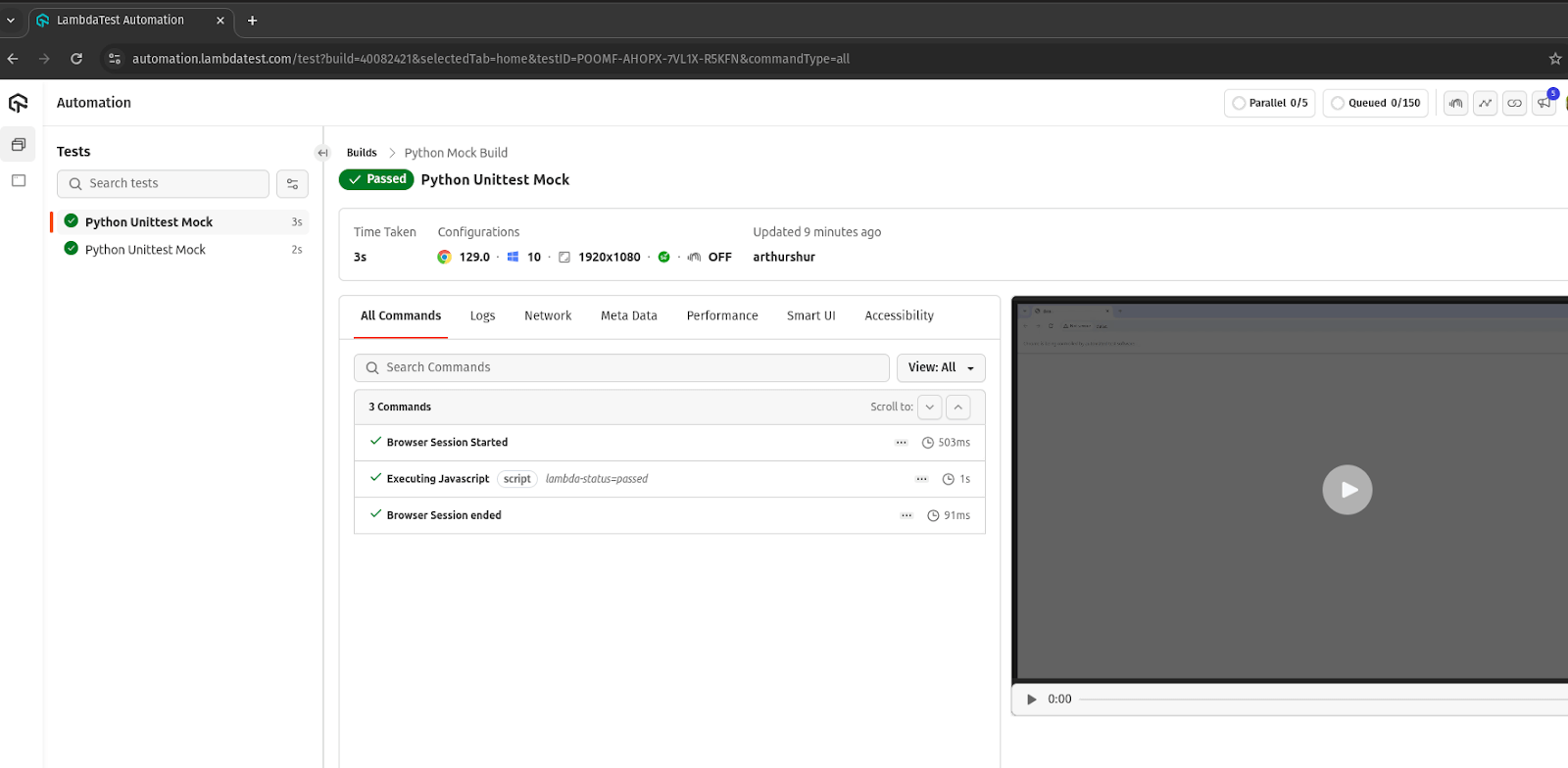
You can view your test results from the TestMu AI Web Automation dashboard:
Real-World Use Cases of Mocking
Mocking a test is a widely adopted practice in automated testing. It is used in various cases to isolate certain software components or external dependencies in testing or staging environments.
We’ll highlight some popular real-world use cases below:
- Mocking API Responses: During the development phase, there are instances when data needs to be fetched from a remote API service. However, when the developer decides to test a feature that uses this remote API, the API may not be available. Therefore, it becomes increasingly important to carry out testing even without the API’s availability.
It provides a use case for mocking the software feature to ensure it works as expected. The API response will be mocked to test success scenarios, errors or timeouts.
- Mocking Database Operations: We can also use mocks to mimic database operations such as fetching, updating and deleting records. Interacting with a live database can be too much overhead and generally slow testing. To test that our function interacts with the database as expected, we can mock this process.
To mimic the database’s behavior, we mock the database connection and the different queries to it. This way, we can verify that our function(s) work as expected when interacting with the database.
- File I/O Operations: File input/output operations are generally regarded as resource-intensive and, in most cases, block requests. System calls like read() and write() methods can delay the operation until it is complete before control is returned to the application.
In this use case, mocks are implemented to avoid delays resulting from reading, writing and deleting files. With mocks, file I/O operations are simulated to test components of the software application.
Python offers a range of frameworks for different development needs. Explore the top Python frameworks to look for in 2025.

Austin Siewert
CEO, Vercel
Discovered @TestMu AI yesterday. Best browser testing tool I've found for my use case. Great pricing model for the limited testing I do 👏
2M+ Devs and QAs rely on TestMu AI
Deliver immersive digital experiences with Next-Generation Mobile Apps and Cross Browser Testing Cloud

Common Mocking Mistakes to Avoid
While mocking is a standard practice in software testing, testers can make counterproductive mistakes when performing mock tests:
- Incorrect Patch Path/Target: One common mistake to avoid while mocking is targeting the wrong module or path. Always verify your patch path to confirm the exact location of the module. Do not patch where a function is defined but where it is used.
- Not Resetting Mocks Before New Tests: Not resetting mocks between tests would cause interference with other test cases. Always reset mocks and clean up resources before the next test to avoid inaccurate results.
- Wrongly Configured Mock Return Values: Testers may forget or configure incorrect return values for mocks. Not configuring or setting wrong return values in mocks will lead to unexpected behavior from tests. Always configure correct mock return values.
- Not Using side_effect for Exceptions or Iterables: The side_effect attribute should raise exceptions when errors occur in mocks or for an iterable that returns multiple values. Do not forget to simulate exceptions in mocks with the side_effect attribute.
Best Practices for Implementing Mocking
Mocking is essential when performing different types of software testing. Mocks produce faster and better tests by reducing reliance on external dependencies that may be unavailable during testing.
However, mocking tests should only be used when necessary. For better and more effective results, here are a few best practices to follow when mocking.
- Avoid Overusing Mocks: Too many mocks in your test scripts can bloat your codebase and make tests fragile. Over-mocking increases dependency on mocked components, making the tests harder to maintain.
- Limit Mocks to the Right Environment: Use mocks only in the development and testing phases—not in production. Write loosely coupled code to make mocking easier, as tightly coupled code is harder to isolate.
- Balance Mocks and Real Services: Only mock components are prone to failure due to external dependencies. Keep the rest of the code unmocked for more realistic system behavior, and switch between mocks and real services using tools like feature flags or environment variables.
- Keep Mocks Simple: Avoid creating overly complex mock objects. Simplicity ensures maintainability and aligns with the purpose of mock tests.
- Use Real Data When Possible: To simulate realistic system behavior, test with real data instead of relying solely on dummy data.
- Avoid Hardcoding Mock Values: Configure mock objects dynamically to ensure flexibility and realistic responses.
- Understand Method Behavior: Ensure you fully understand the methods you’re mocking, including their signatures and expected behavior, to prevent inaccurate test results.
Conclusion
Mocking helps you carry out tests without relying on dependencies that may be unavailable at the time of testing. We create a mock object to simulate the behavior of a real-world object it temporarily replaces during tests.
Python provides the unittest.mock module for creating mocks without a Python codebase. Mocks are made using either the Mock and MagicMock classes or the patch() decorator. After successfully creating mock objects, make assertion calls to verify that they behave as expected.
Mocking makes testing faster. However, you should avoid over-mocking and only use mocks when necessary.


Frequently asked questions
Did you find this page helpful?
More Related Hubs
TestMu AI forEnterprise
Get access to solutions built on Enterprise
grade security, privacy, & compliance
- Advanced access controls
- Advanced data retention rules
- Advanced Local Testing
- Premium Support options
- Early access to beta features
- Private Slack Channel
- Unlimited Manual Accessibility DevTools Tests