

Next-Gen App & Browser Testing Cloud
Trusted by 2 Mn+ QAs & Devs to accelerate their release cycles


On This Page
- What Is n8n?
- How to Use n8n for Automation Testing?
- How Do You Get Started with n8n for Automation Testing?
- Why Is n8n Not a Test Execution Framework?
- Is n8n an Orchestration Layer or a Test Execution Engine?
- Where Does n8n Fit in the Automation Ecosystem?
- How Does Code, Low-Code, and No-Code Work in n8n?
- Can n8n Power AI and Agentic Testing Workflows?
- Competitive Comparison
- Best Practices for Scaling n8n

n8n Automation Testing and AI Testing Guide for 2026
Learn how to use n8n for automation testing with CI/CD webhook workflows, AI-driven test orchestration, and step-by-step n8n setup for QA teams in 2026.

Saniya Gazala
March 2, 2026
n8n is a flexible workflow automation platform. When applied to automation testing, it allows you to orchestrate, monitor, and enhance your testing lifecycle without replacing your existing test frameworks.
When you use n8n for test orchestration, you are not executing browser tests inside n8n. You are building a coordination layer. This layer connects your test execution tools, CI/CD pipelines, reporting systems, and AI-driven analysis into one controlled workflow.
n8n lets you design reusable workflows. These workflows automate everything around test execution. They handle triggering builds, analyzing failures, notifying stakeholders, and more.
Overview
What Does n8n Do?
n8n is an open-source workflow automation platform that orchestrates tools, processes test data, and triggers automated actions across systems.
How to Use n8n for Automation Testing Effectively?
Effective n8n automation testing means using it as a coordination layer, not a test runner. Structure workflows around five stages:
- Identify the Testing Event: Trigger workflows from builds, deployments, schedules, or repository changes.
- Collect the Relevant Test Data: Pull execution results and metadata into a centralized workflow.
- Define Evaluation Rules: Apply pass/fail checks and threshold validations using IF nodes.
- Automate Conditional Actions: Route failures to alerts and successes to logging systems automatically.
- Integrate with Operational Systems: Send structured outputs to Slack, Jira, dashboards, or email lists.
Why Doesn't n8n Function as a Test Execution Engine?
n8n is built for workflow orchestration, not browser or mobile test execution.
- Does Not Execute Browser or Mobile Scripts: No rendering engine or UI interaction capabilities.
- Does Not Replace Existing Test Platforms: Works alongside Selenium, Cypress, and Playwright.
- Focuses on Orchestration: Routes data, applies logic, and triggers operational actions.
Can n8n Enable AI-Driven and Agentic Testing Workflows?
Yes, by acting as middleware between test engines and AI services.
- Triggering Automated Test Executions: Starts CI-based test runs via API calls.
- Collecting Test Results and Logs: Aggregates execution data into structured payloads.
- Sending Data to AI Services for Analysis: Forwards logs to AI endpoints like OpenAI or custom ML models.
- Automating Decisions Using AI Responses: Branches workflows based on AI severity classifications.
- Generating Smart Alerts and Reports: Creates enriched Jira tickets and Slack alerts with AI summaries.
What Is n8n?
n8n is a workflow automation platform that connects applications, processes data, applies logic, and triggers actions across systems. It uses a node-based visual builder. Each node performs a specific task. That task could be sending an HTTP request, evaluating a condition, transforming data, or sending a notification.
You can self-host n8n or run it in the cloud. It supports no-code, low-code, and code-based approaches. You can build workflows visually while still adding custom logic when needed.
At its core, n8n is designed to:
- Connect Tools and Services: Integrates APIs, databases, testing platforms, and collaboration tools into unified automated workflows.
- Automate Repetitive Processes: Remove manual effort from recurring testing, validation, and reporting tasks.
- Apply Conditional Logic: Evaluates test results and system responses to trigger decisions based on defined rules.
- Move and Transform Data: Processes, formats, and enriches data as it flows across your automation ecosystem.
- Trigger Actions Based on Events: Executes workflows when scheduled, event-driven, or webhook-based triggers occur.
n8n is not built specifically for testing. It is built for automation. n8n automation testing becomes powerful when you apply that orchestration capability to your QA ecosystem.

Note: Pair n8n orchestration with AI-native test execution. Try TestMu AI Today!
How to Use n8n for Automation Testing?
When you use n8n in test orchestration, you are not building test scripts. You are designing an automation layer. This layer surrounds your testing ecosystem. It coordinates what happens before, during, and after execution.
The implementation follows a universal structure.
- Identify the Testing Event:Every automation workflow begins with an event. In testing, this event represents the moment validation should occur. It may be a scheduled check, a completed build, a deployment, or a webhook call from your CI pipeline.
- Collect the Relevant Test Data:Once the workflow activates, you retrieve the data representing the test outcome. This could include execution results, API responses, performance metrics, or build summaries.
- Define Evaluation Rules:After capturing the data, you define what success and failure mean for your environment. These rules may involve status validation, threshold checks, or policy enforcement.
- Automate Conditional Actions:Based on the evaluation, the workflow decides what happens next. If results meet expectations, the system logs them. If issues are detected, the workflow can escalate, notify, or trigger follow-up processes.
- Integrate with Your Operational Systems:Finally, the workflow connects testing outcomes with collaboration and operational tools. Notifications go to Slack or Teams. Jira tickets are created. Logs are pushed to dashboards. Escalation processes trigger automatically.
You configure n8n to respond to that event automatically. This shifts your process from manual monitoring to event-driven test coordination.
n8n becomes the central receiver of testing information. Instead of reviewing results across different systems, data flows into a single workflow.
This transforms raw test output into structured decision criteria.
You are no longer reacting manually to failures. The system responds immediately and consistently.
This closes the loop and ensures testing becomes part of a coordinated process rather than an isolated activity.
Using n8n for automation testing allows you to centralize test coordination across multiple systems while enforcing quality policies automatically.
Instead of relying on manual review after your automation testing frameworks complete execution, you create structured workflows that evaluate results, trigger actions, and maintain consistency across environments.
How Do You Get Started with n8n for Automation Testing?
If you are new to n8n in automation testing, the best way to learn is by building a simple workflow.
Test Scenario:
Let's take a simple test scenario where we automate an API health check and validate its response using n8n. Here, we will build a workflow that runs automatically, calls an API, checks the response, and logs whether the test passed or failed.
This practical approach helps you understand how n8n coordinates testing, validation, and reporting in one automated flow.
- Run the workflow automatically using a scheduled trigger.
- Call a public or internal API using an HTTP request.
- Validate the API response using an IF condition.
- Log PASS if the response meets expectations.
- Log FAIL if the validation does not match.
This scenario represents a real-world use case where n8n monitors application health without manual intervention. It demonstrates how automation testing can run continuously and react automatically to system behavior.
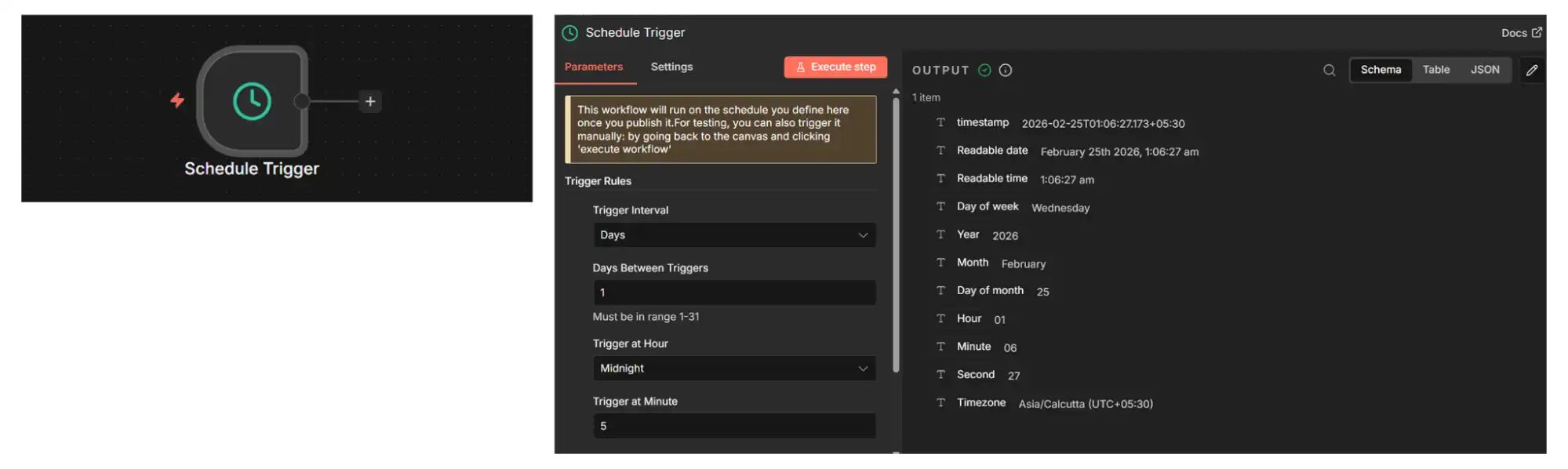
1. Create a Trigger: Start by adding a Schedule Trigger inside n8n. Configure it to run automatically at a fixed time interval so the testing process does not require manual execution.
- Set it to run every 5 or 10 minutes, depending on your testing requirement.
- This workflow executes automatically and continuously without human intervention.
- The workflow simply starts at a given time and moves to the next node.
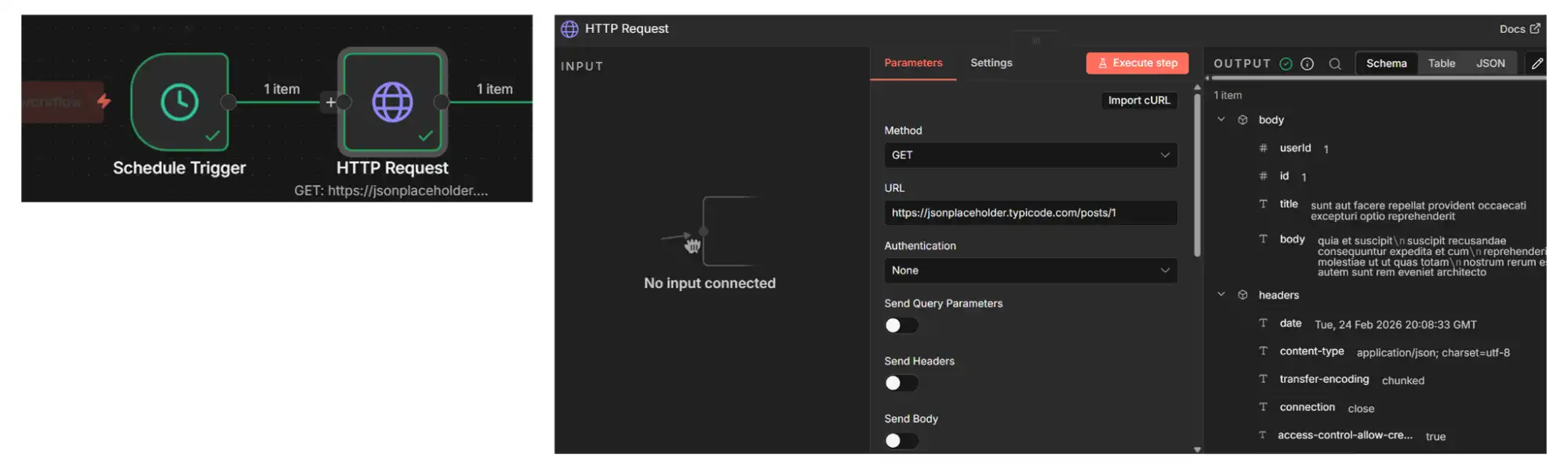
2. Add an HTTP Request to Call the API: Add an HTTP Request node after the trigger to connect to the system under test.
- Configure the node to use the GET method and enter the API endpoint you want to test.
- Enable the option to return the full response so you can access the status code and response data for validation.
- This pulls real test data into the workflow for automated verification.
- The API response becomes available for further evaluation.
Here, you can use this API: https://jsonplaceholder.typicode.com/posts/1 using the GET method.
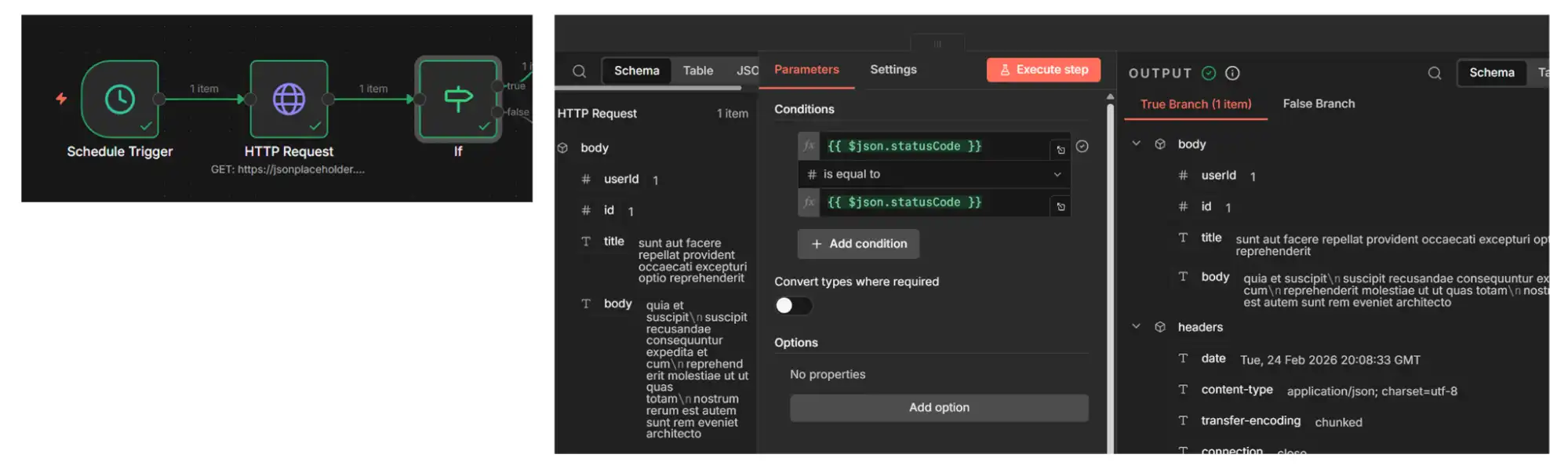
3. Add an IF Node to Validate the Response: Add an IF node after the HTTP request to check whether the API response meets the expected condition. Configure the condition to verify that the status code equals 200 or that the required response data exists.
- This determines whether the test should be marked as passed or failed.
- Based on the condition result, the workflow splits into two branches for further processing.
- Automated decision-making is introduced into the testing process.
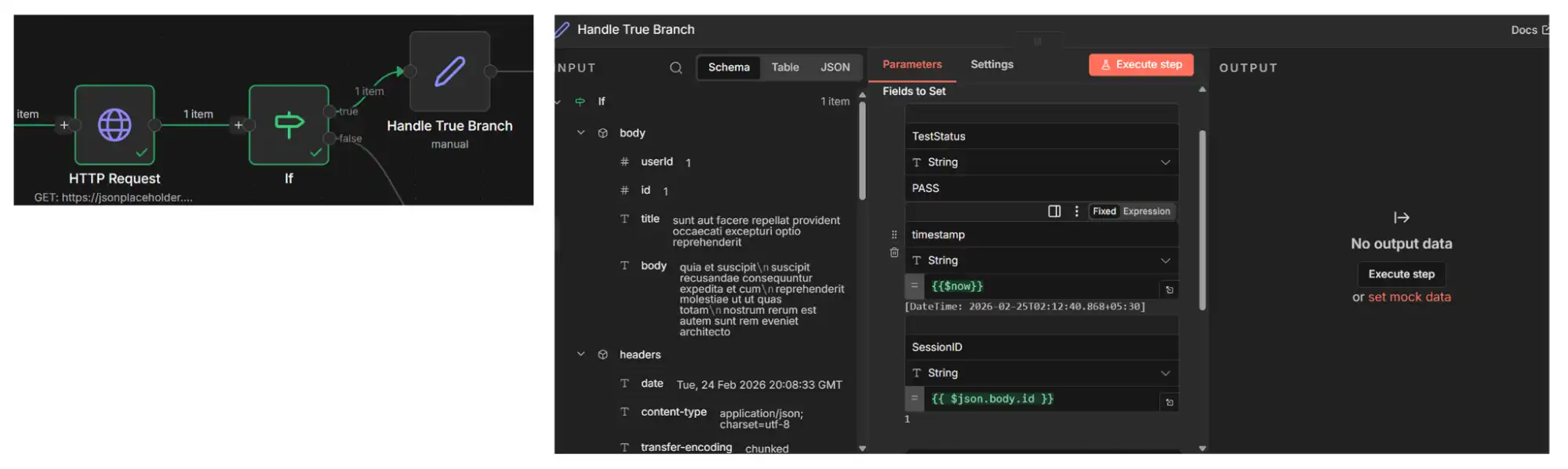
4. Handle the TRUE Branch (Test Passed): Add a Set node under the TRUE branch to log successful test execution. Configure the node to store values such as TestStatus = PASS, Timestamp = {{$now}}, and relevant response data.
- The successful test runs are recorded for reporting and tracking purposes.
- The workflow confirms that the system behaves as expected.
- The success result is stored for visibility and documentation.
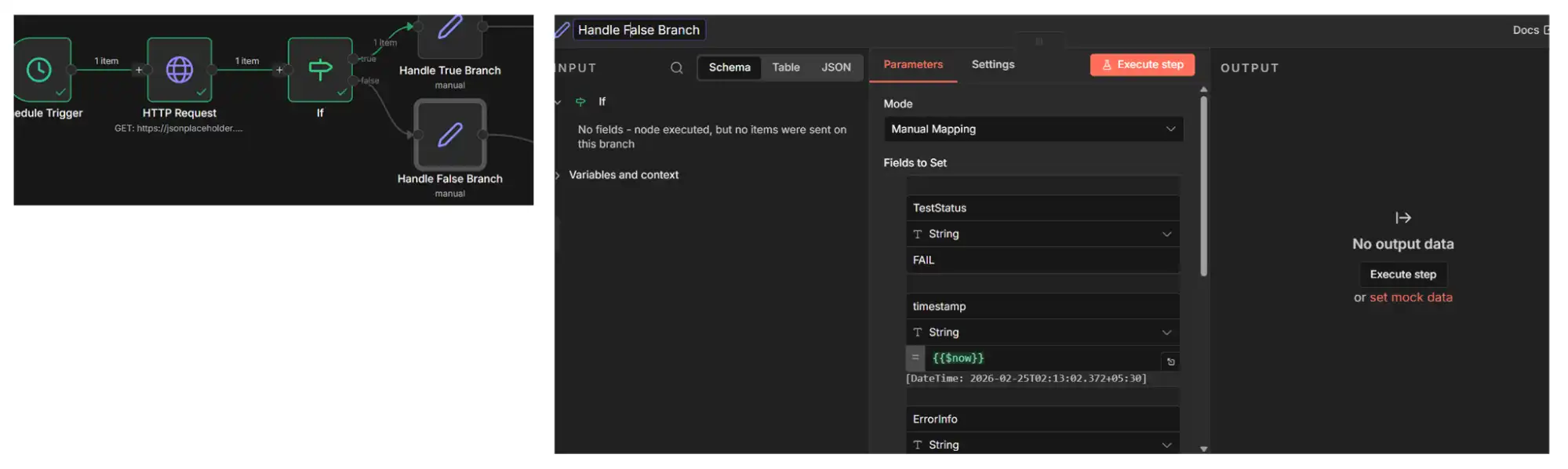
5. Handle the FALSE Branch (Test Failed): Add a Set node under the FALSE branch to log failure details. Configure the node to store TestStatus = FAIL, Timestamp = {{$now}}, and error information from the API response.
- This captures failure context for debugging and analysis.
- The workflow records the failure automatically without manual monitoring.
- Test failures are logged for troubleshooting.
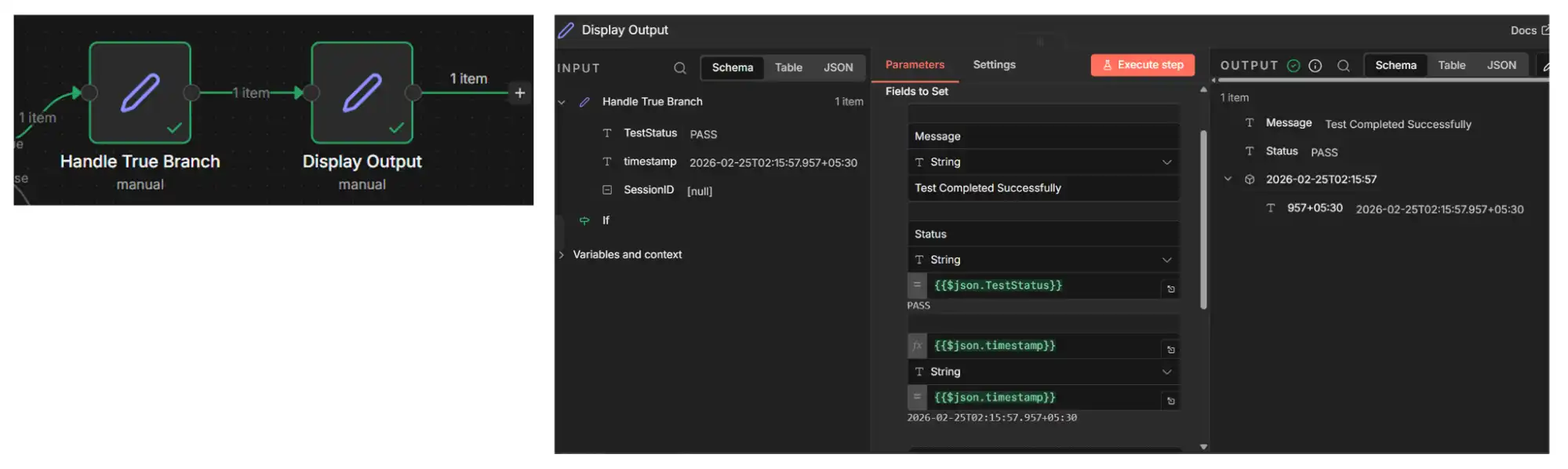
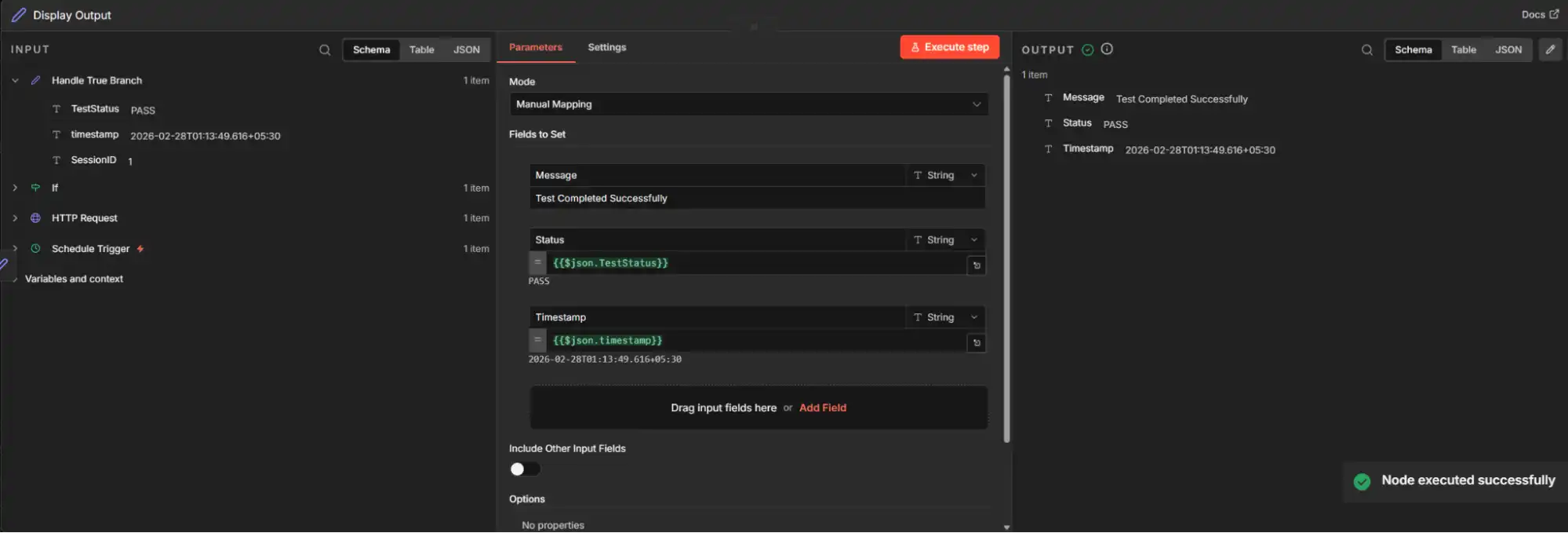
6. Add a Display Output Node: Add a Display Output (Set or NoOp) node at the end of each branch to visualize the test result. Connect it after the TRUE and FALSE Set nodes so the final output is clearly visible in the execution results.
- The node here stores the values, such as TestStatus, Timestamp, and SessionID, are displayed after workflow execution.
- It helps you verify whether the automation logic executed correctly and what data was captured.
- The workflow outputs the final structured test result for review.
Copy and paste this API Health Check JSON directly into your n8n automation workflow to get started.
Output:
Taking It Further: Webhook-Based Triggering from CI/CD
The workflow above uses a schedule trigger, which is ideal for continuous health checks. But in real CI/CD environments, you need n8n to react the moment your test suite finishes, not wait for the next scheduled interval.
This is where webhook-based triggering replaces the Schedule Trigger with a Webhook node. Instead of n8n polling on a timer, your CI/CD pipeline pushes test results directly to n8n after execution completes.
How It Works:
- Replace the Schedule Trigger with a Webhook node in n8n.
- In your CI pipeline (Jenkins, GitHub Actions, GitLab CI), add a POST request to the n8n webhook URL after your test suite finishes.
- The webhook payload includes test results, build metadata, and environment details.
- n8n receives the data and routes it through the same IF → PASS/FAIL → alert logic you built above.
The validation and branching logic stay the same. The only change is how the workflow starts.
Example: Jenkins to n8n Webhook Flow
In your Jenkinsfile, add a post-build step:
post {
    always {
        script {
            def payload = [
                buildNumber: env.BUILD_NUMBER,
                status: currentBuild.result,
                testsPassed: testResults.passCount,
                testsFailed: testResults.failCount,
                environment: env.DEPLOY_ENV,
                timestamp: new Date().format("yyyy-MM-dd'T'HH:mm:ss'Z'")
            ]
            httpRequest url: 'https://your-n8n-instance/webhook/test-results',
                        httpMode: 'POST',
                        contentType: 'APPLICATION_JSON',
                        requestBody: groovy.json.JsonOutput.toJson(payload)
        }
    }
}
Workflow:
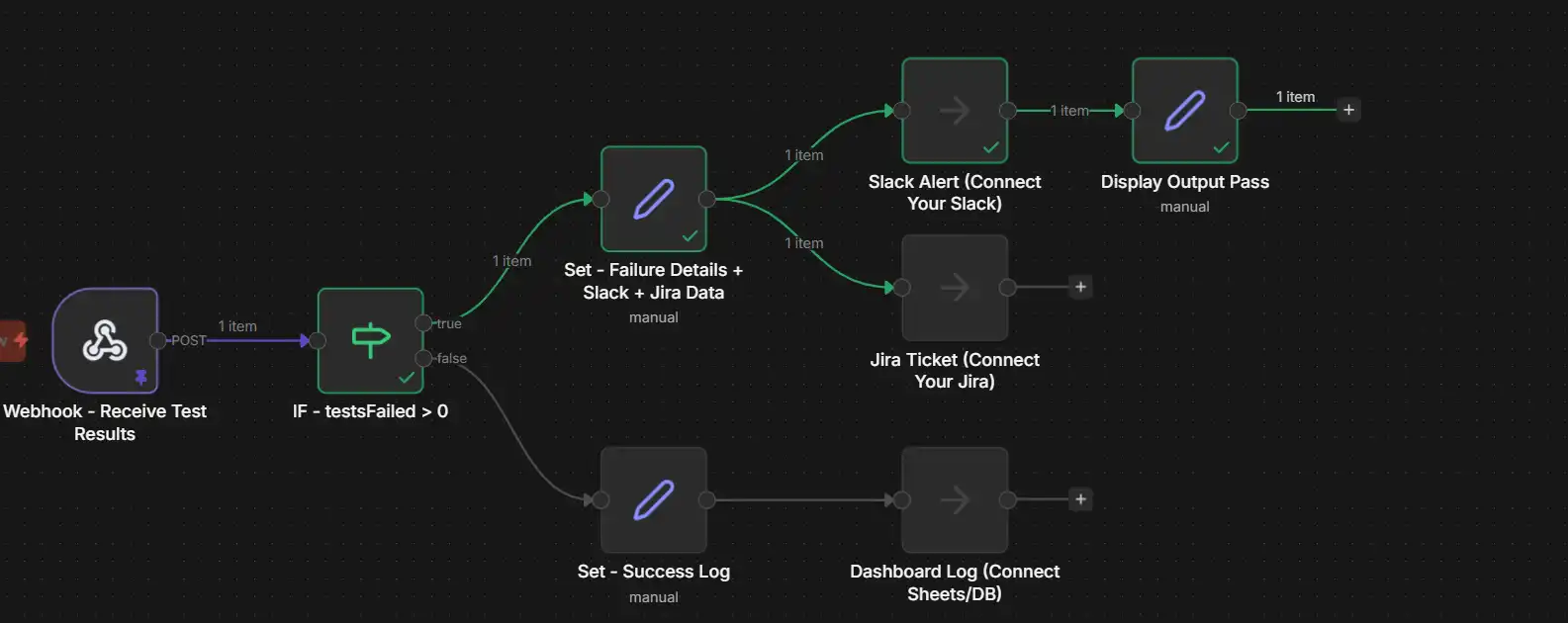
In n8n, the Webhook node receives this payload. An IF node checks if testsFailed > 0. If failures exist, the workflow branches to a Slack notification node and a Jira ticket creation node. If all tests pass, it logs the result to Google Sheets or your reporting dashboard.
When I set up this pattern for a team running 400+ tests per build, I split webhook receivers by environment. Staging failures route to the dev channel. Production failures route to the on-call channel with higher severity. This simple split significantly reduced alert noise.
Output:
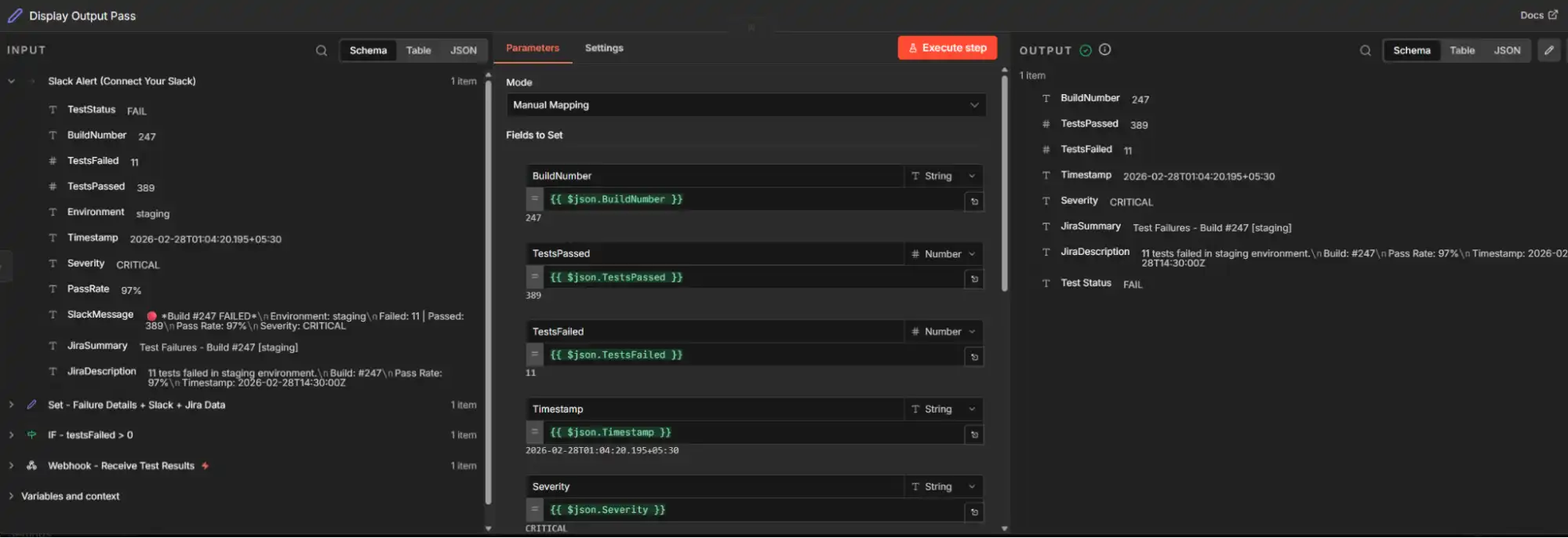
Copy and paste this Webhook JSON directly into your n8n automation workflow to understand this implementation.
Why Is n8n Not a Test Execution Framework?
n8n is built for workflow automation and system orchestration. It does not execute automated test scripts or simulate user interactions.
When you work with test automation frameworks, those systems handle the actual execution of UI, API, or mobile tests. n8n manages what happens around and after the results are generated.
- Does not execute browser or mobile scripts: n8n cannot run Selenium, Cypress, Playwright, or Appium directly. It is not a test execution engine.
- Does not replace existing test platforms: Tools like Selenium, Cypress, and Playwright handle test runtime. n8n complements them by handling validation, notifications, logging, and integrations.
- Focuses on orchestration: n8n connects systems, processes test results, and triggers automated actions. It builds layered workflows around your testing stack.
Is n8n an Orchestration Layer or a Test Execution Engine?
In modern test architectures, tools serve different purposes. Understanding this difference helps you position n8n correctly inside your automation testing stack.
| Capability | n8n as Orchestration Layer | Test Execution Engine | Practical Impact |
|---|---|---|---|
| Test Script Execution | Does not run browser automation or test scripts | Executes automated scripts against applications | Execution stays in Selenium, Cypress, Playwright, and Appium |
| Result Processing | Receives result data, applies validation and transformation logic | Generates raw test results and logs | n8n adds structured evaluation and business logic |
| Automation of Notifications | Automates alerts, ticket creation, reporting, and escalation | Not designed for workflow automation beyond reporting | Communication actions are handled by n8n |
| Business Rule Enforcement | Applies conditional logic and policy-based decisions | Focused on technical validation within the test environment | Operational decisions are automated outside the engine |
| System Integration | Connects CI systems, test tools, databases, AI services, and collaboration platforms | Limited to integrations inside the testing environment | n8n acts as the integration bridge across systems |
Test execution engines validate functionality by running scripts. n8n sits above them as the orchestration layer. It consumes execution results and turns them into automated actions.
This separation creates a scalable architecture. Execution and orchestration operate in clear roles but remain tightly connected.
Where Does n8n Fit in the Automation Ecosystem?
In modern QA environments, multiple tools work together. They handle execution, validation, monitoring, reporting, and intelligence.
n8n fits as the orchestration and integration layer. It connects these systems rather than replacing them.
When you use n8n for test coordination, it operates between test frameworks, CI/CD pipelines, test management platforms, monitoring systems, and collaboration tools. It receives structured data from these systems. It applies conditional logic and business rules. It automates follow-up actions like notifications, ticket creation, logging, and AI-based analysis.
This positioning makes n8n a coordination hub. It enables workflow-driven test coordination across disconnected tools.
How Does Code, Low-Code, and No-Code Work in n8n Automation Testing?
n8n supports different levels of technical control. The choice depends on your team's skill set and workflow complexity.
| Approach | Description | When to Use It | Example in Automation Testing |
|---|---|---|---|
| No-Code | Workflows built entirely with visual nodes and configurations | Simple validation, API checks, notifications, basic result processing | Schedule trigger sends Slack alert if API status fails |
| Low-Code | Visual workflows combined with small logic expressions or limited scripting | Moderate complexity, structured validation, conditional branching | Validate JSON response fields using expressions and branch on threshold values |
| Code-Based | Custom scripting inside workflow nodes for complex transformations | Complex data parsing, custom calculations, AI-based processing | Parse large log files and extract failure patterns using JavaScript |
Which Approach Should You Choose?
The choice depends on your automation testing requirements and the level of control your workflow demands.
- No Code: You use prebuilt visual nodes and configuration options without writing any custom logic. This approach works best for monitoring, basic validations, alerts, and simple result processing. It is ideal for teams that want fast automation without technical complexity.
- Low Code: You combine visual workflow building with small expressions or lightweight logic to implement custom validation rules and conditional branching. This approach aligns closely with modern low-code automation practices and solutions, often categorized as low-code test automation tools, because it balances flexibility with simplicity. It allows you to add structured logic without building everything from scratch.
- Code Based: You write custom scripts inside workflow nodes to handle complex data transformations, advanced computations, or AI-driven processing. This level gives maximum control when automation requires deep customization beyond visual configuration.
This layered flexibility is one of the key strengths of using n8n in automation testing.
Can n8n Power AI and Agentic Testing Workflows?
n8n acts as an orchestration layer that connects test execution tools with AI testing services. This enables intelligent decision-making and automated responses.
n8n enables intelligent test automation by coordinating different systems and applying conditional logic based on test data and AI insights.
It achieves this through:
- Triggering Automated Test Executions: Starts workflows from CI pipelines or scheduled triggers for continuous validation.
- Collecting Test Results and Logs: Gathers execution data from testing platforms for centralized processing.
- Sending Data to AI Services for Analysis: Forwards results to AI systems to detect failures, anomalies, and performance patterns. You can connect to OpenAI, Claude, or custom ML endpoints using HTTP Request nodes.
- Automating Decisions Using AI Responses: Applies conditional logic based on AI-driven insights and validation rules.
- Generating Smart Alerts and Reports: Creates notifications, dashboards, or tickets without manual intervention.
When integrated with AI testing platforms, n8n allows you to build agent-like workflow behavior. Workflows react dynamically based on test results and contextual signals.
This includes automating root cause detection, classifying failures using AI analysis, reducing manual debugging effort, and improving test lifecycle efficiency.
For teams already using AI testing tools, n8n provides the orchestration backbone. It connects the AI analysis to the operational response without requiring custom integration code.
One such AI testing platform is TestMu AI, an AI-native agentic testing platform that handles intelligent test generation, autonomous execution across browsers and devices, and AI-driven root cause analysis.
When you connect TestMu AI to n8n, the orchestration layer triggers test suites on TestMu AI's cloud infrastructure, receives structured results via webhooks, and automates downstream actions like Jira ticket creation, Slack alerts, and dashboard updates. This pairing gives teams both intelligent execution and intelligent coordination in a single automated pipeline.

Competitive Comparison: How Does n8n Compare to Other Tools?
Understanding where n8n fits among testing and automation tools helps clarify its role as an orchestration layer rather than just another execution environment.
Below is a comparison focused on where n8n stands relative to execution frameworks and other automation platforms.
| Tool / Capability | Primary Purpose | Test Execution | Workflow Orchestration | AI / Intelligent Testing | Ideal Use Case |
|---|---|---|---|---|---|
| n8n | Orchestrate cross-tool workflows | No | Yes | Yes (with integrations like TestMu AI) | Coordinating validation, alerting, and reporting |
| Selenium / Cypress | Automated browser and API testing | Yes | Partial | No | Core test execution |
| TestMu AI | AI-Native automation testing | Yes (AI enhancements) | Partial/Integrated | Yes (AI testing & agentic operations) | Intelligent test generation and analysis |
| Postman | API test execution & validation | Yes | Limited | No | API testing workflows |
| Jenkins / GitHub Actions | CI/CD automation | Yes (via plugins) | Yes | Limited | Pipeline orchestration |
| Zapier / Make | Business automation | No | Yes | Limited | Simple cross-tool automations |
n8n is not meant to replace test execution engines. It connects them under one automated workflow umbrella. The key differentiator is that n8n gives you full control over logic, data flow, and system connections. Unlike Zapier or Make, n8n supports self-hosting, custom scripting, and complex conditional branching.
Best Practices for Scaling n8n in Automation Testing
To make your n8n-based automation testing robust and scalable, consider the following best practices:
- Modular Workflow Design with Sub-Workflows: Split logical units into smaller reusable workflows. Use n8n's sub-workflow feature to create one workflow for API validation, one for CI integration, and one for alerting. Connect them using the Execute Workflow node. This makes maintenance easier and encourages reuse across teams.
- Structured Logging with Pinned Data: Always log structured data with clear keys. Include status, timestamp, environment, test name, and error details. Use n8n's Pin Data feature during development. It lets you test workflow logic without triggering real events every time.
- Environment-Aware Configurations: Use n8n's built-in variables and environment settings. Do not hardcode URLs or credentials. Store environment-specific values as workflow variables. This makes workflows portable across staging, QA, and production.
- Secure Credentials Management: Store API keys, tokens, and secrets using n8n's credential store. It supports OAuth2, API key, and header-based authentication. Never store sensitive data in plain text inside workflow nodes.
- Error Workflows and Retry Logic: n8n has a dedicated Error Workflow feature. Configure a separate workflow that triggers when any production workflow fails. Use retry logic on HTTP Request nodes to handle transient failures. Set alert thresholds to avoid noise and duplicate notifications.
- Connect AI e2e Testing Platforms for Smarter Failure Analysis: As your n8n automation testing workflows mature, connect them to AI e2e testing platforms like TestMu KaneAI that provide intelligent failure classification and root cause detection.
Instead of routing raw pass/fail data, your workflows receive enriched analysis, categorized failures, suggested fixes, and confidence scores. This reduces manual triage and lets your IF nodes make smarter routing decisions.
Conclusion
n8n is not a test execution framework. It is an automation and orchestration platform. It enhances how you coordinate your testing ecosystem.
When paired with execution engines like Selenium, Cypress, and Playwright, n8n automation testing workflow bridges execution, analysis, and decision automation. It does this in a scalable, maintainable way.
Instead of writing glue code to connect your tools, n8n provides a visual and extensible approach to QA workflow automation. Whether you are validating APIs, automating CI result handling, orchestrating regression suites, or enabling AI-driven test analysis, n8n helps you streamline and scale with clarity.
The key is positioning n8n correctly. It is not the engine that runs your tests. It is the system that makes your entire testing process intelligent, connected, and automated.


Frequently asked questions
Did you find this page helpful?
More Related Hubs
TestMu AI forEnterprise
Get access to solutions built on Enterprise
grade security, privacy, & compliance
- Advanced access controls
- Advanced data retention rules
- Advanced Local Testing
- Premium Support options
- Early access to beta features
- Private Slack Channel
- Unlimited Manual Accessibility DevTools Tests