

Next-Gen App & Browser Testing Cloud
Trusted by 2 Mn+ QAs & Devs to accelerate their release cycles


Stay Ahead of the Curve with macOS Ventura Preview and Safari 16 on TestMu AI💥
TestMu AI is now live with macOS Ventura Preview and Safari 16 (Beta) for all your testing needs. Leverage the benefits of this update and step up your testing today.

Devansh Bhardwaj
January 27, 2026
At the Worldwide Developers Conference (WWDC) 2022, Apple unveiled macOS Ventura, a new version of its Mac operating system that features a new multitasking experience, overhauled multiple apps, and updated capabilities across the platform.
The new macOS version, named Ventura, is a beautiful and powerful update from Apple that will keep you on your toes for a long time.
We currently have the Beta version for macOS Ventura, but we expect to release the stable version in the fall or autumn. Apple usually releases the new macOS versions around September or October, so we anticipate that the stable version will be available soon. When it is out, we want to keep you prepared.
You can now perform cross browser compatibility testing for your website across the latest macOS version before launching it. We have made the macOS Preview available for both manual and automation testing over TestMu AI. We also have the latest Safari 16 browser that would be the native browser version for macOS Preview. Let’s find out what the latest update is all about!
Perform Live Interactive Testing On macOS Ventura Preview & Safari 16

You can now test your website on the latest macOS Ventura Preview using the TestMu AI real-time testing feature.
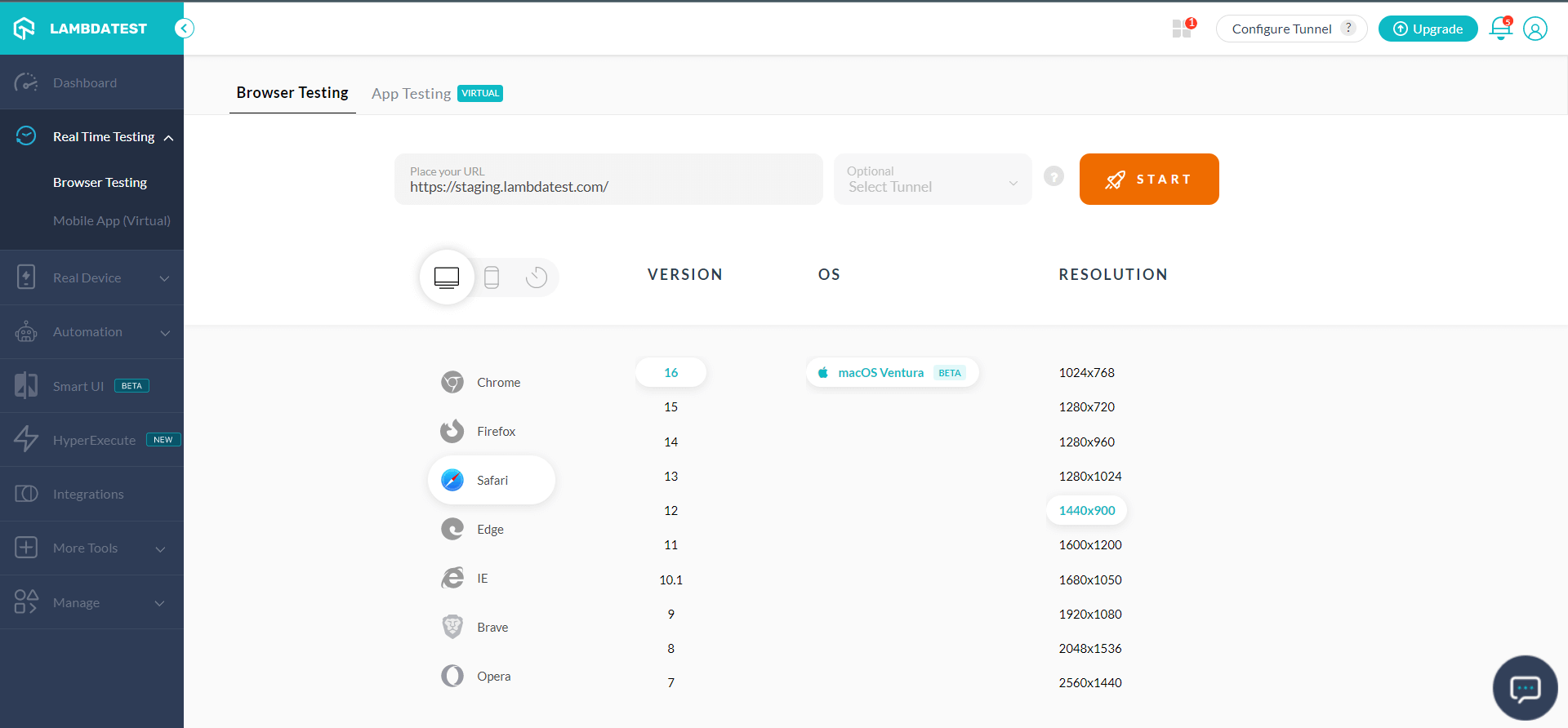
Selenium Testing On macOS Ventura Preview & Safari 16
We have added capabilities for Safari 16 and macOS Ventura Preview in our Desired Capabilities Generator to help you run automation testing with Selenium Grid on the cloud.
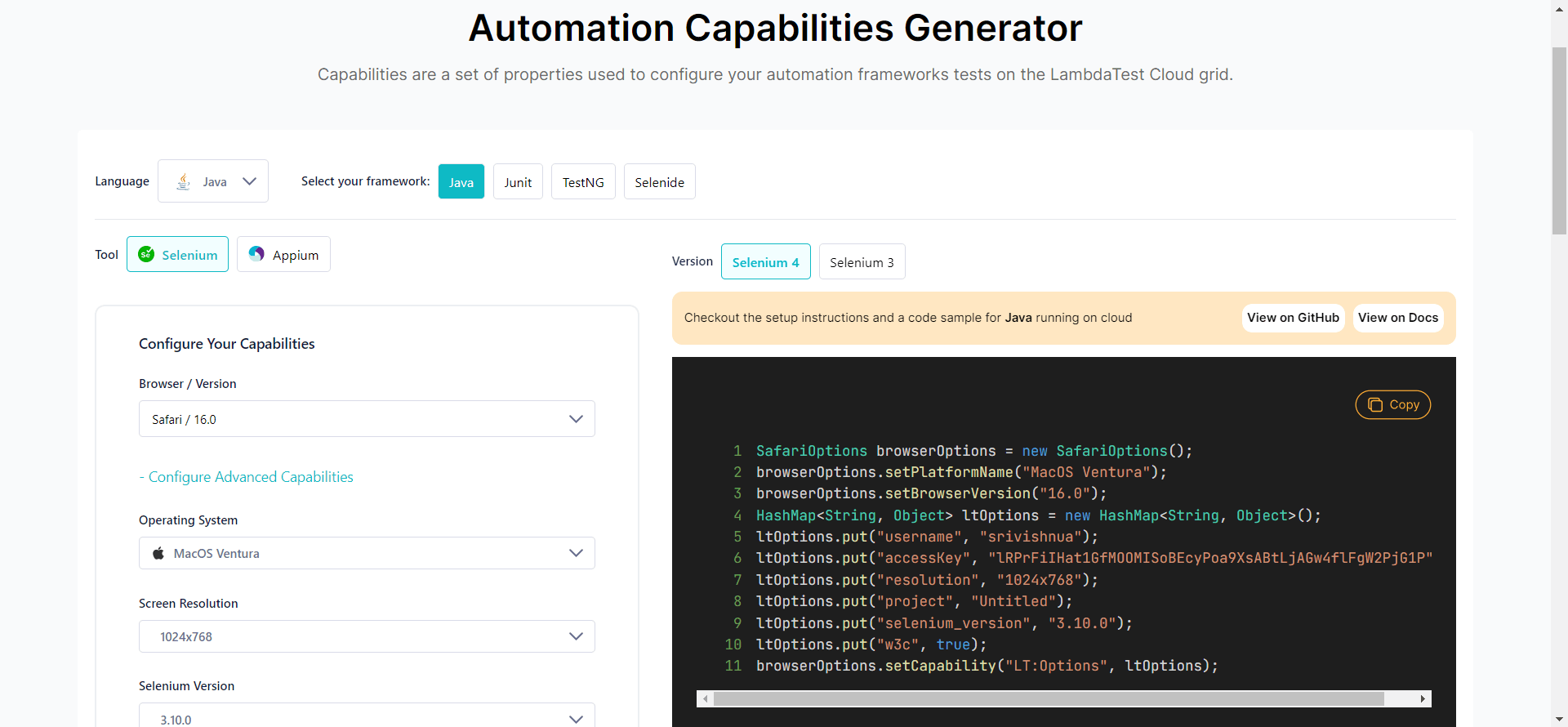
Besides Safari Driver, we’ve configured the macOS Ventura Preview for Selenium ChromeDriver and FirefoxDriver.
By specifying the platform capability as “macOS Ventura,” you can use TestMu AI’s Selenium Grid cloud to test your website and leverage resolution capability to test your website on macOS Ventura Preview in different screen resolutions.
Since you know where you can find the macOS Ventura Preview and Safari 16 on TestMu AI, we can now focus on the critical aspects of the latest macOS and Safari browser versions.

Austin Siewert
CEO, Vercel
Discovered @TestMu AI yesterday. Best browser testing tool I've found for my use case. Great pricing model for the limited testing I do 👏
2M+ Devs and QAs rely on TestMu AI
Deliver immersive digital experiences with Next-Generation Mobile Apps and Cross Browser Testing Cloud

What’s New In macOS Ventura Preview?
The latest macOS version by Apple is expected to be packed with exciting features and redesigns. Here’s what you can expect from the latest version:
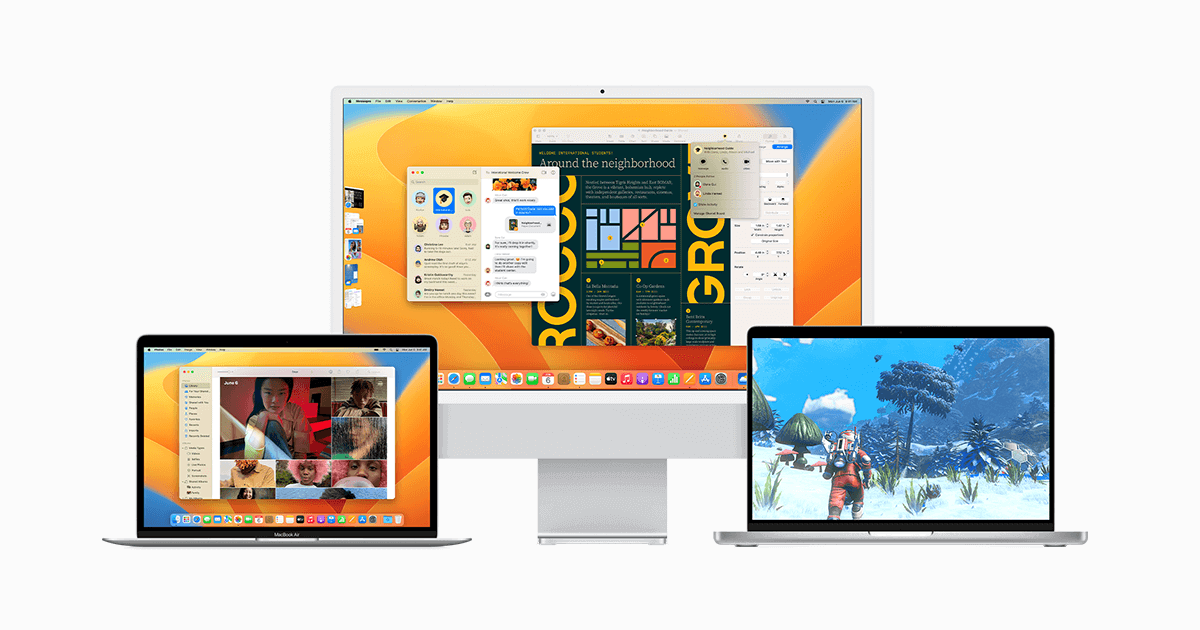
Source
Stage Manager:
Stage Manager provides a new way for Mac users to get more done. Stage Manager brings your main app front and center on the desktop, making quick access to other apps possible when they are needed. By hiding other apps and focusing on the one you need right now, Stage Manager lets you run more programs at once.
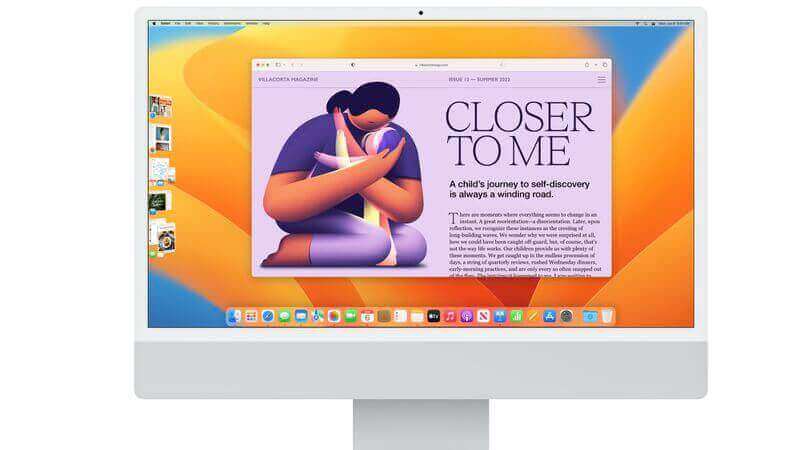
Stage Manager makes it convenient to organize your desktop, so you can keep your workflow running smoothly. It integrates with Mission Control and Spaces so you can click back to the desktop anytime.
Continuity Camera:
If you hate using your Mac’s built-in camera, with the help of the Continuity Camera feature, your iPhone can be used as a webcam for your Mac. The iPhone can be positioned on top of the Mac using a stand designed to connect automatically. There are three modes in the Viewer, including Desk View, that lets you use the Ultra Wide lens to show off your desk if you want to show something on your screen to the camera.

There’s also Center Stage and Studio Light, an effect that illuminates your face while dimming the background.
iCloud Shared Photo Library:
iCloud Shared Photo Library makes sharing your photos with family members easy. You can share an iCloud Photo Library with up to six people, and everyone has equal access to add, edit, favorite, caption, and delete shared images.
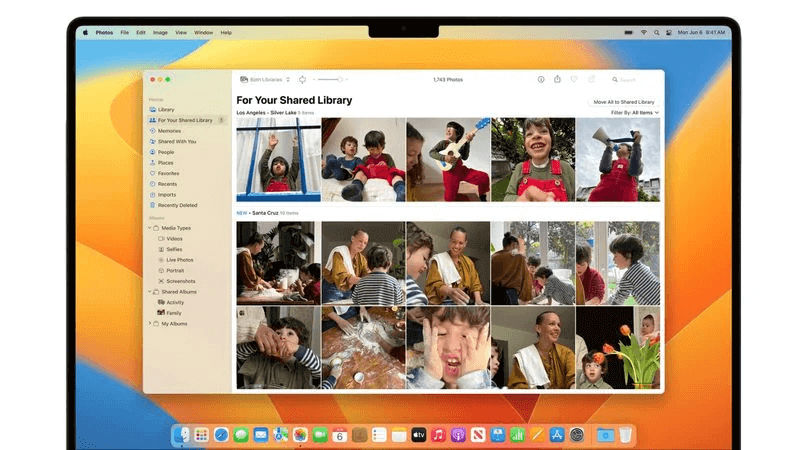
To prevent accidentally shared photos, you can set up rules that control which photos are shared and with whom. You can choose to share all past photos or just photos from a specific start date. You can also share photos with only particular people, such as your family members.
Freeform App:
Apple’s forthcoming Freeform software is a virtual whiteboard for collaborative purposes so that you can brainstorm, diagram projects, and more with others. The Freeform app is cross-platform, so that you can use it on your laptop, tablet, and smartphone. It supports real-time collaboration, so you can view others’ contributions as they make edits. It uses the Messages app and FaceTime to let you chat with collaborators in FaceTime and see updates in a Messages conversation.
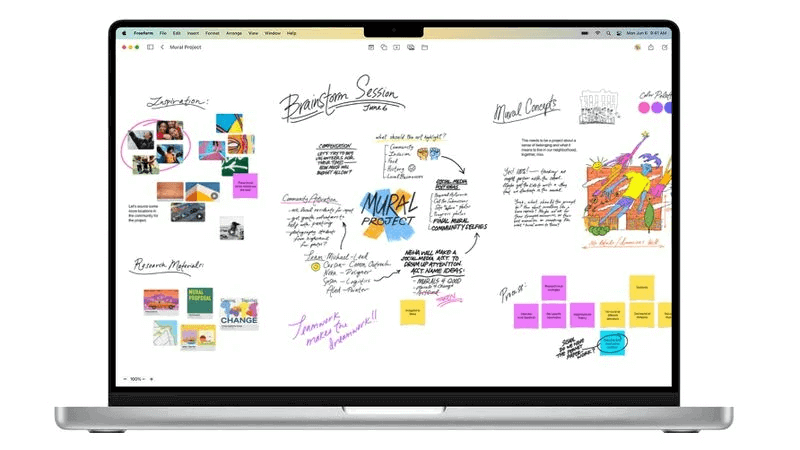
Freeform’s canvas is the stage for all your media. Add images, video, audio, PDFs, documents, and web links directly to the canvas with a single tap and preview them inline without having to go back to another app.
Live Text:
Apple’s Live Text feature, designed to let the Mac recognize text in photos and images, now works with video. It works in Photos, Quick Look, Safari, and other apps. The text will be interactive in paused videos so you can copy/paste, lookup, and translate.
Live Text supports Quick Actions, so you can perform many actions with a click while using the app. It can track flights and shipments, help you translate foreign languages, and convert currencies.
Visual Look Up:
Apple added a new feature, Visual Look Up, that lets you lift the subject out from an image and add it to another image or turn it into a sticker for use in Messages. The feature is available in Photos, Screenshots, Quick Look, Safari, and more.
Passkeys:
Apple’s next operating systems, iOS 16, iPad 16, tvOS 16, and macOS Ventura, will include a new security feature called “Passkeys,” which are more secure than traditional passwords. Passkeys protect users from phishing, malware, and other attacks aimed at gaining account access.
Passkeys are safer, simpler alternatives to standard passwords. As Apple explains in a support document on the feature, Passkeys are built on the WebAuthn standard and use unique cryptographic keys for every website or account.
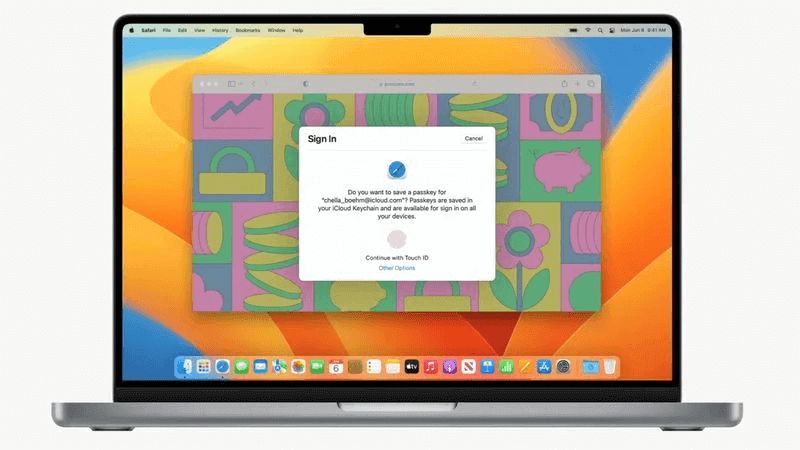
Passkeys are protected by two-factor authentication, providing an extra security layer. Passkeys sync across a user’s devices through iCloud Keychain, which is end-to-end encrypted with cryptographic keys. Though Passkeys sound complicated on paper, they will be as simple as using Touch ID or Face ID to create a passkey to go along with a login.
Other Features:
Other features highlighted by Apple that are included in the latest macOS Ventura are:
- Game Center: The Game Center dashboard has been redesigned with easier access to your friends’ play activities and achievements. Game Center now also supports SharePlay for playing games with friends while on a FaceTime call.
- Apple Pay: A new design feature allows you to add credit cards with fewer steps, review information about a purchase before completing a transaction, and manage your payment information.
- Dictation: Apple’s dictation supports automatic punctuation, which allows users to insert commas, periods, and question marks in their dictations. To use Emoji support, users require Apple silicon Mac.
- Siri: Siri has an updated design that helps you find information faster and more easily.
- FaceTime: macOS Ventura’s FaceTime feature works with Handoff and lets you accept a FaceTime call on your iPhone and then transfer it over to your Mac or vice versa. This seamless transition happens even when you have a Bluetooth headset connected, so you don’t have to worry about dropping your connection as you switch devices during a call.
- Home: The redesigned Home app’s user-friendly interface makes navigating, organizing smart home accessories, and controlling them more manageable. The application’s under-the-hood improvements will make smart home devices more efficient and reliable.
What’s New In Safari 16?
Apple announced Safari 16, bringing macOS Ventura features to macOS Monterey and macOS Ventura. This update comes as we wait for the October launch of macOS Ventura.
Safari 16 includes several improvements. Tab Group start pages let you get right to your favorite sites, and pinned tabs in Tab Groups let you keep your most visited sites at the ready. The update also includes cross-device syncing for website settings and strong password editing for adjusting your passwords to meet various site-specific password requirements.
You can generate the automation capabilities for macOS Ventura and Safari 16 from our automation capabilities generator.
Safari 16 features faster performance and improved security, including:
- The new Tab Group start pages that let you customize your tabs with different background images and favorites for each Tab Group.
- Pinned tabs in Tab Groups can increase productivity by making frequently visited websites available.
- Tabs in the sidebar let you see a list view of your open tabs, which is convenient for moving between many pages.
- You can now sync your settings for specific websites across devices.
- Strong password editing allows you to create a strong password that meets specific website requirements, such as length and character types.
The update also addresses several vulnerabilities in the WebKit rendering engine that could be used to track users through web extensions, lead to arbitrary code execution, and lead to UI spoofing. These vulnerabilities were not known to have been actively exploited, but updating is recommended to take advantage of the Safari 16 functionality.
Safari 16 vs Safari 15.6
We all expect the browser wars to heat up more with the latest updates in Safari 16. A comparison with Safari 15.6 would give you a better idea about the latest Safari 16.
Here is the detailed comparison between Safari 16 and Safari 15.6 with respect to some of the top CSS properties:
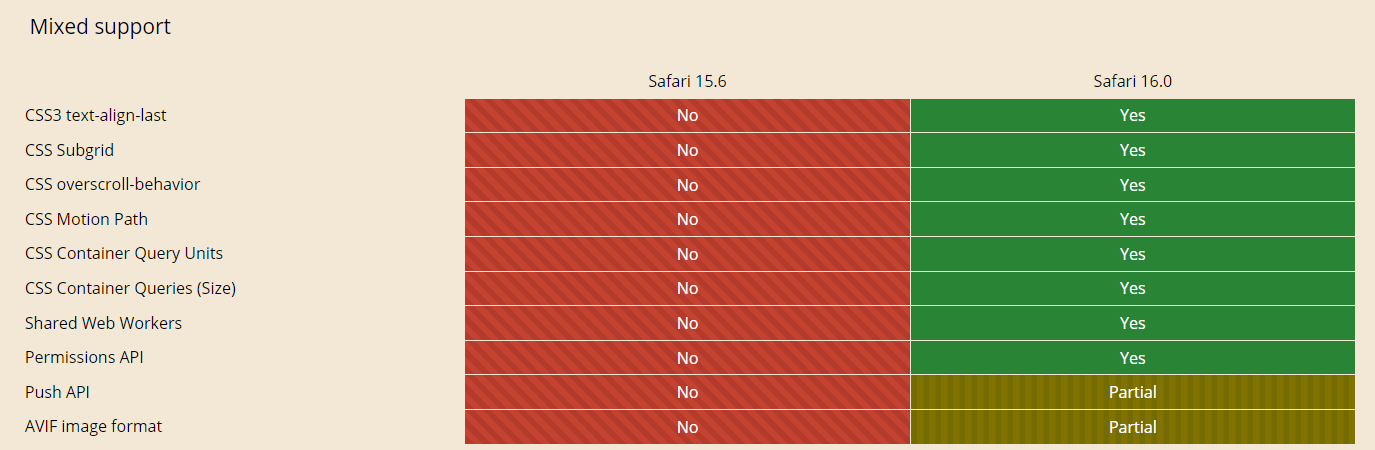
You can find the complete comparison of the features here.
Conclusion
We continuously bring more exciting updates, including all the latest browsers, OS, and more. We hope the new macOS Ventura and Safari 16 will boost productivity and scale your manual cross browser testing experience. You can also leverage our latest additions on the TestMu AI, where you can Test on Real macOS Ventura Online for better accuracy and performance.
Start to test on iPhone for your mobile web and native apps along with macOS. Want to share your valuable feedback on this product update? You can let us know on the TestMu AI community.
To stay updated with the instant updates, visit TestMu AI Changelog.
Happy Testing!


Did you find this page helpful?
More Related Hubs
TestMu AI forEnterprise
Get access to solutions built on Enterprise
grade security, privacy, & compliance
- Advanced access controls
- Advanced data retention rules
- Advanced Local Testing
- Premium Support options
- Early access to beta features
- Private Slack Channel
- Unlimited Manual Accessibility DevTools Tests