

Next-Gen App & Browser Testing Cloud
Trusted by 2 Mn+ QAs & Devs to accelerate their release cycles


On This Page
- Cross Browser Testing on Windows 11 [Beta]
- Mobile Web Testing on Android 12 [Beta]
- New Browsers in Screenshot Testing
- New Android Emulators for Browser Testing
- Realtime Native Mobile App Testing on Android 12 [Beta]
- New Android Emulators for Mobile App Testing
- New Functionalities in Real-Time Native App Testing

Now Test On Windows 11, Android 12, New Browsers, And More!
We are glad to announce the public release of our latest Windows 11 and Android 12 for live-interactive testing, new browsers, and more. This is one of the most awaited updates for testers and mobile developers who use TestMu AI to perform cross-browser compatibility testing. So stay one step ahead & keep your users happy!

Devansh Bhardwaj
January 27, 2026
Greetings Testers! We are back again with one of the most awaited product updates! At TestMu AI, we aim to ride the latest trends and keep upgrading our product to help you get ahead on your journey, and we’re sure that you’ll find something of value in the latest releases with new upgrades and advanced functionalities. So we bring you the updates that we have been working on, and you’re in for a treat.
This week has been extra special, and we’re super excited to announce the release of the latest Windows 11 [Beta] and Android 12 [Beta] for live interactive testing, along with new browsers, Android emulators, new functionalities in real-time native mobile app testing, and more!
Let’s dive in and check out these awesome updates!
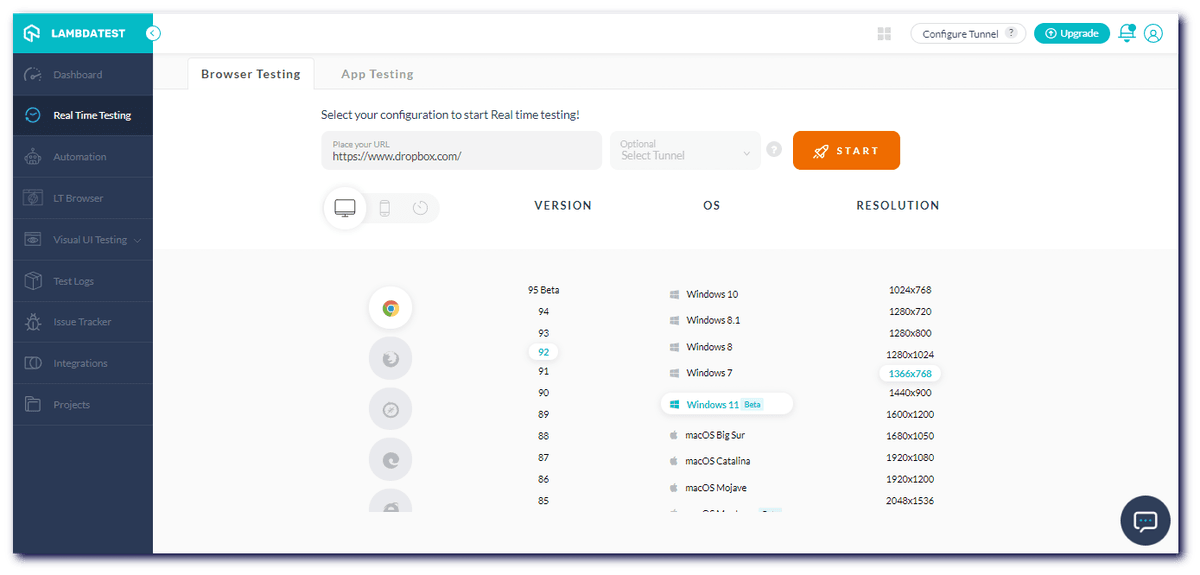
Cross Browser Testing on Windows 11 [Beta]
We are glad to announce that you can now perform browser compatibility testing of your website and web apps on the long-awaited Windows 11. Windows 11 comes with standout features like the latest macOS-like interface, widgets, integrated Android apps, and much more. Currently, we have launched Windows 11 in the Beta phase.
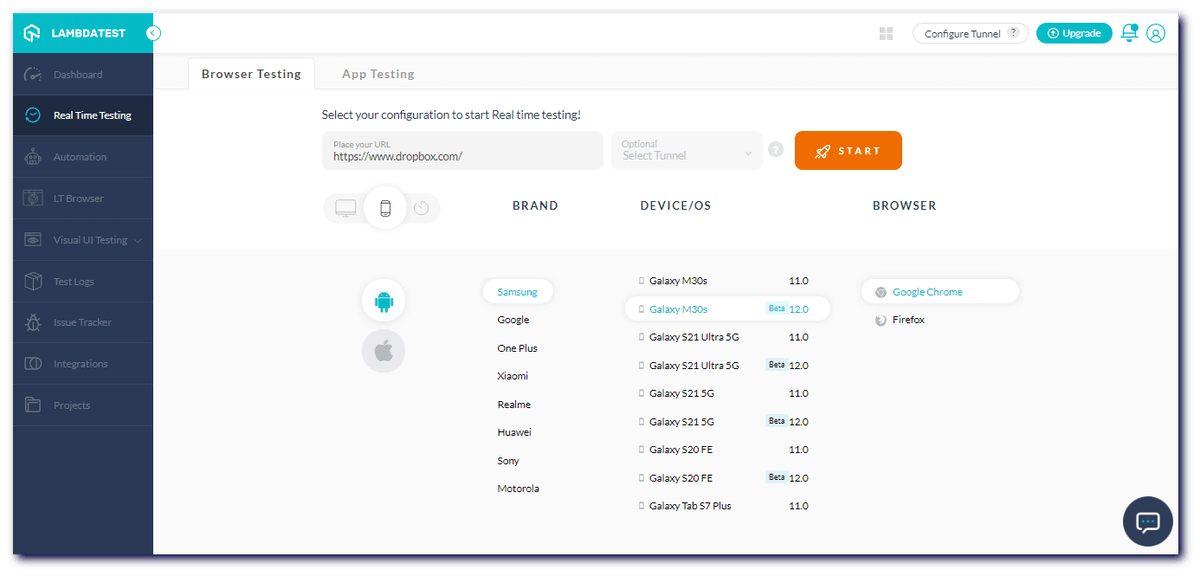
Mobile Web Testing on Android 12 [Beta]
A surprise for all mobile developers who use TestMu AI to test out mobile web applications is that you can now test your websites and web apps across numerous browsers on Android 12 [Beta].

New Browsers in Screenshot Testing
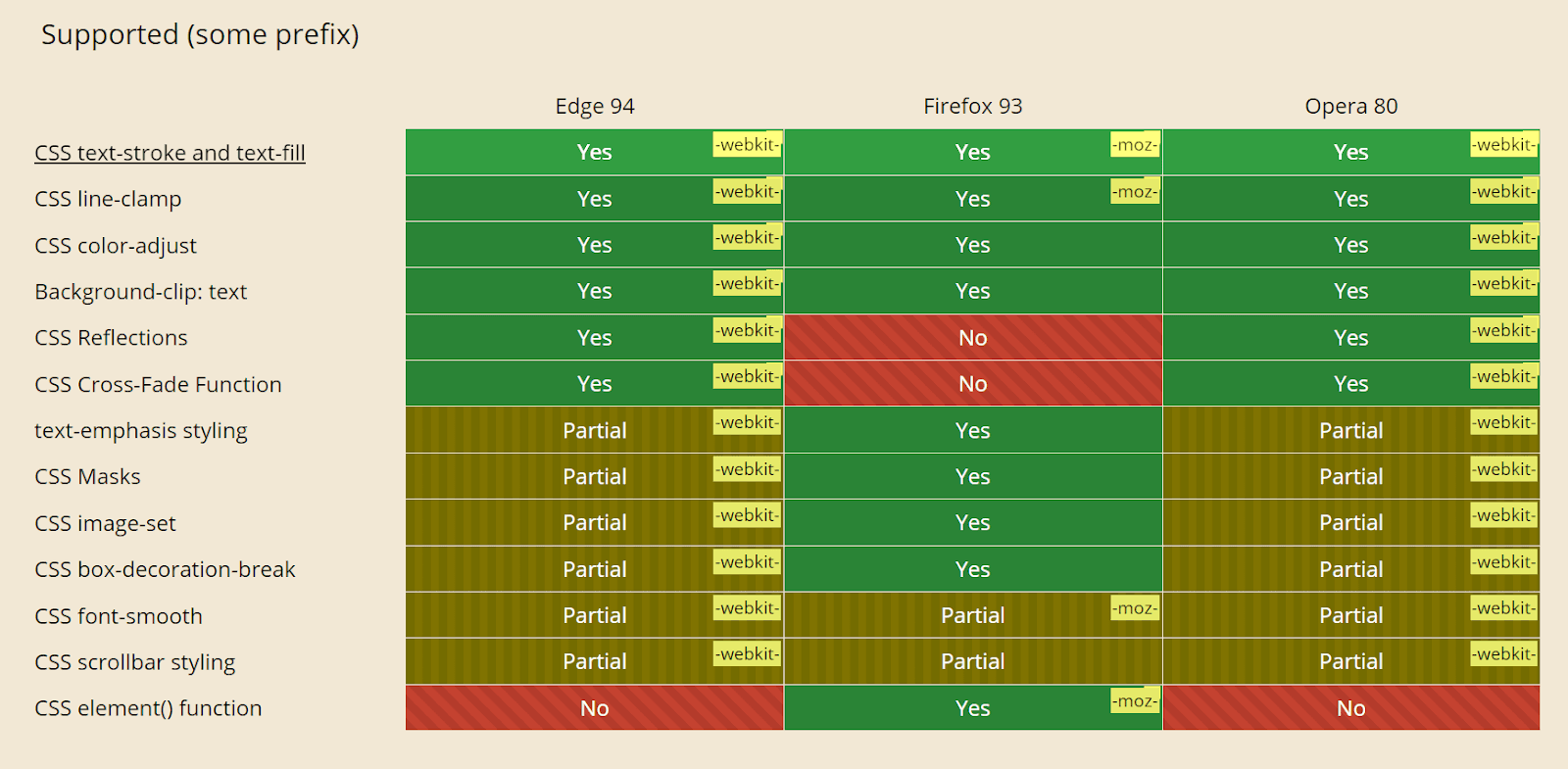
With these latest upgrades, you can now capture bulk screenshots on the newly added browser versions.
- Firefox 93
- Edge 94
- Opera 80
Here is a comparison amongst the browser compatibility between Firefox 93, Edge 94, and Opera 80.
With this Screenshot Testing Tutorial, you will learn how to perform Automated Screenshot Testing on the TestMu AI platform.
New Android Emulators for Browser Testing
You can now perform cross-browser compatibility on the latest versions of Android emulators online as well.
- One Plus 9, 9 Pro, Nord.
- Oppo Reno 6 Pro.
- Test on Redmi 11, 11 Pro.
Hold onto your chairs because we are not yet finished! Along with announcing the updates for the Browser Testing category, we are also excited to announce the updates for the App Testing category. So check out these cool updates!
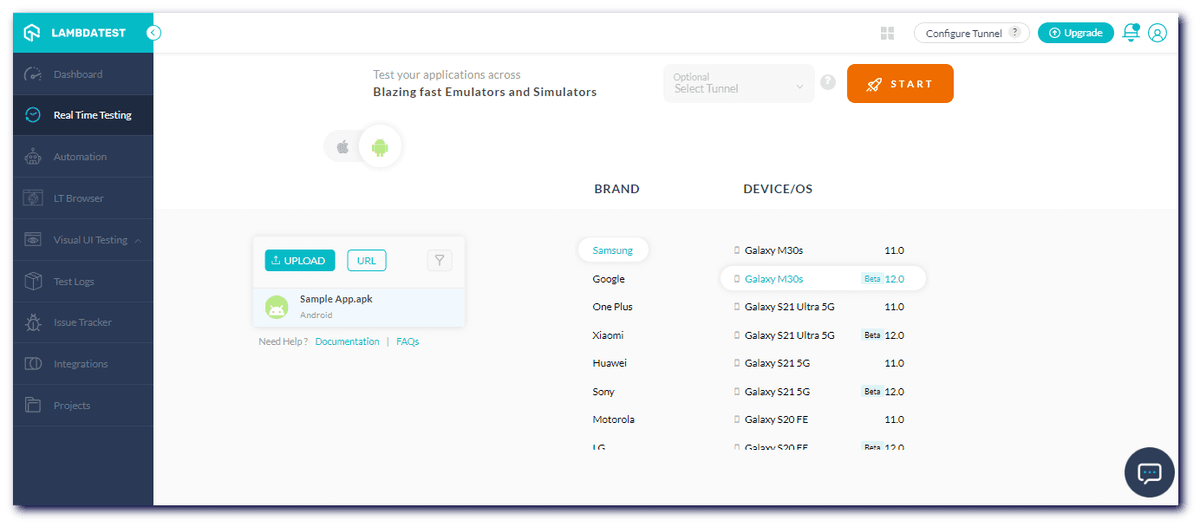
Realtime Native Mobile App Testing on Android 12 [Beta]
Mobile developers using TestMu AI for performing real-time native mobile app testing can now perform tests on the latest android version – Android 12 [Beta].
New Android Emulators for Mobile App Testing
TestMu AI mobile app testing allows you to test your native apps on a wider range of Android emulators. Check out the new Android emulators that are on the list:
- One Plus 9, 9 Pro, Nord
- Oppo Reno 6 Pro
- Xiaomi 11, 11 Pro

Austin Siewert
CEO, Vercel
Discovered @TestMu AI yesterday. Best browser testing tool I've found for my use case. Great pricing model for the limited testing I do 👏
2M+ Devs and QAs rely on TestMu AI
Deliver immersive digital experiences with Next-Generation Mobile Apps and Cross Browser Testing Cloud

Here’s a short glimpse of TestMu AI mobile app testing features:
However, you can follow the TestMu AI YouTube Channel and stay updated with the latest tutorials around mobile app testing, test automation, and more.
New Functionalities in Real-Time Native App Testing
TestMu AI has added new functionalities in real-time native app testing. This includes Shake Menu (Gesture), Network Throttling, add Filters to Uploaded Apps, and options to Change Visibility, Rename & Delete Uploaded Apps.
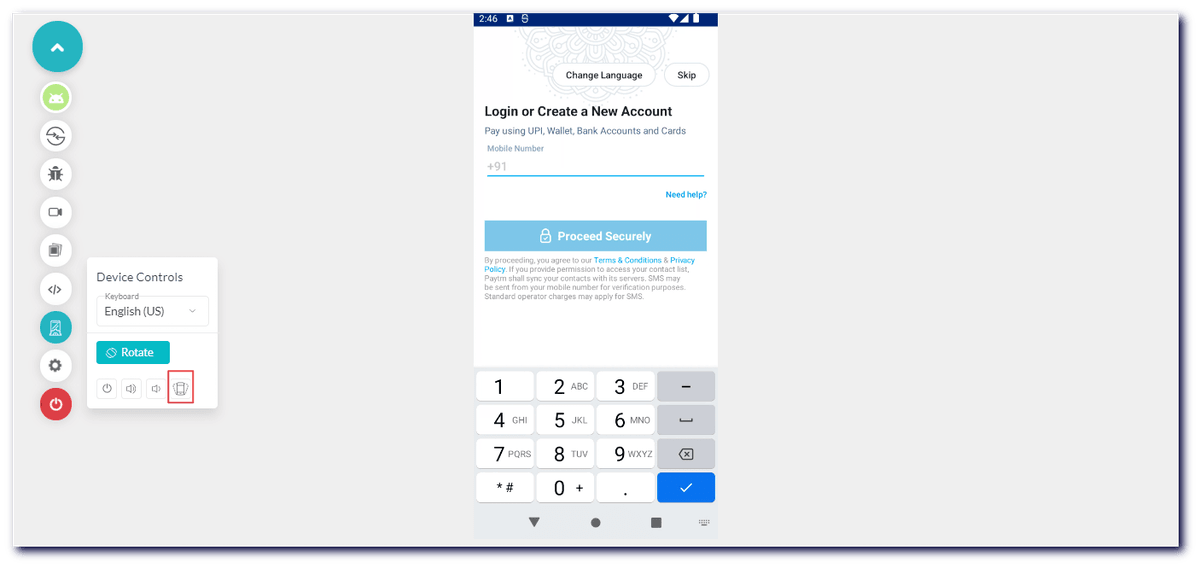
Support Shake Menu (Gesture)
TestMu AI now supports the Shake menu (Gesture) on real-time native app testing. You can now easily point to other environments for testing within an app.
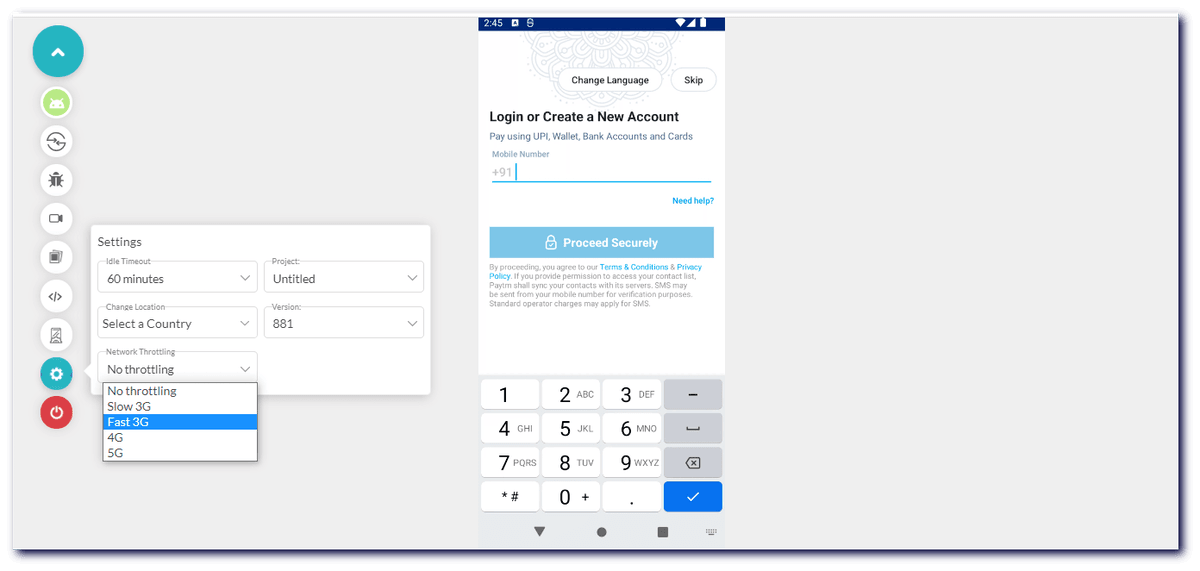
Network Throttling for Native Mobile App Testing
TestMu AI allows its users to test their native apps under different network conditions giving them a better understanding of how their application behaves on low or high latency networks. With this new functionality, you can test your native app over different network conditions like Slow 3G, Fast 3G, 4G, and 5G using the Network throttling feature.
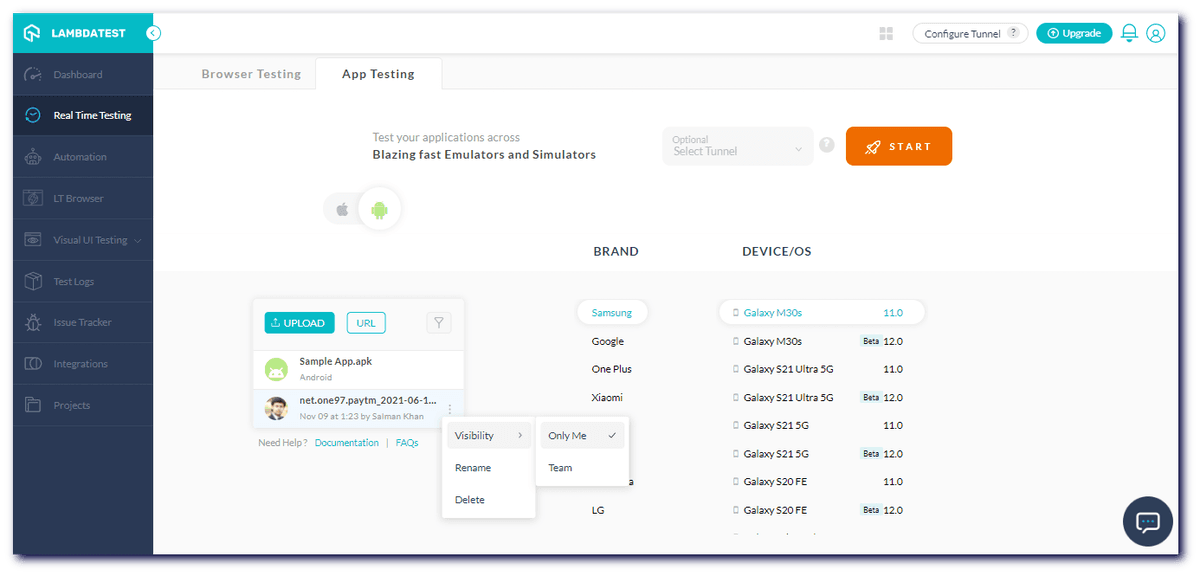
Change Visibility, Rename & Delete Uploaded Apps
We have also added the feature of switching the visibility of your uploaded native apps between you and your team, along with an option to rename and delete the uploaded apps.
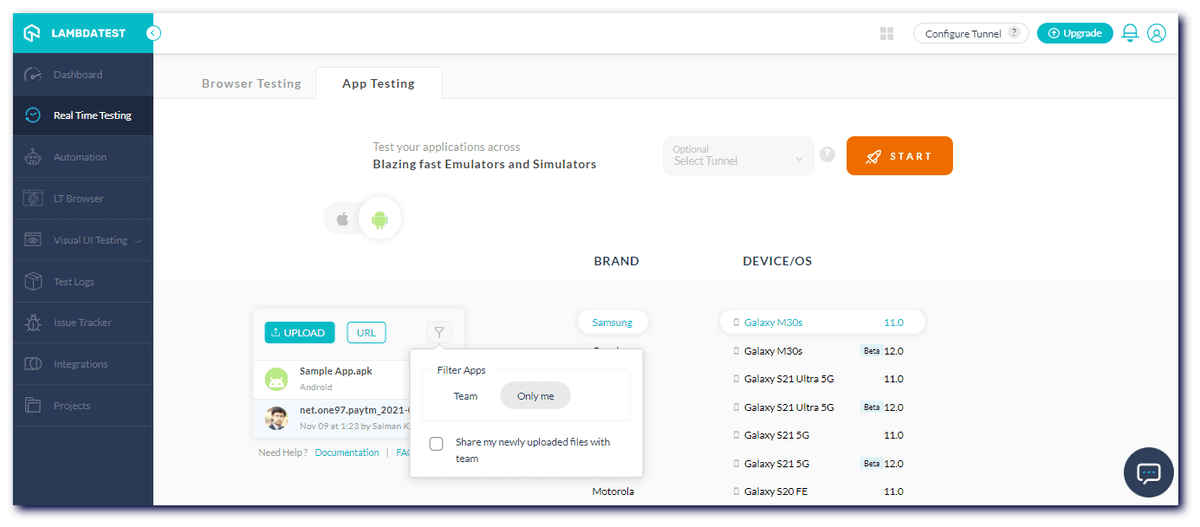
Easily Add Filters to Uploaded Apps
This update also allows testers to easily add filters to share uploaded apps with their team members.
A Final Word..
We at TestMu AI are continuously working to improve your overall testing experience by updating the features and making the platform better, more robust, and reliable for your use.
Your feedback helps us improve and think outside the box. We appreciate you tagging along with us on this mission to improve the future of testing. If you want to stay updated with the latest industry trends and want to share your thoughts on automation testing with like-minded people, check out TestMu AI Community.
Visit TestMu AI Changelog to stay updated with the latest updates and announcements.
Happy Testing!


Did you find this page helpful?
More Related Hubs
TestMu AI forEnterprise
Get access to solutions built on Enterprise
grade security, privacy, & compliance
- Advanced access controls
- Advanced data retention rules
- Advanced Local Testing
- Premium Support options
- Early access to beta features
- Private Slack Channel
- Unlimited Manual Accessibility DevTools Tests