

Next-Gen App & Browser Testing Cloud
Trusted by 2 Mn+ QAs & Devs to accelerate their release cycles


On This Page
- Flutter vs React Native: Which is More Popular?
- What is Flutter?
- What is React Native?
- Features Face-off: Flutter vs. React Native
- Code Implementation — Flutter vs React Native!
- Testing and Debugging Apps – Flutter vs React Native
- Best Backend Choices for Flutter
- Best Backend Choices for React Native
- Popular Case Studies
- Community and Future Outlook
- Flutter vs. React Native: Making the Right Choice for Your App Development

Flutter vs React Native: Which is Right for You In 2025?
Navigate Flutter vs React Native: strengths, weaknesses, & choose the ideal framework for your app development.

Akash Nagpal
February 3, 2026
In today’s tech landscape, businesses increasingly use cross-platform solutions to streamline their mobile app projects. Users interact with these businesses with smartphones, tablets, web apps, etc. Ensuring these apps function smoothly across this diverse landscape is where cross-platform development comes into play. However, the crux of successful cross-platform development lies in selecting the proper framework to translate your vision into reality while maintaining optimal performance and user experience.
Two standout competitive frameworks that have taken the cross-platform realm by storm are Flutter and React Native, making the ‘Flutter vs React Native‘ debate a central focus. These frameworks have not only gained popularity but have also revolutionised the app development industry.
This blog will uncover the critical aspects that set Flutter and React Native apart. We aim to help developers with an informed perspective, empowering them to make the best decision for their next cross-platform app project. We will explore each framework, highlighting its strengths and weaknesses.
Flutter vs React Native: Which is More Popular?
Flutter leads with 46% developer adoption compared to React Native's 32%, though both frameworks continue growing in cross-platform development.
While both Flutter and React Native enjoy popularity in the cross-platform app development landscape, their rise has been backed by different strengths. Let's examine the statistical data to understand their adoption and usage.
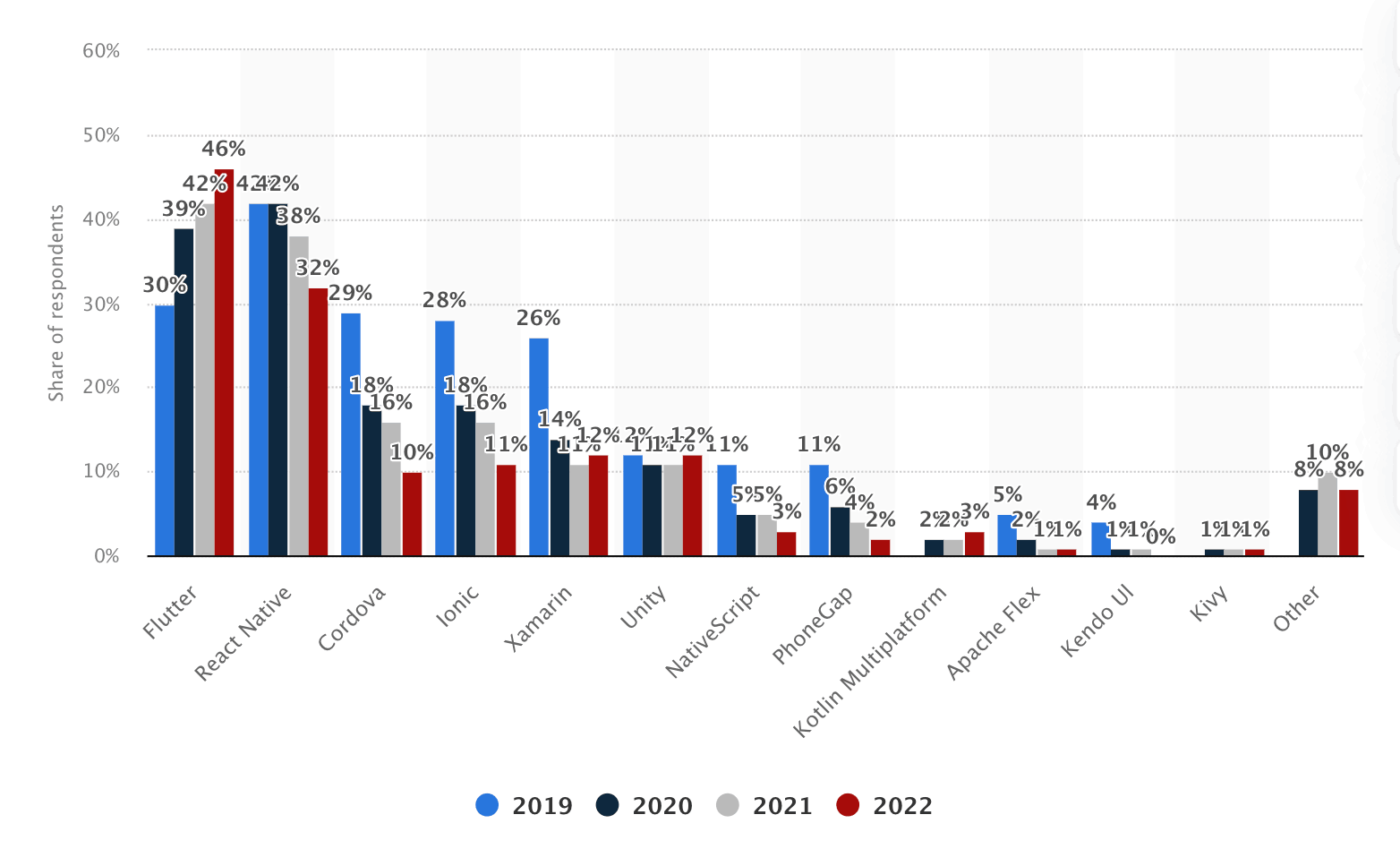
According to the latest survey by Statista, in 2022, developers chose Flutter 46% of the time, whereas React Native was chosen by 32% of the developers, a significant increase from 2021. Both frameworks have grown in acceptance across various applications, from start-ups to large corporations. Let’s explore these platforms for creating apps in more detail.

Note: Test your Flutter Apps with Appium on Real Devices! Try TestMu AI Today!
What is Flutter?
Flutter is Google's open-source UI SDK using Dart to build natively compiled apps for mobile, web, and desktop from a single codebase.
Flutter is an open-source UI software development kit (SDK) created and managed by Google that allows developers to build native apps for several platforms from a single codebase. It uses the Dart programming language and provides a set of pre-designed widgets for generating aesthetically appealing user interfaces.

What’s so Special about Flutter? First, its ability to develop cross-platform apps from a single codebase makes it stand out from the other frameworks. Flutter allows developers to design attractive apps without sacrificing speed, quality, or performance. The rendering engine of Flutter is primarily written in C++. Another notable feature of Flutter is its wide range of customizable widgets and components.
Features Of Flutter
Flutter has various features, making it a popular choice among developers. Here are some key features of Flutter:
- Widget-Based Architecture: In Flutter, everything is a widget, including the UI elements, layout components, and even the whole code app. This widget-based layout makes development easier and allows for the building of rich and interactive user interfaces.
- Expressive UI: Flutter’s widgets allow developers to create expressive and visually appealing interfaces. The framework supports intricate animations, transitions, and effects, providing a polished and engaging user experience.
- Hot Reload: Flutter’s Hot Reload feature is like a live preview of your code. You can change your code and see the results immediately in the app’s UI. This makes it easy to experiment with different ideas and quickly fix bugs.
- Native performance: Flutter offers native performance by compiling its code to native ARM code, ensuring smooth and responsive apps. This reduces the performance disparity that is sometimes encountered with cross-platform frameworks.
- Platform APIs Integration: Flutter Platform APIs Integration allows developers to access the native platform APIs of the underlying operating system from the Flutter app. This can be used to access the device’s camera, contacts, or location or to play audio or video.
In Flutter, everything is a Widget!
Flutter employs a Widget-based UI approach, where widgets are the fundamental elements of the app’s user interface, ranging from buttons to entire app structures. These widgets are organised into a hierarchy known as the “widget tree,” where each widget nests within its parent and inherits context. This hierarchical structure extends to the root widget, either MaterialApp or CupertinoApp, simplifying UI development and enabling the creation of complex interfaces through widget layering and nesting.
Limitations Of Flutter
Flutter, while robust and versatile, also has limitations. Here are some key constraints developers should know when working with Flutter:
- Large App Size: Flutter applications could exhibit a greater file size than native apps. This is mainly attributed to including the Flutter engine and framework, leading to an augmented initial download size for the app.
- Learning Curve for Dart: For developers accustomed to more commonly used languages such as JavaScript, Flutter’s use of the Dart programming language may be a learning curve. While Dart offers many advantages, developers may need time to master it.
- Limited 3D Graphics Capabilities: Flutter’s support for 3D graphics and AR/VR applications is limited compared to other frameworks, making it less suitable for applications heavily reliant on these technologies.
What is React Native?
React Native is Meta's JavaScript framework that enables developers to build native iOS and Android apps using React from a shared codebase.
React Native is a JavaScript framework created and managed by Meta Platforms to create natively rendered iOS and Android mobile apps. It's developed using React, Facebook's JavaScript toolkit for building user interfaces, but instead of being aimed at the web, it's aimed at mobile applications.
Through React Native, we can create platform-specific versions of components so a single codebase can be shared across different platforms. This is how React Native makes it simple to build for both Android and iOS simultaneously.
Features Of React Native
React Native has various features. Listed are some of the key features of React Native:
- Unified Multi-Platform Development: The core principle of React Native is that the code you write should run on almost all popular mobile devices. Among them are Windows, Android, and iOS. Writing code in Swift for iOS, Java for Android, or C# for Windows is unnecessary.
- Reusable Components: React Native is a component-based architecture that allows developers to build modular user interface functions known as components. It allows developers to create reusable UI components that can be shared across different parts of the app or even between other apps.
- Live Reloading: Similar to Flutter’s Hot Reload feature, the “live reloading” feature of React Native enables developers to see the effects of code changes in real-time without rebuilding the entire app. This speeds up the development and testing process.
- Rapid Development: React Native advocates a structured and systematic approach to development, making it easier to maintain and scale up projects as they get large. For Facebook, accelerated development is crucial because React pages load noticeably quicker than conventional JavaScript pages.
- Open Source Contribution: React Native has a rich ecosystem of third-party libraries and open-source contributions. These libraries provide ready-made solutions for a variety of capabilities, hence increasing development efficiency. The collaborative nature of open-source contributions guarantees that React Native developers have access to a wide range of tools.

React Native’s Component Magic!
React Native employs JavaScript to access platform APIs and define UI using React Components. Components are reusable and testable code units, much like Flutter’s Widgets. React Native offers essential Native Components, ready to use, for building apps called Core Components.
Core Components are cross-platform, acting as a bridge between the app’s JavaScript code and the native components on each platform. Core Components provide an additional level of abstraction, simplifying development and allowing developers to create uniform user interfaces across platforms.
Limitations of React Native
Here are some constraints to consider when working with React Native:
- Platform Dependencies: While React Native enables cross-platform development easier, remember that certain features and components may be platform-specific. This could present challenges when aiming to provide a consistent user experience across several platforms.
- Third-Party Dependencies: In React Native development, it’s commonplace to depend on external packages and libraries. However, the quality and maintenance of these packages can vary, potentially leading to compatibility issues and requiring additional attention during app updates.
- Memory Fragmentation: React Native relies on JavaScript, which has its own garbage collection mechanism. The JavaScript runtime and the bridging mechanism can cause memory fragmentation, making it challenging to allocate large contiguous blocks of memory efficiently.
Features Face-off: Flutter vs. React Native
| Aspect | Flutter | React Native |
|---|---|---|
| Programming Language | Dart | JavaScript (with optional TypeScript) |
| UI Component Model | Widget-based Architecture | Component-based Model (using JSX) |
| Performance | Natively compiled | Bridge overhead between JS and native |
| Development Environment | Officially supported and backed up by Google | Developed and maintained by Meta Platforms (Facebook). |
| User Interface and Animations | Flutter offers built-in support for animations, enabling developers to create dynamic and fluid UI elements. | React Native provides a native-like design with native components, enhancing the user experience through adherence to platform design rules. |
| Hot Reload | Supports Hot Reload for faster development | Supports Live Reload for real-time effects of code changes |
| Development and Performance | Flutter uses its Ahead-of-Time (AOT) compiler to generate optimised code for iOS and Android, ensuring native-level performance while keeping the app binary size efficient. | React Native utilises an enhanced JavaScript virtual machine with a JIT compiler, providing speed advantages. It compiles ahead, allowing developers to include the required codebase, achieving performance comparable to native apps without iOS build setting adjustments. |
| Development Speed | Fast development cycles due to the native compilation | Generally fast, but a bridge may introduce some delay |
| Code Reusability | High code reusability across platforms | Code can be shared. Still, platform-specific code may be necessary |
| Integration with Native Code | Supports integration through platform channels | Supports integration through Native Modules |
| Customization | Flutter provides extensive customization options through widgets and supports the creation of custom UI elements. | React Native allows customization through native modules and components, enabling developers to tailor the UI to specific design needs. |
| State Management | Provider, Riverpod, Redux packages etc | Redux, MobX, Recoil, Context API, etc. |
| Navigation | Navigator widget with named routes | Navigation library like React Navigation |
| Access to Device Features | Rich set of plugins for device APIs | Access to native modules for device features |
| Styling | Uses Flutter’s own styling system and plugins | CSS-in-JS (styled-components), Flexbox, etc. or CSS frameworks like Tailwind, Bootstrap, etc |
| Tooling and IDE Support | Flutter DevTools, Android Studio, VS Code | React Native Debugger, Expo, IDEs with extensions |
| Testing and Debugging Tools | Flutter provides a suite of testing options, including unit, widget, integration, and UI testing, as well as Continuous Integration (CI) support. | React Native uses Jest for unit testing, offers end-to-end (E2E) testing with Detox or Appium, and integrates with Android Emulator and iOS Simulator for device testing. |
| Backend Integration | Backend is integrated through platform channels | Backend can be integrated smoothly with native modules |
| Third-Party Components and Libraries | Flutter has a growing collection of third-party libraries and packages to enhance design and functionality. | React Native benefits from a vast ecosystem of third-party components and libraries, allowing developers to improve design and functionality while saving development time. |
| Popular Apps Built with | Alibaba, Google Ads, eBay Motors, etc. | Facebook, Instagram, Airbnb, Tesla, Walmart, etc. |
| Licensing | Open-source (MIT License) | Open-source (MIT License) |
| Community and Ecosystem | Smaller community due to the recently introduced framework as compared to React Native | Larger community with extensive libraries |
Code Implementation — Flutter vs React Native!
Now that we’ve explored the fundamental differences between Flutter and React Native let’s get hands-on and build a simple “Hello, World!” app using each framework.
Building an App using Flutter
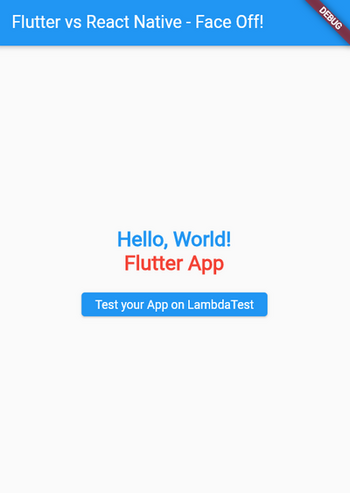
Now, let’s write a simple “Hello, World!” code in Flutter. Along with the “Hello World” code, we will include a basic clickable button in our app to navigate to TestMu AI Playground.
/main.dart
import 'package:flutter/material.dart';
import 'package:url_launcher/url_launcher.dart';


void main() {
  runApp(MyApp());
}


class MyApp extends StatelessWidget {
  @override
  Widget build(BuildContext context) {
    return MaterialApp(
      home: Scaffold(
        appBar: AppBar(
          title: Text('Flutter vs React Native - Face Off!'),
        ),
        body: Center(
          child: Column(
            mainAxisAlignment: MainAxisAlignment.center,
            children: [
              Text(
                'Hello, World!',
                style: TextStyle(
                  fontSize: 24, // Adjust the font size
                  fontWeight: FontWeight.bold, // Make it bold
                  color: Colors.blue, // Change text color
                ),
              ),
              Text(
                'Flutter App',
                style: TextStyle(
                  fontSize: 24,
                  fontWeight: FontWeight.bold,
                  color: Colors.red,
                ),
              ),
              SizedBox(height: 10),
              ElevatedButton(
                onPressed: () {
                  _launchURL(
                    'https://ecommerce-playground.lambdatest.io/');
                },
                child: Text('Test your App on LambdaTest'),
              ),
            ],
          ),
        ),
      ),
    );
  }


  _launchURL(String url) async {
    if (await canLaunch(url)) {
      await launch(url);
    } else {
      throw 'Could not launch $url';
    }
  }
}
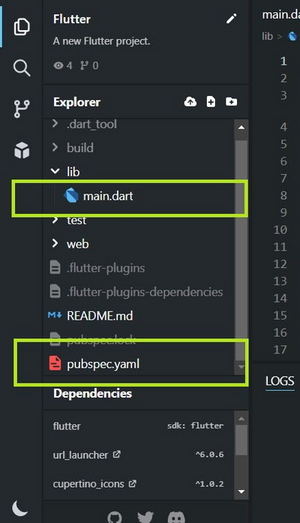
Note: ‘ main.dart’ is the main entry point for the application. It is the primary Dart file where the app’s execution begins. It contains the main() function, which is the starting point for the Flutter framework to run the application.
Dependencies
You need to add a dependency for the url_launcher package to handle launching URLs on button clicks. Add the dependency in your pubspec.yaml file under the dependencies section:
dependencies:
  flutter:
    sdk: flutter
  url_launcher: ^6.0.6 # Use the latest version available
Output
File Structure
Building an App using React Native
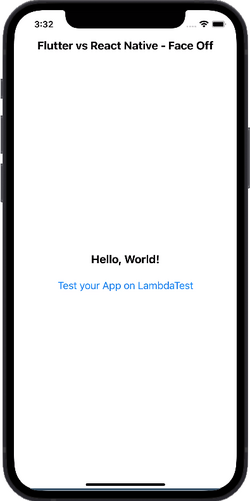
Similarly, let’s write a simple “Hello, World!” program in React Native. Along with Hello World code, we will also include a basic button in our app which, on Click, would navigate to a different URL.
/App.js
import React from "react";
import { View, Text, Button, Linking, StyleSheet } from "react-native";


const App = () => {
  const openExternalURL = () => {
    const url = "https://ecommerce-playground.lambdatest.io/";
    Linking.openURL(url);
  };


  return (
    <>
      <Text style={styles.header}>Flutter vs React Native - Face Off</Text>
      <View style={styles.container}>
        <Text style={styles.text}>Hello, World!</Text>
        <Button title="Test your App on LambdaTest" onPress={openExternalURL} />
      </View>
    </>
  );
};


const styles = StyleSheet.create({
  header: {
    fontSize: 20,
    fontWeight: "bold",
    textAlign: "center",
    marginTop: 50,
    marginBottom: 10,
  },
  container: {
    flex: 1,
    justifyContent: "center",
    alignItems: "center",
  },
  text: {
    fontSize: 20,
    fontWeight: "bold",
    textAlign: "center",
    marginBottom: 15,
  },
});


export default App;
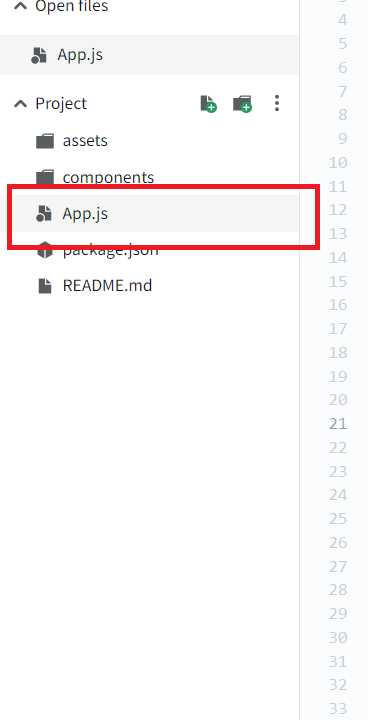
Note: Similar to main.dart, here in React-Native we have App.js file as the main entry point and primary component. It contains the code that defines the structure and behaviour of the app.
Output
File Structure
Testing and Debugging Apps – Flutter vs React Native
Testing plays a pivotal role in the mobile app development lifecycle, and both Flutter and React Native offer robust tools and frameworks tailored for diverse testing requirements. Let’s look into a comparative analysis of testing methodologies within the Flutter and React Native ecosystems:
| Attributes | Flutter | React Native |
|---|---|---|
| Built-in Debugger | Dart DevTools and web interface | Robust debugger tools with Redux and React DevTools |
| IDE Integration | VS Code and IntelliJ IDEA. | VS Code and IntelliJ IDEA. |
| Memory Management | Yes via debugger and built-in Dart’s memory management mechanism. | Yes via debugger and Javascript’s garbage collection. |
| Network Inspection: | Yes (via Debugger) | Yes (via Debugger) and developer tools like Chrome DevTools |
| Component Inspection: | Yes( via Debugger). | Yes (via React DevTool extension ) |
| Testing Flexibility | Supports widget testing for UI components | Supports component testing for UI elements |
Best Backend Choices for Flutter
Choosing the right backend for Flutter apps impacts performance, scalability, and user experience. This section explores popular backend options.
- Google Firebase: Google Firebase is a mobile and web application development platform. It provides real-time database, authentication, hosting, and cloud services, making it an appealing option for developers seeking a speedy and scalable backend solution.
- Amazon Web Services (AWS) Amplify: Amazon Web Services (AWS) Amplify delivers tools and services for developing safe and scalable cloud-powered apps. It offers authentication, data storage, and APIs, which suit various app kinds.
- Django with REST APIs: If you wish to deploy a custom backend, you may combine Flutter with Django, a robust Python web framework. Django can be used to build RESTful APIs that interface with your Flutter app and provide you with control over backend functionality.
Best Backend Choices for React Native
Choosing the right backend for React Native apps also impacts performance, scalability, and user experience. This section explores popular backend options.
- Node.js with Express: Creating backend APIs with Node.js and the Express.js framework is a popular solution. It is widely recognized for its speed and capacity to manage many requests, making it excellent for data-intensive applications.
- Firebase: Firebase, like Flutter, is a flexible backend solution for React Native. It provides real-time data synchronisation, authentication, cloud operations, and more, allowing developers to design feature-rich apps easily.
- GraphQL: An alternative to standard REST APIs is GraphQL. It increases data retrieval flexibility by enabling clients to request only the required data. Apollo Server is a popular alternative for GraphQL backends with React Native.

Popular Case Studies
In this section, we’ll dive into two different showcases of powerful apps built using each framework:
Google Pay – Flutter
Google Pay, a cutting-edge digital payment system created by Google, has started a fantastic adventure to improve user experience. Let us look at how Google Pay took the Fintech market to the next level.

Google Pay’s challenge was adjusting to a varied worldwide user base across iOS and Android platforms. In 2019, they switched to Flutter to streamline and speed up development. Initial key features were rebuilt by a committed team of three engineers, who achieved impressive efficiency gains. After a successful beta launch, they hired 100 developers to relaunch Google Pay in India and the US. Flutter’s capacity to streamline development procedures and generate cross-border applications is demonstrated by the 150 million customers that Google Pay now counts across 40 countries. Refer to the official article on Flutter’s website for further information.
Walmart – React Native
Walmart, a big name in global retail, took an innovative path to improve online shopping. In this study, we’ll see how Walmart used React Native to improve its app.

On iOS and Android, Walmart sought to offer a unified shopping experience. React Native resulted in a single codebase that simplified development and eliminated redundancy. The accessibility of resources might have had an impact on this choice.
With 96% of its code shared, Walmart’s app functions effectively on both platforms. By utilising the abilities of its creators, they had 12.8 million downloads as of November 2021, placing them fourth. Retail giants like Walmart can thrive in the digital age by meeting various client needs thanks to React Native. See the List Of Open Source React Native Apps for other React Native success stories.
Community and Future Outlook
Both Flutter and React Native boast strong communities and ecosystems supported by open-source projects, comprehensive documentation, and active third-party plugins. Let’s delve into the anticipated growth and plans for each community:
Flutter’s Growth Momentum
Flutter’s community of developers has been growing steadily, and there’s an expected significant increase in 2025. Attractive features like hot influence this growth reload and improved performance. As more businesses adopt Flutter, its versatility in various applications becomes more apparent.
Flutter stands out in meeting the demand for cross-platform applications, making it a strong competitor. The community’s contributions have significantly shaped modern UI design trends, resulting in better user experiences. Noteworthy projects by well-known brands highlight Flutter’s crucial role in app development.
React Native’s Growth Momentum
React Native’s extensive JavaScript community, supported by Facebook, drives its growth. The community focuses on ensuring stability and optimizing performance, working on aligning platform APIs to provide a consistent development experience. The fabric architecture enhances performance, making it more likely for businesses to embrace React Native.
Looking ahead, React Native’s future revolves around integrating modern technologies, introducing advanced features, and staying in line with current framework trends. The framework’s commitment to JavaScript standards and swift adoption of new features will be crucial. Collaborations with industry partners aim to elevate React Native, emphasising standardised processes, enhanced documentation, and active participation in issue resolution processes.
Flutter vs. React Native: Making the Right Choice for Your App Development
Flutter and React Native are remarkable options for cross-platform application development. While they exhibit certain resemblances, they also possess notable distinctions that warrant your attention before deciding.
Choosing between Flutter and React Native for an app development project is a crucial decision that can impact the success of a product. To make an informed choice, consider the following factors:
- Performance and User Experience: Both Flutter and React Native provide near-native performance, but in different manners. The widget-based architecture of Flutter allows for consistent UIs across platforms, whereas React Native relies on native components. Consider which strategy best matches the user experience your business wants to provide.
- Development Speed: The “Hot Reload” feature in Flutter and the “Fast Refresh” feature in React Native allows for real-time code modifications, making development faster and more efficient. Consider which framework will improve your development pace and process the most.
- Development Resources: The availability of skilled developers and their familiarity with specific languages can impact your choice. For Example, if you already have web developers on your team, you might consider working on React Native because of the already present knowledge of Javascript.
- Deployment, Scaling, and Maintenance: If your strategy involves scaling your app as it gains popularity, assess how each framework handles increased complexity and user loads. Post-deployment server and app maintenance and updation are vital in this process. Consider the ease of maintaining and scaling your app.
- Documentation and Support: Comprehensive documentation and strong community support are essential for effective development. Analysing the available resources beforehand for both Flutter and React Native.
- Case Studies: “Everyone learns from Experiences.” Some big giants have shifted from one framework to another for better strategy and productivity. Study these product cases built with Flutter and React Native. Then, analyse how these frameworks perform in real-world scenarios and consider whether their features align with your project’s goals.
Conclusion
In comparing Flutter vs React Native, we’ve gained valuable insights into their attributes and strengths. In this blog, we have discussed Flutter’s widget-based architecture and its native-like performance.
We learned about its development performance, testing strategies, and design flexibility, which helps developers understand the framework. React Native, on the other hand, uses native components to create a seamless and familiar user experience. We discussed its Fast Reload feature, Native’s development strategies, design flexibility, and its testing and debugging tools.
Flutter and React Native offer unique advantages and capabilities, so choosing between them is a significant consideration. By examining each framework’s key aspects, developers can better understand which aligns better with their project requirements, skill sets, and desired outcomes. Whether you’re a developer with a lot of experience or just starting to learn about making apps that work on different platforms, this blog will give you the information you need to choose the right one and start building successful apps.


Frequently asked questions
Did you find this page helpful?
More Related Hubs
TestMu AI forEnterprise
Get access to solutions built on Enterprise
grade security, privacy, & compliance
- Advanced access controls
- Advanced data retention rules
- Advanced Local Testing
- Premium Support options
- Early access to beta features
- Private Slack Channel
- Unlimited Manual Accessibility DevTools Tests