

Next-Gen App & Browser Testing Cloud
Trusted by 2 Mn+ QAs & Devs to accelerate their release cycles


Workshop: Effective Evaluation of Automation Tools [Spartans Summit 2024]
Learn from experts how to select the right automation tools based on various evaluation factors and gain insights to streamline the testing process.

TestMu AI
January 30, 2026
In today’s rapidly evolving software industry, organizations face increasing pressure to deliver high-quality products quickly and efficiently. However, manual testing processes often prove inadequate to keep pace with the demands of modern development cycles, leading to delays, errors and decreased overall productivity. As a result, there is a growing need for effective automation testing tools to streamline testing efforts, improve test coverage, and accelerate time-to-market.
With the challenge in mind, Dimpy Adhikary gave invaluable insights into effective automation tools in a session at Spartans Summit 2024. She is an experienced Test Architect with over 18 years of industry expertise, specializing in web, API, mobile, and data warehouse (DWH) testing. Excelling in developing strategies for complex architectural challenges and implementing automated testing solutions, Dimpy shares her knowledge and expertise with the attendees at the summit.
She has guided numerous clients in creating and adopting large-scale, cross-functional automation frameworks throughout her career, ensuring coverage of comprehensive UI and back-end systems.
Her dedication to knowledge sharing and active involvement in testing community events underscore her commitment to continuous learning and staying abreast of the latest trends and practices in software testing.
In this workshop, she covers essential criteria for evaluating tools, offering a structured comparison framework, and facilitating collaborative exercises.
If you couldn’t catch all the sessions live, don’t worry! You can access the recordings conveniently by visiting the TestMu AI YouTube Channel.
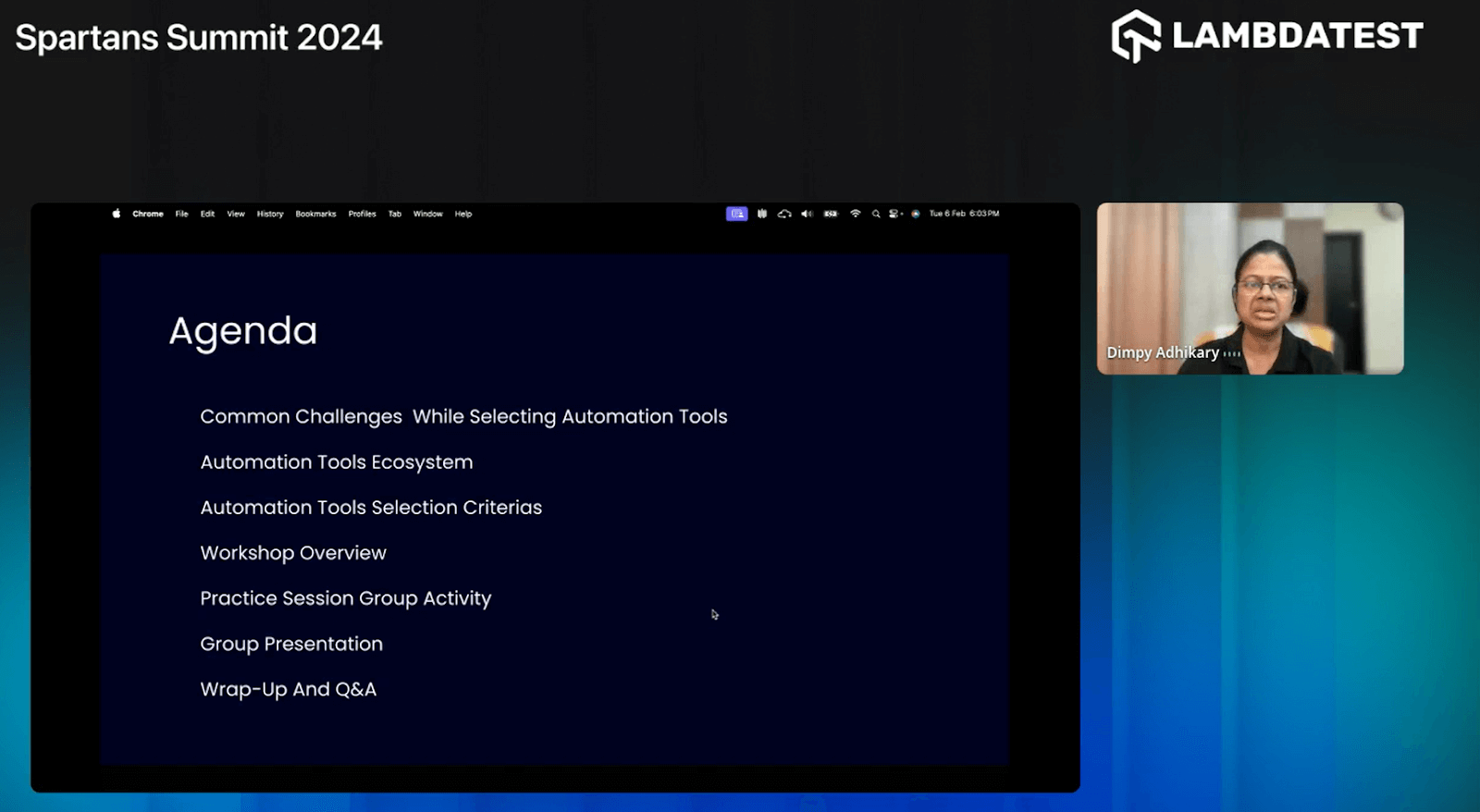
Agenda
- Common Challenges While Selecting Automation Tools
- Automation Tools Ecosystem
- Automation Tools Selection Criteria
- Practice Session: Group Activity
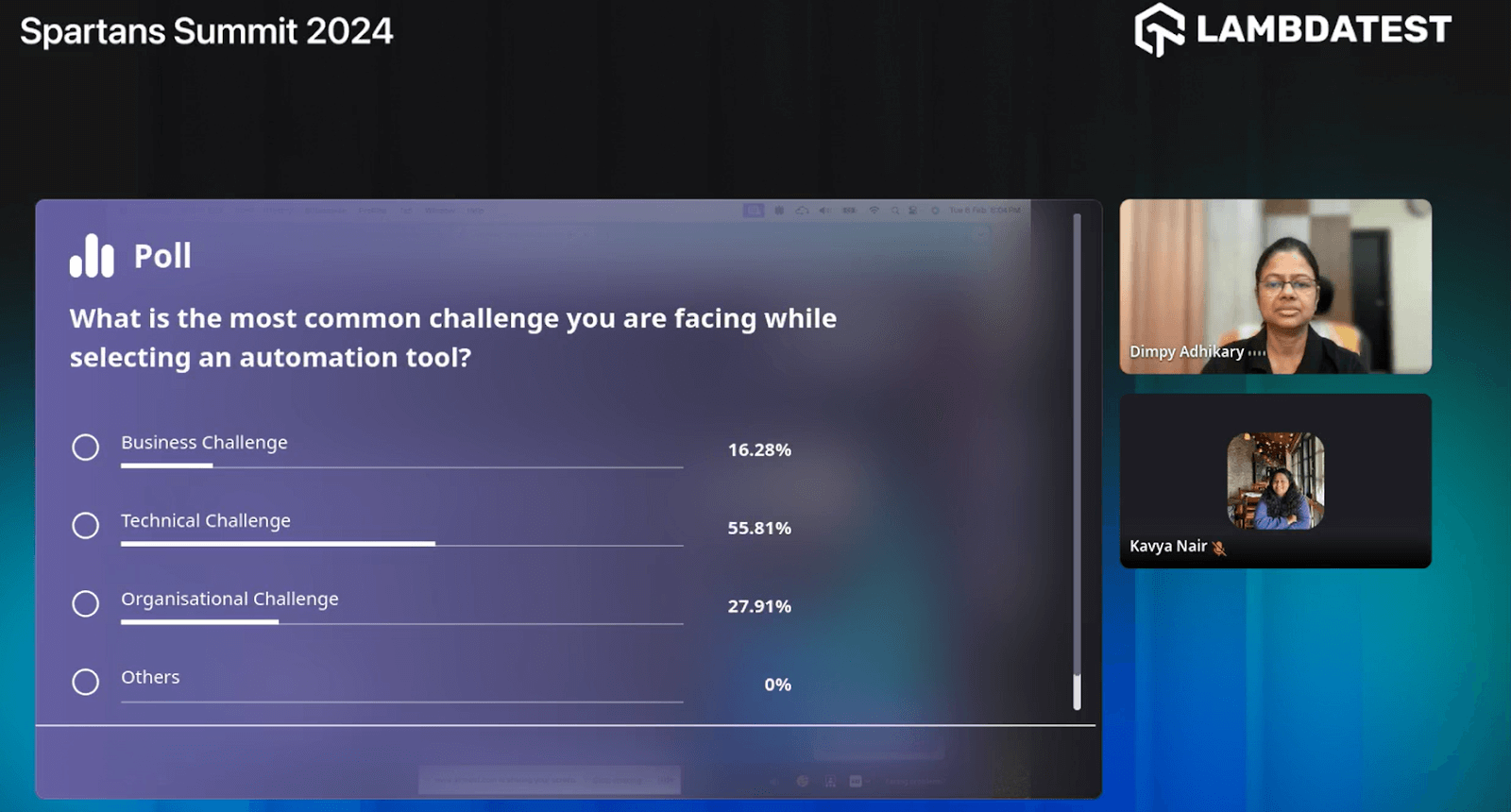
She kickstarts her session by conducting a poll, posing, “Why It Is Difficult To Select A Tool?“ to engage participants and gather insights on common challenges faced in tool selection.

With 56% of the votes, attendees chose “Technical Challenges” as the primary obstacle. Building on this engaging poll result, Dimpy thoroughly explores the common challenges encountered when selecting automation tools, providing valuable insights for the audience to navigate these obstacles effectively.
Common Challenges While Selecting Automation Tools
She highlights the common challenges when selecting automation tools, offering invaluable insights to navigate these obstacles effectively.
Hear Dimpy Adhikary sharing the common challenges encountered when selecting automation tools at #SpartansSummit.
— LambdaTest (@testmuai) February 6, 2024
Gain valuable insights to streamline your tool selection process and tackle business, technical, and organizational hurdles to optimize your automation strategy. pic.twitter.com/9mnDDXSVK9
Business Challenges
She emphasizes that business challenges encompass obstacles organizations face in achieving their goals, including budget constraints, timeline limitations, ROI uncertainty, scalability concerns, and organizational buy-in, all crucial in automation tool selection. Let us look into each of the constraints below.
- Budget constraints: It’s crucial to prioritize finding affordable automation tools that offer good value for money, ensuring they align with the allocated budget for the project or organization.
- Timeline limitations: It’s crucial to have tools to expedite testing processes within tight schedules, ensuring projects are delivered on time.
- Unclear ROI: It’s essential to conduct thorough analyses when selecting automation tools to ensure they provide measurable benefits and justify their investment.
- Scalability concerns: Choosing tools that can grow with organizational needs is essential, ensuring they remain effective as projects expand or evolve.
Technical Challenges
She further explains the technical challenges, which encompass obstacles related to the implementation and upkeep of automation tools. These challenges include feature alignment, learning curve, maintenance, updates, and data security. Let’s delve into each aspect under the technical challenge below.
- Feature alignment: It’s crucial to ensure that the features offered by automation tools align with the specific requirements and objectives of the organization.
- Learning curve: Overcoming the initial difficulty or adjustment period required for users to become proficient with new automation tools.
- Maintenance and updates: Managing ongoing maintenance tasks and staying updated with software updates and patches to ensure optimal performance.
- Data security and privacy: Addressing concerns about protecting sensitive data and maintaining privacy standards using automation tools.
Organizational Challenges
She states that organizational challenges encompass obstacles that delay the smooth functioning of an organization, such as leadership issues, communication breakdown, resource constraints, and resistance to change. Addressing these hurdles requires proactive strategies, effective communication, and collaborative efforts to foster a more agile and resilient organizational culture.
- Lack of buy-in: Overcoming stakeholder resistance can slow automation tool adoption, requiring strategic alignment and effective communication.
- Process management: Inefficient workflows and protocols can impede automation tool integration, necessitating streamlined processes and standardized procedures.
- Team skill sets: Skill gaps among teams may delay automation tool proficiency, highlighting the need for continuous training and skill development initiatives.
- Long-term sustainability: Ensuring the longevity of automation initiatives requires selecting adaptable tools and implementing forward-thinking strategies for scalability and flexibility.
As the session progresses, she delves into a detailed discussion about automation testing tools, categorizing them based on whether they are open-source, commercial, or integrated development environments (IDEs), providing comprehensive insights into each category in the section below.
Automation Tools Ecosystem
She states that the automation tools ecosystem encompasses diverse software solutions to streamline and enhance testing processes across various domains. This dynamic array includes open-source and commercial tools and integrated development environments (IDEs), offering multiple options to meet testing teams’ unique needs and preferences.
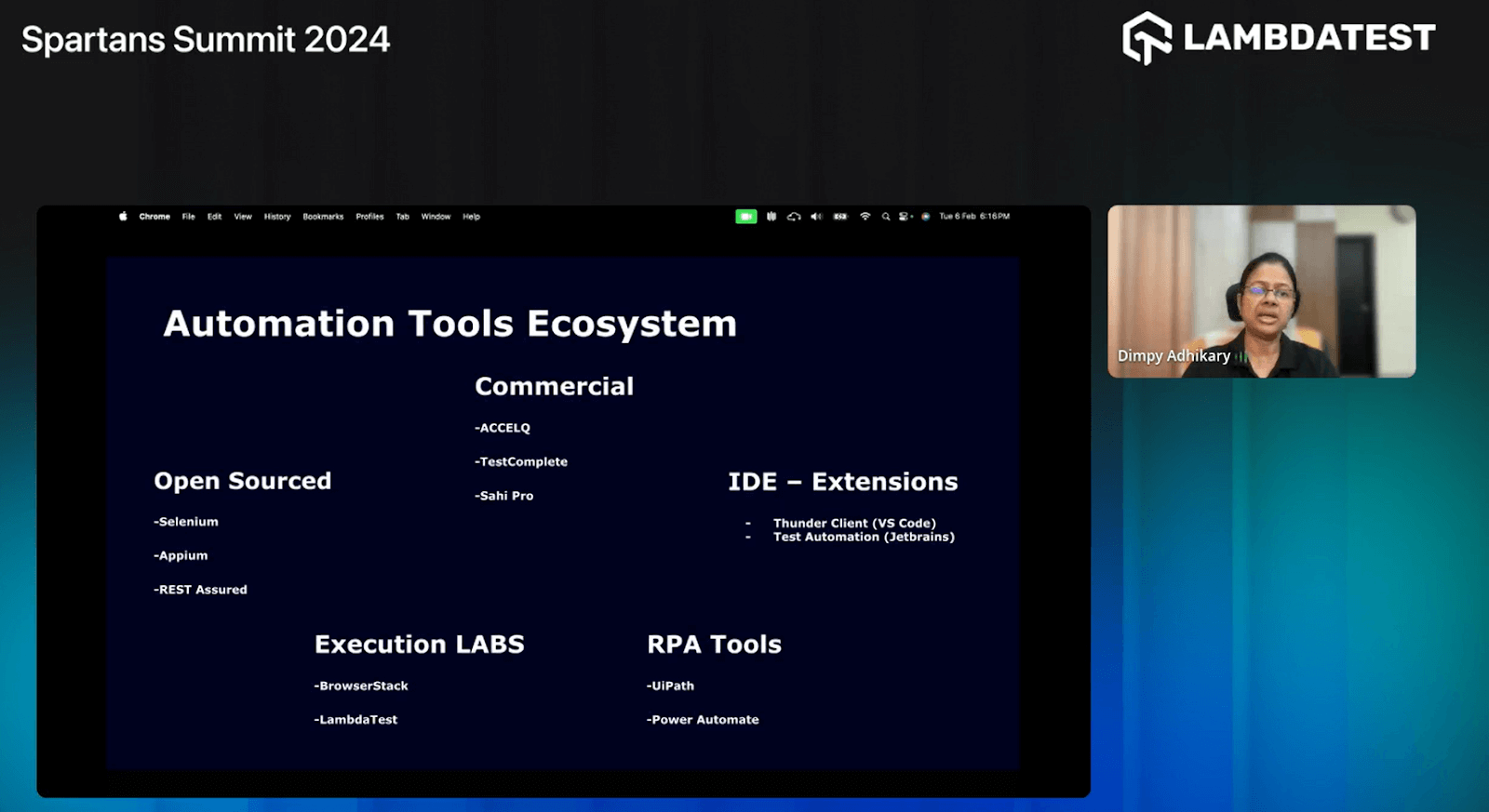
Open Sourced
She further explains that open-sourced automation tools are those whose source code is freely available to the public, allowing users to modify, customize, and distribute the software according to their needs. She highlights some of the tools, including:
- Selenium: Selenium is an open-source automation testing framework primarily used for web application testing. It supports multiple programming languages and browsers, making it versatile and widely adopted in the industry.
- Appium:Appium is an open-source automation tool for testing mobile applications across different platforms, including iOS, Android, and Windows. It allows testers to write tests using standard programming languages and provides seamless integration with various development frameworks.
- REST Assured:REST Assured is a Java-based library for testing RESTful APIs. It simplifies API testing by providing a domain-specific language (DSL) for writing tests, making it easier to validate responses, perform assertions, and automate API testing processes.
After providing insights on open-source automation tools, she continues to explain commercial tools.
Commercial
She highlights that commercial automation tools are proprietary software solutions developed and sold by companies. Compared to open-source alternatives, these tools often come with additional features, support services, and enterprise-level capabilities. While they typically require a license fee or subscription, they may offer advanced functionalities tailored to specific testing needs and requirements.
- ACCELQ: ACCELQ is a commercial test automation platform designed for end-to-end testing of web and mobile applications. It offers a codeless automation approach, AI-driven test automation, and continuous testing and collaboration features, making it suitable for Agile development environments.
- TestComplete: TestComplete is a commercial automation tool for functional UI testing, API testing, and desktop, web, and mobile application performance testing. It provides comprehensive features, including record-and-playback functionality, script customization, and integrations with the best testing frameworks and CI/CD tools.
- Sahi Pro: Sahi Pro is a commercial automation testing tool for web applications. It offers features for automated testing of web applications across different browsers and platforms, including record-and-playback functionality, scriptless automation, and support for testing complex web scenarios such as AJAX and dynamic content.
IDE — Extensions
She further explains what IDEs are, stating that IDE (Integrated Development Environment) extensions are software add-ons or plugins that enhance the functionality of an IDE. These extensions provide additional features, tools, and capabilities tailored to specific programming languages, frameworks, or development tasks.
She explains that these IDEs include code editors, debuggers, version control integration, code formatting tools, and language-specific extensions that improve productivity and streamline the development process within the IDE. Examples of IDE extensions include Visual Studio Code extensions, IntelliJ IDEA plugins, and Eclipse Marketplace add-ons. Some of the tools Dimpy highlighted are:
- Thunder Client (VS Code):Thunder Client is a lightweight REST client extension for Visual Studio Code. It allows developers to make HTTP requests easily, test APIs, and debug responses within the VS Code editor. It simplifies API testing and development workflows with features like environment variables, authentication support, and code snippets.
- Test Automation (JetBrains):Test Automation is a suite of testing tools and features integrated into JetBrains IDEs such as IntelliJ IDEA, PyCharm, and PhpStorm. It provides comprehensive support for various testing frameworks and languages, allowing developers to write, run, and debug tests efficiently within their IDE. With features like smart code navigation, intelligent test runner, and code coverage analysis, Test Automation enhances the testing experience and improves overall productivity for developers.
After explaining open-source and commercial tools, she delves into other tools, such as RPA (Robotic Process Automation) and cloud-based platforms.
RPA Tools
She shares her knowledge of RPA, emphasizing that RPA tools are software solutions designed to automate repetitive and rule-based tasks traditionally performed by humans. These tools utilize bots or software robots to replicate human interactions with digital systems and applications, including data entry, extraction, and transaction processing.
RPA tools offer significant efficiency, accuracy, and scalability benefits, leading to streamlined operations and cost reduction across industries.
- UiPath:UiPath is a leading RPA (Robotic Process Automation) platform that enables organizations to automate repetitive tasks and processes with advanced AI capabilities and a user-friendly interface.
- Power Automate:Power Automate, formerly Microsoft Flow, is a cloud-based automation platform for creating workflows across Microsoft and third-party services, offering pre-built connectors and templates for easy task automation.
With all these brief discussions on automation tools, she highlights how some cloud-based platforms can help make the testing process effective and efficient.
Execution LABS
Before delving into explaining Execution LABS, she introduces it as a platform or service specifically designed to facilitate the execution of tests, experiments, or tasks within a controlled environment. This platform may offer resources, tools, and infrastructure for conducting various tests or simulations, enabling users to observe, analyze, and draw conclusions from the results.
- TestMu AI:TestMu AI is an AI-powered test orchestration and execution platform that lets you run manual and automated tests at scale with over 3000+ real devices, browsers, and OS combinations. This platform allows you to perform web application testing and provides a real device cloud for mobile application testing.
She thoroughly explains each automation tool across different categories, offering attendees valuable insights. Now, let’s delve deeper into the session as Dimpy elaborates on the selection criteria for automation tools.
Automation Tools Selection Criteria
She further elaborates on the essential criteria for selecting automation tools. By covering aspects such as business objectives, security, and more, she gave attendees valuable insights to make informed decisions aligned with their project requirements and goals.
Choosing the correct Automation tool can be a daunting task. Check out Dimpy's insightful talk for understanding the criteria for selecting the right automation tool. pic.twitter.com/JCo2haVjBG
— LambdaTest (@testmuai) February 6, 2024
- Business Criteria:She emphasizes the importance of considering business objectives when selecting automation tools. It includes assessing how well the tools align with the overall goals and strategies of the organization, such as increasing efficiency, reducing costs, or improving product quality.
- Purpose:She highlights the significance of defining the purpose of implementing automation tools. It involves identifying tasks, processes, or areas of the software development lifecycle where automation can provide the most value, such as regression testing, continuous integration, or performance testing.
- Security:She highlights the need to thoroughly assess the security features and capabilities of the tools to ensure alignment with industry standards and regulations. It protects sensitive data and minimizes potential risks or vulnerabilities.
- Developer Experience:She underscores the importance of considering the developer experience when selecting automation tools. It includes assessing factors such as ease of use, documentation, community support, and integration with existing development workflows to ensure a seamless and productive experience for the development team.
- Proof Of Concept (POC):She emphasizes the value of conducting a proof of concept (POC) before committing to a particular automation tool. It involves implementing a small-scale pilot project or test case to evaluate the tool’s performance, functionality, and compatibility with the organization’s requirements and infrastructure before making a final decision.
With all the theoretical knowledge shared, Dimpy transitioned into the practical session, leading a group activity focused on evaluating the worksheet.
Practice Session – Group Activity: Worksheet
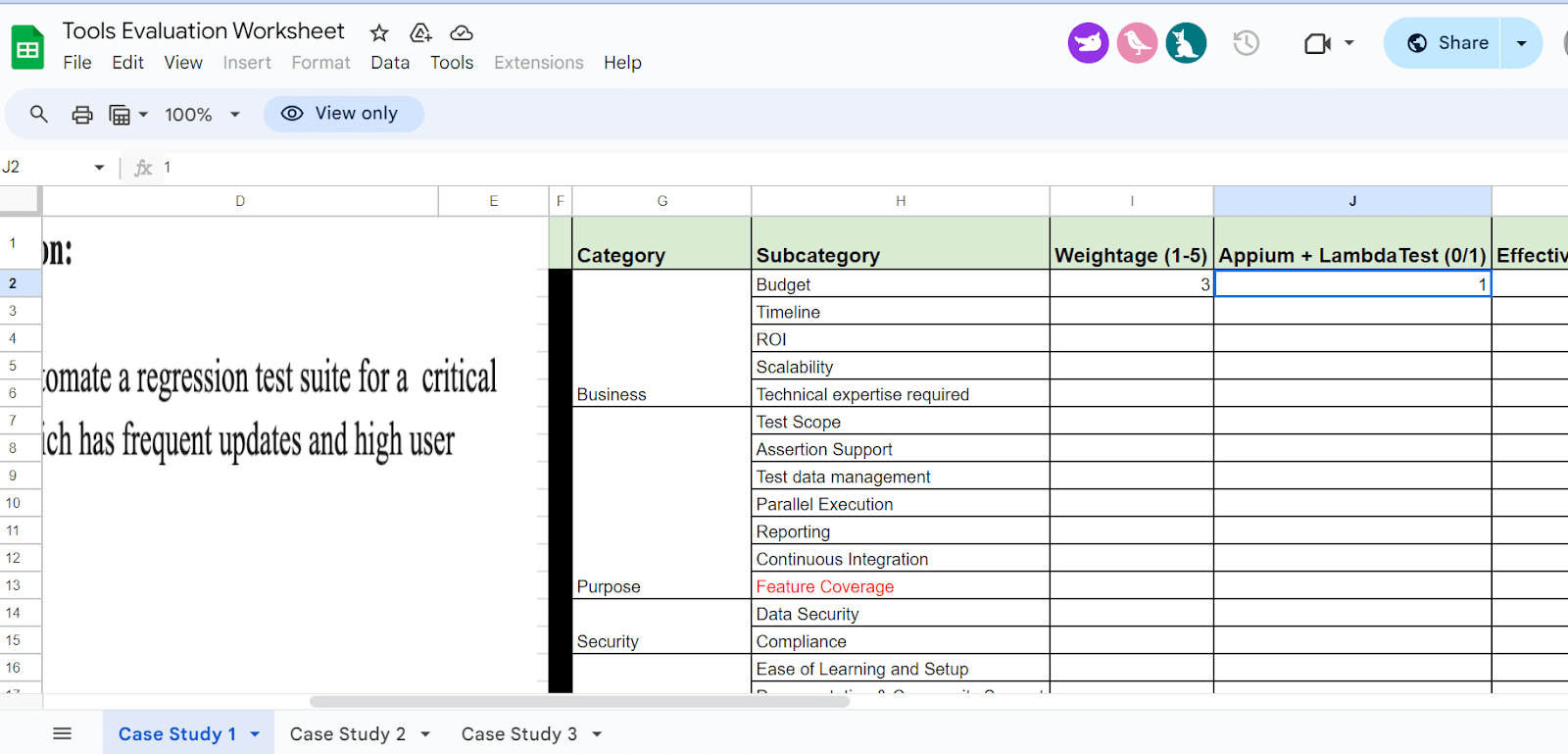
With the help of a Tools Evaluation Worksheet, Dimpy illustrates how to assign weightage to each section of the automation tool criteria. She emphasizes that this approach simplifies decision-making regarding the automation tool’s use.
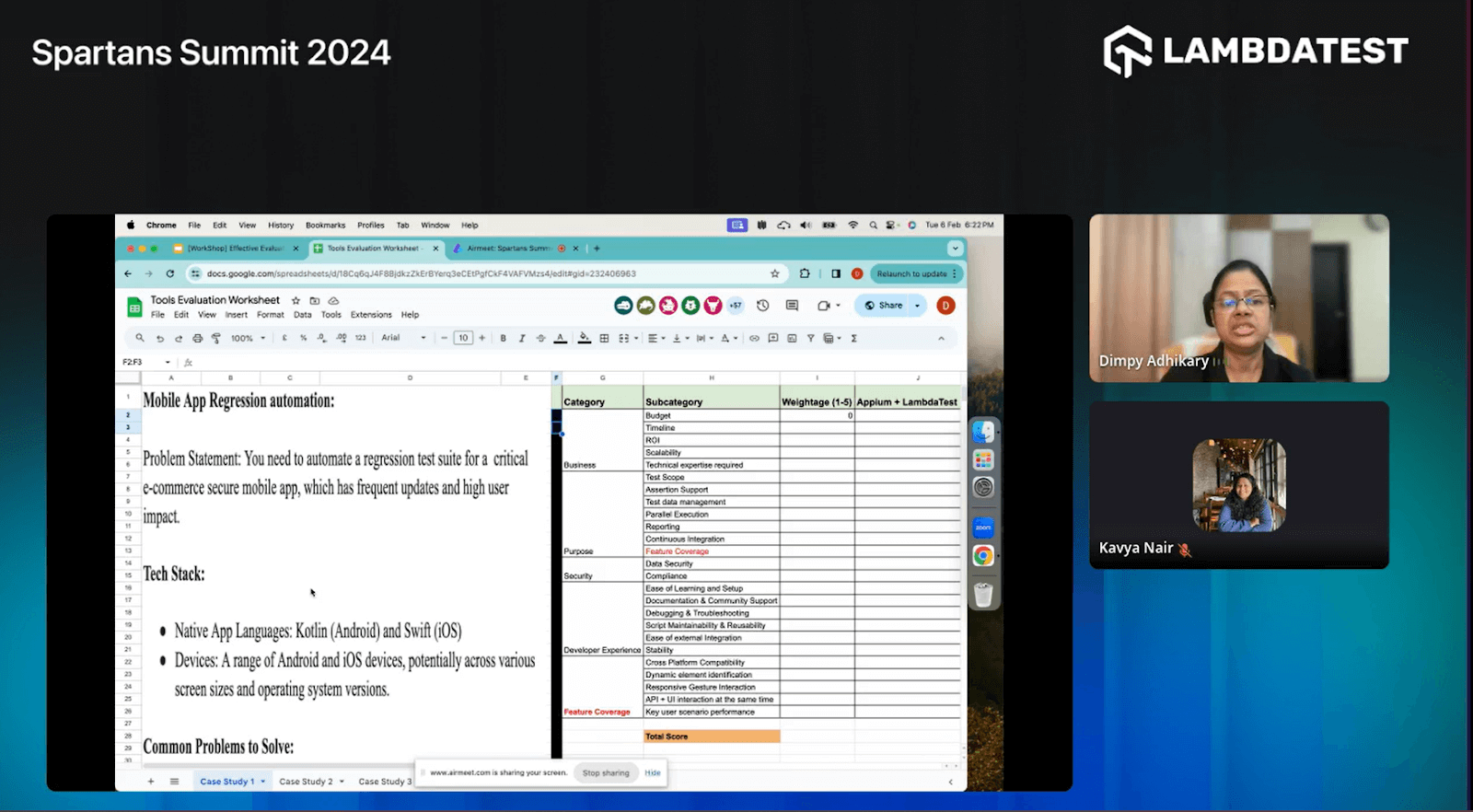
She emphasizes that this activity should involve stakeholders, project managers, developers, and QA teams to ensure comprehensive input and alignment across all relevant parties.
Dimpy’s worksheet includes use cases and a list of categories, sub-categories, and corresponding weights. For explanatory purposes, Dimpy begins by assigning weights to the first use case based on categories and sub-categories, using a weightage scale (1-5).
Dimpy demonstrates how to assign weights to each category and sub-category for the first use case. For instance, she assigns a weight of 3 to the “Budget” sub-category under the “Business” category. Later, she adds a weight of 1 to the cell corresponding to “Appium + TestMu AI.” It indicates that using a cloud-based platform can be advantageous to resolve the use case within budget constraints. Once the sheet is filled with values, testers and stakeholders understand whether or not to use such automation tools.
This session on evaluating automation tools and practicing with the worksheet is excellent, providing both novice and experienced testers with a clearer understanding of how to make decisions when selecting automation tools that best fit the project’s needs.
The session was concluded by addressing questions from the engaged attendees, offering additional clarity and insights to enrich their understanding.
Question and Answer Session
Q. How do you ensure your chosen automation tool aligns with your project’s specific needs?
Dimpy: Make sure the automation tool you pick matches your project’s needs by thoroughly examining its features, compatibility, scalability, and support for your tech stack.
Q: To automate legacy desktop-based applications, which open-source tools can we choose with good community support?
Dimpy: To automate legacy desktop-based applications, consider tools like AutoIt, WinAppDriver, and SikuliX with strong community support. They’re ideal for desktop interfaces.
Q: What are your top three factors when evaluating automation tools?
Dimpy: When evaluating tools, focus on functionality, compatibility, ease of use, and support availability to ensure they meet your project needs.
Q: RPA or open source tools, what would you choose for a small expanding team? Since I’ve seen so many problems with RPA (such as inactive elements after recording), I assumed it could have been more dependable. How do you feel?
Dimpy: For small expanding teams, open-source tools offer flexibility and cost-effectiveness, but RPA tools can be advantageous in specific scenarios. Consider complexity and long-term maintenance.
Q: What role does community support play in evaluating automation tools?
Dimpy: Community support is vital for troubleshooting and sharing best practices when evaluating tools.
Q: How do you handle situations where multiple tools seem equally suitable for a project?
Dimpy: When multiple tools are suitable, prioritize features, integration ease, learning curve, and long-term support for informed decisions.
Feel free to add questions or clear your doubts on the TestMu AI Community.


Did you find this page helpful?
More Related Hubs
TestMu AI forEnterprise
Get access to solutions built on Enterprise
grade security, privacy, & compliance
- Advanced access controls
- Advanced data retention rules
- Advanced Local Testing
- Premium Support options
- Early access to beta features
- Private Slack Channel
- Unlimited Manual Accessibility DevTools Tests