

Next-Gen App & Browser Testing Cloud
Trusted by 2 Mn+ QAs & Devs to accelerate their release cycles


Chromium vs. Chrome: Explore The Key Diffrences
Learn the key differences between Chromium vs Chrome and how they affect your browsing experience.

Upendra Prasad Mahto
January 12, 2026
We all know about Chrome; it’s undisputedly the browser market leader. But have you heard of Chromium? Did you know both Chrome and Chromium are related to each other? And what are the key differences between Chrome and Chromium?
Google Chrome is a web browser developed by Google, enriched with features like automatic updates, a built-in PDF viewer, and a Flash player, making it user-friendly for everyday browsing. The Chrome latest version continues to enhance performance, security, and user experience. On the other hand, Chromium is an open-source project initiated by Google, which serves as a base for Chrome and other browsers.
Chromium is geared towards development and lacks some user-centric features; it forms the foundation for many popular browsers, including Google Chrome, demonstrating its critical role in browser development.
In this blog, we will highlight the differences between Chromium and Chrome. Let’s delve into the Chromium vs Chrome debate to understand how these two browsers, though related, cater to different user needs and preferences.
What Do The Stats Say?
According to W3Counter’s Browser Share statistics for Jan 2024, Chrome is the most used web browser globally, with around 70.2% of the market share. In other words, 7 out of every 10 internet users worldwide prefer Chrome. The remaining market share is shared by Safari, Edge, Firefox, and Opera holding 13.4%, 4.1%, 2.7%, and 1.2%, respectively.
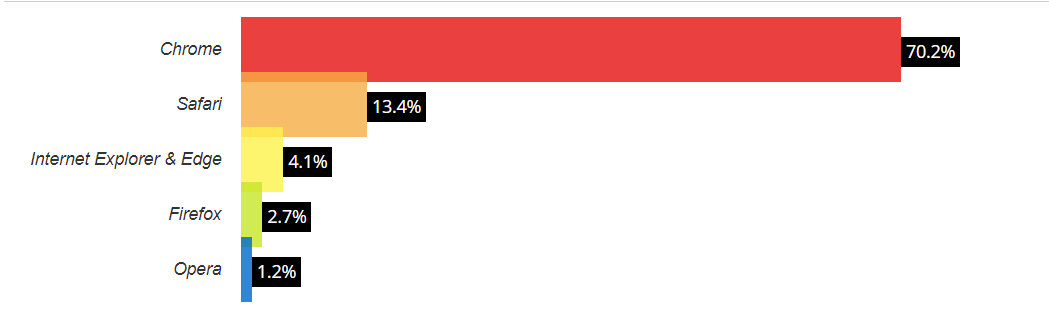
From the above, you can understand the monopoly of Chrome in the browser market. Now it’s time to dive deeper into Chromium vs Chrome.
What Is Chromium?
Chromium is an open-source and free web browser maintained by the Chromium Project. It allows modifying the source code to extend the functionality. However, this is only permitted to trusted Chromium project’s developer community members. On the other hand, Chrome is built on top of Chromium; the developers added their proprietary code to the Chromium source code. In simpler terms, Google Chrome has several things that Chromium does not; for instance, it downloads updates instantly and supports a wider range of video formats.
Downloading Chromium- Easiest Way
The simplest and safest method to download Chromium is to do so from the download page of Chromium. When you open the page, it will automatically recognize your device’s OS and provide the latest compatible edition of Chromium. If that’s not the case, you can also choose it from the list of Operating Systems.
Suppose you are a Linux or Windows user and want to download an older version of Chromium. In that case, go to ‘Last Known Good Revision’ towards the bottom to recover older Chromium editions. You can install it straight from the Linux distro’s software repositories for Linux.
Advantages of Chromium
The following are the advantages of Chromium:
- It doesn’t track browsing data.
- It allows the use of external extensions apart from Chrome Web Store.
- It is accumulated from the Chromium Projects source code and allows the building of other browsers and applications using its codebase.
- It is more frequently updated than Chrome.
- Chromium has a security sandbox mode, but in some cases, Chromium has it turned off by default.
Disadvantages of Chromium
The following are the disadvantages of Chromium:
- Updates need to be downloaded & installed manually.
- It does not provide built-in video codecs and Adobe Flash.
- It does not support licensed media codecs such as MP3, AAC, and H.264.
- It does not have the enabled security sandbox enabled by default.

Note: Simplify Testing: Opt for TestMu AI’s Selenium cloud grid with 3000+ real browsers and OS options. Try TestMu AI Today!
What Is Chrome?
Chrome is a browser developed and managed by Google, released in 2008. It was built on top of the Chromium source code. However, the main difference between Chrome and Chromium is that Chrome is a proprietary browser. This means that Chrome’s code cannot be reverted, decompiled, or anchored to create other similar projects. Compared to Chromium, it offers additional features such as automatic updates, support for media codecs, and Flash Player, but it tracks browsing data.
Downloading Chrome- Easiest Way
This is a straightforward process of simply visiting the Chrome website and downloading the browser. The website will choose a compatible downloadable version (for macOS or Windows), which will be installed within minutes.
Advantages of Chrome
- Chrome is a stable web browser that offers safe browsing. Experience owing to the automatic error reports and updates.
- It provides Incognito Mode for browsing to avoid data tracking.
- It supports built-in media codecs like MP3, H.264, AAC, and Adobe Flash.
- It offers cross-platform compatibility and synchronization.
- It supports multiple extensions from its Chrome Web Store.
Disadvantages of Chrome
The following are the disadvantages of Chrome:
- It tracks browsing data and history in normal browsing.
- It doesn’t support extensions other than Chrome Web Store.
Chromium vs Chrome – Missing Chrome Attributes In Chromium
Apart from the significant difference between Chrome and Chromium we listed above, many more Chrome attributes need to be included in Chromium. The following traits of Google Chrome are not featured in Chromium:
- PDF viewer (Built-in)
- Print preview
- Google Auto-update system for the browser
- Integrated Flash player
- Media codecs to support MP3, H.264, and AAC formats
- Other dissimilarities comprise a choice for crash reports, usage stats to be automatically sent to Google servers, and rare advertising from Google, like for the Chromebook. Even with such traits, this web browser still follows a minimalist style that promotes a simple-to-view, lighter interface.
Difference Between Chromium vs Chrome
Chrome and Chromium are built on the same platform, which means they share the same codebase or platform. Chromium is open-source, while Google Chrome is a proprietary software. The main distinction is the special features that Google adds to Chrome, such as the capability to log in to the Google account at the browser level. However, on the other hand, Chromium is a comparatively lightweight and clean browser, while Chrome comprises several additional features such as automatic support and updates for additional video formats.
| COMPARISON | Chromium | Chrome |
|---|---|---|
| License Support | Just offers support for basic, free codecs: Theora, Opus, WAV, VP8, VP9, and Vorbis | Free under the Terms of Use of Google Chrome. Comprises support for licensed media codecs – H.264, MP3, and AAC. Provides access to extra media content, particularly websites using HTML5 video for streaming H.264 videos. It also comprises basic, free codecs: Theora, Opus, WAV, VP8, VP9, and Vorbis |
| Developer | The Chromium Project | Open source contributors to Chromium and Google Inc. |
| Flash Player | Not built-in; needs a plugin | The Plugin is built-in; could be easily disabled |
| PDF viewer | Not built-in; needs a plugin | The Plugin is built-in; be easily disabled |
| Media-Codec Support | MP4 (QuickTime/ MOV / ISO-BMFF / CMAF), Ogg, WebM, WAV, and HLS. | Additionally supports Theora, Vorbis, H.264, MP3, AAC, etc. |
| Auto-Update | No. It lacks the feature of automatic updates. You will need to update manually. | Yes. This feature is available. When you download this browser on Windows and macOS, you obtain an extra background app that automatically updates the browser. While on Linux, an update is completed utilizing standard software management tools. |
| Stability | More prone to crashes as compared to Chrome versions. | More stable |
| Privacy | Does not track and share data. | It Gathers information and automatically transfers it to Google. |
| Security | It is as secure as Google’s Chrome. | As Chrome is built on Chromium, the safety mechanisms are the same. |
| Web Store | Web store service isn’t feasible in Chromium. | It has a Web store with an array of web tools and apps. |
Chromium vs Chrome And Cross Browser Testing
Chromium and Google Chrome are accessible from desktops, laptops, Android/iOS smartphones, and tablets. Chrome has now turned into the default browser for Android smartphones. And it’s accessible for non-RT Windows 8 devices both as a “metro” app and a traditional app. Also, the Chrome version is obtainable for iOS.
Accessibility on such a surplus of devices allows Google to provide some functionality with Chrome that is not obtainable on Chromium, particularly syncing through “Sign in with Chrome.” Users can seamlessly access their open tabs on one gadget when they shift to a different gadget using the same Google account on both gadgets (as long as they are signed in to Chrome, not merely to Google.com). On the other side, Chromium also runs on different mobile devices with its accessibility for Maemo 5 mobile OS for Nokia, Android, and MeeGo’s netbook version.
Since Chromium and Google Chrome are widely used on different platforms, it is important to check the compatibility of your website with these browsers, this is where TestMu AI’s LT Browser shines.
LT browser is a Chromium-based browser for developers that allows users to build, test & debug mobile websites in a single click. It is a free-to-use responsive testing browser that allows you to test your websites. Packed with features like hot reloading, network throttling, dedicated DevTools for different viewports, ability to interact with six devices simultaneously, and more, LT Browser has become the go-to browser for developers worldwide.
You can also subscribe to TestMu AI YouTube Channel for the latest updates on tutorials around mobile app testing, real device cloud, and more.
Cross Browser Testing On Selenium Cloud Grid
Ensuring web and mobile apps work seamlessly on diverse browsers is a big challenge in the software testing lifecycle. Sometimes, they behave differently on various browsers, causing an unsatisfactory user experience. Manual testing on multiple browsers can be time-consuming and error-prone.
To automate cross browser testing, we use cloud infrastructure like TestMu AI to streamline cross-browser testing through its Selenium Cloud Grid. TestMu AI is an AI-native test orchestration and execution platform that lets you run manual and automated tests at scale on over 3000 real devices, browsers, and OS combinations.
Aside from cross browser testing, TestMu AI offers a wide range of features, including the following:
- Single Sign-On (SSO)
- Parallel Testing
- Scalable Infrastructure
- Real-Time Testing
- Real-Device Testing
- Geolocation Testing
- Collaboration Tools
- Automated Screenshots and Video Recording

Chromium vs Chrome- Which One Is Better?
It is tricky to decide between the feature-rich Chrome and open-source Chromium. For Windows, it is good to use Chrome as Chromium doesn’t come with a steady release, which also applies to macOS. Chromium may be the best choice in Linux’s case – known for its love for open-source and free software. However, you will need to live with the fact that it does not automatically update and lacks media codecs and Adobe Flash plugin. However, several Linux distributions may provide a modified Chromium bundled with numerous missing attributes.
Chromium is now considered the default browser in several Linux distros instead of the browsers like Firefox. Chrome is also accessible for Linux. If you wish to use free software and try to escape any closed-source alternative, Chromium is an excellent choice.
So, Chromium or Chrome? The response depends on what you necessitate in a browser. Chrome is, of course, the better option for most users; however, Chromium can be the right choice for advanced users and for those who place a great value on coding and privacy. But if you require a browser that does not require any special configuration, then Chrome is just for you. Use all the information above and make the right choice! Start your free web browser testing today.
Conclusion
We have looked at Chromium vs Chrome and how you can easily download them, including their features and disadvantages. Then, we highlighted the key differences between the two. We also discussed Chromium and Chromium in the context of cross-browser testing. Finally, we discussed which is best for you. Chromium or Chrome?


Frequently asked questions
Did you find this page helpful?
More Related Hubs
TestMu AI forEnterprise
Get access to solutions built on Enterprise
grade security, privacy, & compliance
- Advanced access controls
- Advanced data retention rules
- Advanced Local Testing
- Premium Support options
- Early access to beta features
- Private Slack Channel
- Unlimited Manual Accessibility DevTools Tests