

Next-Gen App & Browser Testing Cloud
Trusted by 2 Mn+ QAs & Devs to accelerate their release cycles


How To Perform Cypress Accessibility Testing
This article on Cypress accessibility testing discusses the importance of accessibility testing and how to perform Cypress accessibility testing on a cloud grid.

Enrique
January 30, 2026
Cypress accessibility testing ensures that applications are usable by everyone, including people with disabilities, often with the help of assistive technologies like screen readers and keyboard navigation. It is not just about inclusivity; many countries consider inaccessible applications as discriminatory, making accessibility a legal requirement.
Accessibility testing helps verify that applications work for all users, and automating these tests saves time while maintaining quality. Cypress simplifies this process by providing an all-in-one platform for frontend, backend, performance, and accessibility testing. In this tutorial, we will explore why accessibility testing matters and how to perform Cypress accessibility tests on a cloud grid.
Overview
Accessibility testing ensures your web applications are usable by everyone, including those with disabilities, using assistive technologies like screen readers. Automating accessibility tests with Cypress saves time while ensuring compliance.
Why is Accessibility Testing Important?
Accessibility testing not only ensures compliance but also improves user experience, expands your audience, and fulfills ethical responsibilities in product design.
- Legal Compliance: Many countries have laws mandating accessibility for web applications, and failure to comply can lead to legal consequences.
- Wider Audience Reach: Making your application accessible ensures that it can be used by everyone, including those with disabilities, improving user experience.
- Ethical Responsibility: Ensuring accessibility is not just about compliance—it’s about making your product available to all users, regardless of their abilities.
Is it Possible to Automate Accessibility Testing?
Automation helps catch accessibility issues early in development and ensures consistent testing across multiple pages and scenarios.
- Automated Tools: Tools like Axe-Core and Google Lighthouse can perform accessibility checks quickly and consistently, saving testers time and effort.
- Integration with Testing Frameworks: These tools can be integrated into automation frameworks like Cypress, allowing for continuous accessibility testing during development.
- Speed and Efficiency: Automation enables repeated testing throughout the development cycle, helping to catch accessibility issues early.
How to Perform Cypress Accessibility Testing?
Integrating tools like Pa11y and Axe with Cypress allows you to automatically check your web pages for accessibility violations in real-time.
- Install Accessibility Tools: Tools like Pa11y and Axe can be integrated into Cypress for automated accessibility checks.
- Set Up Cypress Commands: Use commands like
cy.pa11y()in Cypress to run accessibility tests against your web pages. - Cloud Grid Testing: For large-scale testing, leverage cloud platforms like TestMu AI to run Cypress accessibility tests on multiple browsers and environments, ensuring broad test coverage.
How to Use Pa11y for Cypress Accessibility Testing?
Pa11y allows you to automate accessibility audits within Cypress, providing detailed reports on violations to streamline remediation.
- Setup Pa11y: Install the Pa11y package in your project and configure Cypress to use Pa11y for accessibility audits.
- Run Tests: Use
cy.pa11y()within your Cypress test scripts to automatically check for accessibility issues. - Report Violations: The tests provide detailed reports of accessibility violations, allowing you to fix issues like insufficient color contrast or missing alt text.
How to Perform Cypress Accessibility Testing on the Cloud Grid?
Using cloud grids like TestMu AI enables parallel testing across multiple browsers and operating systems, increasing coverage and reliability.
- Parallel Testing: Use cloud platforms like TestMu AI to run Cypress accessibility tests in parallel across multiple browsers and operating systems.
- Improved Coverage: Cloud grid testing ensures that your application is accessible across different devices and platforms, increasing test coverage and reliability.
- Efficient Execution: Using cloud grids allows you to execute tests at scale, speeding up the testing process and improving overall productivity.
The importance of Accessibility Testing
The success of an application depends on whether everyone can achieve their goals through their chosen technologies.
We must test an interface against a set of guidelines if we want to be considered for accessibility testing. Common issues that the WCAG doesn’t cover may be considered as well. If you have an accessibility policy, it is good to test your site against its criteria. There are a lot of broad use cases that are covered by the WCAG 2.1 criteria.
Accessibility testing should be focused on the application’s actual use. There are a lot of reasons why a product might not be accessible. It can be a problem with the software itself or how it was designed. Testing for accessibility is about the user and what they want to do. If you create a feature that does not help a user accomplish a task, you need to ask yourself: “Why not?”. Accessibility testing is about making sure a product works for everyone.
Is it possible to automate Accessibility Testing?
Automated accessibility testing uses special software to check your digital product for accessibility problems based on set accessibility standards. The advantages of these tests are that they can be done multiple times during the product’s development and are quick and straightforward to perform, giving you speedy results.
Accessibility testing is an essential part of quality assurance, and there are many different ways of conducting it. Unfortunately, exploratory testing for people with impairments is only one of many options, and sometimes it’s necessary to use other accessibility testing tools.
Test websites against criteria; many modern testing tools help companies like ours. For example, you can use a keyboard or screen reader that people with disabilities commonly use. Axe or Google Lighthouse are browser extensions that can run accessibility checks.
Axe-Core is the most common tool for automated accessibility testing in your software development process. Numerous projects are built on top of the Axe-Core; if you use Selenium, WebdriverIO, Cypress, or another automated testing framework, you can implement Axe in your tests.
Ensure Web Inclusivity With Accessibility DevTools
In addition to these tools, such as Axe and Google Lighthouse, you can leverage the Accessibility DevTools offered by TestMu AI. This Chrome extension provides a convenient way to test for accessibility issues directly within your browser. It offers features like Full Page Scan, Partial Page Scan, Multi-Page Scan, Workflow Scan, Quick Issue Discovery, and more. These features allow testers to efficiently test, manage, and report accessibility issues, ensuring the website is accessible to everyone, including users with disabilities and visual impairments.
2M+ Devs and QAs Rely on TestMu AI for Web & App Testing Across 3000 Real Devices
 Sign up with google
We want to try new things in this article on Cypress accessibility testing, so I would like to share my new finding, pa11y, a powerful tool for accessibility testing.

Austin Siewert
CEO, Vercel
Discovered @TestMu AI yesterday. Best browser testing tool I've found for my use case. Great pricing model for the limited testing I do 👏
2M+ Devs and QAs rely on TestMu AI
Deliver immersive digital experiences with Next-Generation Mobile Apps and Cross Browser Testing Cloud
Pally and Cypress Accessibility Testing
Firstly, let’s talk about Pally, a command-line interface that loads web pages and highlights any accessibility issues it finds. Second, Pa11y is an automated accessibility testing tool. It runs accessibility tests on your pages via the command line so that you can automate your testing process(Pa11y is licensed under the Lesser General Public License (LGPL-3.0-only).
Now, let’s focus on Cypress and Pally and follow the below-mentioned steps for performing Cypress accessibility testing:
- Install the dependency in our local project using the below command:
npm install --save-dev @cypress-audit/pa11y
const { pa11y, prepareAudit } = require("@cypress-audit/pa11y");

module.exports = (on, config) => {
  on("before:browser:launch", (browser = {}, launchOptions) => {
    prepareAudit(launchOptions)
  })

  on("task", {
    pa11y: pa11y(), // calling the function must be important
  })
}
import "@cypress-audit/pa11y/commands"
describe('Accessibility Testing Cypress', () => {
   before(function(){
       cy.visit(`${config.URL2}`)
   })

   it('verify full Home Page is displayed correctly', () =>{

       cy.pa11y()
   })
npx cypress open.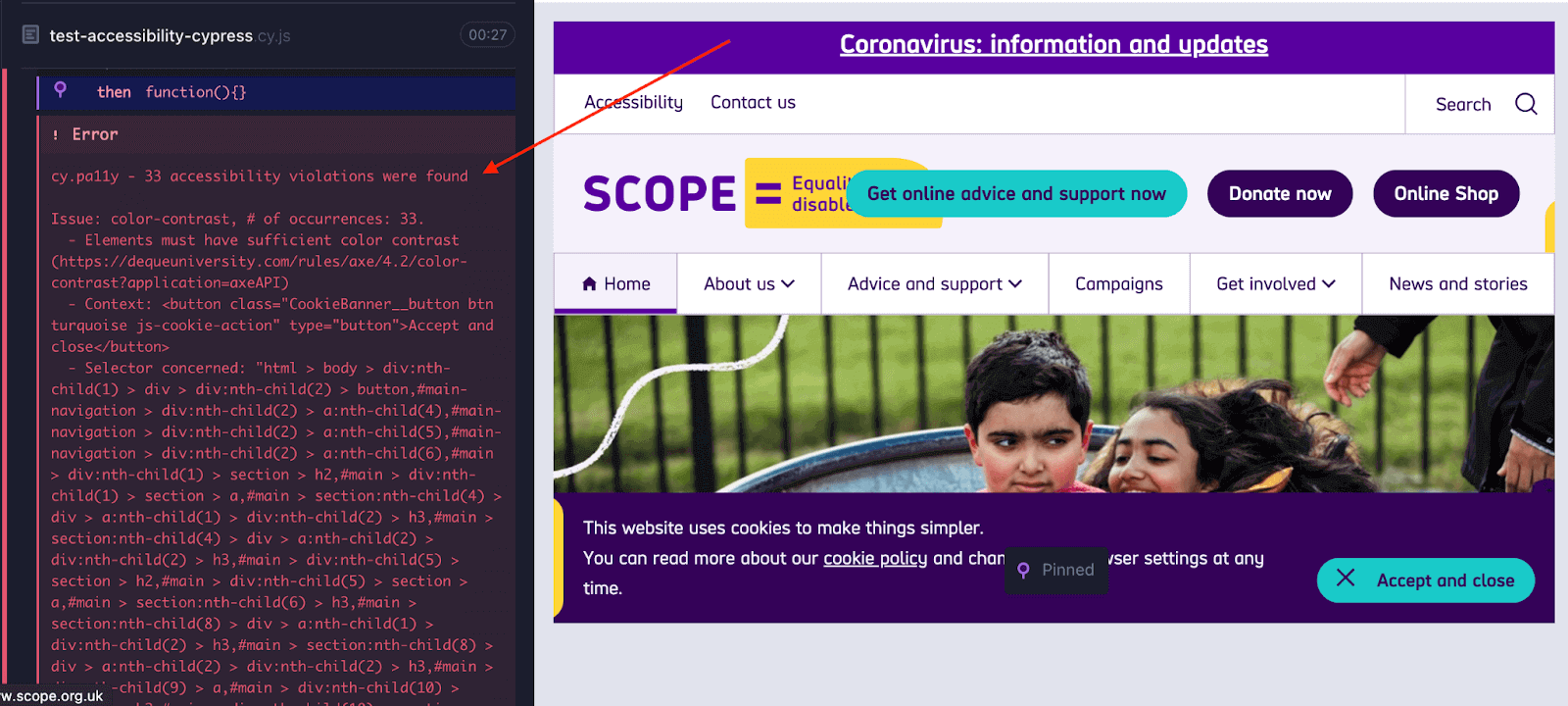
As we identified from the image above, it displays some errors; more specifically, 36 accessibility violations were found.
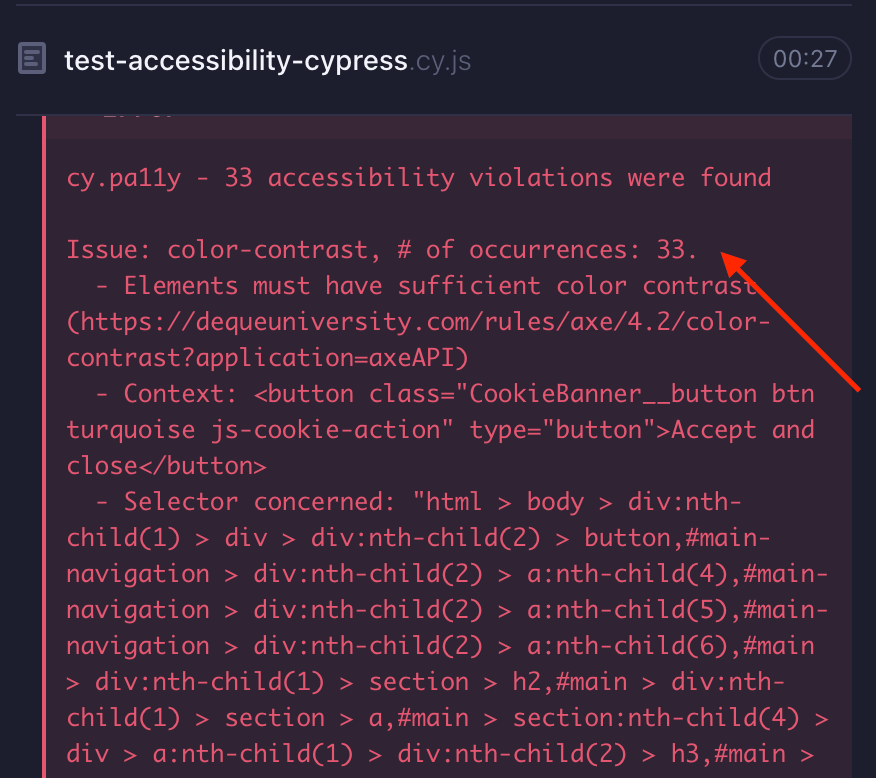
As we identified from the image above, it displays some errors/violations; more specifically, 33 accessibility violations were found. We can see more details related to all the rules here.
The only violation is color contrast; text elements must have sufficient color contrast against the background; as we can see, 33 elements are not following that rule.
Code Walkthrough
import config from './config.json'
import MainPage from '../../page-objects/components/MainPage'

describe('Accessibility Testing Cypress', () => {
   before(function(){
       cy.visit(`${config.URL2}`)
   })

   it('verify full Home Page is displayed correctly', () =>{

       //Using Pally as our tool for Accessibility Testing
       cy.pa11y()
   })


   it('Verify a search in Google', () => {

       cy.origin(`${config.URL3}`, () => {
           cy.visit('/')
       })
       MainPage.searchGoogle('Accessibility Testing')
       cy.pa11y()

   })

})
Let’s start defining our config.json file; here, we can include some data and URLs:
{
   "URL1": "https://www.lambdatest.com/blog/",
   "URL2": "https://www.scope.org.uk",
   "URL3": "http://www.google.com"
}
After that, we need to define our structure; as we can see on the following line of code -> import MainPage from ‘../../page-objects/components/MainPage’, we want to separate our Cypress locators from our tests, saying that this is the Page Object Model structure. We can find that under the “page-objects” folder:
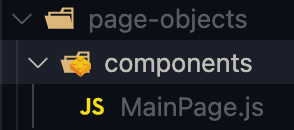
MainPage.js
export default class MainPage {

   static searchGoogle(text){
       cy.get(`input[role='combobox']`).type(`${text} {enter}`)
   }
}
As we mentioned above, our methods and locators can be found here; in our example, we try to do a simple search on Google.
describe('Accessibility Testing Cypress', () => {
   before(function(){
       cy.visit(`${config.URL2}`)
   })
For this case, we are using a before() hook that will open up our page before all of our tests, and after that, we can notice two tests, one related to a full-page home validation and the second one for the google search validation.
it('verify full Home Page is displayed correctly', () =>{

       //Using Pally as our tool for Accessibility Testing
       cy.pa11y()
   })


   it('Verify a search in Google', () => {

       cy.origin(`${config.URL3}`, () => {
           cy.visit('/')
       })
       MainPage.searchGoogle('Accessibility Testing')
       cy.pa11y()

   })
You can go through the following video from the TestMu AI YouTube channel to learn more about Cypress hooks:
You can subscribe to the channel and get the latest tutorials around Cypress testing, automated browser testing, CI/CD, and more!
And here is the test execution, which indicates that our Cypress accessibility testing approach is working:
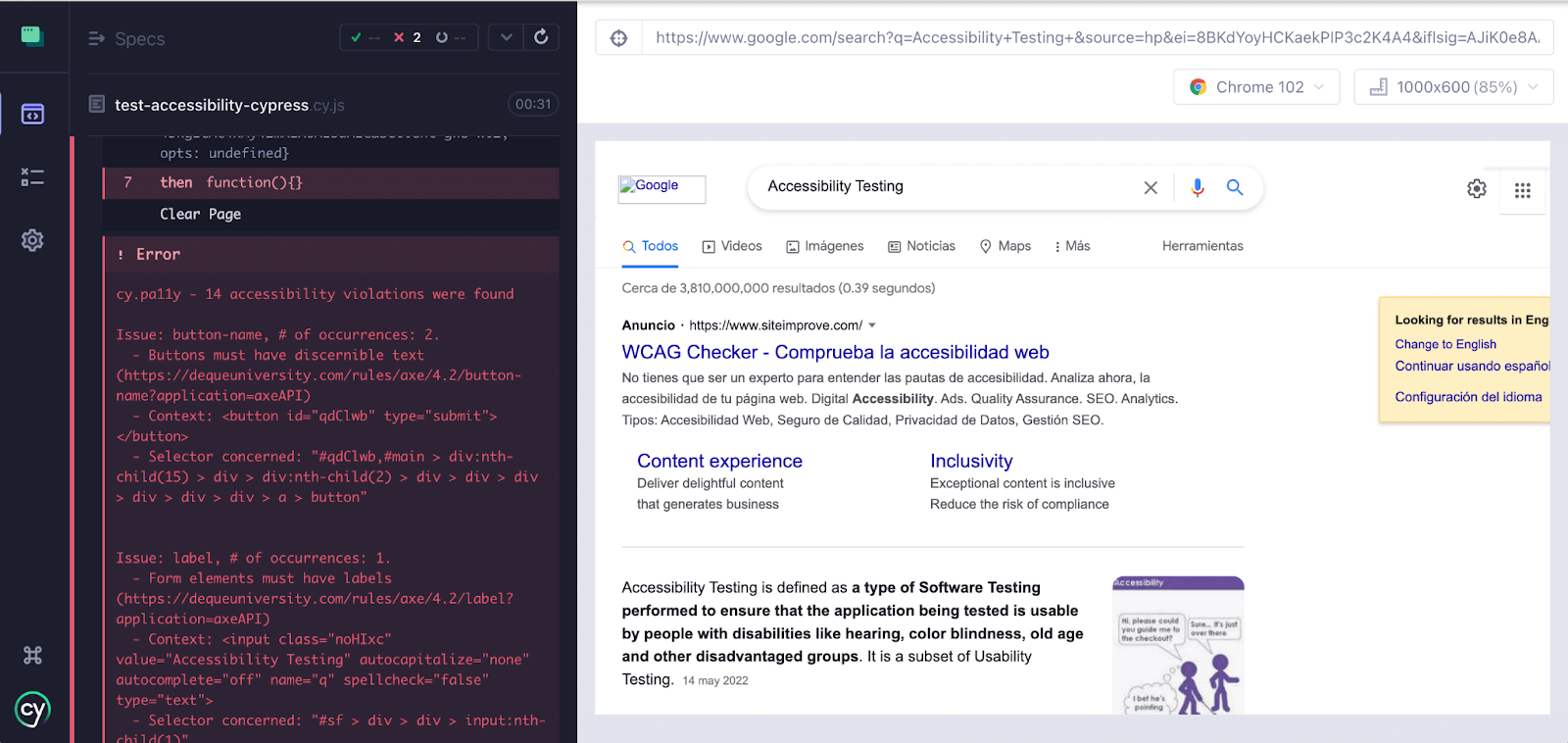
One thing I forgot to mention during our test using “cy.origin” to use this experimental command, we must enable it from our cypress configuration file; our file must be as follows:
"e2e": {
    "experimentalSessionAndOrigin": true
  },
If we don’t enable it, Cypress will throw an error:
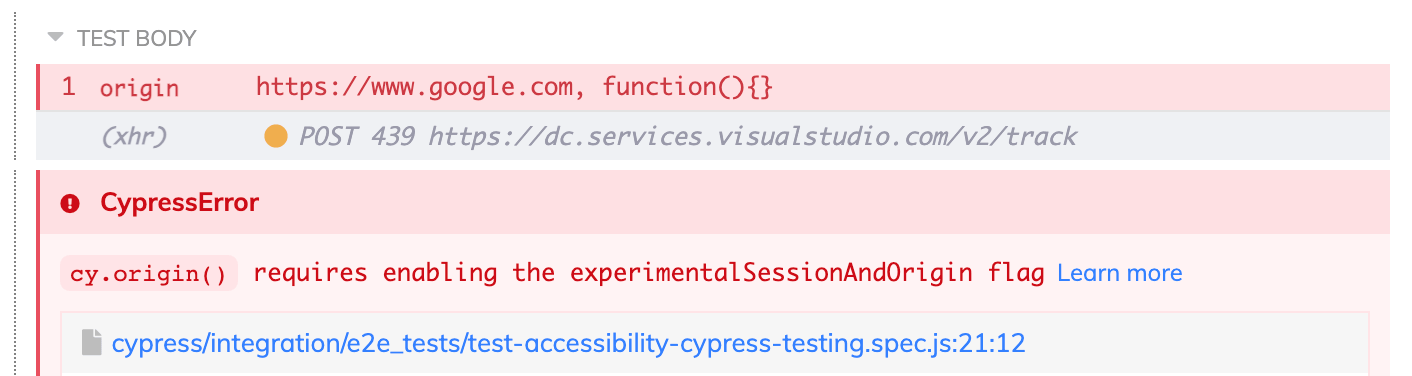
We must upgrade to Cypress 9.6.0, then we can try out the new functionality by setting the new experimentalSessionAndOrigin configuration option to true.

In the next section of this tutorial on Cypress accessibility testing, we will learn how to perform accessibility testing on the Cypress cloud grid.
How to perform Cypress Accessibility Testing on the cloud grid?
We can use a like TestMu AI, which provides automated on 40+ browsers and operating systems, and Cypress parallel testing to expedite the test execution and help perform Cypress testing at scale. In addition, it will help improve our overall test coverage by resulting in better product quality as we can cover different combinations using the same test scripts.
To get started with Cypress e2e testing, follow the below-mentioned steps:
- Install TestMu AI Cypress CLI on your machine. Trigger the following command to install the same:
npm install -g lambdatest-cypress-cli
lambdatest-cypress init
"lambdatest_auth": {
      "username": "<Your LambdaTest username>",
      "access_key": "<Your LambdaTest access key>"
{
  "lambdatest_auth": {
     "username": "",
     "access_key": ""
  },
  "browsers": [
     {
        "browser": "MicrosoftEdge",
        "platform": "Windows 10",
        "versions": [
           "latest"
        ]
     },
     {
        "browser": "Chrome",
        "platform": "Windows 10",
        "versions": [
           "latest"
        ]
     },
     {
        "browser": "Firefox",
        "platform": "Windows 10",
        "versions": [
           "latest"
        ]
     }
  ],
"run_settings": {
     "cypress_config_file": "cypress.json",
     "build_name": "build-Cypress-test",
     "parallels": 5,
     "specs": "./cypress/integration/e2e_tests/*.spec.js",
     "pluginsFile": true,
     "ignore_files": "",
     "npm_dependencies": {
        "cypress": "9.0.0",
        "@cypress-audit/pa11y": "^1.3.0",
        "cypress-plugin-snapshots": "^1.4.4",
        "cypress-visual-regression": "^1.6.2"
     },
     "feature_file_suppport": true
  },
"tunnel_settings": {
    "tunnel": false,
    "tunnelName": null
}
lambdatest-cypress run
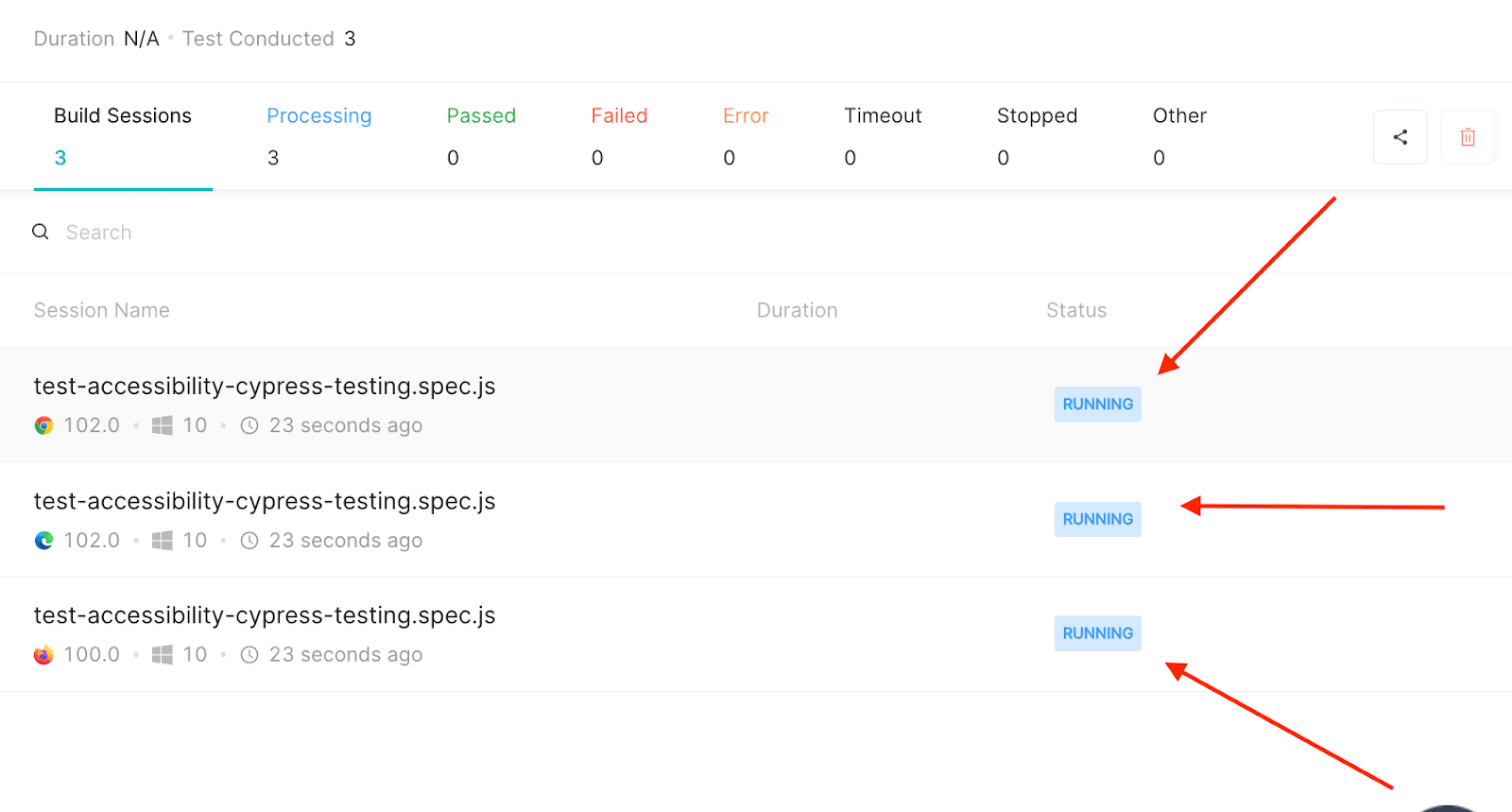
Shown below is the test execution status from the TestMu AI Automation Dashboard.
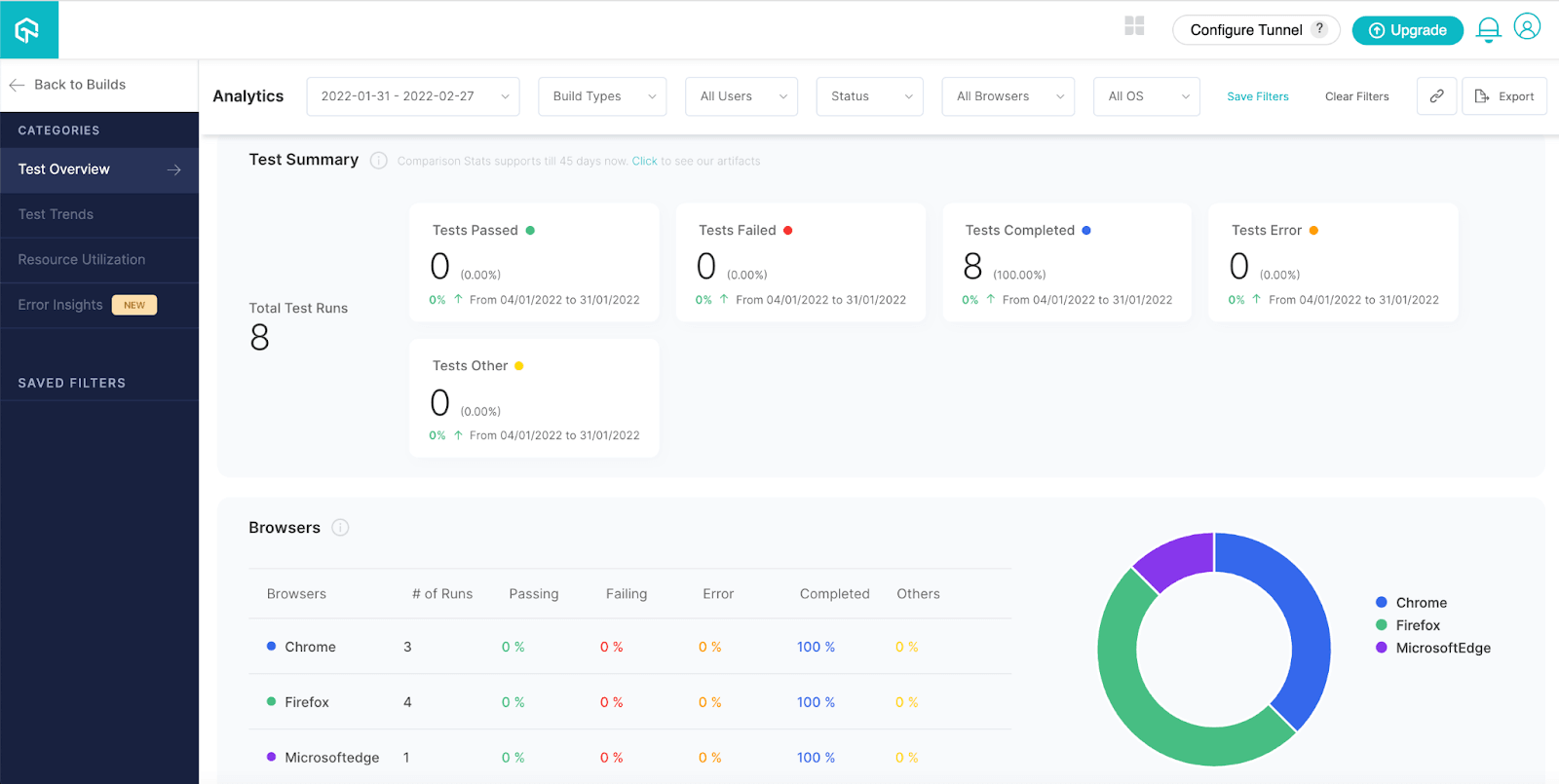
To view test performance metrics, navigate to the TestMu AI Analytics Dashboard. The Test Overview will provide a snapshot of tests consistent with stable behavior. Meanwhile, the Test Summary will display the total number of tests passed or failed and any completed and pending tests.
If you are a developer or a tester and have a basic understanding of Cypress and want to take your knowledge to the next level, then this Cypress 101 certification course is for you.
Austin Siewert
CEO, Vercel
Discovered @TestMu AI yesterday. Best browser testing tool I've found for my use case. Great pricing model for the limited testing I do 👏
2M+ Devs and QAs rely on TestMu AI
Deliver immersive digital experiences with Next-Generation Mobile Apps and Cross Browser Testing Cloud
Here’s a short glimpse of the Cypress 101 certification from TestMu AI:
Final Thoughts
It’s important to ensure your website is accessible to all visitors, including those who have disabilities. In this Cypress tutorial, we learned the importance of accessibility testing and how to perform Cypress accessibility testing on a cloud grid.
Let’s include Accessibility Testing in our projects; Accessibility is easy to consider once you start caring about it. The importance here is to embrace accessibility as part of our Automation testing. Let’s keep applications accessible to as many people as possible.

My suggestion to all Testers is to consider accessibility in your test automation projects; we should work together and keep applications available to all. Accessibility can help us to generate a real impact.
To deepen your Cypress automation expertise, don’t miss our comprehensive guide on the top Cypress interview questions packed with insights to help you shine in your next interview.
Happy Bug Hunting!


Frequently asked questions
Did you find this page helpful?
More Related Hubs
TestMu AI forEnterprise
Get access to solutions built on Enterprise
grade security, privacy, & compliance
- Advanced access controls
- Advanced data retention rules
- Advanced Local Testing
- Premium Support options
- Early access to beta features
- Private Slack Channel
- Unlimited Manual Accessibility DevTools Tests