

Next-Gen App & Browser Testing Cloud
Trusted by 2 Mn+ QAs & Devs to accelerate their release cycles


9 Best Browsers for Website Testing [2026]
Discover the 9 best browsers for website testing in 2026. Compare features, speed, and tools to ensure your site performs flawlessly across platforms.

Zikra Mohammadi
February 8, 2026
When it comes to web testing, prioritizing the best browsers is essential for delivering a seamless user experience. These browsers, such as Google Chrome, Safari, and Microsoft Edge, account for the majority of web traffic, making them the most critical for compatibility testing.
Overview
Here are some of the best web browsers you can include in your testing toolkit.
Best Browsers to Test Websites
- Google Chrome: Fast, feature-rich, and the most widely used browser for both users and developers.
- Mozilla Firefox: Open-source, privacy-focused, and highly customizable for testing flexibility.
- Microsoft Edge: Modern, Chromium-based browser with strong Windows integration and developer tools.
- Safari: Apple’s default browser, essential for testing macOS and iOS compatibility.
- Opera: Lightweight with built-in VPN and unique features that appeal to niche audiences.
Best Browsers for Testing Websites
When testing a website, it’s important to use multiple browsers to catch functional and compatibility issues. Listed below are some of the best web browsers you can consider for web testing.
1. Google Chrome
Google Chrome is the reference point for most website testing because it mirrors how the majority of users will experience a site. Its Blink engine and V8 JavaScript engine provide a stable, predictable environment to benchmark layout rendering, script execution, and performance metrics.
With powerful DevTools and deep extension support, Chrome enables end-to-end testing from initial load times to accessibility checks, making it essential for both functional and performance QA.
Features:
- AI-Enhanced Protection: Detects and blocks malicious domains, enabling real-world security validation during QA.
- Password Manager: Facilitates testing of autofill flows, password field handling, and credential storage security.
- Google Lens and AI Overview: Allows verification of image search accuracy and semantic content parsing.
- Energy and Memory Saver: Useful for assessing site behavior under constrained resource states.
- Incognito Lock: Supports validation of session isolation and private data persistence rules.
- Extension Library: Enables integration of testing tools such as Lighthouse, Axe, and Puppeteer.
Run test on Chrome online using real browsers in the cloud, ensuring your website looks and works exactly as intended for every user.
2. Mozilla Firefox
Mozilla Firefox, powered by the Gecko engine, is yet another one of the best browsers. It comes with Firefox DevTools that offer advanced debugging capabilities, especially for CSS Grid, Flexbox, and accessibility tree inspection.
Also, Microsoft has integrated Copilot AI directly into the browser, enabling content summarization and instant answers. Frequent updates aim to improve both speed and resource efficiency, making Edge a growing competitor in the browser market.
Features:
- Theme and UI Customization: Tests design resilience under modified UI color schemes and contrasts.
- Picture-in-Picture Video: Validates floating video player behavior against media event handling.
- Low Memory Mode: Assesses performance stability on constrained systems.
- CSS Grid and Flexbox Inspectors: Facilitates precise layout debugging and standards conformance checks.
- Enhanced Tracking Protection: Allows QA teams to test site functionality when third-party resources are blocked.
You can instantly test on Firefox online to ensure flawless rendering across all platforms.
3. Microsoft Edge
Microsoft Edge is a browser that runs on Chromium but differentiates itself with built-in productivity tools, robust security measures, and integration with Windows. It supports unique features like vertical tabs, immersive reading mode, and Collections for organizing research.
Also, Microsoft has integrated Copilot AI directly into the browser, enabling content summarization and instant answers. Frequent updates aim to improve both speed and resource efficiency, making Edge a growing competitor in the browser market.
Features:
- Collections: Lets you save and group web snippets, images, and notes for projects.
- Vertical Tabs: Displays tabs in a side column for better multitasking and navigation.
- Copilot AI Integration: Summarizes web pages and generates responses without leaving the tab.
- Built-in VPN: Adds an optional privacy layer that encrypts traffic, useful for public Wi-Fi and unsecured networks.
Accurately test on Edge online to verify design and functionality in one of the web’s most popular browsers.
4. Safari
Safari is considered Apple’s default browser, engineered for macOS, iOS, and iPadOS with speed and energy efficiency as top priorities. It’s deeply integrated into the Apple ecosystem, supporting features like Handoff and Continuity to transfer browsing sessions across devices.
Privacy has been a central focus, with built-in anti-tracking technology and secure private browsing modes. Safari also includes optimizations for Apple Silicon, ensuring that web apps run smoothly and consume minimal power.
Features:
- AI Highlights: Automatically highlights the most relevant parts of a webpage for quicker reading.
- AV1 Video Decoding: Enhances video streaming quality and efficiency on supported devices.
- Locked Private Browsing: Protects open private tabs by requiring Face ID, Touch ID, or a passcode to access.
- Profiles: Allows users to create separate browsing environments with distinct cookies, extensions, and favorites.
Run a quick test on Safari online to ensure privacy-focused users enjoy the same smooth experience.
5. Opera
Opera is a fast and feature-reach web browser. Its Chromium base ensures high compatibility, but its integrated features can alter DOM flow and network requests, making it important for edge-case testing.
The built-in VPN, ad blocker, and sidebar integrations introduce conditions that mimic real-world browsing with altered resource loading. Opera’s adoption of AI assistants and cross-device sync also creates opportunities to test dynamic content delivery and messaging integrations.
Features:
- Sidebar Integrations: Checks layout adaptation when persistent sidebar UI elements are present.
- Aria AI Assistant: Verifies AI-generated summaries and interactive chatbot overlays on web pages.
- Battery Saver Mode: Evaluates performance under CPU throttling conditions.
- Ad and Tracker Blocker: Tests rendering behavior with suppressed ad network calls.
Easily test on Opera online in real environments to spot and fix cross-browser issues before launch.
6. Brave
Brave is a free and open-source web browser that enforces a privacy-first browsing model, blocking ads, trackers, and third-party cookies by default. For QA teams, it is invaluable for testing the resilience of analytics, ad delivery, and content personalization systems when tracking data is unavailable.
Its integration of Tor browsing and crypto wallets also provides unique scenarios for validating anonymity layers and decentralized payment flows.
Features:
- BAT Rewards System: Validates opt-in ad delivery and blockchain-based payout processes.
- Tor Integration: Tests session anonymity, IP masking, and onion routing performance.
- Custom Shields: Allows granular testing of scripts, cookies, and fingerprinting controls per domain.
- Lightweight Performance Profile: Verifies performance metrics on lower-spec hardware.
7. Samsung Internet
Samsung Internet is a mobile browser designed to provide a secure, fast, and user-friendly web experience. Built on the open-source Chromium project, it comes pre-installed on Samsung Galaxy devices and is available for download on other Android devices. The browser offers a range of features tailored to enhance browsing efficiency and protect user privacy.
Features:
- Content Blockers: Let users install extensions to block unwanted content, improving page load times and saving data.
- Secret Mode: Enables private browsing without saving history, cookies, or cache, with optional biometric authentication for added security.
- Sync: Bookmarks and open tabs across devices by signing into a Samsung account, ensuring seamless access to your browsing data anywhere.
- Dark Mode: Applies a dark theme to both web pages and the browser interface, helping reduce eye strain.
8. Vivaldi
Vivaldi is one of the popular browsers and offers extreme customizability. Its unique features like split-screen view, tab stacking, and web panels can impact responsive design and viewport rendering.
Chromium core of Vivaldi browser ensures baseline compatibility while its customization layers expose potential layout and script execution edge cases.
Features:
- Full UI Customization: Tests adaptive design in altered UI element positions.
- Tab Stacking: Validates how multi-tab grouping affects dynamic tab content loading.
- Split-Screen View: Checks rendering consistency when multiple sites share a viewport.
- Command Chains: Simulates automated workflows for repetitive QA tasks.
9. Tor Browser
Tor Browser is a free and open-source web browser that enables anonymous communication by directing internet traffic through a worldwide volunteer overlay network consisting of more than seven thousand relays. This process conceals a user’s location and usage from surveillance and traffic analysis.
Features:
- Multi-Layered Encryption: Routes traffic through three random servers (relays) in the Tor network, ensuring anonymity.
- Tracking Prevention: Isolates each website visited so third-party trackers and ads cannot follow users.
- Fingerprinting Resistance: Makes all users appear the same, making it difficult to track behavior based on browser or device information.
- Built-In Security Tools: Includes HTTPS-Only mode and NoScript to protect against surveillance and malware.
How to Choose the Right Browsers for Website Testing?
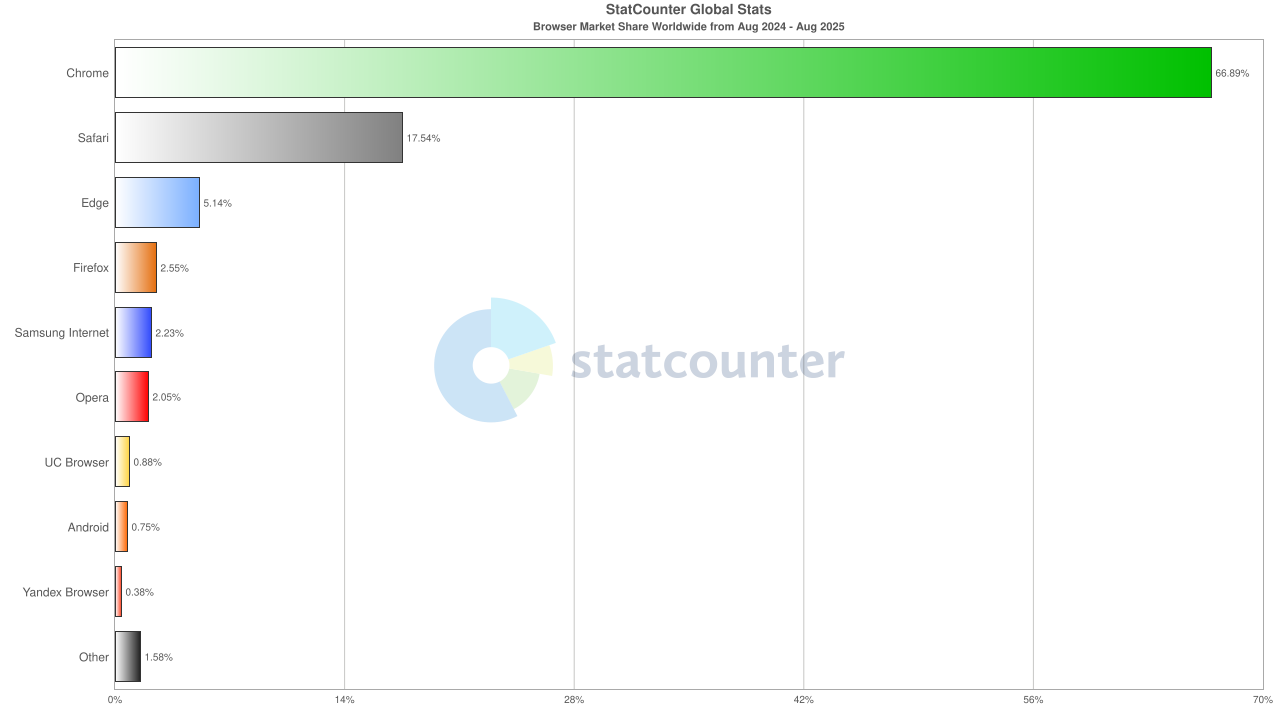
With countless browsers, devices, and operating systems in use, testing them all is not feasible. Instead, identify the most popular browsers and OS versions by reviewing global trends from sources like StatCounter or Statista, and analyzing your own traffic via tools like Google Analytics.
For example, according to Statcounter, Chrome remains the dominant choice for users worldwide, followed by Safari as the second most popular option. Edge, Firefox, and Samsung Internet also hold a notable share, while Opera and other niche browsers contribute to broader testing coverage.
Check out this blog to know tips to select right browser list for website testing.
How TestMu AI Simplifies Cross Browser Testing?
It is crucial to ensure that your website or web application works as intended across the latest and legacy browsers, different versions, and diverse operating systems. Building a massive in-house testing infrastructure for this can be costly and time-consuming.
A more efficient approach is to use a cloud-based testing platform like TestMu AI for cross browser testing. It allows you to perform manual and automated browser testing on a remote test lab of different browsers, real devices and operating systems.
Features:
- Automation Testing: Run tests at scale using popular automation frameworks such as Selenium, Cypress, Playwright, Appium, and more. This helps speed up release cycles and reduce manual effort.
- Visual Regression Testing: Perform visual regression testing to detect layout shifts, style issues, and design changes across different browsers and devices.
- Real Device Cloud: Access a wide range of real devices to test websites and mobile web apps under actual user conditions, ensuring accurate results.
- Geolocation Testing: Simulate different locations, languages, and regional settings to ensure your site works flawlessly for a global audience.
To get started, check out this documentation on web browser testing with TestMu AI.

Conclusion
Choosing the right browser for website testing is more than a matter of preference. It ensures your site delivers a consistent, high-quality experience for all users, regardless of their device or operating system.
By understanding which browsers matter most to your audience and evaluating them against your testing goals, you can focus your efforts where they will have the most impact.


Frequently asked questions
Did you find this page helpful?
More Related Hubs
TestMu AI forEnterprise
Get access to solutions built on Enterprise
grade security, privacy, & compliance
- Advanced access controls
- Advanced data retention rules
- Advanced Local Testing
- Premium Support options
- Early access to beta features
- Private Slack Channel
- Unlimited Manual Accessibility DevTools Tests