

Next-Gen App & Browser Testing Cloud
Trusted by 2 Mn+ QAs & Devs to accelerate their release cycles


On This Page
- What Is Azure Automation?
- Azure Automation Core Components
- Key Benefits of Using Azure Automation
- Setting Up and Creating Azure Automation
- Common Pitfalls of Azure Automation and How to Avoid Them
- Azure DevOps Pipeline Integration With TestMu AI
- Azure Automation Tools and Integrations
- Common Use Cases for Azure Automation
- Tips for Effective Automation in Azure

Azure Automation for DevOps: Enhance Productivity and Streamline CI/CD Workflows
Boost efficiency with Azure Automation for DevOps. Automate workflows, manage updates, and streamline hybrid/cloud operations seamlessly.

Chandrika Deb
December 30, 2025
Managing cloud and hybrid environments can quickly become complex without automation. Azure Automation streamlines operations by automating tasks like setting up resources, keeping systems updated and meeting security and regulatory standards. It boosts consistency, security, and efficiency using Runbooks and other integrated tools.
Overview
Azure Automation enables teams to reduce manual intervention by orchestrating complex processes across multiple systems. It also helps enforce compliance and operational standards consistently.
Steps to Set Up an Azure Automation Account
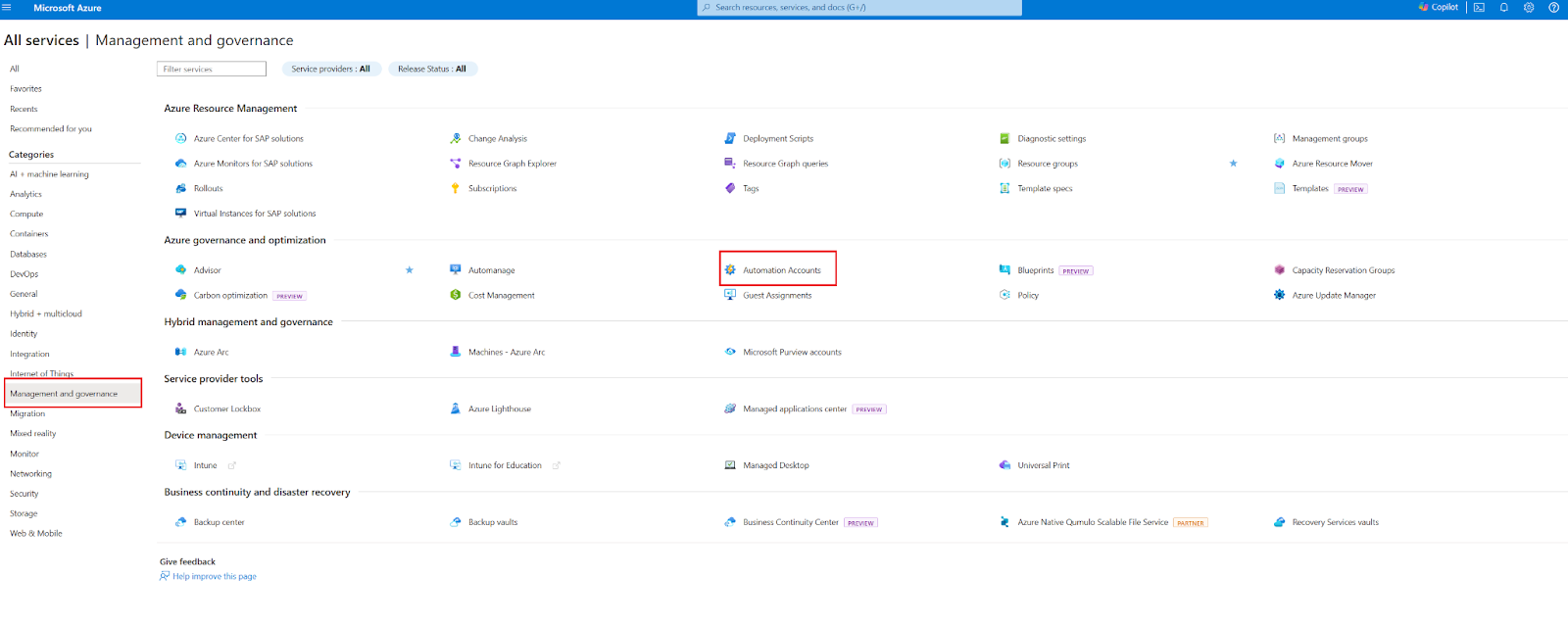
- Log in: Access the Azure Portal and search for Automation Accounts.
- Create Account: Click + Add, enter name, subscription, resource group, and location.
- Use Managed Identity: Authenticate using managed identities instead of Run As accounts.
- Finalize: Click Create and select the account from the list.
- Assign Roles: Provide RBAC roles like Automation Contributor and Log Analytics access.
- Link Workspace: Connect to a Log Analytics workspace for monitoring.
- Utilize Logs: Leverage centralized logs, data transformation, and workspace insights.
Steps to Integrate TestMu AI with Azure DevOps Pipelines
- Navigate to Marketplace: Search for TestMu AI in Azure DevOps Marketplace.
- Add Extension: Click Get it free to add it to your organization.
- Install: Select your organization, click Install, and confirm.
- Use TestMu AI: Run automated and manual tests across browsers and devices.
- Leverage Tunnel: Test internal or staging environments securely.
- Integrate Results: Connect TestMu AI results to Azure DevOps pipelines.
Use Cases for Azure Automation
- Automate Infrastructure: Provision VMs, storage, networks, and resource groups.
- Manage Patching: Discover updates, schedule deployments, and track compliance.
- Schedule Tasks: Automate VM start/stop to optimize costs.
- Integrate DevOps: Connect Azure Pipelines or Logic Apps for CI/CD and governance.
- Use Hybrid Worker: Automate tasks across on-premises and cloud environments.
What Is Azure Automation?
Azure Automation is a service delivered through the cloud that is aimed at the automation of such tasks as provisioning, configuration, monitoring, backup, and recovery of cloud resources. It allows the building, handling, and running of automation scripts (runbooks) and can be used to coordinate complex workflows over different systems and services.
Scripting can be done using PowerShell or Python, and a visual editor is available for easier runbook development. Besides, it is also very easy to connect Azure Automation with other Azure services such as Azure Monitor, Azure Logic Apps, and Azure DevOps (“very easy” could be formalized to “can connect” if desired).
Azure Automation Core Components
Azure Automation provides an efficient platform to manage and integrate cloud and hybrid environments. Its primary features include such as task automation, configuration management, patching, and cross-environment orchestration, enable seamless operations across different environments.
- Azure Runbooks: Use PowerShell, Python, or the graphical editor to automate tasks. Typical applications include VM provisioning, service restarts, and config changes. Operates either on the Azure sandbox or the Hybrid Runbook Worker.
- Desired State Configuration (DSC): Makes sure a machine has the same configuration everywhere (e.g., software, registry, services) by using “configuration as code” for Windows/Linux VMs.
- Update Management: One-stop management of patch distribution for Windows/Linux machines regardless of whether the location is Azure, on-premises or other clouds. Functions like this: setting the time, monitoring compliance, etc.
- Hybrid Runbook Worker: This feature allows execution of automation scripts on non-Azure machines, which may be either on-prem or other clouds.

Note: Automate cloud and hybrid workflows, manage updates, and ensure consistent configurations across various environments. Try TestMu AI today!
Key Benefits of Using Azure Automation
Azure Automation delivers consistent, scalable, and secure operations across environments. It enhances efficiency, reduces errors, and provides centralized control for both cloud and hybrid infrastructures.
- Error reduction: Automation removes manual step-by-step intervention, ensuring tasks run consistently and without human errors.
- Cost/time efficiency: With scheduled and event-driven automation, resources like VMs can start and stop automatically. For example, the Azure Automation Start/Stop VMs solution helps reduce costs by shutting down unused VMs during off-hours, eliminating manual effort and optimizing resource usage.
- Hybrid management: Using Hybrid Runbook Worker, Azure Automation reaches across cloud‑on‑prem boundaries, managing resources uniformly regardless of location.
- Secure and centralized automation: Azure Automation stores credentials securely using Automation assets like credentials and certificates. These can be integrated with Azure Key Vault or managed identities to enable secure access. It also centralizes runbook storage, scheduling, monitoring, and audit logging.
Setting Up and Creating Azure Automation
Before creating your first runbook, you need to create an Azure Automation Account. This account executes runbooks and authenticates to the Azure resources required by those runbooks.
The account groups together Automation resources, runbooks, and configuration settings. You can create multiple accounts to separate functionality, such as development and production environments.
Steps to Create an Azure Automation Account
To get started creating your first Azure Automation Account, follow these steps given below:
- Log in to the Azure Portal: Visit https://portal.azure.com. In the search bar, type Azure Automation, then select Automation Accounts from the results.
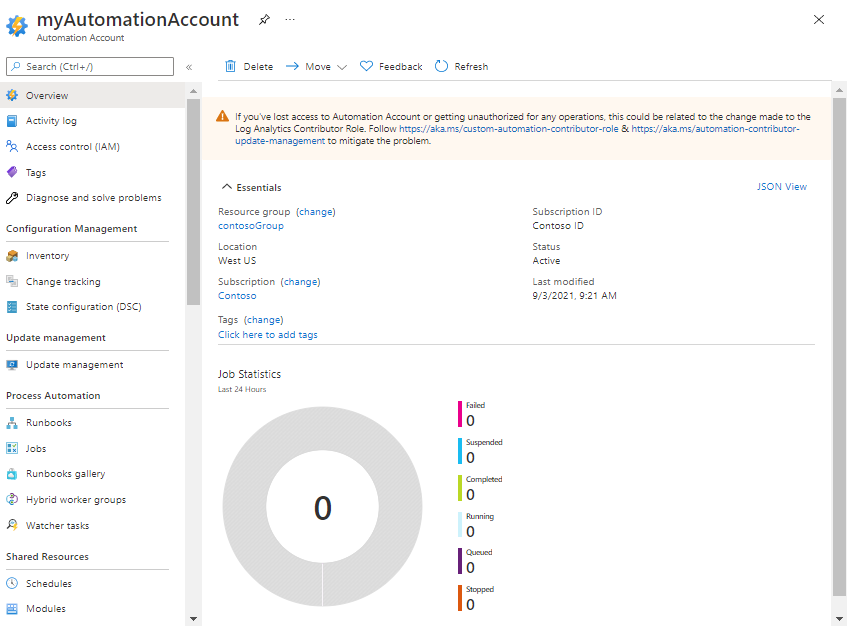
- View Existing Accounts: On the Automation Accounts resource page, you can view and manage any existing accounts.
- Add a New Automation Account:
- Click + Add
- Fill in the required details:
- Name: Use a descriptive name (e.g., aa-cloudskills-prod-westus-001).
- Subscription: Select a valid Azure subscription.
- Resource Group: Choose an existing group or create a new one (e.g., azacct-rg).
- Location: Select a hosting location.
- Create Azure Run As Account: For authentication, Microsoft now recommends using managed identities instead of Run As accounts.
Run As Accounts deprecated, Microsoft recommends using managed identities (system-assigned or user-assigned) for authenticating runbooks to Azure resources. Avoid enabling Run As accounts and configure managed identity access instead.
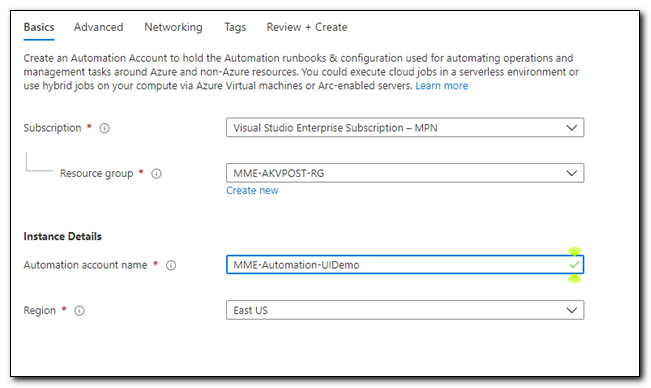
- Create the Account: After entering the details, click Create. Once the account is successfully created, select it from the Automation Account list (refresh if it doesn’t appear immediately).
Required Permissions (RBAC)
To create, manage, and run Automation Accounts and runbooks, the Azure AD user or service principal must have the appropriate Role-Based Access Control (RBAC) roles assigned.
Proper permissions ensure that runbooks execute successfully, credentials are securely accessed, and monitoring/logging works correctly.
- Automation Contributor: Grants full permissions to create and manage Automation Accounts, runbooks, and assets (such as variables, credentials, and schedules). This role is essential for developers or administrators who will author and maintain automation scripts.
- Access to the linked Log Analytics workspace (Reader or Contributor): Enables the Automation Account to send logs and diagnostic data to a Log Analytics workspace. A Reader role allows viewing workspace data, while Contributor permissions are required for modifying settings or creating alerts and queries.
Additional Considerations:
- Role Assignments: Ensure the managed identity has correct roles to access Azure resources.
- Key Vault Access: If using Azure Key Vault, configure access policies so the Automation Account or managed identity can read secrets.
- Least Privilege: Assign only minimum permissions required for automation tasks to enhance security.
By ensuring the correct RBAC configuration, you can securely manage automation workflows while maintaining compliance and operational control.
Linking to Log Analytics
Linking your Automation Account to a Log Analytics workspace enables:
- Rich monitoring and job streams.
- Update compliance tracking.
- Diagnostics and alerting.
This linkage is established during setup or afterward via Automation account settings.
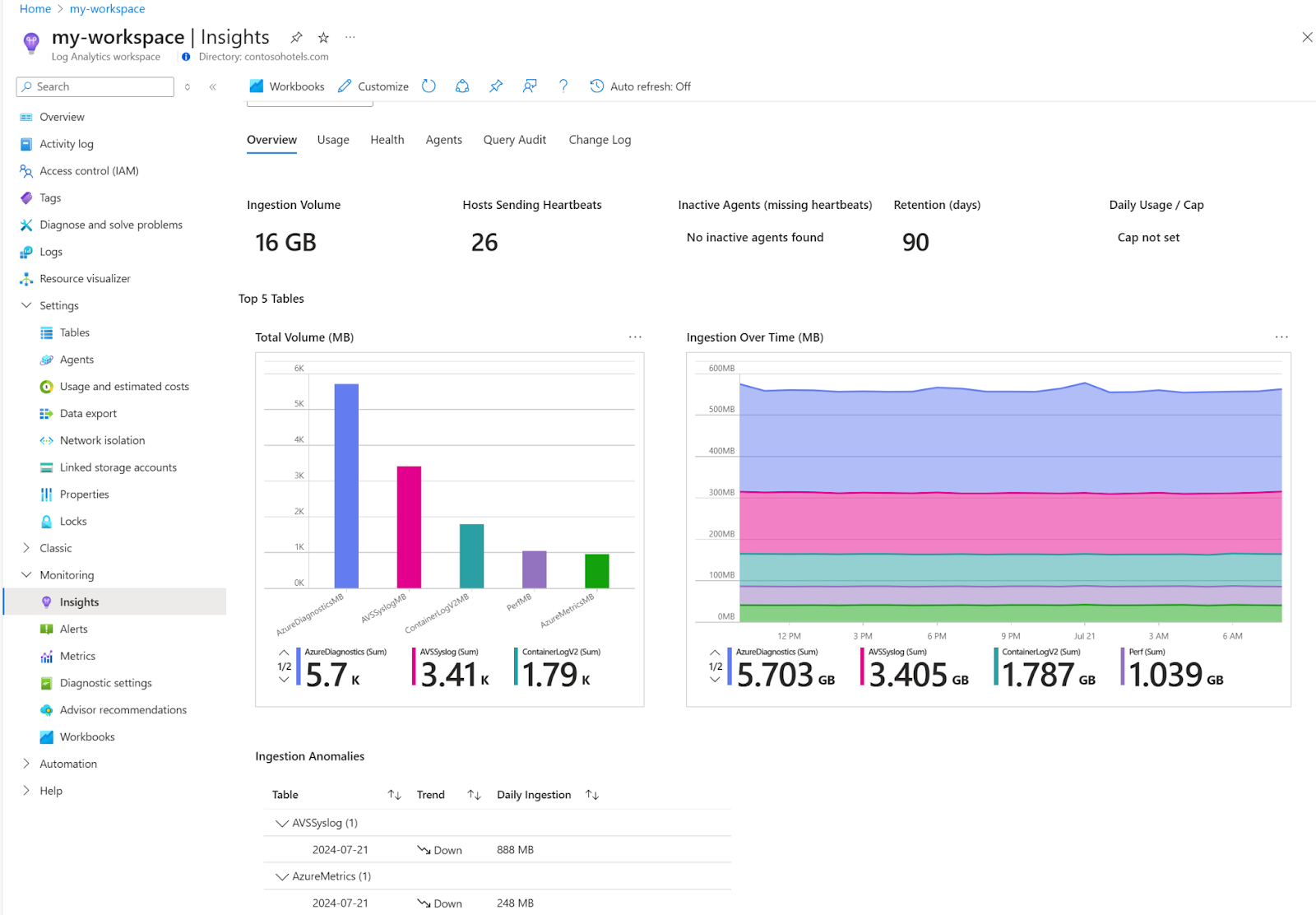
Azure Log Analytics Workspaces centralize log data from Azure and non-Azure resources for analysis, monitoring, and compliance. They integrate with services like Azure Monitor, Microsoft Sentinel, and Power BI, and support features like:
- Data transformation.
- Role-based access control (RBAC).
- Long-term retention.
- Data filtering at ingestion for cost/performance optimization.
- Workspace insights for usage and health monitoring.
Common Pitfalls of Azure Automation and How to Avoid Them
While Azure Automation offers powerful capabilities, many teams encounter avoidable issues during implementation. Recognizing these common pitfalls early can help ensure smoother, more reliable automation outcomes.
Below are a few common issues and ways to mitigate them.
- Overloading the First Project:
Automating everything at once by attempting to automate too much at the very start is a frequent mistake. Most teams want to automate complete environments or intricate workflows from the get-go, which can overstretch resources and delay progress.
How to Avoid: Begin small. Choose a high-impact, low-complexity process that can be automated rapidly and leveraged to prove value. This strategy generates confidence and creates a strong foundation for incremental scaling.
- Ineffective Oversight After Deployment:
It’s not unusual for runbooks and automation scripts to be deployed and abandoned. Without version control and a clear owner, scripts tend to diverge from their original purpose, making maintenance challenging and causing confusion during an incident.
How to Avoid: Assign owners to every automation asset. Employ version control systems (such as Git) to monitor changes, and keep proper documentation in place. Review and update scripts periodically to integrate infrastructure or process changes.
- Inadequate Error or Log Handling:
Failed silently, automation jobs may exhibit severe delays and lost SLAs. Without structured logging and error handling, it is a guessing game to diagnose problems.
How to Avoid: Use structured error-handling in your runbooks through try-catch blocks or similar logic. Log important events, errors, and outputs, and send logs to centralized systems like Azure Monitor or Log Analytics for simple tracking and alerting.
- Credential Security Gaps:
Hardcoding credentials or keeping them in clear text can leave your systems open to debilitating security threats. Automation scripts based on insecure authentication mechanisms become soft targets.
How to Avoid: Employ Azure Managed Identities to authenticate securely without credentials storage. For situations needing secrets, use Azure Key Vault. Rotate secrets and audit access to sensitive data regularly.
- Insufficient Monitoring:
Fly-blind automation. Without visibility into job success, failure, and performance, problems remain unknown until they create real harm.
How to Avoid: Enable monitoring and alerting with Azure Monitor. Create dashboards to see job run trends, failure rate, and performance data. Proactive monitoring enables you to solve issues before they become big problems.
- Idle or Mis-Sized Resources:
If automation does not properly manage the lifecycle of cloud resources, it will leave idle resources running, totaling large, unnecessary expenses.
How to Avoid: Automate deallocation or shutdown of idle resources during non-working hours. Use tags on automation-created resources and monitor usage patterns on a regular basis to right-size your infrastructure.
- Too Permissive RBAC:
Assigning broad permissions to automation users or accounts raises the risk of accidental changes and security compromise. Over time, these too-permissive roles can compromise compliance with governance standards.
How to Avoid: Implement the least privilege principle. Grant permissions required for a particular activity alone, and utilize custom roles when required. Periodically review role assignments to keep access in check.
- Mismatched Module Versions:
In hybrid or complex setups, Azure PowerShell module version inconsistencies may lead to runtime errors, nondeterministic behavior, or compatibility problems.
How to Avoid: Standardize module versions across development, staging, and production environments. Run all automation scripts in a staging environment to confirm compatibility prior to pushing them to production.
Teams implementing Azure Automation often face challenges such as limited on-premises resources, fragmented monitoring, complex cross-environment workflows, security and compliance hurdles, and inconsistent scripts or configurations across environments.
Cloud-based platforms address these issues by providing scalable, secure, and centralized automation infrastructure. They allow on-demand resource scaling, centralized logging, consistent configuration management, and optimized resource usage.
Platforms like TestMu AI further streamline testing by enabling automated and manual tests across multiple browsers, devices, and environments while integrating with CI/CD pipelines for efficient DevOps workflows.
Azure DevOps Pipeline Integration With TestMu AI
Azure DevOps enables automated build, test, and deployment of projects in various production environments. However, executing Azure DevOps testing across multiple browsers, devices, or OS combinations can be complex and time-consuming.
TestMu AI is a GenAI-native testing platform that allows manual and automated testing at scale across 3000+ real browsers and OS combinations. It integrates seamlessly with Azure DevOps and other DevOps tools to ensure a smooth feedback loop, faster testing, and efficient DevOps workflows.

Teams can leverage the TestMu AI Tunnel to test internal, development, and staging environments securely, without exposing them publicly. Check the TestMu AI extension on Azure DevOps Marketplace.
Installing the TestMu AI Extension in Azure DevOps
You can integrate TestMu AI with your Azure DevOps pipelines to run automated and manual tests across multiple browsers and devices.
Follow the steps below to install the TestMu AI extension and set it up in your organization.
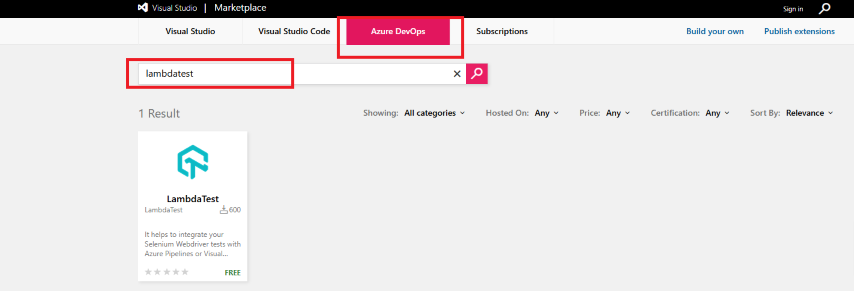
- Visit Azure Marketplace: In the Azure DevOps Marketplace, navigate to the Azure DevOps tab and search for TestMu AI.
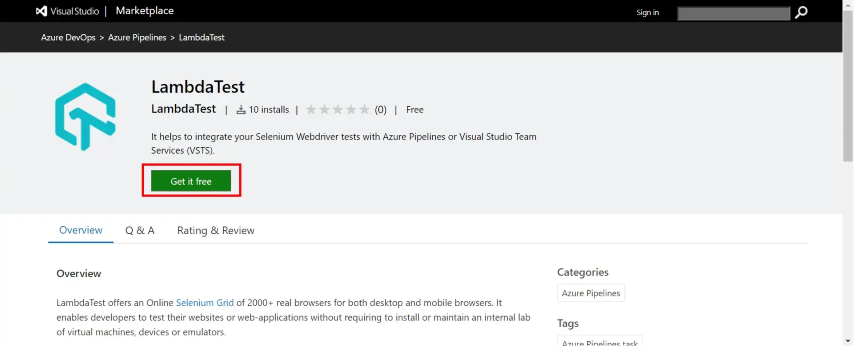
- Open the Extension: Click on the TestMu AI extension in the search results.
- Get it Free: Click Get it free to add the extension to your organization.
- Select Your Organization: Choose the Azure DevOps organization where you want to install the extension.
- Install: Click Install to complete the integration.
- Confirm Installation: Once finished, you will see Done at the top, indicating the TestMu AI extension is ready for use.
For a detailed guide, refer to the official TestMu AI support document on integrating TestMu AI with Azure Pipelines.
By integrating cloud platforms like TestMu AI into Azure Automation and Azure DevOps pipelines, teams can:
- Improve test efficiency and reliability.
- Enhance collaboration between development and QA teams.
- Reduce time-to-market while maintaining compliance and consistency.
- Overcome common pitfalls like mismanagement, insufficient monitoring, and security gaps.
Azure Automation Tools and Integrations
Azure Automation is a perfect fit for popular tools and services across the Azure and DevOps ecosystems, making it an ideal DevOps automation solution. These integrations aid in script management, monitoring, orchestration, and enhance collaboration across teams.
- PowerShell & Python support: Azure Automation makes use of PowerShell runbooks (versions 5.1 and 7.x) and Python 3.8 scripts. Both textual and graphical runbooks can be created. Often, graphical editors are more liked by those who are not developers or for the creation of simpler, visual workflows.
- GitHub / Azure Repos integration: You are able to keep the runbooks source control repositories (GitHub or Azure Repos) and then link them for versioning, cooperation, and CI workflows.
- Azure Monitor & Log Analytics: The integration of the automation with the Azure Monitor is very convenient, as it allows you to register the success or failure of the runbook, performance metrics, and the Update Management compliance. This gives a centralized view of the automation results and the system health.
- Logic Apps and Azure Functions: These runbooks are suitable for being activated from either Logic Apps or Azure Functions. Also, the runbooks can be triggered, resulting in event-driven orchestration. This allows you to efficiently operate the same job many times in parallel (fan-out workflows) or to mix the serverless logic with automation scripts.
Common Use Cases for Azure Automation
Azure Automation is a versatile platform that can be applied to various IT operations and DevOps scenarios. The service covers a wide range of use cases, such as infrastructure provisioning, hybrid orchestration, and managing consistency, all of which are policy-driven automation at scale.
- Infrastructure provisioning: Provisioning of VM storage, network setup, and resource groups can be automated through runbooks, which guarantee that the environment is consistent.
- Patch management: Discovery of missing updates, scheduling of deployment, and compliance reporting can all be done automatically with Update Management.
- Scheduled tasks (e.g., VM lifecycle): The normal operations can be automated in a way that VMs get started during mornings of weekdays and get shut down on nights or weekends to save money.
- DevOps CI/CD and governance: Runbooks are still a great place to start if you want to integrate with another app, such as Azure Pipelines or Logic Apps, to enforce compliance guardrails. For instance, they can be the ones to ensure, before deployment, that resources are in accordance with the tagging standard or policy requirements.
- Hybrid/on-prem Automation: Hybrid Runbook Worker gives you an opportunity to tap into the same automation pool while interacting with on‑prem servers as well as cloud resources.
By allowing Hybrid Runbook Worker deployment (via VM extension) on local machines, Azure Arc-enabled servers, or even cloud VMs outside Azure, Azure Automation extends the reach of hybrid infrastructure.
Runbooks executed on these workers can also be flows to local systems such as SQL Servers, file shares, or internal services via local credentials or managed identities. They can also do configuration changes, install patches, as well as orchestrate workflows across both cloud and on-prem environments.
Azure Pipelines acts as an orchestrator for hybrid CI/CD workflows, facilitating the execution of tasks across on-premises as well as cloud environments. Platforms like TestMu AI are compatible with hybrid agents, thus you can carry out test automation even if your pipeline is partially running outside Azure.
This empowers you to implement cases like combining on-premises desktop or server tests with cloud-based browser testing, all managed centrally through Azure Pipelines.
Tips for Effective Automation in Azure
To get the most out of Azure Automation, it’s essential to follow best practices that promote reliability, maintainability, and security. These tips help streamline operations and future-proof your automation efforts.
- Use modular, reusable Runbooks: Divide logic into small, single-responsibility runbooks (i.e., create VM, apply tags, configure a server). Call them from a parent runbook to improve reusability and maintenance.
- Implement clear naming conventions: Use short, meaningful names for runbooks and activities. Avoid generic names such as Runbook1. Clear naming makes it easier to read and troubleshoot.
- Monitor Runbook performance: Deploy Azure Monitor to set up alarms or dashboards tracking duration, success/failure rates, and latency. Use logs and metrics to fine-tune performance and fix issues.
- Protect credentials: Do not include credentials via hard-coding. Get secrets from Azure Key Vault or use managed identities for secure authentication.
- Use checkpoints in PowerShell Workflow Runbooks: For long-running jobs, insert CheckPoint-Workflow to continue from failure points.
- Handle errors explicitly: Execute organized error handling (try/catch/finally) and ensure logs provide enough context.
- Test in a sandbox before production: Validate runbooks in the Azure test sandbox or a dev environment before deploying to DevOps pipelines to keep critical resources safe.
- Runbooks versioning: Use source control or naming/comments to maintain versioning and track changes.
- Documentation: Utilize inline comments and keep runbook documentation updated to help colleagues understand and support your work.
Conclusion
Automation definitely is not an option anymore, but a necessity. Almost 47% of cloud outages were caused by human error which underlines the dangers of manual operations. The majority of businesses now rely on hybrid or multi-cloud environments. Automation enables seamless operations; therefore, it is the key to achieving consistency, speed, and compliance.
Azure Automation makes it possible for enterprises such as Maersk, Siemens, and Unilever to minimize the time of deployment, decrease their operational expenses, and implement security policies automatically. It carries out the tasks of provisioning, patching, and compliance in both cloud and on-premises systems by utilizing Runbooks, DSC, Update Management, and Hybrid Runbook Workers.
Citations
- Hybrid Cloud Security: https://arxiv.org/abs/2506.00426
- Azure Automation Overview: https://learn.microsoft.com/en-us/azure/automation/overview
- Runbook Types and Runtime Support : https://learn.microsoft.com/en-us/azure/automation/automation-runbook-types
- Automation Runbook Execution: https://docs.azure.cn/en-us/automation/automation-runbook-execution
- Troubleshoot Hybrid Runbook Worker: https://docs.azure.cn/en-us/automation/troubleshoot/hybrid-runbook-worker


Frequently asked questions
Did you find this page helpful?
More Related Hubs
TestMu AI forEnterprise
Get access to solutions built on Enterprise
grade security, privacy, & compliance
- Advanced access controls
- Advanced data retention rules
- Advanced Local Testing
- Premium Support options
- Early access to beta features
- Private Slack Channel
- Unlimited Manual Accessibility DevTools Tests