

Next-Gen App & Browser Testing Cloud
Trusted by 2 Mn+ QAs & Devs to accelerate their release cycles


On This Page

AI Test Case Generation: How It Works and How to Implement It
Learn how AI test case generation works, the techniques behind it, and how to implement it in your workflow. Step-by-step guide with practical examples inside.

Deepak Sharma
March 29, 2026
Over 45% of QA teams now use AI for test case creation. The reason is simple: manual test authoring cannot keep pace with modern release cycles. This guide breaks down how AI test case generation actually works, the techniques driving it, and exactly how to implement it in your workflow.
Overview
What is AI Test Case Generation?
AI test case generation uses machine learning and NLP to automatically create test cases from requirements, code, or application behavior — including edge cases humans typically miss.
Why Do 46% of QA Teams Use AI for Test Case Creation?
Speed, consistency, coverage, scale, and self-healing. AI generates in hours what takes days manually, applies the same logic everywhere, and adapts when the UI changes.
How Does AI Test Case Generation Work?
It follows a 4-stage process:
- Define Objectives: Set coverage goals — structural, boundary, robustness, or requirements-based.
- Feed the Inputs: Provide source code, requirements docs, API specs, state diagrams, and defect history.
- Apply Techniques: Model-based testing, search-based testing, NLP parsing, or fuzz testing.
- Learn and Improve: AI prioritizes tests by defect likelihood, self-heals locators, and refines coverage continuously.
How to Generate AI Test Cases in 5 Steps?
Using TestMu AI Test Manager: create a project, enter your requirements, press Tab to trigger AI generation, Shift+Enter for multiple cases, and organize results into folders. Full docs at Introduction to Test Manager.
AI vs Manual: Which Fits Your Team?
Use AI for regression, large suites, and repetitive scenarios. Use manual testing for exploratory work, usability, and complex business logic. The optimal approach combines both: AI generates 80% coverage, humans handle the 20% requiring judgment.
What is AI Test Case Generation?
AI test case generation uses machine learning and natural language processing to automatically create test cases from requirements, code, or application behavior. Instead of manually writing each scenario, you feed the AI your specifications and it produces comprehensive test coverage, including edge cases humans typically miss.
According to the Future of Quality Assurance Report, 45.90% of QA teams are now using AI for test case creation.
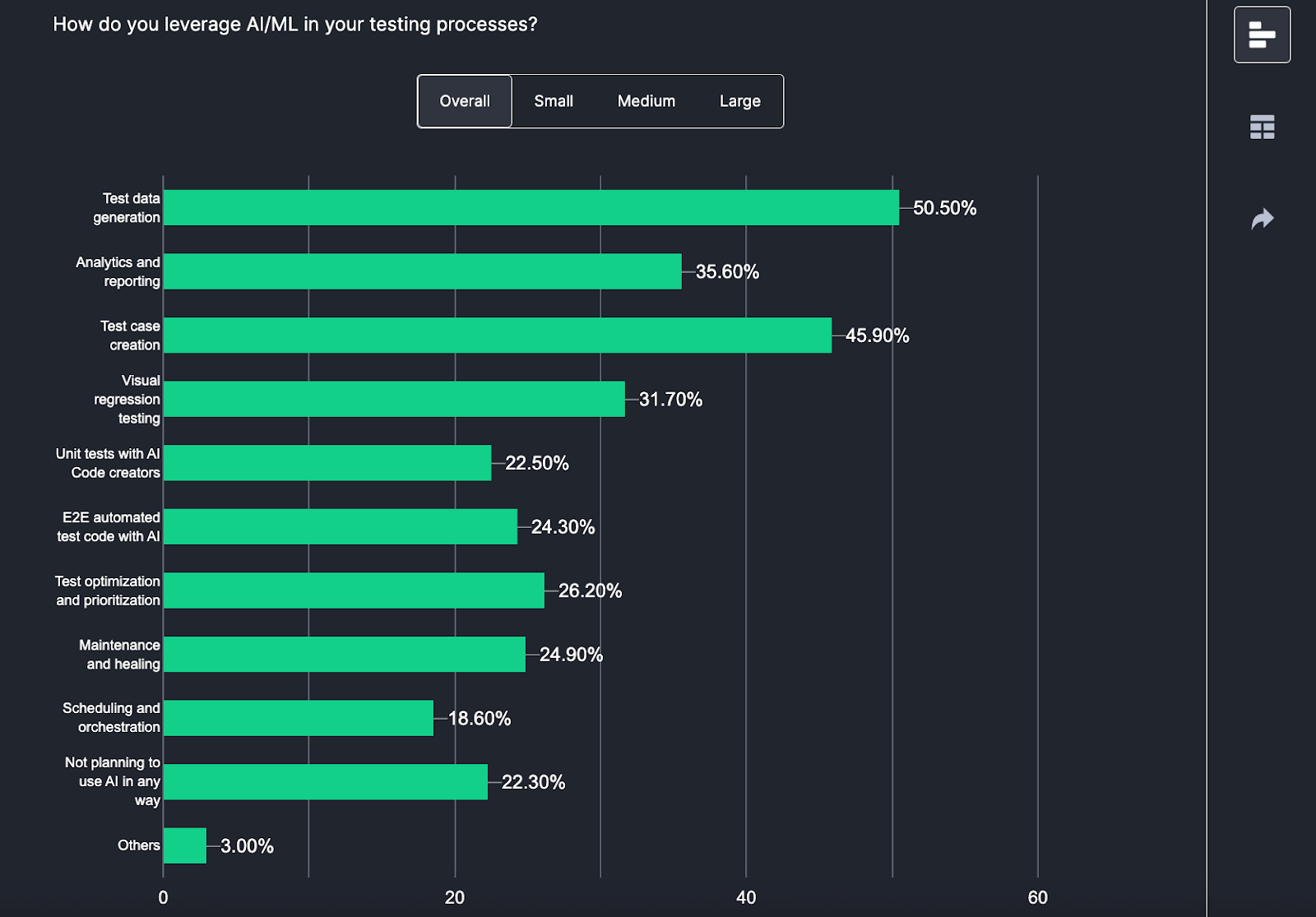
The key difference from traditional automation: older tools used rigid rules and templates. AI tools understand context, learn from historical data, and adapt as your application changes. They generate test cases that read like a senior QA engineer wrote them.
Why 46% of QA Teams Now Use AI for Test Case Creation
- Speed: What takes days manually happens in hours with AI. For CI/CD teams shipping multiple times daily, this is non-negotiable.
- Consistency: AI applies the same logic everywhere. It does not forget edge cases on Friday afternoon or skip scenarios because the sprint is ending.
- Coverage: AI finds test scenarios humans miss. It systematically tests boundary conditions, empty inputs, max values, special characters, and combinations across multiple fields simultaneously.
- Scale: Manual testing requires proportionally more testers as applications grow. AI scales with compute, not headcount.
- Self-healing: When your UI changes, AI-powered tests adapt automatically instead of breaking.
From Requirements to Test Cases: The 4-Stage Process
Stage 1: Define Objectives
What do you want to test? Structural coverage (every line of code executes), decision coverage (both true/false branches), boundary conditions, robustness under failures, or requirements validation. Your objectives determine which techniques the AI applies.
Stage 2: Feed the Inputs
AI needs data to work with: source code for structural analysis, requirements docs for functional coverage, API specs for integration testing, state diagrams for workflow validation, and historical defect data for risk prioritization. Better inputs = better tests.
Stage 3: Apply Generation Techniques
The AI uses multiple approaches:
- Model-based testing: Creates state machines of your app, generates tests to traverse all paths.
- Search-based testing: Uses genetic algorithms to maximize coverage while minimizing redundancy.
- NLP parsing: Reads requirements in plain English, extracts testable assertions.
- Fuzz testing: Generates random inputs to find unexpected failures.
Stage 4: Learn and Improve
This is where AI separates from traditional automation. The system prioritizes tests by defect likelihood based on code changes and failure history. Self-healing updates locators when UI changes. And continuous learning improves generation quality by analyzing which tests actually catch bugs.
For example, given the requirement "Users can reset passwords via registered email," NLP extracts actor (user), action (reset), method (email), precondition (registered). From one sentence, it generates tests for: successful reset, invalid email format, unregistered email, expired link, and rate limiting.
Generate Your First AI Test Cases in 5 Steps
Here is the workflow using TestMu AI Test Manager.
Note: To access TestMu AI Test Manager, contact sales.
- Step 1: Navigate to Test Manager and click New Project.
- Step 2: Enter Project name, Description, and Tags. Be specific. The AI uses this context to generate relevant tests.
- Step 3: Click Create.
- Step 4: Open your project. In the prompt box, press Tab to trigger AI generation, Shift+Enter for multiple test cases, Enter to save.
- Step 5: Organize with folders. Export as needed.
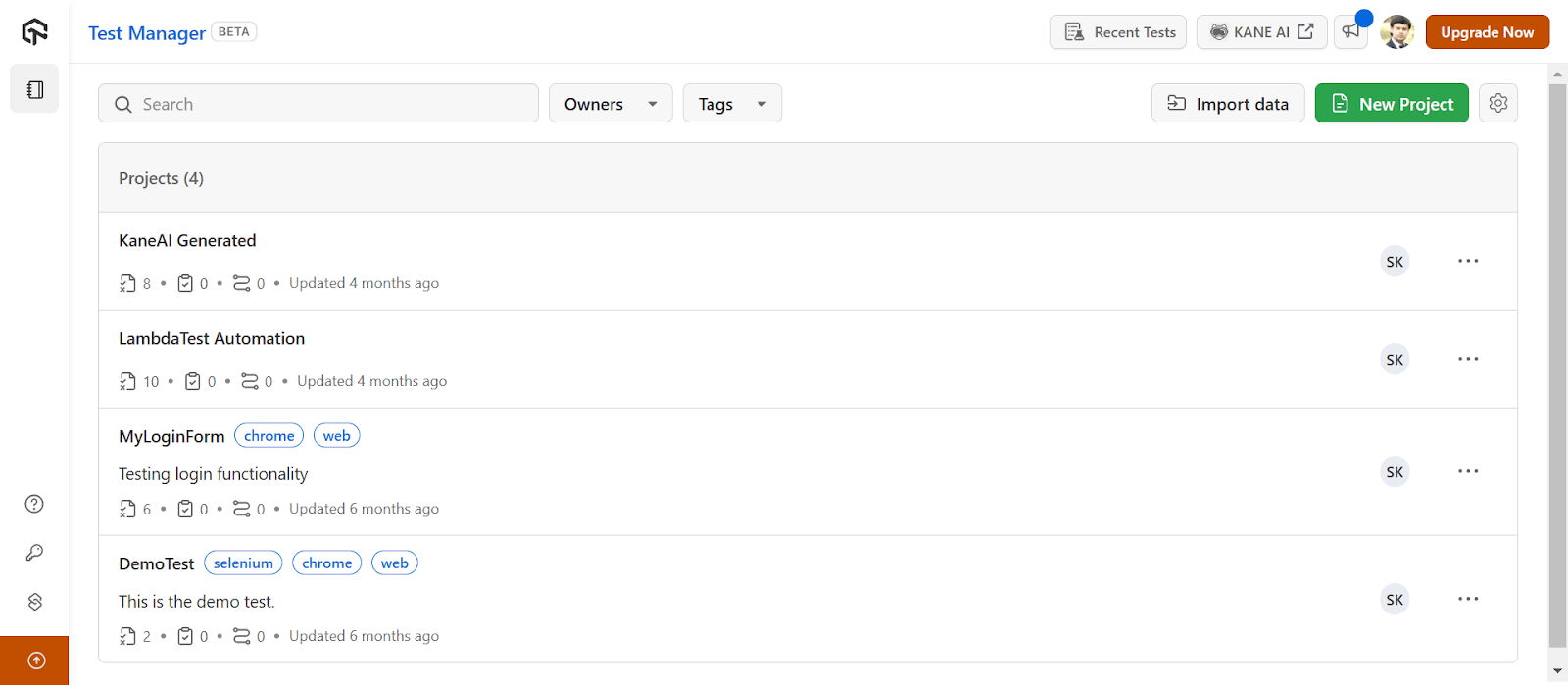
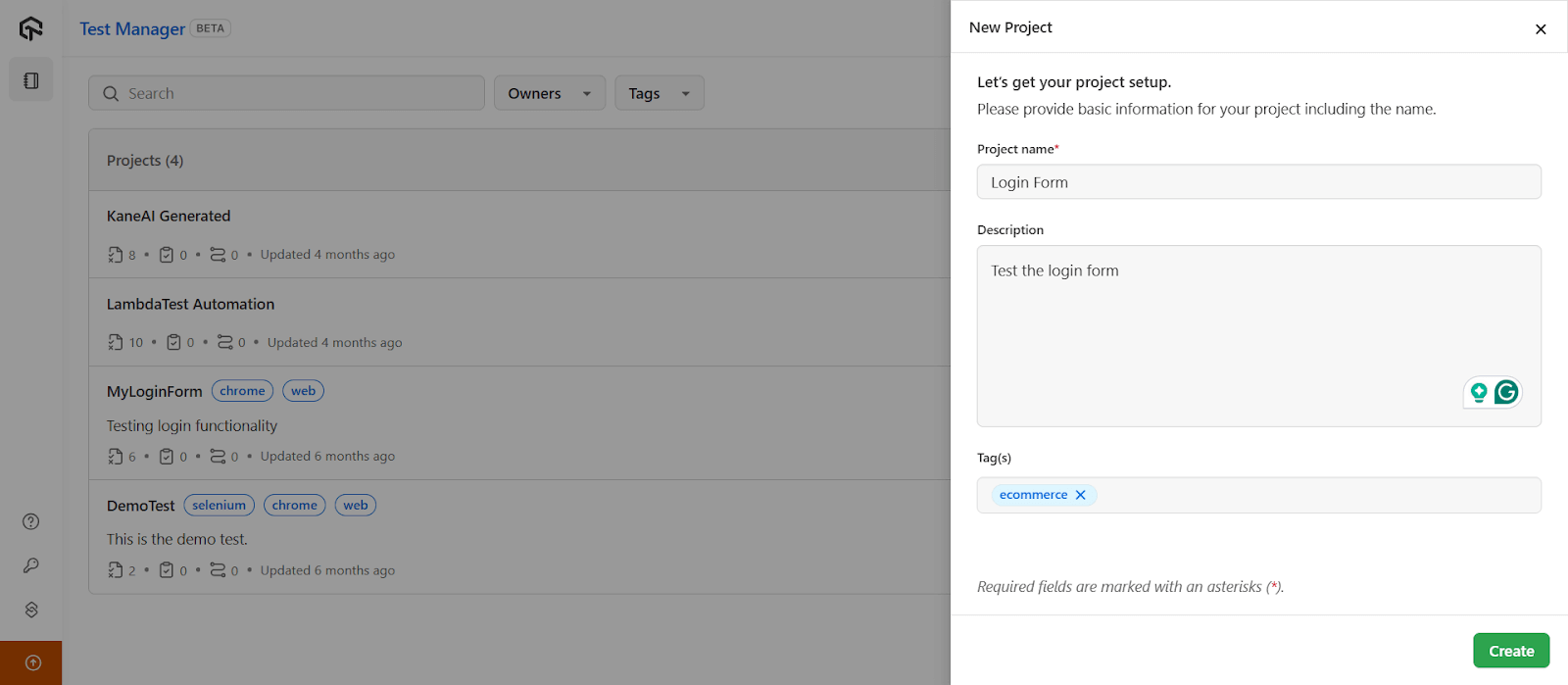
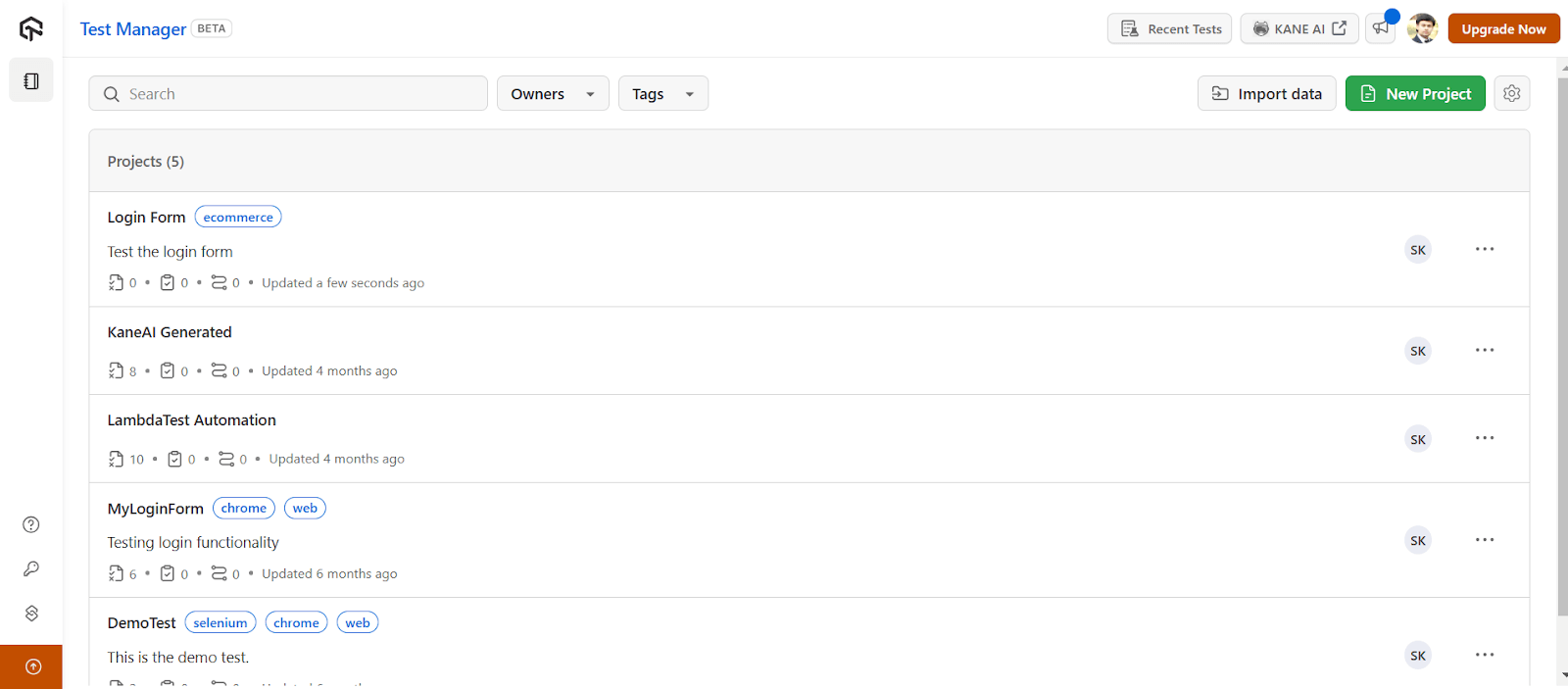
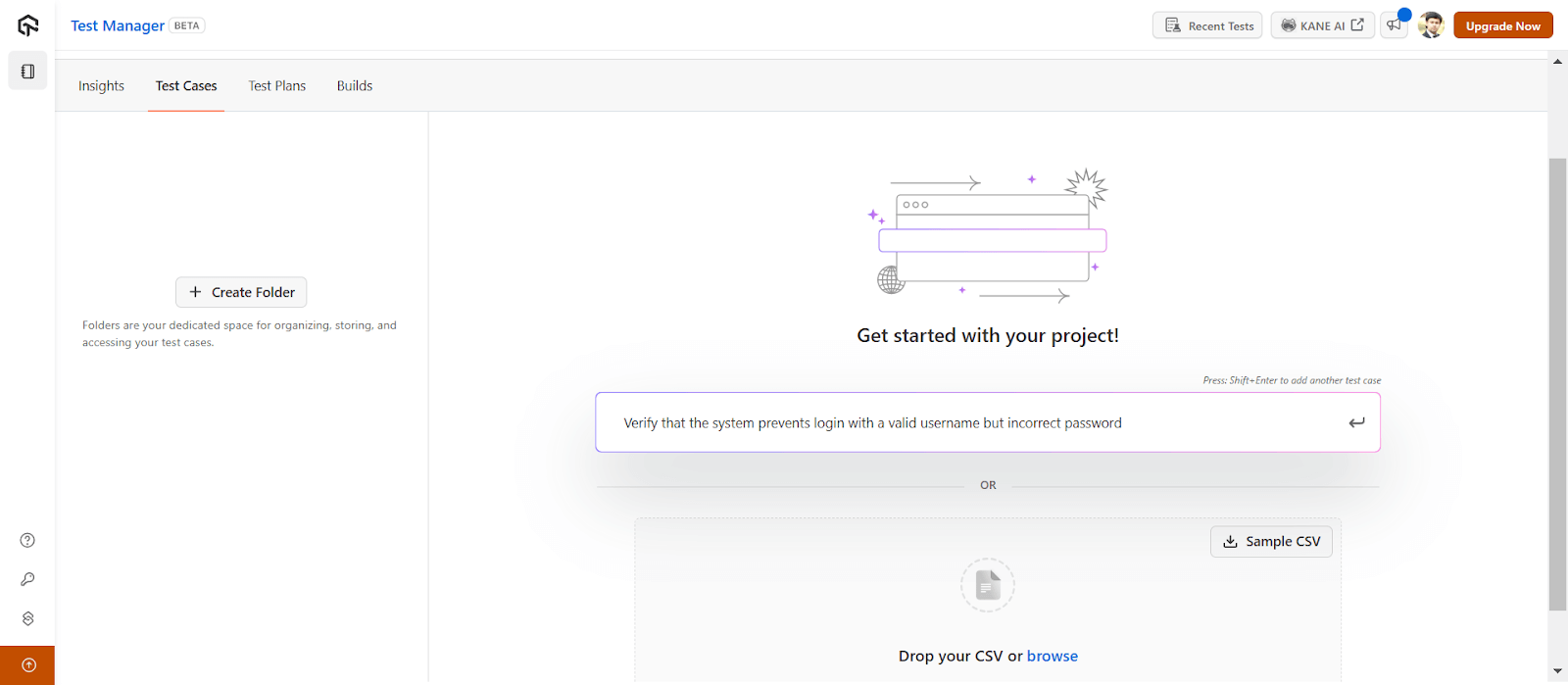
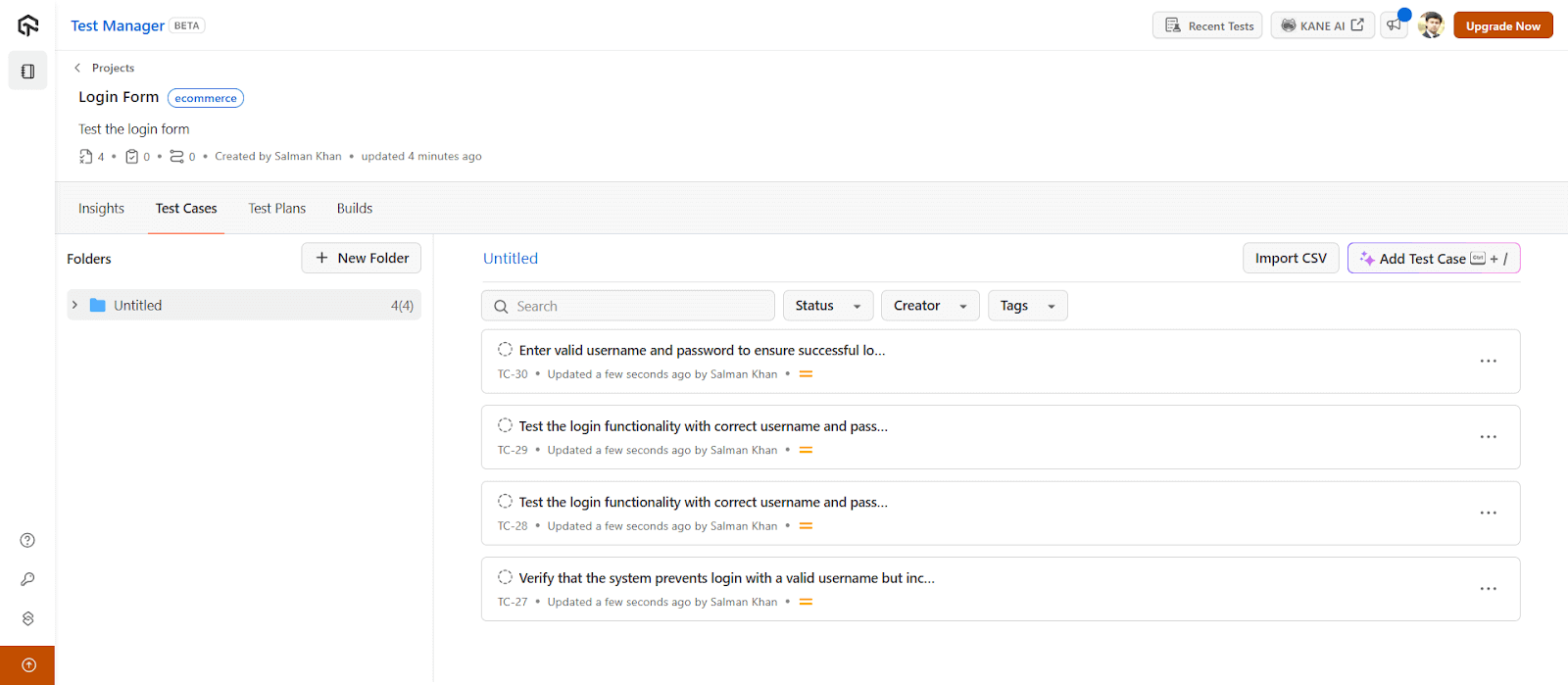
Full documentation: Introduction to Test Manager.
Converting Test Cases to Executable Automation
Once you have test cases, KaneAI converts them to executable scripts. Write tests in plain English, export to Selenium, Playwright, or Cypress, and run across 3,000+ browser/device combinations.

Getting started: KaneAI documentation. Validate your skills: KaneAI Certification.
Common Pitfalls and How to Avoid Them
- Vague requirements produce vague tests. AI cannot infer business logic you did not document. If your requirement says "validate the order" but does not mention that orders over $10K need manager approval, the AI will not know either. Fix: Write explicit acceptance criteria.
- Integration blindspots. AI struggles with third-party system interactions. Payment processing, shipping APIs, and inventory systems have nuances that require human understanding. Fix: Review integration tests manually and provide explicit documentation of external behaviors.
- False positive fatigue. AI-generated tests may flag non-issues, especially early on. A test fails because the error message format changed intentionally. Fix: Track false positive rates, refine generation parameters, and establish a review process before tests enter the permanent suite.
- Over-reliance on self-healing. Major UI overhauls or architectural changes break tests that no amount of healing can fix. Fix: Plan for periodic regeneration cycles, not just healing.
- Security gaps. AI excels at functional testing but will not catch SQL injection or XSS vulnerabilities unless explicitly trained for security. Fix: Treat AI-generated tests as complementary to dedicated security testing, not a replacement.

Note: Best practices: Start with well-structured requirements. Establish human review before tests become permanent. Integrate early in the dev cycle. Track coverage, defect detection, and false positive rates. Combine techniques based on what you are testing.
Top 5 AI Test Case Generation Tools
1. TestMu AI Test Manager + KaneAI
Test Manager handles AI-powered test case generation, organization, and reporting. KaneAI converts those test cases to executable automation using natural language. Write "test login with invalid password," get Selenium or Playwright code. Runs on 3,000+ browser/device combinations. Best for teams wanting end-to-end coverage from ideation to execution.
2. ChatGPT
ChatGPT generates test cases from requirements, user stories, or code snippets. Paste your spec, ask for test scenarios, get structured output in Gherkin, plain text, or code. Works for any language or framework. Limitations: no direct test execution, no self-healing, requires manual copy-paste workflow.
3. GitHub Copilot
GitHub Copilot generates unit tests inline as you code. Type a function, Copilot suggests test cases. Strong for developers who want tests alongside implementation. Works in VS Code, JetBrains, and other IDEs. Best for unit and integration tests, not E2E.
4. testRigor
testRigor enables plain English test authoring. Write "login as [email protected]" and it executes. No coding required. Good for teams without dedicated automation engineers. Handles web, mobile, and API testing.
5. Testim
Testim uses machine learning for test creation and maintenance. Smart locators adapt when UI changes, reducing maintenance by 70-80%. Strong for teams with frequent UI updates. Codeless option available for non-technical testers.
AI vs Manual: Which Approach Fits Your Team?
| Aspect | AI Generation | Manual Creation |
|---|---|---|
| Speed | Minutes to hours | Days to weeks |
| Coverage | Systematic, comprehensive | Varies by experience |
| Consistency | Uniform rules | Individual interpretation |
| Edge Cases | Discovers unexpected scenarios | May miss non-obvious cases |
| Context | Limited to available data | Deep domain knowledge |
| Maintenance | Self-healing capabilities | Manual updates required |
| Cost at Scale | Relatively flat | Linear increase |
When AI wins: Regression testing, large test suites, repetitive scenarios, teams with limited QA headcount, applications with frequent UI changes.
When manual wins: Exploratory testing, usability evaluation, complex business logic validation, security testing, scenarios requiring deep domain expertise.
The hybrid approach that works: Use AI to generate 80% of your coverage for functional and regression testing. Have human testers focus on the 20% that requires judgment, including exploratory sessions, business logic edge cases, and user experience validation. Review all AI-generated tests before they enter your permanent suite.
Start Generating Test Cases Faster Today
AI test case generation is not experimental anymore. Nearly half of QA teams use it. The ones seeing results combine AI coverage with human expertise for review and validation.
Start small: pick one well-understood feature, generate tests, compare against manual effort. Measure coverage, defects caught, time saved. Then scale.
For teams ready to start, TestMu AI offers Test Manager for AI-powered test case generation, KaneAI for natural language test automation, and execution across 3,000+ browser/device combinations. Explore more on AI testing and AI testing tools.
Note: Generate your test cases with AI-native Test Manager. Try TestMu AI Today!


Frequently asked questions
Did you find this page helpful?
More Related Hubs
TestMu AI forEnterprise
Get access to solutions built on Enterprise
grade security, privacy, & compliance
- Advanced access controls
- Advanced data retention rules
- Advanced Local Testing
- Premium Support options
- Early access to beta features
- Private Slack Channel
- Unlimited Manual Accessibility DevTools Tests