

Next-Gen App & Browser Testing Cloud
Trusted by 2 Mn+ QAs & Devs to accelerate their release cycles


Automate your Dynamic UI Tests with Sikuli and TestMu AI
Automate dynamic UI tests efficiently with Sikuli, HyperExecute, and SmartUI. Learn how to streamline test execution, validate visually, and boost reliability.

Aman Chopra
January 11, 2026
Automation in software development was introduced to streamline processes and save time for us developers for more creative endeavours. But when it comes to UI testing, traditional automation methods can feel more like a curse than a blessing.
I recently came across this challenge when grappling with a massive UI test suite. Every minor UI change triggered a domino effect of test updates, turning development into a constant battle against broken tests. In this blog, I am sharing my journey, and how I tackled the challenge of automating and validating the dynamic UI tests with Sikuli, HyperExecute, and SmartUI.
The Challenge: A Labyrinth of UI Tests
Testing a large and dynamic user interface (UI) can be daunting. Traditional testing methods often rely on element locators (IDs, XPaths, CSS paths, etc.). But these locators are fragile.
Me and my team were working on one of our flagship websites, and even a minor UI tweak could break them, causing tests to fail unexpectedly. This throws us into a vicious cycle of test maintenance and debugging, wasting valuable development time. We needed a solution that could handle these dynamic elements effectively, automate repetitive tasks, and significantly accelerate test execution.
Sikuli: Automate your UI Tests
Our initial solution came in the form of Sikuli, an open-source gem that leverages image recognition for UI automation. Sikuli interacts with UI elements based on what you see on the screen! It simply captures screenshots of the elements you want to interact with, and Sikuli uses them to perform actions like clicks, typing, and drag-and-drops.
This was a game-changer for our dynamic UI, eliminating reliance on code that would break with frequent UI changes. However, while Sikuli addressed the automation challenges, running hundreds of Sikuli tests locally remained a time bottleneck. Precious development hours were ticking away during each test execution cycle. We needed a way to hit the gas pedal on test execution
HyperExecute: Orchestrating Speed with Isolated Virtual Machines
This is where HyperExecute, the Next Gen testing platform, entered the scene as the perfect complement to Sikuli. HyperExecute provides pre-configured isolated virtual machines (VMs) equipped with all the tools and libraries your tests need. Think of it as a clean room designed for running your UI automation scripts.
Here’s where HyperExecute truly shines – it avoids the pitfalls of remote driver connection issues that plague some platforms. Traditional platforms often require establishing remote connections to individual VMs for test execution. This can be cumbersome and time-consuming, especially when managing a large test suite
HyperExecute takes a different approach, focusing on test orchestration. It manages VMs behind the scenes and distributes our Sikuli tests for parallel execution. This eliminates the need for individual remote connections, as Sikuli only requires the browser to interact with the tests; thus, it streamlines the process and ensures consistent test execution across different environments.
This newfound confidence allowed us to focus on creating robust Sikuli tests, knowing they’d run flawlessly regardless of the environment. In the next section, we’ll explore how SmartUI, the final piece of our winning trio, further streamlined our UI testing process.

Austin Siewert
CEO, Vercel
Discovered @TestMu AI yesterday. Best browser testing tool I've found for my use case. Great pricing model for the limited testing I do 👏
2M+ Devs and QAs rely on TestMu AI
Deliver immersive digital experiences with Next-Generation Mobile Apps and Cross Browser Testing Cloud

SmartUI: Visual Validation Made Easy
With Sikuli conquering dynamic UI elements and HyperExecute orchestrating speedy test execution, we had a powerful foundation for automated UI testing. But there was still room for improvement. Here’s where SmartUI, the final piece of our winning trio, entered the scene.
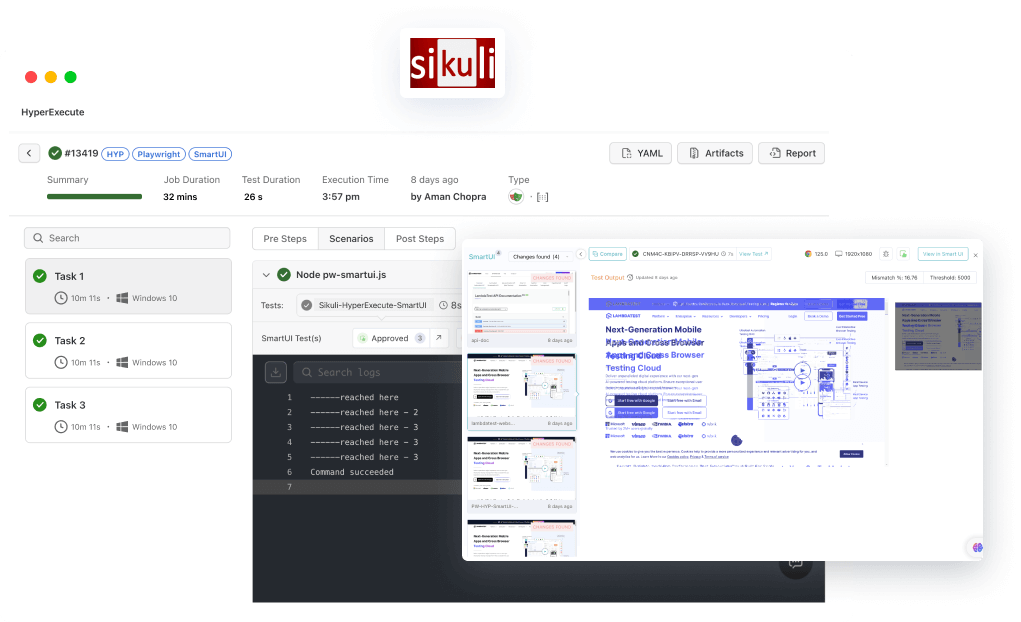
Manually validating the results of hundreds of UI tests can be a tedious and error-prone process. SmartUI brings the power of visual validation to the table. It automatically compares screenshots captured during test execution with baseline screenshots, highlighting any visual discrepancies. This allowed us to quickly identify UI regressions and pinpoint the issue’s exact location.
The Ultimate Trio: Sikuli, HyperExecute, and SmartUI
Here’s how Sikuli, HyperExecute, and SmartUI work together to create a powerful and efficient UI testing process:
- sikuli Automation: We leverage Sikuli to create automated tests that interact with UI elements based on screenshots.
- HyperExecute Orchestration: HyperExecute manages pre-configured VMs and distributes the Sikuli tests for parallel execution across these VMs, drastically reducing execution times.
- SmartUI Validation and Reporting: SmartUI automatically captures screenshots during test execution, compares them with baselines, and generates reports highlighting any visual discrepancies and test failures.
This combination empowered us to:
- Automate complex UI interactions: Sikuli handles dynamic UI elements effectively.
- Run tests faster: HyperExecute orchestrates parallel execution across VMs, significantly reducing execution times.
- Validate UI visually: SmartUI simplifies visual validation and pinpoints regressions with ease.
Conclusion
The struggle against unreliable UI tests and varied environments is a common challenge for developers and testers. But by leveraging the powerful trio of Sikuli, HyperExecute, and SmartUI, you can turn this struggle into a streamlined journey of effective UI automation.
Sikuli enables you to automate using the power of vision, bypassing the limitations of fragile locators. HyperExecute provides a clean room for automation, ensuring consistent execution across all environments. Finally, SmartUI provides seamless visual validation, X-ray vision debugging, and streamlined reporting.
This powerful combination allows you to:
- Shorten Development Cycles: Say goodbye to the vicious cycle of test updates due to UI changes.
- Boost Test Reliability: Eliminate environment-related test failures and gain unwavering confidence in your automation suite.
- Focus on What Matters: Free yourself from the shackles of manual automation tasks and dedicate your skills to crafting exceptional software.



Did you find this page helpful?
More Related Hubs
TestMu AI forEnterprise
Get access to solutions built on Enterprise
grade security, privacy, & compliance
- Advanced access controls
- Advanced data retention rules
- Advanced Local Testing
- Premium Support options
- Early access to beta features
- Private Slack Channel
- Unlimited Manual Accessibility DevTools Tests