

Next-Gen App & Browser Testing Cloud
Trusted by 2 Mn+ QAs & Devs to accelerate their release cycles


On This Page
- Now perform Real Time Testing on iOS 14.5
- Addition Of ‘Test Preferences’ in Real Time Testing
- Perform Web Testing On The Latest Browsers
- New Desired Capability In Automation And Enhancements
- New Advanced Features In LT Browser
- Live With New Selenium Certifications
- Real Time Native App Testing Is Now Out Of Beta

August ’21 Updates: Live With iOS 14.5, Latest Browsers, New Certifications, & More!
We have added iOS 14.5 in Real Time testing, the latest browsers in Real Time, Screenshot, and Automation. Check out now for all the latest updates of Aug’21.

Salman Khan
January 27, 2026
Hey Folks! Welcome back to the latest edition of TestMu AI’s product updates. Since programmer’s day is just around the corner, our incredible team of developers came up with several new features and enhancements to add some zing to your workflow. We at TestMu AI are continuously upgrading the features on our platform to make lives easy for the QA community. We are releasing new functionality almost every week.
This update is primarily focused on the addition of iOS 14.5 for live-interactive testing, latest browsers, advanced features in LT Browser, newly launched certifications, and enhancements along with new functionalities that we have across different TestMu AI products.
Let’s check out the latest features and enhancements!
Now perform Real Time Testing on iOS 14.5
We are pleased to announce that iOS 14.5 is now available on TestMu AI for Real Time testing. Supercharge your testing workflow by testing your websites and web apps for cross browser compatibility on iOS 14.5.
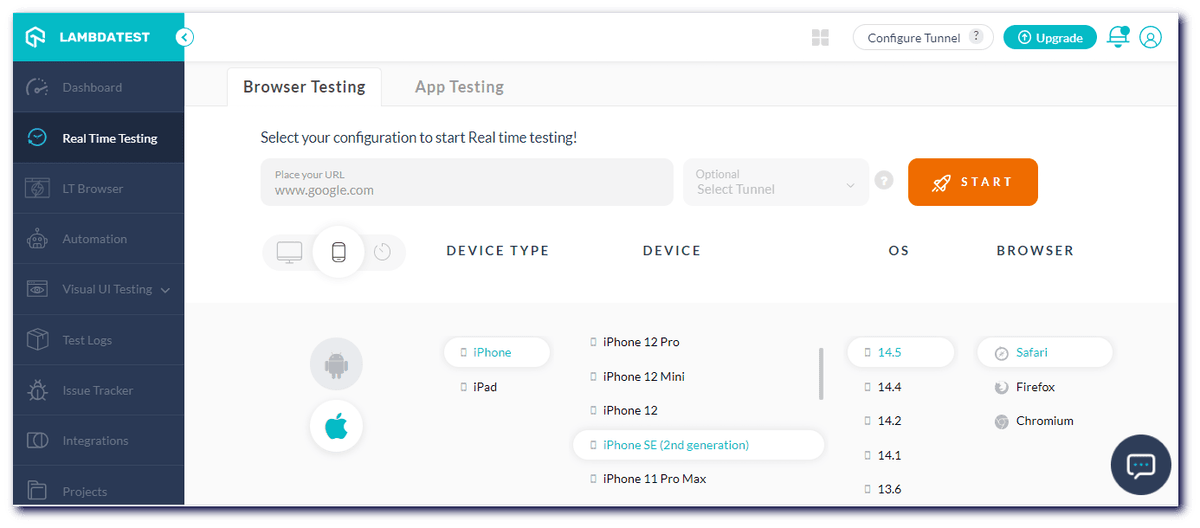
Here is the list of iOS simulators supporting iOS 14.5 for Real Time testing on the TestMu AI.
List of iPhones
- iPhone 12 Pro Max, 12 Pro
- iPhone 12 Mini, 12
- iPhone SE (2nd generation)
- iPhone 11 Pro Max, 11 Pro, 11
- iPhone XS Max, XS
- iPhone XR
- iPhone X
- iPhone 8 Plus, 8
List of iPads
- iPad Mini (5th generation)
- iPad Pro (11-inch) (2nd generation) , (11-inch)
- iPad Pro (12.9-inch) (2nd generation), (12.9-inch) (3rd generation), (12.9-inch) (4th generation)
- iPad Air 3
- iPad Air (3rd generation)
- iPad Pro (9.7-inch)
- iPad (8th generation)
- iPad Air (4th generation)
Perform Testing On Mobile Devices
Test on mobile devices and make sure your website and web apps work across iOS 14.5 mobile browsers and debug your mobile pages in real-time.
We have also added a feature to download Network HAR logs on Android emulators and iOS simulators.
Addition Of ‘Test Preferences’ in Real Time Testing
Earlier, users had to repeatedly set test preferences like Geolocation, Time Zone, Keyboard, and iOS DevTools inside the VM for every test session. In our latest release, we have added a ‘Test Preferences’ section for Real Time Testing to avoid the pain points of reselecting the test preferences for each test session.
To select the chosen Test Preferences as the default one, you need to visit your TestMu AI Profile and navigate to the Preferences tab. You can now set the test preferences like Geolocation, Time Zone, Keyboard & iOS DevTools as per your requirements.
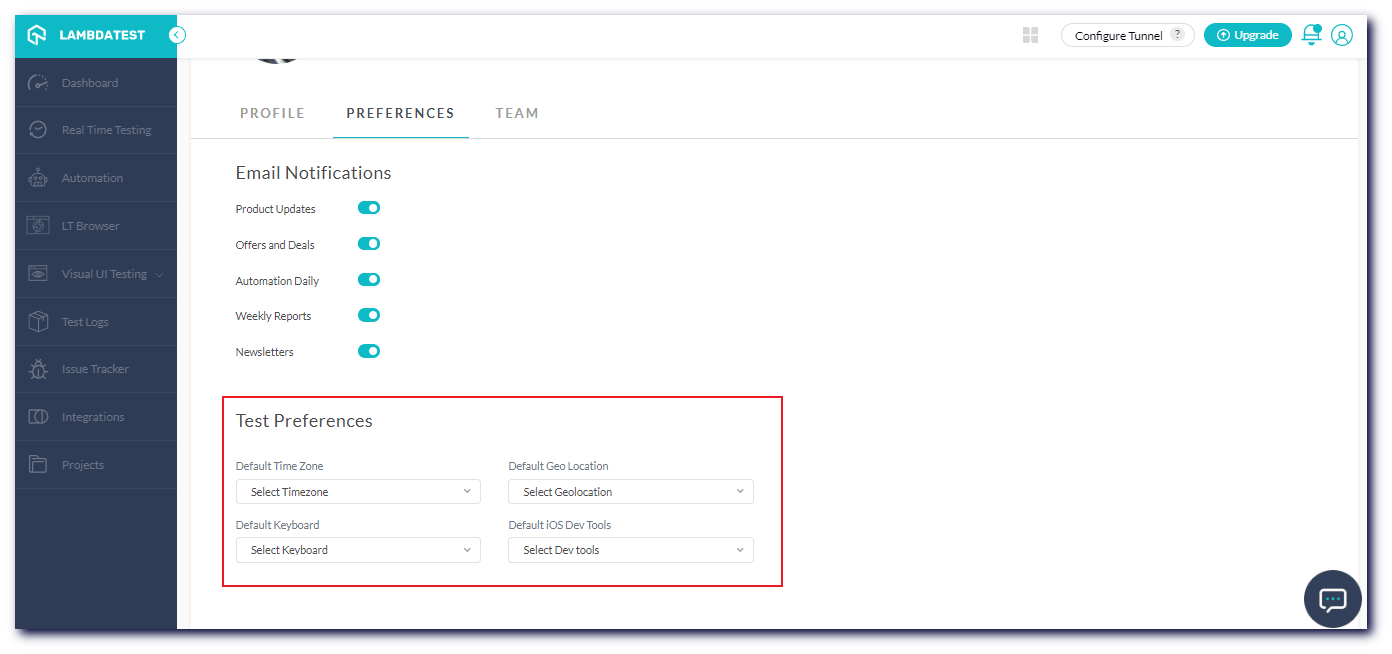
Not only this, but you can also perform Localization Testing by setting the same configuration.
Perform Web Testing On The Latest Browsers!
Elevate your web testing experience and test your websites and web apps on newly added browsers. We have added new browsers in Real Time Testing, Screenshot Testing, and Automation Testing.
Here’s a list of all the browsers and browser versions we have added to our platform in August.
Real Time Testing
Perform cross browser compatibility testing of your websites on the newly added browser versions.
- Chrome 93 Beta
- Firefox 91 Beta
- Edge 93 Beta
- Opera 78
Let’s access the browser compatibility of CSS properties across the latest browser versions like Chrome 93 Beta, Firefox 91 Beta, and Opera 78.
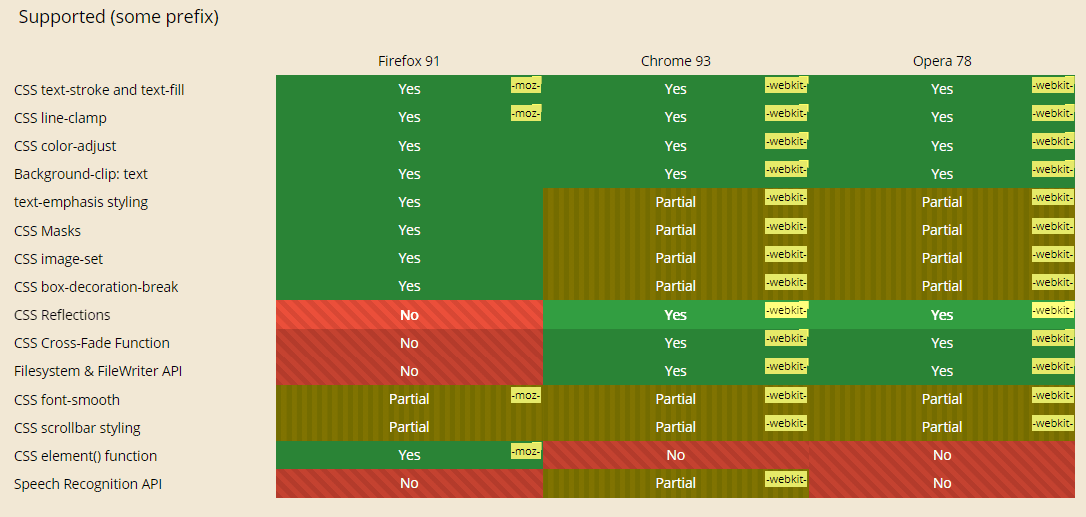
Screenshot Testing
You can now capture screenshots of your websites and web apps for cross browser compatibility issues on the latest added browser versions. Perform automated screenshot testing across real browsers and operating and ensure bug-free product release.
You can capture bulk screenshots for browser compatibility on the following new browsers.
- Chrome 92
- Firefox 90
- Edge 92
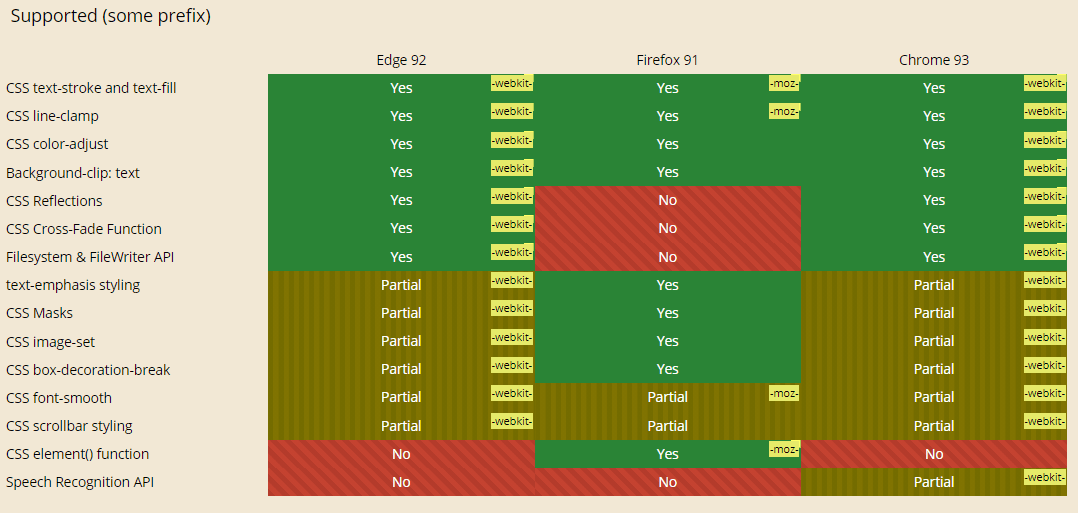
Let’s evaluate the browser compatibility of CSS properties across the latest browser versions like Chrome 92, Firefox 90, and Edge 92.
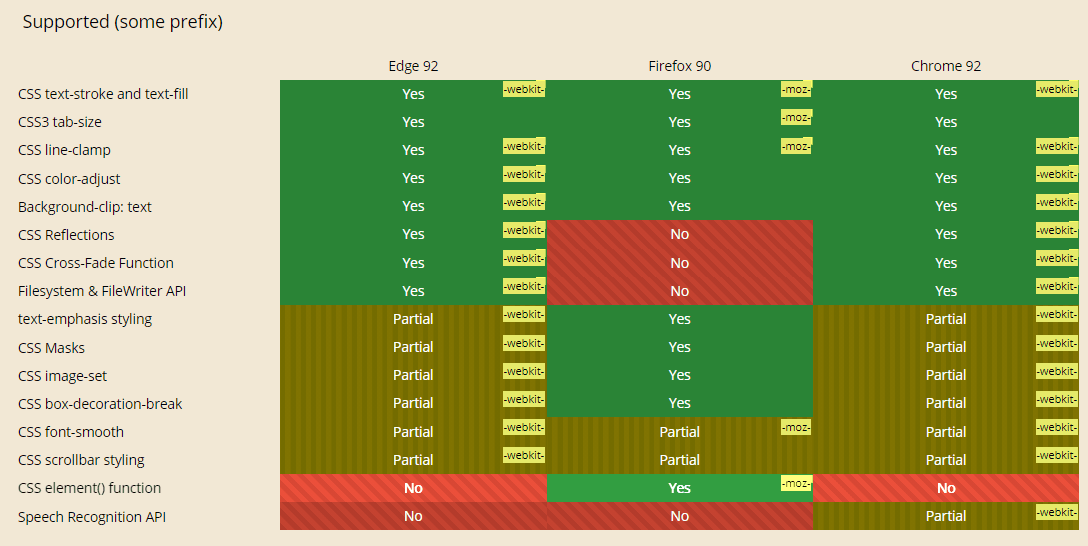
Automation Testing
Elevate your test automation experience by running automation tests on a range of browsers and browser versions. We’ve added the new browser versions of Chrome, Firefox, and Edge.
- Chrome 93 Beta ( Supported on Windows OS)
- Chrome 92 Beta (Stable)
- Firefox 91 Beta, 90 Beta (Stable)
- Edge 92 Beta (Stable)
Now let’s access the browser compatibility of CSS properties between Chrome 93 Beta, Firefox 91 Beta, and Edge 92 Beta.
You can generate the Selenium automation capabilities for the new browser versions from the TestMu AI Desired Capability Generator.
New Desired Capability In Automation And Enhancements
Data security is of prime importance as far as cloud testing is concerned. To ensure a secure automation testing experience, we have added two Selenium capabilities to hide Command logs and Selenium/Appium logs.
- To hide Command logs, you will need to pass the commandLog capability.
capabilities.setCapability("commandLog", false);
capabilities.setCapability("systemLog", false);
DesiredCapabilities capabilities = new DesiredCapabilities();
    capabilities.setCapability("browserName", "Chrome");
    capabilities.setCapability("browserVersion", "latest");
    HashMap<String, Object> ltOptions = new HashMap<String, Object>();

    ltOptions.put("user","Your Lambda Username");
    ltOptions.put("accessKey","Your Lambda Access Key");
    ltOptions.put("build", "your build name");
    ltOptions.put("name", "your test name");
    ltOptions.put("platformName", "Windows 10");
    ltOptions.put("browserName", "Chrome");
    ltOptions.put("browserVersion","latest");

    capabilities.setCapability("LT:Options", ltOptions);
In addition, we have fixed some user interface and performance-related issues, improved Cypress UI logs, and reduced the machine allocation load time by 70%.
New Advanced Features In LT Browser
Your favorite mobile-friendly checker tool – LT Browser, is now equipped with a new bunch of features and enhancements.
Here are the newly added features and enhancements in the LT Browser.
- Select the location for media file downloads: You can select the location to save your media files. Just click on the Download button, select the desired location, and download the media files.
- Download Media Files On Cloud Or Local System: You can download the media files on the cloud (not available for freemium users after 14 days) or to your local system (available for both premium and freemium users).
- Media Pagination: Earlier, the LT Browser Media tab showed only ten screenshots and fifty videos. There was no option to view additional images and videos. We’ve added a Load More button that allows you to view more media files to address this issue.
- Autofill Feature In The URL Search Bar: You will get relevant suggestions while entering your search query with the autofill feature.
- Mark And Share Bug Report: You can now mark and share bug reports that contain one or more errors. You will need an email account to share the error reports with your colleagues.
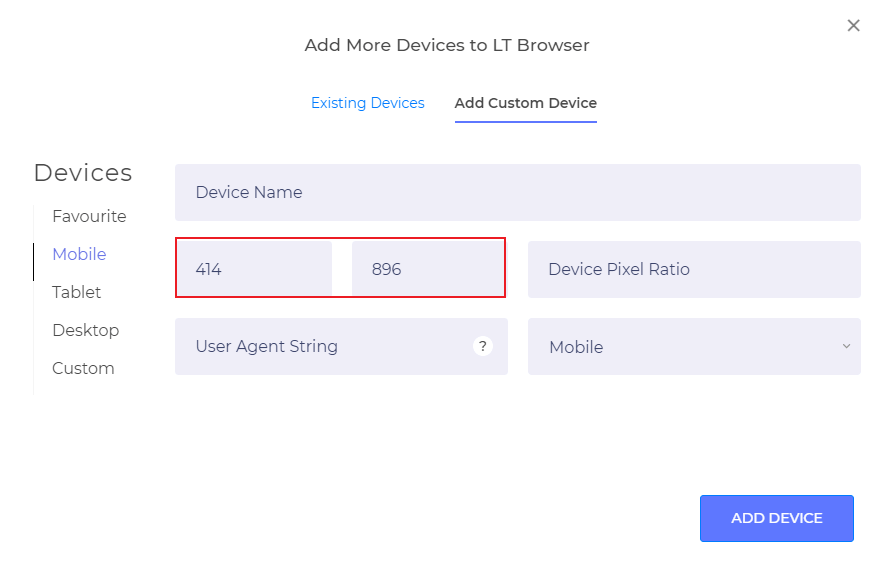
- View Resolution For Different Device Viewports: You can now view the standard resolutions for different device viewports for Desktops, Mobiles, and Tablets in the ‘Add Custom Device’ section.
Live With New Selenium Certifications!
We have launched three new Selenium Certifications:
These free Selenium certifications will help you fast-track your test automation career. Enroll now and upgrade your Selenium automation skills to new heights.
Real Time Native App Testing Is Now Out Of Beta!
Real Time Mobile App Testing that lets you test your website (or web app) on a range of Android emulators and iOS simulators is now out of BETA.
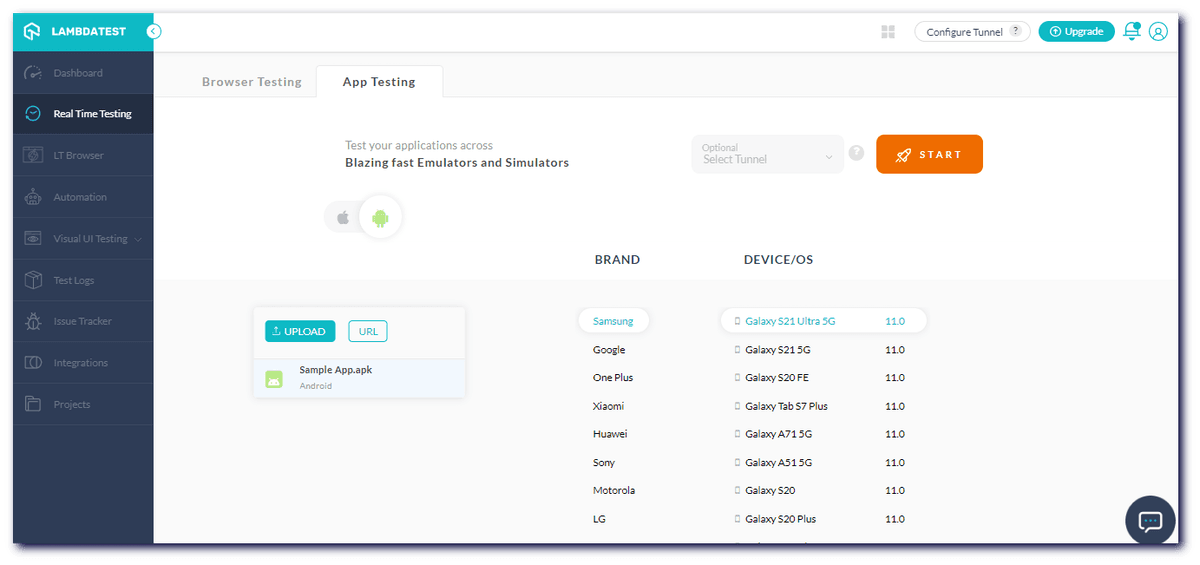
To kick start your mobile app testing, refer to our Realtime Mobile App Testing documentation.

Austin Siewert
CEO, Vercel
Discovered @TestMu AI yesterday. Best browser testing tool I've found for my use case. Great pricing model for the limited testing I do 👏
2M+ Devs and QAs rely on TestMu AI
Deliver immersive digital experiences with Next-Generation Mobile Apps and Cross Browser Testing Cloud

To know more about mobile app testing from TestMu AI, please have a look at the detailed video below:
Wrapping Up!
That’s all for now. Our development team is constantly working on new features and upgrades to improve your testing experience. Make sure to check out TestMu AI Community, a place where you can share your automation testing expertise in giving back to the testing fraternity.
Stay tuned for further amazing updates. You can also visit TestMu AI Changelog for frequent updates and announcements.
Happy Testing!


Did you find this page helpful?
More Related Hubs
TestMu AI forEnterprise
Get access to solutions built on Enterprise
grade security, privacy, & compliance
- Advanced access controls
- Advanced data retention rules
- Advanced Local Testing
- Premium Support options
- Early access to beta features
- Private Slack Channel
- Unlimited Manual Accessibility DevTools Tests