

Next-Gen App & Browser Testing Cloud
Trusted by 2 Mn+ QAs & Devs to accelerate their release cycles


April’25 Updates: HyperExecute MCP Server, Schedule Tests With KaneAI, and More!
Check out what went live in April—smarter test scheduling in Test Manager, Flutter testing support on Android emulators, Bluetooth support in real-time app testing, bug logging with Assembla, and much more.

Salman Khan
January 10, 2026
Hey there – we’ve rolled out new features across our different product lines to help you test smarter and faster.
HyperExecute now comes with an MCP Server to boost performance and control. We’ve added test scheduling feature in KaneAI, and there are more awesome updates.
Let’s uncover them one by one!
Live With HyperExecute MCP Server
When you want to scale your testing, setting up test runners, managing test execution, and dealing with errors can slow things down. That’s why we built the HyperExecute MCP Server. It helps you with test configurations that used to take weeks and gets it done in minutes.
HyperExecute MCP Server is an AI-native platform that understands your codebase to generate test commands and create YAML config files right inside your IDE.
It provides real-time insights from Agentic RAG and helps you speed up your test execution by up to 70% faster than with regular cloud grids.
Other than launching the HyperExecute MCP Server, we have also made some other enhancements in HyperExecute:
- Validate HyperExecute YAML File With validate Flag: You can now ensure your YAML file is correctly formatted with the —validate flag. This you can do without running any tests. The —validate flag allows you to verify the correctness of your YAML configuration before test execution.
- Use the failFast Flag at Scenario Level: The failFast flag is now supported for the scenario level. Therefore, instead of stopping the entire test suite, you can now stop specific scenarios after a defined number of failures.
Earlier, the failFast flag was only available at the overall test level. That meant all scenarios would stop after reaching the failure limit.
Now, with scenario-level support, you get the flexibility to handle failures more efficiently. Only the affected scenarios will stop, not the entire suite.

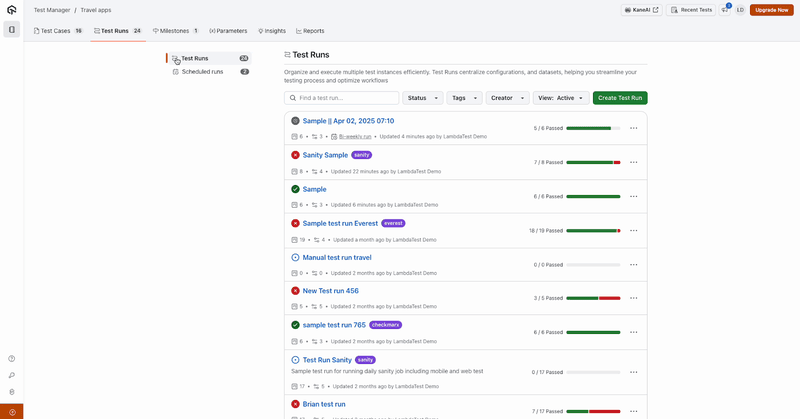
Schedule Test Runs With KaneAI
With KaneAI, you can now schedule test runs for specific times. This way, you don’t have to start them manually every time.
You can set parameters like network logs, console logs, and some other advanced options, too. This will help you manage test runs better, but without needing to check in constantly.
Check out this video for a complete summary of what’s new in TestMu AI , all the latest product updates in one place.
Test Flutter Apps With Appium on Virtual Devices
You can now test Flutter apps on Android emulators with Appium. This means you can easily test your app on different screen sizes and OS versions without needing to set up your emulators.
Also, you can plug these Flutter web app tests into your CI/CD pipeline with our APIs, so your tests run automatically. You’ll get detailed logs, screenshots, and videos to help troubleshoot issues.
To get started, check out this guide on testing Flutter apps on Android with TestMu AI.
Note: In addition, we have also integrated with Flutter Integration Driver, which allows you to test Flutter apps on Android emulators and iOS simulators.
Latest Features in App Automation
We’ve added new capabilities for App Automation. Now you can interact with devices in real time, control Bluetooth, and simulate GPS locations during your test runs.
- Interact With Android and iOS Devices in Real-Time: You can now interact with real Android and iOS devices in real-time while running web automated tests.
It allows you to inspect UI elements as tests run, monitor app behavior instantly, and troubleshoot issues right away.
- Control Bluetooth Settings During Test Sessions: Bluetooth control is now available for real Android and iOS devices.
You can turn Bluetooth on or off mid-session, which makes it easier to validate features that depend on Bluetooth functionality.
To use this feature, check out this guide on Appium desired capabilities.
- Set Custom GPS Coordinates: You now have the ability to set custom GPS coordinates during your tests.
This feature is supported for Espresso, XCUITest, and Flutter frameworks. You can test how your mobile app behaves in location-based scenarios such as regional content delivery, geofencing, or other use cases.
For instance, if you are using the Espresso framework for mobile app testing, you can refer to this documentation on Espresso desired capabilities to use the GPS location feature.
- Manage iOS Keychain Cleanup and Access Groups: Keychain services by Apple provide a secure mechanism for mobile apps to store sensitive info like passwords, certificates, and authentication tokens.
Now, for iOS app testing, we have made it easier to manage Keychain cleanups and access groups on real devices. With this, you can test iOS apps that rely on secure storage and Keychain-specific use cases. Once you complete testing, you can also clean up the Keychain after each session.
Run Real-Time App Tests With Bluetooth Support
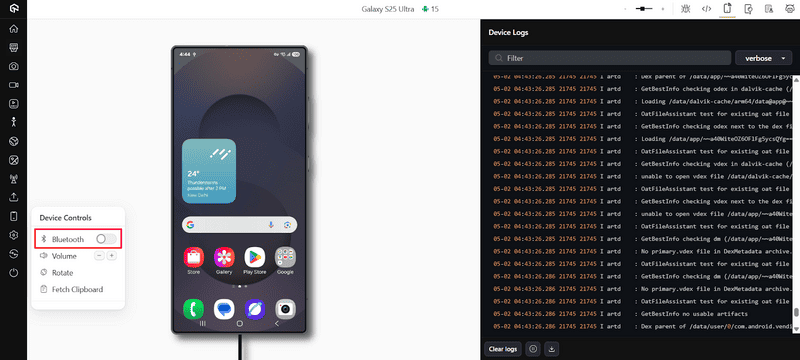
In addition to App Automation, we have also added support for Bluetooth control in real-time mobile app testing.
During live-interactive test sessions, you can now switch Bluetooth on or off directly from the console and test your app features that rely on Bluetooth connectivity.
New Features in Insights
We have rolled out three major features in Insights to help you optimize app performance, speed up debugging, and get deeper insights from your test data.
- Monitor Performance in Real-Time With App Profiling Dashboard: The new App Profiling dashboard gives you a clear view of how your app behaves during tests on real devices.
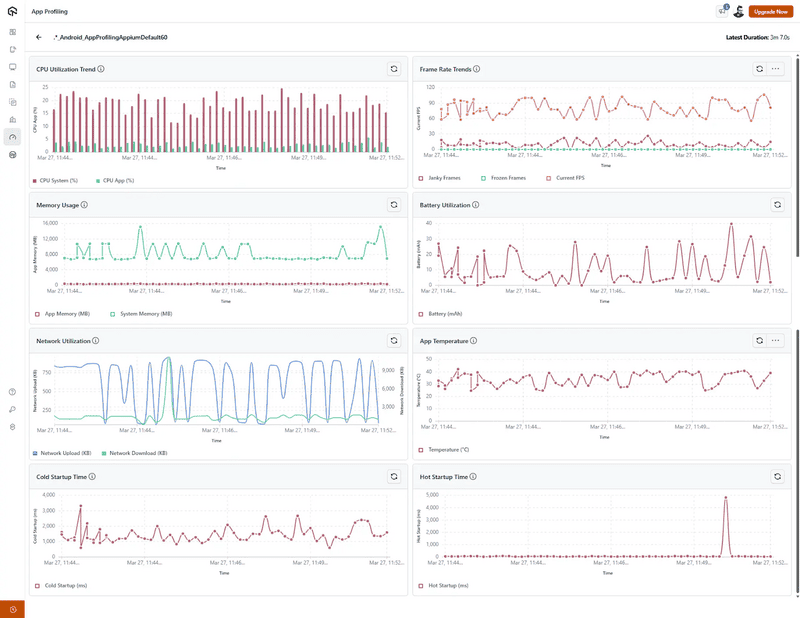
It tracks eight key performance metrics:
- CPU usage
- Frame rate
- Memory usage
- Battery consumption
- Network activity
- Device temperature
- Cold start time
- Hot start time
With this dashboard, you can easily identify bottlenecks, correlate different metrics, set performance benchmarks, and optimize app behavior across real devices. It also provides practical tips to improve each metric.
- Categorize Test Failures With AI: Manually identifying test failures is time-consuming.
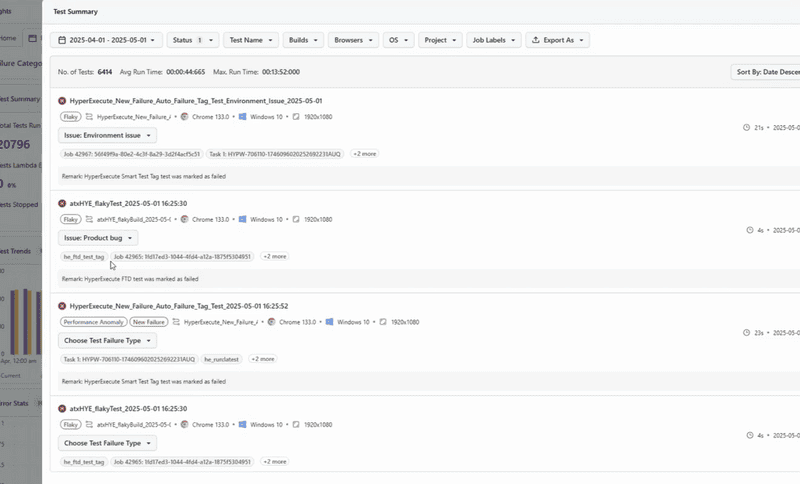
Therefore, we have released the feature, AI-native test failure categorization in Insights, that helps you speed things up by automatically grouping failures based on environment, browser, OS, and error patterns.
- Create Your Own Custom Dashboard Widgets: You can now build your own custom dashboard widgets in Insights. This feature gives you the flexibility to create the exact visualizations you need.
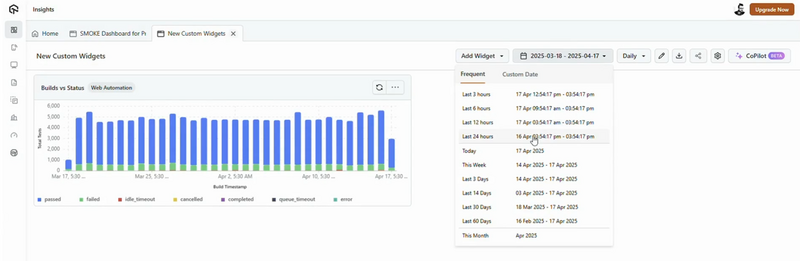
Benefits:
- Select any supported values for both X and Y axes.
- Organize data using your preferred group-by fields.
- Apply multiple filter conditions to zero in on the right data.
Fresh Set of Features in SmartUI
- Test Locally Hosted Websites Automatically With SmartUI SDK and Tunnel: The SmartUI SDKs now come with automatic tunneling support to test websites and web applications hosted in local or private environments. Instead of manually setting up tunnels every time, with SmartUI SDK and TestMu AI Tunnel, you can now configure everything directly within your SmartUI configuration file.
You get the flexibility to choose how you want to manage the tunnels. In automatic mode, SmartUI sets up the tunnel for you.
Just add a simple tunnel object in your config file with type: “auto“, and it will pick up your TestMu AI credentials from environment variables to create a secure connection.
If you prefer more control, you can go with manual mode by specifying the tunnel name using type: “manual“. You can also fine-tune the setup by configuring ports, proxy settings, or local directories.
- Compare Layouts With SmartUI SDK: You can test layouts with SmartUI SDK to check if the structure of your UI stays consistent, regardless of device, browser, or environment.
Layouts often break when content changes or when the same page is viewed in a different language. This feature helps catch those issues early by focusing only on how elements are arranged, not on how they look.
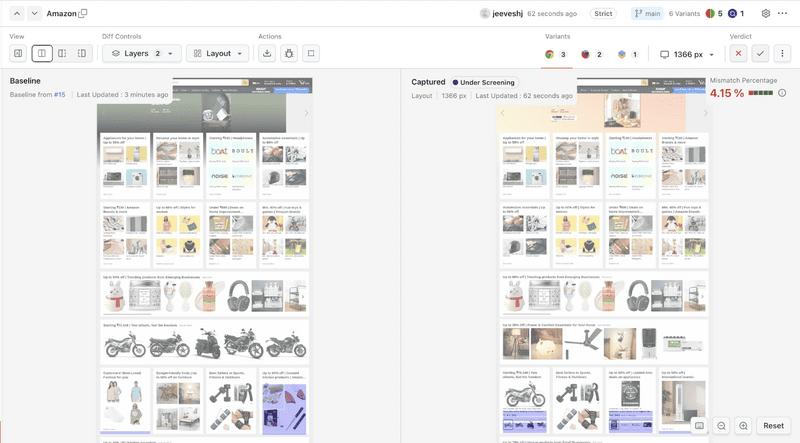
It intentionally ignores changes in text, colors, font sizes, margins, and images. Instead, it checks whether UI components maintain their intended positions and relationships.
This is helpful for localization testing or when maintaining layout reliability across viewports.
- View Coded Regions Directly on SmartUI Dashboard: You can now view coded regions areas you’ve defined in your test scripts to be included or ignored directly on the SmartUI dashboard.
With this feature, these regions appear as overlays alongside any manually drawn ones. So, this helps you ensure consistency between coded and drawn regions and reduce misconfigurations.

Note: Automate visual tests across 3000+ environments. Try TestMu AI Today!
Log Bugs With Assembla Integration
Assembla is a cloud-based platform that provides robust version control capabilities, supporting industry-standard systems like Git and even enterprise-focused options..
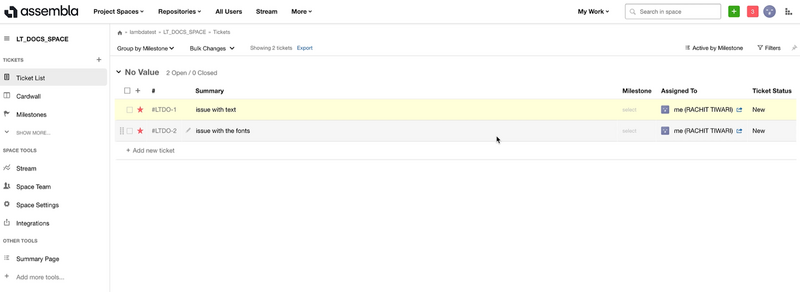
We have now integrated with Assembla to enhance your bug tracking process. With Assembla integration with TestMu AI, you can log issues directly from the TestMu AI platform to the Assembla instance, assign them to team members, and include screenshots during test sessions.
Wrapping Up!
That’s all for this round of updates. You can now schedule test runs with Test Manager, test Flutter apps using Appium on virtual devices, and do much more.
Real-time app testing now comes with Bluetooth support, and we’ve packed in new features across Insights and SmartUI. You can also log bugs straight into your workflow with the new Assembla integration.
Go try out these features, see what works for you, and let us know how it goes. We’re not done yet—more’s on the way!


Did you find this page helpful?
More Related Hubs
TestMu AI forEnterprise
Get access to solutions built on Enterprise
grade security, privacy, & compliance
- Advanced access controls
- Advanced data retention rules
- Advanced Local Testing
- Premium Support options
- Early access to beta features
- Private Slack Channel
- Unlimited Manual Accessibility DevTools Tests