

Next-Gen App & Browser Testing Cloud
Trusted by 2 Mn+ QAs & Devs to accelerate their release cycles


What Is Section 508 Compliance for Accessibility
In this blog, learn about Section 508 compliance, its principles, and tools for ensuring digital accessibility for people with impairments.

Zikra Mohammadi
December 24, 2025
Accessibility is a critical aspect that ensures that everyone, regardless of their physical abilities, can access and interact with digital content. To ensure this, different sets of legal guidelines or standards by federal agencies mandate accessibility across digital content. Accessibility 508 compliance is one such set of legal guidelines.
It refers to Section 508 of the Rehabilitation Act, which ensures that individuals with impairments have access to electronic and information technology created, procured, maintained or used.
In this blog, we’ll look at accessibility 508 compliance and how to run tests to ensure your digital content is accessible.
What Is 508 Compliance in Accessibility?
Section 508 compliance refers to standards articulated in the Rehabilitation Act of 1973. Under this compliance, it is mandatory that all electronic and information technology used by federal agencies is accessible to users with impairments.
To address this, compliance policies are implemented to ensure that access, navigation, and interactions with digital technologies do not interfere with people with visual, auditory, cognitive, or physical impairments.
In this, software applications and other multimedia content are included. For this, compliance guidelines are enforced so that users with visual, auditory, cognitive, or physical impairments do not hinder access, navigation, or interaction with these digital technologies.
Why Is 508 Compliance Important?
According to the Centers for Disease Control and Prevention, more than one in four adults in the United States live with some type of impairment. These statistics show why enforcing Section 508 compliance has become a critical step in ensuring that digital content and technologies are accessible to all individuals.
It is also a legal requirement that government agencies and their partners must follow these regulations to ensure their technology is inclusive. Compliance is not just about meeting legal obligations—it is about making digital access fair for everyone.
Many users rely on assistive tools like screen readers, voice commands, and input devices. These tools only function correctly when websites and mobile applications are designed with accessibility in mind. 508 compliance ensures compatibility, allowing individuals to navigate and interact without difficulty.

Note: Run 508 compliance tests across 5000+ real environments. Try TestMu AI Today!
508 Compliance Requirements for Websites
To ensure section 508 compliance, a website must align with WCAG 2.0 Level A and Level AA guidelines. In WCAG, there are four principles to systematically address accessibility requirements and create inclusive digital experiences.
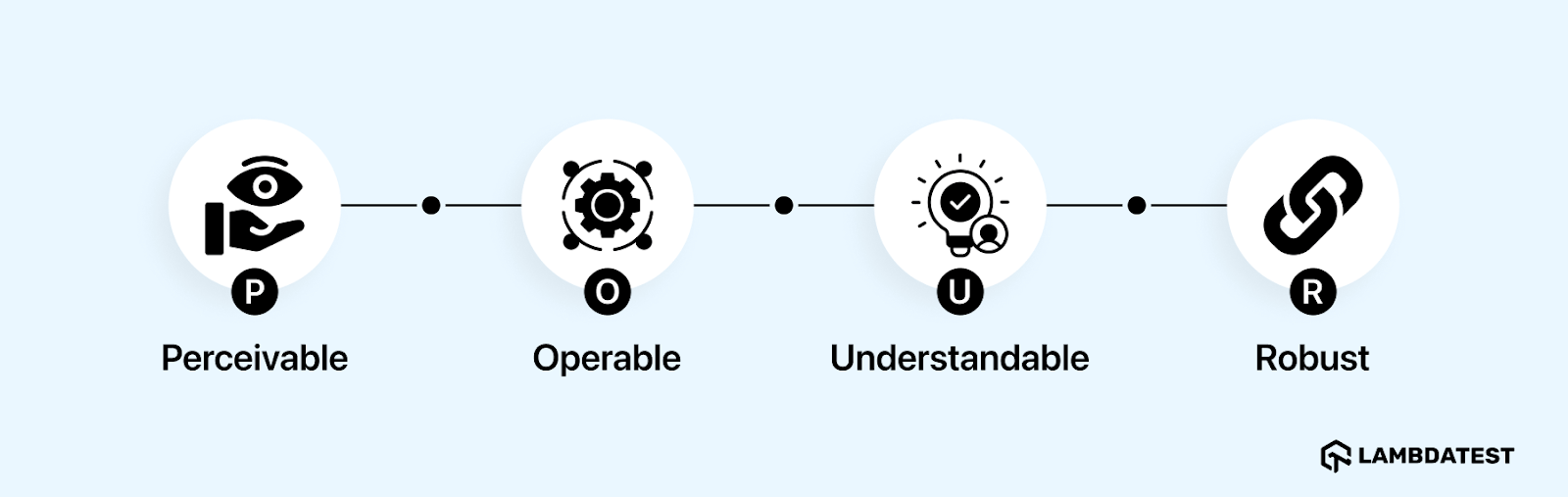
Perceivable
It focuses on presenting content in ways users can sense and understand. To achieve this, content must include descriptive alt text for images to support screen readers. Videos should also have captions and subtitles for users with hearing impairments and audio descriptions for visually impaired users.
Documents should use proper structures, such as headings and semantic HTML, to maintain accessibility across devices and assistive technologies. Visual elements must provide sufficient color contrast, and auditory clarity should be ensured by separating background and foreground sounds.
Operable
It ensures users can navigate and interact with content despite physical or motor limitations. This includes providing full keyboard accessibility for all interactive elements, such as buttons, links, and forms.
It also allows users to pause, stop, or extend time limits on tasks like form submissions or viewing content. Avoid flashing elements that exceed three flashes per second to prevent seizures. After that, offer clear navigation mechanisms such as breadcrumbs, skip-to-content links, and logical sequencing for menus and forms.
Understandable
It ensures users can understand content and interfaces. Therefore, it’s important to keep simple text content with clear language and explanations for technical terms, acronyms, and abbreviations.
Maintain predictable navigation and interface behavior across all sections to prevent confusion. Also, offer input assistance, such as clear form instructions, real-time error feedback, and suggestions for resolving issues.
Robust
It ensures content remains functional and compatible with current and emerging technologies. This requires adhering to coding standards for HTML, CSS, and JavaScript to ensure compatibility with assistive tools like screen readers. Also, regularly validate code to maintain accessibility standards and cross-platform functionality.
How to Perform 508 Compliance Testing?
Now, to ensure your website meets the accessibility standards for Section 508 compliance, it’s important to perform accessibility testing.
Let’s look at how to perform it:
Understand the Accessibility Guidelines
The first step towards ensuring Section 508 compliance is to familiarize oneself with the standards and guidelines. These are founded on four fundamental WCAG principles: perceivable, operable, understandable, and robust. It is critical to understand what each principle implies.
For example, perceivable content ensures that information is presented in ways that users can experience with their available senses, while operable content allows users to interact effectively with digital interfaces.
Run Accessibility Tests (Manual and Automated)
Based on the scope and guidelines, you can use different methods to run accessibility tests. These tests include the following methods:
- Manual Testing: Automated tools are limited in their scope and may not detect more nuanced accessibility issues. Therefore, you can run manual tests to complement test automation by focusing on the user experience.
- Automated Testing: Select automated testing tools to automate repetitive, time-consuming tasks and check common accessibility issues across software applications.
- User Testing: You can also perform user testing by bringing in individuals with impairments to evaluate the accessibility of digital content. This step is critical for identifying real-world problems that may not be identified with automated or manual testing.
- Hybrid Testing: A hybrid approach combines the efficiency of automated testing with the depth of manual and user testing. While automated accessibility testing tools scan for widespread issues, manual and user testing address specific challenges that require contextual understanding.
Document Test Results
Document all accessibility issues identified during testing. This includes recording the nature of each issue and making recommendations for remediation. You should create detailed documentation that provides the steps to fix issues and act as a reference for compliance audits and future accessibility projects.
Fix Accessibility Issues
Fix the identified and documented issues. This includes tasks like adding alternative text to images, adjusting color contrast for improved readability, and ensuring that forms are accessible. In this stage, the team must collaborate to ensure the effective implementation of changes. These issues must be addressed so that the digital content does not deviate from the set accessibility standards.
Perform Retesting
After fixing issues, it should be tested again to validate that all the problems have indeed been addressed. This gives an opportunity to ensure all the changes were implemented satisfactorily, and no further accessibility barriers have been identified during the remediation. Re-testing ensures that the content meets Section 508 compliance comprehensively and provides an opportunity to refine any remaining issues.
Monitor Accessibility
Accessibility is a continuous effort rather than a one-time exercise. To ensure compliance over time, regularly monitor and run tests by checking digital information for accessibility issues, particularly when updates or new features are released.
Understand the Accessibility Guidelines
The first step towards ensuring Section 508 compliance is to familiarize oneself with the standards and guidelines. These are founded on four fundamental WCAG principles: perceivable, operable, understandable, and robust. It is critical to understand what each principle implies.
For example, perceivable content ensures that information is presented in ways that users can experience with their available senses, while operable content allows users to interact effectively with digital interfaces.
Run Accessibility Tests (Manual and Automated)
Based on the scope and guidelines, you can use different methods to run accessibility tests. These tests include the following methods:
- Manual Testing: Automated tools are limited in their scope and may not detect more nuanced accessibility issues. Therefore, you can run manual tests to complement test automation by focusing on the user experience.
- Automated Testing: Select automated testing tools to automate repetitive, time-consuming tasks and check common accessibility issues across software applications.
- User Testing: You can also perform user testing by bringing in individuals with impairments to evaluate the accessibility of digital content. This step is critical for identifying real-world problems that may not be identified with automated or manual testing.
- Hybrid Testing: A hybrid approach combines the efficiency of automated testing with the depth of manual and user testing. While automated accessibility testing tools scan for widespread issues, manual and user testing address specific challenges that require contextual understanding.
Document Test Results
Document all accessibility issues identified during testing. This includes recording the nature of each issue and making recommendations for remediation. You should create detailed documentation that provides the steps to fix issues and act as a reference for compliance audits and future accessibility projects.
Fix Accessibility Issues
Fix the identified and documented issues. This includes tasks like adding alternative text to images, adjusting color contrast for improved readability, and ensuring that forms are accessible. In this stage, the team must collaborate to ensure the effective implementation of changes. These issues must be addressed so that the digital content does not deviate from the set accessibility standards.
Perform Retesting
After fixing issues, it should be tested again to validate that all the problems have indeed been addressed. This gives an opportunity to ensure all the changes were implemented satisfactorily, and no further accessibility barriers have been identified during the remediation. Re-testing ensures that the content meets Section 508 compliance comprehensively and provides an opportunity to refine any remaining issues.
Monitor Accessibility
Accessibility is a continuous effort rather than a one-time exercise. To ensure compliance over time, regularly monitor and run tests by checking digital information for accessibility issues, particularly when updates or new features are released.
508 Compliance Testing Tools
508 compliance or accessibility testing tools are essential for ensuring digital accessibility under Section 508 guidelines. They help identify accessibility issues, provide actionable recommendations, and ensure inclusivity.
Here are some of the tools used for 508 compliance testing:
TestMu AI
TestMu AI is an AI-native cloud testing platform that offers a comprehensive platform for accessibility testing of websites and mobile apps across various browsers and devices.
It provides detailed insights into compliance issues and ensures that content meets Section 508 and WCAG standards. TestMu AI is particularly valuable for teams that need scalable and efficient cross-browser testing capabilities, simplifying the accessibility testing process.
For manual testing, TestMu AI offers Accessibility DevTools Chrome extension for web accessibility with features such as full, partial, multi-page, and workflow scans as well as gives you detailed accessibility reports with an intuitive dashboard.
Additionally, you can also automate accessibility tests using TestMu AI Accessibility Automation with frameworks such as Selenium, Cypress, and Playwright. You can also check this guide on TestMu AI Accessibility Automation to get started.
Also, our Accessibility Testing Suite was launched in April 2025 and recognized as Product of the Day, securing the top spot on Product Hunt.
axe
axe is a widely used open-source accessibility testing tool for developers and testers. It integrates seamlessly with browsers and development environments. axe helps detect common issues like missing alternative text, insufficient contrast, and form labeling errors. It provides actionable suggestions for remediation and supports WCAG 2.1 standards, making it highly effective for Section 508 compliance.
WAVE
Developed by WebAIM, WAVE offers visual feedback on accessibility issues directly within the context of a web page. This browser extension highlights errors like contrast problems, missing labels, and structural issues. WAVE also provides insights into how to fix these issues.
Accessibility Insights
Developed by Microsoft, Accessibility Insights is a tool that offers two modes: FastPass for quick automated checks and Assessment for a detailed, guided evaluation. It supports keyboard navigation testing, color contrast verification, and role-based accessibility audits, helping agencies achieve compliance effectively.
JAWS
JAWS is a screen reader tool for visually impaired users for testing content accessibility. It simulates how users interact with the screen reader. Therefore, testers can identify barriers to navigation and ensure that their content is perceivable and operable.
Risks of Non-Compliance With Section 508
Failure to meet Section 508 requirements can negatively impact any federal agencies. Shown below are the potential risks of failing to comply with Section 508:
- Agencies face lawsuits and further legal action from impaired people who face challenges in accessing digital content. In most cases, such litigation leads to expensive settlements, lawyer fees, or court-ordered remediation. Non-conformity raises the risk of lengthy litigation, which can increase the complexity level and add additional financial overheads.
- Failing to provide accessible digital content can impact an agency’s reputation. Therefore, customers, stakeholders, or partners may view the agency as indifferent to the needs of individuals with impairments.
- A breach of Section 508 is equivalent to discrimination against persons with impairments. This exposure may result in a civil rights violation, which involves legal action and media criticism.
- Addressing accessibility issues after implementation is often more expensive than incorporating compliance from the start. Compliance delays lead to more complex and resource-intensive fixes, draining time and finances.
Best Practices to Make Websites 508 Compliant
It is critical for federal agencies to follow the standards under Section 508 so that users with impairments can access it. Therefore, some best practices must be followed to satisfy the legal requirements.
- Ensure that all non-text elements, such as images, videos, and graphics, have meaningful text equivalents. For images, use descriptive alt text. For multimedia, provide captions, transcripts, or audio descriptions to accommodate users who rely on assistive technologies.
- For users who cannot use a mouse, all functionality should be accessible only via the keyboard. Logical tab arrangement and visual attention indication will be incorporated to allow users to readily access forms, menus, and other interactive features.
- Build clear and well-structured document by using semantic HTML tags. This helps screen readers interpret the page effectively, making it easier for users with disabilities to navigate the site.
- To improve readability, use color schemes with appropriate contrast between text and background. Avoid using color alone to convey information; instead, combine it with text, patterns, or icons for greater accessibility.
- Write in plain language to ensure all users can understand your content. Provide options for text resizing without breaking the page layout, and choose fonts that are clean, simple, and easy to read for everyone.
- To ensure clarity for screen readers, all form elements should have descriptive labels linked to their input fields. Provide specific error messages for validation issues, guiding users on how to correct mistakes.
- Provide equal opportunities to the website screen reader and other assistive technologies. Make sure it has skip links so users may skip repetitive navigation. Make sure modals or pop-ups focus users’ attention on accessibility when a cursor is placed within them.
- Include captions for all video content and provide audio descriptions for visually complex videos. To prevent distractions or interruptions, add controls for users to pause, stop, or mute multimedia elements.
- Run automated tests using tools like axe or TestMu AI to identify common issues. Complement this with manual testing using screen readers and keyboard-only navigation, and involve users with disabilities to gain real-world insights.
- Align your website with WCAG 2.1 standards, focusing on the principles of perceivability, operability, understanding, and robustness. To make it inclusive, ensure the content is compatible with diverse assistive technologies.
- Accessibility is an ongoing process, not a one-time task. To ensure compliance, conduct accessibility audits after every update or redesign. Train your team on accessibility best practices to prevent accidental violations in future updates.
Conclusion
Prioritizing accessibility demonstrates a commitment to inclusivity and enhances your brand’s reputation and reach. Remember that accessibility is an ongoing process. Therefore, regular audits, updates and user feedback will ensure compliance and deliver a seamless experience to all users.
Being 508 compliant means following the law and creating a user-friendly interface. The best practices discussed above will ensure that websites or mobile apps developed are accessible to users of different abilities.
Citations
- FY 24 Governmentwide Section 508 Assessment: https://www.section508.gov/
- IT Accessibility Laws and Policies: https://www.section508.gov/manage/laws-and-policies/


Frequently asked questions
Did you find this page helpful?
More Related Hubs
TestMu AI forEnterprise
Get access to solutions built on Enterprise
grade security, privacy, & compliance
- Advanced access controls
- Advanced data retention rules
- Advanced Local Testing
- Premium Support options
- Early access to beta features
- Private Slack Channel
- Unlimited Manual Accessibility DevTools Tests